





Running a startup means wearing multiple hats founder, HR manager, customer support rep, marketer, and project coordinator often all at the same time. With limited staff and resources, finding free tools that reduce workload without increasing costs is essential.
Fortunately, many platforms offer free plans designed specifically to help early stage teams stay organized, collaborate better, and operate more efficiently.
Below are 5 free tools that cover essential parts of startup operations: leave management, communication, scheduling, customer service, and task management. Also, these tools are simple, powerful, and startup friendly.
Day Off, One of the Best Free Tools for Leave & PTO
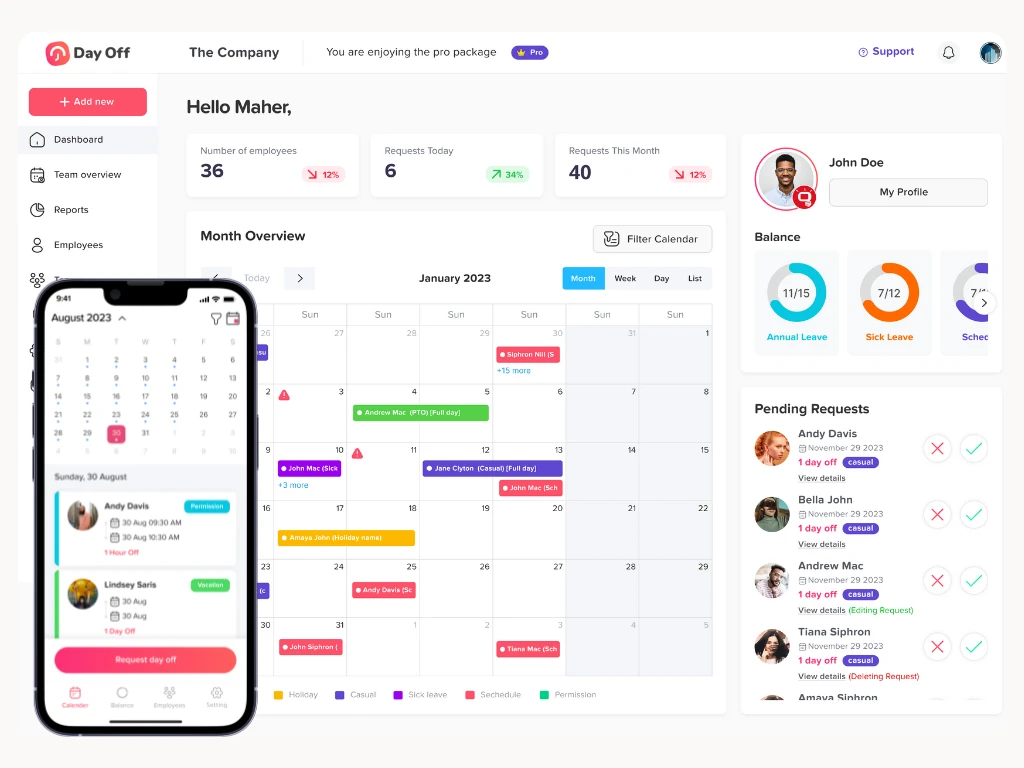
Managing employee leave manually through spreadsheets, WhatsApp messages, or emails quickly becomes messy as your team grows. As a result, miscommunication leads to scheduling conflicts, missed deadlines, and unmet expectations.
Therefore, Day Off solves this problem by offering a clean, easy to use platform dedicated to leave tracking and PTO management.
Key Features
Easy leave requests: Employees tap to request days off, reducing back and forth.
Instant manager approvals: Managers approve with a single click.
Real time team calendar: Shows who’s off today, next week, or next month.
Custom leave types: Vacation, sick leave, unpaid leave, work from home, etc.
Multiple policies: Great for startups with full time, part time, contractors, or different regions.
Available on all platforms: iOS, Android, and web.
Why Startups Should Use Day Off
First, it avoids double scheduling and unexpected absences.
Second, it saves hours spent managing leave manually.
Helps teams stay aligned, especially remote and hybrid teams.
Gives founders clear visibility to plan workload.
Best For
Startups with small but growing teams
Remote teams working across time zones
Early stage companies needing structure without HR complexity
Slack, Free Tools for Organized Team Communication
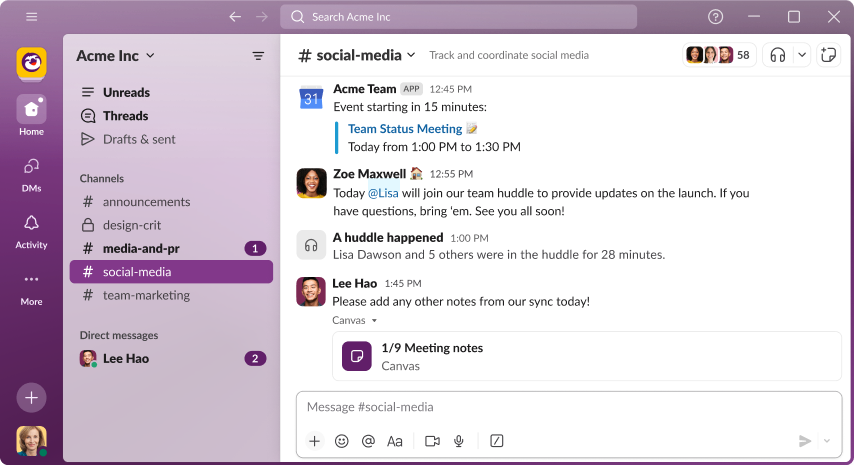
However, email works for formal communication but not for fast moving startups. Teams need real time conversations, instant collaboration, and a place where discussions don’t get buried.
Slack offers a powerful communication hub that keeps everything organized.
Key Features
Channels for topics, projects, or departments
Direct messaging for private discussions
Huddles for quick voice or video check ins
File sharing with previews
Searchable history to find old messages easily
Integrations with tools like Google Drive, Trello, GitHub, Notion, and more
Why Slack Helps Startups Improve Collaboration
First, it reduces clutter and long email threads
Second, it keeps everyone on the same page
Third, it allows faster decision making
Improves remote team communication
Example Use Cases
general for announcements
marketing for campaigns
dev. team for development updates
support for customer issues
random for team culture and bonding
Overall, Slack brings structure and speed to communication something every startup needs.
Calendly, Stress Free Scheduling for Meetings and Appointments

In fact, meeting scheduling can quickly become a headache especially when you’re coordinating with clients, investors, partners, or interview candidates. Instead of endless messages asking “What time works for you?”, Calendly automates the entire process.
Key Features
Personalized booking links
Calendar integration with Google, Outlook, or Apple
Automatic time zone adjustments
Control over available hours
Buffer times to prevent back to back meetings
Email reminders for attendees
Why Calendly Saves Time
No more back and forth messages
Also, it reduces no shows
Makes your startup look more professional
Lets prospects or clients schedule at their convenience
Perfect For
Demo or sales call scheduling
Investor meetings
Customer onboarding
Recruiting and interviews
Internal planning sessions
Ultimately, for founders who value time, Calendly is essential.
HubSpot, One of the Free Tools for CRM & Support

Customer relationships drive startup growth. But with a growing number of leads, emails, and customer conversations, things quickly become scattered.
HubSpot CRM offers a robust free plan that organizes everything in one place.
Key Features
Contacts database to store customer and lead details
Sales pipeline for tracking deal stages
Email tracking and templates
Tickets system for customer support
Live chat widget for your website
Marketing tools like forms and email automation
Why HubSpot Is Perfect for Startups
Helps track every lead from first contact to closing
Prevents lost conversations
Improves customer support response times
Offers insights into sales performance
Scales with your business
Example Uses
Capture leads from your website
Track communication history with investors
Manage customer issues and feedback
Visualize growth through pipelines
Overall, HubSpot gives startups a professional CRM without any upfront cost.
Trello, Simple Visual Project Management for Any Team

In fact, keeping projects organized is critical in early stage startups. Whether you’re planning a product launch, tracking development tasks, or outlining content calendars, Trello’s visual boards help you stay structured and productive.
Key Features
Kanban style boards for intuitive workflows
Drag and drop cards for easy task movement
Checklists, comments, and attachments within each task
Due dates and reminders
Team collaboration tools
Templates for agile sprints, content planning, onboarding, and more
Why Trello Works Well for Startups
First, it is extremely easy to use
Second, it makes roles and responsibilities clear
Third, it helps track progress visually
Reduces miscommunication
Fits any workflow: design, development, marketing, HR, admin
Example Board Ideas
Product roadmap
Marketing content calendar
Bug tracking
Investor outreach list
Recruitment pipeline
Finally, Trello keeps your entire team aligned by showing exactly what’s happening and what’s next.
FAQ: Free Tools for Startups
Are these free tools really free for startups?
Yes. All five tools Day Off, Slack, Calendly, HubSpot, and Trello offer free plans that work great for small or early stage teams. As a result, most startups can run efficiently on the free versions before upgrading later.
Is Day Off one of the free tools that can manage employee PTO without an HR system?
Absolutely. Overall, Day Off is designed for startups and small teams that need simple leave tracking without the complexity of full HR software. Also, it supports multiple leave types, approval flows, and clear team visibility.
Is Slack one of the free tools that works well for small teams?
Yes. In fact, Slack’s free version includes channels, messaging, file sharing, and huddles. Overall, it’s perfect for fast team communication without the need for paid features like unlimited message history.
Are free tools like Calendly suitable for professional scheduling?
Yes. Also, Calendly’s free plan provides everything most startups need: booking links, calendar sync, reminders, and time zone support. Also, it works great for demos, client calls, and interviews.
How much can a startup do with free tools like HubSpot’s CRM?
A lot. Overall, the free In addition, HubSpot CRM offers contact management, pipelines, email tracking, support tickets, forms, chat widgets, and basic marketing tools. In fact, it’s one of the strongest free CRM solutions for early stage companies.
Can free tools like Trello handle full project management for a growing team?
Yes, especially for startups with simple workflows. For example, Trello’s boards, lists, cards, and automations help organize projects visually and clearly.
Are these free tools good for remote or hybrid startups?
Definitely. Also, all five tools are cloud based, accessible from anywhere, and designed for flexible collaboration ideal for remote and hybrid teams.
Do these free tools integrate with each other?
Many of them do. For example, Slack integrates with Trello and HubSpot, Calendly syncs with calendars and Slack, and HubSpot connects with email and scheduling tools. As a result, this creates a smooth, unified workflow.
Which tool should a startup set up first?
Most teams start with Slack for communication since it forms the base of daily teamwork. After that, Day Off for PTO visibility is helpful, then the remaining tools depending on your workflow.
Can I use all these tools together without overwhelming my team?
Yes. Each tool solves a specific need communication, scheduling, PTO tracking, customer management, and task organization so they complement each other without creating clutter.
Conclusion
However, managing a startup doesn’t have to be chaotic. With the right free tools, you can simplify your daily operations and focus on growth.
Here’s a quick recap of your new free toolkit:
Day Off: Leave & PTO management
Slack: Team communication
Calendly: Scheduling & appointments
HubSpot: Customer relationships & support
Trello: Task and project management
Finally, each tool is powerful on its own but together, they create a complete system that helps you run your startup smarter, faster, and more efficiently.