







Managing employee leave shouldn’t require navigating between spreadsheets, emails, and outdated HR software. As modern teams especially hybrid and remote ones shift their daily communication into Slack, it’s natural that leave tracking tool should live there too.
In addition, a powerful leave tracking tool that works inside Slack eliminates friction, reduces confusion, and saves hours of administrative work.

Overall, this guide provides a full, in depth look at the best leave tracking tools for Slack, how they work, key benefits, and why Day Off is the top performing solution for teams of all sizes.
Why Leave Tracking Directly in Slack Matters
In fact, Slack has become the operational command center for thousands of companies. For example, teams discuss projects, share updates, assign tasks, and make decisions all in real time.
Overall, integrating PTO requests and approvals into Slack boosts efficiency dramatically.
Here’s why Slack native leave tracking is essential:
It Removes Confusion From Daily Operations
Without Slack integration, leave requests typically involve:
Email threads
Manual balance checks
Managers forgetting to approve
HR correcting mistakes
Updating a calendar by hand
Instead, Slack centralizes the entire process into a few clicks no switching apps, no jumping between systems.
Employees Take Control of Their Time Off
With a Slack, employees can instantly check:
How many vacation days they have left
How many sick days remain
Whether a date is available
Who else is off the same day
Whether their request is pending approval
Instead of HR answering the same questions repeatedly, Slack provides transparency automatically.
Managers Make Faster, More Informed Decisions
Within Slack, managers can:
Approve or reject requests immediately
Get context about overlapping team leave
Review employee balances instantly
Keep track of trends (e.g., repeated unplanned leave)
Therefore, approvals happen in real time, which reduces delays and backlog.
It Strengthens Team Communication & Planning
Daily and weekly leave summaries keep everyone informed:
“Who is off today?”
“Which members are unavailable next week?”
“How many team members are off on Friday?”
This is especially critical for:
Customer support teams
Engineering teams planning sprints
Marketing teams preparing launches
Operations teams with shift based roles
In short, Slack ensures everyone stays aligned.
It Eliminates Manual Errors Forever
When leave is tracked manually (emails, spreadsheets, paper forms), errors are inevitable:
Overlapping approvals
Incorrect balances
Missing records
Forgotten holidays
Wrong accrual calculations
However, a Slack integrated tool automates everything and keeps records consistent across:
Slack
Web dashboard
Mobile apps
Calendars
Steps Of Day Off Integration With Slack
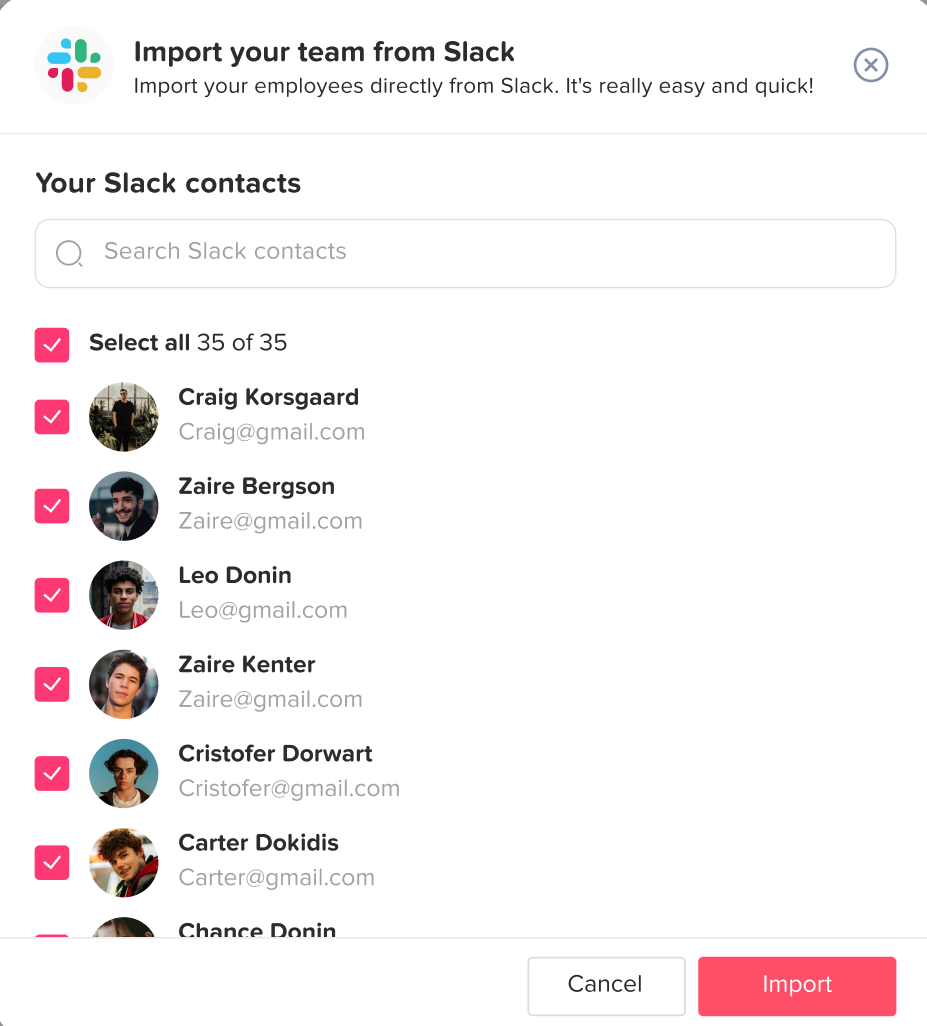
Step1: Import Employees
You Have to Import your employees in Slack, by opening the integration icon from Day off, clicking on Connect with Slack, then select the employees you want to link them with Slack.
Step 2: Simple Leave Requests:
First, employees can request time off directly within Slack by sending a message to the “Day Off” app bot.
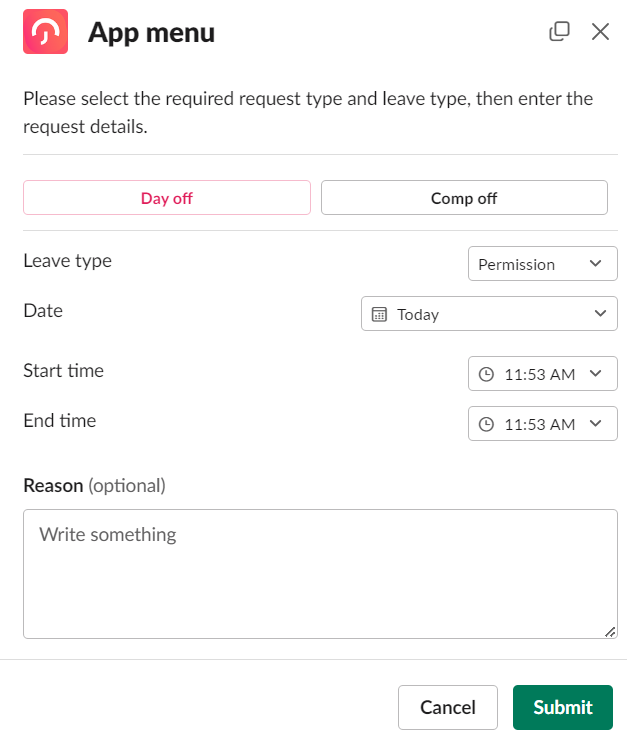
This could be as simple as typing (/dayoff), which the bot then send autoreply of which request needed, ( Submit a request, Status, Pending requests), By choosing Submit a request, App Menu will be appearing to select the required request.
Step 3: Instant Notifications:
Next, managers receive instant notifications about leave requests in Slack, allowing them to quickly review and respond. They can approve or deny requests with a single click, and both the requester and the team are notified of the decision immediately.
Step 4: Leave Balance Inquiries:
Also, employees can check their remaining leave balances by querying the “Day Off” bot in Slack. This might involve a simple command like /dayoff, choose My status, which returns the user’s current leave balances.
Step 5: Team Calendars and Availability:
Integration can include a feature Sending Daily digest, showing who from the team members are off, This visibility helps with planning meetings, projects, and deadlines, ensuring that absences are accounted for in advance.
Why Day Off Is the Best Leave Tracking Tool for Slack
Streamlined Setup and Integration
First, setting up your company in Day Off takes just minutes. For example, you can import employees in bulk, define custom workweeks, and automatically import public holidays from Google, ensuring regional accuracy. Day Off seamlessly integrates with your team’s favorite tools like Slack, Google Calendar, Outlook Calendar, and Microsoft Teams, allowing everyone to stay informed without switching between multiple apps.
Smarter Approval Workflows and Real Time Notifications
With customizable approval workflows, you can choose whether requests require approval from one or multiple managers. Also, notifications are sent instantly when a new leave request is submitted, approved, or denied, keeping everyone updated in real time.
Requesting Leave Is Extremely Easy
Employees can submit PTO in seconds by:
Clicking the Day Off Slack shortcut
Using simple slash commands
Selecting a leave type from a menu
Besides that, Day Off supports all leave types:
Paid vacation
Sick leave
Unpaid leave
Personal days
Work from home
Maternity / paternity leave
Custom leave types
As a result, each request automatically applies the correct leave policy and balance.
Managers Approve With One Click
Managers no longer need to:
Open separate dashboards
Review emails
Switch platforms
They receive a Slack message containing:
Date(s) requested
Leave type
Reason (optional)
Current balance
Overall, this context helps managers approve faster and avoid scheduling conflicts.
Real Time Balance Tracking
Employees can check:
Remaining vacation days
Accrued leave
Carryover balances
Sick leave totals
Special leave entitlements
Moreover, these updates are automatic and accurate based on company policy.
Other Leave Tracking Tool Options for Slack
Deel
Ideal for International Teams
Deel manages:
Global payroll
Legal compliance
Contractor onboarding
Employer of Record (EOR) services
For example, companies hiring globally often choose Deel to avoid establishing legal entities in multiple countries. As a result, PTO tracking becomes an added convenience.
Basic Slack Notifications
Additionally, employees can request leave or send PTO updates that appear inside Slack. Meanwhile, managers receive notifications as well, though the approval workflow is simpler and less interactive compared to Day Off’s dedicated PTO workflow.
Compliance Friendly PTO rules
Because Deel handles HR compliance across many countries, its leave policies can reflect:
Local labor laws
Mandatory leave types
Statutory requirements
Therefore, this is useful for organizations that need legally accurate leave calculations.
Pause
100% Slack Native
In contrast, Pause operates almost entirely within Slack. Also, there’s no separate dashboard or app to manage. As a result, it appeals to small teams that want everything in one place.
Extremely Easy to Set Up
Setup takes only a few minutes:
Add the Pause app to Slack
Configure the leave types
Allow employees to submit requests
In short, it’s built for minimal configuration and convenience.
Simple User Experience
Employees can:
Request time off
View upcoming leave
Notify their team
Cancel requests
Also, the interface is uncluttered and straightforward.
Good for Early Stage Startups
Therefore, teams with fewer than 10-15 members often want something lightweight. Overall, Pause keeps workflows simple.
Expanded Comparison Table
| Feature / Tool | Day Off | Deel | Pause |
|---|---|---|---|
| Core focus | Leave management | Payroll & HR | Slack only PTO |
| Slack requests | ✔️ | ✔️ | ✔️ |
| Slack approvals | ✔️ | ✔️ | ✔️ |
| Daily/weekly summaries | ✔️ | ❌ | ❌ |
| Calendar integration | Google & Outlook | Limited | ❌ |
| Mobile apps | iOS + Android | ✔️ | ❌ |
| Multi policy support | ✔️ | Limited | ❌ |
| Multi location support | ✔️ | ✔️ | ❌ |
| Employee self service | ✔️ | ✔️ | ❌ |
| Ease of setup | Very easy | Moderate | Very easy |
| Best for | Teams of all sizes | Global payroll teams | Small teams |
FAQ
What is leave tracking tool in Slack?
A Slack leave tracking tool is an integration or app that allows employees to request time off, check their leave balances, and receive approvals directly inside Slack. It eliminates the need for spreadsheets, emails, or separate HR platforms by bringing all PTO workflows into your team’s existing communication hub.
Why should companies use a leave tracking tool inside Slack?
In short, tracking leave inside Slack speeds up approvals, reduces miscommunication, and increases transparency. Employees can submit requests instantly, while managers receive real time notifications. Additionally, daily and weekly absence summaries also help teams plan workloads more efficiently, making operations smoother.
What features should the best leave tracking tool in Slack include?
Key features include:
PTO requests & approvals inside Slack
Real time leave balances
Multiple leave types
Daily/weekly absence summaries
Calendar integration (Google & Outlook)
Multi location & multi policy support
Mobile app access
Tools like Day Off offer all of these features and more.
Does Slack have a built in leave tracking tool?
No, Slack does not include a native PTO tracking system. Therefore, companies must integrate a third party tool like Day Off, Deel, or Pause to manage employee leave, track balances, and automate workflows within Slack.
What is the best leave tracking tool for Slack?and why?
Day Off, As it stands out because it offers:
Fast leave requests directly in Slack
One click manager approvals
Automated Google & Outlook calendar syncing
Daily and weekly team absence summaries
Support for multiple policies and locations
iOS and Android mobile apps
It’s easy to set up, scalable, and highly user friendly for teams of all sizes.
Can a leave tracking tool in Slack show leave balances?
Yes using tools like Day Off, employees can instantly check their remaining vacation, sick days, and other leave balances directly inside Slack. This eliminates manual tracking and repetitive HR requests.
Is a leave tracking tool in Slack suitable for small teams?
Absolutely. In fact, small teams benefit from quick setup, real time visibility, and simplified workflows. In fact, Day Off is especially popular among startups and small businesses because it removes admin work and keeps everyone aligned without needing a full HR system.
Is leave tracking tool in slack secure?
Yes. In practice, trusted apps such as Day Off use secure API connections, encrypted data, and strict access controls to ensure leave data remains protected. Moreover, integrations also follow Slack’s security and privacy guidelines.
Can leave tracking tool in Slack support multiple leave policies?
Yes advanced tools like Day Off support:
Different leave quotas
Varying accrual rules
Region specific holidays
Department based policies
This is essential for growing or global companies.
Do leave tracking tool in Slack integrate with calendars?
Most modern tools integrate with Google Calendar and Outlook. In addition, Day Off automatically updates calendars with approved leave to prevent scheduling conflicts and ensure accurate team visibility.
How long does it take to implement a leave tracking tool in Slack?
Implementation is usually very fast typically under 10 minutes. With Day Off, you just set up your policies, add your team, and connect Slack. Then, your employees can start using it immediately.
Conclusion
Among all the tools available today, Day Off stands out as the most complete, flexible, and user friendly leave tracking solution for Slack. It offers the perfect balance of simplicity and power: fast PTO requests, one click approvals, real time summaries, calendar sync, multi policy support, and mobile access. Overall, whether you’re a small startup or a global organization, Day Off adapts to your needs and helps you manage time off in a clear, modern, and automated way.
While alternatives like Deel and Pause serve specific use cases, Day Off delivers the best overall experience for organizations that want seamless Slack integration and a scalable system that grows with them.