




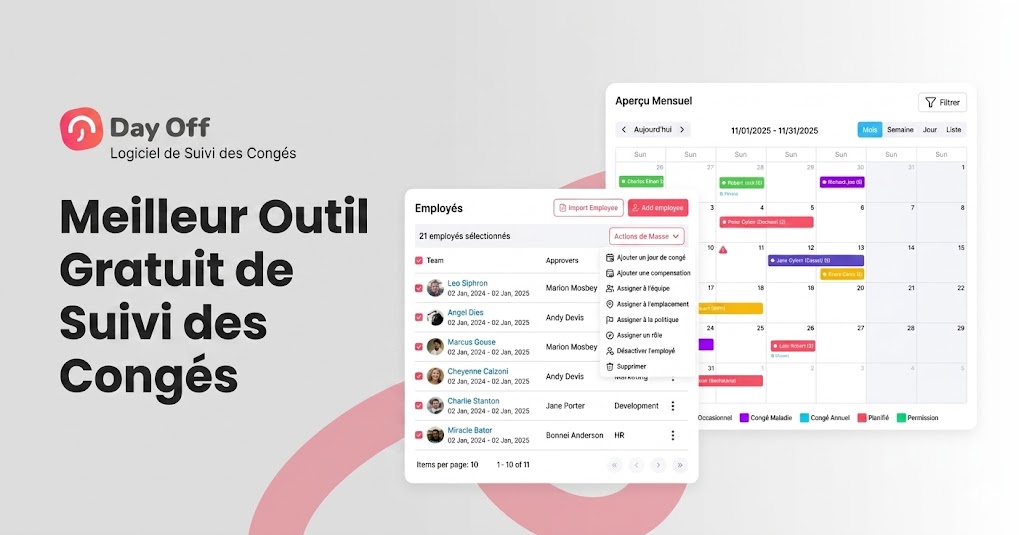
La gestion des congés des employés, qu’il s’agisse de congés payés, de jours maladie, de vacances ou de types de congés personnalisés, est l’une des tâches administratives les plus critiques dans toute organisation. Pourtant, de nombreuses entreprises s’appuient encore sur des tableurs, des fils d’e-mails ou des calendriers éparpillés pour savoir qui est absent et quand. Cela entraîne souvent des erreurs, des problèmes de ressources, des malentendus, et même des litiges juridiques si les soldes de congés ne sont pas suivis ou appliqués avec précision.
Heureusement, les outils modernes de suivi des congés payés gratuits rendent la gestion des absences fluide, transparente et précise. Parmi eux, Day Off se distingue comme l’une des solutions les plus puissantes et conviviales disponibles aujourd’hui. Dans cet article, nous examinerons pourquoi un suivi précis des congés est essentiel, quelles fonctionnalités les meilleurs outils de suivi devraient offrir, et comment Day Off répond à toutes ces exigences avec un outil gratuit et évolutif.

Pourquoi un suivi précis des congés payés est-il essentiel ?
Avant de choisir un outil de suivi des congés, il est important de comprendre pourquoi une gestion précise et fiable des congés joue un rôle crucial dans la satisfaction des employés et les opérations commerciales.
Évite les erreurs manuelles
Les méthodes manuelles de suivi des congé, comme les tableurs, les e-mails ou les documents papier, sont très susceptibles aux erreurs humaines. De petites erreurs comme des formules incorrectes, des mises à jour oubliées ou des saisies en double peuvent rapidement conduire à des soldes de congés inexacts. Avec le temps, ces erreurs créent de la confusion, des litiges et même des problèmes de paie. Un système de suivi précis automatise les calculs, applique les politiques de l’entreprise de manière cohérente et garantit que les soldes sont toujours à jour, éliminant les risques liés à la gestion manuelle.
Améliore la transparence et la confiance
Le manque de visibilité sur les soldes de congés entraîne souvent des malentendus entre les employés, les managers et les RH. Lorsque les employés ne savent pas combien de congés il leur reste ou pourquoi une demande a été rejetée, la frustration s’installe. Les systèmes de suivi précis offrent aux employés un accès en libre-service à leurs soldes de congés, leur historique de demandes et leur statut d’approbation. Cette transparence favorise la confiance, réduit les échanges inutiles avec les RH et aide les employés à avoir confiance que les politiques de congés sont appliquées équitablement.
Rationalise la planification
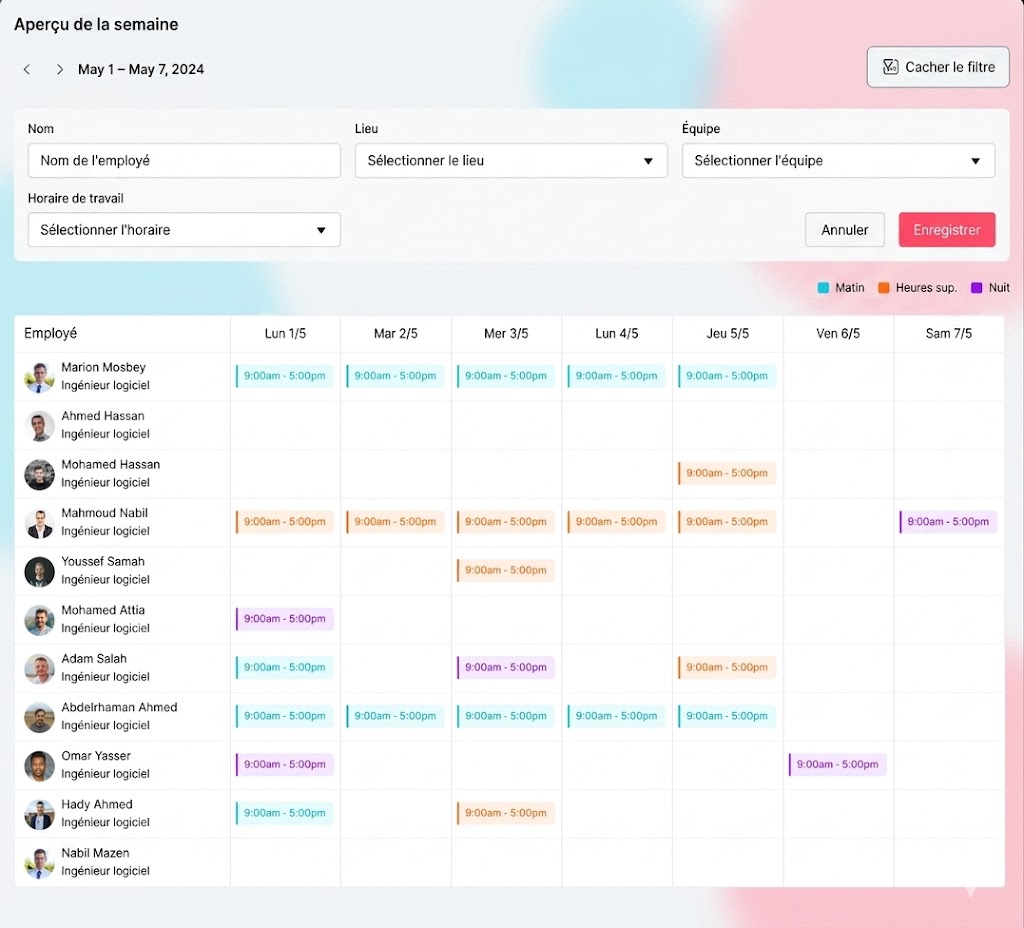
Sans données précises sur les congés, les managers ont du mal à planifier les charges de travail et à assurer une couverture adéquate, notamment pendant les périodes de pointe, les jours fériés ou les échéances de projets critiques. Un système de suivi fiable offre une visibilité en temps réel sur qui est en congé, qui a demandé du temps libre et qui est disponible. Cela permet aux managers de prendre des décisions éclairées, de prévenir les absences simultanées et de maintenir la productivité sans surcharger le reste de l’équipe.
Soutient la conformité et le reporting
Les politiques de congés sont souvent influencées par les lois du travail, les réglementations régionales et les règles internes de l’entreprise. Ces règles peuvent inclure des taux d’accumulation, des limites de report, des politiques d’expiration ou des jours fériés obligatoires. Appliquer manuellement ces règles est un processus complexe et risqué. Les systèmes de suivi précis appliquent automatiquement les règles de conformité, réduisent le risque de pénalités juridiques ou financières, et génèrent des rapports clairs pour les audits, le traitement de la paie et les revues de direction.
Ce qu’il faut rechercher dans un outil de suivi des congés
Que vous évaluiez des outils de gestion des congés en général ou que vous considériez Day Off spécifiquement, un outil de suivi fiable devrait offrir des fonctionnalités qui réduisent le travail administratif, améliorent la précision et améliorent l’expérience des employés.
Soldes de congés automatisés et accumulations précises
Un bon outil de suivi des congés devrait automatiquement calculer et mettre à jour les soldes de congés en fonction des politiques de votre entreprise. Que les congés s’accumulent annuellement, mensuellement, par période de paie ou selon l’ancienneté, le système devrait gérer automatiquement ce processus sans intervention manuelle.
Demandes de congés en libre-service
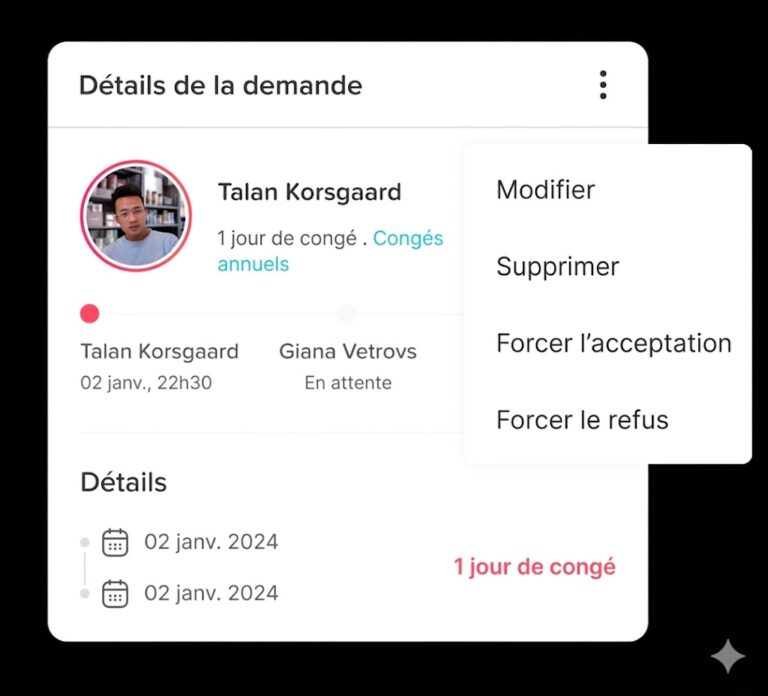
Les employés devraient pouvoir demander des congés facilement via une interface web ou mobile. Au lieu de s’appuyer sur des e-mails ou des messages, un système en libre-service permet aux employés de sélectionner des dates, de choisir des types de congés, d’ajouter des notes si nécessaire et de soumettre des demandes en quelques clics.
Flux d’approbation clairs Chaque
Organisation a une structure d’approbation différente. Un bon outil de suivi des congés devrait prendre en charge des flux d’approbation flexibles, qu’il s’agisse d’une approbation par un seul manager ou de plusieurs étapes d’approbation entre départements.
Calendrier partagé centralisé
Un calendrier d’équipe centralisé offre une visibilité en temps réel sur qui est absent et quand. Cela aide les managers et les équipes à planifier, à éviter les chevauchements d’absences et à maintenir une couverture adéquate pendant les périodes critiques.
Politiques de congés flexibles
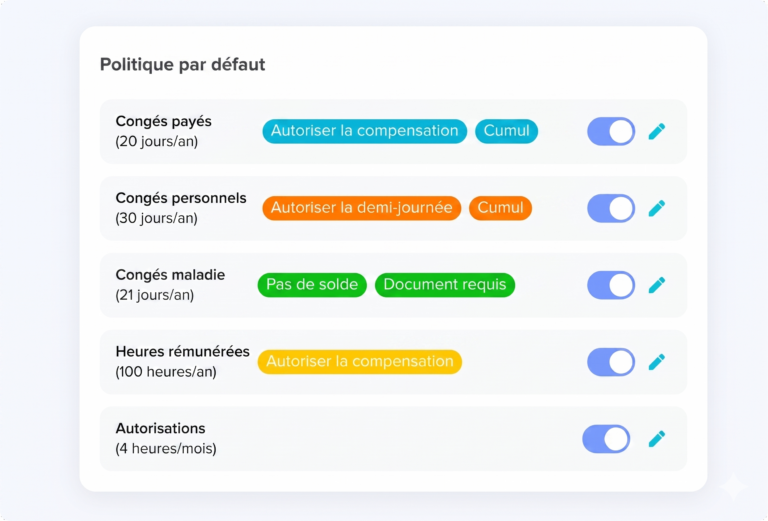
Aucune organisation ne gère les congés de la même manière. L’outil idéal vous permet de créer des types de congés personnalisés illimités, vacances, congés maladie, congés parentaux, congés non payés ou jours de bénévolat, et de configurer les règles d’accumulation, les limites de report, les dates d’expiration et les périodes bloquées.
Reporting robuste
Un reporting détaillé et fiable est essentiel pour les équipes RH, financières et de direction. Un bon outil devrait offrir des rapports sur les soldes, les accumulations, les tendances d’utilisation et les reports, soutenant la précision de la paie, les audits de conformité et la planification stratégique des effectifs.
Intégrations
Des intégrations transparentes avec les outils quotidiens, comme Google Calendar, Outlook, Slack et Microsoft Teams, garantissent que les informations sur les congés sont visibles là où les équipes travaillent déjà.
Day Off Vacation Tracker : Un outil puissant et gratuit
Day Off est une solution cloud de suivi des congés et de gestion des absences conçue pour simplifier la gestion du temps libre des employés pour des équipes de toute taille. Conçu avec la facilité d’utilisation en tête, Day Off combine une interface intuitive avec des fonctionnalités évolutives de niveau entreprise. Plus important encore, il offre un niveau gratuit véritablement robuste, garantissant que les outils essentiels de suivi des congés ne sont pas cachés derrière un paywall.
Soldes de congés automatisés
Day Off calcule et met à jour automatiquement les soldes de congés en fonction des règles que vous définissez. Que vous offriez des allocations annuelles, des accumulations mensuelles, des augmentations basées sur l’ancienneté, ou que vous appliquiez des limites de report et des dates d’expiration, le système gère tout. Les employés voient toujours des droits précis et en temps réel, éliminant la confusion et les ajustements manuels.
Demandes en libre-service
Les employés peuvent soumettre des demandes de vacances, de congés payés, de congés maladie ou de tout autre type de congé via des interfaces web et mobiles intuitives en quelques clics. Les managers et les équipes RH reçoivent des notifications instantanées, garantissant que les demandes sont examinées rapidement sans recourir aux e-mails, aux chats ou aux tableurs.
Flux d’approbation flexibles
Day Off prend en charge les flux d’approbation à une étape et à plusieurs étapes, permettant aux organisations de refléter leur hiérarchie interne et leurs processus d’approbation. Les approbateurs peuvent examiner et agir sur les demandes directement depuis leur boîte de réception, leurs calendriers synchronisés ou au sein de la plateforme Day Off, maintenant les décisions rapides et visibles.
Calendriers d’équipe partagés
Grâce aux calendriers partagés, les équipes bénéficient d’une visibilité claire sur qui est absent et quand, selon les départements et les sites. Les congés approuvés peuvent être synchronisés automatiquement avec Google Calendar et Outlook, facilitant la planification des réunions, des échéances et des charges de travail en fonction de la disponibilité réelle.
Politiques personnalisées et support multi-sites
Day Off permet aux organisations de définir des politiques de congés personnalisées pour différentes équipes, départements ou sites. Configurez les semaines de travail, les calendriers de jours fériés, les règles d’accumulation et les types de congés pour vous conformer aux lois du travail locales et aux pratiques régionales, ce qui en fait une solution idéale pour les équipes distribuées et mondiales.
Rapports et analyses détaillés
Des outils de reporting puissants fournissent des informations sur les soldes de congés, les accumulations, les reports et l’utilisation historique des congés. Les rapports peuvent être filtrés par équipe, site ou type de congé, soutenant la précision de la paie, les audits de conformité et la planification stratégique des effectifs.
Accès mobile et bureau
Avec un support complet mobile et bureau, les employés et les managers peuvent demander, approuver et examiner les congés à tout moment et en tout lieu. Cette flexibilité est particulièrement précieuse pour les équipes à distance, hybrides et de terrain.
Gratuit pour toutes les équipes
Le plan gratuit de Day Off comprend un nombre illimité d’employés et des fonctionnalités essentielles de suivi des congés sans restrictions cachées, ce qui en fait un excellent choix pour les startups, les entreprises en croissance et les organisations soucieuses des coûts.
Avantages RH avancés de l’utilisation de Day Off
Décisions basées sur les données
Grâce aux analyses intégrées et au suivi des tendances historiques, Day Off permet aux dirigeants et aux équipes RH d’aller au-delà d’une gestion réactive des congés. En identifiant des tendances telles que les périodes de congés de pointe, les absences courtes fréquentes ou les congés sous-utilisés, les organisations peuvent anticiper les besoins en effectifs et soutenir proactivement les initiatives de bien-être des employés.
Amélioration de l’expérience des employés
Day Off responsabilise les employés grâce à un accès en libre-service aux données de congés en temps réel, notamment les soldes, les accumulations et les statuts des demandes. Cette transparence minimise les allers-retours administratifs, réduit la frustration et aide les employés à avoir confiance que les politiques sont appliquées équitablement.
Conformité et tenue des dossiers
Day Off enregistre automatiquement toutes les activités de congés, demandes, approbations, rejets, accumulations et reports, créant une piste d’audit fiable et horodatée. Cela soutient la conformité aux lois du travail et aux politiques internes dans différentes régions.
Intégration aux outils de travail
En s’intégrant aux outils sur lesquels les équipes s’appuient déjà, comme les calendriers et les plateformes de communication, Day Off intègre la gestion des congés dans les flux de travail quotidiens, réduisant les changements de contexte et améliorant la visibilité.
Comment démarrer avec Day Off
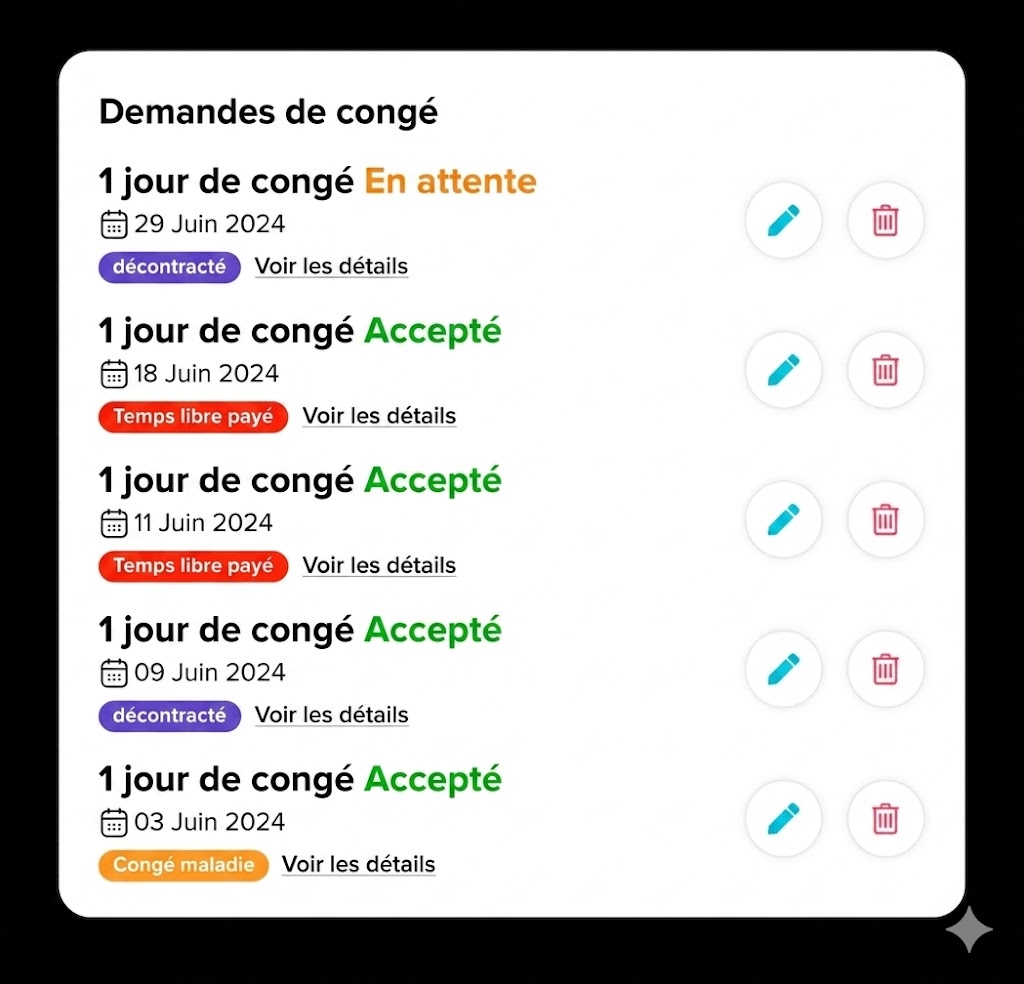
Démarrer avec Day Off est rapide et intuitif, permettant aux équipes de passer du suivi manuel ou basé sur des tableurs à un système de congés moderne et automatisé avec une configuration minimale.
Créer un espace de travail
Configurez votre organisation en quelques minutes en définissant votre calendrier de travail par défaut, votre fuseau horaire et les paramètres à l’échelle de l’entreprise.
Définir les types de congés
Ajoutez les types de congés que votre organisation prend en charge, tels que les congés payés, les vacances, les congés maladie, les congés parentaux ou les congés non payés. Vous pouvez personnaliser chaque type pour correspondre à vos politiques internes.
Définir les règles d’accumulation et de report
Configurez les calendriers d’accumulation, les limites de report et les règles d’expiration afin que les soldes de congés soient calculés automatiquement.
Inviter votre équipe
Invitez les employés par e-mail ou partagez un lien d’invitation simple. Une fois intégrés, les employés peuvent immédiatement consulter leurs soldes et commencer à soumettre des demandes de congés.
Configurer les approbations
Mettez en place des flux d’approbation qui reflètent votre hiérarchie organisationnelle, qu’ils soient à une ou plusieurs étapes.
En quelques heures seulement, vous pouvez remplacer les tableurs et les processus manuels par un système de gestion des congés évolutif et fiable qui grandit avec votre entreprise.
FAQ sur Day Off
Puis-je personnaliser les types de congés au-delà des congés payés, des vacances et des congés maladie standard ?
Absolument. Day Off vous permet de créer des types de congés personnalisés illimités, notamment les congés non payés, les congés parentaux, les jours de bénévolat ou toute catégorie de congés spécifique à l’entreprise. Chaque type de congé peut être configuré avec des règles d’accumulation uniques, des limites de report, des dates bloquées et des flux d’approbation.
Day Off prend-il en charge plusieurs sites ou équipes mondiales ?
Oui. Day Off prend en charge les équipes multi-sites et distribuées. Vous pouvez configurer des semaines de travail, des calendriers de jours fériés et des règles d’accumulation spécifiques à chaque site pour vous conformer aux lois du travail locales.
Les employés peuvent-ils accéder à Day Off sur des appareils mobiles ?
Oui. Day Off est entièrement accessible sur les appareils mobiles et de bureau, permettant aux employés et aux managers de demander, d’approuver ou d’examiner les congés à tout moment et en tout lieu.
Comment Day Off gère-t-il les flux d’approbation ?
Day Off fournit des flux d’approbation flexibles correspondant à votre structure organisationnelle. Qu’il s’agisse d’approbations à une étape ou de processus à plusieurs étapes entre départements, le système achemine automatiquement les demandes vers les bons approbateurs.
Day Off peut-il s’intégrer à des outils comme Google Calendar, Outlook ou Slack ?
Oui. Day Off s’intègre parfaitement aux outils de travail populaires, notamment Google Calendar, Outlook, Slack et Microsoft Teams. Les congés approuvés se synchronisent directement avec les calendriers, et les notifications peuvent apparaître dans les plateformes de communication.
Day Off fournit-il des rapports et des analyses ?
Oui. Day Off offre des rapports et des analyses détaillés sur les soldes de congés, les accumulations, les reports, les tendances d’utilisation et les données historiques. Les rapports peuvent être filtrés par équipe, département, site ou type de congé.
Day Off est-il conforme aux lois du travail ?
Day Off aide à maintenir la conformité aux réglementations du travail en suivant automatiquement les accumulations, les reports, les expirations et les historiques d’approbation. Toutes les actions de congés sont enregistrées avec des horodatages, fournissant un dossier prêt pour les audits.
Day Off peut-il remplacer entièrement les tableurs ?
Oui. Day Off est conçu pour remplacer complètement les méthodes de suivi manuel. Avec des soldes de congés automatisés, des flux d’approbation, des calendriers partagés et des rapports robustes, les tableurs, les chaînes d’e-mails et les dossiers éparpillés ne sont plus nécessaires.
Combien de temps faut-il pour commencer à utiliser Day Off ?
La configuration est rapide et intuitive. En quelques heures seulement, vous pouvez créer votre espace de travail, définir les types de congés, configurer les règles d’accumulation et de report, inviter les employés et établir des flux d’approbation.
Conclusion
Une gestion efficace des congés payés est bien plus que simplement comptabiliser les jours off — c’est un élément critique pour bâtir un environnement de travail productif, transparent et conforme. Les méthodes manuelles comme les tableurs, les e-mails et les calendriers éparpillés peuvent entraîner des erreurs, de la confusion et des inefficacités qui impactent à la fois la satisfaction des employés et les opérations commerciales.
Les outils modernes de suivi des congés, comme Day Off, simplifient la gestion des absences en automatisant les accumulations, en centralisant les approbations, en offrant une visibilité en temps réel et en générant des rapports exploitables. Au-delà d’un suivi précis, Day Off soutient la prise de décision basée sur les données, améliore l’expérience des employés, assure la conformité et s’intègre parfaitement aux flux de travail existants.
Que vous soyez une petite startup ou une entreprise en croissance, adopter un outil comme Day Off permet à votre équipe de se libérer du suivi manuel et d’adopter un système évolutif et fiable qui grandit avec votre organisation. Avec son design intuitif et son plan gratuit robuste, Day Off rend la gestion des congés précise, transparente et efficace, accessible à toutes les équipes.
Faites le premier pas aujourd’hui, rationalisez votre suivi des congés, responsabilisez vos employés et créez un environnement de travail où la gestion du temps libre est simple et entièrement transparente.