

Table of Contents
ToggleManaging paid time off used to be a back-office task handled in spreadsheets or email threads. In 2026, it’s something much bigger.
Today’s companies are distributed, fast-moving, and deeply focused on employee experience. PTO management is no longer just about tracking vacation days, it’s about transparency, fairness, compliance, and team coordination. When someone requests time off, managers want clarity. HR wants automation. Employees want instant answers. Leadership wants visibility.

To identify the strongest PTO platforms this year, we looked at top-rated tools recognized by:
G2
Capterra
Both platforms rank software based on verified user reviews, usability scores, feature depth, implementation experience, and overall satisfaction. The tools below consistently appear among the highest performers in PTO and leave management categories for 2026.
After comparing features, usability, flexibility, and real-world practicality, one solution stands clearly ahead for most modern teams: Day Off.
Let’s take a closer look.
Day Off: The Most Practical & User-Friendly PTO App of 2026

What separates Day Off from the rest of the PTO software market in 2026 isn’t aggressive marketing or an endless list of features. It’s focus.
While many platforms try to position themselves as full HR ecosystems, layering payroll, recruiting, performance reviews, and compliance tools into one large system, Day Off takes a different path. It concentrates entirely on leave management and refines that experience until it feels effortless.
That clarity of purpose shows up immediately when teams start using it.
Users frequently highlight:
An intuitive interface that requires little to no training
Same-day setup for most small and mid-sized teams
Clear, automatically calculated leave balances
Approval workflows that are structured but not complicated
Reliable mobile apps that feel as smooth as the desktop version
In a category that often feels bloated and overly technical, Day Off feels direct and practical. It solves the specific problem it was built to solve, and avoids unnecessary distractions.
What It Does Exceptionally Well
Multi-Policy Flexibility Without Complexity
Modern organizations rarely operate under a single leave policy. Teams may have different accrual rates based on location, role, or tenure. Some companies offer unlimited PTO alongside structured sick leave policies. Others manage parental leave, remote work days, and unpaid leave separately.
Day Off handles this diversity without overwhelming administrators. Multiple policies can be configured and managed from one clean dashboard. HR teams retain control, but the system remains easy to navigate.
Instead of feeling like a compliance engine, it feels like a practical tool designed for real operations.
Real-Time Transparency Across the Organization
Visibility reduces friction.
Employees can instantly check their available balances without contacting HR. Managers can view team availability through a shared calendar before approving requests. HR teams can export accurate reports for payroll processing within seconds.
This level of transparency minimizes misunderstandings and reduces back-and-forth communication. It also builds trust. When balances update automatically and approvals are clearly documented, there is less room for confusion or disputes.
Approval Workflows That Reflect How Teams Actually Work
Approval processes should support teams, not slow them down.
Day Off offers structured workflows that are customizable but easy to understand. There are no buried configuration layers or overly technical rule builders. Managers can approve requests quickly, and companies can add multiple approval levels if needed.
The system mirrors how organizations function in reality, rather than forcing teams to adapt to rigid software logic.
A Truly Mobile-First Experience
In 2026, many employees submit leave requests from their phones. Managers review approvals between meetings or while traveling. A PTO system that only works well on desktop is no longer sufficient.
Day Off’s mobile experience is not secondary to the product, it is central to it. The mobile interface is clean, responsive, and fully functional. Employees can request leave, check balances, and view calendars without limitations.
This mobility supports remote teams and distributed workforces naturally.
Seamless Integrations With Daily Workflows
Work happens inside communication platforms. That is where employees already spend their time.
Day Off integrates smoothly with tools like Slack and Microsoft Teams, allowing leave notifications and approvals to fit into existing workflows. Instead of forcing employees to log into yet another system repeatedly, it meets them where they already operate.
This integration reduces friction and increases adoption across the organization.
Who It’s Best For
Day Off is not limited to one type of organization. Its flexibility and pricing structure make it suitable across a wide spectrum of company sizes and leadership styles.
It is particularly well suited for:
Startups and fast-growing companies
Early-stage teams need systems that can scale without locking them into expensive enterprise contracts. Day Off allows startups to implement professional leave tracking from day one, then expand smoothly as headcount increases, without sudden pricing jumps.
Entrepreneurs and founder-led businesses
Entrepreneurs often manage multiple operational priorities at once. They need tools that work immediately, without weeks of onboarding or configuration. Day Off provides clarity and control without adding administrative burden, allowing founders to focus on growth rather than HR logistics.
Remote-first and distributed teams
With employees spread across cities or countries, visibility becomes essential. Day Off supports multi-location policies, shared calendars, and mobile access, making it ideal for teams that rarely share a physical office.
Small and mid-sized businesses (SMBs)
SMBs often need structure but not the complexity of a full HR suite. Day Off delivers professional-grade PTO management without bundling recruiting, payroll, or performance modules that inflate costs.
Large organizations seeking simplicity
Even larger companies benefit from dedicated tools. Enterprises that already use separate payroll or HR systems can integrate Day Off as a focused leave management solution. Its clarity and predictable per-user pricing make it attractive even at higher headcounts.
Across all these segments, the common thread is the desire for efficiency without unnecessary complexity.
Why It Comes First
For most organizations, PTO management does not need to be elaborate. It needs to be:
Accurate
Transparent
Reliable
Cost-efficient
Day Off achieves this balance better than many competitors in 2026.
It delivers essential leave management functionality without expanding into unrelated HR territories. Companies are not forced into bundled enterprise ecosystems. They are not paying for modules they rarely use. Instead, they receive a focused system designed to solve one operational problem exceptionally well.
Its pricing remains competitive at scale. Its interface encourages fast adoption. Its workflows reflect how teams actually operate.
In a market crowded with feature-heavy platforms attempting to do everything, Day Off succeeds by doing one thing with precision.
That clarity of purpose, combined with affordability and scalability, is why it ranks first.
BambooHR: Strong HR Ecosystem with PTO Built In
Where It Shines
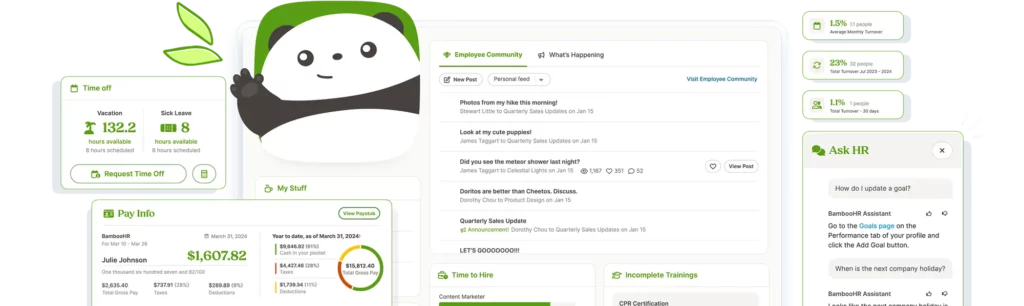
BambooHR is widely known as a full HR platform rather than just a PTO tool. Its time-off functionality is part of a broader system that includes recruiting, onboarding, employee records, and performance management.
For companies already using BambooHR, the PTO module feels like a natural extension of the HR ecosystem.
Strengths include:
Structured accrual rules
Employee self-service portal
Comprehensive reporting
Solid compliance support
Where It Falls Short for PTO-Focused Teams
Because it’s part of a larger system, PTO management isn’t its sole focus. Setup can be more involved. Pricing is higher than standalone solutions. Smaller companies that only need leave tracking may feel like they’re paying for features they don’t use.
Best Fit
Mid-sized organizations that want PTO tightly connected to broader HR processes.
Rippling: Automation-Driven Workforce Management

A Deeply Integrated, Tech-Forward Approach
Rippling isn’t just a PTO tool, it’s a workforce operating system. What makes it stand out in 2026 is how tightly leave management connects to payroll, benefits administration, compliance, and even IT provisioning.
When an employee submits a PTO request in Rippling, that action doesn’t sit in isolation. Approved leave can automatically sync with payroll calculations, adjust benefits deductions, and reflect in workforce reports without manual input. For companies operating across states or countries, that level of automation reduces administrative errors and compliance risks.
Rippling’s philosophy is clear: eliminate repetitive HR tasks through automation. PTO is simply one part of a broader ecosystem designed to centralize employee lifecycle management.
Where Rippling Excels
Advanced Automation
Policies can trigger workflows automatically. For example, accrual adjustments, carryover rules, or regional leave laws can be programmed into the system so HR doesn’t have to intervene manually.
Payroll-Connected Accuracy
Time off flows directly into payroll runs, reducing discrepancies and end-of-month surprises.
Global Workforce Support
Rippling handles international compliance rules and localized leave policies, a major advantage for distributed companies.
Custom Policy Logic
Organizations can create detailed, rule-based policies tailored to departments, locations, or employment types.
Where It Can Be Challenging
Rippling’s strength, its depth, can also be its complexity. Smaller teams may find the configuration process overwhelming, especially if they don’t need the broader HR and IT functionality.
Implementation may require more planning compared to lightweight PTO-only platforms. Pricing can also scale quickly depending on selected modules.
Best Fit
Rippling is ideal for tech-savvy, mid-to-large organizations that want HR, payroll, IT, and PTO fully unified. If your goal is operational automation across the entire employee lifecycle, Rippling delivers powerful infrastructure.
Workday: Enterprise-Grade Leave Management
Built for Scale and Complexity
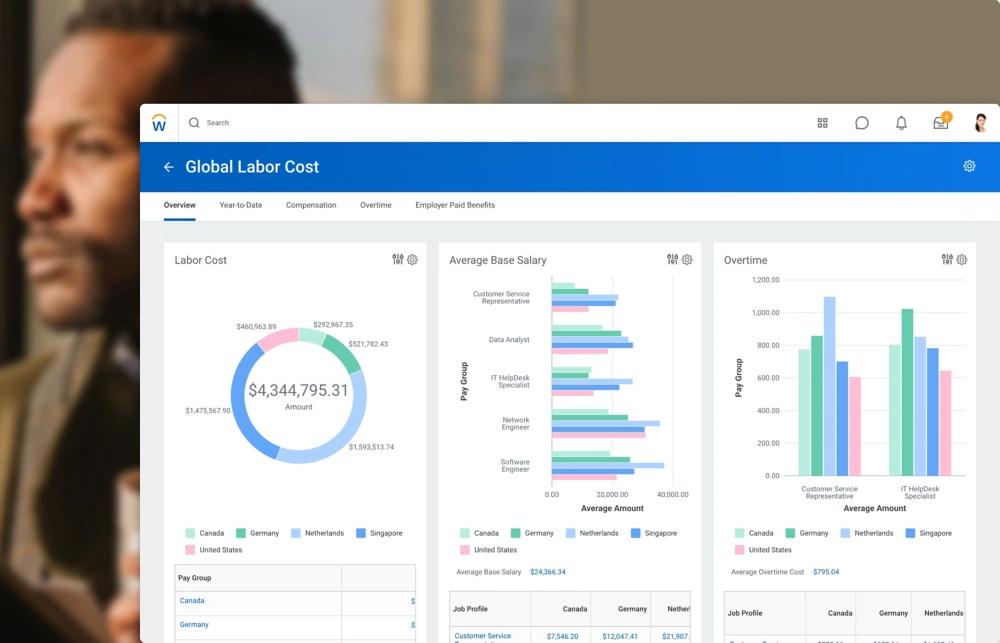
Workday has long been associated with large enterprises, and its PTO capabilities reflect that scale. In 2026, it remains one of the most comprehensive workforce management systems available.
Its leave management module is designed for organizations operating across multiple countries, each with distinct labor laws, public holidays, and compliance requirements. The system can handle intricate accrual formulas, seniority-based benefits, and complex reporting structures.
For enterprises with thousands of employees, Workday provides a centralized, standardized system that ensures consistency across global operations.
Where Workday Stands Out
Global Policy Management
Organizations can configure leave rules by country, region, or business unit, all within one structured framework.
Advanced Analytics & Forecasting
Workday offers deep reporting tools, helping leadership analyze leave trends, absenteeism patterns, and workforce capacity planning.
Enterprise-Level Security
With strict role-based access controls and audit trails, Workday meets the high compliance standards required by large corporations.
Highly Configurable Accrual Rules
Complex PTO structures, such as tiered accrual rates, tenure-based increases, or union-specific agreements, can be implemented accurately.
Limitations to Consider
Workday’s power comes with significant implementation requirements. It typically involves dedicated HR teams, IT collaboration, and sometimes external consultants. Setup can take weeks or months.
For small and mid-sized businesses, this level of complexity may be unnecessary, both financially and operationally.
Best Fit
Workday is best suited for multinational enterprises with layered organizational structures and strict compliance demands. It’s not built for simplicity, it’s built for scale.
Deputy: Ideal for Shift-Based Scheduling Teams
A Scheduling-First Solution with PTO Built In
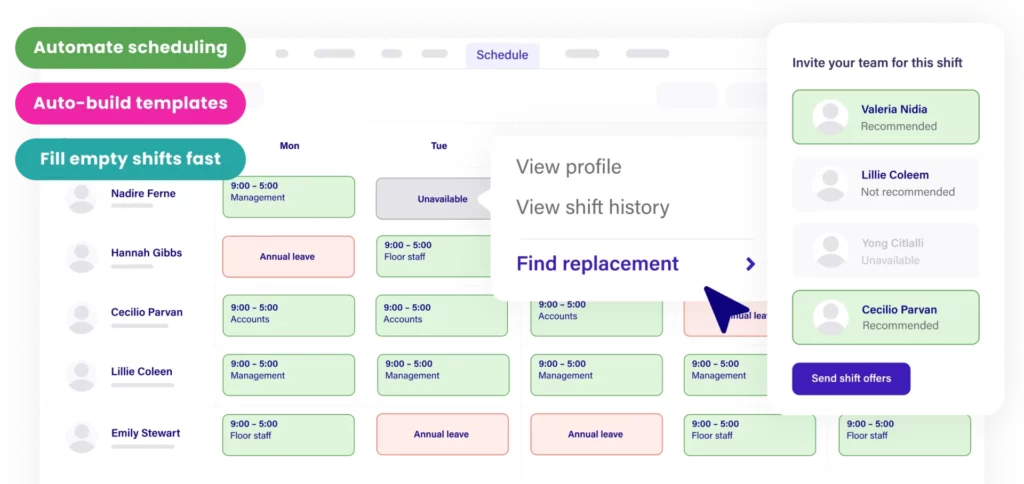
Deputy approaches PTO from an operational perspective. While many platforms start with HR policy logic, Deputy starts with the schedule.
In industries like retail, hospitality, healthcare, and manufacturing, coverage is everything. When someone takes time off, shifts must be reassigned quickly to avoid service disruptions. Deputy integrates PTO requests directly into scheduling workflows, making it easy for managers to see how absences affect staffing in real time.
The platform’s design reflects real-world operational needs rather than purely administrative ones.
Strengths That Matter on the Ground
Shift-Based Coordination
Managers can instantly visualize how leave impacts rosters and fill open shifts accordingly.
Strong Mobile Experience
Frontline workers can request leave, swap shifts, and receive updates directly from their phones.
Clear Operational Adjustments
Deputy simplifies reassigning shifts when time-off requests are approved, reducing last-minute confusion.
Real-Time Visibility
Supervisors get immediate insight into staffing gaps and labor costs.
Where It May Not Be Ideal
For office-based or remote teams without shift structures, Deputy’s scheduling-heavy interface may feel unnecessary. Companies focused purely on PTO tracking rather than workforce coverage may prefer a more streamlined leave-first solution.
Best Fit
Deputy is best for operational teams where daily staffing coverage directly affects revenue and service delivery. If your workforce runs on shifts, Deputy’s integrated approach to scheduling and PTO can be a strong advantage.
Why Day Off Is the First Choice in 2026
When you step back and look at what most companies actually need from a PTO system, the requirements are surprisingly straightforward. Organizations are not searching for dozens of overlapping HR modules. They are looking for clarity, accuracy, speed, and reasonable pricing.
Day Off ranks first in 2026 because it delivers exactly that, without unnecessary complexity.
Clear Visibility Across the Organization
One of the biggest pain points in leave management is simply not knowing who is off and when.
Day Off provides shared calendars and real-time balance tracking so that employees, managers, and HR all see the same information. There are no conflicting spreadsheets, no separate email threads, and no confusion about available days. Visibility is immediate and transparent.
That clarity alone eliminates a large percentage of common PTO-related issues.
Fast, Frictionless Approvals
Time off requests should not require multiple follow-ups or buried approval chains.
With Day Off, managers can review availability, approve requests, and move on within seconds. The workflow is structured enough to maintain control, but simple enough to avoid delays. For fast-moving teams, this speed matters.
Approvals become part of the workflow instead of a bottleneck.
Accurate, Automated Accrual Tracking
Manual accrual calculations are one of the most frequent sources of payroll discrepancies.
Day Off automates accruals based on predefined policies. Balances update automatically. Carryovers and caps are handled within the system. HR teams no longer need to reconcile numbers manually at the end of each month.
Accuracy builds trust, both internally and financially.
Reporting That Actually Saves Time
When payroll processing begins, the last thing HR needs is manual data cleanup.
Day Off allows quick exports of leave data, making reporting straightforward and reliable. Instead of spending hours adjusting spreadsheets, HR teams can generate what they need in minutes.
This reduces administrative overhead and prevents costly mistakes.
Affordable, Predictable Pricing
Cost becomes increasingly important as companies scale.
Day Off maintains a transparent per-user pricing structure without forcing upgrades into broader HR suites. Companies pay for leave management, nothing more. As headcount grows, costs remain predictable.
This pricing discipline makes it especially attractive to startups, entrepreneurs, SMBs, and even larger organizations looking to control recurring software expenses.
Minimal Training and Easy Adoption
Software only works if people actually use it.
Day Off’s interface is intuitive from the start. Employees understand how to request leave immediately. Managers navigate approvals naturally. HR administrators configure policies without technical complexity.
The system does not require weeks of onboarding or process redesign. It fits into how teams already operate.
Built for Modern Teams
In 2026, teams are hybrid, distributed, and constantly moving. The best software is not the loudest or the most feature-heavy. It is the one that integrates quietly into daily operations and performs reliably in the background.
Day Off does not attempt to replace every HR function. It simply makes time-off management accurate, transparent, and effortless.
That focus, combined with affordability and scalability, is why it remains the first choice in 2026.
Frequently Asked Questions (FAQ)
What is the difference between a dedicated PTO tracker and a full HR system?
A dedicated PTO tracker focuses exclusively on leave management, handling accruals, approvals, balances, and reporting without bundling recruiting, payroll, or performance management tools. Full HR systems include PTO as one module within a much larger platform. If leave tracking is your primary need, a focused tool like Day Off is often more cost-effective and easier to implement.
How do I choose the right PTO software for my company size?
Start by evaluating complexity, not just headcount.
Small teams may prioritize ease of use and quick setup. Growing companies should look at scalability and pricing predictability. Larger organizations may need multi-location policies and stronger reporting controls. The best choice aligns with your structure, not just your size.
Can PTO software integrate with payroll systems?
Yes. Many modern PTO tools either integrate directly with payroll providers or allow easy export of leave data for payroll processing. Integration reduces discrepancies between approved time off and payroll calculations, helping avoid costly errors.
Is PTO software necessary for small teams?
Even small teams benefit from structured leave tracking. Once a company passes 10–15 employees, manual tracking often leads to overlapping absences, inconsistent accrual calculations, and confusion about balances. Implementing a lightweight PTO system early prevents operational friction later.
How does PTO software improve employee experience?
Transparency plays a major role in employee satisfaction. When employees can instantly check balances, submit requests easily, and receive timely approvals, it creates a sense of fairness and clarity. Automated tracking also ensures policies are applied consistently across the organization.
What should I look for in terms of scalability?
Look for transparent per-user pricing, multi-policy support, role-based permissions, and reporting capabilities that can handle growth. A system should scale without forcing you into expensive enterprise bundles as headcount increases.
Can PTO systems support remote and hybrid teams?
Yes. Most leading platforms are designed with distributed workforces in mind. Shared calendars, mobile apps, location-based holiday tracking, and real-time notifications make them especially useful for remote and hybrid environments.
Does implementing PTO software require IT involvement?
In many cases, no. Dedicated PTO platforms are typically cloud-based and designed for quick deployment. HR teams can often configure policies and launch the system without heavy IT support, especially when using streamlined solutions.
What are the hidden costs of not using PTO software?
Without a centralized system, companies risk payroll discrepancies, compliance issues, overlapping absences, and wasted administrative time. Over time, manual tracking can become more expensive than a subscription-based solution due to inefficiencies and errors.
Why is Day Off ranked first among 2026 PTO tools?
Day Off ranks first because it combines affordability, simplicity, and scalability without adding unnecessary HR complexity. It delivers core leave management functionality cleanly and predictably, making it suitable for startups, entrepreneurs, SMBs, and even larger organizations seeking focused efficiency.
Conclusion
Choosing the right PTO software is about more than tracking vacation days, it’s about creating clarity, consistency, and operational efficiency. As teams grow, manual processes often lead to errors, confusion, and unnecessary administrative work.
The best solution aligns with your company’s complexity, not just its size. Small teams need simplicity, growing businesses need scalability, and larger organizations require stronger controls and reporting.
If leave management is your primary focus, a dedicated tool like Day Off offers a streamlined, cost-effective way to manage time off without the weight of a full HR system. Investing in the right PTO platform ultimately supports smoother operations and a better employee experience.