

Table of Contents
ToggleAn employee is underpaid because their leave balance was miscalculated, creating frustration and forcing HR to spend hours correcting the error. Two key team members schedule overlapping time off during a critical product launch, leaving the team understaffed at the worst possible moment. A compliance audit then reveals that accrual rules were never applied correctly, exposing the company to potential penalties and retroactive adjustments.
Suddenly, what once felt like a simple spreadsheet task becomes a real business risk. Leave management often stays in the background because it seems straightforward, but as teams grow and policies become more complex, small inaccuracies can quickly snowball, impacting payroll accuracy, operational efficiency, compliance, and employee trust.

Most companies typically fall into one of three categories:
They manage leave in Excel.
They adopt a lightweight leave app like Day Off.
They implement a more structured system like Vacation Tracker.
On the surface, all three options seem to accomplish the same goal: tracking time off.
But in reality, they function very differently, and those differences become increasingly important as a company grows.
Excel: Flexible, Familiar, and Increasingly Fragile
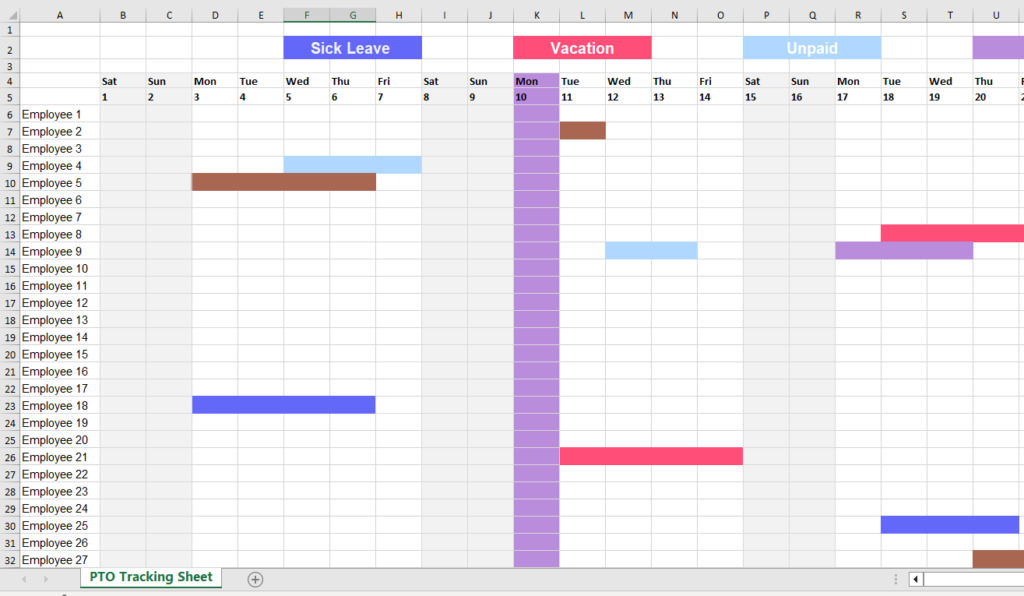
Excel is where most companies begin. It feels practical, controllable, and cost-effective. You can build custom PTO columns, accrual calculations, carryover formulas, separate department tabs, manual approval notes, and even a color-coded leave calendar. On the surface, it looks organized, even sophisticated.
But spreadsheets are only as strong as the people maintaining them.
The Hidden Time Commitment
Every leave request triggers a manual process.
An employee emails HR. HR checks the spreadsheet, verifies the balance, updates totals, reviews accrual calculations, informs the manager, and updates the shared calendar. None of this is automated, every step depends on someone remembering to complete it correctly.
With 10 employees, this feels manageable. With 50, it becomes repetitive. With 100 or more, it becomes operational overhead. HR teams spend increasing amounts of time maintaining data rather than focusing on strategic work.
Excel does not run workflows. It runs on discipline. And as complexity grows, so does the time cost.
Formula Risk and Version Conflicts
Excel’s power is also its weakness. Formulas, pivot tables, and macros can calculate accruals, but they introduce fragility into the system.
A formula can be accidentally overwritten. Data can be sorted without locking reference cells. Multiple versions of the same file can circulate. Shared file conflicts can create inconsistencies. Manual balance adjustments may not be properly documented.
Unlike dedicated systems, Excel does not enforce approval workflows, prevent unauthorized edits, maintain structured audit logs, or lock policy rules. When something breaks, there is no alert, only the downstream impact.
And when leave balances are wrong, payroll accuracy is at risk.
Compliance and Legal Exposure
For organizations operating under statutory leave requirements, Excel provides no built-in safeguards.
There are no automated alerts for minimum leave entitlements, tenure-based accrual rules, carryover limits, regional policy differences, or restrictions between leave types. Everything depends on HR’s knowledge and constant oversight.
That may be sustainable when policies are simple. As rules expand across regions, employee types, or tenure bands, the margin for error increases. Compliance shifts from being system-supported to being entirely human-dependent, which introduces legal exposure.
Data Security and Privacy
Leave records often contain sensitive information, medical leave, parental leave, or personal emergencies.
When spreadsheets are broadly shared, stored in unsecured drives, or emailed back and forth, visibility can extend beyond what is appropriate. Excel does not natively provide structured, role-based access control tailored to leave data. Protecting confidentiality requires careful manual configuration and strict discipline.
Without those controls, data governance weakens.
When Excel Works
Excel can still be the right solution in specific situations:
Team size under 10–15 employees
Simple leave policies
Minimal compliance complexity
Low HR workload
Limited growth expectations
In these cases, flexibility outweighs risk.
But as a company scales, complexity compounds. What begins as a flexible, low-cost tool gradually turns into a manual system that consumes time, introduces risk, and limits visibility. At that stage, Excel stops being just a spreadsheet, it becomes an operational liability.
Vacation Tracker: Structured Automation Within Your Workflow

Vacation Tracker approaches leave management differently. Instead of operating as a separate, disconnected system, it integrates directly into Slack and Microsoft Teams. That integration is more than a convenience feature, it changes how employees and managers interact with leave processes.
Employees submit requests inside the communication platforms they already use every day. Managers review and approve without switching tools. The process fits naturally into existing workflows, which increases adoption and reduces friction. Leave management becomes part of daily operations instead of an external task people forget to complete.
Key Features That Reduce Operational Risk
Automated Approval Workflows
Configurable approval hierarchies
Multi-level approvals when required
Automatic routing to the correct manager
Real-time notifications
Automatic balance updates after approval
This eliminates back-and-forth emails, manual follow-ups, and approval ambiguity. Requests move through a structured flow, and balances update automatically, reducing delays and human error.
Custom Leave Policies
Multiple leave types (vacation, sick, personal, remote days, etc.)
Accrual rules based on tenure
Carryover limits
Regional policy customization
Blackout dates to prevent critical overlaps
Policies are enforced by the system itself. Instead of relying on HR to manually interpret rules each time, the platform applies them consistently and automatically.
Shared Leave Calendar
Team-wide visibility
Departmental filtering
Conflict prevention
Google Calendar and Outlook integration
Managers gain immediate visibility into staffing levels. Potential conflicts can be identified before they disrupt operations, especially during high-demand periods or major projects.
Detailed Reporting & Audit Trail
Exportable leave reports
Timestamped approvals
Full request history
Balance tracking over time
Payroll-ready exports
In the event of disputes, payroll reviews, or compliance audits, documentation is centralized, structured, and reliable. Information is not scattered across inboxes or multiple file versions.
Role-Based Access Control
Managers see their teams
Employees see their personal balances
HR maintains global oversight
Sensitive leave information is better contained. Visibility is aligned with responsibility, improving privacy and governance.
The Real Value: Risk Transfer
Vacation Tracker shifts responsibility from individuals to systems.
Instead of relying on someone to update a spreadsheet correctly, you rely on automated calculations, enforced policies, logged approvals, and structured reporting. The burden moves from memory and manual control to built-in safeguards.
This reduces human error, payroll discrepancies, operational blind spots, and compliance exposure.
Considerations
Like any structured system, it requires initial setup, policy configuration, manager onboarding, and a subscription budget.
However, for companies with 20 to 500+ employees, particularly remote or hybrid teams, the operational stability, visibility, and risk reduction often outweigh the implementation effort.
Day Off: Streamlined and Accessible Leave Management

Day Off positions itself as a lightweight, intuitive leave management solution built for modern teams. It is designed for organizations that have moved beyond spreadsheets but do not want the complexity, cost, or heavy configuration of enterprise-level systems.
The focus is simple: make leave management easy for employees, clear for managers, and efficient for HR, without overengineering the process.
Core Features
Quick Leave Requests
Web and mobile access
Simple, user-friendly request forms
Instant approval notifications
Real-time balance visibility
Day Off removes friction from the request process. Employees can submit leave requests in seconds from desktop or mobile, making it especially practical for remote, hybrid, and distributed teams.
There is no complicated workflow to learn. The interface is clean and intuitive, meaning employees typically require little to no training. Real-time balance visibility ensures employees know exactly how much leave they have available before submitting a request, reducing back-and-forth communication with HR.
Managers receive instant notifications and can approve or decline requests quickly, keeping the process moving without delays.
Leave Type Customization

Vacation leave
Sick leave
Unpaid leave
Custom leave categories
Accrual tracking
Day Off supports multiple leave types and allows organizations to tailor categories to their internal policies. Whether it’s standard PTO, remote days, personal leave, or company-specific categories, policies can be configured clearly without becoming overly complex.
Accrual tracking is automated, ensuring balances update consistently based on defined rules. This removes manual calculations while maintaining flexibility. Companies can structure policies in a way that reflects their culture and operational needs without navigating layers of enterprise configuration.
Team Calendar View
Company-wide leave calendar
Department filtering
Conflict awareness
Visibility is one of Day Off’s strongest advantages. The shared team calendar gives managers and employees a clear overview of who is off and when. Departments can be filtered for better staffing clarity, helping teams plan workloads more effectively.
This visibility reduces scheduling surprises and overlapping absences that can disrupt operations. Instead of discovering conflicts after approvals, managers can proactively assess availability before making decisions.
For growing teams, this level of transparency significantly improves coordination.
Reporting and Administrative Controls

Leave balance summaries
Leave history tracking
Export options for payroll
Employee records management
Holiday management
Day Off covers essential reporting needs without overwhelming HR with excessive data layers. Administrators can access balance summaries, review leave histories, and export data for payroll processing easily.
Holiday management ensures public holidays are properly reflected in leave calculations, further reducing manual adjustments. Employee records are centralized, keeping leave data organized and accessible when needed.
The reporting is practical, focused, and sufficient for most small to mid-sized organizations.
Strengths
Day Off excels in:
Fast setup and minimal onboarding time
Clean, intuitive user experience
Affordable pricing structure
Mobile accessibility
Low administrative burden
Startup and scale-up friendly environments
For companies between 10 and 100 employees, Day Off provides the ideal balance between structure and simplicity. It introduces automation and visibility without creating administrative complexity.
Teams gain control and clarity without feeling like they are implementing a heavy HR system.
Why Day Off Stands Out
While spreadsheets minimize direct software costs, they increase hidden operational risk and manual workload.
More complex systems may offer deeper configuration, but they often require longer setup, heavier management, and higher subscription investment.
Day Off occupies the middle ground, and for many organizations, that is exactly where the value lies.
It provides:
Automation without overcomplication
Structure without rigidity
Visibility without information overload
Compliance support without enterprise bureaucracy
For growing teams that want to professionalize their leave process while staying agile, Day Off offers a practical, scalable solution that supports growth without slowing the organization down.
The Bigger Picture: Cost vs. Risk vs. Growth
The true cost of leave management is not just subscription fees. It includes:
Payroll corrections
HR time spent on manual updates
Scheduling conflicts
Compliance exposure
Employee dissatisfaction
Data privacy risks
Excel minimizes upfront cost but increases operational dependency.
More complex enterprise tools maximize control but add configuration overhead.
Day Off reduces friction, introduces reliable structure, and supports growing teams with exactly the level of functionality they need, making it, for many organizations, the smartest and most balanced option.
| Criteria | Excel | Vacation Tracker | Day Off |
|---|---|---|---|
| Setup & Adoption | Manual setup, process-dependent | Moderate setup, Slack/Teams focused | Fastest setup, intuitive interface, minimal training required |
| Leave Requests & Approvals | Email + manual updates | Automated, multi-level workflows | Simple, streamlined automated approvals with instant notifications |
| Accrual & Balance Tracking | Formula-based, error-prone | Automated & policy-enforced | Automated, accurate, easy-to-manage accrual tracking |
| Visibility & Calendar | Manual tracking | Integrated shared calendar | Built-in team calendar with clear filters and conflict awareness |
| Reporting & Payroll Export | Manual preparation | Structured reports & audit trail | Simple, ready-to-export reports and complete leave history |
| Overall Fit | Very small teams only | Structured mid-to-large teams | Best balance of simplicity, automation, affordability, and scalability |
Frequently Asked Questions (FAQ)
When should a company move away from Excel for leave management?
The tipping point usually comes when manual tracking starts consuming noticeable HR time or when errors begin affecting payroll and team planning. For very small teams with simple policies, Excel may work. But once you’re managing multiple leave types, accrual rules, growing headcount, or regional compliance requirements, the administrative overhead and risk increase significantly.
If HR is spending more time maintaining spreadsheets than improving employee experience or workforce planning, it’s time to consider a dedicated solution.
Is leave management software necessary for small teams?
Not always, but it depends on complexity, not just team size.
A 12-person company operating in multiple regions with different statutory requirements may need structured automation. Meanwhile, a 20-person local team with a single leave policy might still operate comfortably with a lightweight system.
Tools like Day Off are particularly well-suited for small to mid-sized teams that want structure without enterprise-level complexity.
How does leave management software reduce payroll errors?
Payroll errors often happen when balances are manually calculated, accruals are misapplied, or adjustments are not documented properly.
Leave management systems reduce these risks by:
Automatically calculating accruals
Updating balances in real time
Logging approvals and changes
Generating export-ready payroll reports
This removes manual calculations and ensures payroll teams rely on structured, accurate data rather than version-controlled spreadsheets.
What should companies look for in a leave management solution?
Key evaluation criteria include:
Ease of use for employees and managers
Automated accrual tracking
Clear approval workflows
Shared team calendar visibility
Reporting and payroll export capabilities
Role-based access control
Scalability as the company grows
For many growing organizations, the ideal solution balances automation and simplicity, providing structure without heavy implementation or configuration requirements.
Is compliance a real concern for growing companies?
Yes, especially as companies expand across regions or introduce more nuanced leave policies.
Compliance risks can include:
Incorrect statutory leave minimums
Improper accrual calculations
Missed carryover limits
Inconsistent policy enforcement
Without system enforcement, compliance depends entirely on HR oversight. As complexity grows, so does the potential for oversight errors. Structured leave tools help reduce that exposure by applying rules consistently.
How does Day Off compare to more complex systems?
Day Off is built for simplicity and speed. It offers automation, visibility, and reporting without requiring enterprise-level setup or configuration.
Compared to spreadsheets, it reduces manual work and error risk. Compared to more complex systems, it minimizes onboarding time and administrative burden.
For companies in the 10–100 employee range, or growing startups that want professional structure without operational heaviness, it often represents the most balanced option.
What is the biggest hidden cost of poor leave management?
The biggest hidden cost is not software, it’s risk.
That risk shows up in:
Payroll corrections
Lost HR productivity
Operational disruptions
Compliance penalties
Employee dissatisfaction
Data privacy exposure
When leave management is treated as a minor administrative task, those risks compound quietly. The right system doesn’t just track time off, it protects operational stability as the organization grows.
Can a leave management system grow with the company?
The right system should.
A scalable solution allows you to:
Add new leave types
Adjust accrual rules
Support multiple departments
Expand reporting needs
Onboard new employees seamlessly
Day Off is designed to grow alongside teams without requiring them to reimplement an entirely new system as they scale.
Conclusion
Leave management rarely feels strategic, until it becomes a problem. What starts as a simple tracking task can quickly evolve into payroll discrepancies, scheduling conflicts, compliance exposure, and employee frustration. The difference between a smooth operation and an operational headache often comes down to the system behind the process.
Excel offers flexibility and familiarity, but as teams grow, it introduces manual overhead and risk. More complex enterprise tools provide deeper control, but they often come with heavier setup and administrative demands.
For many growing teams, the goal isn’t complexity, it’s clarity, consistency, and control without unnecessary friction. That’s where a solution like Day Off stands out. It delivers the right level of automation, visibility, and structure while remaining intuitive and easy to adopt.