

Table of Contents
ToggleManaging employee leave used to be simple, a shared calendar, a spreadsheet, or even a whiteboard in the office. But today’s workplaces are different. Teams are remote, hybrid, distributed across countries, and operating in multiple time zones. Compliance requirements are stricter. Employees expect transparency. Managers need visibility.
In this environment, a time off tracker with approval workflow is not a luxury, it’s an operational necessity.

What Is a Time Off Tracker with Approval Workflow?
A Time Off Tracker is a centralized system that allows organizations to manage, track, calculate, and report employee leave types such as:
Paid Time Off (PTO)
Vacation leave
Sick leave
Parental leave
Unpaid leave
Compensatory leave (Comp Off)
Floating holidays
Public holidays
An Approval Workflow adds structured governance to the process.
Instead of informal communication like emails or Slack messages, a defined workflow ensures:
An employee submits a leave request.
The system automatically routes the request to the correct approver.
The manager reviews availability and team schedule.
The request is approved or declined.
The employee’s leave balance updates instantly.
The shared team calendar reflects the absence.
A full record is saved for reporting and compliance.
This structure eliminates ambiguity and ensures accountability.
Why Day Off Is the Best Time Off Tracker with Approval Workflow
Among all available leave management solutions, Day Off stands out because it combines simplicity, flexibility, and depth, without overwhelming teams with unnecessary enterprise complexity. It’s built to serve both small businesses and growing organizations that need powerful features without the burden of complicated systems.
Let’s explore its major features in detail.
Clean & Intuitive Interface

A leave management system only works if people actually use it. Day Off is designed with usability at its core, ensuring a smooth experience for employees, managers, and HR teams alike.
Employees can:
Submit leave requests in seconds with just a few clicks
Instantly view their remaining balances
Check team availability through a clear calendar view
There is no steep learning curve, no confusing menus, and no lengthy onboarding process. This leads to high adoption rates and minimal training requirements. Even non-technical users can navigate the platform comfortably from day one.
Fully Customizable Leave Policies
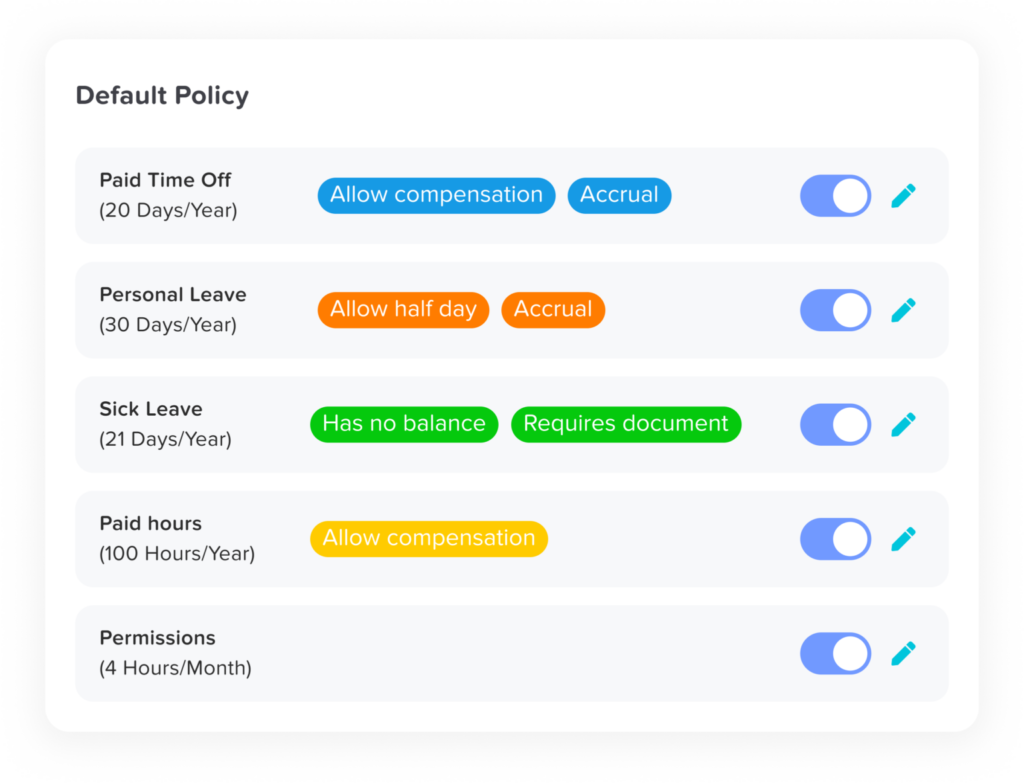
Every organization has unique leave policies, and Day Off is built to accommodate that complexity without making setup difficult.
With Day Off, organizations can:
Create unlimited leave types (annual leave, sick leave, unpaid leave, maternity/paternity leave, etc.)
Configure accrual rules (monthly, yearly, bi-weekly, or fully custom accrual schedules)
Set carryover limits and expiration rules
Define reset periods aligned with fiscal or calendar years
Assign different policies per department, location, or employee group
This flexibility makes Day Off ideal for global companies, multi-location businesses, and organizations with varying employment contracts. Instead of adjusting your policy to fit the system, the system adapts to your policy.
Advanced Approval Workflows

Approval workflows are critical for maintaining control and transparency. Day Off provides structured yet flexible approval processes that support organizations of all sizes.
The approval system includes:
Single-level or multi-level approval chains
Manager-based routing to ensure requests go to the right person
Role-based permissions for HR, supervisors, and executives
Delegated approvals when managers are out of office
This ensures continuity, accountability, and proper oversight. Every action is recorded, providing a clear audit trail for HR and leadership teams.
Real-Time Leave Balance Automation

Manual leave tracking often leads to errors, delays, and spreadsheet chaos. Day Off eliminates this risk with automated calculations.
Once a leave request is approved:
Employee balances update instantly
Accruals calculate automatically based on predefined rules
Carryover and policy limits apply without manual intervention
There is no need for HR to manually adjust balances or reconcile spreadsheets. Automation reduces administrative workload while increasing accuracy and compliance.
Smart Conflict Detection
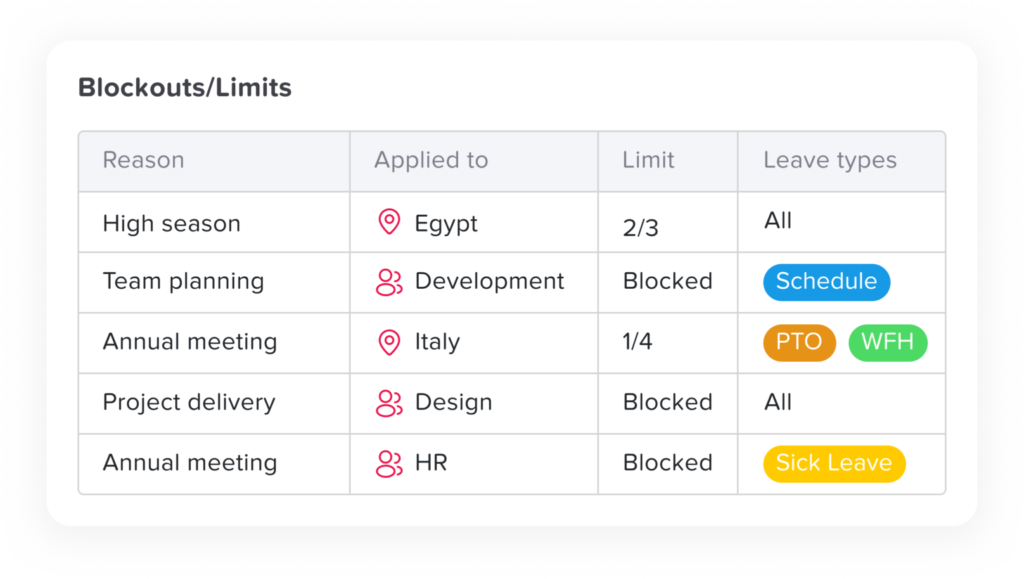
Operational continuity is essential, especially in teams where overlapping absences can disrupt productivity.
Day Off proactively alerts managers when:
Too many employees request leave on the same day
Critical team members have overlapping time off
Department coverage may fall below acceptable levels
These real-time warnings help managers make informed decisions before approving requests, ensuring business stability while still supporting employee flexibility.
Country-Specific Public Holidays

Managing public holidays across multiple countries can be complex and error-prone. Day Off simplifies this process by automatically integrating country-specific public holidays.
This feature:
Reduces manual data entry
Ensures compliance with local labor laws
Prevents accidental leave deductions on official holidays
For global organizations, this is a significant advantage, helping maintain consistency and legal compliance across regions.
Mobile Apps (iOS & Android)
Modern teams are mobile, and leave management should be too. Day Off provides dedicated mobile apps for both iOS and Android devices.
Employees and managers can:
Submit leave requests anytime, anywhere
Approve or reject requests on the go
Check leave balances instantly
View team availability in real time
This mobility ensures that approvals are not delayed simply because a manager is away from their desk.
Calendar Integrations

Switching between multiple tools reduces efficiency. Day Off integrates with popular calendar platforms like Google and Outlook Calendar to keep everyone aligned.
With calendar synchronization:
Approved leaves appear directly in team calendars
Managers gain visibility without logging into multiple systems
Scheduling conflicts are easier to avoid
This integration enhances transparency and ensures time-off planning becomes part of daily workflow rather than a separate administrative task.
Reporting & Analytics Dashboard

Data-driven HR decisions require clear visibility into leave trends. Day Off provides comprehensive reporting and analytics tools to support strategic planning.
HR teams can generate:
Department-level leave summaries
Individual leave reports
Leave usage analytics and trends
Leave liability tracking for financial forecasting
Reports are exportable and ready for payroll processing, compliance audits, or executive review. This transforms leave tracking from an administrative function into a strategic asset.
Multi-Location & Multi-Department Support
As organizations grow, their needs become more complex. Day Off scales effortlessly with expansion.
It supports:
Multiple office locations
Different time zones
Department-specific leave policies
Cross-functional team visibility
Whether a company operates in one country or across continents, Day Off adapts to organizational structure without requiring separate systems.
Secure & Cloud-Based
Security and reliability are non-negotiable for HR systems. Being fully cloud-based, Day Off provides:
Secure, encrypted access
Real-time data updates
No installation or maintenance requirements
Automatic scalability as your workforce grows
Cloud infrastructure ensures accessibility from anywhere while maintaining strong data protection standards.
Why Manual Leave Tracking Fails as Teams Grow
Spreadsheets feel simple. Email approvals feel manageable. And for a team of five, they might even work.
But as soon as a company scales beyond a small group, manual leave tracking begins to break down, slowly at first, then all at once. What once felt “good enough” turns into confusion, errors, and operational risk.
Here’s why.
Human Error in Calculations
Manual leave tracking relies heavily on people updating spreadsheets correctly and consistently. That’s where problems begin.
Common issues include:
Incorrect PTO balances due to formula errors
Miscalculated accruals when policies change
Forgotten updates after approved leave
Carryover mistakes at year-end
Payroll discrepancies caused by outdated records
Even a small formula error can impact multiple employees. And the more people you add, the higher the probability of mistakes.
Over time, these small inaccuracies damage trust. Employees begin questioning their balances. HR spends hours double-checking numbers. Payroll teams waste valuable time reconciling data.
Lack of Visibility
As teams grow, visibility becomes critical.
With spreadsheets and email threads, managers often cannot easily see:
Who is off next week
Which vacations overlap
Department-wide availability
Upcoming leave during critical business periods
Information is scattered, some in inboxes, some in shared drives, some in private files. There is no single source of truth.
This lack of visibility creates scheduling surprises. Projects slow down. Deadlines get missed. Teams become reactive instead of proactive.
No Structured Approval Trail
In manual systems, approvals often happen through:
Email threads
Slack messages
Verbal conversations
Sticky notes and informal confirmations
The problem? These records are inconsistent and easy to lose.
Emails get buried. Managers forget what they approved. HR cannot easily prove who authorized what, and when.
Without a structured approval trail:
There’s no reliable audit documentation
Disputes become difficult to resolve
Compliance reviews become stressful
As organizations grow, documentation becomes essential. Manual systems simply weren’t built for traceability.
Conflict and Coverage Issues
In small teams, managers may remember who requested which dates. But once headcount increases, memory-based coordination fails.
Two key team members might request the same days off, without anyone noticing until it’s too late.
Without conflict detection:
Critical roles may be left uncovered
Customer service may suffer
Production schedules may be disrupted
Team morale may decline
Manual tracking offers no built-in warning system. By the time conflicts are discovered, managers are forced into awkward conversations or last-minute adjustments.
Growing teams require proactive safeguards, not reactive problem-solving.
Compliance Risks Multiply
As companies expand across regions or countries, leave policies become more complex.
Different jurisdictions have different rules regarding:
Minimum statutory leave
Sick leave requirements
Public holidays
Carryover limitations
Payout obligations
Tracking these requirements manually is not only time-consuming, it’s risky.
One missed rule or outdated policy can lead to:
Legal exposure
Financial penalties
Employee disputes
Reputation damage
Compliance complexity scales with growth. Spreadsheets do not.
Startup
- 25 Employees
- Single Approver
- Three Policies
- Unlimited Team
- Unlimited Locations
Why Approval Workflow Is Critical for Modern Organizations
As teams expand, structure becomes essential. A clearly defined approval workflow is not just an administrative feature, it’s a foundation for fairness, clarity, and operational control.
Here’s why it matters.
Transparency
Employees need visibility into the status of their requests.
A structured workflow ensures:
Requests are tracked from submission to final decision
Employees can see whether a request is pending, approved, or declined
No one wonders, “Did my manager see my email?”
Transparency reduces anxiety and improves employee experience. People feel informed instead of ignored.
Fairness
Without a standardized process, approvals may feel inconsistent or biased.
An approval workflow ensures:
Every request follows the same steps
Policies are applied uniformly
Decisions are based on workload and policy, not memory or favoritism
This consistency builds trust. Employees know the system treats everyone equally.
Accountability
In growing organizations, ambiguity causes friction.
Without clarity, employees may ask:
“Who approves my leave?”
“Did HR approve this or my manager?”
“Who gave final confirmation?”
A structured workflow defines:
Clear approvers
Role-based permissions
Documented decision timestamps
There is no confusion about who said yes, or no.
Operational Stability
Leave approvals are not just administrative tasks. They affect workload, productivity, and service delivery.
A structured workflow allows managers to:
Review team capacity before approving
Assess overlapping requests
Make informed scheduling decisions
Instead of reacting to staffing shortages, managers can prevent them.
Compliance & Audit Readiness
Every leave request becomes a documented, traceable record.
This means:
Clear approval history
Accurate balance updates
Reliable data for audits
Stronger legal protection
In regulated industries or multi-region organizations, this documentation is invaluable.
Without Approval Workflow, Chaos Follows
When approvals are informal and inconsistent, organizations face:
Miscommunication
Resentment between employees
Scheduling conflicts
Payroll errors
Compliance risks
What starts as a “quick email approval” often turns into operational confusion.
A structured approval workflow is not about bureaucracy, it’s about clarity, fairness, and control.
Why Day Off Is the Best Overall Choice

When comparing leave management tools on the market, many platforms try to do everything, payroll, recruitment, performance management, benefits administration, and more. While that sounds impressive, it often leads to unnecessary complexity.
Day Off stands out because it does one thing exceptionally well: leave management. And for most organizations, that’s exactly what’s needed.
Let’s break down why it consistently emerges as the best overall choice.
Built Specifically for Leave Management
Unlike large HR suites where leave tracking is just one small module, Day Off is purpose-built for managing time off.
This focused approach means:
Cleaner workflows
Faster setup
Better usability
No clutter from unrelated HR features
Because the platform is designed specifically around leave policies, balances, approvals, and reporting, every feature feels intentional and optimized.
You’re not adapting to a bloated HR system, you’re using a tool built for your exact problem.
Easy to Set Up
Implementation shouldn’t feel like a long-term project.
With Day Off:
Leave types can be created in minutes
Policies can be configured without technical expertise
Teams can be added quickly
Approval chains are simple to define
There’s no need for IT involvement, complex integrations, or weeks of onboarding. Most organizations can go from setup to live usage in a very short time.
This simplicity removes friction, and friction is often what kills software adoption.
Requires No Heavy Training
Software should reduce workload, not create new training burdens.
Day Off’s intuitive design ensures:
Employees understand how to submit requests immediately
Managers can approve or reject in seconds
HR can generate reports without needing advanced tutorials
The interface is clean, self-explanatory, and user-friendly. That means high adoption rates and minimal resistance from teams.
When software feels simple, people actually use it.
Scales With Growing Teams
What works for 10 employees must also work for 100, and beyond.
Day Off scales effortlessly by supporting:
Multiple departments
Different office locations
Varied leave policies
Multi-level approval workflows
As your organization grows, the system adapts without becoming complicated. There’s no need to migrate to a new platform just because your team expanded.
Scalability without complexity is one of its strongest advantages.
Mobile-First Accessibility
Modern teams don’t operate solely from desktops.
With dedicated mobile apps, Day Off allows employees and managers to:
Submit leave requests anytime
Approve requests on the go
Check balances instantly
View team availability in real time
Approvals don’t get delayed simply because someone is out of the office. This improves response times and keeps operations moving smoothly.
Mobility is no longer optional, it’s essential.


Powerful Yet Simple Approval Workflows
Many tools are either too basic or overly complicated.
Day Off strikes the perfect balance:
Structured single or multi-level approvals
Role-based permissions
Clear routing of requests
Documented approval history
The workflow is powerful enough to support accountability and compliance, yet simple enough to remain efficient.
It provides structure, without bureaucracy.
Most Businesses Don’t Need Enterprise-Level HR Complexity
Large HR suites often introduce features that small and mid-sized businesses rarely use, but still pay for.
What most organizations actually need is simple:
Clear leave requests
Fast, structured approvals
Accurate balance calculations
Transparent, exportable reporting
They don’t need complicated dashboards filled with unrelated modules. They need a system that solves one core challenge reliably and efficiently.
Day Off Delivers Exactly That
Day Off combines:
Simplicity for employees
Control for managers
Automation for HR
Scalability for growing businesses
It removes spreadsheet dependency.
It eliminates approval confusion.
It reduces compliance risk.
It saves administrative time.
And it does all this without overwhelming teams with unnecessary enterprise complexity.
Frequently Asked Questions (FAQ)
How long does it take to implement Day Off?
One of the biggest concerns organizations have when adopting new software is implementation time. Unlike complex HR systems that can take weeks or months to configure, Day Off is designed for rapid setup.
Most teams can:
Configure leave types and policies within hours
Add employees in bulk
Define approval workflows in minutes
Because the platform is intuitive and purpose-built for leave management, implementation is typically fast and does not require external consultants or long onboarding cycles.
How does Day Off handle different time zones?
For distributed and global teams, time zone differences can create confusion around leave dates and approval timing.
Day Off supports:
Multiple office locations
Different time zones per employee
Clear date tracking to avoid overlap misunderstandings
This ensures that employees in different regions see accurate leave schedules without ambiguity.
What happens if a manager is unavailable to approve requests?
Approval bottlenecks can slow operations and frustrate employees. To prevent this, Day Off supports delegated approvals and multi-level workflows.
If a primary approver is unavailable:
A delegated manager can step in
Requests can escalate to a secondary approver
No request remains stuck indefinitely
This ensures continuity and avoids unnecessary delays.
Can policies differ between full-time, part-time, and contract employees?
Yes. Organizations often need different accrual rules and leave entitlements depending on employment type.
Day Off allows HR teams to:
Assign policies by role, department, or employment category
Configure accrual rates proportionally
Apply different carryover rules per group
This flexibility supports diverse workforce structures without manual adjustments.
Is employee data secure?
Security is a critical concern when managing HR-related information.
As a cloud-based solution, Day Off provides:
Secure, encrypted access
Controlled role-based permissions
Centralized data storage
Regular updates without manual maintenance
Access is restricted based on user roles, ensuring employees only see relevant information.
Can employees track leave history?
Yes. Employees can view:
Past leave requests
Approval status
Historical balances
Accrual records
This transparency reduces HR inquiries and builds trust, as employees have full visibility into their own leave data.
How does Day Off support growing companies?
Many tools work well for small teams but become restrictive as organizations scale.
Day Off is built to grow alongside your company by supporting:
Increasing headcount
Multiple departments and locations
More complex approval structures
Expanded reporting needs
You don’t need to migrate systems as your workforce grows, the platform adapts with you.
Is Day Off suitable for small businesses?
Yes. While it scales for larger teams, it is especially attractive for small and mid-sized businesses that want structure without enterprise-level complexity.
Small teams benefit from:
Eliminating spreadsheets early
Building consistent approval processes
Preventing future administrative chaos
Starting with a structured system early prevents operational issues later.
What kind of support is available?
Adopting a new system always raises questions. Day Off provides live chat support and support resources to help organizations:
Configure policies correctly
Understand approval workflows
Optimize reporting features
This ensures teams can confidently use the platform without operational disruption.
How is Day Off different from full HR management systems?
Full HR suites often bundle recruiting, onboarding, performance management, and payroll into one system. While powerful, they can be overly complex and expensive for organizations that simply need reliable leave tracking.
Day Off focuses exclusively on:
Time off tracking
Approval workflows
Policy management
Reporting and compliance
This specialization allows it to deliver depth without unnecessary features, making it efficient, practical, and easy to manage.
Conclusion
As workplaces grow more complex, managing employee leave with spreadsheets and informal approvals is no longer sustainable. Teams need visibility, structure, automation, and accountability to operate smoothly and stay compliant.
A modern Time Off Tracker with an approval workflow provides exactly that, clear requests, fast approvals, accurate balances, and reliable reporting.
Day Off delivers this balance perfectly. It combines simplicity with powerful functionality, helping organizations manage leave efficiently without unnecessary HR complexity.
For growing teams that value clarity and control, Day Off is a smart, future-ready solution.