
Table of Contents
ToggleManaging employee leave requests manually with spreadsheets, emails, or paper forms can quickly become messy and inefficient. As companies grow, HR teams need a structured leave approval workflow that ensures requests are processed quickly, transparently, and without errors.
Modern leave approval workflow tools automate the entire process. Employees can submit requests in seconds, managers receive instant notifications to approve or reject them, and HR teams can track balances automatically. This improves productivity, reduces administrative work, and helps organizations avoid scheduling conflicts.
In this guide, we’ll explore the best leave approval workflow tools, starting with Day Off, one of the most user-friendly and efficient leave management solutions available today.

Day Off: Best Overall Leave Approval Workflow Tool
Day Off is a powerful yet simple leave management system designed to streamline leave approval workflows. Unlike complex HR platforms that include dozens of features companies rarely use, Day Off focuses specifically on making leave requests, approvals, and tracking effortless.
The platform is designed for both employees and managers, enabling organizations to implement an automated leave-approval system without complicated setup or training. Its intuitive interface, fast approval process, and mobile accessibility make it a top choice for companies that want to simplify leave management.
Automated Leave Approval Workflows

Day Off allows organizations to create structured approval workflows that automatically route leave requests to the appropriate manager or approver.
When an employee submits a request, the system instantly notifies the manager responsible for approving it. Managers can review the request, check the employee’s leave balance, and see if other team members are already off during the same period.
Organizations can configure different approval structures, including:
Single manager approval
Multi-level approval workflows
Department-based approvals
HR verification after manager approval
This flexibility ensures that leave requests always follow the company’s internal policies while keeping the process fast and organized.
Real-Time Leave Balance Tracking
Keeping track of leave balances manually can easily lead to errors and confusion. Day Off solves this by automatically updating leave balances whenever a request is approved or rejected.
Employees can quickly check their remaining leave days, upcoming time off, and past requests from their dashboard. This transparency helps employees plan their vacations better and reduces the number of questions HR teams receive about leave balances.
For HR departments, real-time tracking eliminates the need for manual calculations and ensures all leave data remains accurate.
Shared Team Leave Calendar

One of the biggest challenges in leave management is ensuring that too many employees don’t take time off at the same time. Day Off includes a visual team leave calendar that provides a clear overview of who is off and when.
Managers can quickly review upcoming absences before approving a request. This helps teams avoid scheduling conflicts, maintain adequate staffing levels, and plan projects more effectively.
The shared calendar also improves team transparency, allowing employees to see their colleagues’ availability without needing to ask HR.
Mobile-Friendly Experience
In modern workplaces, employees and managers often need to handle requests while on the move. Day Off offers a mobile-friendly experience that allows users to submit or approve leave requests directly from their smartphones.
Managers receive real-time notifications and can approve requests instantly, even if they are not at their desks. This significantly reduces delays in the approval process and keeps workflows moving smoothly.
Employees also benefit from mobile access because they can quickly submit requests, check their leave balance, or review upcoming time off at any time.
Custom Leave Policies
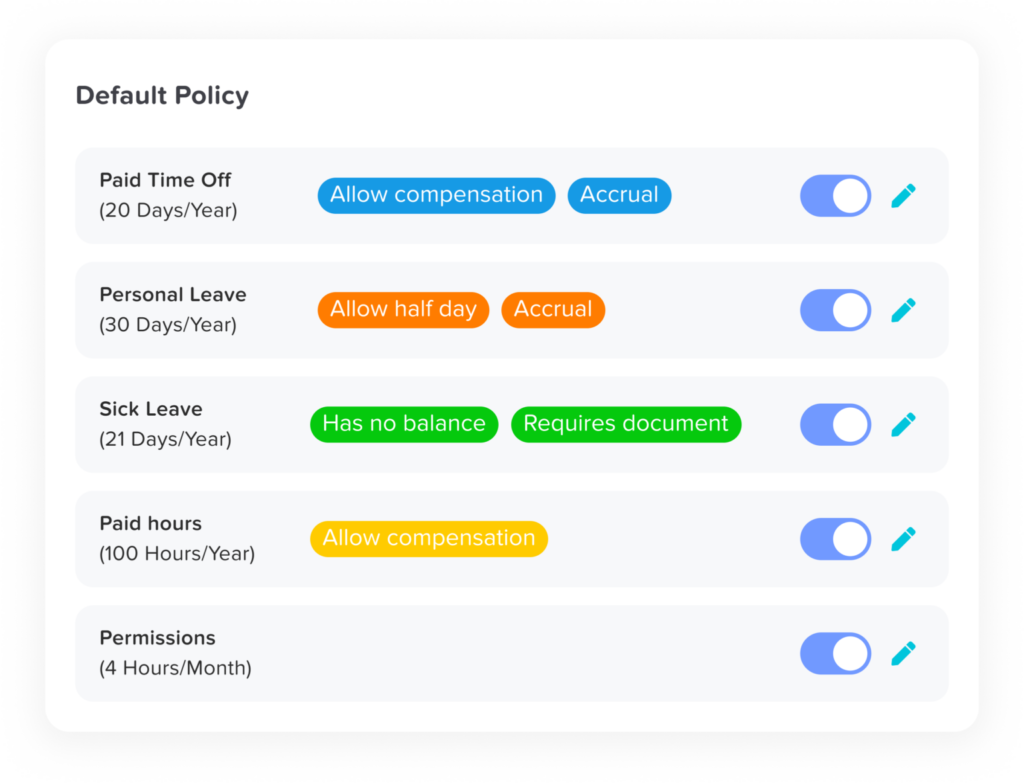
Every organization has different leave policies depending on its size, industry, and location. Day Off allows HR teams to create custom leave types and policies that align with their company’s rules.
For example, companies can easily manage:
Vacation leave
Sick leave
Remote work days
Personal leave
Unpaid leave
HR administrators can also configure rules such as leave accruals, carryover limits, and yearly quotas. This flexibility ensures that the system adapts to the company’s policies rather than forcing companies to adapt to rigid software structures.
Why Companies Choose Day Off
Day Off has become a popular choice for organizations because it balances simplicity and powerful functionality. Companies can quickly implement a professional leave-approval workflow without investing in a large, complex HR platform.
Some of the main reasons businesses choose Day Off include:
Easy setup and onboarding
Clean and intuitive interface
Fast leave request and approval process
Clear team visibility through shared calendars
Mobile-friendly experience for employees and managers
For organizations that want a dedicated leave management solution, Day Off provides an efficient and user-friendly platform that significantly improves how leave requests are handled.
BambooHR
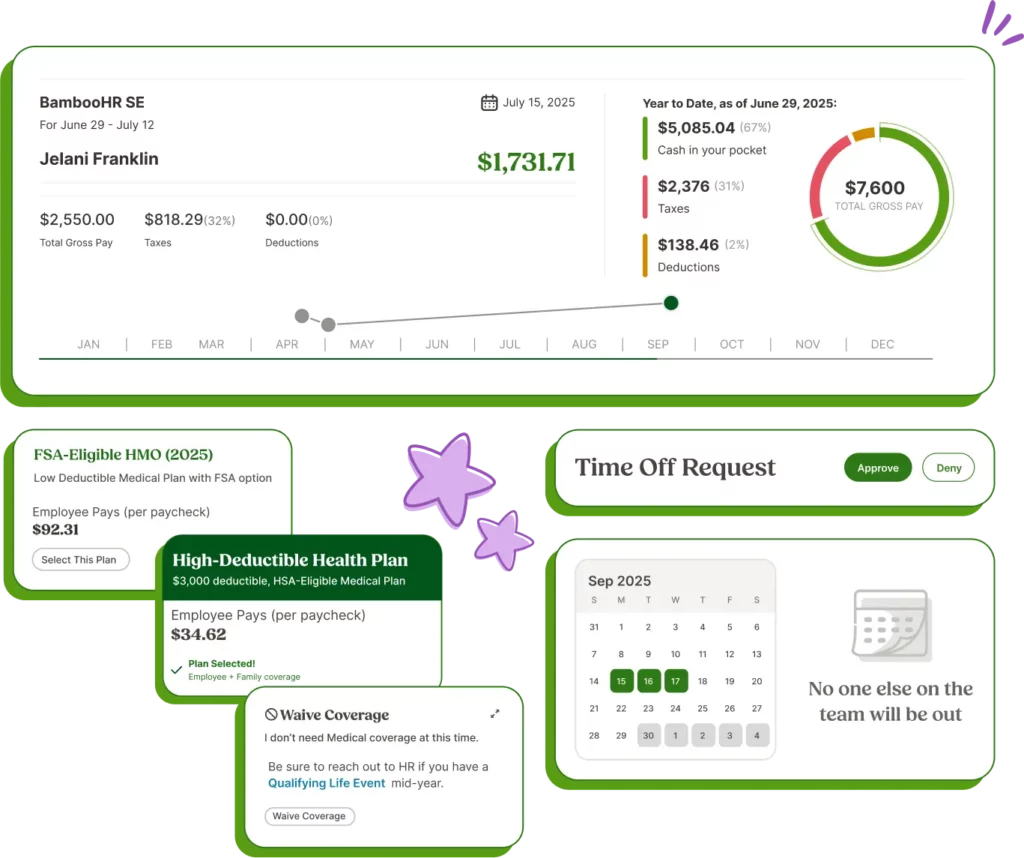
BambooHR is a well-known human resource management platform that includes leave management as part of its comprehensive HR software suite. It is commonly used by medium and large organizations that want to centralize employee data, HR processes, and leave management in a single unified system. Instead of using multiple tools for HR operations, companies can manage employee records, onboarding, time off requests, and performance tracking on a single platform.
Comprehensive HR Platform
One of the main advantages of BambooHR is that it provides much more than just leave management. It acts as a complete HR information system (HRIS) that allows companies to store employee information, manage documents, and handle onboarding workflows. This centralized approach makes it easier for HR teams to keep all employee data organized and accessible.
Because of its broad functionality, BambooHR is particularly useful for organizations that want to manage multiple HR processes within a single platform rather than using separate tools for each function.
Automated Leave Requests and Approvals
BambooHR includes built-in tools that allow employees to submit leave requests through a self-service employee portal. Once a request is submitted, the system automatically notifies the relevant manager, who can review the request and approve or reject it.
Managers can see important details before approving a request, such as:
The employee’s available leave balance
Other team members who may already be off during the requested dates
Company leave policies and restrictions
This automated process helps organizations maintain structured leave approval workflows and reduces the reliance on manual communication.
Leave Tracking and Reporting
Another strength of BambooHR is its ability to track leave balances automatically and generate reports for HR teams. Whenever a leave request is approved, the system updates the employee’s available balance and records the absence.
HR teams can use reporting tools to analyze trends such as:
Vacation usage across departments
Sick leave patterns
Overall employee attendance
These insights can help organizations make better workforce planning decisions.
Considerations
While BambooHR offers powerful HR features, it may be more complex than necessary for organizations that only need a dedicated leave management tool. Smaller teams that simply want an easy leave approval workflow might find the platform’s broader HR functionality more than they require.
Zoho People

Zoho People is a cloud-based HR management platform that provides automation tools for a wide range of HR processes, including leave management, attendance tracking, and employee data management. It is part of the larger Zoho ecosystem, which makes it particularly attractive for companies already using other Zoho business applications.
Customizable Leave Policies
Zoho People allows organizations to create highly customizable leave policies that match their internal HR rules. Companies can configure multiple leave types, such as vacation leave, sick leave, and personal days, and assign different policies to various teams or employee groups.
HR administrators can also define rules such as:
Leave accrual rates
Carryover limits
Maximum leave balances
Approval hierarchies
This flexibility makes Zoho People suitable for companies with more complex leave policies.
Automated Leave Approval Workflows
The platform supports automated workflows that route leave requests to the appropriate manager or approver. Once an employee submits a request, the system automatically notifies the designated approver and tracks the request through the approval process.
Managers can review leave requests, check employee balances, and approve or reject them directly within the system. This helps organizations maintain a structured and transparent approval process while reducing administrative workload.
Integration with the Zoho Ecosystem
One of the biggest advantages of Zoho People is its ability to integrate with other Zoho tools such as:
Zoho CRM
Zoho Projects
Zoho Payroll
Zoho Desk
For companies already using Zoho software, these integrations can create a seamless workflow across multiple business operations.
Considerations
Although Zoho People offers strong customization options, it may require additional configuration during setup to fully align with company policies. Organizations looking for a quick and simple leave management solution may find the system slightly more complex compared to dedicated leave management tools.
Calamari

Calamari is a modern leave management and attendance tracking tool designed for companies that want a simple yet effective way to manage employee absences. It is particularly popular among remote teams and distributed organizations because of its strong integrations and easy-to-use interface.
Simple Leave Request Process
Calamari provides employees with a straightforward interface for quickly submitting time off requests. Once submitted, the system automatically sends a notification to the appropriate manager for approval.
Managers can review requests and approve them directly through the platform, which helps ensure that leave approvals happen quickly and efficiently.
Visual Leave Calendar
One of Calamari’s most useful features is its visual leave calendar, which provides a clear overview of employee absences across the team.
This allows managers to easily see:
Which employees are currently on leave
Upcoming time-off requests
Potential scheduling conflicts
Having this visibility helps teams avoid situations where too many employees take leave at the same time.
Strong Workplace Integrations
Calamari integrates with popular workplace tools such as:
Slack
Microsoft Teams
Google Workspace
These integrations allow employees and managers to interact with leave requests directly within the tools they already use every day. For example, managers can receive leave notifications through Slack and approve requests without switching platforms.
Considerations
Calamari focuses mainly on leave and attendance management rather than full HR functionality. While this makes it simple and efficient, organizations looking for a complete HR platform may need additional software to handle other HR processes.
LeaveBoard

LeaveBoard is a cloud-based leave management system designed to help companies track employee absences and automate leave approvals. It focuses on providing HR teams with a simple and structured way to manage PTO requests without relying on spreadsheets or manual tracking.
PTO and Leave Request Management
LeaveBoard allows employees to submit leave requests directly through the platform, which automatically routes them to the appropriate manager for approval.
Managers can review requests, check available leave balances, and approve or reject them in just a few clicks. Once a request is approved, the system automatically updates the employee’s PTO balance.
This automated workflow helps organizations maintain accurate records while reducing administrative work.
Team Availability and Calendar View
LeaveBoard includes a shared leave calendar that allows managers and employees to see upcoming absences across the organization.
This visibility helps teams plan projects more effectively by ensuring that important deadlines are not affected by overlapping leave requests. It also improves communication by making team availability more transparent.
Reporting and Leave Insights
The platform also includes reporting features that allow HR teams to analyze leave data across the organization.
For example, HR managers can review reports showing:
Leave usage by department
Total PTO taken within a certain period
Trends in sick leave or vacation days
These insights can help organizations better understand employee leave patterns and make more informed HR decisions.
Considerations
LeaveBoard is often appreciated for its simplicity and affordability, making it a good option for small and medium-sized companies. However, compared to some more advanced tools, its customization capabilities may be somewhat limited for organizations with very complex leave policies.
| Tool | Best For | Key Features | Mobile Access | Workflow Flexibility | Ideal Company Size |
|---|---|---|---|---|---|
| Day Off | Simple and efficient leave approval workflows | Automated approvals, real-time balance tracking, team calendar, custom leave policies | Yes | High | Small to mid-sized teams |
| BambooHR | Companies needing a full HR platform | HRIS, employee records, onboarding, automated time off requests, reporting | Yes | Moderate | Mid-sized to large companies |
| Zoho People | Businesses using the Zoho ecosystem | Custom leave policies, automated workflows, attendance tracking, Zoho integrations | Yes | High | Small to large organizations |
| Calamari | Remote teams and integration-heavy workflows | Simple leave requests, visual leave calendar, Slack and Teams integrations | Yes | Moderate | Small to mid-sized teams |
| LeaveBoard | Affordable PTO tracking and reporting | PTO tracking, leave calendar, automated approvals, leave analytics | Yes | Moderate | Small and medium businesses |
How to Choose the Right Leave Approval Workflow Tool
Selecting the right leave approval workflow tool is an important decision for any organization. The right system can simplify leave management, improve transparency, and reduce administrative workload for HR teams and managers. When evaluating different solutions, companies should consider several key factors to ensure the tool fits their operational needs.
Ease of Use
Ease of use should always be one of the top priorities when choosing a leave management tool. Employees should be able to submit leave requests quickly without navigating a complicated interface or going through multiple unnecessary steps.
If the system is difficult to use, employees may revert to requesting time off via email, chat messages, or informal channels. This defeats the purpose of having an automated workflow and can create confusion when tracking requests.
A good leave approval tool should offer a clean interface, simple request forms, and clear dashboards so both employees and managers can use it without extensive training.
Workflow Flexibility
Every company has its own internal approval structure, which is why workflow flexibility is essential. The system should allow organizations to configure approval processes that match their internal policies and management hierarchy.
For example, some companies may require only a single manager’s approval, while others might require multi-level approvals involving department heads or HR teams. A flexible leave management system should make it easy to define these workflows so requests are automatically routed to the correct approvers.
This ensures that the approval process remains structured while still adapting to the organization’s specific requirements.
Visibility and Reporting
A strong leave management tool should provide clear visibility into employee availability. Managers need to quickly see who is currently on leave and who has upcoming time off to avoid scheduling conflicts.
Features such as shared leave calendars, team dashboards, and reporting tools help managers plan projects and allocate resources more effectively. These insights also help HR teams analyze leave patterns and identify trends that may impact workforce planning.
Without proper visibility, organizations risk approving overlapping leave requests that could disrupt productivity.
Mobile Accessibility
In today’s work environment, employees and managers are not always working from their desks. A modern leave approval tool should offer mobile accessibility so users can submit or approve requests from anywhere.
Mobile-friendly platforms or dedicated mobile apps allow managers to receive instant notifications and respond to leave requests quickly. This helps keep approval workflows moving smoothly and prevents unnecessary delays.
For employees, mobile access makes it easier to request time off, check leave balances, and view upcoming absences without needing to log into a desktop system.
Integration Capabilities
Another important consideration is how well the leave management tool integrates with other workplace systems. Many organizations use multiple tools for communication, project management, and HR operations.
A leave approval system that integrates with tools such as Slack, Microsoft Teams, HR software, or calendar applications can help streamline workflows and improve communication across teams.
Integrations ensure that leave information is synchronized across platforms, making it easier for teams to stay informed about employee availability.
Frequently Asked Questions (FAQ)
What is a leave approval workflow tool?
A leave approval workflow tool is software that automates how employees request time off and how managers approve it. Instead of using emails or spreadsheets, employees submit requests through the system, which automatically sends them to the right manager and updates leave balances once approved.
Why do companies use leave approval workflow tools?
Companies use these tools to streamline leave management and avoid manual tracking. They help ensure requests are handled quickly, keep accurate leave records, and give managers clear visibility of employee availability to prevent scheduling conflicts.
What features should a leave approval workflow tool include?
A good leave management tool should offer automated approval workflows, real-time leave balance tracking, a shared team calendar, customizable leave policies, and reporting features. Mobile access and integrations with workplace tools are also useful for improving efficiency.
Are leave approval workflow tools suitable for small businesses?
Yes. Many leave management platforms are designed for small and growing teams. They help small businesses stay organized, track employee absences accurately, and reduce the time spent managing leave requests manually.
Can employees request leave from their phones?
Most modern leave management tools support mobile access through apps or mobile-friendly platforms. This allows employees to submit leave requests and managers to approve them quickly from anywhere.
What types of leave can these tools manage?
Leave approval tools can manage multiple types of time off, including vacation leave, sick leave, personal days, unpaid leave, and other custom leave types defined by the company’s policies.
How do leave management tools help HR teams?
These tools reduce administrative work by automating leave tracking and approvals. HR teams can easily monitor leave balances, generate reports, and maintain accurate records without relying on spreadsheets or manual calculations.
Conclusion
Efficient leave management is essential for keeping teams organized and ensuring smooth business operations. Manual processes like emails and spreadsheets often lead to delays, errors, and poor visibility into employee availability.
Leave approval workflow tools solve these issues by automating requests, approvals, and leave tracking. This helps HR teams reduce administrative work while giving managers clear insight into team schedules.
Among the available options, Day Off stands out as one of the best leave approval workflow tools thanks to its simplicity, automated workflows, and user-friendly experience. By choosing the right tool, organizations can streamline leave management and create a more transparent and efficient process for everyone.