




Leave management in 2026 isn’t a simple HR admin task; it’s a core operational system that directly impacts productivity, compliance, payroll accuracy, and employee experience.
Today’s organizations operate across time zones, contract types, and jurisdictions. Hybrid work is standard. Teams are globally distributed. Employees expect transparency and mobile access. And compliance requirements are more complex than ever.

A basic holiday tracker can’t handle that reality.
Modern companies need leave management platforms that deliver:
Real-time visibility across teams and locations
Automated accrual calculations with zero manual intervention
Multi-level approval workflows
Mobile-first access for distributed workforces
Accurate, exportable reporting for finance and payroll
Flexible global policy configuration
In the dedicated leave tracking category, three platforms consistently lead the conversation:
Day Off
Timetastic
LeaveBoard
This guide delivers a comprehensive, feature-by-feature comparison of all three, evaluating functionality, usability, scalability, integrations, automation depth, reporting capabilities, pricing structure, and real-world performance.
If you’re choosing a leave management system in 2026, this breakdown will help you make a confident, informed decision.
Day Off: The Most Complete, Modern & Scalable Leave Management Platform
Day Off exists for one reason: to make leave management simple for employees and reliable for HR.
That’s it.
We didn’t try to build another all-in-one HR system. We didn’t bolt leave tracking onto payroll or recruiting. We focused on one thing and decided to do it properly.
When software tries to do everything, it usually does most things “well enough.” Leave management ends up being one small feature buried in a complicated system.
Day Off takes the opposite approach. We went deep instead of wide.
The result is a platform that feels easy from the outside, but is powerful underneath. Employees can request time off in seconds. Managers stay in control. HR can configure policies without fighting the system.
It’s simple where it should be simple.
Flexible where it needs to be flexible.
A Leave Policy Engine That Doesn’t Break When Things Get Complex
Most companies don’t have just one clean, simple leave policy. They have multiple locations, different departments, probation periods, seniority rules, part-time employees, public holidays, and evolving accrual structures.
That’s usually where leave systems start to struggle.
Day Off was built for that reality.
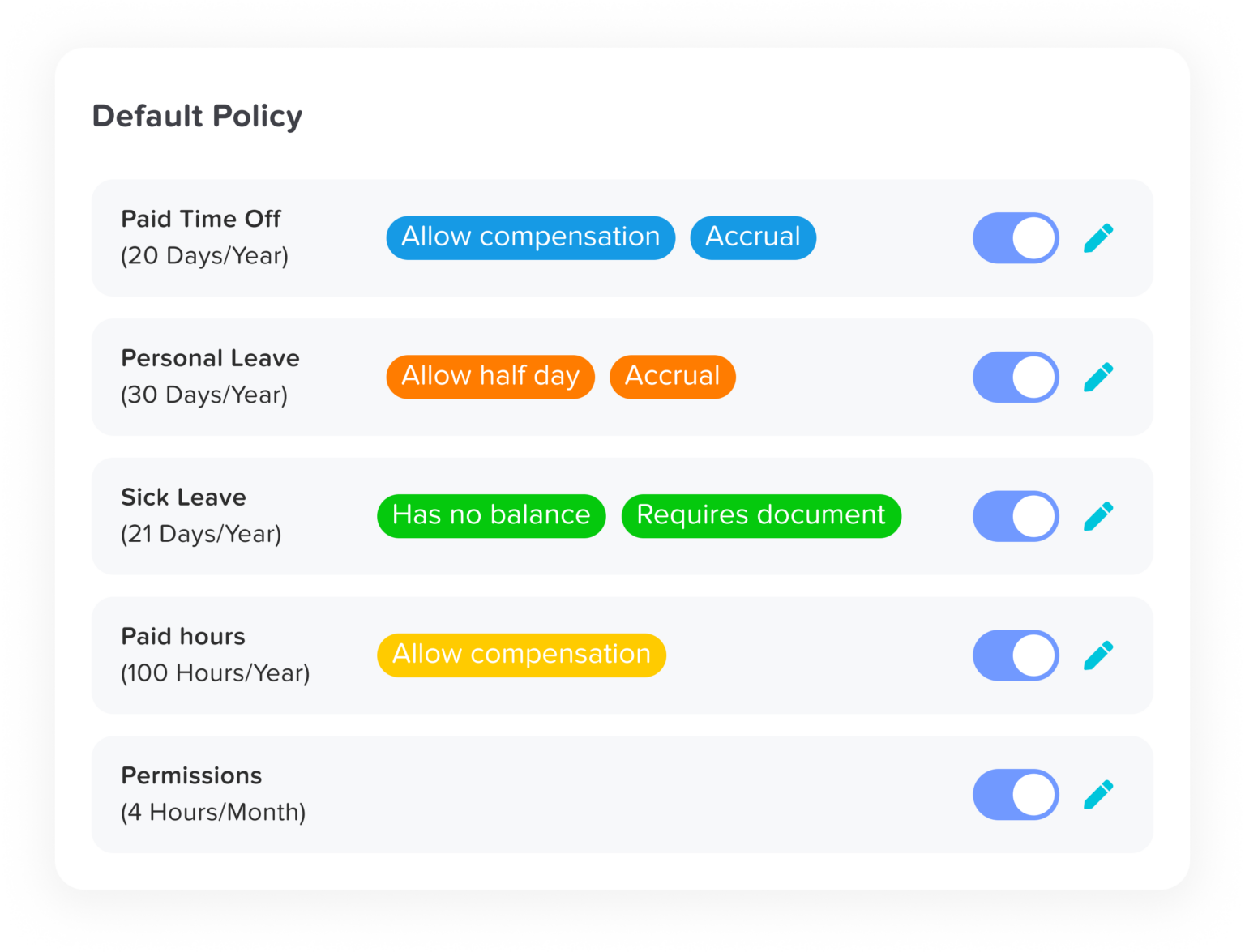
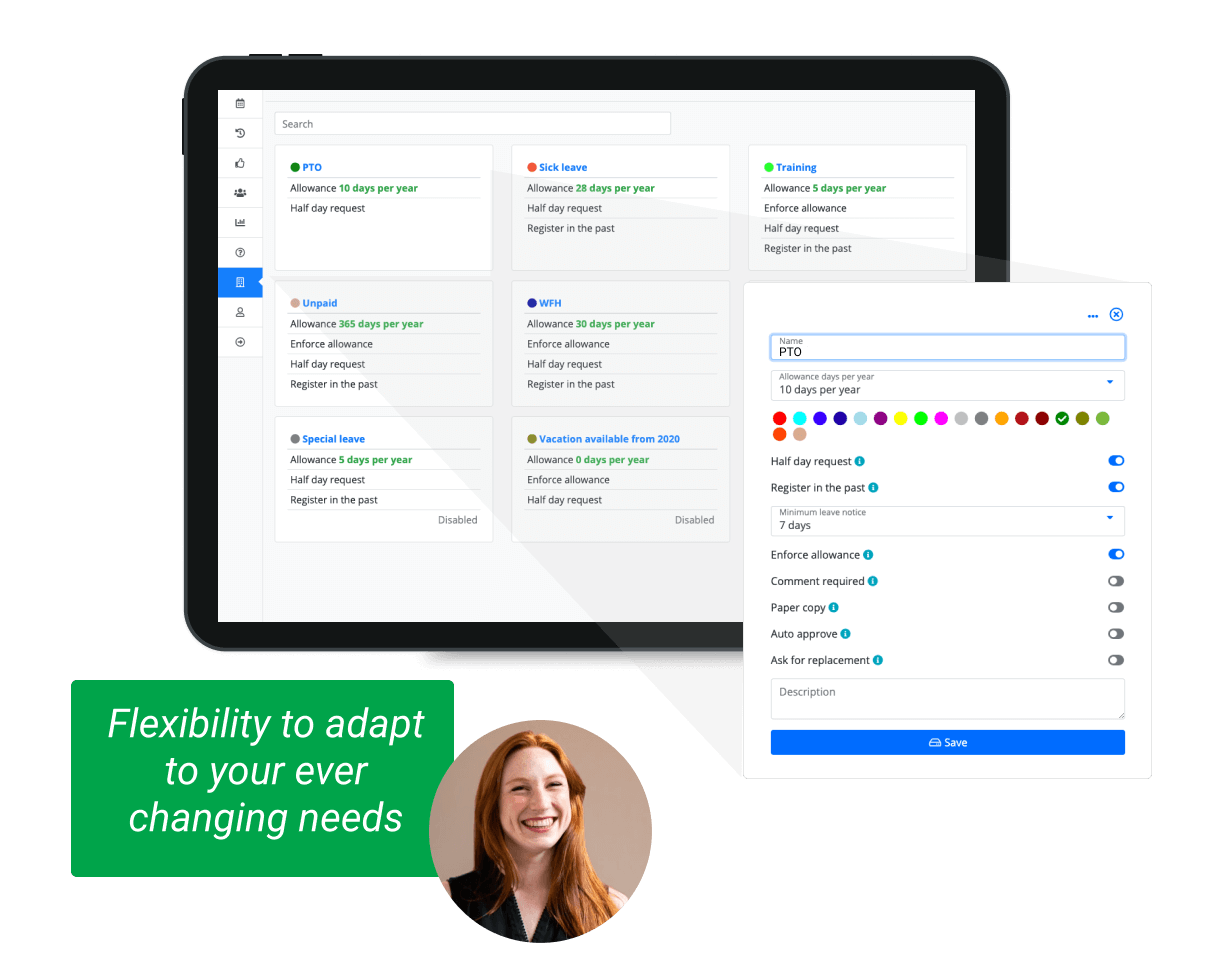
You can create as many leave types as you need, vacation, sick, unpaid, parental, study leave, or something completely custom. Policies can be set by country, department, or location. Senior employees can earn more leave. Probation rules can restrict access. Everything behaves the way your real policy behaves.
Accruals can run monthly, biweekly, annually, or on work anniversaries. Carryover can be capped, limited, or set to expire. You can prevent negative balances. You can allow half days or hourly tracking. You can define different working schedules for part-time or shift-based teams.
The important part? It doesn’t feel complicated while you’re setting it up.
It handles edge cases without forcing HR to invent workarounds.
Approvals Without the Back-and-Forth
Leave approvals shouldn’t require reminders, follow-ups, and Slack messages.
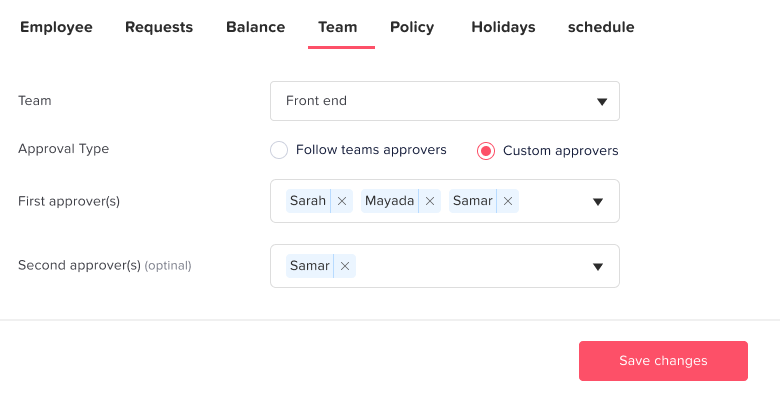
With Day Off, requests go exactly where they need to go. You can set up single or multi-level approvals, route by department, and assign backup approvers so nothing stalls when someone is away.
Managers see the employee’s balance before approving. The system flags overlapping leave automatically. Everyone gets notified instantly.
If clarification is needed, it happens inside the request, with comments and a clear history log.
No confusion. No lost emails. No “Did you see my request?”
Approvals take seconds. And they stay transparent.
Clear Team Visibility Without Asking Around
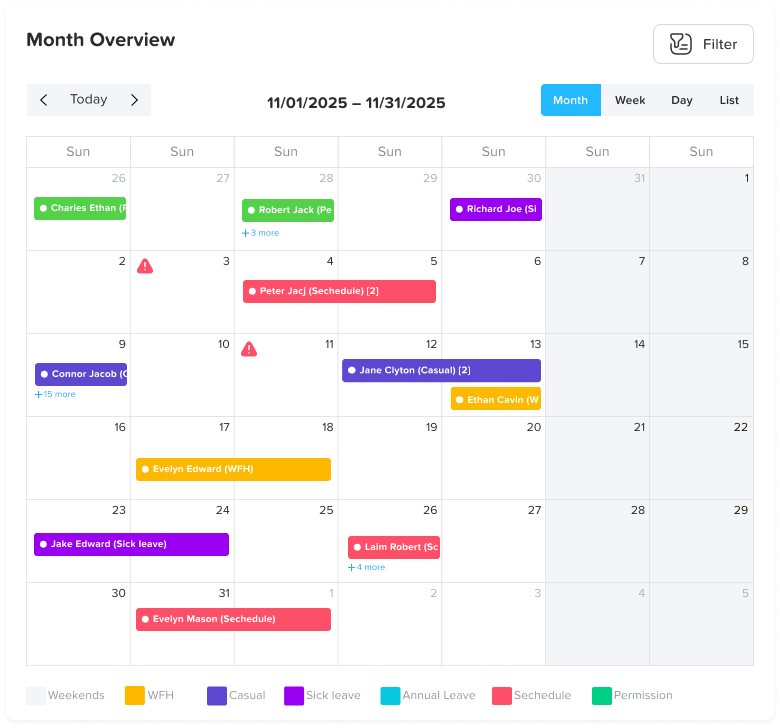
One of the most common workplace questions is still: “Who’s off next week?”
Day Off answers that instantly.
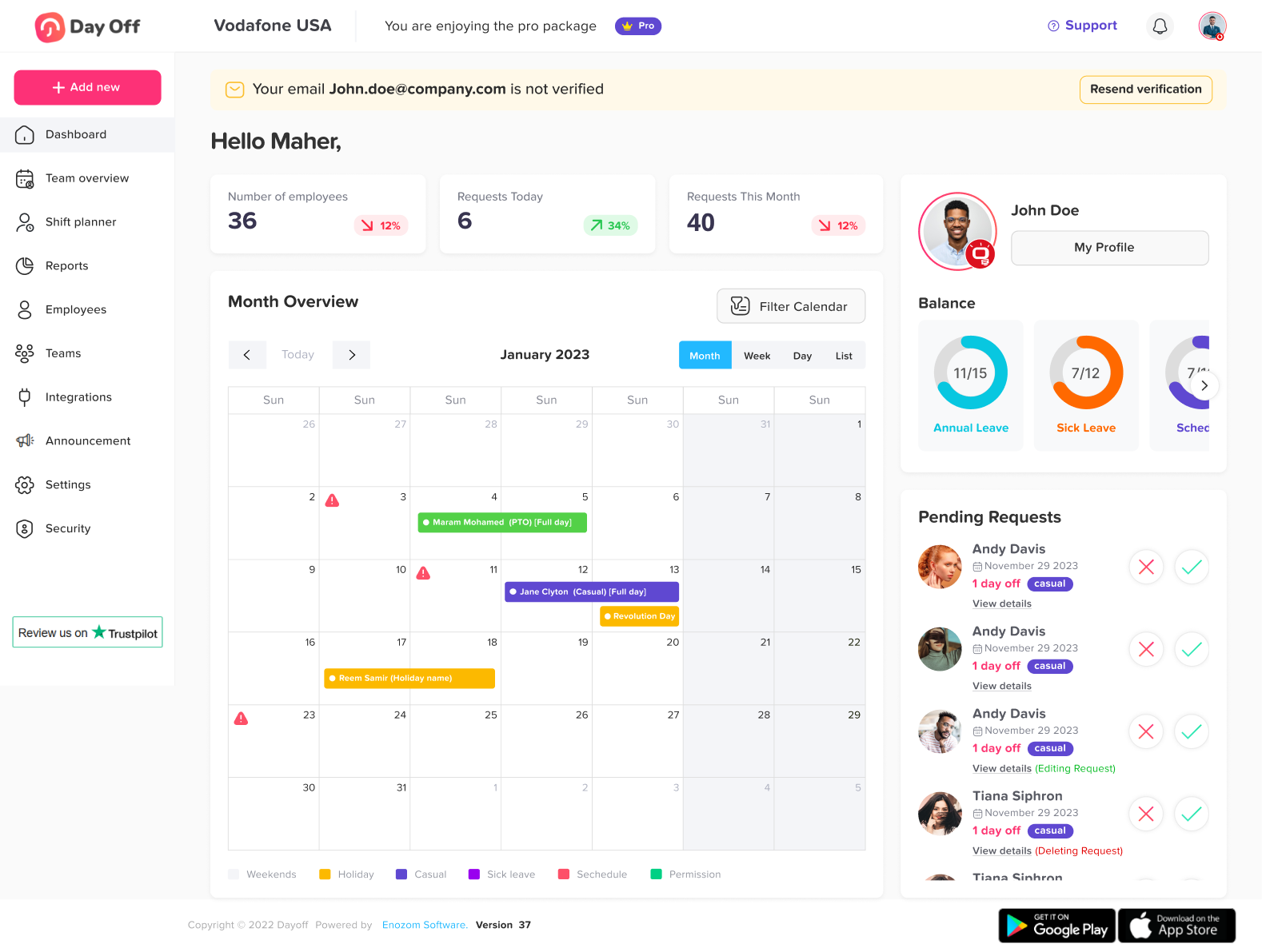
The shared calendar is clean and easy to read. Leave types are color-coded. You can filter by department or location. Public holidays are automatically included. You can switch between monthly and yearly views depending on what you’re planning.
It also syncs with Google Calendar and Outlook, so visibility doesn’t stop inside the platform.
Instead of asking around or checking spreadsheets, teams just know.
That small shift reduces friction more than people expect.
Reporting That’s Actually Useful
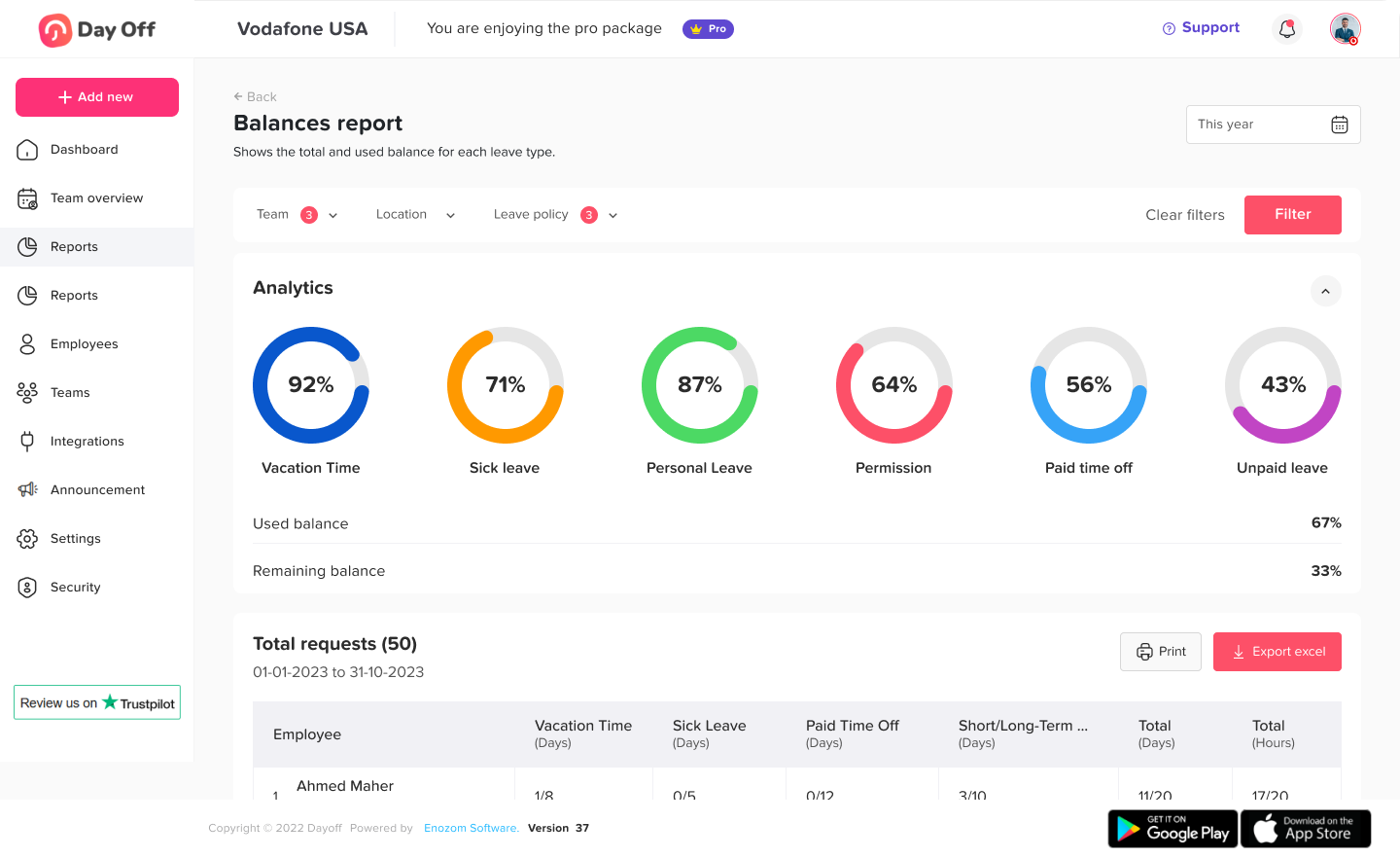
Leave data isn’t just administrative. It affects planning, budgeting, and workload distribution.
Day Off gives HR a clear picture of what’s happening.
You can see balance summaries, department usage patterns, accrual forecasts, carryover reports, and absence trends. Audit logs are complete and exportable. Reports can be downloaded as Excel files without extra steps.
It’s not overwhelming. It’s just the information you need, when you need it.
HR gets clarity. Leadership gets visibility. No digging required.
A Mobile Experience That Feels Native
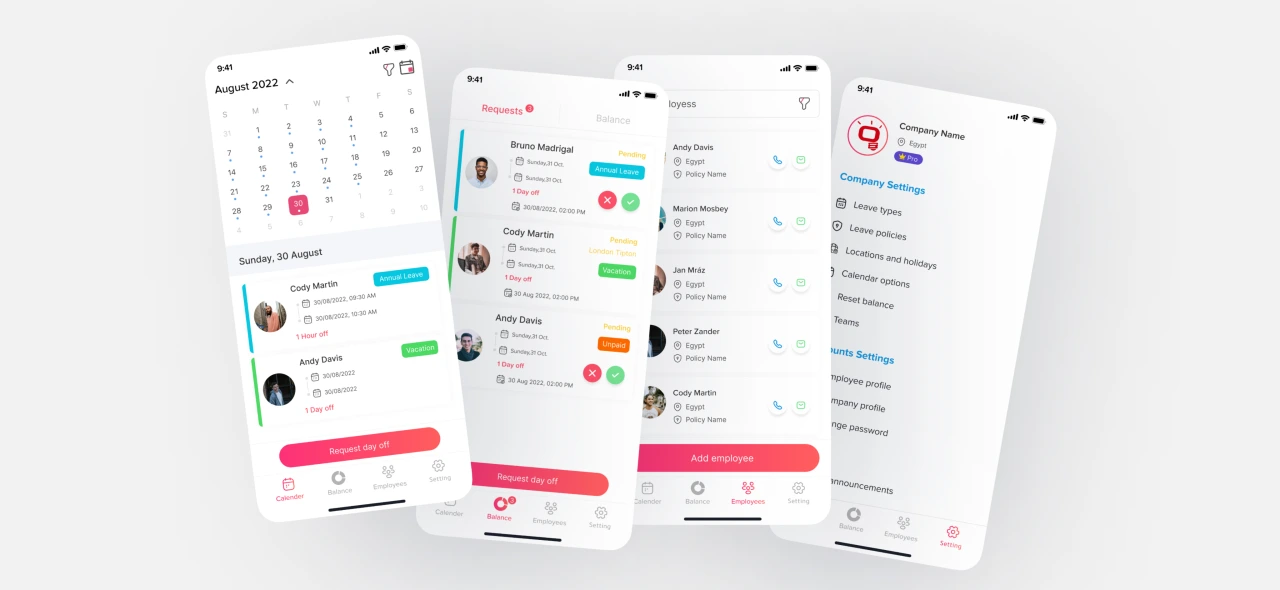
This is where Day Off really stands out.
A lot of systems technically “have a mobile app.” But they feel like desktop software squeezed into a smaller screen.
Day Off was designed for mobile from the beginning.
An employee can submit a leave request in under 10 seconds. They can check their balance while commuting. Managers can approve a request with one tap. Notifications happen in real time.
For remote teams and distributed companies, this matters. Decisions don’t wait for someone to log in at their desk.
The experience feels natural, not forced.
Setup That Doesn’t Turn Into a Project
No one wants a leave management rollout to become a three-week initiative.
With Day Off, setup is fast. You can bulk import employees, define roles and permissions, and configure policies through a guided flow. Most teams are up and running in about 15 minutes.
There’s no need for consultants. No complicated onboarding process. No training sessions just to submit time off.
It connects with Slack, Microsoft Teams, Google Calendar, and Outlook, so it fits into the tools your team already uses.
You don’t adapt to the system. The system adapts to you.
Pricing That Grows With You
We believe powerful software shouldn’t force you into oversized bundles.
Day Off offers a free plan for small teams and straightforward per-user pricing as you grow. There are no surprise upgrades and no forced HR add-ons.
Start small. Scale when ready. Keep control of your costs.
It works for startups. It works for growing companies. It works for structured mid-sized organizations.
And it doesn’t get heavier as you grow.
Timetastic: Visually Strong but Operationally Simpler
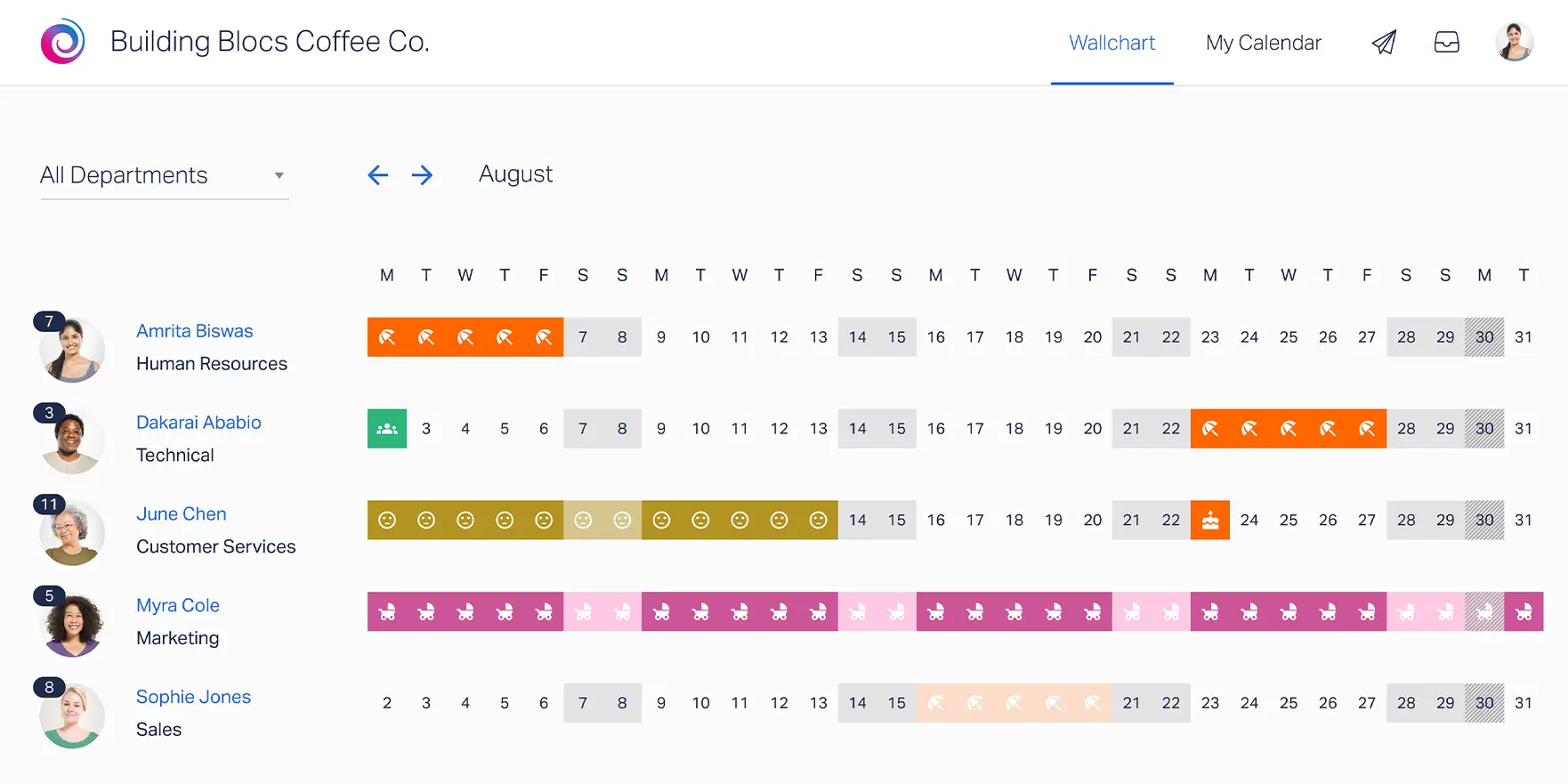
Timetastic built its reputation around a simple, memorable idea: the holiday wallchart.
At its core, it focuses on making leave visible and easy to understand at a glance. For small teams, particularly UK-based businesses with straightforward annual leave structures, this approach works well. It’s clean, visual, and uncomplicated.
Where Timetastic tends to reach its limits is when policies become more layered. Organizations operating across multiple countries, managing varied accrual rules, or supporting part-time and seniority-based structures may find the system less adaptable.
In short, Timetastic is optimized for simplicity.
It performs best in environments where leave policies are consistent, predictable, and not heavily segmented.
Feature Breakdown
Leave Configuration
Timetastic covers the fundamentals of leave management reliably.
Companies can define standard leave types, assign annual leave allowances, configure the leave year, and manage basic accrual structures. Carryover rules are supported, and UK bank holidays can be easily applied.
For many small organizations, this is enough.
However, when policies require more granular segmentation, such as department-level variations, country-based compliance rules, seniority tiers, or complex accrual cycles, flexibility becomes more limited. The system is designed for clarity and ease, not deep structural customization.
That makes it efficient for simple policy environments, but less adaptable for growing or globally distributed teams.
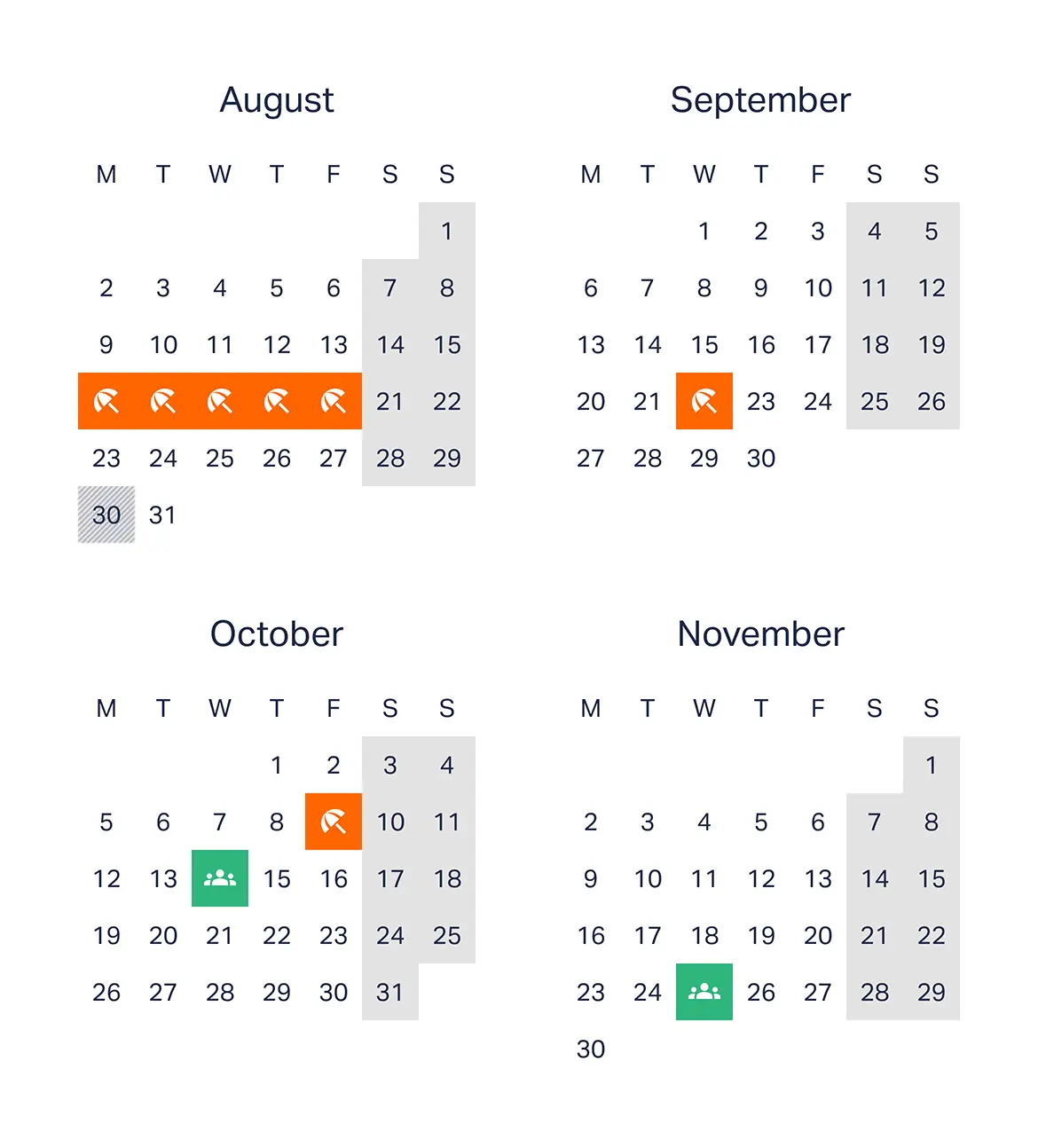
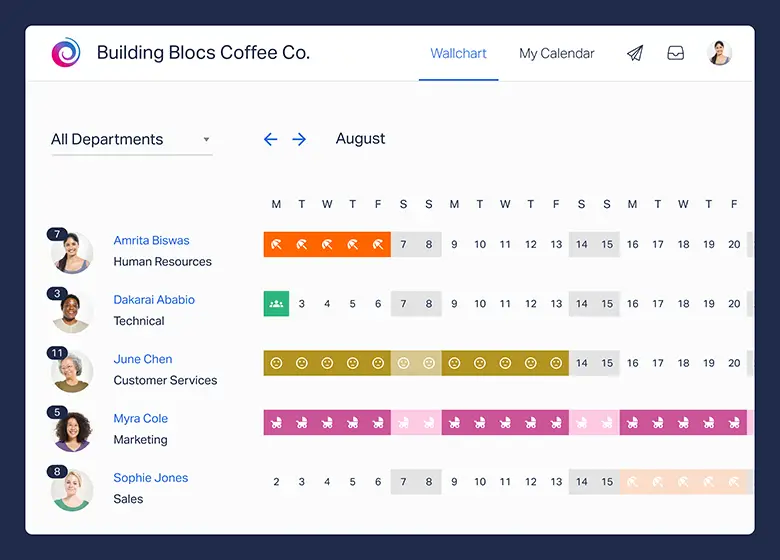
Visual Wallchart
This is Timetastic’s signature strength.
The large team overview grid provides a clear snapshot of who is off and when. It mirrors the traditional office wallchart, but in a digital format. Overlaps are easy to spot, departments can be filtered, and layouts can be printed for physical reference.
For managers who value visual simplicity, this approach is appealing. It reduces the need for back-and-forth communication and gives instant clarity on availability.
Where it stops short is in analytical depth. The wallchart is excellent for viewing leave, but it doesn’t extend strongly into forecasting, trend analysis, or strategic workforce insights.
It’s highly visual, less analytical.
Approval Workflow
Timetastic keeps approvals straightforward.
Requests typically follow a single-level approval structure. Managers receive email notifications and can approve or decline leave directly. Employees can view their leave history, keeping the process transparent.
For small teams with flat reporting structures, this simplicity works well.
However, organizations that require multi-level approvals, backup approvers, department-based routing, or more structured governance may find the workflow less configurable. It handles basic approval flows reliably, but it isn’t built for layered organizational complexity.
Reporting
Reporting in Timetastic is practical and functional.
Teams can access annual leave summaries, track employee allowances, and export data when needed. For administrative tracking and year-end reviews, this is usually sufficient.
What’s missing is deeper visibility, such as accrual forecasting, absence trend analysis, or more advanced reporting breakdowns across departments and locations.
It delivers clarity on current leave usage, but offers limited strategic insight.
Mobile Experience
The mobile experience covers the essentials.
Employees can request leave, check their balances, and managers can approve requests on the go. The functionality is there, and it works as expected.
That said, the experience feels more like an extension of the desktop system rather than a mobile-first design. It supports mobility, but it doesn’t feel purpose-built for it.
For teams that rely heavily on mobile workflows, especially remote or distributed organizations, the difference in optimization can become noticeable.
Pricing
Timetastic maintains a transparent pricing structure and represents good value for small, straightforward teams.
Costs are predictable, and for companies operating under simple leave frameworks, the pricing aligns well with the feature set.
As organizations grow in complexity, particularly across multiple countries or with more advanced policy requirements, flexibility can become more constrained relative to evolving needs.
For smaller businesses with consistent leave rules, it remains a practical and cost-effective choice.
LeaveBoard: Broader HR Scope, Less Leave Focus
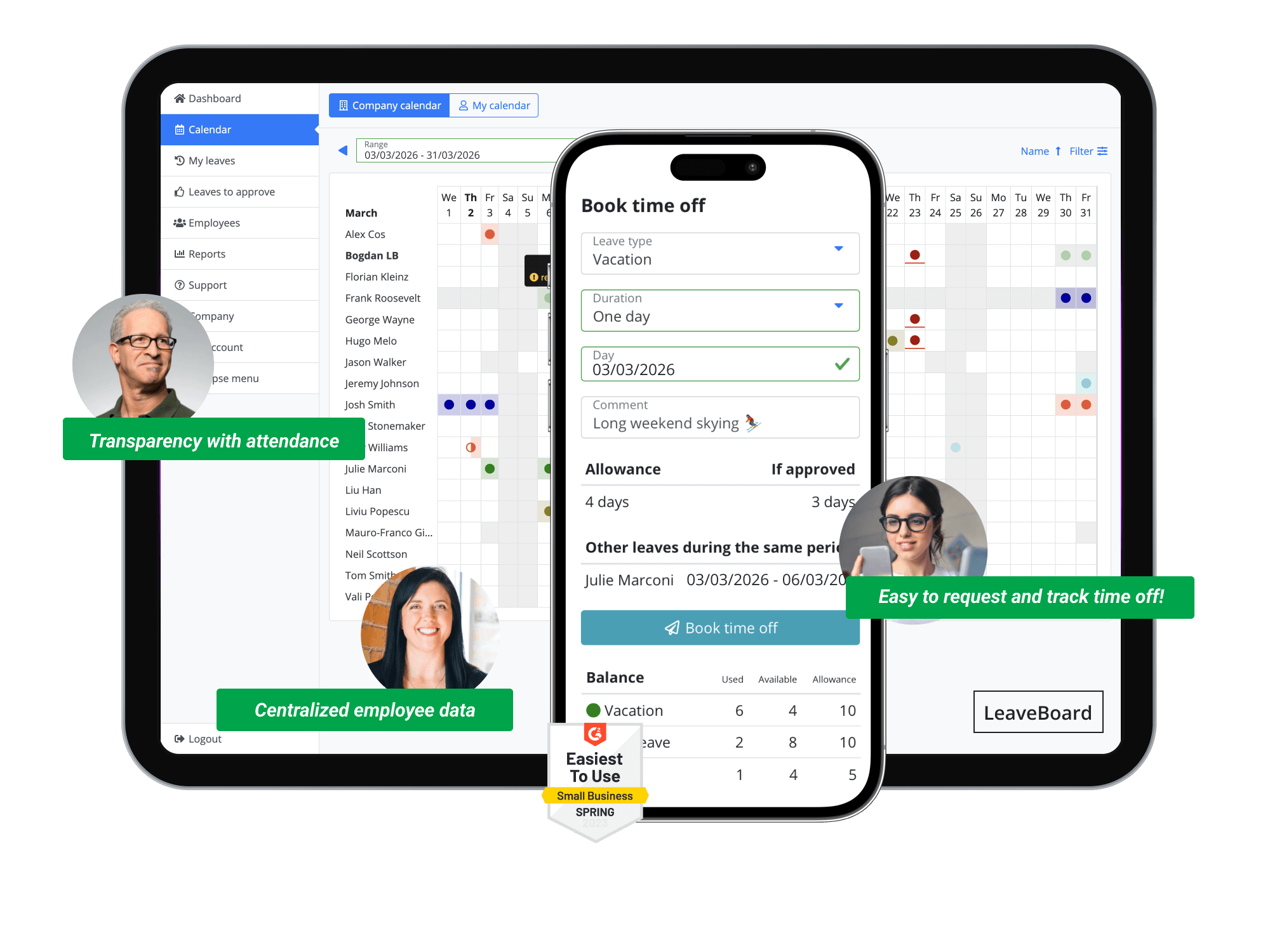
LeaveBoard positions itself as a hybrid solution, combining leave management with lightweight HR administration tools.
For companies that don’t yet use an HR system, this can be appealing. It offers basic employee record management alongside time-off tracking, creating a single place to store core HR information.
The trade-off, however, is focus.
Because LeaveBoard spans both leave management and HR administration, it doesn’t go as deep into leave specialization. The product feels broader, but less optimized for organizations that need advanced flexibility, speed, or highly configurable policy logic.
It’s a generalist solution, practical for companies seeking bundled simplicity, but less agile for teams that want a dedicated, modern leave management engine.
Feature Breakdown
Leave Management
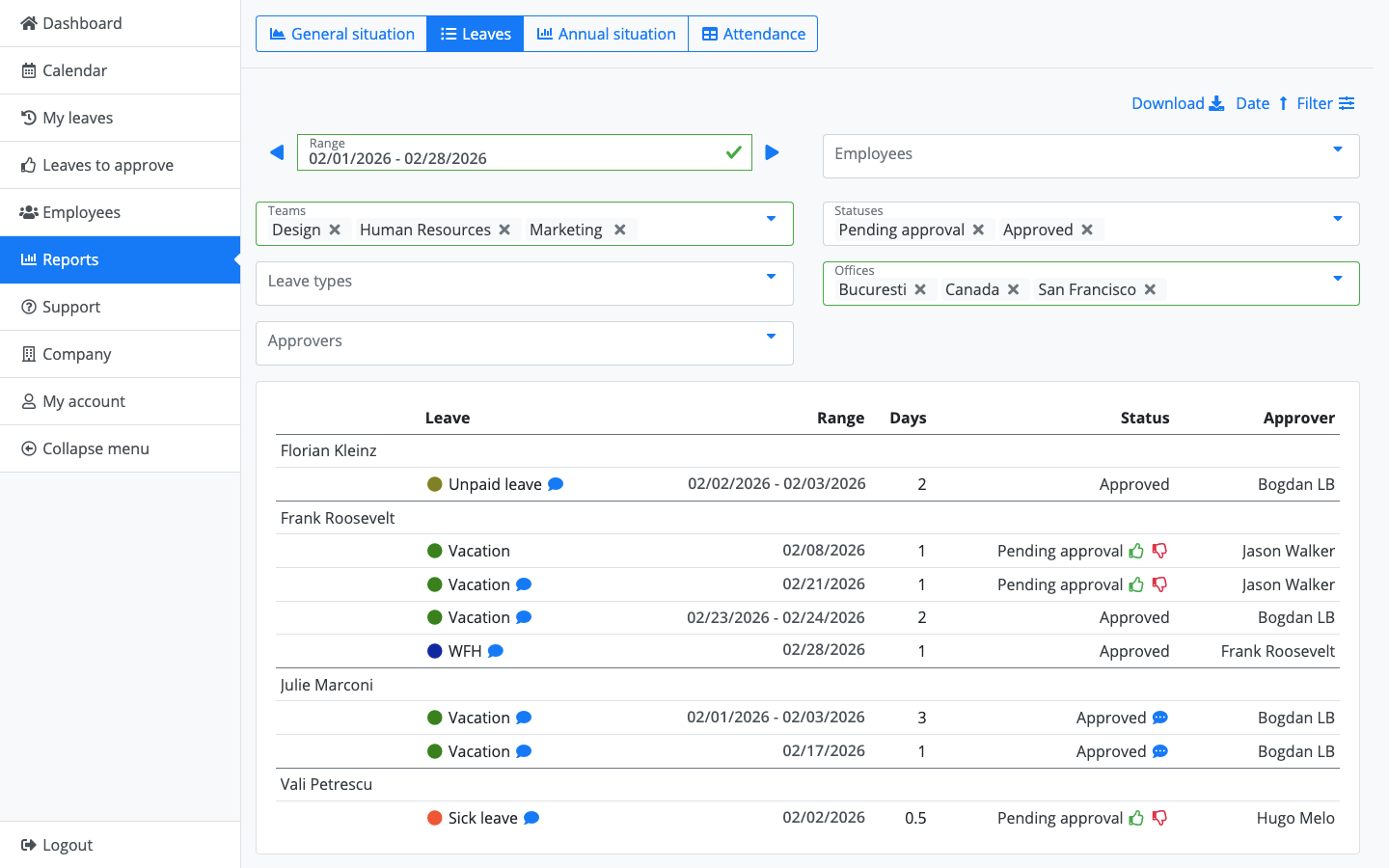
LeaveBoard covers the core requirements of leave tracking competently.
Organizations can create multiple leave types, automate accrual calculations, define carryover policies, apply public holiday calendars, set leave caps, and manage negative balances. From a functionality standpoint, the essentials are in place.
Where the difference emerges is in configuration and flexibility. Setting up policies tends to require more manual structuring, and the experience feels more administrative than intuitive. It supports structured policy management, but doesn’t feel as fluid when adapting to nuanced or evolving rules.
For companies with relatively stable leave policies, this works well. For organizations managing multiple countries, departments, or policy tiers, the system may feel heavier to configure and maintain.
HR Module Features
This is where LeaveBoard differentiates itself.
Beyond leave tracking, it includes employee records, document storage, organizational charts, and basic HR analytics. For smaller companies without an existing HR platform, this can provide immediate value by centralizing information.
However, for businesses already using dedicated HR software, these features can feel redundant. Instead of simplifying the stack, they introduce overlap.
The broader scope adds functionality, but also adds weight. The system becomes more about record management and less about delivering a fast, streamlined leave experience.
Approval & Reporting
LeaveBoard provides structured approval chains and standard absence reporting tools. HR metrics and data exports are available, supporting compliance and internal reporting needs.
The overall experience feels more corporate and process-driven. It emphasizes structure and documentation over speed and ease.
For organizations that prioritize formal HR processes, this approach may align well. For teams that value fast approvals, mobile responsiveness, and minimal friction, it may feel less streamlined.
User Experience
The interface reflects its broader HR orientation.
Navigation feels more traditional, with a heavier layout and more administrative layers. Setup typically takes longer compared to more streamlined, leave-focused platforms.
It’s not overly complex, but it doesn’t feel lightweight.
Where some systems aim to make leave requests feel effortless, LeaveBoard leans toward a structured HR tool experience. For companies wanting a central HR utility, that makes sense. For teams seeking speed and simplicity in leave management specifically, the difference becomes noticeable.
| Category | Day Off | Timetastic | LeaveBoard |
|---|---|---|---|
| Ease of Use | ★★★★★ | ★★★★☆ | ★★★☆☆ |
| Policy Flexibility | Advanced | Basic | Moderate |
| Mobile Experience | Mobile-first | Standard | Functional |
Frequently Asked Questions (FAQ)
Which leave management system is best for a growing company in 2026?
For growing companies, flexibility and scalability are critical. As teams expand across departments, locations, and contract types, leave policies tend to become more complex.
Day Off is generally the strongest fit for growing organizations because it supports advanced accrual logic, multi-level approvals, seniority tiers, department-based rules, and global policy configuration without becoming complicated to use. It scales smoothly from small startups to structured mid-sized companies.
Timetastic works well for smaller, stable teams with straightforward policies, while LeaveBoard may suit organizations looking for bundled HR features alongside leave tracking.
What’s the biggest difference between Day Off, Timetastic, and LeaveBoard?
The core difference lies in focus and flexibility.
Day Off is a dedicated, highly configurable leave management platform built to handle complex policies while staying easy to use.
Timetastic emphasizes visual simplicity through its wallchart and works best in environments with consistent, uncomplicated leave structures.
LeaveBoard combines leave tracking with lightweight HR management, offering broader functionality but less specialization in leave flexibility.
If advanced customization and mobile-first access are priorities, Day Off stands out.
Which platform is best for global or multi-country teams?
Global teams require:
Country-specific public holidays
Different accrual rules by location
Department-level policy variations
Flexible carryover and compliance settings
Among the three, Day Off provides the most robust support for global policy segmentation and advanced accrual configuration. It was built to handle multi-location and distributed workforce realities without forcing workarounds.
Timetastic performs well in simpler, often UK-centric structures, while LeaveBoard can support multiple policies but may require more administrative configuration.
Do these systems support automated leave accrual?
Yes, all three platforms support automated accrual to varying degrees.
Day Off offers monthly, biweekly, annual, and anniversary-based accrual with carryover caps, expiration rules, and negative balance controls.
Timetastic supports standard annual accrual and carryover but with less granular flexibility.
LeaveBoard includes automated accrual logic but may require more manual structuring for complex variations.
If accrual automation depth is a deciding factor, Day Off offers the most comprehensive configuration options.
Which system has the best mobile experience?
In 2026, mobile-first access is no longer optional.
Day Off stands out because its mobile experience feels native and purpose-built. Employees can request leave in seconds, managers can approve instantly, and notifications are real-time.
Timetastic and LeaveBoard both offer mobile functionality, but they tend to feel more like extensions of their desktop platforms rather than fully optimized mobile-first environments.
For distributed or remote teams, this distinction becomes meaningful.
Can these tools integrate with calendars and communication platforms?
Yes. Integration is standard across all three platforms, though depth may vary.
Day Off integrates with Google Calendar, Outlook, and Slack.
Timetastic supports calendar syncing and email notifications.
LeaveBoard provides export and integration options aligned with HR workflows.
If seamless workflow integration is important, reviewing the specific tools your organization uses will help determine compatibility.
Are these platforms suitable for small businesses?
All three platforms can support small teams.
Timetastic is particularly attractive for small businesses with straightforward leave policies.
LeaveBoard may appeal to small organizations seeking combined HR and leave management.
Day Off offers a free plan and scalable pricing, making it accessible for startups while still capable of supporting future growth.
For small teams planning to expand, Day Off may provide longer-term flexibility without requiring a system change later.
How difficult is implementation?
Implementation complexity varies:
Day Off typically allows teams to configure policies and import employees within minutes, thanks to a guided setup flow.
Timetastic is straightforward for simple policy structures.
LeaveBoard may require slightly more setup time due to its broader HR components.
None of the platforms require heavy technical resources, but Day Off tends to offer the fastest path from signup to full operation.
Do these systems help with payroll and compliance?
Yes, primarily through accurate tracking and reporting.
All three platforms provide exportable data for payroll processing. However:
Day Off offers detailed accrual forecasts, carryover tracking, and audit logs that support compliance documentation more comprehensively.
Timetastic provides essential leave summaries.
LeaveBoard includes HR-oriented reports that may assist with documentation.
For organizations where payroll accuracy and compliance oversight are priorities, reporting depth should be evaluated carefully.
Which leave management system offers the best long-term value?
Long-term value depends on how well a platform adapts as your organization evolves.
If your leave policies are simple and unlikely to change significantly, Timetastic may remain sufficient.
If you want bundled HR administration alongside leave tracking, LeaveBoard may align with your needs.
If you want a system that remains flexible as you scale, supports complex policies without friction, delivers strong mobile performance, and avoids unnecessary HR bloat, Day Off provides the most balanced long-term investment in 2026.
Conclusion
Leave management in 2026 demands more than basic tracking. Companies need clarity, automation, and flexibility that can grow with them.
Timetastic works well for small teams with simple policies. LeaveBoard offers broader HR features for organizations that want bundled functionality.
But Day Off delivers the strongest overall balance. It combines deep policy customization, smooth approvals, clear reporting, and a truly mobile-first experience, all without unnecessary complexity. For modern teams looking for a scalable, focused, and future-ready leave management solution, Day Off stands out as the clear leader in 2026.
