

Table of Contents
ToggleChoosing leave management software is not just an HR systems decision, it is an operational, financial, and cultural one. Time off policies sit at the intersection of employee experience, compliance, payroll accuracy, and workforce planning. When the system works well, it fades into the background. When it fails, everyone feels it.
As organizations grow more distributed and policies become more nuanced, spreadsheets and email threads break down quickly. The challenge is not finding software that can “track leave,” but choosing a platform that can reflect how your organization actually operates today, and how it will operate tomorrow.
This guide breaks the decision into ten essential factors, explained in depth, with practical insight into what truly matters during evaluation.

Start With Policy Reality, Not Vendor Assumptions
Every leave management platform claims flexibility. Very few handle real-world policy complexity without friction.
Before looking at features, take a hard look at your own policies. Consider how accruals are calculated, when balances reset, whether carryover is capped, and how eligibility changes with tenure or employment type. Add to that part-time employees, probation periods, regional holidays, and unpaid leave rules, and you begin to see why “standard PTO” is rarely standard.
The right software should allow these rules to be modeled directly in the system, not approximated through manual adjustments. If HR needs to override balances every month or track exceptions offline, the system is not doing its job. During demos, insist on seeing your exact policies configured using your own terminology. Configuration should feel intentional, not improvised.
Employee Experience Determines Whether the System Succeeds
Leave software lives or dies by adoption. If employees find it confusing or slow, they will bypass it, and HR will be forced back into policing requests manually.
A strong employee experience is simple, predictable, and transparent. Employees should be able to request time off in seconds, clearly see their available balance, understand how it was calculated, and review their request history without asking HR. The interface should work just as well on a phone as it does on a laptop, especially for frontline or remote teams.
When evaluating software, observe how first-time users behave. Confusion at this stage almost always translates into long-term friction. The best systems quietly build trust by making leave balances feel accurate and fair.
Manager Approvals Must Match How Decisions Are Actually Made

Managers are not administrators. They need fast, contextual information to make decisions that balance fairness, coverage, and business priorities.
Effective leave management software presents approvals in the flow of a manager’s day. Requests should include visibility into team availability, overlapping absences, and potential conflicts. Approval workflows should support delegation, temporary acting managers, and multi-step approvals where required, without forcing unnecessary complexity on teams that do not need it.
If a manager must jump between systems or ask HR for context before approving a request, the workflow is broken. The goal is informed decisions with minimal effort.
Visibility and Calendars Prevent Operational Surprises
One of the most overlooked benefits of good leave software is shared visibility. When absences are reflected accurately in calendars and schedules, teams plan better and last-minute disruptions decrease.
Look for clean integration with organizational calendars, including sensible privacy controls. Colleagues generally need to know that someone is unavailable, not why. Public holidays should be managed centrally by location, and time zones should be handled correctly for global teams.
When leave data flows naturally into daily planning tools, it stops feeling like an HR process and becomes part of how work gets organized.
Compliance Should Be Supported, Not Outsourced to Memory
Leave entitlements are often regulated, and mistakes can carry financial or legal consequences. While software cannot replace legal advice, it should reduce compliance risk rather than increase it.
A reliable system maintains a clear audit trail of requests, approvals, and balance changes. It supports record retention requirements and allows documentation workflows where legally appropriate. Reporting should make it easy to demonstrate compliance during audits or internal reviews.
If compliance relies on institutional knowledge or manual tracking outside the system, the risk grows as your organization scales.
Integrations Determine Whether Data Can Be Trusted
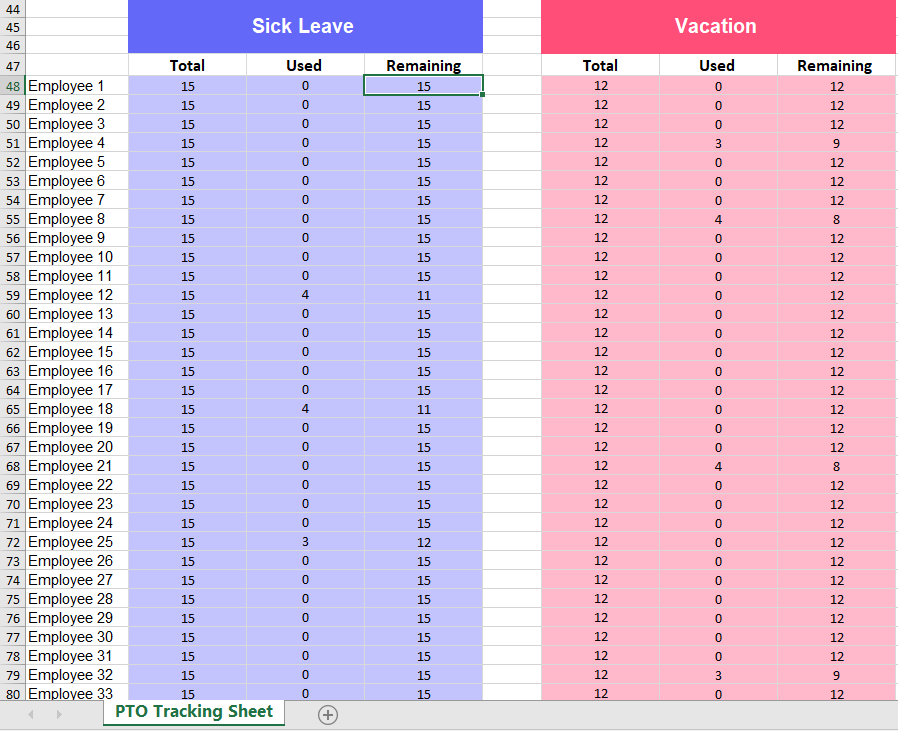
Leave management does not exist in isolation. It depends on accurate employee data and feeds directly into payroll and financial processes.
Strong integration with your HRIS ensures that new hires, terminations, and manager changes are reflected automatically. Payroll integration ensures that paid and unpaid leave is accounted for correctly, reducing errors and rework. Identity management and single sign-on simplify access and improve security.
Ask vendors how their system behaves when data changes mid-cycle. Real integration is resilient to change; fragile integration creates reconciliation work.
Reporting Turns Leave Data Into Insight
At scale, leave data becomes a planning asset. It informs capacity management, cost forecasting, and well-being initiatives.
The software should allow you to easily answer practical questions: who will be out next week, which teams are carrying large unused balances, and how leave usage trends over time. Reports should be filterable, exportable, and usable by HR, finance, and leadership without technical workarounds.
If reporting feels like an afterthought, you will miss opportunities to act proactively rather than reactively.
Privacy and Permissions Protect Trust
Leave information is sensitive. The system must enforce clear boundaries around who can see what.
Role-based access should reflect organizational reality, separating employee, manager, HR, payroll, and auditor views. Employees should not see more about their colleagues than necessary, and manager notes should remain confidential.
In multi-entity or multi-country organizations, data separation is especially critical. Trust erodes quickly when privacy controls are weak or inconsistent.
Configuration Flexibility Enables Growth
Policies evolve. Companies expand into new regions, introduce new leave types, and adjust entitlements as they mature. Your leave management software should adapt without requiring constant vendor intervention.
HR administrators should be able to update policies, add leave types, and apply changes from specific effective dates with confidence. The system should support multiple policies within one organization and handle growth without structural rework.
If every policy change requires a support ticket or professional services engagement, the long-term cost will far exceed the subscription price.
Total Cost Includes Risk, Not Just Pricing
Subscription fees tell only part of the story. Implementation effort, support quality, security posture, and data portability all affect total cost of ownership.
Evaluate what is included in the base price versus add-ons you will inevitably need, such as integrations, audit logs, or advanced permissions. Review support responsiveness, documentation quality, and security certifications if your organization requires them.
Finally, consider exit risk. A good vendor makes it easy to export your data in a usable format. Confidence in leaving is often a sign of confidence in staying.
Day Off Features: Everything You Need to Manage Time Off Simply and Accurately

Modern teams need more than a basic vacation tracker. They need a system that removes friction from requesting days off, gives managers confidence when approving time away, and provides HR with reliable, accurate oversight. Day Off is built to meet these needs without introducing unnecessary complexity or administrative overhead.
Below is a detailed look at the core Day Off features and how they support practical, day-to-day time-off management across growing teams.
Flexible Day Off Policies That Match Real Company Rules
No two organizations define “day off” in exactly the same way. Policies vary by location, seniority, employment type, and even department. Day Off is designed to reflect this reality rather than forcing companies into rigid, one-size-fits-all templates.
Organizations can define multiple day off types, such as annual leave, sick leave, unpaid leave, or custom categories, and configure how each one behaves. Accruals can happen monthly, annually, or based on milestones like hiring anniversaries. Carryover limits, balance caps, probation periods, and even negative balances can be aligned precisely with internal policies.
By automating these rules, Day Off ensures balances are always accurate and up to date. This removes the need for manual corrections, shadow spreadsheets, or “exceptions” tracked outside the system.
Simple and Clear Day Off Requests for Employees
Day off management only works if employees actually use the system. Day Off is built with an employee first experience that makes requesting time off feel effortless and predictable.
Employees can instantly view their available balance before submitting a request, choose full or partial days, and add notes when needed. Once submitted, the request status is always visible, along with past and upcoming days off. This transparency eliminates uncertainty and reduces follow-up questions to managers or HR.
Because the interface is intuitive and uncluttered, employees rarely need training or guidance, helping adoption happen naturally across the organization.
Fast and Context-Aware Approval Workflows
Managers need more than a yes-or-no button. They need context to make fair, informed decisions while keeping work moving.
Day Off provides managers with immediate visibility into team availability and overlapping requests, allowing them to understand the impact of approving time off before taking action. Approvals can be completed quickly within the platform, without chasing emails or cross checking calendars.
This context driven workflow reduces approval delays, avoids accidental understaffing, and helps managers apply policies consistently across their teams.
Shared Team Calendar and Availability Visibility

Unplanned absences are often the result of poor visibility, not poor communication. Day Off addresses this by making team availability easy to understand at a glance.
The shared team calendar shows who is off and when, helping teams plan meetings, deadlines, and coverage more effectively. Privacy is built in: colleagues can see that someone is unavailable without seeing sensitive details about the reason or type of day off.
Instead of being just a record of absences, the calendar becomes an everyday planning tool that supports smoother collaboration.
Automatic Balance Tracking and History
Manual balance tracking is time consuming and error prone. Day Off removes this risk by automatically updating balances as days off are approved and taken.
Employees, managers, and administrators can view a detailed history of balance changes, including accruals, deductions, carryovers, and manual adjustments when required. This historical transparency builds trust and makes it easy to resolve questions or disputes.
Accurate balance tracking also simplifies payroll coordination and reduced the likelihood of costly corrections.
Reporting and Insights for HR and Leadership

As teams grow, time off data becomes an important source of insight. Day Off transforms day off records into clear, actionable information.
HR teams can review usage trends, upcoming absences, and remaining balances across teams, departments, or locations. These insights support workforce planning, help identify burnout risks, and highlight unused leave liabilities before they become a problem.
Reports are designed to answer real operational questions quickly, without overwhelming users with unnecessary complexity.
Role-Based Permissions and Privacy Controls
Day off data is sensitive, and access must be handled carefully. Day Off includes built-in role-based permissions that ensure information is only visible to the right people.
Employees see their own data, managers see relevant team information, and HR administrators retain full oversight. Sensitive notes and leave reasons are protected, supporting confidentiality and compliance across the organization.
These controls are not optional add ons, they are fundamental to how the system is designed.
Easy Setup and Scalable Configuration
Implementing new software should not create more work than it removes. Day Off is designed to be quick to set up and easy to maintain over time.
HR teams can configure policies, approval flows, and leave types without relying on vendor support for everyday changes. As the organization grows, new teams, locations, or policies can be added without restructuring the system or disrupting existing data.
This flexibility ensures Day Off continues to work as the organization evolves.
Reliable Support and Continuous Improvement
Even the best software needs dependable support. Day Off prioritizes responsive assistance and ongoing improvements driven by real customer feedback.
Updates focus on enhancing usability and functionality without adding unnecessary complexity. This ensures the platform remains intuitive and effective as needs change.
Startup
- 25 Employees
- Single Approver
- Three Policies
- Unlimited Team
- Unlimited Locations
All Day Off Features at a Glance
Day Off is designed to cover the full lifecycle of time off management, from policy setup to reporting, while remaining simple to use and easy to scale.
Leave & Day Off Policy Management
Create unlimited day off / leave types (annual leave, sick leave, unpaid leave, custom types)
Flexible accrual methods (monthly, weekly, biweekly, semi-monthly, anniversary-based)
Front-loaded and accrual-based policies
Prorated accruals for new hires and part-time employees
Carryover rules with caps and expiration dates
Support for negative balances (allow or restrict)
Probation period rules before leave eligibility
Tenure-based entitlement increases
Policy assignment by team, role, location, or employee
Multiple policies within the same organization
Employee Day Off Requests
Quick day off request submission
Full-day and half-day requests
Clear visibility of available balances before requesting
Add notes or comments to requests
View request status (pending, approved, rejected)
Full history of past and upcoming days off
Self-service access without HR involvement
Intuitive, employee-friendly interface
No training required for employees
Approval & Manager Workflows
One-click approve or reject requests
Context-aware approvals with team visibility
See overlapping requests before approving
Prevent approval conflicts and understaffing
Delegation to backup or acting managers
Consistent approval logic across teams
Reduced approval delays and bottlenecks
Team Calendar & Visibility
Shared team calendar view
See who is off and when at a glance
Privacy-respecting visibility (availability without reasons)
Prevent scheduling conflicts
Support for distributed and remote teams
Planning-friendly availability overview
Balance Tracking & History
Automatic balance updates upon approval
Real-time balance calculations
Detailed balance history (accruals, deductions, carryovers)
Manual adjustments to the employee balance
Transparency for employees, managers, and HR
Reduced disputes over balances
Payroll-ready balance accuracy
Public Holidays Management
Support for public holidays
Assign holidays by country or location
Centralized holiday management
Automatic exclusion of holidays from leave calculations
Accurate handling for global teams
Reporting & Insights
Leave usage reports
Upcoming absences overview
Remaining balance reports
Department- and team-level reporting
Workforce planning insights
Identify unused leave liabilities
Burnout and overuse pattern visibility
Exportable reports for payroll and finance
Roles, Permissions & Privacy
Role-based access control
Separate views for employees, managers, and HR
Restricted access to sensitive leave reasons and notes
Secure handling of personal leave data
Support for multi-team organizations
Clear data ownership and visibility rules
Organization & Team Management
Create and manage multiple teams
Assign managers to teams
Support for organizational hierarchy
Manage growing or changing team structures
Easy onboarding for new employees
Handle manager changes without data loss
Setup, Configuration & Scalability
Fast and simple initial setup
No complex implementation required
HR-managed configuration (no vendor dependency)
Easy policy updates with effective dates
Scale from small teams to growing organizations
Add new locations, teams, or policies seamlessly
Data Accuracy, Audits & Compliance Support
Full audit trail of requests and approvals
Consistent policy enforcement
Reduced compliance risk through automation
Support & Product Reliability
Responsive customer support
Continuous product improvements
Feature updates driven by customer feedback
Stable, easy-to-use interface
Focus on simplicity and reliability over feature bloat
Blockout Dates (Restricted Time-Off Periods)
Define blockout dates where time off cannot be requested
Apply blockout periods to specific teams or the entire organization
Support recurring blockout dates (e.g. year-end close, peak seasons)
Prevent accidental approvals during critical business periods
Clear visibility for employees before submitting requests
Reduce last-minute conflicts during high-demand or mission-critical times
Maintain fairness and consistency in time-off restrictions
Overall Product Philosophy
Designed to reduce administrative workload
Built for trust, accuracy, and transparency
Focused on real-world time-off workflows
Simple enough for employees, powerful enough for HR
Scales with the organization without becoming complex
Frequently Asked Questions (FAQ)
What is leave management software, and how is it different from a simple vacation tracker?
Leave management software is designed to manage the full lifecycle of time off, not just record vacation days. It handles policy rules, accruals, approvals, balances, reporting, compliance records, and integrations with HR and payroll systems. A basic vacation tracker typically only logs dates off and lacks the logic, automation, and controls needed as organizations grow.
Who should be involved in choosing leave management software?
While HR usually leads the evaluation, the decision should also involve managers, payroll, finance, and IT. Managers need approval workflows that match how they work, payroll needs accurate and timely data, and IT must review integrations and security. Involving these stakeholders early helps avoid surprises after implementation.
How do I know if my organization has outgrown spreadsheets or manual leave tracking?
Common signs include frequent balance disputes, delayed approvals, payroll corrections related to time off, lack of visibility into who is off, and heavy reliance on HR to answer basic questions. If leave management consumes more administrative time as your organization grows, it is usually time for a dedicated system.
Can leave management software handle different policies across teams or countries?
Yes, modern leave management platforms are built to support multiple policies within the same organization. This includes different accrual rules, public holidays, carryover limits, and eligibility criteria by location, role, or employment type. This flexibility is essential for distributed or growing organizations.
How does leave management software improve compliance?
Good leave management software maintains a clear audit trail of requests, approvals, balance changes, and adjustments. It supports record retention and consistent policy enforcement, which reduces reliance on memory or manual tracking. While it does not replace legal advice, it significantly lowers the risk of errors and inconsistencies.
How long does it typically take to implement a leave management system?
Implementation time varies based on policy complexity and data readiness, but many modern systems can be configured in days rather than months. Cleaning employee data, confirming policies, and deciding how to handle historical balances usually has more impact on timelines than the software itself.
Will employees need training to use a new leave management tool?
In most cases, minimal or no formal training is required if the system is designed with employees in mind. A clear interface, visible balances, and simple request flows allow employees to adopt the system quickly. Short internal guidance or a quick walkthrough is usually sufficient.
How does leave management software integrate with payroll?
Leave data such as paid time off, unpaid leave, and special leave types can be exported or synced with payroll systems. This ensures payroll calculations are accurate and reduces manual reconciliation. When evaluating software, it is important to confirm how it handles mid-cycle changes and backdated requests.
Is employee privacy protected in leave management systems?
Yes, reputable platforms use role-based permissions to ensure employees only see their own data, managers see relevant team information, and HR or payroll have appropriate administrative access. Sensitive details such as leave reasons or notes can be restricted to protect confidentiality and maintain trust.
What should I consider when comparing pricing between vendors?
Look beyond the headline subscription cost. Consider implementation effort, support quality, access to integrations, audit logs, advanced permissions, and reporting. Also evaluate how easy it is to export your data if you ever decide to switch. Total cost of ownership includes both money and administrative effort.
How does Day Off fit into this evaluation?
Day Off is designed to address the exact challenges outlined in this guide: flexible policy configuration, simple employee requests, context-aware approvals, strong visibility, accurate balance tracking, and scalable administration. It focuses on removing friction from day-to-day leave management while remaining easy to configure and maintain as organizations grow.
Conclusion
Choosing the right leave management software is ultimately about trust, trust in the accuracy of balances, the fairness of approvals, and the reliability of the system behind them. When leave policies are modeled correctly, requests are easy, approvals are informed, and data flows cleanly into payroll and planning, time off management stops being a recurring problem and becomes an invisible support system.
As organizations grow and work becomes more distributed, manual tools and disconnected processes can no longer keep up. A well designed platform brings clarity to complexity, reduces administrative burden, and creates a consistent experience for employees, managers, and HR alike.
By evaluating leave management software through policy fit, usability, visibility, compliance, integrations, scalability, and long term cost, you can make a decision that supports not only today’s needs but tomorrow’s growth. The right system will not demand attention, it will earn confidence by working quietly, accurately, and consistently in the background.