

Table of Contents
ToggleManaging employee leave is no longer just an administrative task, it’s a critical part of workforce planning, operational continuity, and employee experience. As teams grow and work becomes more distributed, organizations need clear, structured ways to ensure the right people are available at the right time. Blackout periods in a leave tracker app play an important role in achieving that balance.

This article provides an in depth, practical explanation of blackout periods: what they are, how to implement them correctly in a leave tracker app, and the advantages and drawbacks organizations should carefully consider.
Understanding Blackout Periods in Leave Management
A blackout period is a defined time frame during which employees are restricted from requesting specific types of leave. These restrictions are usually temporary and tied to business critical periods when staffing levels must remain stable.
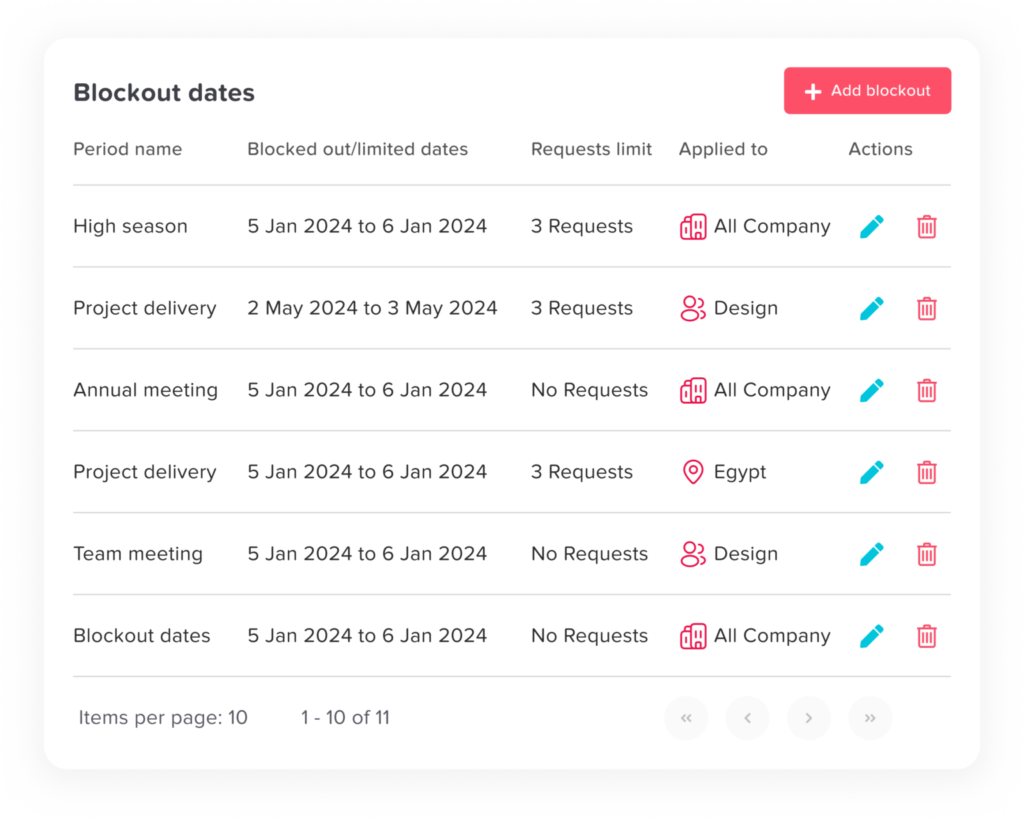
In modern leave tracker apps, blackout periods are not rigid, one dimensional blocks. They can be configured to:
Apply to specific leave types (e.g., vacation, unpaid leave)
Affect only certain teams, roles, or locations
Allow exceptions such as sick leave or emergency leave
Be overridden by authorized managers when necessary
This flexibility makes blackout periods a strategic planning tool rather than a blunt restriction.
Why Blackout Periods Are Essential in a Leave Tracker App
Without clearly defined blackout periods, leave management often becomes reactive. Managers are forced to assess leave requests individually, sometimes too late to prevent coverage gaps. This approach can result in:
Insufficient staffing during peak demand
Unequal or inconsistent leave approvals
Increased operational risk
Tension between employees and management
A leave tracker app with blackout functionality replaces guesswork with predefined rules. It ensures everyone understands when leave is limited and why, long before conflicts arise.
Common Business Scenarios That Require Blackout Periods
Blackout periods are not limited to one type of organization or industry. They are commonly used in scenarios such as:
Financial closing periods (monthly, quarterly, or annual)
Peak sales or retail seasons
Product launches or major system releases
Customer support surges
Regulatory audits or compliance reviews
Major internal events or organizational changes
By planning these periods in advance, organizations protect critical operations while maintaining fairness and transparency.
How to Implement Blackout Periods Effectively in a Leave Tracker App
Define the Purpose of Each Blackout Period
Every blackout period should have a clear, documented reason. Employees are far more accepting of restrictions when they understand the business need behind them. Avoid vague or overly broad blackout rules that lack justification.
Limit the Scope of Restrictions
Professional leave management avoids unnecessary rigidity. Instead of blocking all leave:
Restrict only non essential leave types, such as vacation
Keep sick leave, emergency leave, or statutory leave available
Apply blackout periods only where operationally required
This approach balances structure with empathy.
Apply Blackout Periods at the Right Level
A modern leave tracker app allows blackout periods to be applied with precision:
Company wide for major organizational events
Team based for departments with specific workloads
Role based for critical positions
Avoid applying blanket restrictions that affect teams without operational justification.
Make Blackout Periods Visible
Professional leave management relies on clarity. Employees should be able to:
See blackout periods directly in the leave calendar
Understand which leave types are affected
Know the duration and reason for the restriction
Visibility reduces confusion and prevents unnecessary leave requests that must later be declined.

Establish a Clear Override and Exception Process
Even the best planning cannot account for every situation. A leave tracker app should allow authorized managers to:
Approve leave during blackout periods when justified
Record reasons for exceptions
Maintain a clear audit trail
This ensures flexibility without undermining policy integrity.
Review Outcomes After Each Blackout Period
After a blackout period ends, take time to evaluate its effectiveness:
Was staffing adequate?
Did teams experience unnecessary strain?
Were many exceptions required?
These insights help refine future blackout strategies and improve employee trust.
Advantages of Using Blackout Periods
Operational Stability
Blackout periods ensure critical tasks are adequately staffed, reducing risk during high impact periods.
Consistent and Fair Enforcement
Automated rules eliminate favoritism and ensure policies are applied equally across teams.
Improved Planning and Forecasting
Managers can plan projects and workloads with confidence, knowing staffing levels are protected.
Reduced Administrative Burden
Fewer conflicting leave requests mean less back and forth between employees and managers.
Stronger Compliance and Documentation
All rules, approvals, and exceptions are logged, supporting audits and HR reporting.
Potential Drawbacks and Risks
Reduced Perceived Flexibility
If blackout periods are frequent or poorly justified, employees may feel restricted or undervalued.
Risk of Burnout
Blocking leave during already intense periods can increase stress if not balanced with recovery time afterward.
Morale Issues from Poor Communication
Unexpected or unclear blackout rules can lead to frustration and disengagement.
Overgeneralization
Applying blackout periods too broadly can negatively affect teams that don’t require them.
Best Practices for a Professional Blackout Period Policy
Use blackout periods strategically, not excessively
Communicate them early and clearly
Combine them with fair leave accrual and carryover policies
Allow controlled exceptions with accountability
Regularly reassess their necessity and impact
Blackout periods should support business continuity and employee well being not undermine either.
FAQ
What is a blackout period in a leave tracker app?
A blackout period is a predefined date range during which employees are restricted from requesting certain types of leave. In a leave tracker app, blackout periods are configured in advance and automatically enforced to ensure adequate staffing during critical business periods.
Can employees request any type of leave during a blackout period?
That depends on company policy and how the blackout period is configured. Most organizations block vacation or non-essential leave while still allowing sick leave, emergency leave, or legally required leave to ensure fairness and compliance.
Who can create or manage blackout periods?
Typically, only administrators or HR managers can create and edit blackout periods. Some leave tracker apps also allow team managers to manage blackout periods for their own teams, depending on role permissions.
Are blackout periods applied to all employees?
Not necessarily. Blackout periods can be applied company wide, to specific teams, roles, or even individual employees. This flexibility helps avoid unnecessary restrictions for teams that are not affected by peak workloads.
Can blackout periods be overridden?
Yes. Most leave tracker apps allow authorized managers or admins to override blackout restrictions in exceptional cases. These overrides are usually logged to maintain transparency and an audit trail.
How are employees informed about blackout periods?
Blackout periods are usually visible in the leave calendar within the leave tracker app. Employees may also receive notifications or alerts when blackout periods are added, updated, or when they attempt to request leave during restricted dates.
Do blackout periods affect leave balances?
No. Blackout periods only control when leave can be taken, not how much leave an employee has. Leave balances, accruals, and entitlements remain unchanged.
How long should a blackout period last?
Blackout periods should be as short as possible while still covering the critical business need. Overly long blackout periods can negatively impact employee morale and should be avoided.
Are blackout periods legally allowed?
In most regions, blackout periods are allowed as long as they comply with local labor laws and do not restrict statutory or legally protected leave. Organizations should always review local regulations before implementing blackout policies.
How often should blackout periods be reviewed?
Blackout periods should be reviewed after each use or at least annually. Regular reviews help ensure they remain necessary, fair, and aligned with both business needs and employee well being.
Conclusion
Blackout periods are most effective when they are thoughtfully designed, transparently communicated, and supported by a capable leave tracker app. They are not about restricting time off, but about aligning employee availability with business priorities in a fair and predictable way.
When implemented correctly, blackout periods reduce conflict, improve planning, and strengthen trust between employees and management. The key lies in balance, clarity, and consistent execution.