

Table of Contents
ToggleModern organizations no longer rely on slow email chains or disconnected HR portals that sit outside the daily workflow. Today, collaboration, approvals, and operational decisions happen inside platforms like Slack and Microsoft Teams, where teams already spend most of their time.
When leave management lives in a separate system with a different login or dashboard, it creates unnecessary friction. Employees have to switch tools, managers have to check another platform, and approvals slow down. Over time, these small interruptions reduce visibility and create avoidable operational gaps.
Managing employee leave within the same platforms where work already happens keeps processes aligned with daily workflows, speeds up approvals, and removes unnecessary complexity.

That is exactly why Slack- and Teams-native leave management software has become essential rather than optional in 2026.
In this comprehensive and deeply detailed guide, we will explore:
Why modern companies must rethink traditional leave tracking systems
The operational risks of outdated leave management processes
The essential features you should demand from any serious solution
A detailed breakdown of leading platforms in the market
And most importantly, why Day Off stands out as the clear number one choice for Slack and Microsoft Teams users
The Hidden Problems With Traditional Leave Management Systems
Before understanding what makes great software, it’s important to understand what goes wrong with outdated systems.
Manual Systems Create Invisible Operational Risk
Many organizations still rely on spreadsheets, email threads, or isolated HR systems to track time off.
At first glance, this might seem manageable.
But over time, these systems create:
Approval delays due to buried emails
Incorrect leave balance calculations
Overlapping absences in critical departments
Lack of visibility for managers
Increased HR administrative workload
The bigger the company grows, the more fragile these systems become.
Context Switching Quietly Damages Productivity
When an employee has to:
Leave Slack
Log into an HR portal
Navigate multiple menus
Submit a leave form
Wait for an email approval
Each step adds friction.
Context switching, even for a minute, interrupts focus and slows momentum.
Now multiply that across dozens or hundreds of employees.
The productivity loss becomes significant.
Delayed Approvals Impact Business Performance
In fast-moving organizations, timing matters.
A delayed leave approval can:
Block travel planning
Create uncertainty in project timelines
Cause staffing gaps
Lead to last-minute coverage issues
When approvals live inside Slack or Teams, managers can respond instantly without disrupting their workflow.
Speed improves clarity. Clarity improves execution.
Why Slack & Microsoft Teams-Native Leave Management Is the Future

Modern collaboration tools are no longer just messaging apps. They are operational hubs.
Companies run standups, sprint planning, product launches, and executive discussions inside Slack and Teams.
Leave management should live in the same ecosystem.
Real-Time Visibility Prevents Scheduling Conflicts Before They Happen
Without a shared and accessible leave calendar, companies risk:
Entire teams taking leave simultaneously
Critical roles becoming uncovered
Client deliverables being delayed
Reduced service levels during peak demand
Native integration provides live visibility directly inside the platforms managers already monitor daily.
This prevents surprises before they become problems.
Seamless Approvals Improve Leadership Efficiency
Managers are already overloaded with decisions.
When leave requests appear inside Slack or Teams with one-click approval buttons, the process becomes effortless.
No logging in elsewhere.
No searching through email threads.
No separate dashboards.
Efficiency increases naturally because the process fits the manager’s workflow.
Employees Expect Instant, Frictionless Experiences
Modern employees are accustomed to fast, intuitive software experiences.
If requesting leave feels complicated, employees may:
Delay requests
Forget to log absences
Rely on informal messages
Create tracking inconsistencies
A chat-based leave experience feels natural and intuitive.
And when something feels easy, adoption rises automatically.
Day Off: The Best Leave Management Software for Slack & Microsoft Teams
If your company runs on Slack or Microsoft Teams, you already know how central those tools are to daily work. Conversations, decisions, quick approvals, project updates, it all happens there.
So it only makes sense that leave management should live there too.
That’s exactly why Day Off stands out. It isn’t a traditional HR platform that later added Slack or Teams notifications. It’s built around the way modern teams actually work: inside chat.
Let’s break down why Day Off consistently ranks as the strongest and most purpose-built leave management tool for collaboration-first workplaces.
Day Off for Slack
Day Off for Slack is designed for teams that rely on Slack as their operational hub. The goal is simple: make requesting and approving leave as easy as sending a message.

Request Leave Directly Inside Slack
Employees can submit time off requests without leaving Slack. Whether through slash commands or the Day Off interface inside the workspace, the process takes seconds. There’s no separate HR portal, no additional login, and no context switching.
One-Click Interactive Approvals
Managers receive fully interactive approval messages inside Slack. Instead of a passive notification, they see clear request details with buttons to approve or reject instantly. The action happens right there in chat, eliminating delays caused by switching systems.
Real-Time Notifications & Smart Reminders
As soon as a request is submitted, managers are notified immediately to help prevent bottlenecks. This keeps the workflow moving naturally within Slack, where managers are already active.
Automatic Team Announcements
Approved leave or a daily digest can be automatically shared in selected Slack channels. This ensures team-wide visibility without manual updates and reduces the risk of scheduling conflicts.
Shared Leave Calendar & Balance Checks
Employees can quickly check their leave balances and view upcoming absences without contacting HR. Managers gain clear visibility into who’s off and when, helping them make informed staffing decisions.
Easy Employee Import from Slack
You can link your Slack workspace and automatically import employees directly into Day Off. This eliminates manual data entry and ensures your leave system stays aligned with your active Slack user base.
For Slack-first companies, especially startups and fast-moving teams, this creates a frictionless leave experience that feels like a natural extension of daily communication.
Day Off for Microsoft Teams
Day Off for Microsoft Teams is optimized for organizations operating within the Microsoft 365 ecosystem. It combines ease of use with the structure and security larger organizations often require.

Native Teams App Experience
Day Off runs as a dedicated app inside Microsoft Teams, allowing employees to request leave without leaving the platform. The interface feels integrated and familiar, reducing resistance to adoption.
Actionable Approval Cards in Chat
Managers receive approval requests as interactive cards inside Teams. These cards contain all relevant details and allow instant approval or rejection directly within the conversation, no redirects required.
Automated Notifications & Workflow Alerts
Leave requests, reminders, start-of-leave notifications, and return updates are delivered inside Teams. Because these alerts appear in a tool managers use daily, approvals happen faster and HR doesn’t need to follow up manually.
Centralized Leave Calendar for Planning
Managers can access a clear, shared leave calendar that displays absences across teams, departments, and locations. This improves workforce planning and reduces last-minute staffing gaps.

Advanced Policy & Approval Structures
For companies with layered management structures, Day Off supports multi-level approval workflows, accrual-based policies, localized public holidays, carryover limits, and custom leave categories, all while keeping the employee-facing experience simple.
Employee Import from Microsoft Teams
Organizations can sync or import employees directly from Microsoft Teams. This ensures your employee directory stays accurate and eliminates the need for manual setup.
Single Sign-On (SSO) for Microsoft Users
Day Off supports Single Sign-On (SSO) for Microsoft Teams users. Employees can access the system securely using their existing Microsoft credentials, enhancing security while removing additional login friction.
For companies already operating within Microsoft 365, this integration ensures leave management aligns with corporate security standards, user management systems, and structured approval hierarchies.
Additional Leave Management Tools for Slack & Microsoft Teams Workplaces
If you’re evaluating leave management software for a Slack- or Microsoft Teams-driven company, there are several additional tools worth considering beyond the usual big HR suites.
Below are more options that serve different types of organizations, from startups to global enterprises, each with varying levels of collaboration integration.
Timetastic: Simple and Visual PTO Tracking
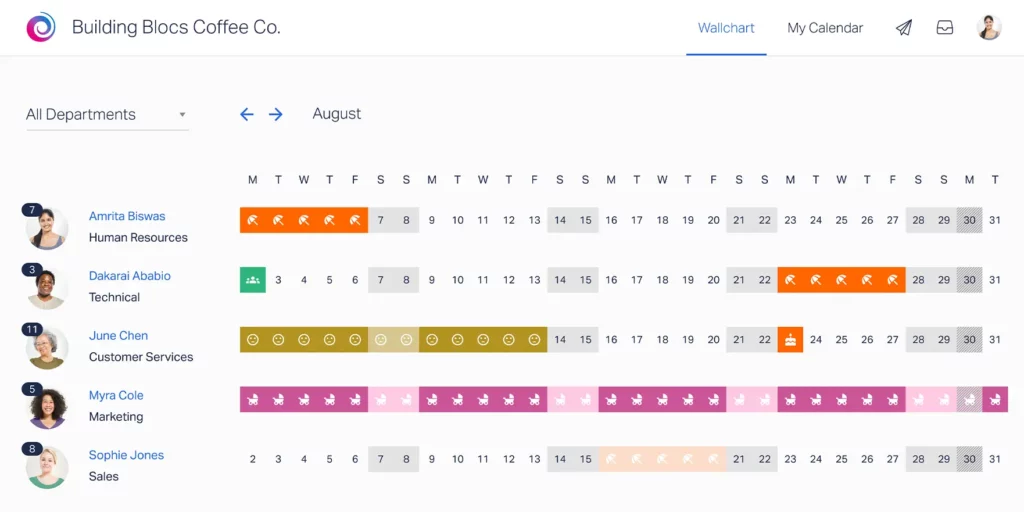
Timetastic is designed to make leave management feel straightforward and visual, particularly for smaller teams that don’t want heavy HR complexity.
One of its standout features is its shared “wallchart” style calendar. This gives managers and teams a clear visual overview of who’s off and when, making it easy to spot overlaps and plan around absences.
What Timetastic Does Well
Clear and visual team calendar
Straightforward leave requests and approvals
Automatic public holiday tracking
Slack notifications for updates
Timetastic integrates with Slack for alerts and reminders, but most leave requests and approvals are completed inside the Timetastic web app.
Ideal For
Small to mid-sized teams
Companies that want simple PTO tracking
Organizations that prioritize visual planning over complex automation
If you want something clean and easy without deep policy customization, Timetastic can be a practical solution.
Calamari: Slack-Focused Leave & Attendance Tracking
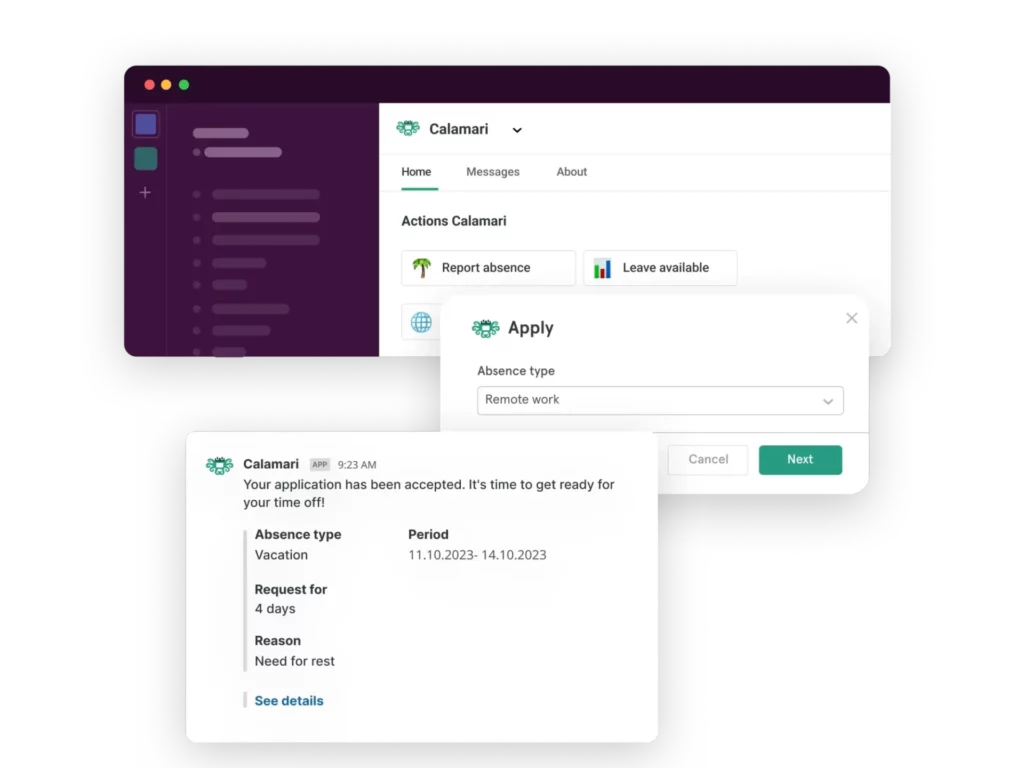
Calamari is known for its strong Slack integration and its dual focus on leave management and attendance tracking.
Unlike many HR platforms that treat Slack as secondary, Calamari has historically leaned into Slack-based interactions, allowing employees to request time off and managers to receive notifications directly within Slack.
Core Strengths
Leave management and attendance tracking combined
Accrual policy configuration
Multi-location and multi-country support
Slack-based leave workflows
Calamari also supports integrations with payroll systems and HR tools, which makes it flexible for companies that need both time tracking and leave management in one system.
However, depending on your setup, Microsoft Teams functionality may not be as central as Slack integration.
Ideal For
Slack-centric companies
Businesses that need both attendance and leave tracking
Teams that want more policy control than basic PTO tools
LeaveBoard: Policy-Driven Leave Management with Reporting

LeaveBoard focuses heavily on structured leave policies and reporting capabilities, making it appealing to organizations that prioritize data visibility and compliance.
It offers automated accrual tracking, carryover management, and structured approval workflows.
What It Does Well
Detailed leave balance tracking
Automated accrual calculations
Advanced reporting and export options
Public holiday management
Slack integration is generally used for notifications rather than full in-chat approvals, so the core leave management experience remains web-based.
Ideal For
Companies that need structured leave reporting
HR teams that want exportable data
Organizations operating in compliance-sensitive environments
If reporting and data visibility are high priorities, LeaveBoard provides solid functionality.
Humaans: Modern HR Platform with Built-In Leave Tracking
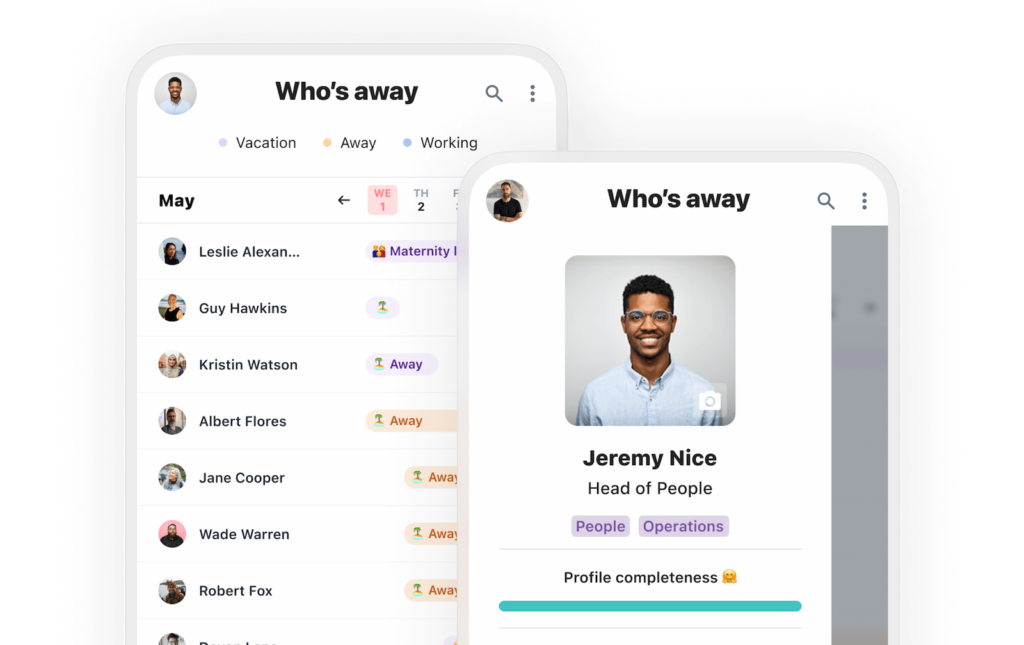
Humaans is a modern HR platform built for fast-growing companies, particularly startups and scale-ups. Leave management is one module within its broader employee lifecycle system.
It combines onboarding, employee data management, workflows, and PTO tracking in one clean interface.
Strengths
Modern and intuitive design
Automated HR workflows
Slack integration for updates
Centralized employee records
Because Humaans is a full HR platform, leave management is integrated into a larger system rather than being the primary focus.
Ideal For
Growing startups building their HR foundation
Companies that want employee data + leave in one platform
Teams that value a clean, modern user experience
Personio: Comprehensive HR & Leave for European Companies

Personio is widely used across Europe and is designed to support HR, payroll, recruiting, and leave management in one system.
It offers strong compliance support, which is particularly valuable in countries with strict labor regulations.
Key Capabilities
Automated leave tracking
Payroll and compensation integration
Compliance features
Detailed reporting and analytics
Slack and Teams integrations are available but typically function as notification channels rather than full interactive approval systems.
Ideal For
European SMBs and mid-sized companies
Organizations that need payroll + HR + leave combined
Compliance-heavy environments
Deputy: Workforce Scheduling + Leave for Shift-Based Teams
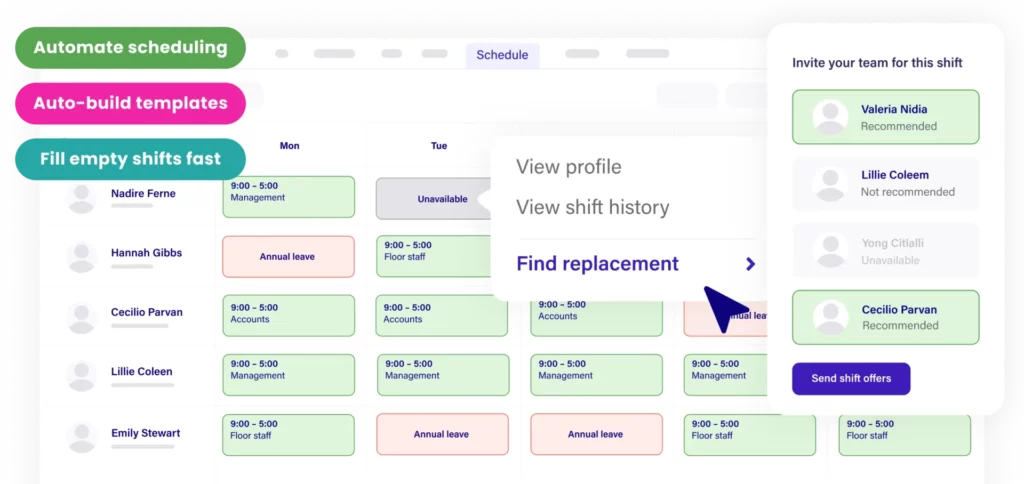
Deputy focuses primarily on workforce scheduling, making it popular in industries like retail, hospitality, and healthcare.
Leave management is integrated into its scheduling system, allowing managers to balance time-off requests against shift coverage.
What Makes Deputy Unique
Shift scheduling + leave tracking in one system
Mobile-friendly interface
Compliance support for labor laws
Integration with payroll systems
Slack integration exists, but Deputy’s main strength is operational scheduling rather than chat-native workflows.
Ideal For
Businesses with hourly workers
Companies managing rotating shifts
Industries that need coverage planning tied to leave
Frequently Asked Questions (FAQ)
Why should leave management be integrated with Slack or Microsoft Teams?
Because that’s where your team already works.
When leave requests, approvals, and visibility live inside Slack or Microsoft Teams, the process becomes part of the natural workflow. Employees don’t need to log into another system, and managers don’t need to check separate dashboards.
The result is:
Faster approvals
Fewer missed requests
Better visibility
Less administrative follow-up
In chat-first workplaces, integration isn’t just convenient, it directly improves efficiency.
Is Slack or Teams integration really that important?
For companies that rely heavily on Slack or Teams, yes.
If most daily communication, project updates, and decisions happen in those platforms, moving leave management elsewhere creates friction. Even small interruptions, like switching tools or searching through emails, add up over time.
Native or deeply embedded integrations help eliminate that friction and keep workflows aligned.
What’s the difference between “notifications” and “native integration”?
This is an important distinction.
Many HR platforms offer Slack or Teams notifications, meaning you get an alert in chat, but you still need to open another system to take action.
Native integration allows you to:
Submit leave requests inside Slack or Teams
Approve or reject directly in chat
View balances and availability without switching tools
That difference significantly affects speed and adoption.
Can leave management software handle multiple countries and policies?
Yes, modern leave management tools are designed for this.
Most serious platforms support:
Country-specific public holidays
Accrual-based leave policies
Carryover limits
Custom leave types
Multi-level approval chains
If your company operates across multiple regions, make sure the system supports localized policies and holiday calendars.
How secure is leave management software inside Slack or Teams?
Reputable leave management tools rely on the security frameworks of Slack and Microsoft Teams, along with their own data protection measures.
They typically support:
Role-based access controls
Secure authentication
Encrypted data storage
Admin-level permissions
Always verify compliance standards and data handling policies before choosing a provider.
Is leave management software suitable for small startups?
Absolutely.
In fact, startups often benefit the most because they don’t have large HR departments to manage manual tracking.
For a small team, integrated leave management:
Reduces administrative overhead
Prevents overlapping absences
Keeps planning transparent
Scales easily as the company grows
Starting with the right system early prevents messy transitions later.
How does leave management software improve productivity?
It improves productivity in several ways:
Reduces time spent requesting and approving leave
Prevents staffing conflicts before they happen
Eliminates manual balance calculations
Removes the need for HR follow-ups
Increases visibility across teams
When approvals are instant and calendars are transparent, teams plan better and operate more smoothly.
What should I look for when comparing tools?
When evaluating options, focus on:
Depth of Slack and Teams integration
Ease of use and adoption
Policy flexibility and automation
Real-time team visibility
Reporting and analytics
Scalability for future growth
Don’t just compare features, compare how naturally the tool fits into your company’s daily workflow.
Do I need a full HR suite, or is a focused leave tool enough?
That depends on your needs.
If you require payroll, recruiting, performance reviews, and employee lifecycle management in one system, a full HR suite may make sense.
However, if your main goal is efficient, collaboration-native leave management without added complexity, a focused tool is often:
Faster to implement
Easier to use
More affordable
Less overwhelming for employees
The key is choosing a solution aligned with your priorities.
How quickly can a company implement leave management software?
Implementation time varies by platform, but collaboration-native tools are typically faster to roll out because:
They require minimal training
Employees already use Slack or Teams daily
Setup often involves policy configuration rather than system migration
Smaller teams can often implement within days, while larger organizations may require structured onboarding.
Conclusion
Modern work happens inside Slack and Microsoft Teams. That’s where conversations unfold, decisions are made, and approvals happen in real time. When leave management sits outside those platforms, it creates unnecessary friction, employees switch systems, managers delay responses, and visibility suffers. Over time, those small interruptions add up, affecting planning, productivity, and operational stability.
The most effective approach is simple: manage leave where your team already works. Collaboration-native leave management keeps approvals fast, calendars transparent, and processes aligned with daily workflows. For companies that rely on Slack or Microsoft Teams, choosing a solution that integrates seamlessly isn’t just convenient, it’s a smarter, more efficient way to support growth and keep teams running smoothly.
