

Table of Contents
TogglePaid time off (PTO) is one of the most important benefits employers can provide. It supports employee well-being, boosts productivity, and helps control burnout. But at the end of every leave year, one question always arises: What happens to unused vacation or sick leave?
Companies answer this question through a PTO rollover policy, which outlines whether unused time is lost, paid out, or carried into the next year. A well-designed rollover policy provides clarity, consistency, and fairness, while also reducing administrative work for HR.
This in-depth article explores what PTO rollover is, how common policies work, the advantages and disadvantages for both employees and employers, and how you can configure PTO carryover inside Day Off, including manual customizations and reporting options.

What Is PTO Rollover?
PTO rollover (or PTO carryover) is the system a company uses to determine whether employees can transfer unused paid time off from the current plan year into the next one. Instead of resetting everyone’s balance to zero at year-end, rollover policies allow employees to retain some (or all) of their unused hours or days.
This system exists for two major reasons:
-
Employee flexibility: Life doesn’t always follow the calendar year, so rollover allows workers to manage personal events, holidays, and workloads more realistically.
-
Operational consistency: HR teams need a structured approach to managing unused leave and ensuring compliance with local labor laws.
Without a rollover policy, organizations face confusion, legal risk, and inconsistent treatment across teams. With a good one, companies can encourage healthy PTO usage while also controlling financial liability.
Common PTO Rollover Rules
Companies typically choose a rollover model based on their culture, financial situation, industry norms, and legal requirements. Below are the main types, each with expanded explanations and examples.
Limited Rollover (Capped Carryover)
This is the most common PTO rollover system used by companies today. Under this approach, employees can carry unused paid time off into the next year, but only up to a certain limit. The limit might be a set number of days (like 5 days), a number of hours (like 40 hours).
-
Provides flexibility without losing control: Employees still get the benefit of extra time off if they couldn’t use all their days, which feels fair and supportive.
-
Prevents PTO from piling up: HR and finance departments prefer this approach because it stops large balances from building, which can become a financial liability for the company.
-
Encourages people to rest: It gently pushes employees to take time off during the year while still letting them keep a reasonable amount for later.
Example:
If an employee ends the year with 12 days left but the company only allows 5 days to roll over, the employee will carry 5 days into the new year. The other 7 days disappear and cannot be used.
Unlimited Rollover
With unlimited rollover, employees can keep all their unused PTO from year to year with no limits and no expiration date. This policy empowers employees to manage their time off as they see fit.
Advantages:
-
Maximum trust and independence: It shows employees that the company trusts them to manage their own time responsibly.
-
Ideal for long-term planning: Employees can save up time for big life events such as long trips, extended medical recovery, parental leave, or caring for a family member.
-
Attractive to job seekers: In competitive industries, unlimited rollover can make a company stand out when hiring.
Challenges:
-
Large balances can become costly: When employees save up a lot of PTO, the company carries a large financial responsibility on its books.
-
Some employees avoid taking breaks: Ironically, having unlimited rollover can make people put off vacations, leading to burnout.
-
Difficult for HR to plan around: When people save months of PTO, it can be harder for managers to plan schedules and coverage.
While unlimited rollover offers huge flexibility, it is still relatively rare because it requires a strong culture of trust and responsible PTO use.
Use-It-or-Lose-It Policies
In a use-it-or-lose-it system, employees must use all their PTO by a certain deadline, typically the end of the year, or they forfeit any unused time. There is no rollover at all.
-
Ensures regular rest: Employees are encouraged, or even required, to take time off throughout the year. This often leads to better mental health and higher morale.
-
Stops PTO from building up: Since no vacation time rolls over, the company avoids carrying unpaid time on its financial records.
-
Simplifies HR management: End-of-year processes become easier because there are no complicated rollover calculations or tracking.
Important note:
These policies are not legal everywhere. In some countries or states, workers must be allowed to keep or be paid out for unused vacation time. Employers using this approach must make sure they follow all local labor laws.
PTO Cash-Out Options
Some companies allow employees to “cash out” unused PTO instead of rolling it over. This means employees can trade their remaining vacation hours for money at the end of the year. In some workplaces, this is optional; in others, it happens automatically.
Benefits for employees:
-
Extra income: Getting a cash payment at the end of the year can feel like a bonus.
-
No wasted hours: Employees don’t feel like they’re missing out if they didn’t use all their time off.
Benefits for employers:
-
Less paperwork: Cash-outs simplify PTO management and avoid complicated rollover rules.
-
Reduces financial liability: Since unused PTO converts to cash immediately, the company doesn’t have to carry it over as a future debt.
This approach is more common for vacation days than sick days, since sick leave usually serves a different purpose.
Rollover With Expiration
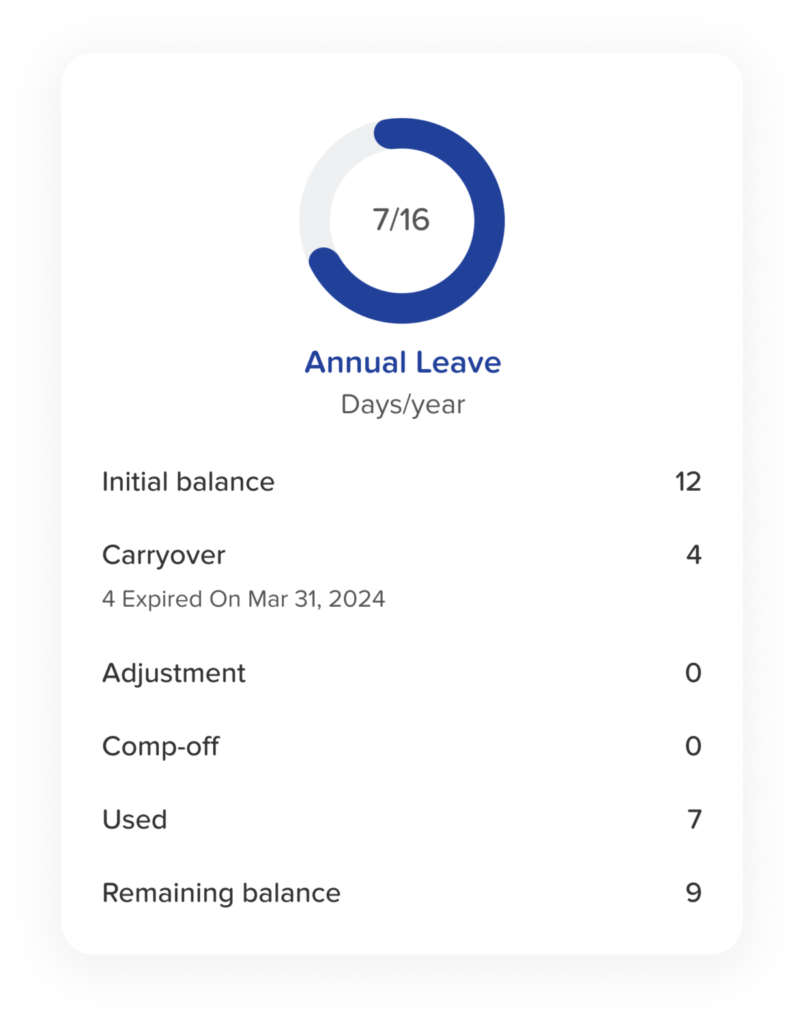
This is a middle-ground option. Employees can carry unused PTO into the new year, but they must use those rolled-over days by a certain deadline, often within the first few months of the next year.
-
Provides flexibility: Employees still get a second chance to use their time off if they couldn’t fit everything in during the year.
-
Ensures long-term rest: The expiration date encourages people to actually use the time rather than saving it indefinitely.
-
Controls long-term cost: Since the rolled-over time eventually expires, companies avoid large financial liabilities.
-
Example: A company may allow up to 3 days to roll over, but the employee must use them by April 30. If they don’t, those days expire automatically.
Employee Pros & Cons of PTO Rollover
| Type | Item | Clear Explanation |
|---|---|---|
|
Benefits |
More personal control |
Employees can plan vacations around real-life needs (family, workload, big events) instead of being restricted by the year-end calendar. |
|
|
Reduced pressure |
No need to take random days off just to avoid losing them. Rollover removes year-end stress. |
|
|
Ability to save for major plans |
Employees can build up time for long trips, weddings, extended travel, or caregiving responsibilities. |
|
|
Financial benefits with cash-out |
When cash-out options exist, unused PTO can turn into extra income, offering financial support. |
|
Drawbacks |
Higher risk of burnout |
Some employees keep postponing vacation because “they can always take it later,” leading to exhaustion. |
|
|
Rollover caps may still cause loss |
If the company limits how much PTO can carry over, employees may still lose part of their earned time. |
|
|
Unequal ability to take PTO |
Teams with heavier workloads may struggle more to use PTO, causing unfair differences between employees. |
Employer Pros & Cons of PTO Rollover
| Type | Item | Clear Explanation | |
|---|---|---|---|
|
Benefits |
Stronger benefits package |
A flexible PTO policy helps attract and keep talent by showing employees they are valued. |
|
|
|
Less year-end scheduling chaos |
Rollover reduces December PTO “rushes,” helping maintain proper staffing levels. |
|
|
|
Healthier PTO usage patterns |
Employees feel more comfortable taking time off when it truly supports work and personal balance. |
|
|
Drawbacks |
Increased financial liability |
Unused PTO stays on the company’s balance sheet, and higher rollover limits increase this cost. |
|
|
|
Possible scheduling issues |
Employees with large PTO balances may request long absences, requiring careful planning and coverage. |
|
|
|
Needs reliable tracking systems |
Without an automated tool, keeping track of rollover amounts becomes time-consuming and error-prone. |
How to Set Up PTO Carryover in Day Off
Day Off makes it simple for HR teams to set up PTO carryover rules that match their company policies. Whether your organization uses limited rollover, unlimited rollover, expiration rules, or a mix of all three, the system guides you through each step and handles the calculations automatically.
It also offers powerful tools for customizing rollover for individual employees and generating detailed reports that help you stay compliant and organized.
Step 1: Open the Policy Settings
To begin, you’ll need to access the PTO policy you want to configure.
-
Log in to your Day Off admin dashboard.
-
Navigate to Settings → Leave Policies.
-
Select the leave policy you want to edit, then select any leave type such as Vacation, Annual Leave, or Sick Leave.
Each leave type in Day Off has its own set of rules. This means you can let vacation days roll over, prevent sick leave from rolling over, or create custom rules for different departments or employment types. The system is flexible and designed to match your organization’s real-world structure.

Step 2: Enable and Set Up PTO Carryover
Once you’ve opened the policy, you’re ready to turn on carryover.
Inside the selected policy:
-
Look for the Carryover option and switch it on.
-
Choose the carryover model that matches your policy:
Unlimited Rollover
All unused PTO rolls over with no limits. Day Off keeps track automatically and carries the full balance into the next cycle.
Limited Rollover
You set a maximum number of days or hours that can roll over. Day Off will apply the limit and remove the rest at the cycle’s end.
Carryover With Expiration
You decide how long rolled-over days remain available, whether that’s a few weeks, months, or until a specific date.
Once configured, Day Off handles all the year-end or cycle-end calculations on its own. HR no longer needs spreadsheets or manual adjustments.
Step 3: Manually Customize Carryover for Individual Employees
Even with an automated system, there will always be special cases. Day Off gives HR the ability to adjust balances manually whenever needed.
You might need to:
-
Add extra rollover days for long-service rewards
-
Reduce rollover due to an exception in a contract
-
Correct a balance after an audit or system change
-
Apply a special amount for unique employment agreements
Administrators can make these changes directly in an employee’s profile or through the balance adjustment tools. This ensures that no matter the situation, HR always remains in full control.
Use the Carryover Report for Review, Export, or Printing
Before Day Off applies any rollover changes, it generates a Carryover Report that gives HR a complete picture of what will happen to each employee’s PTO balance. This report includes:
-
Total unused PTO remaining at the end of the cycle
-
The exact amount that will roll over into the next period
-
Any hours or days scheduled to expire
-
The final balance employees will begin with in the new cycle
This report serves as a central tool for planning, verification, and communication. It can be used in several important ways:
Export to Excel
Perfect for payroll and finance teams who need accurate numbers for budgeting, audits, and year-end reviews. Managers can also use the exported file to verify team balances or prepare for upcoming staffing needs.
Print or Save as PDF
Helpful for official HR documentation, compliance requirements, internal presentations, or sharing updated PTO summaries with leadership teams or department heads.
Internal Review for Accuracy
Before rollover is applied, HR can review the report to confirm that all balances, adjustments, and exceptions are correct. This helps catch errors early and prevents incorrect balances from carrying over into the new cycle.
By providing all relevant PTO information in one organized place, the Carryover Report ensures transparency, simplifies audits, and supports confident decision-making.

Save and Apply the Policy
Once you’ve confirmed that everything is set up correctly, simply save your changes, and Day Off takes care of the rest.
After saving:
-
All employee PTO balances are recalculated instantly, based on your updated settings.
-
Rollover is applied automatically at the appropriate time, whether that’s the end of the calendar year or the end of each employee’s individual leave cycle or his anniversary.
-
Employees see their updated balances right away in the app, reducing questions and helping them plan time off with confidence.
-
HR avoids time-consuming manual updates, spreadsheets, and recalculations, which drastically reduces administrative work and the risk of mistakes.
This automation ensures that your PTO policy is applied consistently and accurately, freeing HR to focus on higher-level tasks instead of routine maintenance.
FAQ: PTO Rollover and Day Off
What is the main purpose of a PTO rollover policy?
A PTO rollover policy provides a clear, consistent way for companies to handle unused leave at the end of the year. It helps employees plan their time off more realistically while giving employers a structured system that prevents confusion, reduces risk, and ensures compliance with labor laws.
Is PTO rollover required by law?
It depends on where your company operates. Some regions require that unused vacation be carried over or paid out, while others allow employers to set their own rules. Because the laws vary widely, businesses should always review local regulations before choosing a policy. Day Off makes it easier to stay compliant by documenting and applying your rules consistently.
What’s the difference between limited rollover and rollover with expiration?
-
Limited rollover allows employees to carry over only a fixed number of days or hours into the next year.
-
Rollover with expiration allows employees to carry time over but requires them to use it by a specific date (like March 31).
Together, they give employees flexibility while giving employers control over long-term PTO buildup.
Does unlimited rollover mean unlimited PTO?
No. Unlimited rollover simply means employees can keep all the PTO they’ve earned from year to year. It doesn’t change how much PTO they earn, it only affects whether unused time disappears or stays available.
How does Day Off calculate rollover automatically?
Day Off applies the rules you’ve defined, such as caps, expiration dates, or unlimited rollover, and runs the calculations for you when the leave cycle ends. The system determines how much time carries over, how much expires, and the new balance for every employee, ensuring accuracy without any manual work.
Can HR override or adjust rollover amounts manually?
Yes. Day Off lets administrators add, reduce, or replace rollover amounts for specific employees. This is especially helpful for correcting errors, honoring special agreements, granting rewards, or handling unique contract terms.
What happens if an employee leaves the company before rollover occurs?
Day Off keeps a full history of all earned, used, and remaining PTO. If your local laws or company policies require paying out unused time when an employee leaves, the system makes it easy to retrieve their final balance for payroll or documentation.
Can employees see their rollover amount?
Yes. Once rollover is applied, employees instantly see their updated PTO balance in the app. This transparency helps employees plan better and reduces HR workload by minimizing questions.
Does Day Off support different rollover rules for different teams or leave types?
Absolutely. Every leave type, Vacation, Annual Leave, Sick Leave, etc., can have its own rollover rules. You can also create separate policies for different departments, locations, or employment types. This makes it easy to match your company’s structure and local requirements.
How often should companies review their PTO rollover policy?
Most organizations benefit from reviewing their PTO rules at least once a year. Laws change, business needs evolve, and employee expectations shift over time. A yearly review ensures your policy remains fair, compliant, and aligned with your company culture and goals.
Conclusion
A thoughtful PTO rollover policy does far more than determine what happens to unused vacation time, it helps shape a healthier and more supportive workplace. When employees understand their benefits clearly and feel empowered to plan their time off, they’re more engaged, less stressed, and better equipped to perform at their best.
From an HR perspective, a well-designed rollover system eliminates confusion, reduces administrative burden, and ensures your policies are applied fairly across the organization.
Day Off takes the complexity out of managing all of this. By automating calculations, offering flexible rollover models, allowing manual adjustments, and providing detailed reports, it helps HR teams stay accurate, compliant, and in control without hours of manual work.
The result is a smoother year-end process, clearer communication, and a PTO experience that benefits everyone: employees, managers, and HR alike.
