

Table of Contents
ToggleManaging time off inside chat tools is no longer a “nice to have.” In 2026, distributed teams expect to request leave, approve PTO, and check balances without leaving Slack or Microsoft Teams.
PTO bots bridge the gap between HR systems and daily communication platforms, reducing back and forth emails, eliminating spreadsheet errors, and keeping everyone aligned in real time.

In this guide, we review six of the best PTO bots for Slack and Microsoft Teams, comparing features, strengths, and ideal use cases.
Day Off: Best for Simplicity and Multi Policy Teams


Day Off is a dedicated leave management platform designed for small to mid sized teams that want clean UX, strong policy control, and seamless Slack and Microsoft Teams integration.
Key Features
PTO requests directly inside Slack & Teams
Instant manager approval workflows
Real time balance tracking
Multi location and multi policy support
Blackout periods configuration
Hour based and day based leave tracking
Rotating and flexible work schedules
Mobile apps (iOS & Android) + web access
Why It Stands Out in 2026
Many PTO bots are lightweight add ons. Day Off is a full leave management system that integrates into chat platforms, not the other way around.
This makes it ideal for:
Companies operating in multiple countries
Teams with different accrual rules
Hour based leave tracking environments
Growing startups transitioning away from spreadsheets
Best For
Organizations that want a dedicated PTO system with Slack/Teams convenience built in.
AttendanceBot: Best for Chat First Teams

AttendanceBot is one of the earliest PTO bots built primarily for Slack and Microsoft Teams.
Key Features
Leave requests via chat commands
Time tracking and clock in functionality
Basic reporting
Shared leave calendar
Pros
Strong Slack native experience
Good for chat driven cultures
Covers attendance and PTO together
Cons
Interface can feel command heavy
Advanced policy customization is limited
Best For
Teams that live entirely inside Slack or Teams and want minimal switching between tools.
Timetastic, Best for Visual Leave Calendars

Timetastic focuses on making absence tracking highly visual and easy to understand.
Key Features
Simple PTO requests
Clear team calendar view
Slack notifications
Holiday management
Pros
Very intuitive interface
Strong calendar visibility
Easy onboarding
Cons
Limited complex policy handling
Fewer enterprise level controls
Best For
Small businesses that prioritize visibility over advanced HR configuration.
Vacation Tracker: Best for Global Teams

Vacation Tracker is a PTO focused bot built specifically for Slack and Microsoft Teams users.
Key Features
Leave approvals inside chat
Custom leave types
Regional holiday calendars
Automated balance calculations
Pros
Strong Slack & Teams integration
Reliable automation
Supports multiple regions
Cons
UI outside chat can feel basic
Fewer advanced workflow options
Best For
Companies with distributed international teams needing regional holiday support.
LeaveBot: Best for Quick Setup

LeaveBot offers a lightweight PTO solution with fast deployment.
Key Features
Chat based leave requests
Approval notifications
Basic accrual tracking
Simple reports
Pros
Easy installation
Minimal configuration required
Good for startups
Cons
Limited scalability
Fewer customization options
Best For
Small teams that want a plug and play solution without complex HR rules.
Calamari: Best for Time & Attendance Combo
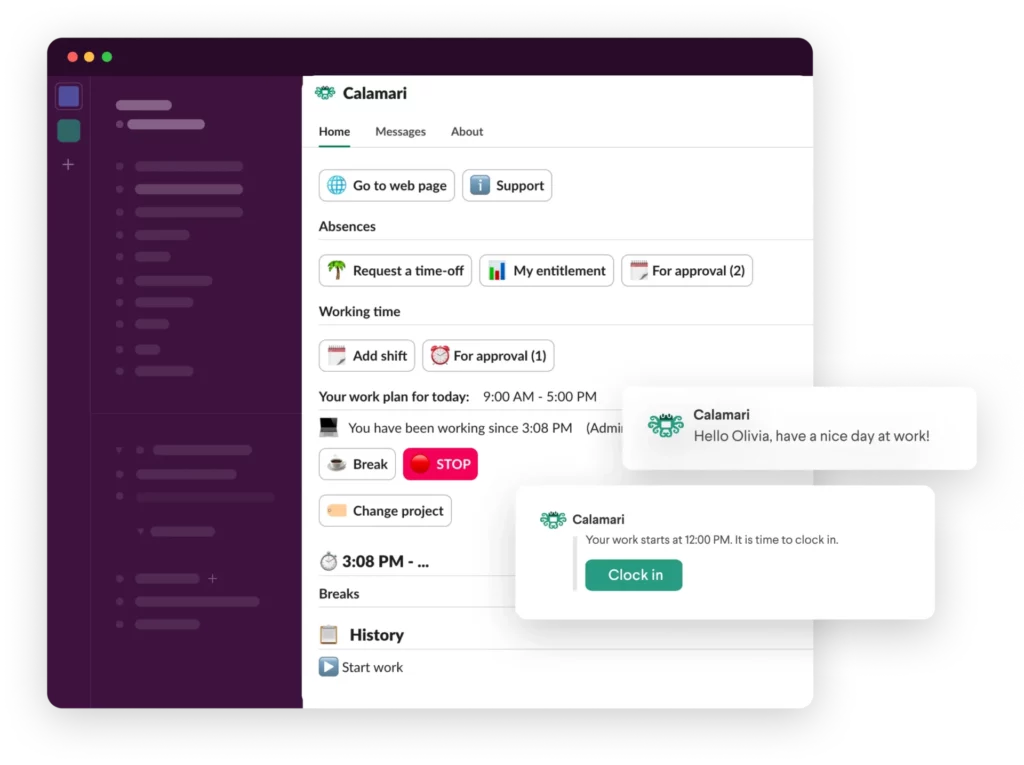
Calamari combines PTO tracking with time and attendance monitoring.
Key Features
Slack & Teams integrations
Clock in/clock out tracking
PTO approvals
Policy configuration
Pros
Strong attendance features
Good for shift based companies
Useful reporting tools
Cons
Can feel complex for PTO only needs
Pricing increases with modules
Best For
Companies needing both leave management and attendance tracking in one system.
How to Choose the Right PTO Bot in 2026
When evaluating Slack and Microsoft Teams PTO bots, consider:
Policy Complexity
Do you need multi policy support? Accrual rules? Rotating schedules?
Lightweight bots may not handle advanced structures.
Scalability
Will the tool still work when your team grows from 15 to 150 employees?
User Experience
Is the bot intuitive for employees?
Can managers approve requests in seconds?
Reporting & Compliance
Do you need downloadable reports, audit trails, or balance forecasting?
Platform Availability
Is it available on:
Slack
Microsoft Teams
Web dashboard
Mobile apps
Full platform systems provide long term flexibility.
FAQ
What is a PTO bot for Slack or Microsoft Teams?
A PTO bot is an application that integrates with collaboration platforms like Slack or Microsoft Teams and allows employees to request, approve, and track paid time off directly inside chat.
Instead of logging into a separate HR system, users can:
-
Submit leave requests
-
Check their PTO balance
-
View who’s off
-
Approve or decline requests
Advanced solutions like Day Off go beyond chat commands and connect to a full leave management dashboard with policies, reports, and mobile access.
Are PTO bots secure?
Yes,reputable PTO bots use secure authentication (OAuth), encrypted data transmission, and role based permissions.
For companies with stricter requirements, it’s important to check whether the system supports:
-
Role permissions (admin, manager, employee)
-
Audit logs
-
Two factor authentication (2FA)
-
Company level access controls
Security standards vary depending on whether the bot is chat only or connected to a full HR platform.
Can PTO bots handle complex leave policies?
Some can some cannot.
Lightweight bots are ideal for:
-
Simple vacation requests
-
Basic approval workflows
-
Small teams with one leave policy
More advanced systems support:
-
Multiple leave policies per location or department
-
Accrual rules (monthly, yearly, anniversary based)
-
Hour based balances
-
Rotating or flexible work schedules
-
Blackout periods
If your organization has different rules across teams, you’ll need more than a basic chat plugin.
Do PTO bots work for remote and global teams?
Yes, and they’re especially valuable for distributed teams.
Good PTO bots support:
-
Multiple time zones
-
Public holiday calendars per country
-
Multi location teams
-
Real time leave visibility
This prevents overlapping absences and staffing gaps across regions.
Can managers approve requests directly inside Slack or Teams?
Yes. Most PTO bots allow managers to approve or reject requests directly from:
-
A Slack notification
-
A Microsoft Teams message
-
A chat command
Some systems also provide dashboard approvals for HR teams who prefer a centralized view.
Do PTO bots replace HR systems?
Not always.
There are two categories:
Chat first bots
These operate primarily inside Slack or Teams and provide basic PTO tracking.
Full leave management platforms with chat integrations.
These combine Slack/Teams functionality with web dashboards, mobile apps, reporting, and advanced configuration.
If your company only needs lightweight leave visibility, a chat first bot may be enough.
If you need structured policies, compliance controls, and reporting, a full leave management system is more suitable.
Can PTO bots handle hour based leave tracking?
Some can, but many basic bots only track leave in days.
If your company operates with:
-
Shift based employees
-
Flexible working hours
-
Rotating schedules
-
Partial day absences
You should verify that the system supports hour based deductions and custom work schedules.
What happens when a company grows?
Growth often exposes the limits of simple bots.
As companies scale, they typically require:
-
Multiple leave types
-
Department specific rules
-
Role permissions
-
Reporting for finance or payroll
-
Policy compliance across locations
Scalable PTO systems allow organizations to expand without migrating data later.
Are PTO bots suitable for enterprises?
Yes, but only if the solution supports:
-
Advanced permissions
-
SSO integration
-
Audit logs
-
Custom approval flows
-
Multi entity support
Enterprises should evaluate whether the bot is a lightweight add on or part of a structured HR infrastructure.
What is the biggest benefit of using a PTO bot in 2026?
The biggest benefit is reducing friction.
Employees stay inside tools they already use daily.
Managers approve requests instantly.
HR avoids manual spreadsheets and email chains.
The result is:
-
Faster approvals
-
Fewer calculation errors
-
Clear leave visibility
-
Better workforce planning
In 2026, seamless integration between communication tools and HR systems is no longer optional, it’s expected.
Conclusion
Slack and Microsoft Teams PTO bots are no longer just productivity add ons they are core HR infrastructure for modern teams.
If your organization needs:
Advanced leave policies
Multi location control
Blackout periods
Hour based tracking
Clean mobile and web access
A dedicated system like Day Off offers stronger long term value than lightweight chat-only bots.
For smaller teams wanting minimal setup, tools like AttendanceBot or LeaveBot may be sufficient.
The right choice depends on whether you need simplicity, chat convenience, or full HR grade leave management power.
As workplaces become more distributed in 2026, the companies that automate time off effectively will reduce administrative friction, prevent staffing conflicts, and build healthier, more transparent teams.