

Table of Contents
ToggleManaging employee leave seems simple, until your team starts growing.
What begins as a shared spreadsheet quickly turns into overlapping PTO requests, inconsistent policies across departments, time zone confusion, country-specific holidays, and payroll errors caused by manual tracking.
As teams scale, leave management becomes more complex, and more critical.
That’s where Team Vacation Planner Software becomes essential. The right system centralizes policies, automates approvals, prevents scheduling conflicts, and gives managers clear visibility into team availability.

In this guide, we’ll cover:
Why modern teams need dedicated leave management systems
The key features that define great vacation planning software
The best tools available today
Why Day Off stands out as the top choice
Day Off: The Best Team Vacation Planner Software
When it comes to balancing power, simplicity, flexibility, and affordability, Day Off consistently stands out as the best dedicated team vacation planner.
Unlike complex HR suites that overwhelm teams with unnecessary modules, Day Off focuses on one thing, making leave management effortless, transparent, and accurate.
Here’s what makes it exceptional:
Extremely Easy to Use
Adoption is everything. If employees find a system confusing, they go back to email and spreadsheets.
Day Off keeps things simple with:
A clean, intuitive dashboard
Clear PTO balance displays
A fast “Request Time Off” flow
One-click manager approvals
Minimal training required
Employees can submit requests in seconds. Managers can approve instantly, even from mobile, eliminating back-and-forth emails.
Complete Leave Tracking for Every Policy Type
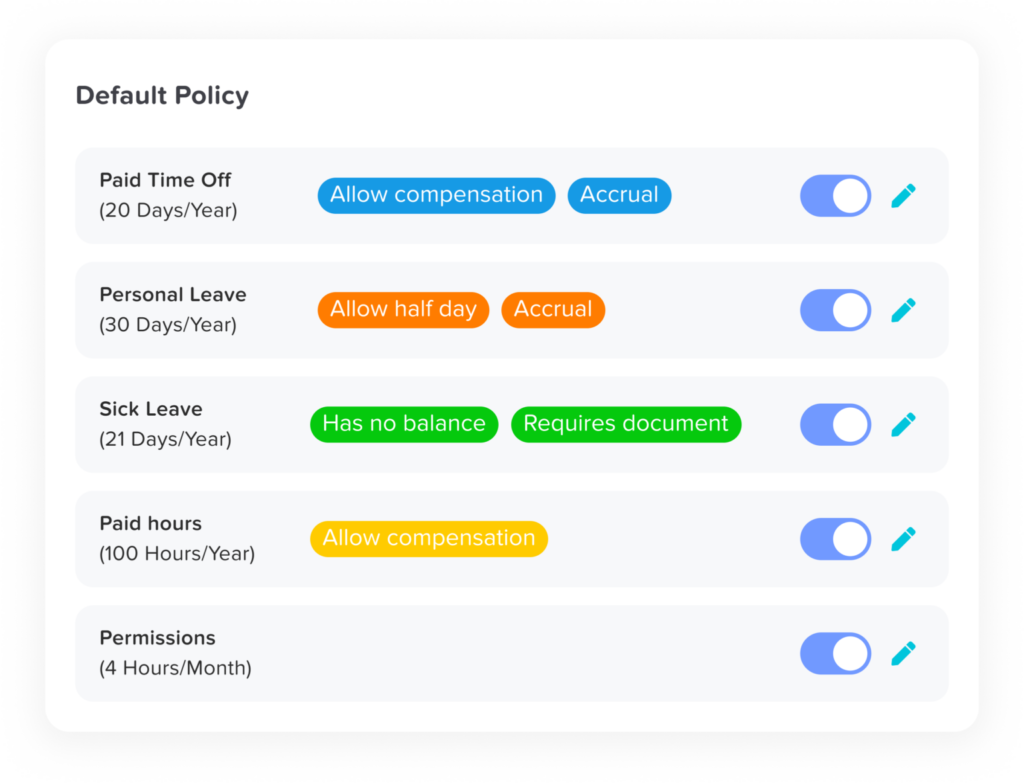
Every company structures leave differently. Day Off supports:
Paid Time Off (PTO)
Vacation leave
Sick leave
Maternity & paternity leave
Unpaid leave
Compassionate leave
Work-from-home tracking
Custom leave categories
Half-day and hourly leave
Policies can be customized by department, location, employment type, seniority level, or country, making it ideal for global and multi-location teams.
Shared Team Calendar with Real-Time Visibility

The centralized calendar provides instant clarity on:
Who is currently off
Upcoming leave
Department-level absences
Public holidays
Overlapping requests
With monthly and yearly views plus smart filters, managers can prevent understaffing and scheduling conflicts before they happen.
Customizable Multi-Level Approval Workflows
Day Off supports:
Single-step approvals
Multi-level approval chains
Role-based approvers
Department-specific workflows
Automatic notifications
Full approval history tracking
This ensures compliance while reducing HR oversight.
Automated PTO & Accrual Management

Manual calculations create errors. Day Off automates:
PTO accrual rules
Monthly or weekly, bi-weekly or semi-monthly accrual tracking
Carryover limits
Expiration policies
Pro-rated balances for new hires
Automatic balance deduction
Employees always see real-time balances, reducing HR inquiries and payroll discrepancies.
Smart Public Holiday Management
For global teams, Day Off provides:
Country-specific holiday calendars
Automatic holiday population
Custom holiday entries
Multi-location support
Automatic leave adjustment around holidays
This simplifies compliance across regions.
Advanced Reports & Workforce Insights
HR leaders gain access to:
Leave usage by department
Absence trends
Employee leave summaries
PTO liability reports
Exportable payroll-ready reports
These insights help forecast staffing, identify burnout risks, and manage liabilities.
Mobile Access for Hybrid Teams
With full mobile functionality, employees and managers can:
Submit or approve requests
Check balances
View team availability
Receive push notifications
Perfect for remote and hybrid workplaces.
Seamless Integrations
Day Off integrates with:
Google Calendar
Outlook Calendar
Slack
Microsoft Teams
Approved leave syncs automatically, no duplicate entries or missed absences.

Role-Based Permissions & Data Security
The platform supports:
Employee-level access restrictions
Manager-only approval visibility
HR administrative controls
Executive reporting access
Sensitive data stays secure while maintaining appropriate transparency.
Other Strong Team Vacation Planner Software Options
While Day Off is the top recommendation for dedicated leave management, several other tools are worth considering depending on your organization’s size, structure, and broader HR needs. Some of these platforms offer leave tracking as part of a complete HR ecosystem, which may be beneficial if you’re looking for an all-in-one solution.
BambooHR
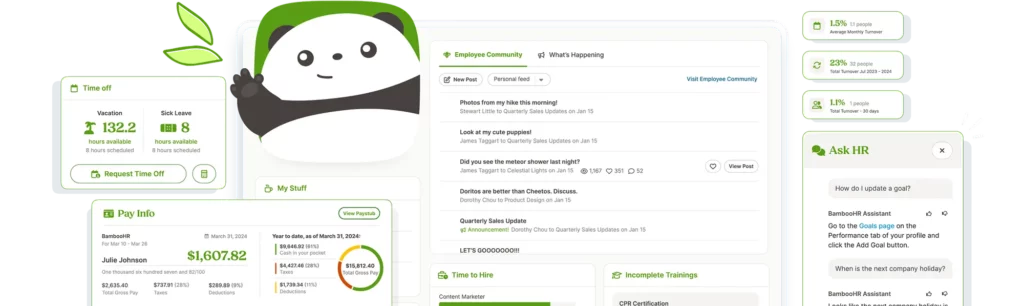
BambooHR is a comprehensive HR management system designed primarily for small to mid-sized businesses. While leave tracking is just one component of the platform, it’s well-integrated into the broader HR environment.
Key strengths include:
PTO tracking with customizable policies
Automated accrual calculations
Employee self-service portal
Built-in reporting and analytics
Integrated performance and hiring tools
Because leave management is connected to employee records, onboarding, and performance management, HR teams gain a centralized view of workforce data. However, companies seeking a lightweight, dedicated vacation planner may find BambooHR more robust, and more expensive, than necessary if leave tracking is their main priority.
Best for: Companies looking for a full HR suite rather than a standalone leave tool.
Gusto
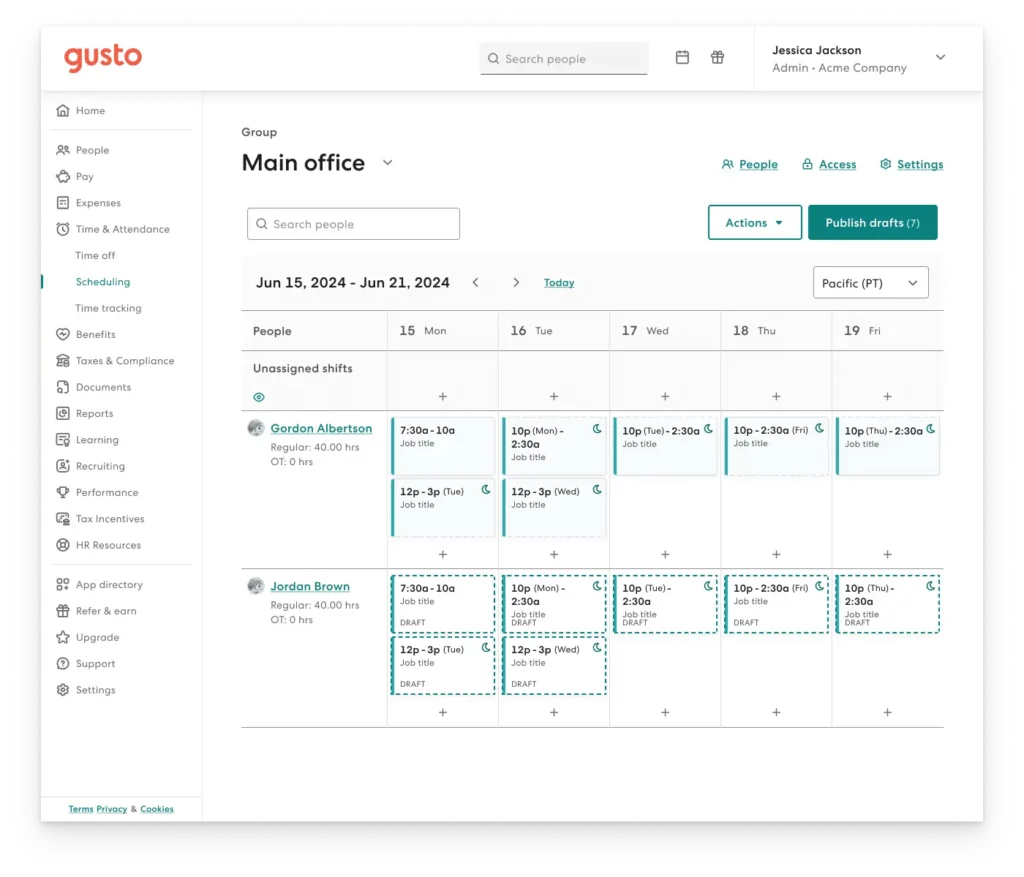
Gusto is widely known as a payroll platform, but it also includes PTO tracking and benefits administration. Its leave management features are closely tied to payroll, making it especially useful for businesses that want automatic synchronization between time off and compensation.
Highlights include:
PTO policy configuration
Automatic accrual tracking
Paid holiday management
Payroll-integrated leave deductions
Employee self-service dashboards
Because PTO balances directly impact payroll calculations, Gusto reduces the risk of payment errors caused by manual adjustments. That said, its leave features are typically best suited for small and mid-sized businesses rather than complex, multi-location organizations.
Best for: Businesses that prioritize payroll integration alongside leave management.
Zoho People

Part of the broader Zoho ecosystem, Zoho People provides a flexible HR platform that includes time off tracking, attendance monitoring, and workflow automation.
Core leave management capabilities include:
Fully customizable leave policies
Accrual and carryover management
Multi-level approval workflows
Integration with other Zoho applications
Detailed reporting and analytics
For organizations already using Zoho products (such as Zoho CRM or Zoho Projects), integration can be seamless. Its customization options make it appealing for companies with unique leave structures. However, the system may require more setup and configuration compared to simpler, dedicated leave tools.
Best for: Businesses already operating within the Zoho ecosystem.
Factorial HR
Factorial HR is a modern, cloud-based HR solution popular among startups and scaling companies, particularly in Europe. It combines leave management with document management, performance tracking, and employee records.
Key features include:
Leave tracking with automated accrual rules
Public holiday management by region
Digital employee document storage
Performance and time-tracking modules
Workforce analytics dashboards
Factorial’s interface is clean and modern, making adoption relatively smooth. However, like other full HR systems, leave planning is one module within a broader HR toolkit, which may add complexity for teams that only need vacation tracking.
Best for: Growing companies looking for an all-in-one HR management platform.
Timetastic
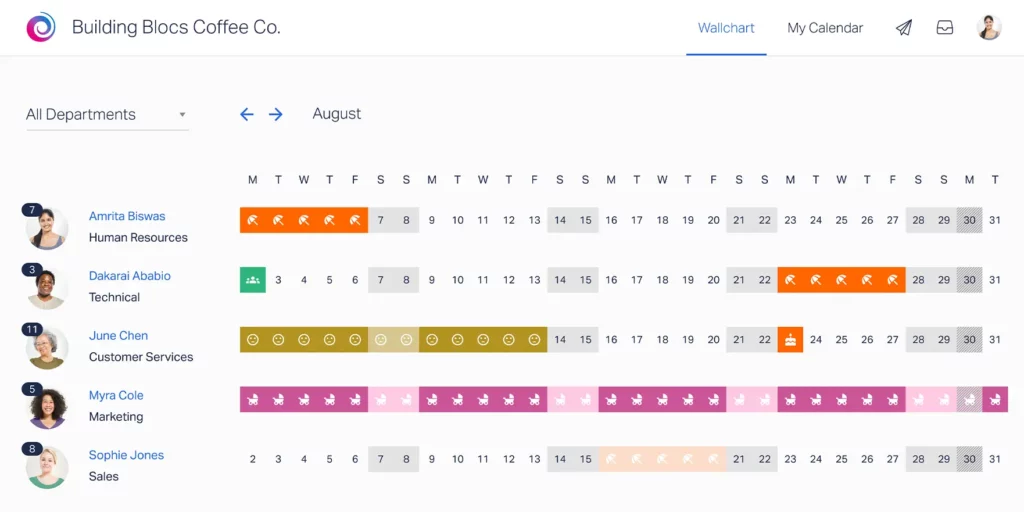
Timetastic is a dedicated leave management tool focused on simplicity and ease of use. Unlike large HR suites, it concentrates specifically on managing time off efficiently.
Notable capabilities include:
PTO tracking and approval workflows
Shared absence calendar
Public holiday management
Calendar integrations
Simple reporting features
Its lightweight structure makes it easy to deploy and adopt quickly. However, it may lack some of the advanced analytics, policy customization, and scalability that larger or global organizations require.
Best for: Small to mid-sized teams looking for a straightforward leave planner.
How to Choose the Right Team Vacation Planner Software
Not all leave management tools deliver the same value. The right solution should align with your company’s structure, support your operational needs, and remain effective as your organization evolves.
Here are the most important factors to consider, explained clearly and practically.
Company Size & Growth Plans
Your software should match both your current team size and your future growth trajectory.
For small teams, simplicity and quick setup are key. But as your organization expands, you’ll likely need:
Department-based leave policies
Advanced reporting
Multi-level approvals
Accrual customization
More detailed visibility controls
Switching systems later can be disruptive and costly. That’s why it’s smart to choose a scalable platform from the beginning, one that can handle 10 employees today and 500 tomorrow without requiring a complete overhaul.
The right tool grows with you, preventing migration headaches and retraining costs down the line.
Global vs. Local Workforce
If your company operates in multiple countries, or plans to, flexibility becomes critical.
Different regions have different:
Public holidays
Leave entitlements
Accrual rules
Labor law requirements
A strong vacation planner should allow you to assign policies by location, automatically apply country-specific holidays, and manage multiple teams under one centralized system.
Even if you currently operate in one region, planning for global expansion now will save you major operational friction later.
Approval Workflow Complexity
Every organization has its own approval structure.
Some teams only require direct manager approval. Others may require:
Department head validation
HR review
Multi-step authorization for extended leave
Your software must reflect your real workflow, not force you into a simplified structure.
Look for tools that support:
Single or multi-level approvals
Role-based approval chains
Automatic notifications and reminders
Clear audit trails
When approvals are automated and aligned with your hierarchy, decisions move faster and HR avoids manual oversight.
Integration Requirements
Vacation planning software should not operate in isolation.
To avoid manual work and duplicate entries, it should integrate with:
Company calendars (Google or Outlook)
Communication tools (Slack or Teams)
Payroll systems
HR platforms
When leave data syncs automatically, managers can see absences in their scheduling tools, payroll stays accurate, and employees avoid confusion.
Seamless integration reduces administrative work and increases operational efficiency.
Reporting & Visibility
Tracking leave is only part of the job, understanding the data is what creates strategic value.
Strong reporting features allow leadership to:
Identify absence trends
Forecast staffing gaps
Monitor PTO liabilities
Spot potential burnout patterns
Real-time dashboards and exportable reports help HR make informed decisions before issues escalate.
Visibility turns leave management from a reactive task into a proactive workforce planning tool.
Benefits of Using a Dedicated Leave Management System
Implementing a dedicated leave management system isn’t just an operational upgrade, it’s a strategic investment. The right platform improves coordination, reduces risk, and enhances the overall employee experience.
Here’s how it creates measurable business value:
Improved Workforce Planning
With a centralized, real-time leave calendar, managers instantly see who is available and who is scheduled to be away.
This allows teams to:
Prevent overlapping absences in critical roles
Plan project timelines more accurately
Adjust workloads before staffing gaps occur
Maintain service levels during peak periods
Instead of reacting to last-minute surprises, leadership can proactively allocate resources and maintain productivity.
Increased Transparency
When employees can log in and view their leave balances, accruals, and request history at any time, it eliminates uncertainty.
This transparency:
Reduces repetitive HR inquiries
Prevents misunderstandings about remaining PTO
Builds trust in company policies
Encourages responsible leave planning
Clear visibility creates a more confident and informed workforce.
Reduced Administrative Work
Manual leave tracking through spreadsheets and email chains consumes valuable HR time.
A dedicated system automates:
PTO accrual calculations
Leave deductions
Approval workflows
Balance updates
Notifications and reminders
This significantly reduces administrative burden and allows HR teams to focus on higher-impact initiatives like employee engagement and talent development.
Better Compliance
Accurate leave tracking supports both internal policy enforcement and external labor law compliance.
Automated systems help organizations:
Apply consistent leave policies
Maintain audit trails of approvals
Track statutory leave requirements
Reduce payroll errors
Avoid compliance penalties
This lowers legal risk and strengthens organizational governance.
Stronger Employee Experience
A smooth, intuitive leave request process directly impacts employee satisfaction.
When requesting time off is:
Fast
Clear
Transparent
Mobile-friendly
Employees feel respected and supported.
A frictionless leave experience reinforces work-life balance and contributes to overall engagement and retention.
| Feature / Platform | Day Off | BambooHR | Gusto | Zoho People | Factorial HR | Timetastic |
|---|---|---|---|---|---|---|
| Primary Focus | Dedicated leave | Full HR suite | Payroll + HR | HR ecosystem | All-in-one HR | Dedicated leave |
| Ease of Use | ⭐⭐⭐⭐⭐ | ⭐⭐⭐ | ⭐⭐⭐⭐ | ⭐⭐⭐ | ⭐⭐⭐⭐ | ⭐⭐⭐⭐ |
| PTO & Accrual Automation | ✔ Advanced | ✔ Included | ✔ Payroll-linked | ✔ Customizable | ✔ Automated | ✔ Basic |
| Multi-Level Approvals | ✔ Flexible | ✔ Yes | ⚠ Limited | ✔ Yes | ✔ Yes | ⚠ Basic |
| Global Public Holidays | ✔ Country-based | ⚠ Limited | ⚠ Basic | ✔ Configurable | ✔ Regional | ⚠ Basic |
| Shared Team Calendar | ✔ Real-time | ✔ Yes | ⚠ Limited | ✔ Yes | ✔ Yes | ✔ Yes |
| Payroll Integration | ⚠ Export / sync | ⚠ Add-ons | ✔ Native | ⚠ Integrations | ⚠ Integrations | ⚠ Limited |
| Mobile Access | ✔ Full | ✔ Yes | ✔ Yes | ✔ Yes | ✔ Yes | ✔ Yes |
| Best For | Focused, scalable leave planner | Companies needing full HR | Teams using Gusto payroll | Zoho ecosystem users | Growing HR-driven companies | Small teams needing simplicity |
| Complexity Level | Low | High | Medium | Medium | Medium–High | Low |
| Implementation Speed | Very fast | Moderate | Moderate | Moderate | Moderate | Fast |
Why Day Off Remains the Top Recommendation
Many platforms offer leave tracking as part of a larger HR ecosystem. While those systems can be powerful, they often come with unnecessary complexity, steep learning curves, and higher costs.
Day Off stands out because it focuses on doing one thing exceptionally well: making leave management simple, scalable, and efficient.
Here’s why it continues to be the top recommendation:
Purpose-Built for Leave Management
Unlike broad HR suites that treat time-off tracking as a secondary feature, Day Off is built specifically for vacation and PTO management.
That focus means:
Faster setup
Cleaner interface
No overwhelming modules
Minimal training required
Organizations can implement it quickly without disrupting daily operations.
Streamlined User Experience
Adoption is critical for any internal system. If employees avoid using it, HR ends up back in spreadsheets.
Day Off offers:
A clear dashboard with visible balances
A fast, intuitive leave request process
One-click approvals for managers
Mobile-friendly access
The simplicity encourages company-wide usage, which is essential for accurate tracking.
Flexible Global Policy Support
For growing companies and distributed teams, policy flexibility is essential.
Day Off supports:
Multiple leave types
Country-specific public holidays
Custom accrual rules
Department-based policies
Multi-location teams
This makes it suitable for both small local businesses and expanding international organizations.
Powerful Automation Without Unnecessary Complexity
Automation should reduce work, not create confusion.
Day Off automates:
PTO accrual calculations
Leave deductions
Carryovers and expiration rules
Approval workflows
Notifications and reminders
All of this happens behind a clean interface that doesn’t overwhelm users with technical settings.
Clear Visibility for Managers and Employees
Transparency drives better planning.
With real-time calendars and reporting tools:
Managers can avoid scheduling conflicts
Teams can plan projects more effectively
Employees can track their balances anytime
HR can monitor trends and liabilities
This level of visibility turns leave management into a proactive planning tool rather than a reactive administrative task.
Frequently Asked Questions (FAQ)
What is team vacation planner software?
Team vacation planner software is a centralized digital system designed to manage all aspects of employee leave in one place. It allows organizations to:
Track paid time off (PTO) balances
Automate accrual calculations
Manage leave requests and approvals
Display shared team calendars
Apply public holidays automatically
Generate absence reports
Instead of relying on manual processes, it creates a structured, transparent workflow that improves accuracy, planning, and compliance across the organization.
Why can’t we just use spreadsheets?
Spreadsheets may work temporarily for very small teams, but they quickly become unreliable as your company grows.
Common issues include:
Manual calculation errors
Outdated or duplicated files
Overlapping leave approvals
Lack of real-time visibility
Payroll discrepancies
No approval audit trail
As soon as multiple managers are involved or your workforce expands beyond 10–15 employees, spreadsheets create inefficiencies and risks. Dedicated software automates calculations and ensures everyone works from a single, accurate source of truth.
What features should the best leave management software include?
At minimum, a strong vacation planner system should provide:
Automated PTO tracking and accrual management
Custom leave policy configuration
Single or multi-level approval workflows
A shared, real-time team calendar
Public holiday management by country or location
Reporting and analytics dashboards
Integration with calendars and communication tools
Role-based access controls
The best platforms go beyond tracking, they support workforce planning, compliance, and data-driven decision-making.
Is leave management software suitable for remote teams?
Yes, and remote or hybrid teams often benefit the most.
When employees are distributed across locations and time zones, visibility becomes critical. Centralized leave tracking allows managers to:
See availability instantly
Prevent scheduling conflicts
Coordinate across global teams
Maintain coverage during key projects
Without a shared system, remote teams rely heavily on fragmented communication, which increases the risk of missed absences and operational gaps.
Can leave software handle different leave types?
Modern leave management systems are designed to support a wide variety of leave categories, including:
Vacation leave
Sick leave
Maternity and paternity leave
Unpaid leave
Compassionate leave
Half-days
Hourly leave
Fully customizable leave types
Advanced systems also allow policies to vary by department, location, or employment type, ensuring flexibility for diverse workforces.
Does vacation planner software integrate with payroll?
Many leave management tools integrate directly with payroll platforms or allow easy export of leave data for payroll processing.
This integration helps:
Ensure accurate salary deductions
Prevent overpayment or underpayment
Reduce manual data entry
Maintain audit-ready records
Automated synchronization between leave and payroll systems significantly lowers administrative risk.
Is leave management software secure?
Reputable platforms prioritize data protection and employee privacy.
They typically provide:
Role-based access controls
Encrypted data storage
Secure cloud infrastructure
Permission-based visibility
Approval history logs for audit tracking
This ensures that sensitive employee information remains protected while still allowing appropriate visibility for managers and HR teams.
How long does implementation typically take?
Implementation time depends on company size and policy complexity, but dedicated leave management tools, such as Day Off, are designed for quick deployment.
For many organizations:
Setup can take just a few hours
Policy configuration may take a few days
Employee onboarding requires minimal training
Because the system focuses specifically on leave management, the implementation process is significantly faster than full HR suites.
What size company benefits most from vacation planner software?
Any company with more than 10–15 employees can benefit from structured leave tracking.
As team size increases:
Approval chains become more complex
Leave overlaps become more likely
PTO calculations become harder to manage manually
Compliance risks increase
Mid-sized and growing organizations experience the greatest operational improvements, but even small teams gain clarity and efficiency from automation.
What makes Day Off different from larger HR systems?
Unlike comprehensive HR platforms where leave tracking is just one module among many, Day Off is purpose-built specifically for vacation and PTO management.
This focused approach means:
A cleaner, more intuitive interface
Faster implementation
Less employee training
No unnecessary HR modules
Lower complexity and cost
It delivers powerful automation and flexibility without overwhelming teams with features they may never use, making it an ideal solution for organizations that want simplicity without sacrificing capability.
Conclusion
As teams grow, managing leave becomes more than just tracking days off, it becomes essential to maintaining productivity, compliance, and employee satisfaction.
The right team vacation planner software simplifies the process by automating approvals, centralizing policies, and giving managers clear visibility into availability. While several tools offer solid features, a dedicated solution like Day Off provides the ideal balance of simplicity, flexibility, and control.
Investing in the right system today helps your organization stay organized, efficient, and ready to scale tomorrow.
