

Table of Contents
ToggleRemote work has permanently changed how companies operate. Teams are no longer sitting in the same office, working the same hours, or even living in the same country. While this flexibility has unlocked access to global talent and improved work-life balance, it has also created new operational challenges.
One of the most overlooked, yet critical, challenges is managing vacation time.
In a distributed team, time off cannot rely on casual conversations, shared spreadsheets, or email threads. Without a proper system, visibility disappears, planning becomes reactive, and mistakes become expensive.

In this comprehensive guide, we’ll explore:
Why vacation tracking is essential for remote teams
The real operational and cultural costs of poor leave management
What features matter most in remote-first environments
The best vacation tracking software for remote teams
How to choose the right tool for your organization
Why Vacation Tracking Is Critical for Remote Teams
The Visibility We Take for Granted in Offices
In a traditional office, awareness happens naturally.
You overhear someone mention they’ll be out next week. You notice a few empty desks. A manager walking past can quickly see who’s around and who isn’t. That ambient visibility quietly keeps teams aligned without anyone formally coordinating it.
Remote Work Removes Ambient Awareness
When teams are distributed across time zones, that natural visibility disappears.
There are no hallway conversations. No visual cues. No casual reminders that three people will be offline at the same time. Availability becomes fragmented across emails, Slack messages, and personal calendars.
The Hidden Risks of Poor Leave Coordination
Without a clear system, problems surface quickly:
A manager approves leave without realizing multiple team members are already out.
A deadline slips because a key contributor is unavailable.
An employee hesitates to request time off because they’re unsure about coverage.
HR struggles to reconcile balances across spreadsheets and disconnected tools.
These issues aren’t caused by poor management. They’re caused by a lack of shared visibility.
Distributed Teams Need Intentional Systems
In remote environments, transparency can’t be accidental. It has to be built into workflows.
Teams need a simple, reliable way to see who is off, who is available, and how leave impacts coverage. That visibility shouldn’t depend on memory or manual updates, it should be automatic and accessible to everyone.
Vacation Tracking as a Single Source of Truth
Vacation tracking software provides that structure. It centralizes requests, approvals, calendars, and leave balances into one shared system.
Employees can confidently plan time off. Managers can approve requests with full awareness of team capacity. HR can maintain accurate records without chasing information across platforms.
This isn’t just about organization.
It’s about maintaining operational stability, protecting deadlines, and giving people the confidence to take time off without disrupting the team.
The Hidden Costs of Manual Leave Management
At first glance, spreadsheets feel practical. They’re simple, familiar, and easy to set up. Many companies start there, and for a while, it works.
But as teams grow and become more distributed, manual leave tracking starts to introduce quiet friction. What once felt manageable becomes a source of risk, confusion, and wasted time.
Administrative Overload
Manual tracking creates an invisible workload.
HR teams spend hours updating spreadsheets, double-checking formulas, answering balance questions, and reconciling discrepancies. Managers send follow-up emails. Employees ask for confirmations.
Individually, these tasks seem small. Collectively, they drain time that could be invested in strategic priorities like employee engagement, workforce planning, or talent development.
Calculation Errors That Erode Trust
Spreadsheets rely on formulas, and formulas break.
One incorrect cell reference can miscalculate PTO balances for multiple employees. An outdated version can overwrite recent changes. A manual adjustment can create inconsistencies that are hard to trace.
When leave balances are wrong, trust erodes. Employees question payroll accuracy. HR spends time fixing preventable mistakes. What should be straightforward becomes a credibility issue.
No Real-Time Visibility
Spreadsheets are rarely a live, shared source of truth.
Managers may approve leave without seeing the full team calendar. Multiple employees might request overlapping time off without anyone realizing the impact on coverage.
Without instant visibility, decisions are made in isolation, and operational gaps follow.
Slow, Fragmented Approvals
Email-based approvals add another layer of friction.
Requests get buried in inboxes. Time zone differences delay responses. Follow-ups are required. There’s no clear record of status unless someone manually updates it.
What should take minutes can stretch into days.
Cultural Consequences
Perhaps the most overlooked cost is cultural.
When leave processes feel unclear, inconsistent, or difficult, employees hesitate to take time off. They worry about coverage. They’re unsure about their balance. They don’t want to create extra work.
In remote environments, where burnout risk is already elevated, this hesitation becomes dangerous. Time off stops feeling like a supported benefit and starts feeling like a burden.
A More Reliable Approach
Vacation tracking software addresses these risks directly.
It automates calculations to prevent errors. It centralizes requests and approvals in one system. It provides real-time visibility into team availability.
The result isn’t just efficiency. It’s clarity, consistency, and confidence, for HR, for managers, and for employees who should be able to take time off without friction.
Day Off Vacation Tracker

Day Off is a streamlined PTO and leave management solution built for clarity and ease of use. Instead of overwhelming teams with heavy HR suites, it focuses on doing one thing exceptionally well: making time-off tracking simple, transparent, and reliable.
Best for: Small to mid-sized remote teams that want a focused, easy-to-implement solution without enterprise complexity.
Why It Works Especially Well for Remote Teams
Remote teams need tools that are intuitive, accessible from anywhere, and fast to adopt. Day Off removes friction from leave management by centralizing everything in one clean, easy-to-navigate system.
Because it’s purpose-built for PTO tracking, onboarding is fast. There’s no complicated configuration or unnecessary modules to work around.
Core Features
Simple Leave Requests & Fast Approvals
Requesting time off shouldn’t feel formal or complicated. With Day Off, it’s straightforward. Employees choose their dates, select the type of leave, and submit. That’s it.
Managers are notified right away and can quickly see the context around the request, who else is off, what the balance looks like, and how it might impact the team. Approving or declining takes seconds.
The process feels natural and lightweight, which is especially important for distributed teams. When people work across time zones, delays add up fast. A clear, quick approval flow keeps things moving without unnecessary back-and-forth.
Shared Team Calendar
One of the biggest challenges in remote teams is simply knowing who’s available. The shared calendar solves that.
Everyone can see upcoming time off in one place. Before submitting a request, employees can check whether teammates are already away. Managers can spot potential coverage gaps before they become problems.
It removes guesswork and reduces awkward conversations. Instead of asking around or scrolling through Slack threads, the answer is right there.
Real-Time PTO Balance Tracking
Few things create more confusion than unclear leave balances.
With Day Off, balances update automatically after every approved request. Employees can log in anytime and see exactly how much time they have left. No spreadsheets. No emailing HR for clarification. No second-guessing the numbers.
That transparency builds trust. People feel more confident planning time off when they know the system is accurate.
Custom Leave Types & Policies

Every company handles time off differently. Some offer flexible PTO. Others have structured accrual systems. Some operate across multiple countries with different public holidays and labor requirements.
Day Off adapts to those realities. You can create different leave types, define how time is earned, set carryover rules, and reflect regional policies.
It doesn’t force teams into a rigid template, it supports how your organization actually works.
Automated Accruals
Tracking accruals manually can quickly become messy, especially as headcount grows.
With automated accruals, the system handles the math in the background. Time can accrue monthly, yearly, or based on your company’s specific structure. Balances update without anyone needing to monitor formulas or make adjustments.
It’s one less thing for HR to worry about, and one less place for mistakes to happen.
Multi-Level Approval Workflows
Some teams prefer a simple manager approval. Others need an additional layer, such as HR confirmation.
Day Off allows you to set up approval chains that reflect your internal structure. The process remains clear and organized, but still easy to manage.
This flexibility is helpful for growing companies that are adding structure without wanting to create bureaucracy.
Holiday Management
For distributed teams, public holidays can get complicated. What’s a working day in one country may be a national holiday in another.
Day Off allows holidays to be assigned based on location, so calendars and balances reflect local realities. This helps prevent scheduling misunderstandings and keeps planning accurate across regions.
It’s a small detail that makes a big difference for global teams.
Reporting & Insights

Beyond day-to-day requests, leaders need a broader view.
Reporting tools provide visibility into leave trends, upcoming absences, remaining balances, and team availability. This makes workforce planning more proactive instead of reactive.
Instead of discovering gaps at the last minute, managers can anticipate and adjust.
Mobile-Friendly Access
Remote work isn’t tied to a desk. People travel, work flexibly, and operate across different environments.
Day Off’s mobile-friendly design ensures employees and managers can submit and review requests from anywhere. Whether someone is on the go or working remotely, the process remains simple and accessible.
That convenience keeps leave management from becoming a bottleneck.


Clean, Modern Interface
Adoption often depends on simplicity. If a system feels complicated, people avoid it.
Day Off’s interface is clean and intuitive. Information is easy to find, and the experience feels straightforward from the start. Most teams can begin using it immediately without long training sessions.
That ease of use encourages consistent adoption, which ultimately makes the entire leave process smoother for everyone.
BambooHR
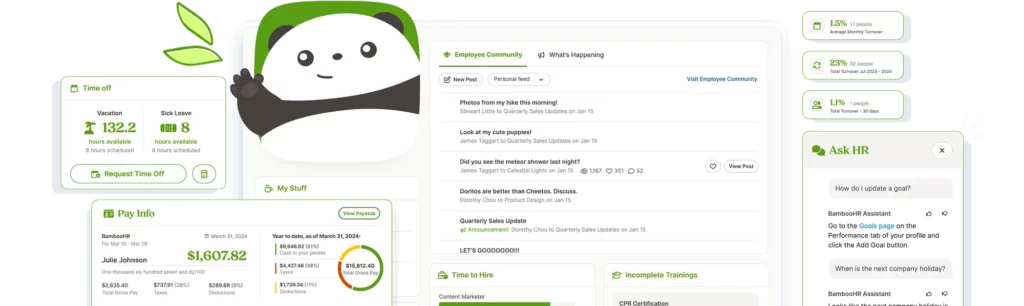
BambooHR is a full-service human resources platform that includes PTO tracking as part of a broader HR ecosystem. Rather than functioning as a standalone leave tool, it connects time-off management to employee records, performance data, and organizational reporting.
Best for: Mid-sized organizations that want an integrated HR system instead of separate point solutions.
Strengths
Centralized employee records
All employee information, from personal details to job history, lives in one secure system. PTO data connects directly to those records, reducing duplication and administrative work.Integrated PTO tracking
Leave requests, balances, and approvals are built into the broader HR workflow. Managers can review time off alongside performance reviews, team data, and reporting dashboards.Performance management tools
Goal tracking, feedback cycles, and review systems are part of the platform, allowing HR to manage employee development alongside administrative processes.Reporting and analytics
Detailed reports provide visibility into headcount, turnover, leave trends, and more, supporting data-driven decision-making.
For organizations that want everything in one place, BambooHR provides structure and depth. However, smaller remote teams that only need vacation tracking may find it more robust than necessary for their immediate needs.
Rippling

Rippling combines HR, payroll, benefits, and IT management into a single unified platform. It’s designed for companies operating at scale, especially those managing distributed or international teams.
Best for: Large or global remote organizations with complex operational requirements.
Strengths
Automated PTO calculations
Leave balances update automatically based on company policy, reducing manual oversight and ensuring payroll alignment.Payroll integration
PTO data connects directly to payroll processing, minimizing discrepancies and improving financial accuracy.Compliance support across regions
Rippling helps organizations manage local labor laws, tax requirements, and employment regulations, particularly valuable for international teams.Advanced automation workflows
Custom workflows can automate approvals, onboarding processes, and administrative tasks, reducing repetitive work across departments.
Rippling is powerful and highly scalable. Its breadth makes it well-suited for organizations managing global operations. For early-stage or smaller remote teams, however, the level of complexity and pricing may exceed what’s required for straightforward leave management.
Timetastic
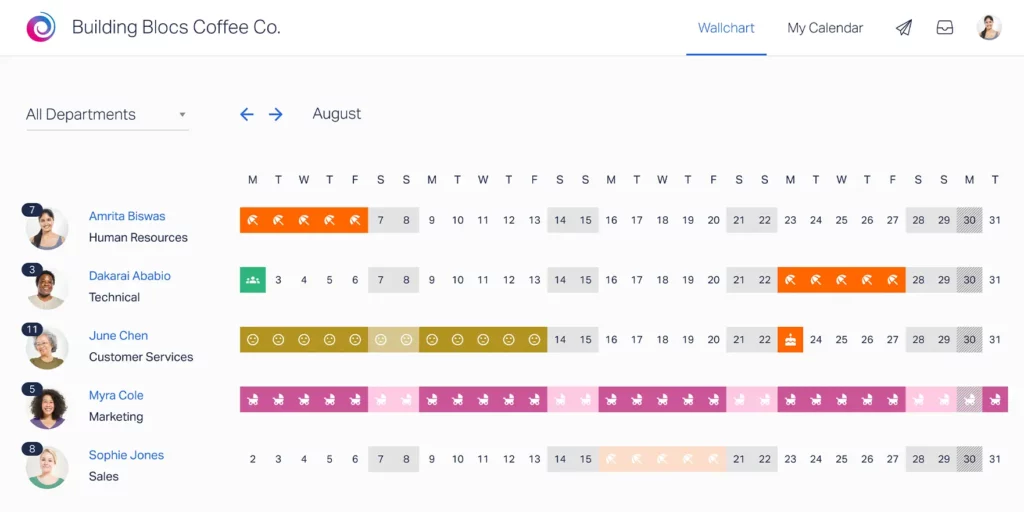
Timetastic is a dedicated absence management tool designed with clarity and simplicity in mind. It focuses specifically on helping teams see who’s off and when, without adding extra HR layers.
Best for: Teams that prioritize ease of use and visual transparency.
Strengths
Clear calendar layout
The visual team calendar makes availability immediately obvious, reducing scheduling conflicts and improving planning.Simple booking system
Employees can request time off quickly, and managers can approve with minimal friction. The experience is intuitive from day one.Slack integration
Notifications and updates can flow directly into Slack, keeping communication aligned with existing team workflows.
By removing unnecessary features, Timetastic keeps the experience focused and easy to adopt. This streamlined approach works particularly well for remote teams that want straightforward visibility without the overhead of a full HR suite.
LeaveBoard

LeaveBoard combines leave tracking with structured reporting tools, offering more oversight than lightweight apps while remaining simpler than comprehensive HR systems.
Best for: Organizations that need stronger reporting and compliance support without implementing a full HR platform.
Strengths
Custom leave policies
Companies can configure leave types, accrual rules, and carryover settings to align with internal policies or legal requirements.Accurate balance tracking
Automated calculations ensure that leave balances remain consistent and transparent for employees and administrators.Dashboard reporting
Built-in dashboards provide visibility into usage trends, upcoming absences, and workforce availability.
LeaveBoard offers a balanced approach, more structured than minimalist tools, yet less complex than enterprise-level HR systems. For organizations seeking reporting clarity alongside reliable leave tracking, it provides a practical middle ground.
How to Choose the Right Tool
Choosing vacation tracking software isn’t just a feature comparison exercise. It’s about finding a system that fits how your team works today, and where it’s headed tomorrow.
Start by stepping back and looking at the bigger picture.
Team size and growth plans
A five-person startup has very different needs than a 300-person distributed company. Think about where your team will be in 12–24 months. Will the tool scale with you, or will you outgrow it quickly?
Geographic distribution
If your employees work across multiple countries, you’ll need support for regional holidays, time zones, and possibly different leave policies. Global teams benefit from tools that handle this complexity without manual workarounds.
Compliance requirements
Depending on your location and industry, leave policies may be subject to labor regulations. Make sure the system can support accurate tracking and documentation.
Budget
Pricing models vary widely. Some tools are lightweight and affordable. Others bundle PTO into full HR ecosystems. The key is ensuring you’re paying for value, not unused features.
Desired level of complexity
Not every team needs advanced automation, payroll integration, or layered workflows. Sometimes simplicity drives better results.
In many remote-first companies, the most effective tool isn’t the one with the longest feature list; it’s the one your team actually uses consistently.
Adoption determines effectiveness.
If the system is intuitive and easy, it becomes part of the workflow. If it feels heavy or confusing, people avoid it, and visibility disappears.
The Cultural Impact of Effective Leave Management
Vacation tracking isn’t just an operational process. It quietly shapes company culture.
When leave systems are clear and transparent, they send a message: taking time off is normal, supported, and expected.
Strong systems help:
Encourage employees to take time off without hesitation
Reduce burnout by making rest easier to plan
Promote fairness through consistent policies and visibility
Strengthen trust in leadership and HR processes
In remote environments, where work and personal life often blend together, boundaries can blur. Without clear signals, employees may feel pressure to stay constantly available.
A transparent leave system reinforces healthy separation. It shows that rest isn’t disruptive, it’s part of sustainable performance.
When employees trust the process, they disconnect more fully. And when they return, they’re more focused, more energized, and more productive.
Effective leave management, in that sense, isn’t just about tracking days off. It’s about protecting long-term team health and stability.
Frequently Asked Questions (FAQ)
How is vacation tracking different from basic calendar scheduling?
A shared calendar can show when someone is out, but it doesn’t manage balances, accruals, approval workflows, or policy compliance.
Vacation tracking software connects availability with policy rules and real-time balances. It ensures that when someone books time off, the system automatically updates totals, notifies the right people, and maintains accurate records. It’s operational, not just visual.
Can vacation tracking software integrate with other tools we already use?
Most modern leave management platforms integrate with tools like Slack, Microsoft Teams, Google Workspace, and payroll systems.
Integrations reduce duplicate data entry and ensure that time-off updates flow into communication channels, shared calendars, and payroll automatically. When evaluating a tool, it’s worth checking whether it connects with your existing tech stack.
How long does it typically take to implement a vacation tracking system?
Implementation time varies depending on complexity.
Lightweight tools can often be set up in a few hours or days. Full HR platforms may require weeks for configuration, policy mapping, and data migration.
For most remote teams, the key is clarity around leave policies before implementation, once policies are defined, setup becomes much smoother.
What happens to historical leave data when switching systems?
Many tools allow bulk data imports from spreadsheets or previous systems. This ensures historical balances and past leave records remain accurate and accessible.
Before switching, it’s important to audit your existing data for inconsistencies so you start clean in the new system.
Is unlimited PTO easier to manage than traditional accrual systems?
Not necessarily.
While unlimited PTO removes accrual calculations, it still requires visibility, approvals, and tracking for operational planning. Teams still need to know who is off and when.
In fact, unlimited PTO policies often benefit from strong tracking systems to ensure fairness and encourage actual usage.
How do vacation tracking tools handle part-time or contract employees?
Most platforms allow you to create customized accrual rates or policy types based on employment status.
This means part-time employees can accrue leave proportionally, contractors can have separate policies, and different employment agreements can be reflected accurately within the same system.
Can leave management tools support blackout periods or peak seasons?
Yes. Many systems allow administrators to define restricted periods during which leave requests are limited or require additional approvals.
This is especially useful for businesses with seasonal demand, product launches, or critical operational windows.
How does vacation tracking impact payroll accuracy?
When PTO balances are connected to payroll systems, the risk of underpayments, overpayments, or incorrect deductions decreases significantly.
Accurate tracking ensures that paid time off, unpaid leave, and carryover balances are reflected correctly in compensation calculations.
What security considerations should companies evaluate?
Vacation tracking systems contain sensitive employee data.
When choosing a tool, look for secure data storage, role-based permissions, encrypted connections, and compliance with relevant data protection standards.
Access controls are particularly important in remote environments to ensure only authorized personnel can view or modify records.
How can companies encourage employees to actually use the system?
Adoption improves when the system is simple, and leadership models the behavior.
Managers should consistently submit and approve leave through the platform rather than informal channels. Clear communication about policies and expectations also reinforces usage.
When employees see that the system is reliable and easy, it becomes a natural part of workflow rather than an extra task.
Does vacation tracking software help with workforce planning?
Yes.
With visibility into upcoming absences and leave trends, managers can anticipate staffing gaps, redistribute workloads, and plan hiring or temporary support more effectively.
Over time, leave data also provides insight into seasonal patterns and team capacity planning.
Is vacation tracking software only necessary for fully remote teams?
No.
Hybrid and even office-based teams benefit from centralized visibility, especially as flexibility increases. Once teams adopt staggered schedules, flexible hours, or distributed hiring, manual tracking quickly becomes insufficient.
The need isn’t defined by physical location, it’s defined by complexity and scale.
Conclusion
Remote work has changed how teams operate, and with that shift comes the need for clearer systems. What once relied on informal visibility now requires intentional structure.
Vacation tracking isn’t just administrative. It affects planning, productivity, compliance, and employee wellbeing. Without a reliable system, small gaps in visibility can quickly turn into operational and cultural challenges.
The right tool brings clarity. It centralizes information, reduces errors, and gives both managers and employees confidence around time off.
In distributed teams, effective leave management isn’t a nice-to-have. It’s part of building a stable, healthy, and sustainable organization.