Category: Schedules

  • Leave Management For Global Distributed Teams

    Leave Management For Global Distributed Teams

    As companies continue to expand beyond borders, global distributed teams have become a strategic advantage. Hiring across countries allows access to wider talent pools, cost efficiencies, and around the clock productivity. However, this global reach introduces one of the most underestimated challenges in workforce operations: leave management across multiple countries, laws, and time zones.

    Leave management is no longer a simple HR task. For global teams, it sits at the intersection of legal compliance, workforce planning, employee experience, and operational continuity. In this in depth guide, we’ll explore the full scope of global leave management, why it’s complex, and how organizations can design scalable, compliant, and efficient systems.

    Understanding Leave Management in a Global Context

    Leave management refers to how organizations define, track, approve, and report employee time off. In a global environment, this includes:

    • Paid time off (PTO) and vacation leave

    • Sick and medical leave

    • Public and national holidays

    • Parental, maternity, and paternity leave

    • Compassionate, bereavement, and special leave

    • Unpaid or statutory protected leave

    What makes global leave management unique is that each of these leave types may be governed by different laws depending on the employee’s location.

    A policy that works perfectly in one country can be illegal or incomplete in another.

    Why Global Leave Management Is So Challenging

    Country Specific Legal Requirements

    Every country defines leave entitlements differently. These differences can include:

    • Minimum vacation days per year

    • Whether sick leave is paid, unpaid, or employer funded

    • Rules around public holidays and substitutes

    • Carryover limits and expiration rules

    • Whether unused leave must be paid out upon termination

    Failing to meet statutory requirements can expose companies to audits, penalties, and employee disputes. For global teams, manual tracking increases the likelihood of mistakes.

    Local Interpretation of “PTO”

    In some regions, PTO is a single flexible balance. In others, leave types must be separated and tracked independently. Combining everything into one bucket may violate labor laws or collective agreements.

    This makes it critical to design leave structures that respect local definitions of leave, not just company preferences.

    Cultural Differences Around Time Off

    Beyond legal compliance, cultural expectations vary widely:

    • Some cultures encourage employees to take their full leave entitlement

    • Others discourage long absences or overlapping leave

    • Public holidays may be heavily observed in one country and flexible in another

    Ignoring cultural norms can negatively impact morale, retention, and employer brand.

    Time Zone Driven Scheduling Risks

    Distributed teams often work asynchronously. Without careful planning, leave can cause:

    • Delays in approvals

    • Missed handovers

    • Gaps in customer support or operations

    • Reduced collaboration during key periods

    Scheduling leave across time zones requires real time visibility and forecasting, not static calendars.

    The Business Impact of Poor Global Leave Management

    When leave is not managed effectively at a global level, the consequences extend far beyond HR:

    • Operational disruption due to understaffing

    • Manager burnout from last minute scheduling issues

    • Payroll errors from incorrect balances or accruals

    • Compliance risks from outdated or misapplied rules

    • Employee dissatisfaction caused by confusion or perceived unfairness

    Over time, these issues can erode trust and productivity across distributed teams.

    Designing a Scalable Global Leave Strategy

    Establish a Global Leave Framework

    A strong foundation starts with a global framework that defines:

    • Core leave principles

    • Standard approval processes

    • Common terminology

    • Reporting and governance rules

    This framework ensures consistency while allowing flexibility where local laws require it.

    Layer Local Policies on Top

    Instead of reinventing policies for every country, organizations should:

    • Adapt entitlements based on local labor laws

    • Configure accruals, carryover, and resets by region

    • Respect mandatory leave types

    This approach balances control with compliance.

    Centralize Leave Data

    A single, centralized system is essential for global teams. Centralization enables:

    • Accurate real time leave balances

    • Consistent approvals regardless of location

    • Clear reporting across departments and countries

    • Simplified audits and record keeping

    Without centralization, global leave data becomes fragmented and unreliable.

    Automate Compliance Wherever Possible

    Automation is key to scaling global leave management. Automated systems can:

    • Apply statutory rules automatically

    • Prevent invalid leave requests

    • Adjust balances correctly over time

    • Keep policies aligned as regulations change

    This reduces dependency on manual oversight and legal interpretation.

    Integrate Scheduling and Capacity Planning

    Leave management should not exist in isolation. For global teams, it must integrate with scheduling by:

    • Displaying team availability across time zones

    • Highlighting overlapping leave risks

    • Supporting approval decisions based on coverage

    • Helping managers plan workloads proactively

    This transforms leave management from a reactive process into a strategic planning tool.

    The Role of Leave Management Software for Global Teams

    Modern leave management software is designed to handle the complexity of distributed workforces. A dedicated solution allows organizations to:

    • Manage employees in multiple countries from one platform

    • Configure country specific leave rules and policies

    • Track PTO, sick leave, and statutory leave accurately

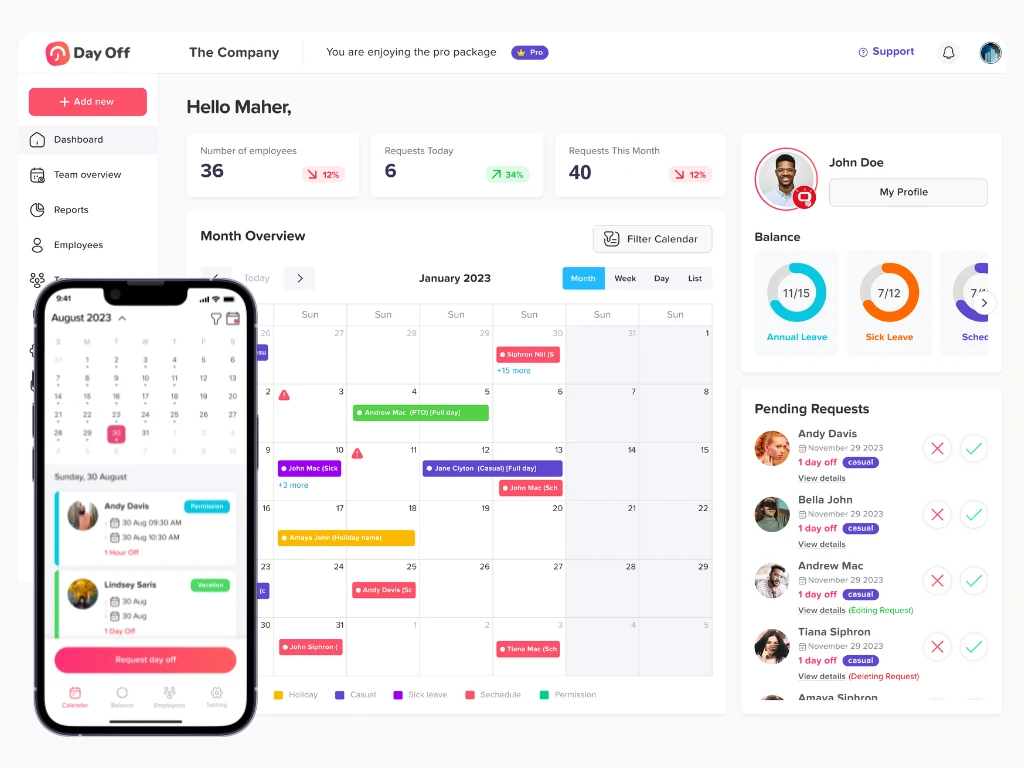
    • Visualize leave calendars across regions and time zones

    • Maintain transparent approval workflows

    • Generate detailed reports for HR, payroll, and leadership

    Solutions like Day Off are built to support global and distributed teams by combining multi country compliance, scheduling visibility, and ease of use across web, iOS, and Android.

    Governance, Reporting, and Audits

    Global leave management also requires strong governance. Organizations should ensure they can:

    • Demonstrate compliance with local labor laws

    • Provide audit ready leave records

    • Track usage trends by region and team

    • Identify risks such as excessive absenteeism or burnout

    Advanced reporting enables better decision making and long term workforce planning.

    Supporting Employee Experience in Distributed Teams

    Clear, transparent leave management is a major contributor to employee trust. For global teams, this means:

    • Self service access to leave balances

    • Clear explanations of entitlements

    • Predictable approval processes

    • Equal treatment across regions

    When employees understand their leave rights and feel confident requesting time off, engagement and retention improve.

    The Future of Global Leave Management

    As global hiring accelerates, leave management will continue to evolve. Future focused organizations will:

    • Treat leave data as part of workforce analytics

    • Integrate leave planning with capacity and resource management

    • Use automation to stay compliant across jurisdictions

    • Design policies that support flexibility without sacrificing structure

    Global leave management is no longer just an HR responsibility it’s a business critical system.

    FAQ

    What is leave management for global distributed teams?

    Leave management for global distributed teams refers to the process of tracking, approving, and managing employee time off across multiple countries, time zones, and legal systems. It ensures that employees receive their correct leave entitlements while organizations remain compliant with local labor laws and maintain adequate staffing across regions.

    Why is multi country compliance important in leave management?

    Multi country compliance is critical because labor laws vary by location. Each country may have different rules for paid vacation, sick leave, public holidays, parental leave, and PTO carryover. Non compliance can result in legal penalties, employee disputes, and reputational damage. A compliant leave management system automatically applies local rules and keeps accurate records.

    Can one leave policy work for all countries?

    A single universal policy rarely works without adjustments. Most organizations use a global leave framework with country specific variations. This approach maintains consistency while allowing flexibility to meet local legal requirements and cultural expectations.

    How do global teams manage public holidays across countries?

    Global teams typically manage public holidays by assigning holidays based on the employee’s work location. A centralized leave management system can automatically apply country specific holiday calendars, ensuring accurate scheduling and preventing confusion or coverage gaps.

    How does leave management affect global team scheduling?

    Leave management directly impacts scheduling by showing who is available across time zones. Without proper visibility, overlapping leave can cause understaffing or delays. Integrated leave calendars help managers plan workloads, approve time off responsibly, and maintain operational continuity.

    What are the risks of managing global leave manually?

    Manual leave tracking increases the risk of errors, including incorrect balances, missed statutory entitlements, payroll mistakes, and compliance violations. It also limits visibility for managers and creates administrative overhead that doesn’t scale as teams grow.

    How does automation help with global leave compliance?

    Automation enforces country specific rules automatically, calculates accruals correctly, prevents invalid leave requests, and keeps policies up to date as regulations change. This reduces legal risk and ensures consistent application of leave policies worldwide.

    Do global teams need separate leave types for each country?

    Often, yes. Some countries require leave types to be tracked separately, such as sick leave, vacation leave, and statutory leave. A flexible leave management system allows organizations to define different leave types per country while maintaining centralized oversight.

    How can managers prevent leave overlaps in distributed teams?

    Managers can prevent leave overlaps by using shared team calendars, approval rules based on team capacity, and alerts for overlapping requests. Visibility across regions and time zones enables proactive planning rather than last minute adjustments.

    How does leave management software support employee experience?

    Leave management software provides employees with self service access to balances, clear entitlement information, and transparent approval workflows. This clarity builds trust, reduces confusion, and encourages employees to take time off responsibly.

    Is leave management software necessary for small global teams?

    Even small global teams benefit from dedicated leave management software. As soon as employees are hired in multiple countries, compliance and scheduling complexity increases. Using the right system early helps avoid costly mistakes and supports future growth.

    How does Day Off support global distributed teams?

    Day Off helps global teams manage leave across countries by centralizing policies, automating compliance rules, and providing clear scheduling visibility. It supports web, iOS, and Android, making leave management accessible for distributed teams everywhere.

    How often should global leave policies be reviewed?

    Global leave policies should be reviewed at least annually or whenever a company enters a new country. Regular reviews help ensure compliance with changing labor laws and alignment with business needs and workforce expectations.

    Conclusion

    Leave management for global distributed teams is complex, but it’s also manageable with the right strategy and tools. By combining a global policy framework, local compliance automation, centralized visibility, and smart scheduling, organizations can:

    • Stay compliant across countries

    • Prevent staffing and scheduling disruptions

    • Improve employee experience worldwide

    • Scale confidently as teams grow internationally

    In a world of distributed work, effective leave management is not just about time off it’s about enabling sustainable, compliant, and high performing global teams.

  • 5 Free Tools To Make Startup Management Easier

    5 Free Tools To Make Startup Management Easier

    Running a startup means wearing multiple hats founder, HR manager, customer support rep, marketer, and project coordinator often all at the same time. With limited staff and resources, finding tools that reduce workload without increasing costs is essential.

    Fortunately, many platforms offer free plans designed specifically to help early stage teams stay organized, collaborate better, and operate more efficiently.

    Below are 5 free tools that cover essential parts of startup operations: leave management, communication, scheduling, customer service, and task management. These tools are simple, powerful, and startup friendly.

    Day Off, Streamlined Leave & PTO Management

    Managing employee leave manually through spreadsheets, WhatsApp messages, or emails quickly becomes messy as your team grows. Miscommunication leads to scheduling conflicts, missed deadlines, and unmet expectations.

    Day Off solves this problem by offering a clean, easy to use platform dedicated to leave tracking and PTO management.

    Key Features

    • Easy leave requests: Employees tap to request days off, reducing back and forth.

    • Instant manager approvals: Managers approve with a single click.

    • Real time team calendar: Shows who’s off today, next week, or next month.

    • Custom leave types: Vacation, sick leave, unpaid leave, work from home, etc.

    • Multiple policies: Great for startups with full time, part time, contractors, or different regions.

    • Available on all platforms: iOS, Android, and web.

    Why Startups Should Use Day Off

    • Avoids double scheduling and unexpected absences.

    • Saves hours spent managing leave manually.

    • Helps teams stay aligned, especially remote and hybrid teams.

    • Gives founders clear visibility to plan workload.

    Best For

    • Startups with small but growing teams

    • Remote teams working across time zones

    • Early stage companies needing structure without HR complexity

    Slack, Organized Communication That Keeps Teams Aligned

    Email works for formal communication but not for fast moving startups. Teams need real time conversations, instant collaboration, and a place where discussions don’t get buried.

    Slack offers a powerful communication hub that keeps everything organized.

    Key Features

    • Channels for topics, projects, or departments

    • Direct messaging for private discussions

    • Huddles for quick voice or video check ins

    • File sharing with previews

    • Searchable history to find old messages easily

    • Integrations with tools like Google Drive, Trello, GitHub, Notion, and more

    Why Slack Helps Startups Improve Collaboration

    • Reduces clutter and long email threads

    • Keeps everyone on the same page

    • Allows faster decision making

    • Improves remote team communication

    Example Use Cases

    • general for announcements

    • marketing for campaigns

    • dev. team for development updates

    • support for customer issues

    • random for team culture and bonding

    Slack brings structure and speed to communication something every startup needs.

    Calendly, Stress Free Scheduling for Meetings and Appointments

    Meeting scheduling can quickly become a headache especially when you’re coordinating with clients, investors, partners, or interview candidates. Instead of endless messages asking “What time works for you?”, Calendly automates the entire process.

    Key Features

    • Personalized booking links

    • Calendar integration with Google, Outlook, or Apple

    • Automatic time zone adjustments

    • Control over available hours

    • Buffer times to prevent back to back meetings

    • Email reminders for attendees

    Why Calendly Saves Time

    • No more back and forth messages

    • Reduces no shows

    • Makes your startup look more professional

    • Lets prospects or clients schedule at their convenience

    Perfect For

    • Demo or sales call scheduling

    • Investor meetings

    • Customer onboarding

    • Recruiting and interviews

    • Internal planning sessions

    For founders who value time, Calendly is essential.

    HubSpot, A Free CRM That Organizes Customers, Leads & Support

    Customer relationships drive startup growth. But with a growing number of leads, emails, and customer conversations, things quickly become scattered.

    HubSpot CRM offers a robust free plan that organizes everything in one place.

    Key Features

    • Contacts database to store customer and lead details

    • Sales pipeline for tracking deal stages

    • Email tracking and templates

    • Tickets system for customer support

    • Live chat widget for your website

    • Marketing tools like forms and email automation

    Why HubSpot Is Perfect for Startups

    • Helps track every lead from first contact to closing

    • Prevents lost conversations

    • Improves customer support response times

    • Offers insights into sales performance

    • Scales with your business

    Example Uses

    • Capture leads from your website

    • Track communication history with investors

    • Manage customer issues and feedback

    • Visualize growth through pipelines

    HubSpot gives startups a professional CRM without any upfront cost.

    Trello, Simple Visual Project Management for Any Team

    Keeping projects organized is critical in early stage startups. Whether you’re planning a product launch, tracking development tasks, or outlining content calendars, Trello’s visual boards help you stay structured and productive.

    Key Features

    • Kanban style boards for intuitive workflows

    • Drag and drop cards for easy task movement

    • Checklists, comments, and attachments within each task

    • Due dates and reminders

    • Team collaboration tools

    • Templates for agile sprints, content planning, onboarding, and more

    Why Trello Works Well for Startups

    • Extremely easy to use

    • Makes roles and responsibilities clear

    • Helps track progress visually

    • Reduces miscommunication

    • Fits any workflow: design, development, marketing, HR, admin

    Example Board Ideas

    • Product roadmap

    • Marketing content calendar

    • Bug tracking

    • Investor outreach list

    • Recruitment pipeline

    Trello keeps your entire team aligned by showing exactly what’s happening and what’s next.

    FAQ

    Are these tools really free for startups?

    Yes. All five tools Day Off, Slack, Calendly, HubSpot, and Trello offer free plans that work great for small or early stage teams. Most startups can run efficiently on the free versions before upgrading later.

    Is Day Off enough for managing employee PTO without an HR system?

    Absolutely. Day Off is designed for startups and small teams that need simple leave tracking without the complexity of full HR software. It supports multiple leave types, approval flows, and clear team visibility.

    Does Slack’s free version work well for small teams?

    Yes. Slack’s free version includes channels, messaging, file sharing, and huddles. It’s perfect for fast team communication without the need for paid features like unlimited message history.

    Is Calendly’s free plan suitable for professional scheduling?

    Yes. Calendly’s free plan provides everything most startups need: booking links, calendar sync, reminders, and time zone support. It works great for demos, client calls, and interviews.

    How much can a startup do with HubSpot’s free CRM?

    A lot. The free HubSpot CRM offers contact management, pipelines, email tracking, support tickets, forms, chat widgets, and basic marketing tools. It’s one of the strongest free CRM solutions for early stage companies.

    Can Trello handle full project management for a growing team?

    Yes, especially for startups with simple workflows. Trello’s boards, lists, cards, and automations help organize projects visually and clearly.

    Are these tools good for remote or hybrid startups?

    Definitely. All five tools are cloud based, accessible from anywhere, and designed for flexible collaboration ideal for remote and hybrid teams.

    Do these tools integrate with each other?

    Many of them do. Slack integrates with Trello and HubSpot, Calendly syncs with calendars and Slack, and HubSpot connects with email and scheduling tools. This creates a smooth, unified workflow.

    Which tool should a startup set up first?

    Most teams start with Slack for communication since it forms the base of daily teamwork. After that, Day Off for PTO visibility is helpful, then the remaining tools depending on your workflow.

    Can I use all these tools together without overwhelming my team?

    Yes. Each tool solves a specific need communication, scheduling, PTO tracking, customer management, and task organization so they complement each other without creating clutter.

    Conclusion

    Managing a startup doesn’t have to be chaotic. With the right free tools, you can simplify your daily operations and focus on growth.

    Here’s a quick recap of your new free toolkit:

    • Day Off: Leave & PTO management

    • Slack: Team communication

    • Calendly: Scheduling & appointments

    • HubSpot: Customer relationships & support

    • Trello: Task and project management

    Each tool is powerful on its own but together, they create a complete system that helps you run your startup smarter, faster, and more efficiently.

  • Overtime & Work Hours Simple With Time Duration Calculator

    Overtime & Work Hours Simple With Time Duration Calculator

    Tracking work hours and overtime correctly is one of the biggest challenges for both employers and employees. Even a small error in recording time can create payroll disputes, lead to mistrust, and cause compliance issues with labor laws. A Time Duration Calculator removes these risks by providing precise results in seconds, eliminating the need for manual math or guesswork.


    Whether you’re an employee looking to confirm your overtime pay, a freelancer billing clients, or an HR manager handling dozens of schedules, a time duration calculator makes the entire process smoother, faster, and more reliable.

    What Is a Time Duration Calculator?

    A time duration calculator is a digital tool that calculates the total time between two given points for example, from 9:15 AM to 6:45 PM. Instead of manually subtracting hours and minutes (which often leads to mistakes), the calculator instantly provides an accurate result.


    What makes it so powerful is its ability to handle situations that often confuse manual calculations, such as:

    • Shifts Crossing Midnight: For night shift workers, the calculator can measure hours from one day into the next without errors.

    • Break Time Deductions: You can subtract lunch breaks or coffee breaks easily, ensuring only actual working hours are counted.

    • Multiple Shifts in a Day: If someone works in split shifts, the calculator can add up total hours seamlessly.

    • Conversions into Decimal Format: Many payroll systems require hours in decimals (e.g., 7 hours 30 minutes = 7.5 hours). The calculator does this instantly.

    This level of accuracy is essential for payroll, project billing, and overtime management.

    Why Accurate Time Tracking Is Critical

    Time tracking might sound simple, but its effects on a business go far beyond just calculating hours. Here’s why it matters so much:

    • Fair Payroll
      Employees dedicate their time and skills to their jobs, so accurate pay is the foundation of trust. If time is miscalculated even by 10 minutes a day it adds up to hours of unpaid work over weeks or months. A calculator ensures every minute is counted, so workers feel valued and treated fairly.

    • Regulatory Compliance
      Labor laws often dictate strict rules about maximum working hours, rest periods, and overtime pay. For example, some regions mandate overtime pay after 40 hours per week, while others calculate it daily. Without accurate records, businesses risk fines, lawsuits, or government penalties. A calculator ensures companies stay compliant with these laws.

    • Productivity Insights
      Beyond payroll, time tracking provides valuable insights into how teams spend their time. Managers can identify employees who are consistently overworked, spot bottlenecks in projects, and make smarter scheduling decisions. Over time, this leads to higher efficiency and better resource allocation.

    • Trust and Transparency
      Employees are more engaged when they know their work is recorded fairly. Transparent time tracking prevents disputes and strengthens the relationship between staff and management. It eliminates the “gray area” where workers may feel shortchanged.

    Overtime Tracking Made Simple

    Overtime is one of the most challenging aspects of payroll, but a time duration calculator makes it much easier:

    • Daily Overtime: If an employee’s shift is 8 hours but they stay 9 hours, the calculator clearly shows 1 hour of overtime. This ensures workers are compensated correctly without relying on manual checks.

    • Weekly Overtime: In many countries, overtime is defined on a weekly basis (e.g., after 40 hours). A calculator can quickly sum up total hours across multiple days and highlight when the threshold is exceeded.

    • Partial Overtime: Even small amounts of extra work like staying 15 minutes late add up over time. Many manual systems ignore these small increments, but a calculator records them precisely, ensuring fair pay.

    • Different Rates of Pay: Some companies have tiered overtime rates (e.g., 1.5x for standard overtime, 2x for holiday work). With clear totals from a calculator, payroll teams can easily apply the right pay multipliers.

    Beyond Payroll Everyday Uses of Time Duration Calculators

    The benefits of time duration calculators extend far beyond just payroll. They are versatile tools that can be used in many aspects of work and personal life:

    • Shift Scheduling
      For managers, scheduling shifts is a puzzle. You need to balance coverage, prevent overlaps, and respect labor limits. A calculator makes it easy to measure exact shift lengths and create balanced schedules for employees.

    • Partial Day Leaves
      Sometimes employees don’t take a full day off they may leave a few hours early or arrive late due to personal appointments. A calculator ensures that only the exact hours are deducted from their PTO balance, keeping records fair and precise.

    • Freelancer Billing
      Freelancers often bill clients by the hour. By using a time duration calculator, they can track every session accurately, justify invoices with exact time records, and avoid disputes over billable hours.

    • Event Management
      Organizers can use it to plan sessions, calculate speaker times, and allocate breaks between activities. It ensures smooth event flow without sessions running too long or too short.

    • Study & Fitness Tracking
      Students can time their study sessions to stay consistent, while athletes can measure workout durations. This helps track progress and stay disciplined.

    • Travel & Commute Planning
      Business travelers or commuters can use it to calculate travel times between locations. This helps in planning meetings, estimating arrival times, and avoiding scheduling conflicts.

    Benefits of Using a Time Duration Calculator

    • Saves Time
      Manual calculations can take several minutes and are prone to mistakes. A calculator produces results instantly, freeing up time for more important tasks.

    • Error Free Results
      Human errors are common when working with hours and minutes. With automation, mistakes are eliminated, ensuring accuracy every time.

    • Fairness for Everyone
      Both employers and employees can trust the numbers. No one feels cheated, and disputes are minimized.

    • Boosts Efficiency
      Managers can focus on bigger responsibilities like team performance and strategy instead of wasting hours checking timesheets.

    • Versatility for All Users
      Whether you’re a student, freelancer, HR manager, or business owner, the calculator adapts to your needs personal or professional.

    • Supports Remote Work
      With remote teams becoming common, employees can easily track and share their working hours from anywhere in the world, avoiding miscommunication across time zones.

    Why Businesses Need More Than Just a Calculator

    While a free time duration calculator is incredibly useful, businesses with growing teams often need more advanced solutions that integrate time tracking with leave management, approvals, and PTO policies.


    This is where Day Off, a dedicated leave and PTO management app, comes in.


    With Day Off, companies can:

    • Automate Leave Requests & Approvals. Employees request time off through the app, and managers approve with one click no paperwork or messy email threads.

    • Track PTO & Overtime Automatically  Balances update in real time, so employees always know how many days or hours they have left.

    • Centralized Scheduling in One Dashboard. Managers get a clear overview of all absences, avoiding conflicts and understaffing.

    • Access Anytime, Anywhere  Available on iOS, Android, and the web, making it easy for both desk based and remote teams.

    • Customize Leave Policies. From annual leave and sick leave to floating holidays and unlimited PTO, Day Off adapts to every company’s structure.

    By combining the quick calculations of a time duration calculator with the robust features of Day Off, businesses create a stress free, transparent, and efficient HR system.

    Smarter time off tracking starts here.

    Tips for Maximizing a Time Duration Calculator

    • Always Subtract Breaks
      Don’t forget to account for lunch breaks or personal breaks to avoid overestimating actual work hours.

    • Use It in Real Time
      Enter start and end times immediately instead of waiting until the end of the week. This reduces the risk of forgetting or misreporting hours.

    • Integrate with Payroll Systems
      Export results into payroll software for smooth, automated payment processing. This prevents errors from manual data entry.

    • Set Overtime Rules Clearly
      Make sure employees know what counts as overtime in your company (daily, weekly, or holiday hours). A calculator works best when paired with clear rules.

    • Review Weekly Totals
      Even small daily mistakes add up over the week. Reviewing weekly totals ensures everything stays aligned with company policy and legal requirements.

    FAQ

    How do I calculate hours between two times?

    To calculate hours between two times, you subtract the start time from the end time. For example, from 9:00 AM to 5:30 PM equals 8 hours and 30 minutes. However, manual calculations can get confusing if minutes cross the hour mark (e.g., 9:15 AM to 4:50 PM) or if shifts extend past midnight. That’s why a time duration calculator is the easiest solution it handles hours, minutes, and even overnight shifts automatically.

    Can a time duration calculator handle overnight shifts?

    Yes, most advanced calculators are designed to handle shifts that cross midnight. For example, if you work from 10:00 PM to 6:00 AM, a calculator will correctly record this as 8 hours. This is especially useful for industries like healthcare, security, and manufacturing where night shifts are common.

    Can I use a time duration calculator for partial leave days?

    Absolutely. A time duration calculator is perfect for tracking partial day leave like leaving 2 hours early for an appointment or taking half a day off. Instead of deducting a full day of PTO, the calculator ensures that only the exact hours are deducted, making leave tracking more fair and precise.

    Is a time duration calculator only useful for payroll?

    No, it has many applications beyond payroll. While payroll and overtime tracking are the most common uses, people also rely on these calculators for:

    • Freelancer billing (charging clients accurately)

    • Event planning (timing sessions, breaks, and schedules)

    • Personal productivity (study sessions, workouts, or practice hours)

    • Travel and commutes (estimating total trip times)

    Does a time duration calculator support breaks?

    Yes, many calculators allow you to enter break times so that they are automatically deducted from total hours. For example, if you work 9:00 AM to 5:00 PM with a 1-hour lunch break, the calculator will show 7 hours worked instead of 8. This prevents overestimating hours and ensures accurate payroll.

    How accurate is a time duration calculator compared to manual calculations?

    Manual calculations are prone to errors, especially when adding multiple shifts, handling overnight work, or converting minutes to decimals. A time duration calculator removes human error and guarantees accuracy every single time. This is why businesses prefer using them for payroll compliance.

    Can businesses rely only on a time duration calculator?

    For very small teams, a free calculator might be enough. But as a company grows, it becomes inefficient to manage multiple employees manually. Businesses benefit from dedicated tools like Day Off, which not only includes time tracking but also manages leave requests, PTO balances, approvals, and overtime automatically all in one platform.

    Final Thoughts

    Managing work hours and overtime doesn’t have to be complicated. With a time duration calculator, businesses and individuals can calculate work hours accurately, prevent errors, and ensure fairness across the board.

    Employees gain confidence in their pay, managers save time on administration, and businesses remain compliant with labor laws. And when paired with a full featured leave management app like Day Off, the process goes from simply accurate to fully automated making HR smoother, faster, and stress free.

  • Hybrid Work Schedules: Strategies for Flexible Workforce

    Hybrid Work Schedules: Strategies for Flexible Workforce

    Hybrid work is a modern work model that combines elements of both remote and in-office work. Rather than requiring employees to be physically present in the office every day, hybrid work schedules allows for flexible arrangements where individuals may work from home part of the week and come into the office for collaboration and team activities on specific days. The approach can vary by company, but common structures include two to three in-office days balanced by remote work. The most successful hybrid models are tailored to match the specific needs, workflows, and dynamics of individual teams, enabling a harmonious blend of productivity, flexibility, and connectivity.

    Common Hybrid Work Models

    Hybrid work schedules offers flexibility, but success lies in choosing the right structure for your organization’s needs. Below are the most widely adopted hybrid models, each with its own strengths and considerations:

    Fixed Hybrid Schedule

    In this model, employees are assigned set days to work from the office, for example, Monday to Wednesday, while the remaining days are designated for remote work. This format provides a consistent routine for both staff and managers.


    Benefits:

    • Predictability allows teams to plan in-person meetings and collaborative sessions with confidence.

    • Operational efficiency improves with consistent desk occupancy, resource usage, and team rhythms.

    • Managers find it easier to track attendance and performance metrics with a uniform schedule.

    Considerations:

    • May limit flexibility for employees who have shifting personal or project needs.

    • If teams are not aligned on office days, it can create silos and reduce the value of in-person collaboration.

    Flexible Hybrid Schedule

    With this model, employees choose where they work on a day-to-day basis, offering the highest degree of autonomy. Some may work remotely for extended periods, while others might prefer regular office presence.


    Benefits:

    • Empowers individuals to align their work environment with their productivity style, leading to higher satisfaction and output.

    • Ideal for creative and knowledge-based roles that require focus and independence.

    • Reduces burnout, as employees can manage personal responsibilities and wellness more easily.

    Considerations:

    • Without visibility tools (like shared calendars or presence tracking), coordination can falter.

    • Team collaboration may suffer if employees rarely overlap in physical or virtual presence.

    • Strong digital infrastructure and clearly defined communication norms are essential for cohesion.

    Anchor-Based Hybrid Schedule

    This structure designates specific “anchor” days when all team members are expected to be in the office, such as Tuesdays and Thursdays, while the other days remain flexible.


    Benefits:

    • Guarantees meaningful in-person interaction, ideal for brainstorming, feedback loops, and culture-building.

    • Enables planning of recurring meetings, onboarding sessions, and social activities.

    • Creates a shared rhythm without imposing a full in-office requirement.

    Considerations:

    • To be effective, anchor days must be used intentionally, not just for individual desk work.

    • Coordination is still needed across departments to align anchor days where cross-functional work is important.

    Team-Specific Hybrid Schedules

    Different departments or teams establish their own hybrid arrangements based on their roles, priorities, and working styles. For example, a customer support team may operate best from the office, while a design or engineering team might work more effectively remotely.


    Benefits:

    • Customized to functional needs, boosting efficiency and employee satisfaction.

    • Encourages team autonomy, allowing managers to optimize performance based on what works best for their people.

    • Often fosters stronger buy-in from employees who feel their workstyle is acknowledged.

    Considerations:

    • Inconsistencies across the organization may lead to confusion or friction, especially for cross-functional initiatives.

    • Requires robust policy guidance and executive alignment to ensure fairness and transparency.

    Why Hybrid Works

    Hybrid work isn’t just a trend, it’s a strategic advantage that meets the evolving expectations of today’s workforce while driving measurable benefits for organizations. By thoughtfully combining remote and in-office work, companies unlock new levels of performance, satisfaction, and sustainability.

    Key Benefits of Hybrid Work:

    Elevated Productivity

    Hybrid work schedules optimizes how and where people focus. At home, employees can tackle deep, focused tasks without the usual office interruptions. In the office, face-to-face collaboration fosters real-time brainstorming, faster decision-making, and stronger alignment. This balance empowers employees to work smarter, not harder, maximizing both individual output and team synergy.

    Improved Work-Life Balance

    Reducing or eliminating the daily commute gives employees back hours of their day. That extra time can go toward family, fitness, hobbies, or simply rest, resulting in healthier, more satisfied employees. This improved well-being translates directly to better performance, fewer sick days, and a more resilient workforce.

    Talent Retention & Attraction

    Today’s top talent actively seeks flexibility. Offering a hybrid work schedules model demonstrates trust, respect, and a forward-thinking culture, three key factors that enhance employee loyalty. It also broadens the talent pool by removing location as a barrier, allowing companies to attract skilled professionals from diverse geographies.

    Environmental Sustainability

    With fewer people commuting daily, hybrid work schedules dramatically reduces carbon emissions, fuel consumption, and traffic congestion. Organizations that embrace hybrid models contribute to environmental goals while appealing to eco-conscious employees and stakeholders. This aligns operational efficiency with corporate responsibility.

    Cost Efficiency

    Though not always obvious, hybrid models can reduce real estate and operational costs. Companies may downsize physical office space, invest in flexible coworking solutions, or redesign workplaces for hot-desking, all while maintaining productivity and culture.

    Day Off App: Optimizing Hybrid Schedules

    Managing schedules and time-off can quickly become complex. The Day Off App offers a smart, streamlined solution that helps organizations maintain clarity, consistency, and fairness in how work schedules and leave are handled. Designed for flexibility and built with hybrid teams in mind, this platform transforms how modern teams coordinate availability and manage time.

    Key Features Supporting Hybrid Work:

    Work Schedule Templates

    The Day Off App lets managers and HR teams create and assign a wide variety of schedule templates tailored to diverse roles and team needs:

    • Fixed Schedule: Ideal for traditional work settings where employees are expected to be in the office on specific days each week. This structure supports routine and simplifies planning.

    • Fixed Hours: Perfect for shift-based work, this template includes defined start and end times, with options for lunch and break periods. It’s useful for operational roles that require consistent daily presence.

    • Flexible Hours: Empowers employees to meet their required hours within a day, but with the freedom to choose when they start or finish. This model supports autonomy while ensuring productivity targets are met.

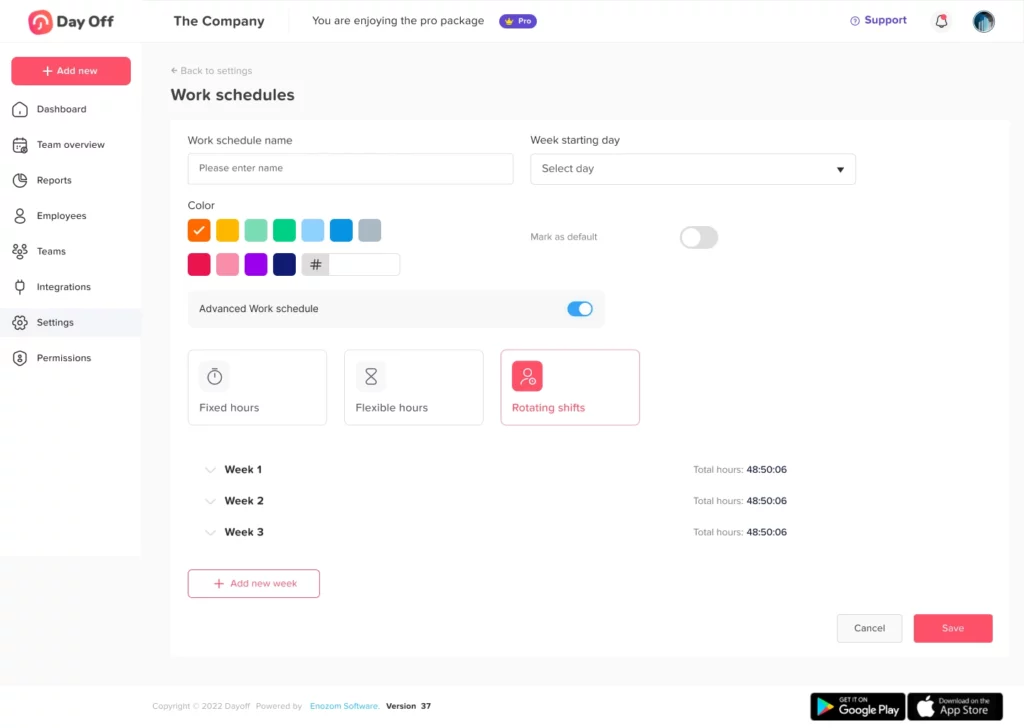
    • Rotating Shifts: Designed for businesses operating around the clock, this template automates complex shift patterns across multi-week cycles, ideal for customer service teams, healthcare, or global operations.

    • Advanced Hour-based Tracking: Offers precise control over leave calculations by tracking in hours rather than days. Particularly valuable for part-time staff or teams needing granular time-off tracking.

    Smart Leave Validation

    The app includes intelligent logic to ensure that leave requests align with an employee’s assigned schedule:

    • Leave Outside Schedule Prevention: Automatically blocks leave requests submitted for non-working hours or days. This eliminates errors and helps maintain accurate records.

    • Partial-Day Leave Requests: Supports nuanced leave like “2 hours off in the afternoon,” offering flexibility for personal appointments or short absences without disrupting full-day workflows.

    Global & Team Flexibility

    The Day Off App supports global operations and cross-functional team needs:

    • Custom Schedules by Role or Location: Assign different work patterns based on team responsibilities, time zones, or regional regulations. This ensures that scheduling remains relevant and compliant no matter where your team operates.

    • Timezone-Aware Planning: Facilitates coordination between globally distributed teams by respecting each employee’s local time, key for international organizations.

    Integrations & Dashboards

    Seamless connectivity with everyday tools keeps hybrid teams in sync:

    • Calendar Syncing: Integrates with Google Calendar, Microsoft Outlook, Slack, and Teams so employees can easily see their schedule and colleagues’ availability without switching apps.

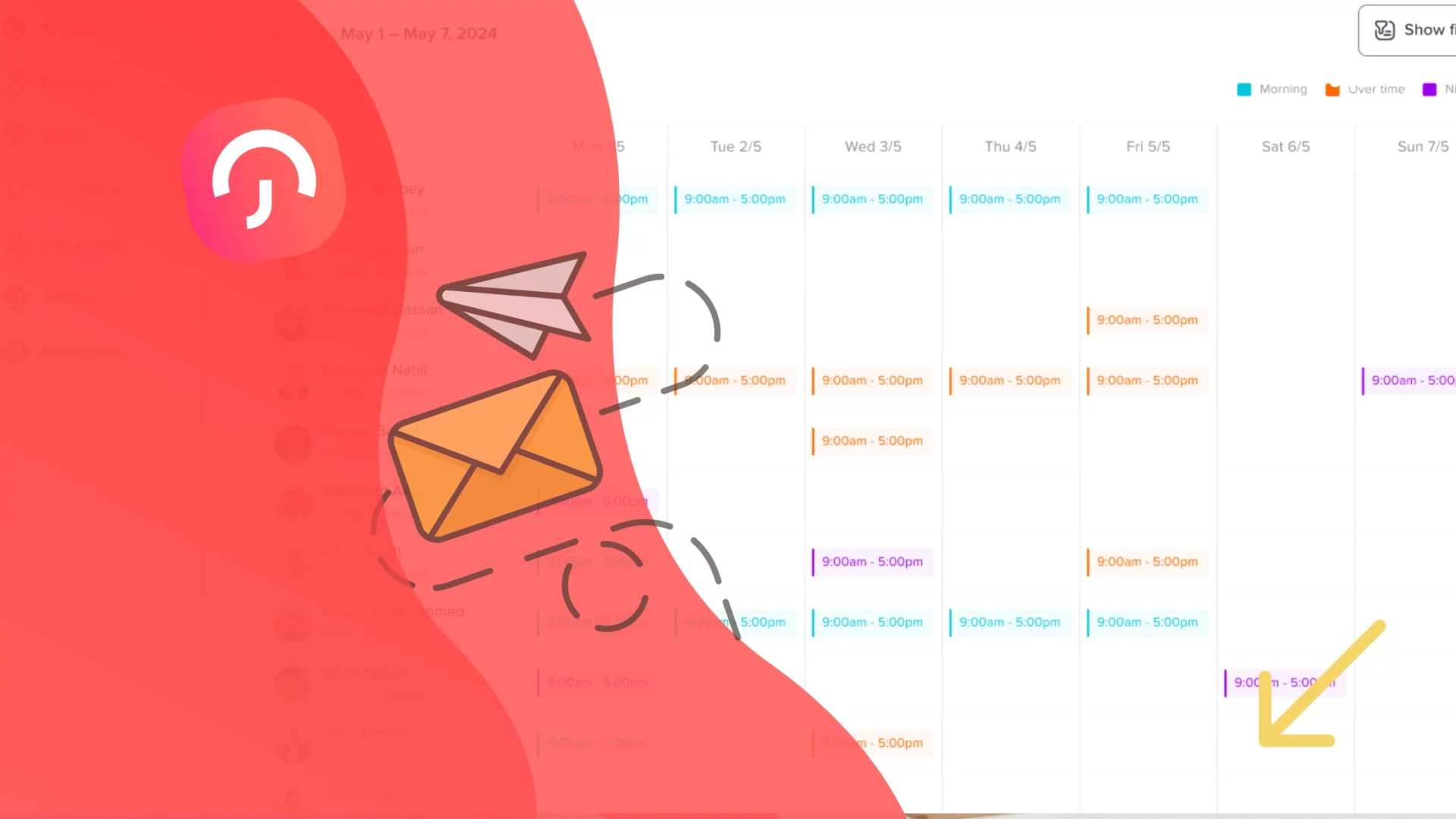
    • Real-Time Presence Tracking: Dashboards display who is working remotely or in the office on any given day, crucial for planning meetings, managing space usage, or organizing collaborative sessions.

    Advanced Policy Management

    Create robust governance and leave policies tailored to your organization’s structure and values:

    • Custom Leave Types: Define and differentiate between standard PTO, remote days, fieldwork, and more. This allows for more detailed reporting and policy compliance.

    • Accrual Rules & Blackout Dates: Set custom accrual rates for different leave types, define when leave can’t be taken (e.g., critical project dates), and ensure consistency in policy enforcement.

    • Multi-Stage Approvals: Build flexible workflows for leave approvals, from direct managers to HR oversight, ensuring accountability and reducing delays.

    • Actionable Analytics: Access reports and insights on leave usage, scheduling trends, and workforce availability to drive strategic planning and continuous improvement.

    Smarter time off tracking starts here.

    Steps to Build a Successful Hybrid Policy

    Designing an effective hybrid work schedules policy isn’t just about choosing which days employees come into the office, it’s about building a flexible, inclusive system that supports productivity, well-being, and collaboration across diverse work styles. Here are key steps to ensure success:

    Set Clear Guidelines

    A well-defined framework is essential for smooth hybrid operations. Clearly communicate expectations around:

    • Work hours and availability: Define core working hours for meetings and collaboration, while allowing flexibility outside them.

    • Communication tools: Specify which platforms (e.g., Slack, Zoom, Teams) are used for different purposes to reduce confusion.

    • Response times: Align on how quickly employees should respond to messages or emails, depending on urgency and context.

    • Digital etiquette: Encourage practices such as using video in meetings, muting when not speaking, and indicating availability with status updates.

    These guidelines create alignment and help reduce friction, especially for distributed teams.

    Design Purposeful Office Days

    Not all in-office time is equal. Instead of having people come in just for the sake of presence, plan office days around:

    • Collaboration: Schedule brainstorming sessions, project kickoffs, and strategy meetings in person for richer interaction.

    • Connection: Host team-building activities, lunch-and-learns, or informal gatherings to nurture relationships and culture.

    • Mentorship & Onboarding: Use in-person time to support junior staff and new hires through face-to-face training, shadowing, and introductions to colleagues.
      This approach makes office days feel valuable, not mandatory.

    Foster Transparency

    Hybrid success depends on visibility. Encourage employees to:

    • Update shared calendars with their working location (e.g., “Remote”, “In-Office”, “On Leave”).

    • Use status indicators in communication tools (e.g., “Focusing”, “In a Meeting”) to communicate availability without interruption.

    • Share their weekly work rhythm in team chats to help others coordinate.
      When everyone knows who’s available and where they are, scheduling becomes easier and misunderstandings are minimized.

    Provide the Right Technology

    Technology is the backbone of hybrid work schedules. Ensure every team has access to:

    • Reliable video conferencing software for seamless virtual meetings.

    • Asynchronous communication tools like Slack or Notion to bridge time zones and flexible hours.

    • Desk booking systems to manage limited office space and avoid overcrowding.

    • Secure cloud storage and VPN access to ensure all employees can access necessary resources from anywhere.
      Consistent, reliable tools reduce frustration and ensure no employee feels left behind.

    Empower Teams

    One hybrid structure doesn’t fit all. Grant teams the autonomy to:

    • Tailor their schedules based on their specific collaboration needs.

    • Decide on anchor days or flexible arrangements based on their operational rhythm.

    • Experiment and evolve their model with the support of leadership and HR.
      When teams feel ownership over their structure, they are more likely to engage with it and optimize it for performance.

    Measure and Iterate

    A hybrid policy should evolve with your workforce. Continuously:

    • Survey employees to understand satisfaction, pain points, and suggestions.

    • Analyze office usage data to see if space is being over- or under-utilized.

    • Track collaboration metrics like meeting volume or project completion rates.
      Use this data to adjust schedules, resources, or communication practices, creating a feedback loop that keeps your hybrid model aligned with team needs.

    Challenges & Solutions

    Even the most thoughtfully designed hybrid models face challenges. The key is to anticipate them and apply practical solutions that turn potential setbacks into opportunities for improvement.

    Challenge Solution
    Inconsistent Office Attendance
    When employees randomly choose in-office days, it defeats the purpose of collaboration. Solution: Adopt an anchor-based schedule where everyone agrees on common in-office days (e.g., Tuesdays and Thursdays). This ensures meaningful overlap and stronger team presence.
    Unequal Access or Visibility
    Remote workers may feel overlooked or less involved than their in-office peers. Solution: Rotate who works in-office, ensure remote participation in meetings, and use shared tools (like Day Off) to show everyone’s status, making visibility equitable.
    Technical Hurdles for Remote Staff
    Without reliable tools, remote employees can’t work effectively. Solution: Invest in quality hardware, robust internet reimbursement policies, and company-standard software across all teams to ensure a consistent experience regardless of location.
    Erosion of Company Culture
    Distance can weaken the sense of belonging. Solution: Foster connection through virtual team rituals (e.g., Friday wins), casual check-ins, hybrid social events, and regular all-hands meetings. Purposeful efforts to maintain culture help retain team cohesion.

    Implementation & Best Practices

    Introducing hybrid scheduling tools like Day Off is only the beginning, successful implementation requires thoughtful execution and ongoing refinement. These best practices will help ensure smooth adoption and maximum impact across your organization:

    Analyze Team Dynamics

    Before configuring schedules, take time to understand how each team operates. Assess their typical workloads, collaboration needs, customer-facing responsibilities, and individual work preferences. A one-size-fits-all schedule rarely works, tailoring your approach to fit each team’s rhythm ensures better alignment and satisfaction.

    Set Up Custom Schedules

    Leverage the flexibility of tools like Day Off to create unique schedule templates for different teams, roles, or locations. For example, a support team might follow rotating shifts, while a design team could benefit from flexible hours. Building schedules that reflect real work patterns increases compliance and reduces friction.

    Train Teams Thoroughly

    Adoption only succeeds when users are confident in the system. Provide clear training on how to view assigned schedules, request time off, understand working hours, and use integrated features like status updates. Consider creating simple walkthroughs or hosting live Q&A sessions to address common questions and ensure comfort with the platform.

    Integrate with Shared Calendars

    Synchronization is crucial in a hybrid setup. By integrating Day Off with tools like Google Calendar, Outlook, Slack, or Microsoft Teams, you ensure that everyone has visibility into who is working, who is on leave, and where colleagues are located. This transparency reduces scheduling conflicts and improves daily coordination.

    Review and Refine Regularly

    Set a routine to evaluate how well your scheduling policies are working, monthly reviews are a great starting point. Are employees using their leave properly? Are hybrid schedules matching real usage patterns? Are there gaps in in-office coverage? Use insights from Day Off’s dashboards and employee feedback to make timely, data-informed adjustments.

    The Future: Hybrid + Smart Scheduling

    As work continues to evolve, hybrid scheduling is moving beyond basic flexibility into a new era of intelligence and personalization. The next frontier lies in smart, adaptive systems that learn from organizational behavior and optimize schedules accordingly.

    Tailored Schedules by Function

    Forward-thinking companies are designing hybrid models based on the unique needs of each function. For example, HR or operations teams may benefit from more in-office days to support internal collaboration and employee services, while engineering or creative roles may thrive with remote-heavy setups focused on deep, uninterrupted work. This strategic differentiation helps teams operate at their best without forcing uniformity.

    Predictive Tools and AI-Driven Optimization

    The rise of AI and analytics in workforce management means companies can now anticipate scheduling needs rather than simply react. Tools are emerging that analyze availability, workloads, leave history, and even meeting patterns to recommend the most efficient work arrangements, improving collaboration and minimizing burnout.

    Unified Work Planning Platforms

    Tools like Day Off are increasingly serving as the central hub for coordinating time-off, hybrid presence, and project alignment. Instead of juggling multiple tools for leave, schedules, and availability, teams can manage everything in one place, resulting in clearer workflows, fewer errors, and better-informed decisions.

    Frequently Asked Questions (FAQ)

    What exactly is hybrid work, and how is it different from remote or flexible work?

    Hybrid work schedules combines both in-office and remote work, typically with employees splitting their time between the two. Remote work means working entirely off-site, while flexible work refers to arrangements that allow variability in hours or location, hybrid being a structured form of flexibility.

    How do we choose the right hybrid model for our company?

    Start by evaluating your business needs, team dynamics, and employee preferences. Some companies thrive with fixed schedules, while others benefit from flexible or anchor-based approaches. Consider factors like collaboration frequency, customer interaction, and operational continuity when choosing your model.

    What are the biggest benefits of hybrid work?

    Hybrid work enhances productivity by combining focused remote tasks with collaborative office time. It also improves work-life balance, boosts employee retention, reduces commuting stress, lowers environmental impact, and helps attract top talent.

    What are some of the key challenges in hybrid work, and how can we solve them?

    Common challenges include inconsistent attendance, unequal visibility, tech limitations, and culture dilution. These can be mitigated with anchor-based scheduling, rotating remote days, investing in reliable tools, and maintaining regular team rituals.

    Why is leave management important in hybrid work?

    In hybrid setups, leave should align with actual work schedules. Accurate tracking ensures that time off is deducted only during assigned working hours, preventing confusion or inequality between remote and in-office employees.

    How does the Day Off App help with hybrid work management?

    Day Off offers custom scheduling templates, smart leave validation, timezone-aware planning, and real-time visibility into who’s working where. It integrates with your calendar tools and provides analytics for strategic planning, all from a mobile- and web-accessible platform.

    What kinds of schedules can we create with Day Off?

    You can build Fixed, Fixed Hours, Flexible Hours, Rotating, and Advanced (hour-based) schedules. Each type suits different operational , consistent office shifts to dynamic, autonomous routines.

    Can Day Off handle global and cross-team scheduling?

    Yes. Day Off supports custom schedules across locations, time zones, and teams. You can assign different rules to departments or offices, giving each unit flexibility while maintaining organizational consistency.

    How do we get employees to adopt hybrid scheduling tools effectively?

    Educate employees on the benefits, provide clear training, and integrate tools with platforms they already use (like Google Calendar or Slack). Make the system easy to navigate and use real examples during rollout.

    What does the future of hybrid work look like?

    Hybrid work will increasingly rely on AI, analytics, and predictive scheduling tools. Companies will shift toward hyper-personalized, data-driven work patterns, supported by platforms like Day Off that unify leave tracking, presence management, and productivity planning in one cohesive system.

    Conclusion

    Hybrid work schedules isn’t just a flexible trend, it’s a redefinition of how teams operate in the modern world. When thoughtfully implemented, it enhances productivity, supports employee well-being, and drives operational efficiency. The key to making it work lies in smart scheduling, clear communication, and tools like the Day Off Vacation Tracker that bring structure and fairness to every work arrangement. As companies move toward AI-driven scheduling and tailored flexibility, those who invest in the right systems today will be the most adaptive and successful tomorrow. Hybrid work is here to stay, make it work smarter, not harder.

  • New In Day Off: Work Schedule For Managing Work Hours & Shifts

    New In Day Off: Work Schedule For Managing Work Hours & Shifts


    We’re excited to announce the launch of a brand new feature on Day Off, The Work Schedule. 
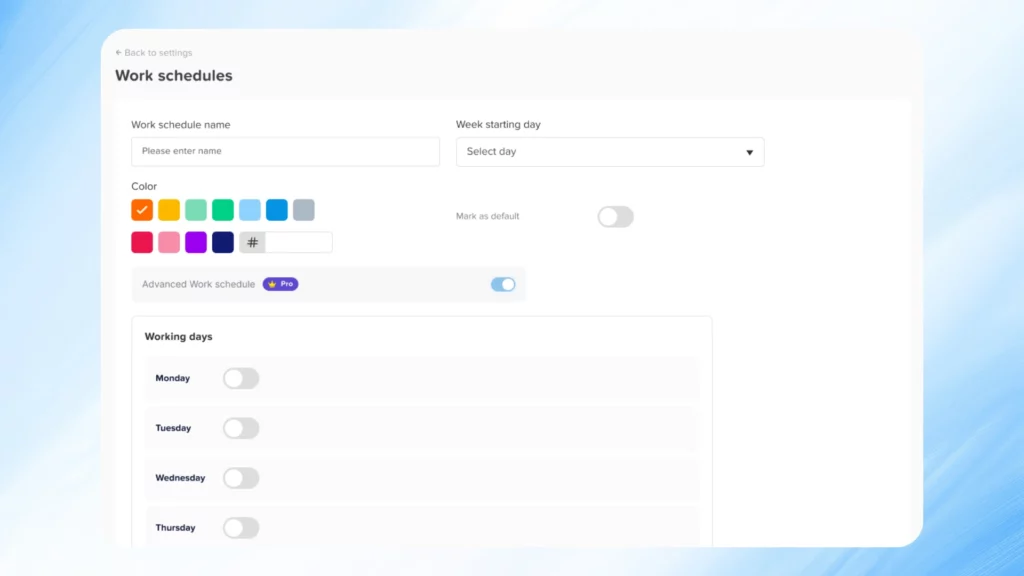
    This powerful addition allows employers to create and assign custom work schedules to teams or individual employees. Whether your company operates on fixed hours, rotating shifts, or flexible working arrangements, Work Schedules enables accurate leave tracking based on each employee’s actual working time.


    With this update, time off requests are now validated against real work schedules ensuring that leave is only deducted when it overlaps with scheduled working hours.

    Why Work Schedules Are Important

    Many organizations today employ diverse working styles: hybrid models, part time roles, flexible arrangements, and rotating shifts. When all employees are treated as though they work the same schedule, it creates challenges in managing leave balances fairly.


    The Work Schedules feature directly addresses this issue. It allows admins to:

    • Set exact working days and hours for each team or employee

    • Define rules around shift breaks, split shifts, and rotating cycles

    • Configure how leave requests are submitted and approved based on real-time availability

    • Ensure leave is only deducted during scheduled working hours

    • Provide employees with full visibility into their work and leave conditions

    This level of customization eliminates miscommunication and ensures that both managers and team members are operating on the same page.

    An In-Depth Look at Day Off’s Work Schedule Types

    We’ve developed powerful schedule types designed to cover the full spectrum of modern workplace needs. Here’s how each one works with real world examples and benefits:

    Fixed Schedule

    The Fixed Schedule is the most basic but essential format. It allows employers to specify which days of the week are official working days and which are not.

    How It Works:

    You simply choose which days are “on” (working days) and which are “off” (weekends or other days off). There are no specific start or end hours just a day based structure.

    Why It’s Useful:

    This is perfect for teams working a standard weekly routine like Monday through Friday. It ensures that leave requests are only counted on the days the employee is actually scheduled to work.

    Example:

    If your team works Monday to Friday and someone requests Monday off, it’s counted as a full day off. But if they request Saturday, it’s ignored because it’s not a workday.

    Best for: Office teams, salaried employees, small businesses with consistent hours.

    Fixed Hours Schedule

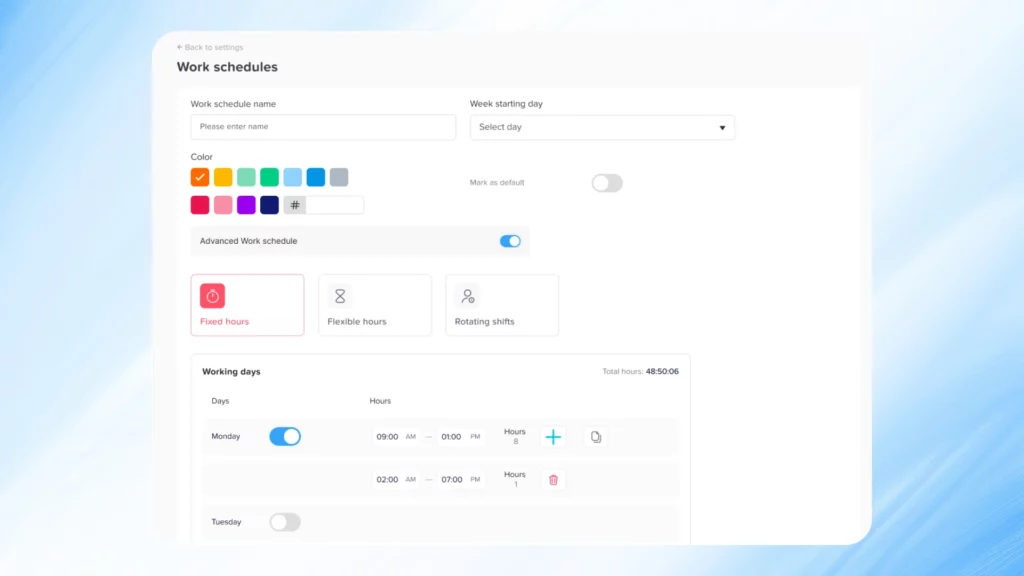
    The Fixed Hours Schedule takes daily structure to the next level. It allows you to define exact start and end times for the workday, as well as optional split shifts and break deductions.

    How It Works:

    • Set start and end times (e.g., 9:00 AM – 5:00 PM)

    • Optionally divide the shift into segments (e.g., 9–1, 2–6)

    • Deduct a specific break time (e.g., 1 hour lunch)

    • Requests are only valid within working hours

    Why It’s Useful:

    This model introduces precision into your leave tracking. It ensures that time off is calculated only during designated work periods. If an employee submits a leave request outside of these hours, it won’t count.

    Example:

    An employee requests time off from 3 PM to 6 PM on a day their shift runs from 9 AM to 5 PM. Since this overlaps with 2 working hours (3–5 PM), only those hours are deducted. Any time outside that range (like 5–6 PM) is ignored.

    Best for: Retail teams, logistics, hospitality, customer support, or businesses requiring exact shift control.

    Flexible Hours Schedule

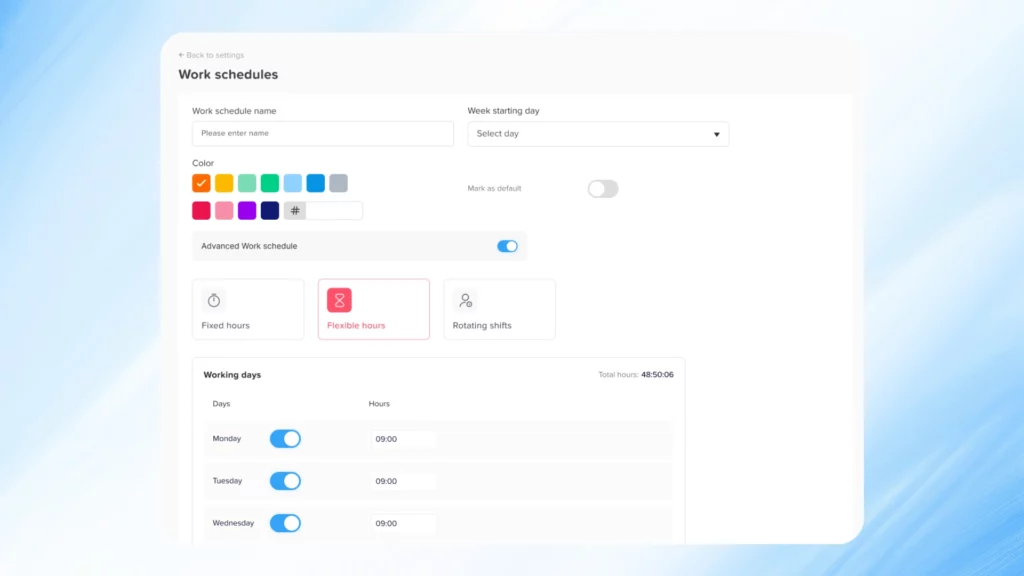
    This schedule supports flexibility in when employees work, while maintaining control over how much they work.

    How It Works:

    • You define the number of work hours required per day (e.g., 6 hours/day)

    • Employees can choose when to work those hours within the day

    • Leave is calculated by comparing requested hours against required daily hours

    Why It’s Useful:

    This is ideal for teams that prioritize autonomy, allowing employees to structure their day as they see fit without compromising on accountability.

    Example:

    An employee needs to take 2 hours off for a doctor’s appointment. As long as they fulfill their remaining 4 hours later in the day, they remain in compliance. If they request those 2 hours as leave, it is deducted fairly from their hour based balance.

    Best for: Remote teams, tech startups, creative roles, consultants.

    Rotating Shift Schedule

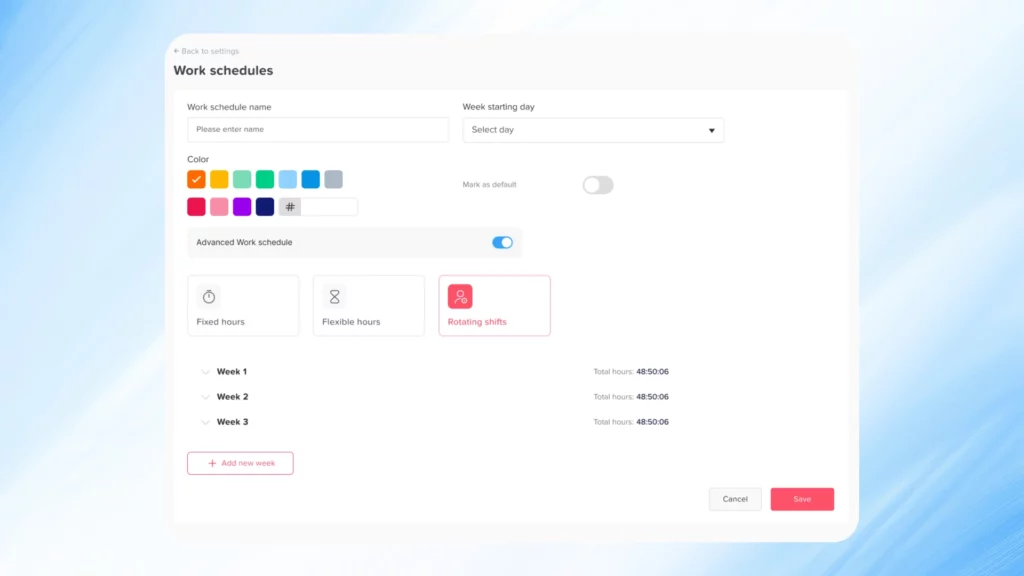
    Rotating schedules are often complex, but essential for 24/7 operations. This option enables you to set up dynamic, repeating shift patterns that change weekly.

    How It Works:

    • Define multiple weeks with different shift hours

    • For each week, set unique start/end times (e.g., Week 1: 9–4, Week 2: 12–7)

    • The schedule rotates automatically across weeks

    Why It’s Useful:

    Managing rotating shifts manually is time consuming and error prone. With Day Off, once you set up the rotation, everything runs on autopilot including leave tracking.

    Example:

    You create a 3-week rotating schedule:

    • Week 1: 8 AM – 3 PM

    • Week 2: 12 PM – 7 PM

    • Week 3: Off
      Each team member cycles through these shifts every 3 weeks. Their leave requests are calculated based on which shift is active that week.

    Best for: Call centers, hospitals, factories, or any team operating on a 24/7 or variable basis.

    Advanced Schedule (Hour-Based Leave Balances)

    For organizations tracking leave in hours instead of days, the Advanced Schedule is the perfect fit.

    How It Works:

    • Set the number of working hours per day

    • Employees request leave based on specific hours

    • The system deducts only the hours requested from their total balance

    • Supports partial day leave (e.g., 90 minutes off)

    Why It’s Useful:

    This format provides high-resolution control over leave usage. It allows employees to take time off without losing an entire day of balance and supports hourly tracking across all types of work.

    Example:

    An employee has 32 hours of available leave. They submit a request to leave early by 2 hours. After approval, only 2 hours are deducted, leaving them with 30 hours remaining.

    Best for: Hourly workers, freelancers, contractors, or companies offering micro-leave.

    The Power of Precision and Flexibility

    By introducing Work Schedules, Day Off helps you:

    • Avoid mistakes in balance deductions

    • Honor unique team structures and compliance policies

    • Simplify leave requests for employees with real time validation

    • Increase trust and transparency in time off processes

    • Scale HR operations with automation and customization

    No matter your company size or industry, these tools will save time and reduce errors giving HR more bandwidth to focus on people, not paperwork.

    How to Set Up Work Schedules

    Getting started is quick and intuitive:

    • Log in to your Day Off Admin Dashboard

    • Go to the Settings

    • Go to the Work Schedules tab

    • Click Add New Schedule

    • Choose a type (Fixed, Fixed Hours, Flexible or Rotating)

    • Enter your parameters (days, hours, breaks, rotations, etc.)

    • Assign the schedule to a specific team or employee

    The system takes care of the rest. From that point forward, leave requests are automatically validated and calculated based on the assigned schedule.

    Accessible Anywhere, Anytime

    Work Schedules is fully integrated across all platforms:

    • iOS and Android apps for both managers and employees

    • Web version for complete schedule management via Day Off. 

    Employees can easily view their schedule and plan time off accordingly. Managers can approve requests with confidence, knowing they’re based on real working conditions.

    Start Smarter Leave Planning Today

    The Work Schedules feature is now live for all Day Off users. Whether you’re a team of 5 or 500, this update will bring clarity, fairness, and structure to your leave management process.

    Set up your first schedule today and experience a smarter, more accurate way to manage time off.

    FAQs

    What is the Work Schedules feature in Day Off?

    The Work Schedules feature allows employers to create customized working time templates for their teams. It supports multiple schedule types such as fixed days, fixed hours, flexible hours, rotating shifts, and advanced hour based tracking. Leave requests are validated based on these schedules, ensuring accurate balance deductions and better time off planning.

    Can I assign different schedules to different teams or individuals?

    Yes, You can create an unlimited number of work schedules and assign them to specific teams or even individual employees. This is especially useful for companies with multiple departments, varying roles, or locations operating in different time zones or work structures.

    What happens if an employee submits a leave request outside their working hours?

    If the employee is on a Fixed Hours or Advanced Schedule, any request that falls outside their scheduled working hours will not be counted toward their leave balance. This ensures that time off is only deducted when it overlaps with actual working time.

    How do break times and split shifts work?

    For Fixed Hours Schedules, you can define break times (e.g., 1-hour lunch) that are automatically deducted from total work hours. You can also split shifts into two parts (e.g., 9 AM–1 PM and 2 PM–6 PM) to better reflect real working conditions.

    Can I use hour-based leave tracking instead of days?

    Yes, With the Advanced Schedule option, leave is managed in hours, not days. Employees can request time off for specific hours (e.g., 1.5 hours), and the system will deduct that exact amount from their hour based balance.

    How does the Rotating Shift Schedule work?

    You can define multiple weekly shift patterns (e.g., Week 1: 8 AM–3 PM, Week 2: 12 PM–7 PM), and the schedule will rotate automatically. Employees are assigned to these patterns, and their leave is calculated based on the current week’s shift.

     What if an employee doesn’t have a work schedule assigned?

    If no work schedule is assigned, Day Off will fall back on the default settings for your company (e.g., standard 5-day workweek). However, to ensure the highest accuracy in leave calculation, we recommend assigning a schedule to every team.

    Can employees see their assigned schedule?

    Yes, Employees can view their assigned work schedule directly from the Day Off mobile app (iOS & Android) or via the web dashboard. This helps them plan their leave more effectively and avoid conflicts with working hours.

    Is it possible to change or update a work schedule after it’s created?

    Absolutely. Admins can edit any existing schedule or reassign employees to a new schedule at any time. All changes take effect immediately and influence how new time off requests are calculated moving forward.

    Does this feature cost extra?

    No. The Work Schedules feature is included in your Day Off plan. If you’re on a free or trial tier, you may need to upgrade to unlock some advanced functionality check your plan details for more info.

    What are some examples of companies that benefit from Work Schedules?

    • Retail chains with varying store hours

    • Healthcare organizations with rotating shifts

    • Startups with flexible working environments

    • Manufacturing plants with day/night shifts

    • Freelancer teams or agencies using hourly billing

    How do I get started with Work Schedules?

    Just log into your Day Off admin dashboard, navigate to the Work Schedules section, and click “Add New Schedule.” Choose a schedule type, customize it, and assign it to your teams. The entire setup takes only a few minutes.

    Conclusion

    The launch of Work Schedules marks a major step forward in making leave management more accurate, transparent, and adaptable for every type of workplace. Whether your team runs on fixed hours, rotating shifts, or flexible arrangements, this feature ensures that every leave request reflects real working conditions, saving time, reducing errors, and building trust across your organization.


    Start creating your team’s schedules today and experience how effortless managing time off can be with Day Off, where smarter planning meets real flexibility.

    Smarter time off tracking starts here.