

Table of Contents
TogglePaid Time Off management has quietly become one of the most important operational systems inside modern organizations. In 2026, PTO software is no longer just an HR convenience; it is a critical layer that connects employee experience, workforce planning, payroll accuracy, and legal compliance.
As companies become more distributed, more flexible, and more globally diverse, the cost of poor PTO tracking increases. Missed approvals lead to staffing gaps. Incorrect balances damage employee trust. Manual corrections create payroll risk. What once could be handled informally now requires a structured, reliable system.
This article offers a deep, long-form comparison of Day Off and the leading PTO software alternatives in 2026, examining not only features but also philosophy, usability, scalability, and real world fit. The goal is not to declare a single “winner,” but to help organizations understand which tool aligns best with how they actually work.

The Role of PTO Software in 2026
PTO management sits at the intersection of multiple business concerns. Employees expect transparency and autonomy. Managers need visibility to plan coverage and deadlines. Finance teams depend on accurate data for payroll and accrual accounting. HR teams must ensure policies are applied consistently and in compliance with local regulations.
The complexity has increased dramatically over the last decade. Remote and hybrid work have removed physical visibility into who is available. Global hiring has introduced different holiday calendars and statutory leave rules. Flexible schedules and contract-based work have blurred the line between hours and days. PTO software must now reconcile all of these realities while remaining simple enough that employees actually use it correctly.
The best tools fade into the background, quietly enforcing rules and providing clarity. The worst tools create friction, confusion, and mistrust.
Day Off: A Purpose-Built PTO Platform Focused on Simplicity

Day Off is built around a simple but powerful principle: PTO should be easy to understand, easy to use, and reliable at every stage of company growth. Unlike many tools that are either “too simple” for larger teams or “too heavy” for smaller ones, Day Off is designed to scale naturally without changing how people work.
What makes Day Off stand out is that it treats time off as a first-class system, not a secondary feature. Every design decision prioritizes clarity, speed, and adoption, which is why it works equally well for startups, mid-sized companies, and more established organizations.
Ease of Adoption and Everyday Usability
From an employee perspective, Day Off feels immediately familiar. Requesting time off is straightforward, balances are visible, and the approval status is always clear. There is little ambiguity about whether a request was submitted correctly or who needs to approve it.
This ease of use has a significant downstream effect. Employees trust the system, which reduces off-platform conversations and “just checking” messages. PTO becomes transparent rather than negotiable.
Visibility, Planning, and Team Awareness
For managers, Day Off’s value lies in visibility. The calendar-centric design allows leaders to see availability patterns quickly, identify overlaps, and plan coverage without guesswork. This is especially valuable for small and mid-sized teams where a single absence can materially affect output.
Rather than reacting to PTO requests, managers can anticipate them.
Pricing Transparency and Scope Control
Day Off offers enough configuration to support multiple leave types and approval flows, but it avoids deep HR complexity. This makes it ideal for organizations that want consistency without dedicating a full HR role to PTO administration.
Best-Fit Organizations for Day Off
Day Off works best when PTO needs to be clear, reliable, and frictionless, not endlessly configurable. It is particularly strong for startups, distributed teams, and growing companies that already have payroll or HR systems but need a better PTO layer.
Vacation Tracker: PTO Embedded in Collaboration Tools

Vacation Tracker starts from a different assumption: PTO decisions happen through communication, not interfaces. Instead of pulling employees into a dedicated system, it embeds PTO directly into collaboration tools like Slack and Microsoft Teams.
This fundamentally changes how PTO feels. Requests become part of daily conversation, approvals happen in real time, and time off becomes highly visible across teams.
Workflow Efficiency in Fast-Moving Teams
In organizations where Slack or Teams function as the primary workspace, Vacation Tracker reduces friction dramatically. Managers do not need to log into another system. Employees do not need to remember URLs. Everything happens where work already lives.
This can significantly speed up approvals and reduce forgotten requests, particularly in asynchronous or remote environments.
Automation and Long-Term Scalability
Vacation Tracker places strong emphasis on automation. As organizations grow, PTO policies tend to evolve, and manual oversight becomes unsustainable. Vacation Tracker supports automated reminders, policy-based rules, and structured workflows that reduce human error.
Where Friction Can Appear
The same chat-based design that some teams love can frustrate others. High notification volume, reduced visual planning, and reliance on chat literacy can create fatigue. Teams that prefer quiet, calendar-based planning may find the experience less intuitive.
Strategic Fit
Vacation Tracker is best suited for collaboration-heavy, tech-forward organizations that value speed, automation, and conversational workflows over traditional planning interfaces.
Calamari: Modular PTO and Workforce Management

Calamari is not just a PTO tool, it is a modular workforce management platform. PTO exists alongside attendance tracking, time tracking, and basic HR features, all designed to work together.
This philosophy appeals to organizations that view time off as one data point within a broader operational system.
Strength in Structure and Consistency
Calamari’s PTO management is highly structured. Policies are explicit, reporting is formalized, and workflows emphasize consistency. For organizations in regulated industries or environments where attendance data matters, this level of rigor is a major advantage.
Operational Trade-Offs
The trade-off for structure is complexity. Setup requires more time. Employees who only interact with PTO occasionally may find the interface heavier than necessary. The platform feels more “systematic” than “friendly.”
Strategic Fit
Calamari works best for organizations that need structure more than simplicity, particularly those combining PTO with attendance or compliance reporting.
LeaveBoard: Cost-Conscious PTO with Basic HR Support

LeaveBoard is positioned for small businesses that want to bring structure to PTO management without committing to expensive or complex software. It targets teams that have outgrown spreadsheets and email approvals but still need a solution that is easy to adopt and budget-friendly.
Practical Strengths
For organizations with straightforward leave policies, LeaveBoard covers the essentials well. Employees can submit time off requests through a centralized system, managers can review and approve them, and leave balances are tracked automatically. The inclusion of basic HR records adds convenience for very small teams that do not use a separate HR tool.
Limitations as Organizations Grow
As teams expand, PTO requirements often become more complex. Multiple policies, locations, or layered approval flows can be harder to manage in LeaveBoard. Reporting remains fairly basic, and customization options are limited, which may require manual workarounds over time.
Strategic Fit
LeaveBoard is best suited for small, budget-conscious organizations with simple PTO needs and limited plans for near-term complexity or rapid scaling.
Zoho People: PTO as One Component of a Broad HR Ecosystem

Zoho People is designed as a comprehensive HR platform, with PTO included as part of a wider set of HR tools. Rather than focusing solely on leave management, it aims to support end-to-end HR operations for growing organizations.
Power Through Customization
The platform offers strong customization capabilities. Approval workflows can be tailored, policies can be automated, and PTO can be connected to other HR processes such as onboarding and performance management. This flexibility allows organizations to model more complex rules accurately.
Complexity and Ownership Requirements
With this level of flexibility comes added complexity. Zoho People requires thoughtful setup and ongoing administration. PTO is not a plug-and-play feature, and teams without dedicated HR ownership may find the system heavier than necessary for basic leave tracking.
Strategic Fit
Zoho People is ideal for organizations that are intentionally building a full HR infrastructure, particularly those already using other Zoho products and planning for long-term HR scalability.
BambooHR: Enterprise-Grade HRIS with Deep PTO Integration
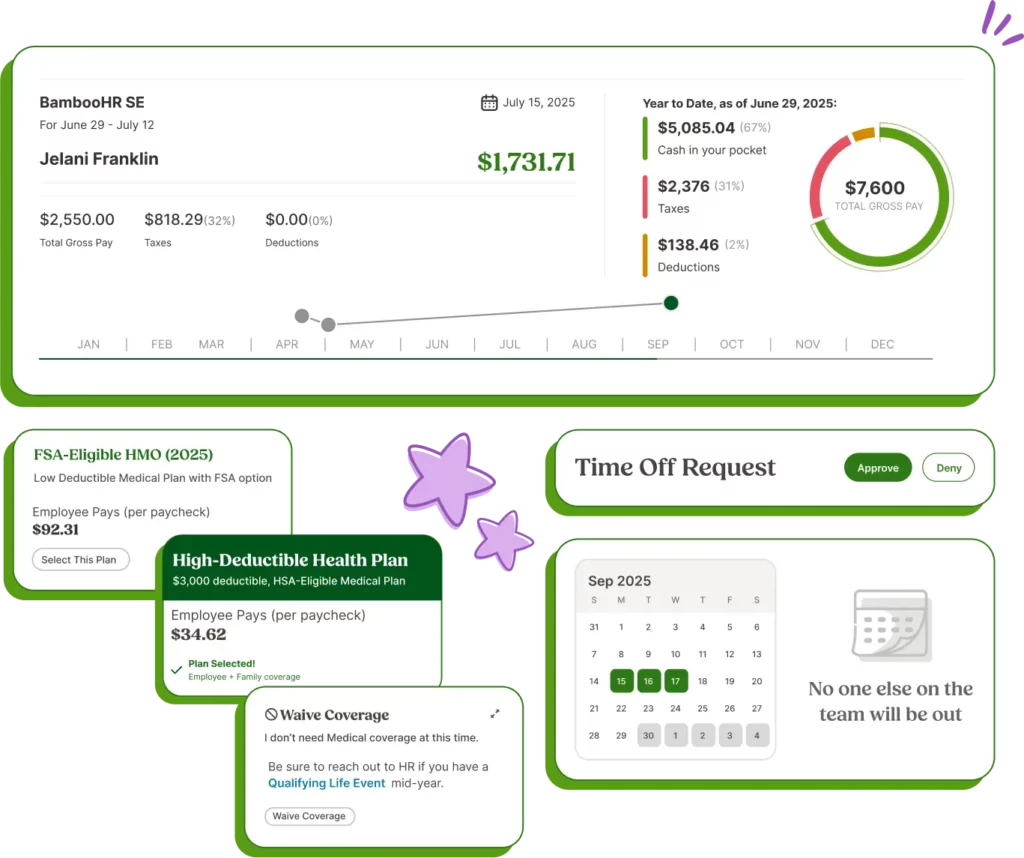
BambooHR treats PTO as an integrated part of the employee lifecycle. Time off balances are closely tied to hire dates, role changes, and employment status, which helps maintain accuracy and consistency across HR records.
Strength in Governance and Reporting
The platform is well-suited for organizations that require strong governance and documentation. PTO data feeds into robust reporting tools that support audits, compliance, and strategic workforce planning.
Cost and Implementation Considerations
BambooHR requires a higher financial and operational investment than standalone PTO tools. Implementation takes time, and ongoing administration is expected. For teams that only need basic PTO tracking, this level of complexity may feel unnecessary.
Strategic Fit
BambooHR is best for mid-sized and growing organizations that are formalizing HR processes and want a mature, enterprise-ready HRIS with PTO fully embedded.
How to Choose the Right PTO Software in 2026
Clarifying What Actually Matters
Choosing PTO software starts with understanding your organization, not the tools themselves. Teams should assess how complex their leave policies truly are, how much administrative time they can realistically dedicate to PTO management, and how employees prefer to interact with internal systems. A solution that looks powerful on paper can quickly become a burden if it does not align with daily workflows or company culture.
Matching the Tool to the Way You Work
For organizations that want PTO to be clear, visible, and low friction, Day Off stands out as the most consistently effective option across company sizes. It offers the simplicity smaller teams need while remaining structured enough for growing and established organizations.
Vacation Tracker is a strong fit for teams that operate primarily inside collaboration tools and value speed and conversational workflows. Calamari, Zoho People, and BambooHR are better suited to organizations where PTO is tightly tied to attendance tracking, compliance, or broader HR governance.
Final Guidance
The right PTO software is not the most complex or feature rich option. It is the one employees trust to be accurate, managers rely on for planning, and administrators can maintain without constant oversight. In 2026, tools that balance clarity, usability, and scalability, like Day Off, are the ones most likely to succeed long term.
Common Mistakes When Choosing PTO Software
Overestimating Complexity Needs
A frequent mistake organizations make is choosing PTO software that is far more complex than their current reality requires. Teams often assume they will “grow into” advanced workflows, detailed compliance logic, or enterprise level reporting. In practice, this complexity slows adoption, increases configuration effort, and pushes employees back toward informal processes. Instead of creating structure, overly complex systems often introduce friction and confusion.
Focusing Only on Price
Cost is an important factor, but focusing solely on the lowest price can be misleading. Low cost tools may handle basic needs initially, yet struggle to adapt as policies evolve, teams expand, or visibility requirements increase. Replacing a PTO system later is disruptive, requiring data migration, retraining, and changes to established workflows. Choosing a solution that balances affordability with scalability is often more cost-effective in the long run.
Underestimating Usability and Adoption
Usability is not a “nice to have” in PTO software, it determines whether the system succeeds or fails. Even the most powerful tool provides little value if employees find it confusing or managers avoid using it. Poor usability leads to manual corrections, side conversations, and inconsistent records. Successful PTO systems feel intuitive and trustworthy, encouraging consistent use without constant reminders or explanations.
Why Day Off Avoids These Pitfalls
Day Off avoids these common mistakes by offering a system that scales naturally. It remains simple enough for small teams to adopt quickly, while providing enough structure for growing and established organizations. By prioritizing clarity and usability without limiting future needs, Day Off reduces friction rather than creating it.
Startup
- 25 Employees
- Single Approver
- Three Policies
- Unlimited Team
- Unlimited Locations
Future Trends in PTO Software
Smarter Automation and Employee Self-Service
PTO software is increasingly moving toward intelligent automation. Modern systems are beginning to identify potential conflicts automatically, flag policy violations before they occur, and guide employees through self-service workflows. This reduces administrative workload, minimizes errors, and improves confidence in PTO data across the organization.
Self-service is also expanding beyond simple requests. Employees increasingly expect to understand balances, policies, and approval status without relying on HR intervention.
Greater Emphasis on Visibility and Planning
Future PTO tools are placing more emphasis on proactive planning rather than reactive approval. Clear calendars, overlap awareness, and forecasting tools help managers plan workloads and reduce last-minute disruptions. Visibility is becoming just as important as policy enforcement.
Clearer Market Segmentation
Rather than converging into a single “all-in-one” solution, the PTO software market is becoming more segmented. On one side are focused, purpose built PTO tools designed for clarity and ease of use. On the other are comprehensive HR platforms where PTO is one component of a broader system.
This segmentation makes alignment with organizational philosophy more important than ever. Teams must decide whether they want PTO to remain a focused, lightweight system or to be embedded within a larger HR framework.
Why Day Off Continues to Stand Out
Day Off continues to stand out by offering focus without limitation. It delivers the clarity and ease of use of a dedicated PTO tool while remaining flexible enough to support organizations as they grow. As PTO software evolves, tools that balance simplicity, visibility, and scalability, like Day Off, are well positioned for long-term success.
Frequently Asked Questions (FAQ)
Why is PTO software essential for organizations in 2026?
PTO software is no longer just about tracking days off. In 2026, it plays a critical role in employee trust, workforce planning, payroll accuracy, and compliance. As teams become more distributed and policies more nuanced, manual or informal PTO tracking increases the risk of errors, misunderstandings, and operational disruption. A reliable PTO system ensures clarity, consistency, and confidence for everyone involved.
Is PTO software necessary for small teams?
Yes. Even small teams benefit from PTO software because it replaces spreadsheets and ad hoc processes with transparency and structure. Early adoption prevents confusion as teams grow and reduces the need to switch systems later. Tools like Day Off are particularly effective because they are easy to adopt for small teams while remaining suitable for larger organizations as needs evolve.
What makes Day Off a strong choice across different company sizes?
Day Off is designed to scale naturally. It is simple enough for small teams to use immediately, yet structured enough to support growing and established organizations. Its focus on visibility, usability, and consistency allows teams to mature their PTO processes without changing tools or increasing administrative burden.
When should a company choose a full HR platform instead of a PTO focused tool?
A full HR platform may be appropriate when PTO needs to be deeply integrated with onboarding, attendance tracking, performance management, or compliance reporting. However, many organizations prefer to keep PTO as a focused, standalone system to avoid unnecessary complexity. For those teams, Day Off offers a cleaner and more flexible alternative.
What is the most common mistake organizations make when choosing PTO software?
The most common mistake is choosing a tool that does not match how the organization actually works. This often means selecting software that is too complex too early, or too limited for long-term growth. Successful PTO systems balance simplicity, usability, and scalability, ensuring employees trust the system, managers rely on it, and administrators can maintain it with minimal effort.
Can PTO software help improve manager planning and team coverage?
Yes. Modern PTO software provides visibility into availability and overlapping absences, allowing managers to plan workloads more effectively. Tools like Day Off support proactive planning through clear calendars, helping managers anticipate coverage gaps rather than reacting to last-minute requests.
How do organizations know when it’s time to upgrade their PTO system?
Organizations typically need to upgrade when PTO tracking becomes a source of confusion, manual corrections increase, or managers lack visibility into availability. If employees are frequently asking about balances or approvals, or if payroll adjustments are common, it is a strong signal that the current system is no longer sufficient. Choosing a scalable tool early, such as Day Off, helps avoid disruptive migrations later.
Conclusion
Choosing the right PTO software in 2026 is less about feature lists and more about alignment. The most effective systems are the ones that fit naturally into how teams already work, supporting employee trust, managerial planning, and administrative accuracy without creating unnecessary complexity.
As this comparison shows, each PTO tool serves a different purpose. Some prioritize collaboration speed, others emphasize structure or deep HR integration. What consistently sets Day Off apart is its ability to balance simplicity and scalability. It works just as effectively for small teams replacing spreadsheets as it does for growing and established organizations that need reliable visibility and consistency.
In a workplace defined by flexibility, remote work, and evolving policies, PTO software should reduce friction, not add to it. Tools that remain clear, usable, and dependable over time, like Day Off, are the ones that deliver lasting value.