Category: News

  • AI Video Editing for HR: Ally or Replacement?

    AI Video Editing for HR: Ally or Replacement?

    Video editing has come a long way from manual cutting and splicing to digital workflows. The rise of artificial intelligence has made the process faster, more efficient, and accessible to creators of all skill levels. Today, an AI video editor can automatically trim clips, adjust color balance, remove noise, and generate transitions, all with minimal manual input.


    While these advancements have revolutionized content creation, they have also sparked a debate. Can AI truly replace human editors, or is it simply a powerful tool that enhances their work? While AI is making video production more efficient, questions about creativity, originality, and artistic control remain central to the discussion.


    In the world of HR and PTO tracking, AI is also making a noticeable impact. From automating leave approvals to generating insightful reports on employee time off trends, AI tools are helping HR professionals manage their teams more effectively. Integrating AI-powered video editing into PTO training materials or onboarding videos can further streamline HR efforts, allowing teams to create engaging content faster and with fewer resources without sacrificing quality or clarity.

    The Role of AI in Video Editing, How It Works

    AI video editors work through advanced machine learning algorithms that analyze footage, recognize visual and audio patterns, and make intelligent adjustments automatically. These systems can detect objects, faces, movements, and even emotional cues, allowing them to identify the most important moments in a video and make editing faster and more intuitive.


    By automating repetitive tasks such as cutting, trimming, and applying transitions, AI dramatically reduces editing time while maintaining consistency. Smart scene detection identifies changes in subjects or environments and adjusts seamlessly to create smooth transitions between shots. Additionally, real-time color correction fine-tunes exposure, contrast, and saturation levels, ensuring each frame looks balanced and visually appealing without the need for manual adjustments.

    One of the most valuable features of AI-powered video editing tools is their ability to generate automated subtitles and voiceovers. These systems can produce highly accurate captions in multiple languages, making content more inclusive and accessible to global audiences. By automatically transcribing dialogue and syncing text with speech, AI saves creators countless hours of manual transcription and editing. It also enhances viewer engagement, especially on platforms where muted autoplay is common.


    Beyond text and audio support, AI also optimizes videos for various platforms with ease. Through intelligent video resizing tools, businesses and content creators can instantly adapt a single video for multiple channels such as Instagram, YouTube, TikTok, and LinkedIn, each with different aspect ratios and audience preferences. This ensures that every version maintains visual quality, composition, and impact without requiring separate manual edits for each format.

    The Creative Edge, What AI Brings to Video Editing

    AI is more than just a tool for automation; it’s a powerful enabler of creativity. By simplifying complex editing techniques, AI expands what creators can achieve, regardless of their skill level.


    AI-driven editing platforms allow editors to work faster and more efficiently without compromising quality. What once required hours of meticulous manual adjustments, color grading, audio balancing, or frame-by-frame corrections, can now be handled in seconds. Through video upscaling technology, AI can breathe new life into older or lower-resolution footage, sharpening details and enhancing clarity. Similarly, AI-powered stabilization tools smooth out shaky clips, delivering steady, cinematic results without the need for costly equipment or reshoots.


    Beyond these technical enhancements, AI brings creative intelligence to the table. It can analyze pacing, composition, and subject movement to suggest transitions, effects, and overlays that complement the narrative. By understanding the rhythm of the footage, AI helps shape visually cohesive and engaging videos. This means even novice creators can produce professional-grade content with confidence, while experienced editors gain more time to focus on storytelling and artistic vision.

    Where AI Falls Short, The Limitations of Automated Editing

    While AI delivers remarkable efficiency, it still comes with notable limitations. The most significant of these is its inability to truly understand human emotion or the deeper layers of storytelling that define powerful video editing.


    Editing is not simply about stitching clips together; it’s about crafting a story that resonates. Great editors use rhythm, timing, and emotion to guide the viewer’s experience, building tension, evoking empathy, or delivering impact through creative decisions. While AI can recognize key moments or shifts in visuals, it cannot fully comprehend context, tone, or the emotional nuances that shape a compelling narrative.


    Originality is another challenge. Because AI tools rely on pre-programmed templates, data patterns, and learned algorithms, the resulting edits can sometimes feel formulaic or repetitive. Although these systems produce technically polished videos, they often lack the distinct creative flair or artistic spontaneity that sets truly memorable work apart.


    There’s also a risk in depending too heavily on automation. When editors lean too much on AI, they may lose some of the creative control that defines their craft. The ideal approach is to treat AI as an assistant, an efficient collaborator that handles repetitive tasks, while maintaining human judgment to ensure that every final edit reflects the intended message, style, and emotional tone.

    AI as a Tool, Not a Replacement, The Human-AI Collaboration

    Rather than replacing human editors, AI functions best as a collaborative partner that enhances the creative process and streamlines workflow. Many professionals now integrate AI into their editing pipelines, not as a substitute for skill or creativity, but as a powerful assistant that frees them from repetitive, time-consuming tasks.


    AI handles technical operations such as trimming clips, stabilizing shaky footage, and correcting colors with remarkable precision. This automation allows editors to devote more time and focus to the aspects of editing that truly require human insight, refining story flow, crafting emotional rhythm, and adding artistic elements that give each project a unique voice.


    This human-AI partnership creates a more balanced and efficient production process. Editors can work faster, maintain consistency, and elevate their creative output without being burdened by routine technical chores. The result is a seamless blend of technology and artistry, where AI manages the groundwork and human creativity brings the story to life.

    Many professionals in the film and content creation industry are already leveraging AI-powered tools to accelerate the post-production process. These technologies have become integral to modern workflows, helping editors save valuable time by automating tasks such as color correction, noise reduction, and clip organization. However, even with these efficiencies, the final quality of a video still depends heavily on human expertise.


    AI can execute technical enhancements with precision, but it lacks the intuition and emotional intelligence needed to craft a meaningful story. Human editors bring depth, creativity, and empathy to the process, qualities that transform raw footage into a compelling narrative. In the end, while AI improves speed and consistency, storytelling, emotional impact, and artistic interpretation remain firmly in human hands.

    AI Video Editing: A Game-Changer or a Job Disruptor?

    As AI technology continues to advance, many professionals in the creative industry have expressed concern about potential job displacement. However, rather than replacing human editors, AI is far more likely to redefine their roles and responsibilities. The evolution of video editing tools mirrors what’s happened in other creative fields, automation eliminates tedious tasks but enhances the value of human creativity and strategic thinking.


    AI-driven platforms are rapidly becoming more sophisticated, offering features such as real-time editing suggestions, automated storytelling assistance, and intelligent presets that adapt to specific styles or genres. These innovations make high-quality video production accessible to a wider audience, empowering beginners to create professional content while giving experienced editors more time to focus on creative direction, storytelling, and design.


    The key to thriving in this AI-driven era lies in adaptability. Editors who embrace emerging tools and learn how to integrate them effectively into their workflow will gain a significant competitive edge. By striking the right balance between automation and artistic intuition, video professionals can stay ahead of technological change, using AI not as a threat, but as an ally that amplifies their creativity and impact in an ever-evolving digital landscape.

    Frequently Asked Questions (FAQ) About AI in Video Editing

    What is an AI video editor?

    An AI video editor is software that uses artificial intelligence and machine learning to automate parts of the video editing process. It can analyze footage, detect scenes, adjust color and lighting, trim clips, and even generate captions or transitions automatically. These tools are designed to save time and make video editing accessible to users of all skill levels.

    How does AI video editing work?

    AI video editing tools use algorithms trained on vast datasets of video and image content. They recognize patterns such as facial expressions, object movement, and scene changes to make intelligent editing decisions. This allows the software to perform tasks like cutting unnecessary segments, applying filters, syncing audio, and generating subtitles without requiring manual intervention.

    Can AI replace human video editors?

    No, AI cannot fully replace human editors. While AI excels at automating repetitive and technical tasks like trimming, color correction, or stabilization, it lacks the emotional intelligence and storytelling ability that human editors bring. Creativity, tone, and narrative flow still require a human touch to ensure the final product aligns with the intended message and artistic vision.

    What are the main benefits of using AI in video editing?

    AI offers several advantages for creators and businesses, including:

    • Speed: Automates time-consuming tasks like cutting, color grading, and captioning.

    • Consistency: Ensures uniform style and quality across videos.

    • Accessibility: Makes editing easier for beginners and non-professionals.

    • Efficiency: Allows professionals to focus on storytelling and creative strategy rather than technical details.

    In HR and corporate training, AI video editing can also streamline onboarding and PTO policy videos, improving engagement while saving time.

    What are the limitations of AI video editors?

    While powerful, AI video editors have some key limitations:

    • Lack of emotional understanding — AI cannot grasp tone or mood.

    • Risk of repetitive or generic results due to template-based processing.

    • Limited adaptability to abstract or unconventional creative choices.

    • Dependence on clean, high-quality input footage for optimal results.

    AI is best seen as a complementary tool, not a substitute for human creativity.

    How is AI impacting creative jobs in the video editing industry?

    AI is transforming, not eliminating, creative roles. Instead of replacing editors, AI tools are changing how they work — automating tedious steps and allowing more focus on creative storytelling. Video professionals who learn to integrate AI tools effectively will remain in high demand, as their expertise will guide AI-driven workflows toward more innovative, human-centered results.

    Can AI improve corporate or HR training videos?

    Yes. AI can significantly improve the production process for corporate and HR teams. By using AI-powered editing tools, HR professionals can create high-quality training, onboarding, and PTO explainer videos faster and more affordably. AI can automate subtitles, add voiceovers, and adjust visuals to suit different platforms, all while maintaining brand consistency and accessibility for global teams.

    What are some popular AI video editing tools available today?

    Some of the most widely used AI video editors include:

    • Runway ML: Known for smart object removal and AI-generated effects.

    • Pictory: Converts text or scripts into short, branded videos.

    • Descript: Offers AI-powered editing via text transcripts.

    • Magisto: Simplifies video creation for social media.

    • Adobe Premiere Pro (Sensei AI): Enhances professional workflows with intelligent automation.

    Each tool serves different user needs, from casual creators to professional editors.

    How will AI shape the future of video editing?

    AI is expected to become even more integrated into the creative workflow. Future AI tools may offer real-time editing suggestions, automated storytelling assistance, and advanced style replication. The most successful editors will be those who blend AI efficiency with human creativity to craft emotionally resonant, visually compelling content.

    Is AI editing safe in terms of data and privacy?

    Most reputable AI video editing platforms prioritize data security by encrypting user uploads and following GDPR or equivalent privacy standards. However, users should always review privacy policies, especially when editing sensitive corporate or employee-related videos, to ensure data protection and compliance.

    Conclusion

    AI video editing is not a substitute for human creativity but a powerful enhancer that elevates the entire production process. While AI excels at handling technical, repetitive, and time-consuming tasks, it lacks the emotional depth, storytelling instinct, and artistic judgment that only human editors can provide. The true potential of AI lies in collaboration, where technology accelerates efficiency, and humans shape meaning and emotion.


    By viewing AI as a creative partner rather than a competitor, editors and content creators can unlock new possibilities in speed, quality, and innovation. The future of video production will not be defined by machines replacing people, but by humans using technology to amplify their creative expression. When automation and artistry work hand in hand, the result is not just faster video editing, it’s smarter, more inspired storytelling.


    Smarter time off tracking starts here.

  • AI Meets Cuisine: Redefining Menus And PTO With Technology

    AI Meets Cuisine: Redefining Menus And PTO With Technology

    A restaurant menu is an invitation to an experience rather than merely a list of meals. It establishes expectations, captures the essence of the restaurant, and teases patrons with what’s to come. A customer’s impression of a brand is greatly influenced by the Redefining Menus design, regardless of whether the institution is upscale or a little café.
     
    But behind the scenes of every great dining experience is a well organized team. Just as technology is transforming how menus are designed and presented, it’s also revolutionizing staff management. PTO tracking tool help restaurant managers stay on top of employee schedules, reduce conflicts, and ensure optimal staffing during peak hours. By automating time off requests and approvals, restaurants can maintain smooth operations while supporting employee well being.
    The skill of Redefining Menus has always involved combining strategy and aesthetics. However, this art is currently undergoing a revolution due to the development of artificial intelligence. AI powered solutions like an AI image generator are revolutionizing menu design by allowing eateries to produce aesthetically pleasing layouts, superior food photography, and unified branding more quickly and effectively than in the past.

    Why menus are key to a restaurant’s success

    A well designed menu engages as well as informs. It influences patrons’ decisions and pulls them into the restaurant’s narrative. From the font and images to the arrangement of the menu items, every little thing adds to this narrative.

    However, it can be difficult to Redefining Menus that strikes this balance. It calls for a blend of imagination, accuracy, and knowledge of how users engage with visual content. This is where artificial intelligence (AI) comes in, providing creative solutions that optimise the procedure while producing outstanding outcomes.

    Elevating visuals with AI

    In a world where people are visually orientated, a menu’s visuals are frequently its most crucial component. A dish can be transformed from a plain serving to a must try experience with the help of delicious, high quality images. But not every restaurant has access to custom artwork or expert photography services.

    AI solutions, including AI picture generators, have revolutionised the industry by enabling the creation of customised, superior graphics in a matter of minutes. AI can be used, for instance, to create gorgeous images with an ocean theme that blends in well with the menu items of a seafood restaurant. In order to make the graphics as appealing as the food itself, these technologies can also be used to create original backgrounds, overlays, and artistic components that complement the restaurant’s theme.

    AI can improve already existing graphics in addition to producing new ones. AI powered techniques like image upscale
    , which improves clarity and detail to create a polished, enticing picture, may turn blurry or poorly lit photos into sharp, professional grade photos.

    Optimizing layouts for maximum engagement

    Although eye catching images capture attention, a menu’s design retains it. A well designed layout emphasises the restaurant’s high margin goods and specialty dishes in an easy to use manner.

    AI powered design tools make it simpler to optimise layouts for impact and readability by analysing how users interact with visual material. AI may recommend, for instance, that popular meals be positioned in prominent menu sections where customers are likely to look, such as the upper right corner or the middle of the page. Additionally, it can suggest colour schemes and fonts that improve the overall layout while preserving the menu’s readability.

    AI tools also contribute to the scalability and ease of updating of menus. These tools make it easier to make adjustments while keeping the menu looking professional, whether you’re adding seasonal specials or changing prices.

    Building a cohesive brand identity

    A great brand identity is built on consistency, therefore a Redefining Menus should have the same personality and aesthetic as a restaurant’s interior design, signage, and promotional materials. Customers are more likely to recall and suggest a restaurant with a unified design since it fosters recognition and confidence.

    It is simpler to incorporate branding components into menu design when using AI tools, such as AI logo generator. The logo of a restaurant can be used as a discreet watermark, placed prominently on the cover, or modified for use on print and digital menu formats. These resources strengthen the restaurant’s identity by ensuring that the logo keeps up its quality and complements the entire design of the menu.

    Personalizing menus for target audiences

    Each restaurant has a unique story, and a menu should express that tale in a way that appeals to its patrons. One of AI’s most potent features is personalisation, which enables eateries to customise their menus to certain clientele, tastes, and dining patterns.

    For instance, a fine dining establishment might choose a simple, sophisticated design, whereas a family friendly restaurant might employ AI to recommend lively, playful designs. AI is also capable of analysing regional cuisine and trends to suggest products that are likely to be liked by the intended audience. This degree of customisation strengthens the bond between the restaurant and its patrons while also improving the dining experience.

    The future of menu design

    The possibilities for menu design are growing as AI technology develops. We may anticipate menus that incorporate augmented reality (AR) in the near future, which will enable patrons to scan a menu and examine 3D renderings of food or receive customised pairing recommendations.

    Additionally, restaurants will be able to develop dynamic, adaptable menus that react instantly to client feedback thanks to AI’s growing involvement in analysing diner behaviour and preferences. In addition to improving the dining experience, these developments will give restaurant owners insightful information.

    Conclusion

    More than just a useful document, a restaurant menu serves as a visual narrative, a brand ambassador, and a major source of revenue. Creating a menu that attracts and captivates guests is now easier than ever, thanks to AI powered technologies.

    These technologies let restaurants design menus that are as distinctive as the food they offer, whether it’s through the use of AI to generate original visuals, picture upscale to improve food photography, or free logo generators to maintain consistent branding.

    Restaurants of all sizes may use these tools to stand out in a competitive market, create enduring relationships with their patrons, and provide exceptional dining experiences as AI continues to push the limits of creativity and efficiency.

    Menu design has entered a new era that is brimming with opportunities.

    Smarter time off tracking starts here.

  • Leave Tracker Software: Must Have Features for 2026

    Leave Tracker Software: Must Have Features for 2026

    Managing employee leave is one of the most fundamental responsibilities of any HR department. Whether you’re running a fast-growing startup or managing a multinational organization, balancing vacations, sick leaves, personal days, and hybrid schedules can quickly turn chaotic, especially as teams become more global and distributed.


    That’s where modern leave tracker software comes in. In 2026, HR management tools have evolved beyond basic spreadsheets and email-based approvals. Today’s leave management systems integrate automation, analytics, and AI-driven insights to help businesses improve planning, ensure compliance, and enhance employee satisfaction.


    If you’re considering implementing or upgrading your leave management system, here’s a detailed breakdown of the must-have features your software should include, and how each one can transform your HR operations.,

    User Friendly Interface and Onboarding Experience

    The success of any HR tool depends on how easy it is to use. If your leave tracker feels complicated, employees won’t adopt it, leading to confusion, errors, and unnecessary HR involvement.


    A well-designed system should offer:

    • Intuitive dashboards that display key information (balances, requests, holidays) at a glance.

    • Clear navigation menus with icons, tooltips, and contextual guidance.

    • A simple “Apply for Leave” process that takes only a few clicks.

    • Interactive product tours or onboarding guides to help new users get started without training.

    The goal is to minimize friction and eliminate the need for constant HR assistance. The best systems are intuitive enough that even non-technical employees can navigate them independently.


    Pro Tip: Choose a leave tracker that offers role-based onboarding, for example, tailored dashboards for HR admins, managers, and employees.

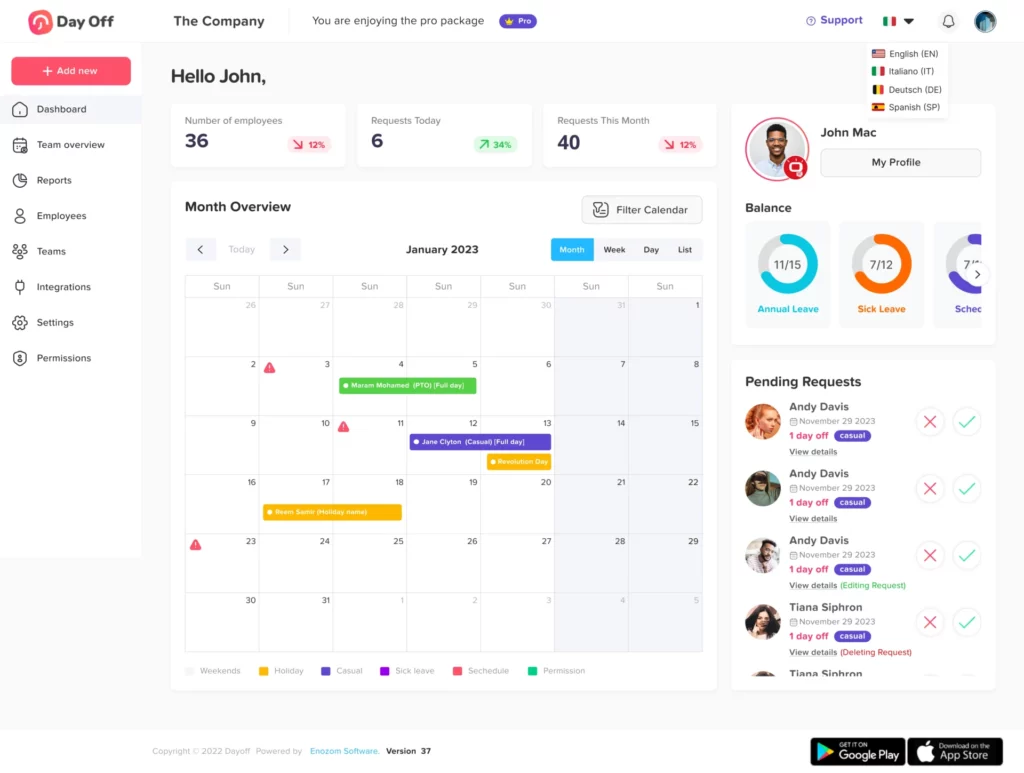
    Day Off Leave Tracker

    Customizable Leave Types and Policies

    No two organizations have the same leave policies. Companies differ by geography, industry, and workforce structure, which means your software must adapt to you, not the other way around.


    Look for a system that allows you to:

    • Create custom leave types, such as work-from-home days, parental leave, study leave, or volunteer days.

    • Define specific rules for each type (eligibility, approval hierarchy, documentation).

    • Set accrual methods, whether monthly, quarterly, or annually.

    • Establish carryover or expiration rules to prevent unused leave accumulation.

    For example, a tech company may allow five “Remote Work” days per quarter, while a healthcare organization may define “Emergency Leave” for urgent family situations. Flexibility ensures compliance and fairness across departments and regions.


    Pro Tip: Opt for a leave tracker that automatically adjusts to local labor laws and time zones for global teams.

    Real-Time Leave Balances and History

    Transparency is key to trust and efficiency. Employees should be able to view their current leave balances, accrued time, pending approvals, and historical data in real-time, without emailing HR.


    A transparent leave tracker should provide:

    • A real-time dashboard displaying available and used leave.

    • A comprehensive history log showing dates, types, and reasons for previous leaves.

    • Automatic updates after approvals or payroll cycles.

    For HR and managers, this visibility reduces administrative questions and helps with scheduling, payroll reconciliation, and performance evaluations.


    Bonus Feature: Choose a platform that syncs leave data automatically with payroll and attendance systems.

    Mobile Access and Multi-Device Compatibility

    In the era of remote and hybrid work, accessibility is essential. Employees should be able to manage leave requests from any device, anywhere, whether on a desktop, tablet, or mobile phone.


    A mobile-optimized or app-based leave tracker allows:

    • Employees to apply for leave instantly.

    • Managers to approve or reject requests on the go.

    • HR to monitor attendance and staffing in real time.

    This flexibility ensures that business operations don’t pause just because a manager or HR lead is out of the office.


    Ideal For: Field teams, traveling executives, or distributed workforces who rely on mobile communication tools.

    Automated Approval Workflows and Smart Notifications

    Manual email chains are inefficient and error-prone. Modern leave tracker software automates the entire approval process, ensuring speed, accountability, and clarity.


    Key capabilities include:

    • Customizable approval workflows (e.g., employee → direct manager → HR).

    • Automated reminders for pending approvals.

    • Notifications through email, Slack, or Microsoft Teams.

    • Delegation options when managers are on leave.

    Automation reduces HR workload, eliminates bottlenecks, and ensures that leave requests never fall through the cracks.


    Pro Tip: Look for systems that auto-redirect approvals to backup approvers during managerial absences.

    Team and Company Calendar View

    A shared calendar is one of the most powerful features of any leave tracker. It allows HR and team leads to visualize who’s off and when, preventing overlaps and staffing shortages.


    An effective calendar should display:

    • Approved and pending leaves across teams.

    • Public holidays and company events.

    • Department-specific or organization-wide views.

    • Color-coded leave types for clarity.

    When integrated with Google Calendar or Outlook, this visibility improves scheduling, workload distribution, and overall coordination across departments.


    Pro Tip: Use color-coded categories (e.g., blue for vacation, red for sick leave) to make patterns easy to identify at a glance.

    Comprehensive Reporting and Analytics

    Data-driven insights separate good HR systems from great ones. In 2026, leave tracking software should do more than log absences, it should help HR predict patterns and improve decision-making.


    Top reporting features include:

    • Leave usage analysis by individual, team, or department.

    • Absenteeism and turnover correlations.

    • Forecasting tools for busy vacation seasons.

    • Compliance and audit-ready reports.

    These insights allow companies to identify workload issues, prevent burnout, and optimize coverage during critical business cycles.


    Example: If marketing teams consistently take time off after major campaigns, managers can plan lighter schedules in those periods to balance recovery and productivity.

    Compliance and Legal Support

    Leave laws vary widely across regions, and non-compliance can result in costly penalties. Modern leave trackers help organizations stay compliant automatically.


    Your software should support:

    • Region-specific legal frameworks, including paid leave entitlements and statutory holidays.

    • Automatic updates for labor law changes.

    • Audit trails and documentation for HR inspections.

    • GDPR and data privacy compliance to protect employee information.

    Ideal For: Multinational organizations managing teams across different countries or states.

    Employee Self-Service Portal

    Empowering employees reduces HR’s administrative burden. A good leave tracker offers a self-service portal where team members can manage their own requests and track their status independently.


    Essential features include:

    • Leave balance overview and application forms.

    • Access to company leave policies and FAQs.

    • Visibility into upcoming public holidays.

    • Ability to cancel or modify leave requests before approval.

    When employees take ownership of their time-off planning, HR gains valuable time for more strategic initiatives.

    AI and Predictive Features

    The future of HR tech is AI-powered. Advanced leave trackers in 2026 are leveraging artificial intelligence and machine learning to predict and optimize workforce management.


    Key AI features include:

    • Leave trend forecasting based on historical data.

    • Automatic burnout alerts for employees who haven’t taken leave in months.

    • Smart leave suggestions based on company workflows and busy periods.

    • Anomaly detection for spotting potential leave abuse or irregular patterns.

    Example: If a team consistently books last-minute sick leaves on Fridays, the system can flag the trend for HR review.

    Security and Data Protection

    Because leave data includes personal and employment information, security is non-negotiable.

    Look for:

    • End-to-end encryption for all stored and transmitted data.

    • Role-based access controls so only authorized users can view sensitive details.

    • Regular backups and audits.

    • Compliance with GDPR, HIPAA, or local privacy laws.

    Prioritizing data protection safeguards both employees and the organization from legal risks.

    Frequently Asked Questions (FAQ) About Leave Tracker Software

    What is a leave tracker software?

    A leave tracker software is a digital tool that helps organizations record, manage, and approve employee time off. It automates leave requests, tracks balances in real time, and provides visibility into schedules, eliminating the need for manual spreadsheets or email chains.

    Why is a leave management system important in 2026?

    With remote and hybrid work becoming the norm, businesses need digital solutions that ensure transparency, flexibility, and compliance. A modern leave management system simplifies tracking across time zones, integrates with communication platforms, and provides analytics to help HR make data-driven decisions.

    How does a leave tracker help improve productivity?

    By automating approvals and providing clear visibility into team availability, a leave tracker minimizes scheduling conflicts and ensures proper staffing. Employees can request time off quickly, and managers can plan workloads more effectively, reducing bottlenecks and improving overall efficiency.

    Can leave tracking software integrate with payroll or HR systems?

    Yes. Most modern leave management tools integrate seamlessly with payroll, HRIS, and communication platforms such as Slack, Microsoft Teams, or Google Workspace. These integrations ensure accurate payroll calculations, eliminate duplicate data entry, and streamline employee record management.

    What should I look for when choosing a leave tracker?

    Focus on features like user-friendliness, mobile accessibility, automation, custom leave types, compliance tools, analytics, and security. The best systems adapt to your organization’s policies and scale as your team grows, while maintaining accuracy and transparency.

    How can AI enhance leave management?

    AI-powered leave trackers analyze patterns to predict future absences, identify potential burnout, and recommend optimal scheduling. They also detect policy misuse, forecast staffing needs, and support data-driven decision-making, helping HR move from reactive management to proactive planning.

    How can companies encourage employees to use their PTO or leave benefits?

    Organizations should foster a healthy PTO culture by normalizing time off, ensuring transparent policies, and providing easy-to-use tools like Day Off. Leaders should model behavior by taking time off themselves and reinforcing the message that rest and recovery are vital for long-term performance.

    Conclusion

    A modern leave tracker software does far more than just count vacation days it acts as a powerful tool for planning, compliance, communication, and employee engagement.


    As we move through 2026, organizations must seek out solutions that are flexible, smart, and scalable. Whether you’re managing a small startup or a distributed global team, choosing the right tool will save you time, money, and unnecessary stress.


    By focusing on the must have features outlined in this guide, you’ll be well equipped to select leave tracking software that supports your business goals and keeps your team productive and happy.

    Smarter time off tracking starts here.

  • Best Time Off App For 2026: Features, Benefits

    Best Time Off App For 2026: Features, Benefits

    Managing employee absences effectively is critical for maintaining productivity, ensuring compliance, and fostering a healthy work-life balance. Whether it’s paid time off (PTO), vacation, sick leave, or parental leave, manual tracking using spreadsheets or emails is no longer efficient. It’s error-prone, time-consuming, and lacks transparency, creating unnecessary stress for HR teams and employees alike.


    This is where a Time Off App becomes indispensable.


    A modern Time Off App automates the entire leave management process, allowing employees to request time off easily, managers to approve requests instantly, and HR teams to track leave balances in real-time. With 2026 bringing advanced AI capabilities, mobile-first design, and powerful integrations, time off management has evolved into a seamless, data-driven experience.


    If your company is still using outdated leave tracking systems, now is the time to modernize. Implementing a reliable Time Off App will not only simplify administrative processes but also improve compliance, transparency, and employee satisfaction.

    Why Your Business Needs a Time Off App

    A Time Off App is more than a convenience, it’s a productivity and compliance tool that impacts your entire organization.

    Leave Requests and Approvals

    Manual request forms or emails create delays and confusion. A time off app automates every step, employees can submit requests in seconds, managers are instantly notified, and approvals are processed with just one click.


    With a modern system like Day Off:

    • Employees select leave dates, specify the leave type (vacation, sick, unpaid, etc.), and attach supporting documents if needed.

    • Managers receive automatic notifications, review requests, and approve or decline with one tap.

    • HR instantly sees updates in the dashboard, no lost forms, no data duplication.

    Automation ensures that no request goes unnoticed and that approvals are always processed promptly and fairly.

    Reduces Administrative Workload

    Without automation, HR teams spend hours calculating accruals, managing spreadsheets, and tracking leave histories. A Time Off App eliminates these manual tasks by automatically updating balances, recording absences, and generating reports.


    This reduces administrative overhead, minimizes human error, and gives HR professionals more time to focus on employee engagement and strategic initiatives.


    Example:
    An HR manager overseeing 100 employees could save up to 10 hours a week previously spent on manual tracking and corrections, that’s over a full workday reclaimed.

    Prevents Errors and Scheduling Conflicts

    One of the biggest challenges in managing leave manually is overlapping requests and miscalculations. A good Time Off App ensures accuracy across the board.


    Here’s how:

    • Leave balances update automatically after every approval.

    • The app checks for conflicting dates to prevent overlapping absences.

    • Team calendars provide visibility into who’s off and when, improving resource planning.

    This visibility allows managers to maintain optimal staffing and prevents disruptions to projects or workflows.

    Ensures Compliance with Labor Laws

    Compliance with local, state, and federal labor regulations is essential. Time Off Apps ensure your company adheres to legal requirements for paid leave, parental leave, and sick time.


    Day Off App, for instance, allows HR teams to:

    • Set up localized leave policies for different regions or countries.

    • Automatically apply accruals, carryover limits, and legal entitlements.

    • Maintain digital records for audit and reporting purposes.

    This eliminates compliance risks and ensures consistent application of labor laws across the organization.

    Promotes Transparency and Employee Satisfaction

    Employees value clarity. When they can view their available PTO balance, track approvals, and access their leave history without needing to email HR, trust and satisfaction increase.


    Modern tools like Day Off make this possible by offering self-service portals and mobile accessibility. Employees can check their balance, submit leave requests, and receive notifications all from their phone.


    A smooth leave management experience leads to better morale, less confusion, and a stronger work-life balance.

    Key Features to Look for in a Time Off App

    Not all Time Off Apps are created equal. The best solutions combine flexibility, automation, and simplicity. Below are the must-have features your business should look for in 2026, all of which are core strengths of Day Off App.

    Easy Leave Requests and Approvals

    An intuitive interface is essential. Employees should be able to request time off in seconds, and managers should approve or deny requests instantly.


    Day Off provides:

    • One-click requests and instant notifications.

    • Manager dashboards for bulk approvals.

    • Automated approval workflows for different departments or roles.

    This ensures a fast, organized, and documented approval process.

    Customizable Leave Policies

    Every organization has unique leave policies. A top-tier app must allow complete customization.


    Day Off offers:

    • Custom leave types (vacation, sick leave, maternity, bereavement, unpaid, etc.).

    • Personalized accrual and carryover rules.

    • Support for multiple teams, departments, or countries.

    • Configurable approval hierarchies and expiration settings.

    This flexibility makes it suitable for both small startups and large enterprises.

    Automated PTO Tracking and Accruals

    No more manual calculations. Day Off automatically tracks earned and used leave, updates balances in real-time, and applies company-specific accrual rates.


    Example: If your policy grants 1.5 days of PTO per month, Day Off automatically adds that to each employee’s balance on schedule, without HR intervention.


    The system also handles negative balances, carryovers, and anniversary-based resets seamlessly.

    Calendar and System Integrations

    Integration is key to smooth operations. Day Off syncs effortlessly with:

    • Google Calendar and Outlook Calendar (for automatic schedule updates).

    • Slack and Microsoft Teams (for real-time status notifications).

    • Payroll and HR systems (to ensure accurate compensation and record-keeping).

    This ensures that everyone stays informed and aligned, even in hybrid or remote setups.

    Mobile App and Accessibility

    Modern workplaces demand mobile solutions. Day Off’s iOS and Android apps make it easy for employees and managers to stay connected wherever they are.


    Mobile capabilities include:

    • Submitting and approving requests on the go.

    • Checking team availability from a shared calendar.

    • Receiving push notifications for approvals or reminders.

    This flexibility supports today’s dynamic, mobile-first workforce.

    Real-Time Analytics and Reporting

    Data-driven insights are essential for effective HR management. Day Off provides detailed reports that help HR teams analyze trends, forecast staffing needs, and identify problem areas.


    You can generate:

    • Absenteeism and PTO usage reports.

    • Department-wise time-off summaries.

    • Compliance reports for audits.

    These insights allow companies to make smarter, evidence-based decisions.

    Work Schedule Management

    A standout feature of Day Off is its Work Schedules capability. This allows businesses to define and manage varying working hours or shifts for employees, ensuring that time-off calculations are always accurate.


    Key advantages:

    • Configure flexible schedules for full-time, part-time, or shift-based staff.

    • Assign different schedules for departments or locations.

    • Automatically adjust accruals based on working days.

    This is particularly useful for companies operating globally or with hybrid and rotating teams.

    Single Sign-On (SSO) and Data Security

    Security and convenience are non-negotiable. Day Off offers Single Sign-On (SSO), allowing users to securely log in using existing company credentials through providers like Google Workspace or Microsoft.


    Benefits include:

    • Streamlined access with one set of login details.

    • Reduced password fatigue and fewer IT requests.

    • Centralized access control for administrators.

    Day Off also follows strict data protection protocols, ensuring compliance with global privacy standards.

    Best Time Off Apps in 2026

    Day Off App (Top Pick for Large and Mid-Sized Businesses)

    Why It’s Great:
    Day Off combines simplicity, automation, and advanced features like work schedules and SSO, making it perfect for startups and growing companies.

    Key Highlights:

    • Intuitive dashboard for employees and HR.

    • Customizable leave types and approval workflows.

    • Real-time PTO tracking and automated accruals.

    • Calendar integrations (Google, Outlook).

    • Slack and Microsoft Teams notifications.

    • Mobile app access for on-the-go management.

    • Reporting and analytics dashboards.

    • Work schedule management.

    • Secure SSO login for enterprise-grade access control.

    Best For: Companies that want an easy-to-use, scalable, and cost-effective PTO tracker that grows with their team.

    BambooHR

    Why It’s Great: All-in-one HR platform with integrated time-off tracking.
    Best For: Companies needing comprehensive HR management (payroll, onboarding, performance).

    Timetastic

    Why It’s Great: Clean interface, affordable pricing, and calendar synchronization.
    Best For: Small businesses seeking simplicity.

    Factorial

    Why It’s Great: Cloud-based HR suite that includes PTO and compliance tools.
    Best For: Mid-size to large organizations focused on HR analytics.

    Benefits of Using a Time Off App

    A time off management system benefits every layer of an organization:

    • Saves Time and Reduces Errors: Automation eliminates manual tracking and reduces calculation mistakes.

    • Improves Transparency: Employees can access real-time balances and request histories.

    • Prevents Scheduling Conflicts: Managers can plan better with clear visibility of team absences.

    • Boosts Employee Morale: Quick approvals and fair policies build trust.

    • Ensures Legal Compliance: Avoids penalties by automatically enforcing labor laws.

    Ultimately, a Time Off App creates a balance between organizational efficiency and employee well-being.

    How to Choose the Best Time Off App for Your Business

    • Assess Your Business Needs: Identify your company size, industry, and leave policy complexity.

    • Prioritize Integrations: Ensure compatibility with existing HR, payroll, and communication tools.

    • Test Usability: A good app should be intuitive and require minimal training.

    • Check Scalability: Choose a solution that can grow as your team expands.

    • Evaluate Security and Support: Look for SSO options, encryption, and reliable customer service.

    Frequently Asked Questions (FAQ)

    What is a Time Off App?

    A Time Off App is a digital tool that automates the management of employee absences. It allows employees to request leave, managers to approve or reject requests, and HR teams to track balances and compliance, all in one place.

    How does a Time Off App save time for HR?

    It eliminates manual data entry, spreadsheet updates, and email follow-ups. Tasks like tracking accruals, generating reports, and approving requests are automated, saving hours of administrative work.

    Why is Day Off considered one of the best Time Off Apps in 2026?

    Day Off stands out because of its balance between simplicity and functionality. It offers automated PTO tracking, customizable policies, calendar integrations, work schedule management, mobile access, and enterprise-grade security through SSO, all in an intuitive interface.

    Can Day Off handle multiple teams or offices?

    Yes. Day Off supports multi-location setups, allowing businesses to assign region-specific holidays, schedules, and policies. It’s ideal for distributed and international teams.

    Does Day Off integrate with calendar and communication tools?

    Absolutely. Day Off syncs with Google Calendar, Outlook, Slack, and Microsoft Teams, ensuring that approved leaves appear in shared calendars and notifications are automatically sent to team members.

    How secure is Day Off?

    Day Off uses encrypted cloud storage and supports Single Sign-On (SSO) for secure, centralized access. It adheres to strict data protection standards to keep company and employee data safe.

    What is the Work Schedule feature in Day Off?

    The Work Schedule feature allows HR to define custom work hours, shifts, and working days for different teams or employees. This ensures accurate leave calculations and fair policy enforcement.

    Can employees access Day Off from mobile devices?

    Yes. Day Off offers mobile apps for iOS and Android, allowing users to request leave, approve requests, and check balances from anywhere.

    How does Day Off support compliance with labor laws?

    Day Off helps organizations enforce local leave laws automatically, including paid and unpaid leave policies, accrual rules, and record-keeping requirements. This minimizes compliance risks.

    Conclusion

    In the modern workplace, managing leave manually is no longer practical. A Time Off App streamlines the entire process, ensuring accuracy, compliance, and transparency while reducing administrative workload.


    Among the options available in 2026, Day Off App stands out for its ease of use, advanced automation, and rich feature set, including real-time tracking, work schedules, mobile accessibility, and SSO security.


    By adopting Day Off, businesses can transform their leave management system into a smooth, efficient, and employee-friendly experience, ensuring productivity and satisfaction go hand in hand.

    Smarter time off tracking starts here.

  • Day Off is On Capterra’s Best Leave Management Shortlist 2026!🎉

    Day Off is On Capterra’s Best Leave Management Shortlist 2026!🎉

    We’re thrilled to announce that Day Off has been named to Capterra’s exclusive “Best Leave Management System 2026” shortlist! This recognition is a proud moment for our team and a testament to our relentless focus on making leave management smooth, efficient, and stress free for companies everywhere.

    But today isn’t just about celebrating us it’s about celebrating you, our amazing community, who has driven us to constantly improve and innovate. So, let’s dive into what makes this milestone so special.

    Why This Recognition Matters to Us

    Being featured among the top leave management solutions by Capterra, a trusted platform for business software, is a significant achievement. It’s more than just an award, it’s validation that our dedication to user satisfaction, innovation, and ease of use truly resonates with the HR professionals and organizations who depend on us.

    This milestone wouldn’t have been possible without the invaluable feedback and support of our users. Each suggestion, review, and shared experience has helped shape Day Off into what it is today, and we’re beyond grateful for it.

    What Makes Day Off the Ultimate Leave Management Solution?

    Day Off dachboard

    At Day Off, we’re on a mission to revolutionize how companies of all sizes handle time off, making it a breeze for both employees and managers. Whether you’re running a lean startup, managing a growing mid sized company, or overseeing a large enterprise, our platform is designed to streamline leave management effortlessly.

    Effortless One Click Leave Requests

    No more lengthy forms or confusing processes! With Day Off, employees can request time off in seconds, just a few clicks, and they’re done. For managers, reviewing and approving requests is just as simple, allowing you to stay on top of things without interrupting your busy day.

    Customizable Leave Policies to Fit Your Business

    We understand that every company has its own leave policies, so we give you full control to tailor the platform to match your unique needs. Create personalized leave types (vacation, sick days, parental leave, etc.), set up custom accrual rules, and design multi step approval workflows to align perfectly with your organization’s policies.

    • Easily set different leave entitlements for full time, part time, or contract staff.
    • Adjust carryover rules, blackout dates, and holiday schedules to fit your business model.

    Real Time Calendar Integration

    Stay fully aware of who’s in and who’s out with our real time calendar syncing feature. Day Off integrates seamlessly with your existing company calendars (like Google Calendar or Outlook) so everyone’s availability is clear at a glance. This means no more scheduling conflicts, missed meetings, or overburdened teams due to unplanned absences.

    • Instantly view team members’ leave status on a shared calendar.
    • Avoid double bookings or unexpected staffing shortages.

    Automated Leave Balance Tracking & Reporting

    Tracking leave balances manually can be a nightmare, especially as your team grows. Day Off takes the hassle out of the process by automatically calculating leave balances and accruals. No more Excel sheets, manual entries, or errors, just real time, accurate data at your fingertips.

    • Get instant visibility into leave balances, accrual rates, and remaining days for every employee.
    • Generate detailed reports to gain insights into leave trends and optimize workforce planning.

    Accessible Anywhere, Anytime

    We believe that managing leave shouldn’t be tied to your desk. With Day Off’s mobile friendly design, you can access your leave management dashboard from any device, whether you’re in the office, at home, or on the go. Both managers and employees can handle leave requests, approvals, and calendar views from their smartphones, tablets, or desktops.

    • Mobile app support ensures flexibility for remote and hybrid teams.
    • Notifications keep everyone updated on request statuses, ensuring nothing slips through the cracks.

    What Our Users Are Saying

    The best feedback comes directly from those who use our platform daily. Here’s what a few of our satisfied users have to say:

    • “We love the simple and user friendly interface that allows all employees to place requests and view their status with ease. The benefits greatly outweigh the costs with this.”
      Bri B., Director of Operations

    • “Impressive free package, can support growing teams of all sizes, simple and easy to use, nice mobile apps.”
      Amr A., CEO & Co-founder

    • “Day Off is very easy to use for everyone involved: from the employees to the supervisors. We love how it integrates with our Google calendar so everyone can be aware when people are out of the office.”
      Candace C., Director of Operations

    • “The shared calendar is great too. Most aspects of the app are easy to use and straightforward.”
      Josephine J., Admin Assistant

    • “Very positive experience and the chat support has been very helpful and quick to respond to my questions.”
      Lorraine L., Pharmacist

    Thank You to Our Community

    We wouldn’t be celebrating this recognition without our incredible users. Your trust, feedback, and continued support drive us to keep pushing the boundaries of what’s possible in leave management. We are incredibly grateful to each and every one of you for making Day Off a part of your workplace.

    Join Day Off Family

    Haven’t experienced Day Off Leave Tracker yet? Now’s your chance! Start your free trial today and see how we can transform your leave management process into a streamlined, automated experience that frees up your time for what matters most.

    Here’s to many more milestones together! 

    Smarter time off tracking starts here.

  • How To Get Benefit From Integration With Slack

    How To Get Benefit From Integration With Slack

    Slack: is AI-powered platform for work bringing all of your conversations, apps, and customers together in one place. Offering instant messaging, document sharing and knowledge search for modern teams, Around the world, Slack is helping businesses of all sizes grow and send productivity through the roof.
    Integration With Slack are a powerful way to enhance your team’s productivity by connecting Slack with other tools and services you use daily. These integrations allow for a seamless flow of information between Slack and external applications, automating tasks, and centralizing notifications in one place.

    What Is Slack Integration?

    Integration With Slack refers to the process of connecting Slack, with other software tools, services, or custom applications to enhance its functionality and streamline workflows. Integrations can range from simple notifications sent to a Slack channel from another application, to complex interactions enabling users to perform tasks within Slack that would normally require the use of another software tool.

    Types Of Slack Integrations

    Integration With Slack with other tools can significantly increase productivity by reducing the need to switch between applications, automating routine tasks, and ensuring that important information is readily accessible within the Slack environment where teams are already communicating and collaborating.

    • Built-in Integrations and Apps: Slack offers a vast directory of pre-built apps and integrations for popular services like Google Drive, Trello, GitHub, and many others. These can be easily added to Slack to bring information and functionality from those services into your Slack workspace.
    • Custom Integrations via Slack APIs: For more tailored needs, Slack provides powerful APIs (Application Programming Interfaces) that developers can use to create custom integrations. These APIs allow for a wide range of interactions, from posting messages in channels to automating workflows and even building bots that can assist with various tasks directly within Slack.
    • Incoming Webhooks: A simpler form of integration that allows external services to send messages into Slack. Webhooks are perfect for notifications like alerts, status updates, or any other automated messages from other applications.
    • Slash Commands: These are custom commands that users can type in Slack to interact with external applications or services. For example, you might use a slash command to look up information in a database or to trigger an action in another tool.
    • Slack Apps: Beyond integrations, you can develop full-fledged Slack applications that can provide a more interactive and complex set of functionalities within Slack. These apps can include modals, interactive messages, and more, leveraging the Slack API to create a rich user experience.

    Why Connect Your Tools With Slack

    Features Of Slack 

    Stay on the same page and make decisions faster by bringing all of your work communication into one place.

    Slack Connect transforms the way you work alongside your partners, vendors or customers by moving conversations out of siloed email threads and into the same place.

    • Bring communication out of inboxes and into channels, where you can work quickly and collaboratively with outside organizations.
    • Keep your work secure with Slack’s enterprise-grade security features and compliance standards.
    • Streamline processes and speed up collaboration by building and connecting new workflows across organizations.

    Channels bring order and clarity to work, you can create them for every project, topic, or team. When there’s a channel for everything, you can focus on the conversations and work that matters most to you.

    • Provide you and your team with a shared view into the work being done. With access to the same information, everyone in the channel can work in sync, and new members have full context when they join. And whenever you want to talk, simply use Slack Huddles to start a live voice conversation.
    • Your conversations and files become a searchable archive that gets more useful with time. Find answers, get context and make better decisions without having to chase down people or information.

    Slack canvas Keep everyone on the same page,

    • Capture vital details for anything you’re working on, Embed your canvas with files, images, videos and more, Co-edit with stakeholders in comments and threads, all without leaving Slack.
    • Add workflows to your canvas, Build your own automations for whatever you need, no coding required, See workflows and related context together.
    • Add unfurl links for the apps you use every day, Keep data and app insights in view to eliminate context switching, Take action on items in Salesforce, Jira, Figma and more without leaving a canvas.

    Huddles happen right in Slack. Instantly connect over audio or video and share screens so you can get more done where you’re already working.

    • Liven up the conversation: Emoji reactions. Colorful backgrounds. Delightful effects. In huddles, teams can express themselves to make being together even better.
    • If it’s shared in a huddle, it’s saved in Slack: Any links, documents and messages shared during a huddle are automatically saved once the huddle ends, so your team can easily jump back to them for reference.
    • Messaging Put your typing to good use. Efficient, organized team chat helps you and your team work better together.
      Choose the communication style that works for you, Connect with people wherever they’re working, Bring context into the conversation.
    • Clips Stay aligned and free up time.
      Clips let your team get updates, announcements and explanations straight from you. Post audio, video or screen recordings to give more color and context, all right in Slack.
      Everyone can watch or create clips on their own time, so teams can be kept up to date without waiting to find time on the calendar.
      Watch or listen to clips whenever and however you’d like: Speed them up, slow them down, follow along with captions or quickly skim the transcript, at your desk or on the go.
    • Accessibility A pleasant Slack experience is a “need to have,” not a “nice to have.” That’s why we’re making sure everyone can use Slack, in whatever ways fit them best.
      Customize how GIFs and emoji animate in Slack.
      Choose your zoom level, contrast setting, and more.

    Day Off Integration With Slack

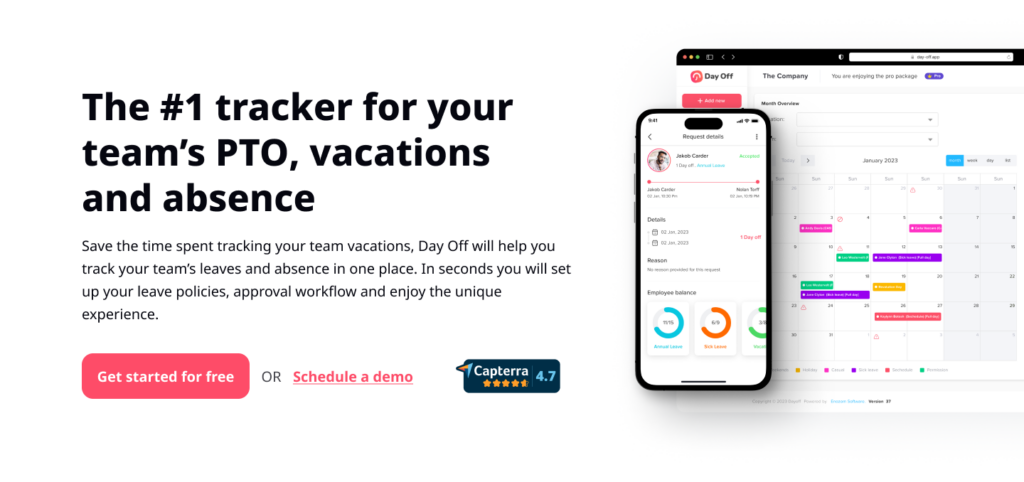
    Managing employee time off efficiently is one of the most important aspects of maintaining a balanced, motivated, and productive workforce. The Day Off app stands as the #1 tracker for team PTO, vacations, and absences, designed to simplify and automate the entire leave management process for organizations of all sizes.

    With Day Off, HR managers and team leaders can track employee leaves and absences effortlessly in one centralized platform. In just a few seconds, companies can set up their leave policies, configure approval workflows, and synchronize calendars, transforming a once tedious task into a smooth, transparent, and enjoyable experience.

    What makes Day Off stand out is its focus on both organizational efficiency and employee empowerment. The platform is built with a modern, user-friendly interface that enables employees to request, view, and manage their own time off with ease. Meanwhile, HR professionals and managers gain full visibility into team availability, ensuring that business operations remain uninterrupted even during peak vacation periods.

    Comprehensive Leave Management for Every Organization

    Day Off supports multiple types of leave, including annual leave, sick leave, maternity/paternity leave, unpaid leave, and more. You can also create custom leave types and unique policies that reflect your organization’s specific requirements. The app supports both day-based and hour-based leave tracking, making it flexible enough to fit any company’s structure, whether you manage a global team or a small local office.

    Streamlined Setup and Integration

    Setting up your company in Day Off takes just minutes. You can import employees in bulk, define custom workweeks, and automatically import public holidays from Google, ensuring regional accuracy. Day Off seamlessly integrates with your team’s favorite tools like Slack, Google Calendar, Outlook Calendar, and Microsoft Teams, allowing everyone to stay informed without switching between multiple apps.

    Smarter Approval Workflows and Real Time Notifications

    With customizable approval workflows, you can choose whether requests require approval from one or multiple managers. Notifications are sent instantly when a new leave request is submitted, approved, or denied, keeping everyone updated in real time. Managers can even handle approvals directly through integrated platforms like Slack, ensuring quick and efficient decision making.

    Transparency and Accountability

    One of the biggest advantages of using Day Off is the transparency it brings to leave management. Employees can easily check their leave balances, track past requests, and understand their remaining PTO,  eliminating confusion and reducing unnecessary HR inquiries. Teams can also view a shared leave calendar, helping everyone coordinate schedules, plan projects, and ensure coverage when colleagues are away.

    Analytics, Insights, and Reporting

    Beyond simple tracking, Day Off offers advanced analytics and reporting tools that provide valuable insights into attendance patterns, absenteeism rates, and team availability. These insights help HR teams identify trends, improve workforce planning, and maintain a healthier work-life balance across departments.

    Why Choose Day Off?

    • All-in-one platform for managing employee leave and absences.

    • Unlimited employees and leave types supported.

    • Customizable policies for full flexibility.

    • Integration-ready with popular tools like Slack, Teams, and Google Workspace.

    • User-friendly interface for both managers and employees.

    • Improved accuracy, compliance, and efficiency in HR operations.

    In essence, Day Off isn’t just a PTO tracker, it’s a complete leave management solution that empowers companies to operate more efficiently while prioritizing employee well-being. It helps HR teams move away from outdated spreadsheets and manual processes, replacing them with a modern, automated, and data-driven system that supports productivity, transparency, and a healthier workplace culture.

    Provides an ideal platform for streamlining leave management processes directly within the flow of daily work communication.

    Steps Of Day Off Integration With Slack

    Import Employees

    You Have to Import your employees in Slack, by opening the integration icon from Day off, clicking on Connect with Slack, then select the employees you want to link them with Slack.

    Simple Leave Requests:

    Employees can request time off directly within Slack by sending a message to the “Day Off” app bot. This could be as simple as typing (/dayoff),  which the bot then send autoreply of which request needed, ( Submit a request, Status, Pending requests), By choosing Submit a request, App Menu will be appearing to select the required request. 

    An image shows how can you submit a leave or time off request using Day Off platform

    Instant Notifications:

    Managers receive instant notifications about leave requests in Slack, allowing them to quickly review and respond. They can approve or deny requests with a single click, and both the requester and the team are notified of the decision immediately.

    Leave Balance Inquiries:

    Employees can check their remaining leave balances by querying the “Day Off” bot in Slack. This might involve a simple command like /dayoff, choose My status, which returns the user’s current leave balances.

    Team Calendars and Availability:

    Integration can include a feature Sending Daily digest, showing who from the team members are off, This visibility helps with planning meetings, projects, and deadlines, ensuring that absences are accounted for in advance.

    Other Popular Integrations With Slack

    • Click Up
      Click Up is one of the most well-liked productivity and project management tools in small and large organizations. It would be an understatement to say that Click Up’s Slack integration does anything an ordinary chat tool can do.
      Turn your Slack messages into Click Up tasks and send notifications on new messages and changes in your Click Up channel.
      You can open Click Up tasks in Slack, go through the important details, and make them happen immediately.
    • Active Campaign
      Active Campaign is a CRM software for sales teams to maximize their potential.
      Essentially, it assists teams in email marketing, marketing automation, and CRM, so they can keep customers satisfied and happy.
    • Calendly
      Its purpose is to enable users to schedule meetings that work for them. That way, you don’t have to manage a whole bunch of emails to set up a meeting. It also means you can sleep without worrying about being disturbed by an unscheduled meeting.
    • Giphy
      It’s the place where animated GIFs that people prefer way more than words can be found. It lets you create many animated images (aka GIFs) to converse with your teammates.
    • GitHub
      GitHub is a platform for your software team to easily manage their projects. This app integration will speed up your team’s development by letting them access some of the best code in community-approved projects and repositories.
    • Karma
      It is a Slack bot that recognizes employees for doing a good job and congratulates them when milestones are reached. One easy way to recognize your teammates is by utilizing this Slack integration that is based on micro-feedback, automatically sets rewards, and identifies individual contributions.

    Security

    Trust Slack to keep your data secure and meet your compliance requirements.

    • Identity and device management
      Ensure that only the right people and approved devices can access your company’s information in Slack with features like single sign-on, domain claiming and support for enterprise mobility management.
    • Data protection
      In Slack, customer data is encrypted at rest and in transit by default. We protect your data with tools like Slack Enterprise Key Management (Slack EKM), audit logs and data loss prevention (DLP).
    • Information governance
      Slack offers governance and risk-management capabilities flexible enough to meet your organization’s needs, no matter what they are. This includes global retention policies, legal holds and support for eDiscovery.

    Conclusion

    Integrations with Slack, especially for productivity and HR tools like Day Off, represent a major step forward in how modern teams manage communication, collaboration, and daily operations. By embedding essential workflows, such as PTO tracking, leave approvals, and team availability updates, directly into Slack, organizations can eliminate inefficiencies and create a truly connected workspace.


    These integrations not only streamline processes but also empower employees to manage their time, communicate effectively, and stay aligned with company goals without ever leaving their primary workspace. For HR teams and managers, this means fewer administrative hurdles, real-time visibility into team activities, and a more data-driven approach to workforce management.


    Ultimately, the combination of Slack’s collaborative ecosystem and Day Off’s powerful leave management features promotes a culture of transparency, flexibility, and balance. It ensures that while teams stay highly productive and connected, employees can also enjoy the work-life harmony they deserve. This synergy between communication and HR technology is shaping the future of modern workplaces, smarter, faster, and more human-centered than ever before.

    Smarter time off tracking starts here.

  • Day Off Earns Time Tracking Software Recognition From Top B2B Review Site

    Day Off Earns Time Tracking Software Recognition From Top B2B Review Site

    Day Off recently received a major industry award from a renowned B2B review platform, celebrating the excellence of its outstanding products and services.

    CompareCamp, one of the most well-known and respected sources for comprehensive B2B SaaS reviews, recently lauded Day Off as one of the best time tracking platforms this year. In addition, the software review platform presented Day Off with a Rising Star Award, an award typically given to companies that have earned positive comments and rising followers on social media. 

    Software specialists from CompareCamp also authored a detailed Day Off review and concluded that it effectively assists organizations in monitoring leaves and vacations filed by their employees. They recognized the tool’s versatile features and impressive performance as an exceptional time tracking software.

    What CompareCamp Applauded

    Efficient, Transparent Leave Tracking

    Day Off streamlines the entire leave lifecycle, from request to approval to balance updates, giving employees and managers a clear, shared source of truth. This reduces confusion around balances, eliminates back-and-forth emails, and helps teams plan coverage with confidence.

    Customizable, Policy-Ready Controls

    The platform adapts to real-world policy complexity. Companies can define leave types, accruals, carryover rules, and country- or team-specific holidays. This flexibility keeps Day Off aligned with evolving org structures and employee preferences, without messy workarounds.

    Workflow Control for HR and Managers

    Configurable approval flows give HR and people leaders the oversight they need, while keeping day-to-day actions fast for managers. Centralized visibility promotes accountability and keeps decisions moving, even in peak seasons.

    Instant Notifications & Real-Time Updates

    Automatic alerts keep everyone in sync, requesters, approvers, and stakeholders, so decisions happen quickly and calendars stay accurate. Real-time updates prevent scheduling collisions before they happen.

    Mobile-First Self-Service

    With Day Off’s mobile experience, employees can submit, modify, and track requests anywhere, and managers can approve on the go. That agility shortens cycle times and keeps work flowing.

    Customer Support That Shows Up

    CompareCamp’s review also noted Day Off’s responsive, people-first support, from quick answers to configuration guidance, enhancing overall user satisfaction and ROI.

    Gratitude to Our Community

    Day Off extends sincere appreciation to CompareCamp for this recognition and to our customers for the continuous feedback that shapes our roadmap. Your trust motivates us to keep raising the bar on usability, flexibility, and reliability.

    “Awards are wonderful, but the real win is when teams feel in control of time off,” the spokesperson added. “We’re doubling down on the features customers love most: powerful policy customization, clean reporting, and seamless mobile workflows.”

    What’s Next

    We remain committed to delivering thoughtful enhancements that make time-off management even easier, from richer analytics and forecasting to deeper integrations that meet teams in the tools they already use.

    Frequently Asked Questions (FAQ)

    What exactly did Day Off win from CompareCamp?

    Day Off earned CompareCamp’s Rising Star Award and was listed among the best time & leave management platforms this year. The Rising Star is granted to products showing strong user satisfaction, rapid adoption, and clear market momentum. For customers, this signals that Day Off is not only feature-rich but also proving its value in real-world, day-to-day operations across diverse teams.

    Why did CompareCamp highlight Day Off?

    Reviewers praised Day Off’s ability to make leave management fast, transparent, and policy-accurate. They called out our clean UX, deep policy customization, flexible approval workflows, real-time notifications, and mobile-first experience. In practice, that means fewer back-and-forth emails, consistent rule application, clear calendars, and approvals that don’t bottleneck, even during peak vacation seasons.

    Is Day Off a time tracker or a leave/PTO tracker?

    Day Off is purpose-built for leave, PTO, and absence management. While some directories group it under “time tracking,” our core focus isn’t timesheets, it’s policy-driven time off (vacation, sick, comp off, parental leave, holidays, custom types), with accurate balances, conflict prevention, and smooth approvals that map to your actual rules.

    What kinds of leave can Day Off handle?

    Nearly any you define: vacation/annual, sick, personal, parental, bereavement, comp off, unpaid, plus custom categories. Each type can carry its own accrual rates, carryover caps/expiry, eligibility rules, documentation requirements, and approval flows. This lets HR run a unified system while honoring regional laws and team-specific norms.

    Can Day Off manage Comp Off (compensatory time)?

    Yes. You can create a Comp Off leave type with conversion rates (e.g., 1.5x for holidays), bank caps, and expiry windows so recovery time is taken promptly. Requests can include context (incident/ticket IDs), managers approve on web or mobile, and balances plus calendars update instantly, keeping coverage and compliance intact.

    How flexible are the approval workflows?

    Highly flexible. Configure single or multi-step approvals, assign backup approvers, and run different workflows by leave type, team, or location. Approvals trigger instant alerts and can be completed from the mobile app, helping decisions happen on time even when managers are on the move.

    Does Day Off integrate with our existing tools?

    Yes, Google Calendar, Outlook Calendar, and Slack are supported so approved absences show up where planning actually happens, and notifications meet people in their daily tools. For payroll and audits, CSV/Excel exports provide clean, structured data you can plug into downstream systems.

    How easy is it to get started?

    Most teams move from signup to first approvals the same day. Set company details, add teams, configure policies/holidays, invite users, and you’re live. We recommend a brief pilot with one or two teams to validate rules and workflows, then scale company-wide with confidence.

    Can we import our current balances and holidays?

    Absolutely. Import opening balances, accrual starting points, and country/region holiday calendars. Establish global defaults and override at team or location level. This keeps calculations accurate without maintaining multiple fragmented systems.

    What reporting does Day Off provide?

    You get team calendars, pending/approved request views, and downloadable reports covering balances, usage trends, approval timelines, and upcoming expiries (e.g., Comp Off near expiry). HR can reconcile payroll quickly, managers can plan coverage, and leadership can spot patterns like year-end PTO surges.

    How does Day Off help prevent staffing conflicts?

    By combining shared visibility with conflict warnings. Managers see overlapping requests before approving and can adjust plans proactively. Because approvals sync to Google/Outlook, the same “who’s off when” picture appears in everyone’s planning tools, reducing last-minute surprises and service gaps.

    Is there a mobile app?

    Yes. Employees can request, modify, and track leave; managers can review and approve on the go. Push notifications keep cycles short, and the mobile UI mirrors the clarity of desktop, so no learning curve when you switch devices.

    How does Day Off support global teams?

    Localize working weeks (e.g., Sunday–Thursday), time zones, country/region holidays, and policy differences by team or location. This ensures balances and deductions are computed correctly everywhere, while still giving HQ the consolidated visibility it needs.

    What about security and privacy?

    Day Off employs role-based access controls, encryption in transit and at rest, and comprehensive audit logs for requests, approvals, and balance changes. Admins define who sees what; exports ensure you retain data ownership for compliance, audits, and internal archiving.

    How responsive is customer support?

    Fast, practical, and people-first. Expect help with configuration, policy mapping, best practices, and troubleshooting. Many customers highlight the short time from question to solution, particularly helpful during rollout or policy changes.

    Can Day Off scale as we grow?

    Yes. Add new teams, locations, leave types, and workflows without re-architecting. Hierarchical settings allow company-wide defaults plus team-level overrides, so complexity stays organized as headcount and geography expand.

    How does pricing work?

    Pricing uses clear tiers suitable for small businesses through mid-market teams. Plans scale with features such as advanced workflows and integrations. Share your requirements, and we’ll align you to the plan that fits, without surprise add-ons.

    How will this award benefit customers in practical terms?

    Awards validate product quality and customer satisfaction, which strengthens our feedback loop and accelerates our roadmap. In short: more momentum means faster improvements to usability, analytics, integrations, and policy controls that reduce admin time for your teams.

    What’s on the near-term roadmap?

    We’re focused on deeper calendar/chat integrations, richer analytics and forecasting, and fine-grained policy controls (e.g., nuanced accruals, carryover behaviors) that remove manual work and shorten approval cycles, especially for multi-region setups.

    What if our policy changes mid-year?

    Update settings without starting over. Snapshot current balances, apply new rules with effective dates, and, if needed, run one-time adjustments. Communicate changes via announcements and automate reminders to keep everyone aligned during the transition.

    Can we enforce minimum time off or encourage healthier usage?

    Yes. Many customers set soft minimums (e.g., at least one five-day break per year) and use reports to nudge under-utilizers. Managers receive visibility to help schedule rest thoughtfully, balancing employee well-being with coverage.

    Do you support documentation for specific leave types (e.g., sick leave)?

    You can require notes or attachments by leave type and limit visibility to the appropriate approvers. This keeps sensitive information private while ensuring policy compliance and clear records for audits.

    Smarter time off tracking starts here.

  • Day Off Wins Top B2B Time Off Tracking Award

    Day Off Wins Top B2B Time Off Tracking Award

    Day Off, a leading time off tracking software, has recently been honored with the Rising Star Award by FinancesOnline, a highly respected B2B software review platform. This recognition celebrates Day Off’s rapid market growth, innovative features, and outstanding performance as a reliable solution for leave management.

    About Day Off and the Rising Star Award

    FinancesOnline, renowned for its in depth software reviews and trusted evaluations, awards the Rising Star accolade to promising new business software brands that quickly gain market traction and user appreciation. Day Off’s impressive user growth and positive feedback have earned it this distinguished status, reflecting its strong position in the competitive landscape of HR and leave management tools.

    The platform’s expert reviewers highlighted Day Off’s versatility and effectiveness, praising how the software simplifies the complex task of tracking employee leave and vacation requests. The comprehensive review emphasized Day Off’s user friendly design, robust capabilities, and the seamless experience it delivers for HR teams and employees alike.

    Key Features That Set Day Off Apart

    Day Off offers a comprehensive suite of features designed to streamline and enhance the leave management process for businesses of all sizes. Below is an in depth look at the core functionalities that set Day Off apart:

    Employee Management

    • Centralized Employee Directory: Easily manage your workforce with a centralized system that allows you to view and update employee profiles, track leave balances, and monitor request histories.

    • Bulk Actions: Efficiently manage multiple employees simultaneously, including actions like adding, updating, or removing employees, and adjusting leave balances or policies in bulk.

    • Profile Customization: Assign specific leave policies, teams, locations, and approvers to each employee, ensuring personalized and accurate leave management.

    Customizable Leave Policies

    • Tailored Leave Types: Define various leave types such as vacation, sick leave, personal days, and more, with customizable rules for each type.

    • Accrual Management: Set up accrual systems based on your organization’s preferences, whether it’s weekly, biweekly, or monthly, to manage how employees earn their leave.

    • Carryover Rules: Establish policies for unused leave, including carryover limits and expiration dates, to maintain compliance and manage balances effectively.

    Streamlined Approval Workflows

    • Multi Level Approvals: Assign up to two approvers per employee, ensuring that leave requests are reviewed and approved by the appropriate personnel.

    • Instant Notifications: Receive real time alerts for pending leave requests, approvals, and rejections, facilitating prompt responses and maintaining workflow efficiency.

    • Customizable Workflows: Adapt the approval process to fit your organization’s hierarchy and operational needs, providing flexibility and control.

    Comprehensive Reporting and Analytics

    • Detailed Reports: Access in depth reports on leave balances, accruals, carryovers, and usage patterns, enabling data driven decision making.

    • Export Capabilities: Export reports to Excel for further analysis or record keeping, ensuring that data is readily available for audits or strategic planning.

    • Trend Analysis: Identify trends in leave usage, such as peak periods or frequent absences, to better manage staffing and resources.

    Calendar Integration

    • Shared Calendars: Integrate with Google Calendar and Outlook to synchronize approved leave requests, providing a unified view of team availability.

    • Blockout Dates: Set specific dates where leave is restricted, such as during critical business periods, to ensure operational continuity.

    • Team Visibility: Gain insights into team availability and plan accordingly, reducing scheduling conflicts and ensuring adequate coverage.

    Mobile Accessibility

    • On the Go Management: Access Day Off via mobile devices, allowing employees and managers to submit, approve, and track leave requests anytime, anywhere.

    • User Friendly Interface: Navigate the platform effortlessly with a mobile optimized design that ensures a seamless experience across devices.

    • Real Time Updates: Receive instant notifications on mobile devices, keeping all stakeholders informed and engaged in the leave management process.

    Multi Location and Team Support

    • Location Based Policies: Assign different leave policies to various locations, accommodating regional differences in holidays and work practices.

    • Departmental Management: Organize employees into departments or teams, each with tailored leave policies and approval workflows, to align with organizational structure.

    • Global Reach: Manage a diverse workforce across multiple locations with ease, ensuring consistency and compliance in leave management practices.

    Employee Self Service Portal

    • Transparency: Allow employees to view their leave balances, request statuses, and leave histories, empowering them to manage their time off effectively.

    • Reduced Inquiries: Minimize administrative workload by enabling employees to access their leave information independently, reducing the need for HR intervention.

    • Self Management: Empower employees to plan and track their leave, fostering a sense of responsibility and trust within the organization.

    Why Businesses Benefit from Using Day Off

    Day Off empowers HR teams to manage leave policies with precision and ease, reducing administrative overhead and minimizing errors. The ability to customize approval hierarchies and automate notifications ensures smooth workflows, even as organizations grow or evolve.

    The software’s mobile capabilities cater to the increasing demand for flexible, remote friendly HR tools, helping businesses adapt to the modern workplace’s dynamic nature.

    Industry Growth and Market Potential

    As remote work and flexible schedules become the norm, demand for efficient vacation and time tracking solutions is surging. Market research shows that the global time and attendance software market, valued at $2.16 billion in 2020, is expected to more than double by 2030, reaching $5.31 billion, with a healthy CAGR of 9.4%.

    Day Off’s innovative approach and user centric design position it as a leading contender in this expanding market, perfectly aligning with industry needs and review platforms’ criteria for excellence.

    Gratitude and Future Commitment

    Day Off is honored to receive this recognition from FinancesOnline, a testament to our commitment to delivering exceptional leave management solutions. We extend our heartfelt thanks to our loyal customers for their continued trust and support.

    Looking ahead, Day Off remains dedicated to enhancing our platform with new features and superior service to meet the evolving needs of businesses worldwide. We eagerly anticipate growing alongside our clients and forging lasting partnerships.

    Frequently Asked Questions (FAQ) About Day Off

    What is Day Off, and how can it help my business?

    Day Off is a simple yet powerful leave management tool designed to help businesses track employee time off with ease. It allows HR teams and managers to manage vacation requests, sick leave, and PTO policies efficiently, saving time, reducing manual errors, and improving overall team coordination.

    Can I customize leave policies and approval workflows?

    Yes. Day Off lets you fully customize leave types, accrual rules, carryover settings, and approval chains based on your company’s unique structure. Whether you need multi level approvals or different policies for various teams or locations, Day Off gives you total control.

    Is there a mobile app for on the go access?

    Absolutely. Day Off offers a user-friendly mobile app for both Android and iOS. Employees can request time off, check their leave balance, and receive updates, all from their phone. Managers can review and approve requests on the go, making it ideal for remote and hybrid teams.

    Does Day Off integrate with calendars and other tools?

    Yes. Day Off integrates with Google Calendar and Outlook, allowing approved leaves to appear on shared calendars. This helps teams avoid scheduling conflicts and ensures better visibility of who’s in or out of the office.

    How do I get started, and is there a free trial?

    Getting started is easy. You can sign up at Day Off Vacation Tracker, and yes, there’s a free trial available. This lets you explore all the core features and see how Day Off fits your organization’s needs before making a commitment.

    Smarter time off tracking starts here.