







Managing PTO is usually straightforward when work is calm, deadlines are flexible, and teams have enough capacity. But things become more complicated during product launches, important client deadlines, seasonal demand, company events, payroll periods, holiday rushes, or end-of-quarter work.
Employees still need time off during busy periods. They may have planned vacations, family responsibilities, sick days, emergencies, or personal commitments. At the same time, managers need to protect business operations, maintain customer service, and keep important projects moving.

This is why companies need a clear process for managing PTO during launches, deadlines, and busy seasons.
The goal is not to stop employees from taking leave. The goal is to plan ahead, communicate clearly, approve requests fairly, and make sure the team has enough coverage when work demand is high.
In this guide, we will explain how HR teams and managers can manage PTO during busy periods without confusion, unfair decisions, or last-minute stress. We will also show how a leave management system like Day Off can help teams track requests, balances, approvals, shared calendars, and team availability in one organized place.
Why PTO Management Is Harder During Busy Seasons
PTO management becomes more sensitive during busy seasons because every absence can affect team capacity. When an employee is away during a quiet week, their tasks may be easy to pause or reassign. But during a product launch, client deadline, holiday season, or major campaign, their absence may affect delivery, customer support, approvals, reporting, or team workload.
Busy periods often create challenges such as:
- Multiple employees requesting the same dates
- Managers approving leave without seeing full team availability
- Employees feeling unsure about whether they can request time off
- Last-minute absences affecting urgent work
- Unclear rules about which requests should be approved first
- Employees working during PTO because no one covered their tasks
- HR spending too much time answering follow-up questions
- Managers making inconsistent approval decisions
These problems usually happen when PTO rules are unclear or when leave requests are managed manually through email, chat, or spreadsheets.
A better process gives everyone clarity before the busy period starts.
Common Busy Periods That Affect PTO Planning
Every company has different peak periods. HR teams should identify the times of year or business moments when employee availability matters most.
Common examples include:
- Product launches
- End-of-month or end-of-quarter deadlines
- Payroll processing periods
- Tax season or financial closing periods
- Holiday retail seasons
- Customer support peak periods
- Major client deadlines
- Company events or conferences
- Marketing campaign launches
- Software release windows
- Inventory counts
- School holiday periods
- Restaurant, hotel, or hospitality peak seasons
- Healthcare staffing pressure periods
- Black Friday, Cyber
- Monday, or other sales events
Once these periods are identified, HR and managers can create PTO rules that match the company’s real operational needs.
Identify Critical Business Periods Early
The first step is to define when the company expects higher workload or lower flexibility. Managers should not wait until employees start requesting PTO to realize that a deadline is approaching.
HR can work with department leaders to create a calendar of critical business periods. This calendar may include launch dates, project deadlines, seasonal peaks, client commitments, payroll cycles, and major internal events.
For example, a software company may mark release weeks as critical. A retail company may mark November and December as peak periods. A finance team may mark month-end closing dates. A marketing team may mark campaign launch weeks.
When these dates are clear, managers can plan leave coverage earlier and employees can make better decisions before submitting PTO requests.
Create a PTO Policy for Busy Seasons
A company’s PTO policy should explain how leave requests are handled during high-demand periods. This does not mean employees are automatically blocked from taking PTO. It means the company has a fair and consistent process.
A good busy season PTO policy should explain:
- How far in advance employees should submit planned PTO
- Whether certain dates require extra review
- How overlapping requests will be handled
- Whether minimum staffing levels must be maintained
- Who approves PTO during busy periods
- Whether emergency leave follows a different process
- How employees should prepare handoff notes
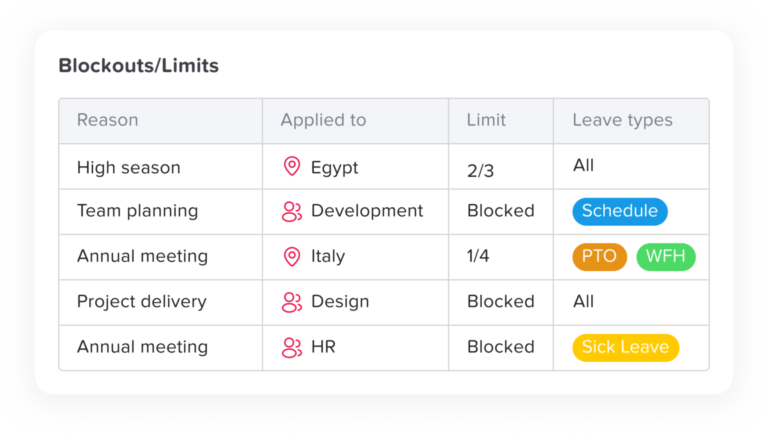
- Whether blackout dates apply to specific teams or roles
- How managers should communicate approval or denial decisions
The policy should be written in simple language. Employees should understand the rules before they request time off, not after a request is denied.
Use PTO Blackout Dates Carefully
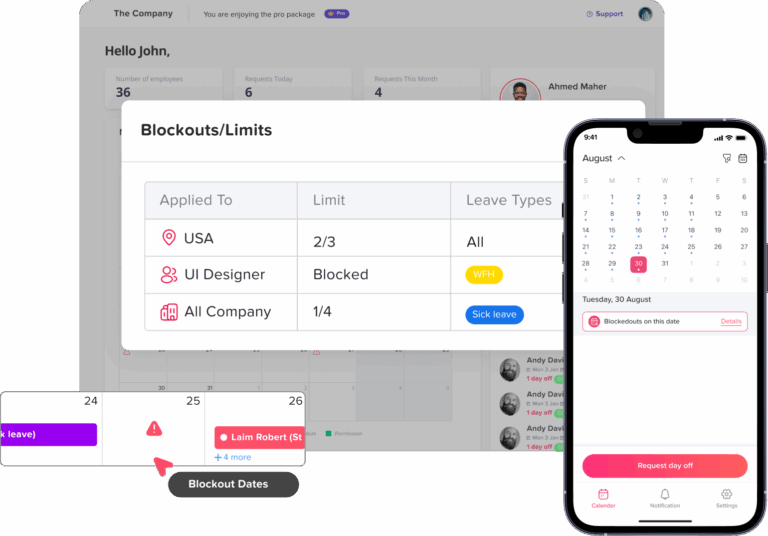
Some companies use PTO blackout dates during extremely busy periods. A blackout date is a date or period when planned PTO may be restricted because the business needs enough employees available.
Blackout dates can be useful in industries such as retail, hospitality, healthcare, customer support, logistics, accounting, and software development. However, they should be used carefully.
A fair blackout date policy should be:
- Clearly communicated in advance
- Limited to specific business needs
- Applied consistently
- Explained in the employee handbook or PTO policy
- Reviewed regularly
- Flexible enough for emergencies or legally protected leave
Managers should avoid using blackout dates as a general excuse to deny time off. If blackout dates are too broad or unclear, employees may feel that PTO is not truly available.
For many companies, a better approach is not a full blackout period but a limited approval rule. For example, the company may allow PTO during a launch week as long as minimum coverage is available.
Set Minimum Staffing Rules
Minimum staffing rules help managers decide how many employees must be available during a busy period.
For example:
- A customer support team may need at least 6 agents available per shift.
- A restaurant may need at least 2 managers available during weekend rush hours.
- A software team may need the release manager and QA lead available during launch week.
- A payroll team may need at least 2 payroll specialists available during payroll processing.
- A sales team may need coverage for active enterprise accounts before quarter-end.
Minimum staffing rules help managers approve PTO fairly because decisions are based on business needs, not personal preference.
These rules should be specific to each department. A marketing team, support team, engineering team, and HR team may all need different coverage requirements.
Review Team Availability Before Approving PTO
Before approving PTO during a busy season, managers should check the full team calendar.
They should review:
- Who is already off
- Who has pending requests
- Which employees are working remotely or on different schedules
- Which public holidays overlap with PTO requests
- Which projects or deadlines are active
- Whether the employee has critical responsibilities during that period
- Whether another employee can cover the work
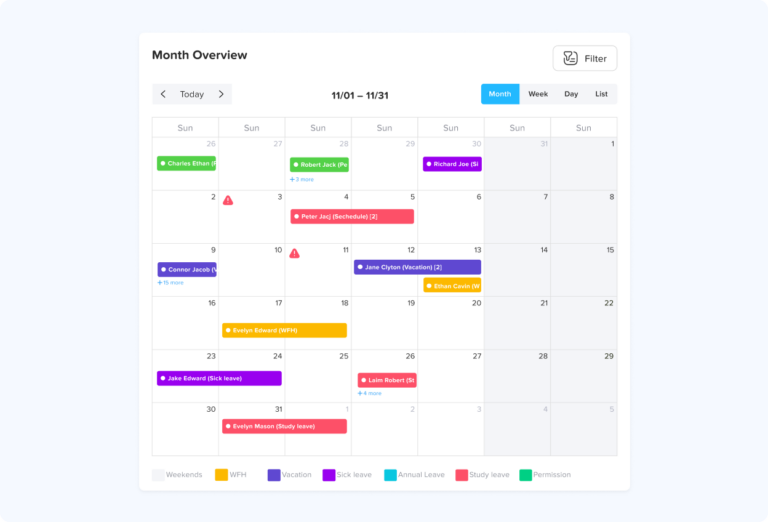
This is where a shared leave calendar becomes valuable. With Day Off, managers can view approved leave and pending requests in one place, making it easier to understand team availability before making approval decisions.
Without this visibility, managers may accidentally approve too many overlapping requests and only discover the problem later.
Create Fair Approval Rules
Busy seasons can create tension if employees feel PTO approvals are unfair. This often happens when managers approve requests without clear criteria.
To avoid this, companies should define how PTO requests are prioritized.
Common approval methods include:
- First come, first served
- Rotation system for popular dates
- Seniority-based rules
- Business-critical role review
- Minimum staffing requirement
- Manager discretion with HR oversight
- Split coverage between team members
- Partial approval for some requested days
Each method has pros and cons. For example, first come, first served is simple, but it may not feel fair if the same employees always request dates early. Seniority-based rules may reward long-term employees, but they may frustrate newer team members.
The best approach depends on the company culture and type of work. What matters most is that the rules are transparent and applied consistently.
Separate Planned PTO From Emergency Leave
Planned PTO and emergency leave should not be handled the same way.
Planned PTO includes vacations, personal days, travel, or scheduled appointments. These requests can usually be submitted in advance.
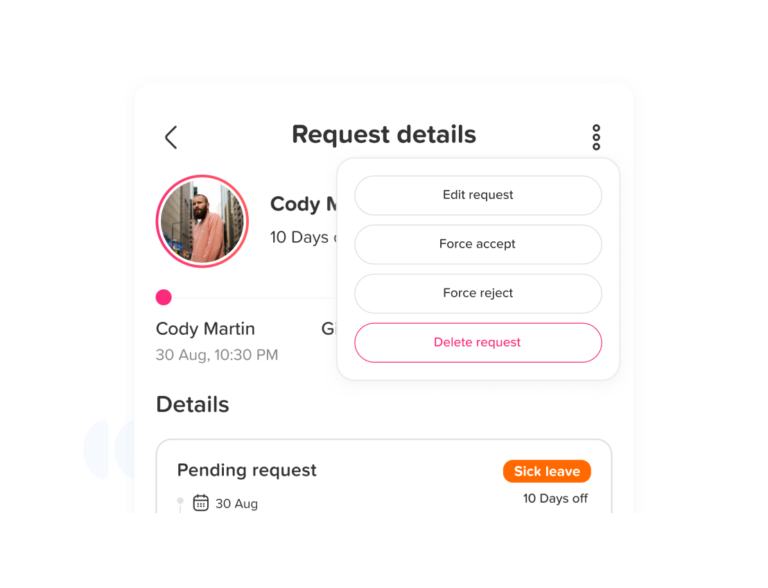
Emergency leave includes sudden illness, family emergencies, urgent personal matters, or unexpected situations. These cannot always follow normal notice rules.
During busy seasons, managers may need stricter rules for planned PTO, but they still need a process for emergency absences.
A fair policy should explain:
- How employees should report emergency leave
- Who they should notify
- How quickly they should communicate if possible
- Whether documentation is required
- How managers should adjust coverage
- How urgent tasks will be reassigned
This helps companies stay organized while still treating employees with respect during real emergencies.
Ask Employees to Prepare PTO Handoffs
For planned PTO during a product launch or deadline period, a handoff is essential.
A PTO handoff helps the covering employee understand what needs attention while the employee is away.
A useful handoff should include:
- Current project status
- Tasks that must be completed during the absence
- Deadlines and priority levels
- Important contacts
- File links and system locations
- Meeting notes
- Client or stakeholder updates
- Open risks or blockers
- Tasks that can wait until the employee returns
- Emergency contact rules, if needed
The handoff does not need to be complicated. It should be clear, practical, and easy for the backup person to follow.
Managers can create a simple handoff template so every employee prepares information in the same format.
Assign Backup Owners Before the Busy Period Starts
Backup planning should happen before a launch or deadline, not after someone submits PTO.
Each critical task should have a backup owner. This is especially important for roles that manage approvals, customers, payroll, operations, technical systems, or reporting.
For example:
- A product manager may need a backup for launch decisions.
- A customer success manager may need someone to handle urgent client messages.
- A finance employee may need a backup for payment approvals.
- A support lead may need someone to monitor escalations.
- An HR manager may need someone to review leave requests or employee issues.
Backup ownership prevents work from stopping when one employee is unavailable.
Avoid Overloading the Same People
During busy seasons, reliable employees often become the default backup for everyone. This can create burnout, resentment, and lower productivity.
Managers should track who is covering work and how often.
If the same person is always asked to cover, the team may need better cross-training, clearer documentation, or a more balanced workload.
A fair coverage process should consider:
- Current workload
- Employee skills
- Previous coverage responsibilities
- Project deadlines
- Availability
- Stress level
- Whether the coverage task is urgent or optional
Coverage should be temporary and realistic. Employees should not be expected to do two full jobs for long periods.
Cross-Train Employees Before Launches and Deadlines
Cross-training is one of the best ways to prepare for PTO during busy periods.
When employees understand parts of each other’s work, it becomes easier to cover absences without confusion.
Cross-training can include:
- Documenting recurring tasks
- Recording short process videos
- Pairing employees on important responsibilities
- Rotating ownership of routine tasks
- Creating backup access where appropriate
- Sharing project context during team meetings
- Training junior employees on basic coverage tasks
Cross-training should happen before busy seasons. Waiting until the employee is already on PTO is too late.
Use a Shared Calendar for Visibility
A shared PTO calendar helps employees and managers see who is off and when. This is especially useful during launches, deadlines, and seasonal peaks.
A shared calendar helps teams:
- Avoid overlapping absences
- Plan work around leave dates
- Schedule meetings more effectively
- Prepare handoffs earlier
- Understand team availability
- Reduce repetitive questions to HR
- Coordinate coverage across departments
Day Off gives teams a shared view of time off, helping managers and employees stay aligned without relying on scattered messages or spreadsheets.
Communicate Decisions Clearly
When PTO is approved, delayed, or denied, communication matters.
Managers should explain decisions clearly and professionally. A short and respectful message is better than a vague answer.
For approvals, the manager can confirm:
- Approved dates
- Coverage owner
- Handoff expectations
- Any tasks to complete before leave
For denied or delayed requests, the manager should explain:
- The business reason
- The coverage issue
- Alternative dates if possible
- Whether partial approval is available
- When the employee can request again
Clear communication protects trust. Employees may not always like the decision, but they are more likely to accept it if the process is fair and transparent.
Offer Alternative PTO Options When Possible
If a manager cannot approve the full PTO request during a busy period, they should consider alternatives.
Possible options include:
- Approving part of the requested time
- Suggesting nearby dates
- Allowing a half-day instead of a full day
- Approving remote work if appropriate
- Offering time off after the launch or deadline
- Splitting leave across two shorter periods
- Reassigning responsibilities to make approval possible
This shows employees that the company is trying to support their time off, even when the original request is difficult to approve.
Review PTO After the Busy Period Ends
After a product launch, deadline, or seasonal peak, HR and managers should review how PTO was handled.
Questions to ask include:
- Were there too many overlapping absences?
- Were PTO requests approved quickly enough?
- Did employees prepare useful handoffs?
- Did any team become overloaded?
- Were blackout dates or staffing rules clear?
- Did employees feel the process was fair?
- Were there last-minute coverage problems?
- Did managers need better visibility?
This review helps improve the process for the next busy period.
How Day Off Helps Manage PTO During Busy Seasons
Day Off helps teams manage PTO during product launches, deadlines, and busy seasons by keeping leave requests, approvals, balances, policies, and calendars organized in one place.
Instead of tracking PTO through emails, spreadsheets, or chat messages, HR and managers can use Day Off to:
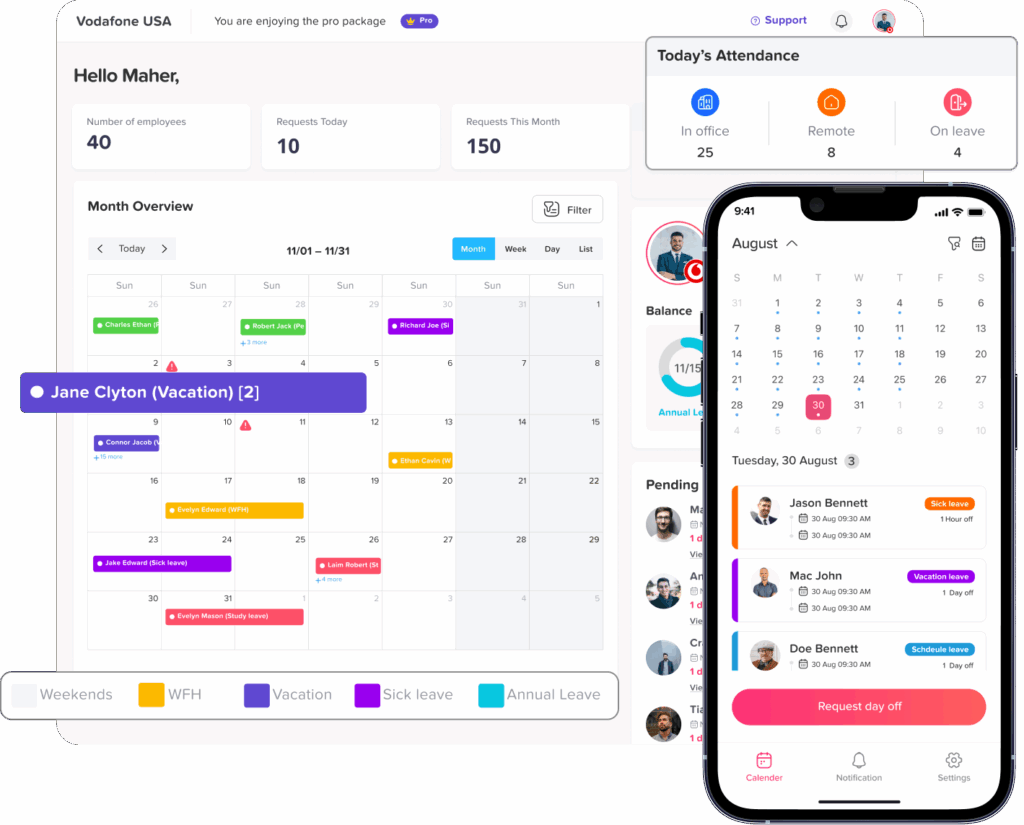
- Manage leave requests
- Review employee balances
- Set custom leave policies
- Use approval workflows
- View team availability
- Track approved and pending requests
- Manage different leave types
- Use shared calendars
- Export reports
- Reduce manual follow-ups
This makes PTO planning easier because managers can see who is available before approving requests. HR can keep accurate records, and employees can understand the status of their requests without repeated messages.
For growing teams, this visibility is especially important. The more employees and departments a company has, the harder it becomes to manage busy season PTO manually.
Best Practices for Managing PTO During Busy Seasons
To manage PTO fairly and effectively during high-demand periods, companies should follow these best practices:
- Plan critical dates early
- Communicate busy periods in advance
- Use shared leave calendars
- Set clear minimum staffing rules
- Create fair approval criteria
- Separate emergency leave from planned PTO
- Require handoff notes for planned absences
- Assign backup owners for critical work
- Cross-train employees before deadlines
- Avoid overloading the same people
- Review leave patterns after busy periods
- Use leave management software instead of manual tracking
These practices help companies balance employee time off with business needs.
Common Mistakes to Avoid
Companies often struggle with busy season PTO because they make avoidable mistakes.
Common mistakes include:
- Announcing blackout dates too late
- Applying rules inconsistently
- Approving requests without checking team availability
- Denying PTO without explaining the reason
- Using spreadsheets that are not updated in real time
- Failing to prepare backup coverage
- Expecting employees to work during PTO
- Treating emergency leave like planned vacation
- Ignoring repeated approval delays
- Overloading the same employees with coverage work
Avoiding these mistakes creates a more respectful and organized PTO process.
FAQ: Managing PTO During Product Launches, Deadlines, and Busy Seasons
Can an employer deny PTO during a busy season?
In many workplaces, employers can consider business needs, staffing levels, deadlines, and company policy when reviewing PTO requests. However, rules vary by country, state, contract, and leave type. Companies should have a clear PTO policy that explains when requests may be denied or delayed and should apply the policy consistently.
What is a PTO blackout period?
A PTO blackout period is a specific time when planned PTO requests may be limited because the business needs more employees available. Blackout periods are often used during holiday rushes, product launches, major deadlines, or peak customer demand. They should be communicated clearly and in advance.
How do you manage PTO during a product launch?
To manage PTO during a product launch, define critical launch dates, review team availability, assign backup owners, prepare handoff notes, and approve requests based on coverage needs. A shared leave calendar can help managers see who is off and prevent overlapping absences.
How far in advance should employees request PTO during busy periods?
The notice period depends on company policy and the type of leave. For planned vacation during busy periods, many companies ask for earlier notice so managers have enough time to plan coverage. Emergency leave and sick leave usually require a different process because they cannot always be planned.
How should managers handle multiple PTO requests for the same dates?
Managers should review team coverage, business priorities, and the company’s approval rules. Some companies use first come, first served. Others use rotation, seniority, minimum staffing rules, or manager review. The most important thing is to use a fair and consistent process.
Should employees be allowed to take PTO before a major deadline?
It depends on the employee’s role, the deadline, team coverage, and company policy. If the employee’s work can be completed early or covered by someone else, the PTO may be approved. If the absence creates a serious business risk, the manager may suggest alternative dates or partial approval.
What should employees include in a PTO handoff before a deadline?
A PTO handoff should include project status, urgent tasks, deadlines, file links, meeting notes, client updates, risks, blockers, and the name of the backup person. The goal is to make sure essential work continues without contacting the employee during PTO.
How can HR prevent PTO conflicts during busy seasons?
HR can prevent PTO conflicts by communicating busy periods early, setting clear request rules, using a shared leave calendar, reviewing overlapping requests, defining minimum staffing levels, and using approval workflows. Day Off can help by keeping requests, balances, and calendars organized in one system.
Is it fair to use first come, first served for PTO requests?
First come, first served can be simple, but it may not always feel fair if the same employees consistently request popular dates early. Some companies combine it with rotation, minimum staffing rules, or manager review to create a more balanced process.
Can employees be contacted while they are on PTO during a launch?
Employees should generally be able to disconnect during PTO. If the company needs coverage during a launch, managers should plan handoffs and backup owners before the employee leaves. Contacting employees during PTO should be limited to true emergencies.
Conclusion
Managing PTO during product launches, deadlines, and busy seasons requires balance. Employees need time off, but managers also need enough coverage to keep work moving.
The best approach is to plan early, set clear policies, use shared calendars, define minimum staffing rules, prepare handoffs, and communicate decisions fairly.
When companies rely on manual tracking, busy season PTO can quickly become confusing. Requests may overlap, approvals may be delayed, and managers may struggle to see who is available.
Day Off helps teams manage this process more clearly by bringing leave requests, approvals, balances, policies, shared calendars, and reports into one easy-to-use system. With the right process and the right tools, companies can support employee time off while still protecting launches, deadlines, and business operations.