





SSO for Google: One Click, You’re In
Say goodbye to juggling passwords! You can now log in to Day Off securely using your Google account. It’s one less thing to remember and one faster way to get to your dashboard.
How it Helps
- Instant Access: No new credentials needed, just use your existing Google account.
- Better Security: Leverage Google’s trusted authentication to keep your data safe.
- Unified Experience: Perfectly integrates with your existing company workflow, especially for teams already using Google Workspace.
Time Tracking
Track working hours right alongside leave. With Time Tracking, employees can clock in and out, log breaks, and build accurate timesheets, all from the same app they already use to request time off.
How it Helps
- One Tool for Time and Leave: No need for a separate time clock app, employees track their hours and their time off in a single, unified dashboard.
- Accurate Timesheets: Automatically generates timesheets based on logged clock-ins and clock-outs, reducing manual entry and errors.
- Manager Visibility: Managers can review logged hours alongside leave balances, giving a complete picture of who worked, who was out, and when.
- Simplified Payroll Prep: Exportable time logs make it easier to reconcile hours worked with payroll, cutting down on administrative back-and-forth.
Two-Factor Authentication (2FA)
Two-Factor Authentication adds an extra layer of security to your Day Off account. Instead of relying only on a password, users are also required to enter a verification code from an authenticator app when signing in.
How it Helps
- Adds extra account protection: Even if a password is compromised, an additional verification code is still required to access the account.
- Protects employee and company data: Helps reduce unauthorized access to sensitive information such as employee details, leave records, and company settings.
- Improves company-wide security: Admins can require Two-Factor Authentication for users across the company.
- Reduces password-related risks: Adds another security step in case passwords are reused, weak, or accidentally exposed.
- Keeps login simple and secure: Users enter their password, then confirm their identity using a rotating 6-digit code from their authenticator app.
Flexible Leave Type Resets
We’ve moved beyond the “one-date-fits-all” approach. Released this April, you now have the power to define specific reset logic for each individual leave type, rather than applying a single company-wide date.
How it Helps:
-
Leave-Specific Timing: You can now set your Annual Leave to reset on an employee’s anniversary while keeping Sick Leave or Study Leave resetting on the standard Calendar Year (January 1st).
-
Three Reset Options: For every leave type, you can choose between:
-
Default Company Reset Month: Follows your global company setting.
-
Specific Month: Choose any month of the year (ideal for fiscal year alignment).
-
Employee Anniversary: Automatically resets based on each person’s unique hire date.
-
-
Effortless Management: The system handles the math and timing for each employee and leave type independently, ensuring your balances are always accurate without manual intervention.
Watchers
Keep the Right People in the Loop
You can now add “Watchers” to leave requests. These are team members or stakeholders who aren’t official approvers but still need to stay informed about specific absences. When a request is submitted or updated, Watchers receive an automatic notification.
How it Helps:
-
Enhanced Coordination: Perfect for project leads or teammates who need to adjust their workflows when a colleague is away, even if they don’t have approval authority.
-
Reduces Manual Updates: Eliminates the need for employees to send separate “I’m taking leave” emails to their project groups, the system handles it automatically.
-
Better Visibility: Ensures that no one is caught by surprise when a key team member is absent, improving overall project management and planning.
SSO for Microsoft: One Click, You’re In
Say goodbye to juggling passwords! You can now log in to Day Off securely using your Microsoft account. It’s one less thing to remember and one faster way to get to your dashboard.
How it Helps:
-
Instant Access: No new credentials needed—just use your existing work account.
-
Better Security: Leverage Microsoft’s trusted authentication to keep your data safe.
-
Unified Experience: Perfectly integrates with your existing company workflow.
Custom Domain Branding
Professionalize your employee portal by using your own company domain. Instead of accessing the app through our standard URL, you can host your workspace at a custom address like yourcompany.day-off.app.
How it Helps:
-
Consistent Branding: Provides a seamless, white-labeled experience that aligns with your company’s internal brand and corporate identity.
-
Easy Access: Makes it simpler for employees to remember where to go for leave requests with a familiar, company-specific URL.
-
Professional Appeal: Gives your HR platform a premium, enterprise-level feel that builds trust with your team and stakeholders.
Day Off APIs
Connect and Automate Your HR Workflow
Build your own custom connections with Day Off. Our new API allows you to programmatically access your data, enabling you to sync leave information with your internal tools, payroll systems, or custom dashboards.
How it Helps:
-
Endless Integrations: Connect Day Off to any third-party software or internal tool that doesn’t have a native integration yet.
-
Automated Data Sync: Eliminate manual data entry by automatically pulling leave balances and request statuses into your company’s custom HR portal.
-
Custom Reporting: Fetch raw data to create specialized reports or visualizations that fit your company’s unique analytical needs.
Multi-Step & Multi-Approver Workflows
Advanced Approval Workflows
We’ve upgraded our approval logic to support more complex organizational structures. You can now set up a two-step approval process, with the ability to assign multiple approvers to each individual step.
How it Helps:
-
Flexible Hierarchy: Perfect for organizations where an employee needs a “green light” from both a direct manager and an HR lead.
-
Redundancy & Speed: By adding multiple people to a single approval step (e.g., both Team Leads), you ensure requests don’t get stuck if one person is busy or away.
-
Customized Oversight: Allows you to tailor the flow based on company policy, ensuring the right eyes are on every request before it’s finalized.
Microsoft Teams Integration
Stay Notified Where You Work
Bring Day Off directly into your Microsoft ecosystem. Just like our Slack integration, you can now sync your team, receive daily updates, and manage leave requests without ever leaving the Teams app.
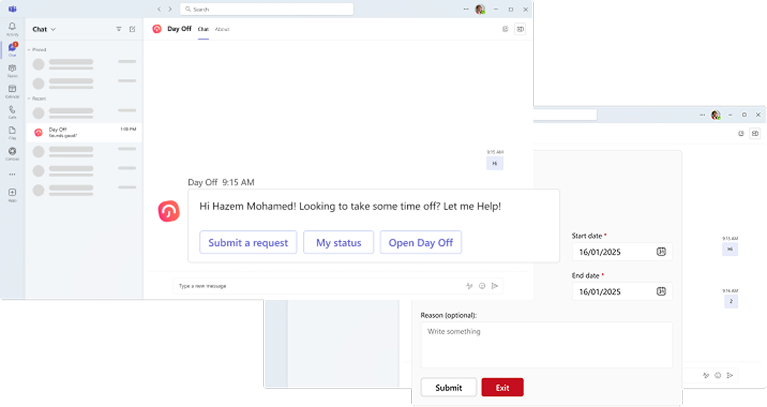
How it Helps:
-
Rapid Team Setup: Admins can quickly import users from your Microsoft directory, making onboarding seamless for large organizations.
-
Daily Status Updates: Receive a daily digest in your preferred Teams channel highlighting who is away and any upcoming company holidays.
-
Streamlined Experience: Employees can view their balances and submit leave requests directly within Microsoft Teams, keeping communication and scheduling in one place.
Advanced Work Schedules
Support Every Way Your Team Works
While fixed days are our default, your team might not be. We’ve introduced three new Work Schedule types, Fixed Hours, Flexible Hours, and Rotating Shifts, allowing you to accurately track leave regardless of how your employees’ time is structured.
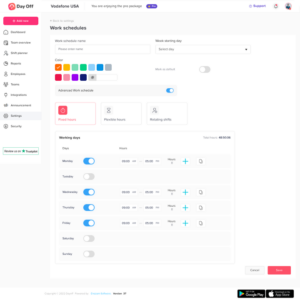
How it Helps:
-
Diverse Scheduling: Whether your team works a standard 9-to-5, flexible hours, or complex rotating shifts, Day Off now maps perfectly to their reality.
-
Accurate Leave Calculations: The system automatically calculates leave deductions based on the specific hours or shifts assigned to an employee, ensuring balances are always precise.
-
Simplified Shift Management: Easily manage employees who work non-traditional weeks or varying hours without manual workarounds.
Leave Type Categories
Manage More Than Just Time Off
Day Off is evolving beyond simple leave tracking. You can now categorize your request types into four distinct groups: Leave, Work From Home, Permissions, and Room Reservations, each with its own specialized behavior and tracking logic.
How it Helps:
-
Diverse Request Handling:
-
Leave: Standard time-off tracking against employee balances.
-
Work From Home: Record remote work days without deducting from vacation time.
-
Permissions: Perfect for short gaps like arriving an hour late or leaving early.
-
Room Reservations: Extends the app’s utility to office management, allowing staff to book shared desks, meeting rooms, or common areas.
-
-
Cleaner Reporting: Automatically filter reports by category to see exactly how much time is spent “out of office” versus “working remotely” or “in meetings.”
-
Unified Resource Management: Consolidates team schedules and office resources into one single dashboard, reducing the need for multiple booking tools.
Annual Billing & Prepaid Plans
Save More with Annual and Prepaid Plans
We’ve introduced more ways to pay for Day Off Pro. You can now choose between flexible monthly billing or switch to an annual plan to lock in a lower rate. Additionally, our new prepaid options allow you to manage your budget upfront with ease.
Custom Roles & Permissions
Flexible Access for Every Level
You no longer have to choose between a standard employee view and full admin access. With custom roles, you can grant specific permissions to managers or team leads, giving them exactly the tools they need to manage their teams without exposing sensitive company-wide settings.
How it Helps:
-
Granular Control: Assign specific rights, like the ability to view reports or edit employee profiles, only to the users who actually need them.
-
Empower Managers: Allow team leads to oversee their own departments and approve requests while keeping the rest of the company data private.
-
Enhanced Security: Protect sensitive information by ensuring users only see what is relevant to their specific role within the organization.
Intégration Slack
Slack Integration
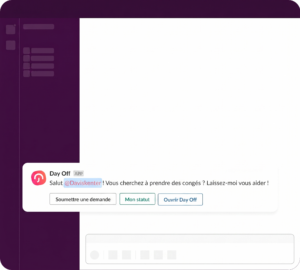
Manage Leave Without Leaving Your Workspace Bring Day Off directly into your daily workflow. With our Slack integration, you can sync your team, receive daily updates, and manage leave requests all within your favourite communication tool.
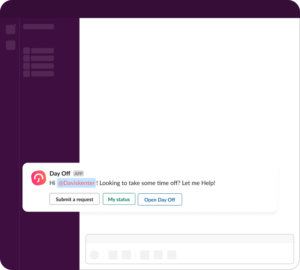
How it Helps:
- Easy Onboarding: Admins can instantly import users from Slack, making it faster than ever to get your team set up in Day Off.
- Daily Visibility: Stay informed with a daily digest sent to your chosen Slack channel, showing exactly who is off today and any upcoming company holidays.
- All-in-One Workflow: Employees can check balances and submit requests directly inside Slack, removing the need to switch between apps and saving time.
Advanced Leave Restrictions
Define Your Company’s Specific Rules
Take full control over how leave is requested and approved. Our new restriction settings allow you to set clear boundaries and documentation requirements for every leave type, ensuring your company policies are followed automatically.
How it Helps:
-
Mandatory Documentation: Require employees to upload a document (like a doctor’s note) or provide a specific reason before they can submit a request.
-
Smart Date Counting: Choose whether to include weekends or public holidays within the leave period for more accurate balance deductions.
-
Request Boundaries: Set a minimum or maximum number of days for any single request to manage long-term absences or quick tasks.
-
Advance Notice: Enforce a “notice period” (e.g., requests must be made 7 days in advance) to give managers enough time to plan for coverage.
Outlook Calendar Integration
Seamless Scheduling for Microsoft Users
Keep your workspace connected by syncing Day Off with your Outlook Calendar. All approved leave requests will automatically appear in your schedule, making it easy for you and your team to see your availability at a glance.
How it Helps:
-
Real-Time Sync: Approved requests flow directly into your Outlook calendar, so you don’t have to enter them manually.
-
Better Team Visibility: Teammates can instantly see when you’re “Out of Office” when they try to book meetings with you.
-
Unified Planning: View your personal leave, company holidays, and work meetings in one single place for better time management.
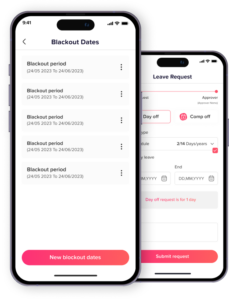
Blockout Dates: Control Time Off on Critical Dates
Busy season approaching? Now you can set “Blockout Dates” to prevent new leave requests during your most critical workdays.
How it Helps:
-
Avoid Understaffing: Automatically manage how many requests are allowed on any given day.
-
Flexible Control: Apply rules company-wide or target specific departments and branches.
-
Clear Expectations: Employees will see restricted dates instantly, making planning easier for everyone.
Multi-Location & Advanced Leave Policies
Tailored Control for Complex Organizations
We’ve reimagined how you manage global and diverse teams. You can now create specific Locations with their own holiday calendars and settings, and group leave types into Leave Policies. Instead of a “one-size-fits-all” approach, you can assign different policies to different groups, ensuring every employee has the right rules for their specific role or region.
How it Helps:
-
Localized Holidays: Perfect for teams spread across different countries or states; each location now follows its own local holiday schedule.
-
Customized Policy Groups: Group your leave types (e.g., “Standard,” “Executive,” or “Contractor”) and assign them to the right people with a single click.
-
Streamlined Scaling: Easily manage unique balances and rules for different offices or branches from one central dashboard.
-
Superior Flexibility: Moves beyond team-level tweaks to a full-scale policy system that adapts to your company’s growth.
Automated Accruals
Earn Leave Gradually Over Time
Ditch the manual balance updates. You can now set leave to be earned automatically on a schedule that fits your payroll. Whether your team earns time weekly, biweekly, monthly, or semimonthly, Day Off keeps every balance updated in real-time.
How it Helps:
-
Flexible Schedules: Choose from four frequencies: weekly, biweekly, monthly, or semimonthly—to match your company’s specific accrual policy.
-
Real-Time Accuracy: Employees can see exactly how much leave they’ve earned to date, reducing “how much time do I have?” questions.
-
Precision Reporting: Use the Accrual Report to audit exactly when and how much time was granted to each employee, ensuring complete transparency.
Balance Carryover
Manage Unused Leave with Ease
Handling leftover leave at the end of the year is now automated. You can set rules to carry over unused balances to the next period, ensuring your team’s hard-earned time off is always accounted for without manual adjustments.
How it Helps:
-
Automated Transfers: Define exactly how many days or hours roll over automatically, eliminating end-of-year spreadsheet stress.
-
Carryover Expiry: Set specific expiration dates for carried-over leave to encourage employees to take their breaks.
-
Dedicated Reporting: Use the new Carryover Report to track exactly how much time was moved, used, or expired across your entire company.
Bulk Employee Import
Add Your Entire Team in Seconds
Say goodbye to manual entry. Admins can now upload a simple Excel template to import their entire staff list all at once, making company setup faster and more accurate.
How it Helps:
-
Saves Hours of Work: No more adding employees one by one, get your whole directory live in just a few clicks.
-
Reduces Entry Errors: Using a template ensures all employee data is consistent and formatted correctly from the start.
-
Effortless Onboarding: Ideal for growing companies or those migrating from spreadsheets to Day Off.
Google Calendar Integration
Keep Your Schedule in Sync Automatically
Never miss a beat by connecting Day Off to Google Calendar. Once integrated, all approved leave requests automatically sync to your calendar, ensuring your availability is always up to date across all your devices.
How it Helps:
-
Centralized Visibility: View your time off alongside your meetings and daily tasks without switching between apps.
-
Smart Coordination: Helps managers and teammates see who’s “Out of Office” instantly, making it easier to plan meetings and project deadlines.
-
Automatic Updates: Any changes or cancellations in Day Off are reflected in your Google Calendar in real-time, eliminating manual entries and scheduling conflicts.
Day Off Pro & Free Plans
Choose the Right Fit for Your Team
We’ve introduced two new ways to use Day Off. Whether you’re a small startup or a growing enterprise, you can now pick the plan that matches your team’s size and needs.
How it Helps:
-
Free for Small Teams: Small teams of up to 10 users can enjoy the essentials of Day Off at no cost, perfect for keeping things simple.
-
Unlimited Pro Features: Our Pro version unlocks all advanced tools with no limit on the number of users, giving your growing company the full power of our platform.
-
Scalable Growth: Easily transition from Free to Pro as your team expands, ensuring your leave management scales right along with you.
Hourly Leave Tracking
Precision Tracking Down to the Minute
Move beyond days and half-days with our most granular tracking yet. You can now set leave types in hours, allowing employees to request time off in increments as small as 5 minutes for total flexibility.
How it Helps:
-
Ultimate Flexibility: Perfect for quick errands or short appointments that don’t require a full half-day.
-
Accurate Deductions: Ensures employee balances are debited exactly for the time they take, keeping records 100% precise.
-
Modern Workflows: Supports flexible work cultures that value time-based rather than day-based attendance.
Auto-Approve Requests
Hands-Free Leave Management
Simplify your workflow by automating approvals for specific leave types. When enabled, requests are granted instantly, so you can focus on high-level tasks while the system handles the paperwork.
How it Helps:
-
Reduced Admin Burden: Eliminates the need for manual clicks on routine or low-stakes leave types.
-
Instant Confirmation: Employees get an immediate “yes,” improving their experience and allowing them to plan faster.
-
Automated Notifications: Approvers stay in the loop with instant alerts, ensuring everyone is informed without needing to take action.
Balance Reset on Anniversary Dates
You can now set employee leave balances to reset on their work anniversary instead of the calendar year. Simply add the joining date and enable the anniversary option in your settings to automate the process.
How it Helps:
-
Fair Tracking: Ensures leave cycles align perfectly with each employee’s individual tenure.
-
Set and Forget: Once enabled, the system automatically handles the reset, saving you manual admin time every year.
-
Flexible Policies: Easily switch between calendar year, fiscal year, or anniversary resets to match your company’s policy.
Web App for Employees: Day Off on Big Screen
Prefer your laptop? You can now log in via any browser to check your balance and submit requests. It’s the same simple experience, just with more room to breathe.
What’s New for You:
-
Flexible Access: Log in from any browser to submit requests or check your balance without picking up your phone.
-
Detailed History: Get a clear, expanded view of your past leaves and upcoming holidays.
-
Perfect Sync: Everything you do on the web app stays perfectly updated on your mobile app instantly.
Introducing Multi-Level Leave Approvals
Two-Step Approvals: More Control, Less Chaos
Need an extra set of eyes? You can now assign two levels of approval for any employee, ensuring the right people stay in the loop automatically.
How it Helps Your Team:
-
Automated Workflow: Once the first approver says “yes,” the request instantly travels to the second—no manual forwarding required.
-
Perfectly Tailored: Mix and match approvers based on your company’s unique hierarchy.
-
Clear Visibility: Everyone stays in the loop on exactly where a request stands in the chain.
Découvrez le tableau de bord web Day Off
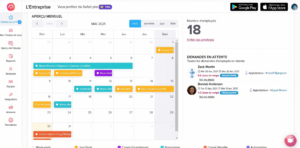
Say Hello to the Day Off Web Dashboard
Managing a PTO and leave just got a whole lot brighter! Our new web experience gives you a bird’s-eye view of your entire company.
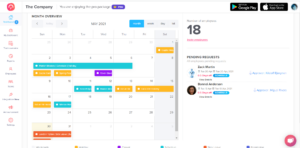
What’s New for Admins:
-
Team Calendar: See who’s in and who’s out at a glance with our intuitive monthly overview.
-
Smart Employee Directory: Access full profiles and request histories without breaking your flow.
-
Custom Company Settings: Tailor your leave policies and holiday calendars to fit your unique culture.
-
Deep-Dive Reports: Turn data into decisions with downloadable reports that show exactly how your team is taking time off.
Announcements: Keep Your Team Informed
Admins can now send quick updates directly through Day Off. Whether it’s a company-wide news flash or a message for a specific team, you can ensure everyone stays in the loop with just a few clicks.
How it Helps:
-
Targeted Communication: Send messages to the entire company or filter by specific teams for more relevant updates.
-
Centralized News: Keeps important company updates in the same place where employees manage their time.
-
Instant Reach: A faster way to share news without relying on cluttered email inboxes.
iOS App: Day Off is Now on the App Store!
We’ve brought Day Off experience to iOS so you can manage your team’s time off with the elegance and ease you expect from your favourite device. Whether you’re approving a last-minute request while grabbing coffee or checking your own balance on the fly, everything you need is now right in the palm of your hand.
What’s Inside:
-
Mobile-First Design: A sleek, intuitive interface built specifically for iOS.
-
On-the-Go Requests: Submit or approve leaves in seconds, no matter where your “office” is today.
-
Real-Time Sync: Everything stays perfectly in sync with your web dashboard and Android teammates.
-
Total Control: Manage company settings, add holidays, and view employee histories with zero friction.
Version 1.0.0 – Android Launch
The Day Off experience arrives on Android
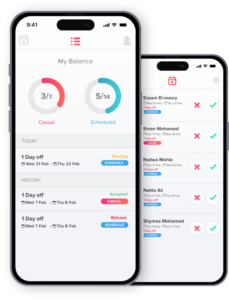
This initial release establishes the core foundation for mobile leave management, allowing teams to move away from manual tracking.
Core Features Included:
-
Effortless Setup: Create your company profile and add your team in minutes.
-
Flexible Leave Types: Define your own leave categories with support for full days or quick half-day requests.
-
Holiday Tracking: Add official holidays so the whole team stays synced on upcoming breaks.
-
One-Tap Approvals: Admins can review and approve requests instantly, keeping the workflow moving.
-
Complete Transparency: View employee profiles, check live balances, and browse request histories all in one clear view.