




Managing paid time off is one of those responsibilities that sounds simple until you’re staring at a calendar where half your team is gone the same week a major deadline lands.
Whether you’re leading a team of five or fifty, PTO management is a skill, and when done poorly, it creates resentment, burnout, and operational chaos. When done well, it builds trust, improves retention, and actually makes your team more productive.
This guide walks you through everything you need to know as a manager: how to approve time-off requests fairly, how to prevent coverage gaps, and how to build a PTO culture your team actually wants to be part of.

Why PTO Management Matters More Than You Think
Before diving into tactics, it’s worth understanding the stakes.
According to the U.S. Travel Association, American workers left an estimated 768 million vacation days unused in a single year, and burnout is one of the leading causes of voluntary turnover. As a manager, you sit directly between company policy and employee wellbeing. The way you handle PTO requests sends a signal about what your team culture truly values.
Poor PTO management leads to:
- Presenteeism: employees showing up mentally checked out because they never truly recharge
- Quiet resentment: team members who feel their time off is always denied or complicated
- Coverage crises: last-minute scrambles when multiple people are out at once
- Talent loss: high performers leaving for companies with more flexible cultures
Good PTO management, on the other hand, correlates directly with higher engagement, lower absenteeism, and better team performance.
Step 1: Understand Your Company’s PTO Policy (Deeply)
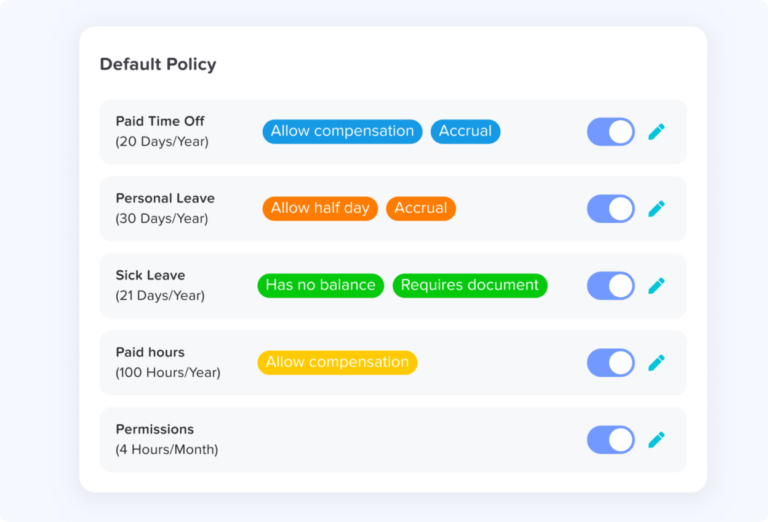
You can’t manage what you don’t understand. Start by getting crystal clear on the rules you’re working within.
Questions every manager should be able to answer:
- Does your company use accrued PTO, a flat annual bank, or unlimited PTO?
- Is there a blackout period around fiscal year-end, product launches, or peak seasons?
- What’s the carry-over policy? Does unused PTO roll over or expire?
- Is there a difference between PTO, sick leave, and personal days?
- What’s the approval chain, do you have final say, or does HR need to sign off?
If you don’t know the answers, find them before your team asks. Inconsistent or misinformed responses erode trust fast.
Step 2: Set Clear Expectations Upfront
One of the biggest sources of tension around PTO is ambiguity. Employees shouldn’t have to guess whether a request will be approved, or feel like approval depends on how the manager is feeling that day.
Build a simple PTO framework your team can count on:
Establish a request lead time
Set a minimum notice period for time-off requests. A good rule of thumb:
- 1–2 days off: 1 week notice
- 3–5 days off: 2–3 weeks notice
- Extended leave (1+ week): 4–6 weeks notice
Make exceptions for emergencies, of course, but having a baseline prevents last-minute chaos.
Define your coverage threshold
Before approving any request, know your minimum coverage number. For example: “We need at least three engineers available to handle on-call rotations. If we drop below that, the request needs to be rescheduled.”
Communicate this threshold openly so it doesn’t feel like arbitrary denials.
Create a shared visibility system
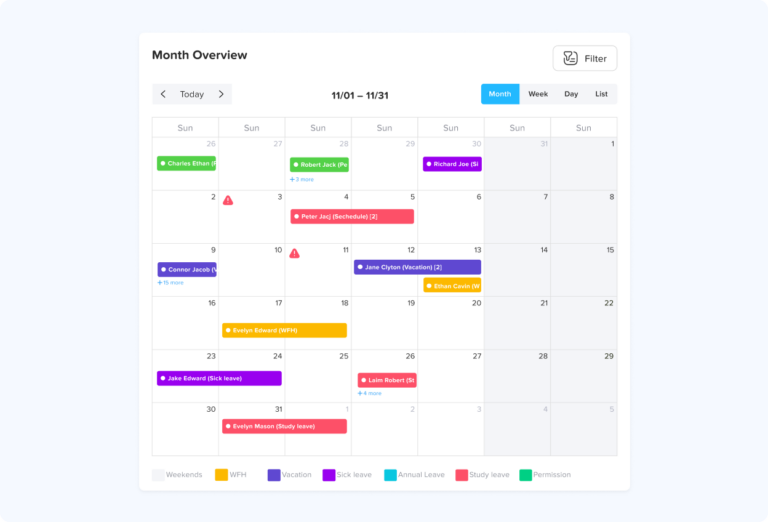
Whether you use a shared calendar, a Slack status convention, or a dedicated tool like Day Off, your whole team should be able to see who’s out and when, before submitting a request. This reduces conflicts and saves everyone time.
Step 3: Build a Fair Approval Process
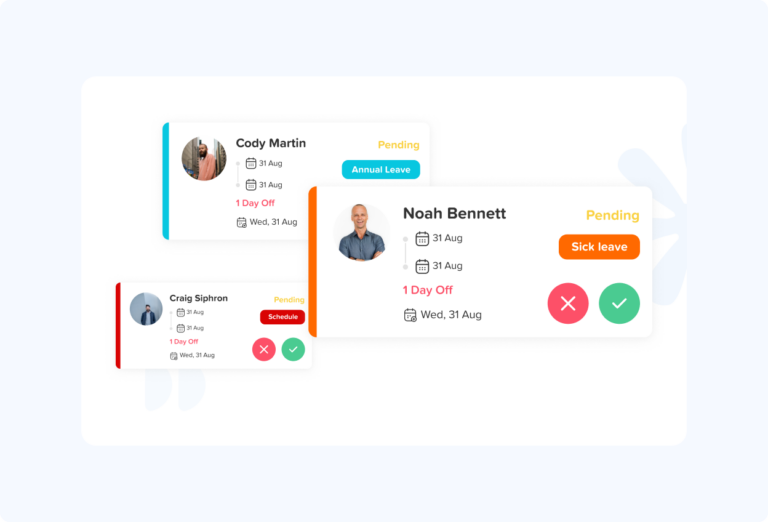
Fairness doesn’t mean approving every request. It means applying consistent criteria that your team understands and agrees with.
First-come, first-served for popular periods
Holiday weeks, summer Fridays, and long weekends will always be in high demand. The simplest way to manage them fairly is first-come, first-served, but make sure the window for submitting requests is clearly communicated and equal for everyone.
Rotate priority for recurring conflicts
If the same popular dates come up every year (Christmas, Thanksgiving, New Year’s), consider rotating who gets priority. Keep a simple log so that someone who didn’t get Christmas week this year is prioritized next year.
Don’t let seniority dominate
It’s tempting to default to seniority when requests conflict. But this can demotivate newer team members and create a two-tiered culture. Combine seniority with rotation systems and early-request incentives to keep things feeling equitable.
Document your decisions
Even informally, keep a record of approved and denied requests and the reasons. This protects you from accusations of bias and helps you spot patterns (like one person always submitting requests the day before a deadline).
Step 4: Plan for Coverage, Not Just Absence
Approving time off is only half the job. The other half is making sure work doesn’t collapse while someone’s gone.
Create a coverage plan for every absence
For any absence longer than a day or two, work with the employee before they leave to document:
- What’s in flight: active projects, deadlines, and status
- Who covers what: named backup for key responsibilities
- Where to find things: links, files, login credentials (through secure channels), documentation
- Escalation path: who to contact if something urgent comes up that the backup can’t handle
This doesn’t need to be elaborate, a simple shared doc or ticket works fine. The goal is that no one has to guess.
Cross-train deliberately
If the same person is always the single point of failure on a critical process, that’s not just a PTO problem, it’s a team design problem. Use quieter periods to deliberately cross-train team members so coverage is never a crisis.
Protect your team from “leave guilt”
One of the most damaging patterns in team culture is employees feeling guilty or anxious about taking approved time off because they know their absence will pile work onto colleagues. As a manager, it’s your job to absorb that pressure, not let it flow back to the person on vacation.
If someone needs to be genuinely unreachable to recharge, make that okay. Handle the coverage. That’s part of your job.
Step 5: Track PTO Thoughtfully, Not Punitively
Tracking time off is a legitimate management responsibility. But the way you do it matters.
What good PTO tracking looks like:
- Visibility for everyone: Employees should be able to see their own balances, accruals, and history without having to ask HR
- Trend awareness: If someone has accrued 40+ hours and never takes time off, that’s a flag worth addressing, not celebrating
- Usage encouragement: Some companies find that employees with unlimited PTO actually take less time off due to ambiguity and guilt. Regular check-ins (“Hey, I noticed you haven’t taken any time off in three months, is everything okay?”) normalize taking PTO
What bad PTO tracking looks like:
- Treating leave requests as suspicious
- Comparing who takes “too much” time off in a way that shames employees
- Denying requests without explanation
- Creating informal records that aren’t aligned with HR systems
Step 6: Handle PTO Conflicts Like a Manager, Not a Referee
Even with great systems, conflicts will happen. Here’s how to handle them without creating winners and losers.
Acknowledge the conflict directly
Don’t dodge it. If two people both want the same week off and you can only approve one, say so clearly and explain the criteria you’re using.
Explore creative solutions first
Before denying either request outright, ask: Is there a solution where both people get some of what they want? Split weeks, adjusted schedules, or hybrid remote coverage sometimes open up options that weren’t initially obvious.
Be consistent and transparent
If you deny a request, explain why, in terms of business need, not personal preference. “We have a client presentation that week and I need you on it” is a reason. “It just doesn’t work” is not.
Follow up after denying a request
A denied PTO request stings. Acknowledge that, and proactively work with the employee to find an alternative time. If you regularly deny the same person’s requests, that’s a pattern worth examining.
Step 7: Build a PTO-Positive Team Culture
The best PTO management isn’t reactive, it’s embedded in your team’s culture year-round.
Practical ways to build a PTO-positive environment:
- Model the behavior yourself. If you never take time off, your team won’t feel like they can either. Take your PTO. Disconnect fully when you do.
- Celebrate rest, not just hustle. When someone comes back from vacation refreshed and energized, acknowledge that positively. Don’t reward those who “never take a day off” as if that’s a virtue.
- Build buffer into project plans. Treating PTO as unexpected is a planning failure. Assume people will take vacation, because they should. Build your timelines accordingly.
- Check in proactively with high accrual holders. Don’t wait for someone to burn out before noticing they haven’t taken time off in months.
- Create a culture where backfilling is normal. When covering for a colleague feels like an imposition rather than a normal part of the job, it creates hostility around PTO. Normalize it as part of how the team operates.
Common PTO Management Mistakes to Avoid
Even experienced managers fall into these traps:
Approving requests verbally without logging them Verbal approvals are a source of disputes. Always confirm in writing, even a quick Slack message creates a paper trail.
Letting popular periods go unmanaged If you don’t have a clear process for the December holiday week by October, you’ll be dealing with a conflict by November. Get ahead of high-demand periods.
Ignoring unused PTO until year-end If your company’s PTO expires or rolls over, don’t let employees find out in December that they’re about to lose weeks of earned time. Monitor balances and send reminders.
Inconsistently applying “unlimited” PTO policies Unlimited PTO only works if managers actively encourage it. If approvals are inconsistent or people feel judged for taking time off, the policy becomes a liability rather than a benefit.
Making coverage the employee’s problem “You can take PTO if you find your own coverage” puts an unfair burden on employees. Coverage is a management responsibility.
The Right Tools Make a Real Difference
Managing PTO manually, through email requests, spreadsheets, and shared calendars, works until it doesn’t. As your team grows, the complexity compounds: overlapping requests, accrual calculations, carryover tracking, and cross-team visibility become genuinely difficult to manage without dedicated tooling.
This is exactly the problem Day Off was built to solve.
What Day Off does
Day Off is a dedicated leave management app designed to replace the patchwork of spreadsheets and email chains that most teams rely on. The core workflow is simple: employees submit leave requests through the app, managers approve or decline with a single click, and everyone on the team has visibility into who’s in and who’s out, before conflicts happen, not after.
But the real value for managers goes deeper than just approvals.
The team calendar is the centerpiece
Instead of fielding requests blind and then mentally cross-referencing coverage, you see the whole picture in one view. If three people want the same week off, that’s visible before you approve anyone, eliminating the awkward conversation of having to walk back an approval later.
Balance and accrual tracking is automatic
No more manually calculating how many days someone has left, whether their carry-over expired, or how much they’ve accrued so far this quarter. Day Off handles the math and surfaces it in real time, to both the employee and the manager. Employees stop asking HR for their balances, and managers stop making decisions without the full picture.
The policy engine handles real-world complexity
Different leave types (PTO, sick leave, parental, bereavement, unpaid), different accrual rules per team or department, and country-specific public holidays for organizations with employees in multiple regions. If your company has nuanced leave policies, Day Off can reflect them, rather than forcing you to work around a rigid system.
It lives where your team already works
Day Off integrates with Slack and Microsoft Teams, which matters because the friction of switching to a separate tool is often why leave software doesn’t get adopted. When a request surfaces in Slack and you can approve it without context-switching, the whole process takes seconds instead of minutes.
Who Day Off is built for
Day Off is particularly well-suited for small to mid-sized companies that have outgrown informal PTO tracking, spreadsheets managed by one person, leave requests sent via email, but don’t need (or want to pay for) a full HRIS platform. It focuses on doing one thing well: leave management. That focus shows in how intuitive the product feels compared to leave modules bolted onto larger HR systems.
Employees get a clear view of their own balances and can see when teammates are out before submitting a request. HR teams can set company-wide policies, pull reports, and keep leave records audit-ready. And managers get the visibility and workflow they need to approve requests fairly and plan coverage without operational surprises.
If your team is still managing PTO through a shared Google Sheet or a trail of Slack messages, Day Off is worth a look. Most teams that switch describe the biggest benefit not as any single feature, but simply as having one place where everyone agrees on who’s out and when.
Frequently Asked Questions
How many PTO days should I give my team?
There’s no universal answer, but the U.S. average is around 10–15 days of PTO per year for full-time employees, often increasing with tenure. Many companies are moving toward more generous policies, 20+ days, as paid leave becomes a key factor in attracting and retaining talent. If you’re benchmarking, look at what’s standard in your industry and region, not just the legal minimum. In many countries, paid leave minimums are set by law; in the U.S., there is no federal mandate, so it’s entirely up to the employer.
What’s the difference between PTO and vacation days?
Vacation days are a specific type of leave reserved for personal trips and leisure. PTO (paid time off) is a broader bank that typically combines vacation, sick days, and personal days into one pool that employees can use however they choose. The PTO model gives employees more flexibility and reduces the stigma around using sick days, since there’s no separate bucket to draw from.
Can I deny a PTO request?
Yes, managers can deny PTO requests for legitimate business reasons, such as critical deadlines, minimum coverage requirements, or company blackout periods. What you can’t do (in most jurisdictions) is deny leave that’s legally protected, such as FMLA leave in the U.S., maternity/paternity leave, or sick leave protected by local law. Always check with HR before denying a request that might involve a protected category.
How do I handle a PTO request submitted at the last minute?
Having a written notice policy in place (see Step 2) makes this much easier. If someone submits same-day or next-day without an emergency reason, it’s fair to deny it and point to the policy. If it is an emergency, illness, family crisis, unexpected circumstances, most managers should err on the side of approving it and addressing the pattern separately if it becomes recurring.
What is a PTO blackout period?
A blackout period is a window of time during which PTO requests are not approved due to high business demand. Common examples include fiscal year-end for finance teams, holiday shopping seasons for retail, or major product launch windows for tech companies. Blackout periods should be communicated well in advance, ideally at the start of the year, and applied consistently across the team to avoid perceptions of favoritism.
How do I manage PTO for a remote or distributed team?
Remote and distributed teams add complexity around time zones, country-specific public holidays, and varying local leave laws. The key is having a single shared system where everyone’s leave is visible regardless of location, and configuring your leave policy to account for regional differences. Tools like Day Off support multi-country setups with localized public holidays built in, which removes the manual work of tracking what’s a holiday in each country your team operates in.
What happens to unused PTO when an employee leaves?
This depends on your company policy and local law. In some U.S. states (like California), accrued vacation is considered earned wages and must be paid out upon termination. In others, it can be forfeited if the policy says so. Outside the U.S., many countries mandate PTO payout on separation. HR should own this process, but managers should be aware of the rules so they can answer basic questions and flag any unusual situations when someone gives notice.
How do I encourage employees to actually use their PTO?
Start by modeling it yourself, if you never take time off, your team won’t feel safe doing so. Beyond that: send proactive reminders when someone has a high unused balance, block out “use it or lose it” reminders before year-end, and avoid contacting people while they’re on approved leave unless it’s a genuine emergency. Normalizing disconnection is one of the most powerful things a manager can do for team morale and long-term retention.
What’s the difference between accrued PTO and a lump-sum PTO policy?
With accrued PTO, employees earn leave gradually over time, for example, 1.5 days per month worked. With a lump-sum (or front-loaded) policy, the full annual allowance is granted at the start of the year (or on the employee’s work anniversary). Lump-sum policies are simpler to manage and communicate, while accrual policies limit liability if an employee leaves early in the year having taken more leave than they’ve earned.
How do I handle PTO for part-time employees?
Part-time employees are typically entitled to pro-rated PTO based on the hours or days they work relative to full-time. For example, someone working 3 days a week would accrue PTO at 60% of the full-time rate. The exact calculation depends on your company policy and local law. Make sure your leave tracking system can handle fractional accruals, many tools, including Day Off, support pro-rated leave configurations.
What is unlimited PTO and does it actually work?
Unlimited PTO policies remove a fixed leave cap, giving employees the freedom to take as much time as they need with manager approval. In theory, it’s a great perk; in practice, research consistently shows that employees on unlimited PTO take less time off than those with a fixed allowance, often due to ambiguity about what’s acceptable and fear of judgment. If your company uses unlimited PTO, the manager’s role is critical: actively encourage your team to take time off, set expectations around minimum usage, and model healthy behavior yourself.
Conclusion
How you handle time off is a reflection of how you lead. Every request is a small test of trust, employees are asking whether the policies are fair, and whether they can actually disconnect without everything falling apart.
The managers who get this right aren’t doing anything complicated: clear expectations, consistent approvals, proactive coverage planning, and modeling healthy behavior themselves. Culture flows downward. If you’re always on, your team will feel like they have to be too.
If the administrative side, tracking balances, managing accruals, keeping everyone aligned, is eating more time than it should, that’s a tooling problem worth solving. Day Off handles all of it, so you can focus on leading rather than managing spreadsheets.