







A Time Clock Tracker is no longer just a tool for recording when employees start and end their workday. For modern teams, it has become a central part of managing work hours, attendance, overtime, PTO, absences, schedules, and payroll records in one clear system. As businesses move away from paper timesheets, spreadsheets, and scattered messages, a web based time clock tracker gives managers and HR teams a faster, more accurate way to understand who is working, who is away, and how employee time is being used.

For many companies, time tracking used to be simple. Employees came to the same workplace, followed the same schedule, and clocked in from one location. Today, work is more flexible. Teams may work from the office, from home, across different branches, in the field, or on rotating shifts. Some employees work fixed hours, others follow flexible schedules, and many need to request PTO throughout the year.
This is why businesses need more than a basic clock in tool. They need a web based time clock tracker that connects attendance, work hours, paid time off, leave balances, approvals, and reports in one place.
What Is a Web Based Time Clock Tracker?
A web based time clock tracker is an online system that allows employees to clock in and clock out from a browser, mobile device, or connected app. Instead of using paper attendance sheets or manual spreadsheets, employees record their work time digitally, and managers can review attendance data in real time.
The main purpose is to answer simple but important questions:
- Who started work today?
- Who is late?
- Who left early?
- How many hours did each employee work?
- Who is on PTO?
- Which team members are available?
- Are overtime hours being tracked correctly?
- Are attendance records ready for payroll?
A good time clock tracker does more than collect time entries. It helps businesses organize attendance records, reduce manual work, improve visibility, and connect working time with employee leave.
Why Web Based Time Tracking Matters Today
Modern work is more flexible than it used to be. According to the U.S. Bureau of Labor Statistics, 22.6% of workers teleworked or worked from home for pay in March 2026, and the telework rate stayed between 21.5% and 23.0% over the previous year. This shows that remote and hybrid work are no longer temporary trends for many teams.
When employees work from different locations or follow different schedules, manual attendance tracking becomes harder. A manager may not know whether an employee is late, working remotely, on approved leave, or simply missing from the schedule. This creates confusion for payroll, scheduling, HR, and daily operations.
A web based time clock tracker solves this by giving everyone one shared source of truth. Employees can clock in from the right device, managers can review time records, and HR can connect attendance with PTO and absence data.
The Problem With Manual Time Tracking
Manual time tracking may look simple at first, but it often creates hidden problems as the team grows. Spreadsheets, paper timesheets, emails, and chat messages can work for a very small team, but they become difficult to manage when schedules, PTO requests, and attendance records increase.
Here are common problems businesses face with manual time tracking:
Employees Forget to Submit Hours
When employees have to write down their hours manually, they may forget to submit them on time. Some may fill in timesheets at the end of the week based on memory, which can lead to missing or inaccurate records.
Managers Spend Too Much Time Checking Records
Without a digital system, managers often need to chase employees, review messages, compare schedules, and manually calculate hours. This takes time away from more important work.
PTO and Attendance Are Tracked Separately
One of the biggest issues is tracking work hours in one place and PTO in another. If an employee is on approved vacation but the attendance sheet does not show it clearly, they may look absent. This creates confusion and unnecessary follow-up.
Payroll Becomes More Difficult
Payroll depends on accurate records. If clock-in times, overtime, leave days, and absences are not organized, payroll preparation becomes slower and more stressful.
Team Availability Is Unclear
Managers need to know who is available before assigning work, approving leave, or planning shifts. If attendance and PTO are scattered across different tools, planning becomes harder.
What a Web Based Time Clock Tracker Should Do
A strong time clock tracker should help with more than basic clock in and clock out. It should support the full employee time management process, from attendance to PTO.
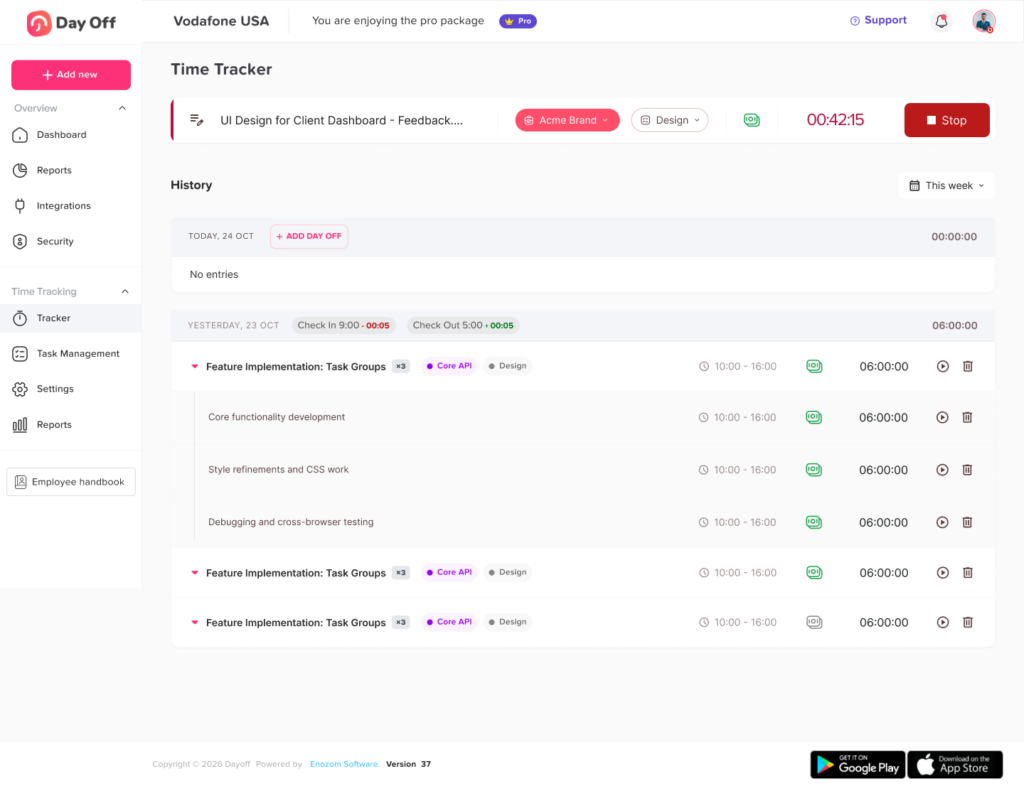
Clock In and Clock Out
Employees should be able to record when they start and finish work. This gives managers accurate daily attendance records and helps identify late arrivals, missed shifts, early departures, and overtime.
Track Work Hours Automatically
Once employees clock in and out, the system should calculate total hours worked. This reduces manual calculations and makes it easier to review daily, weekly, or monthly work hours.
Manage Attendance in Real Time
Managers should be able to see who is currently working, who has not clocked in, and who is away. Real-time visibility helps teams respond faster to absences or scheduling gaps.
Connect PTO With Attendance
A valuable web based time clock tracker should not treat PTO as a separate issue. It should show approved leave, sick days, vacation days, unpaid leave, and other absences alongside attendance records.
Support Different Work Schedules
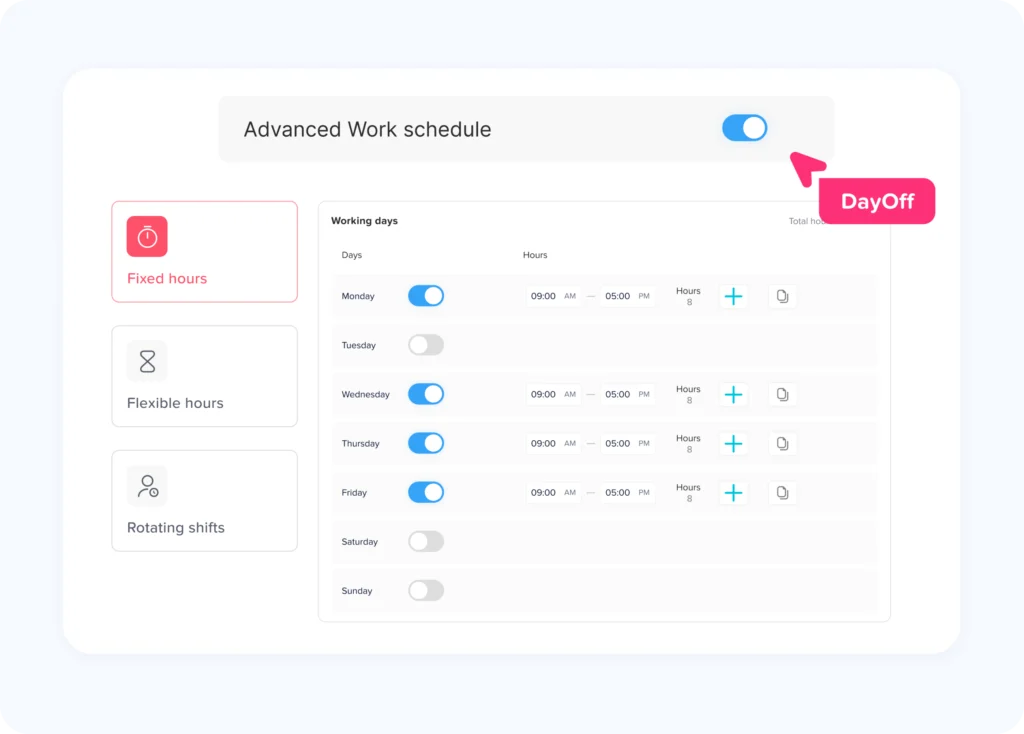
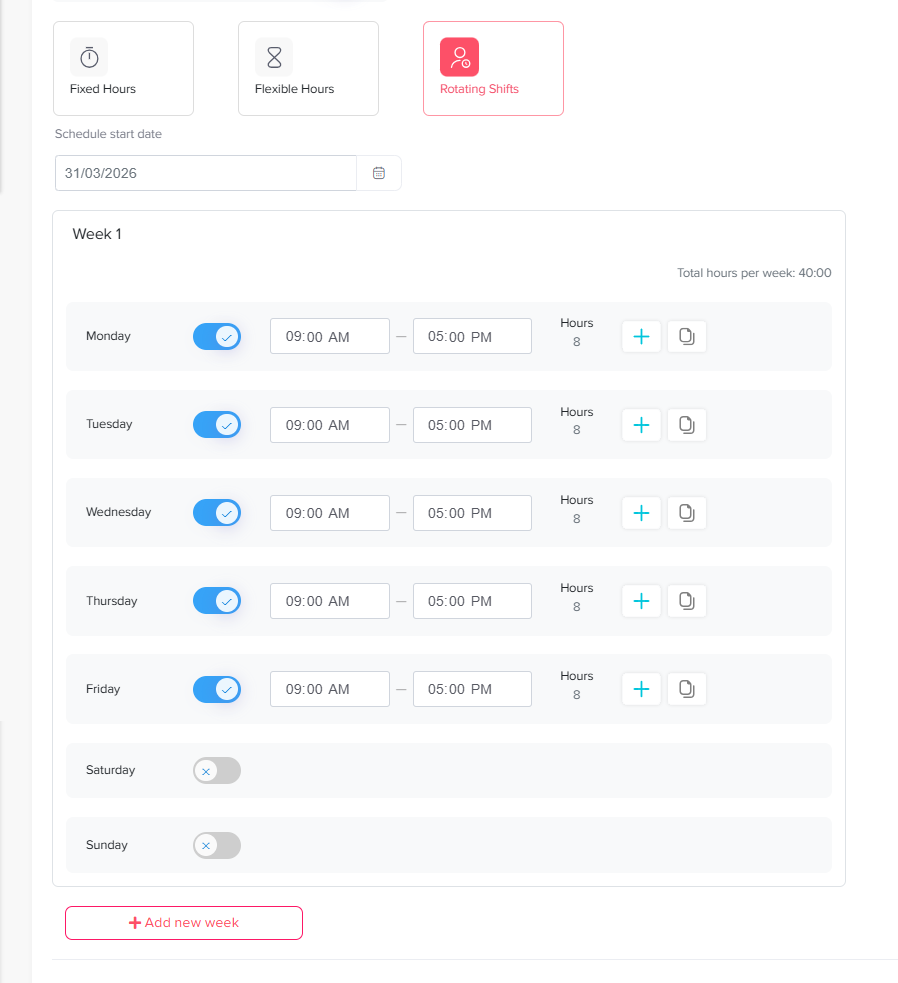
Not every employee works the same hours. Some teams use fixed schedules, flexible hours, rotating shifts, or part time arrangements. A good system should support different schedules so attendance is judged fairly.
Provide Reports
Reports help HR and managers understand attendance patterns, total hours, PTO usage, overtime, and absence trends. Instead of building reports manually, teams should be able to generate them quickly.
Time Clock Tracker vs. Traditional Timesheets
A web based time clock tracker gives businesses more structure than traditional timesheets. The difference is not only about technology. It is about visibility, accuracy, and control.
| Area | Manual Timesheets | Web Based Time Clock Tracker |
|---|---|---|
| Time entry | Employees fill hours manually | Employees clock in and out digitally |
| Accuracy | Depends on memory and manual updates | Records are captured more consistently |
| PTO visibility | Usually tracked separately | PTO can be connected with attendance |
| Manager review | Requires checking spreadsheets or messages | Managers can review records in one system |
| Payroll preparation | Time-consuming and error-prone | Easier to prepare with organized records |
| Team availability | Hard to see in real time | Clearer view of who is working or away |
| Reports | Created manually | Generated more easily |
| Remote access | Limited | Available from web or mobile |
Why PTO Should Be Connected to Time Tracking
Many businesses think of time tracking and PTO tracking as separate tasks. In reality, they are closely connected.
Attendance tells you when employees worked. PTO tells you when employees were approved to be away. If these two records are not connected, managers may misread the situation.
For example, imagine an employee does not clock in on Monday. Without PTO visibility, the manager may think the employee is absent without notice. But if the system shows that the employee has approved vacation, there is no problem.
Connecting PTO with time tracking helps businesses avoid confusion around:
- Approved vacation days
- Sick leave
- Unpaid leave
- Half day leave
- Remote work days
- Public holidays
- No shows
- Late arrivals
- Early departures
- Overtime after time off
This connection is especially useful for teams with multiple departments, branches, or work schedules.
How a Web Based Time Clock Tracker Improves Attendance Management
Attendance management is not only about knowing whether employees arrived on time. It is about creating a reliable system that helps the business operate smoothly.
Clear Daily Visibility
Managers can quickly see who is working, who is late, and who is away. This is useful for daily planning, especially in businesses where coverage matters.
Faster Response to Absences
When someone does not clock in, managers can check whether they are on approved PTO, scheduled off, or unexpectedly absent. This helps teams react quickly instead of waiting until the end of the day.
Better Schedule Control
A time clock tracker helps compare actual work hours with planned schedules. This makes it easier to spot repeated lateness, missed shifts, or overtime patterns.
More Accurate Employee Records
Digital attendance records reduce the risk of missing information. This is important for payroll, internal reporting, and compliance. In the U.S., employers covered by the Fair Labor Standards Act must keep accurate records for covered nonexempt workers, including hours worked and wages earned.
How It Helps Payroll and HR
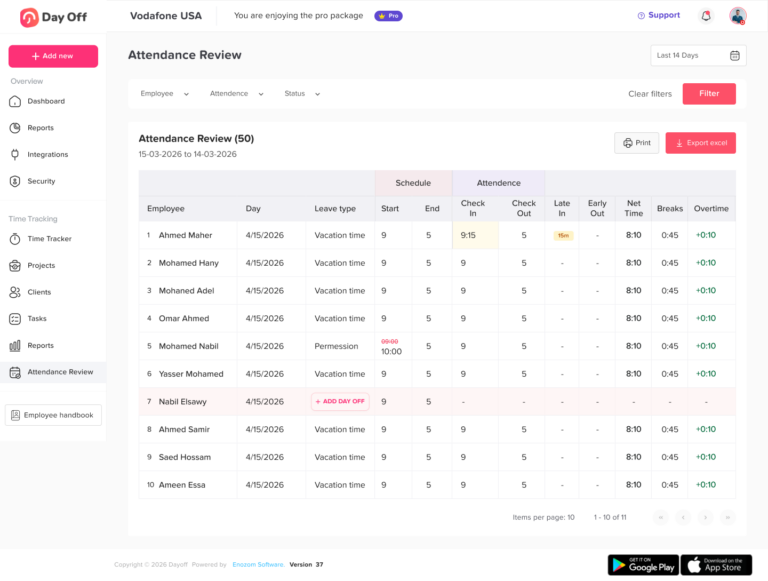
Payroll becomes easier when attendance, hours, overtime, and PTO are already organized. HR teams do not have to spend as much time collecting missing records or correcting manual entries.
A web based time clock tracker can help payroll by providing:
- Total hours worked
- Approved paid time off
- Unpaid leave records
- Overtime hours
- Late arrivals
- Early departures
- Attendance summaries
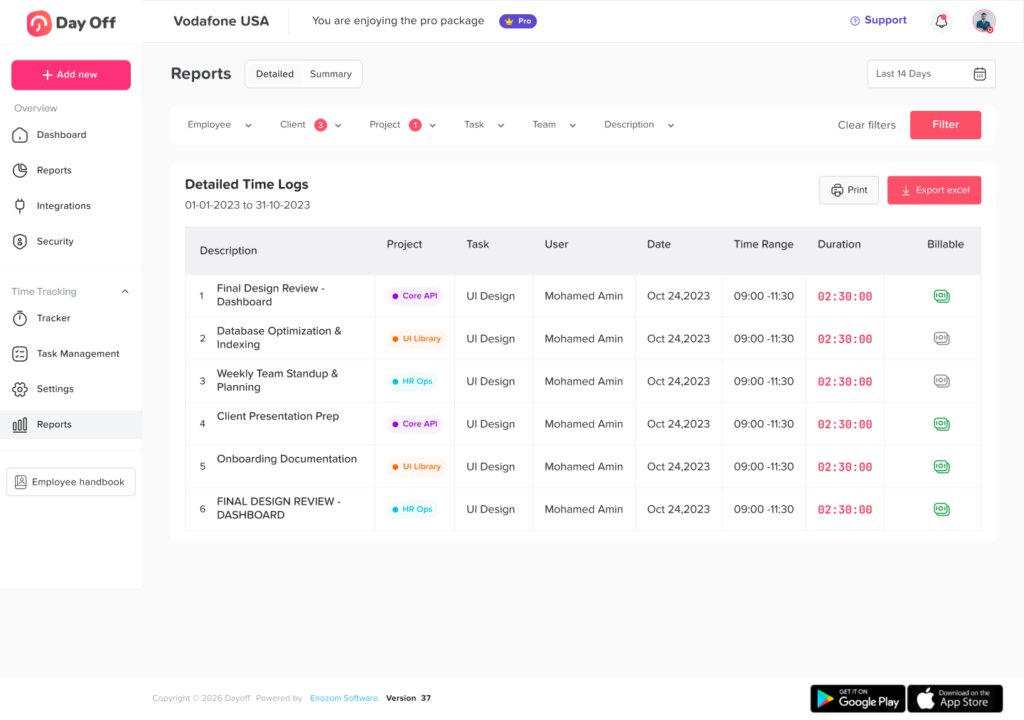
- Exportable reports
The U.S. Department of Labor notes that payroll records should generally be preserved for at least three years, while records used for wage calculations, such as time cards and work schedules, should generally be retained for two years.
This is one reason organized digital records are valuable. They help businesses keep information easier to access, review, and store.
Features to Look for in a Web Based Time Clock Tracker
Not every time clock tracker is built the same. Some tools only record clock-in and clock-out times, while others support broader workforce management.
Here are the most important features to look for.
Easy Clock In and Clock Out
Employees should be able to clock in without a complicated process. If the system is difficult, employees may avoid using it correctly.
Web and Mobile Access
A web based system should work from a browser, but mobile access is also important for remote workers, field employees, and teams that are not always at a desk.
Real Time Attendance Dashboard
Managers should be able to see attendance status instantly. This helps with daily planning and reduces the need to ask employees for updates.
PTO and Leave Tracking
The best time clock tracker should connect with leave management. This allows managers to see whether an employee is working, away, on vacation, sick, or scheduled off.
Work Schedule Support
The system should support different schedules, including fixed hours, flexible hours, part-time schedules, and rotating shifts.
Overtime Tracking
Overtime should be easy to identify. This helps managers control labor costs and review workload patterns.
Attendance Reports
Reports should help HR review work hours, absences, leave usage, and attendance trends without building everything manually.
Manager Approvals
Some businesses may need managers to review and approve timesheets or attendance records before payroll.
Notifications
Notifications can remind employees to clock in, alert managers about missed clock-ins, or notify teams about approved leave.
Integrations
A good system should work with the tools businesses already use, such as calendars, communication platforms, HR tools, or payroll systems.
Who Needs a Web Based Time Clock Tracker?
A web based time clock tracker can be useful for many types of teams, but it is especially helpful when employee time is difficult to manage manually.
Small Businesses
Small businesses often start with spreadsheets because they are simple and free. But as the team grows, tracking attendance, PTO, and payroll manually becomes harder. A web based system helps small teams stay organized without needing a large HR department.
Remote and Hybrid Teams
Remote and hybrid employees may not clock in from the same place every day. A web based tool helps managers track hours clearly without depending on office attendance.
Multi Location Companies
Businesses with more than one branch need visibility across locations. A time clock tracker can help managers review attendance by team, department, or location.
Field Teams
Field employees may work outside the office, visit clients, or move between job sites. Mobile friendly clock-in options make it easier to record hours from wherever work happens.
Shift Based Teams
Teams with shifts need accurate attendance records to avoid coverage gaps. This is useful for customer support, healthcare, retail, restaurants, operations, and service teams.
HR and Payroll Teams
HR and payroll teams need reliable data. A time clock tracker reduces manual follow up and helps prepare payroll with clearer records.
How Day Off Helps Teams Track Time, Attendance, and PTO
Day Off helps businesses manage employee leave, PTO, attendance, and time tracking in one organized system. Instead of separating time records from leave requests, Day Off gives teams a clearer way to manage employee availability.
With Day Off, teams can manage:
- PTO requests
- Vacation leave
- Sick leave
- Unpaid leave
- Leave balances
- Approval workflows
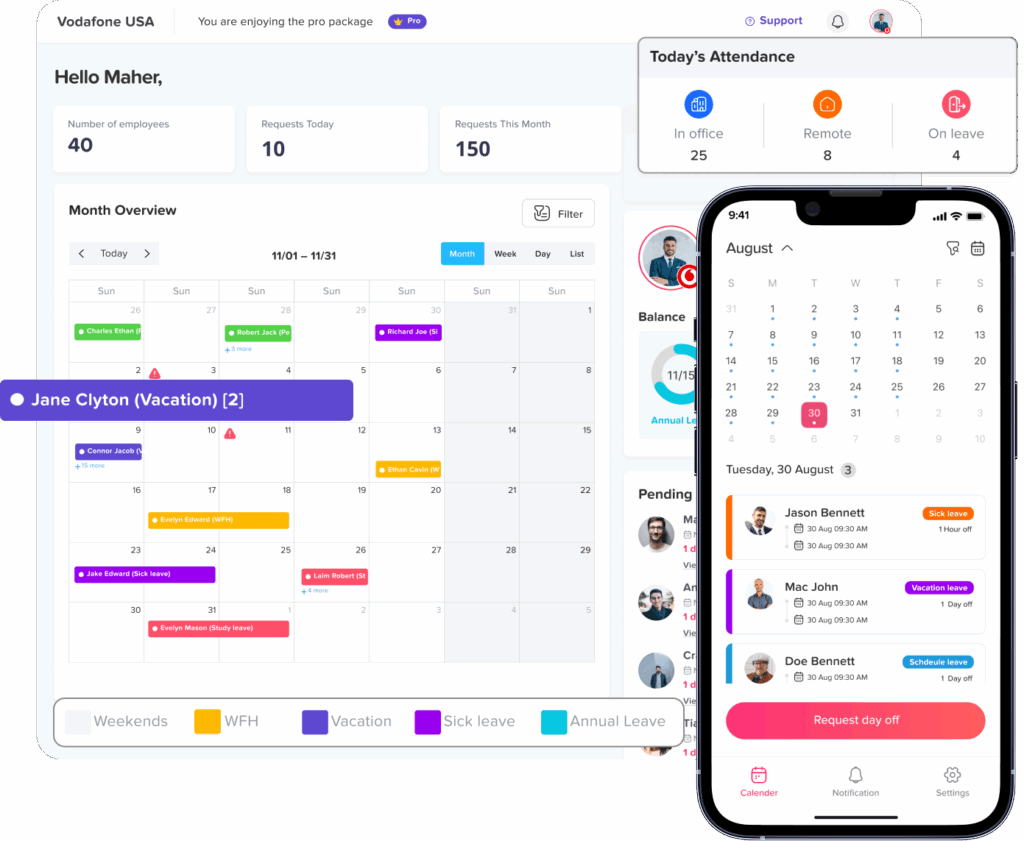
- Team calendars
- Attendance records
- Work schedules
- Time tracking
- Employee availability
- Reports and exports
This makes it easier for HR teams, managers, and employees to stay aligned. Employees can request time off and check their balances, while managers can review who is working, who is away, and how schedules are affected.
For businesses that want a simple and connected way to manage time and leave, Day Off can be a strong option because it brings PTO tracking, attendance, and team visibility together.
A Better Way to Think About Time Tracking
The best time clock tracker is not about watching every minute of an employee’s day. It is about reducing confusion.
A good system helps answer important business questions:
- Do we have enough people working today?
- Are employees being paid based on accurate records?
- Are PTO requests affecting team coverage?
- Are certain teams working too much overtime?
- Are attendance issues becoming a pattern?
- Can employees see their own leave and time records clearly?
When time tracking is done well, it supports both the business and the employee. Managers get better visibility, HR gets cleaner records, and employees get a fairer process.
How to Start Using a Web Based Time Clock Tracker
Moving from manual tracking to a web based system does not have to be difficult. The key is to set up the process clearly from the beginning.
Step 1: Define What You Need to Track
Start by deciding what matters most for your business. This may include clock-in time, clock out time, breaks, overtime, PTO, sick leave, unpaid leave, remote work, or shift attendance.
Step 2: Set Clear Work Schedules
Employees should know their expected work hours. This helps the system identify lateness, early departures, and missed shifts correctly.
Step 3: Connect Leave Policies
Add your leave types, PTO rules, accruals, carryover rules, and approval workflows. This helps attendance and leave work together.
Step 4: Train Employees
Explain how employees should clock in, clock out, request PTO, and check their balances. A clear process reduces mistakes.
Step 5: Review Reports Regularly
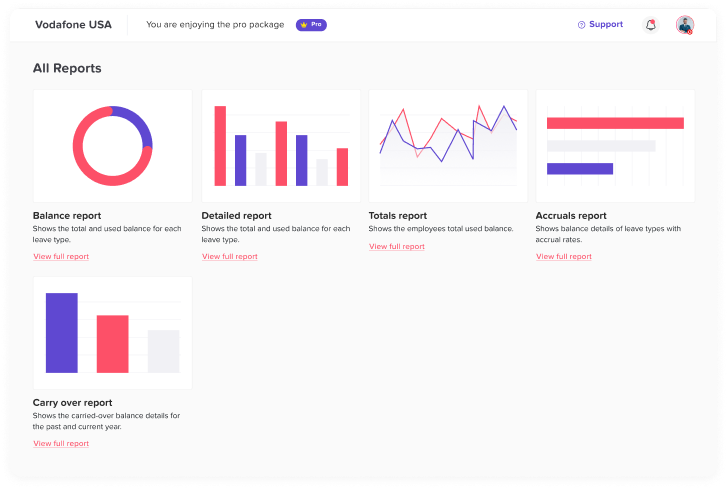
Do not wait until payroll day to check attendance records. Managers should review reports regularly to catch missing entries, overtime, and attendance issues early and used PTO.
Benefits of a Web Based Time Clock Tracker
A web based time clock tracker can improve several areas of business operations.
More Accurate Work Hour Records
Digital clock-in and clock-out records help reduce missing or unclear timesheets.
Less Manual HR Work
HR teams spend less time chasing employees, updating spreadsheets, and calculating hours manually.
Better Payroll Preparation
Organized attendance and PTO records make payroll easier to prepare and review.
Clearer Team Availability
Managers can see who is working, who is away, and who has upcoming PTO.
Improved Accountability
Employees and managers can both follow the same process, reducing confusion and unfair assumptions.
Easier Reporting
Reports help businesses understand attendance, leave usage, overtime, and scheduling patterns.
Better Employee Experience
Employees can track their own time and PTO without asking HR for every update.
Example: Before and After Using a Time Clock Tracker
Before using a web based time clock tracker, a company may rely on spreadsheets, emails, and chat messages. Employees send PTO requests manually. Managers approve them in different places. HR updates balances by hand. Attendance is recorded separately. Payroll needs several checks before it is ready.
After using a connected time clock tracker, the process becomes simpler. Employees clock in digitally. PTO requests go through one approval workflow. Managers see attendance and leave in one calendar. HR can export reports when needed. Payroll preparation becomes faster because the data is already organized.
The difference is not only speed. It is clarity.
FAQs
What is a web based time clock tracker?
A web based time clock tracker is an online tool that allows employees to clock in and clock out digitally. It helps businesses track work hours, attendance, overtime, absences, and sometimes PTO from one system.
Why should businesses use a time clock tracker?
Businesses use a time clock tracker to improve attendance accuracy, reduce manual timesheet work, prepare payroll more easily, and understand employee availability in real time.
Can a time clock tracker manage PTO?
Some time clock trackers only record work hours, but stronger systems connect time tracking with PTO management. This helps managers see approved vacation, sick leave, unpaid leave, and absences alongside attendance records.
Is a web based time clock tracker useful for remote teams?
Yes. A web based system is useful for remote and hybrid teams because employees can clock in from different locations while managers still get clear attendance records.
How does a time clock tracker help payroll?
It helps payroll by organizing work hours, overtime, approved PTO, unpaid leave, and attendance records in one place. This reduces manual calculations and makes payroll review easier.
What features should I look for in a time clock tracker?
Look for clock in and clock out, web and mobile access, attendance reports, PTO tracking, schedule support, overtime tracking, manager approvals, notifications, and integrations.
Can small businesses use a web based time clock tracker?
Yes. Small businesses can benefit from a time clock tracker because it replaces manual spreadsheets and helps them manage attendance and PTO before the process becomes messy.
What is the difference between time tracking and PTO tracking?
Time tracking records when employees work. PTO tracking records when employees are approved to be away from work. Connecting both gives businesses a clearer view of availability.
Final Thoughts
A web based time clock tracker gives businesses a better way to manage employee hours, attendance, and PTO without relying on scattered spreadsheets or manual updates. It helps managers see who is working, who is away, and how time is being used across the team.
For HR teams, it reduces manual work and improves record accuracy. For managers, it improves visibility and planning. For employees, it creates a clearer process for clocking in, requesting leave, and checking time off information.
As teams become more flexible, businesses need tools that can keep up. A connected time clock tracker is not only about tracking hours. It is about building a more organized, transparent, and reliable way to manage work time and employee availability.