







A PTO audit helps HR teams make sure employee time off records are accurate, fair, and ready for payroll, reporting, and policy review. When paid time off is tracked manually across spreadsheets, emails, calendars, and chat messages, small errors can quickly turn into bigger problems. Employees may see the wrong leave balance, managers may approve time off without full visibility, and HR may spend hours fixing records before payroll or year-end reporting.
A clear PTO audit checklist gives HR a structured way to review leave balances, accruals, carryover, approvals, pending requests, and employee leave history. It also helps companies spot policy gaps before they affect employees or business operations.
Related reading: PTO Calendar Sync: How to Connect Time Off With Google, Outlook, and Team Calendars, SSO for HR Software: Why Microsoft Login Makes Leave Tracking Safer, PTO Abuse: How to Handle Repeated Time Off Problems Fairly, Time Theft at Work: How to Reduce It With Better Attendance Tracking, and Google Single Sign-On for PTO and Time Tracking.

This guide explains how to run a PTO audit step by step, what records to review, which mistakes to look for, and how a leave management tool like Day Off can make the process easier.
What Is a PTO Audit?
A PTO audit is a detailed review of your company’s paid time off records. The goal is to confirm that every employee’s leave balance, accrual, used time, pending requests, and carryover amount are correct.
A PTO audit usually reviews:
- Employee leave balances
- Accrued PTO
- Used PTO
- Approved and pending leave requests
- Carryover balances
- Expired or reset leave
- Sick leave, vacation leave, unpaid leave, and other leave types
- Payroll-related PTO records
- Policy rules and system settings
- Manager approvals and HR adjustments
The audit is not just about finding mistakes. It also helps HR understand whether the company’s PTO policy is working clearly and consistently.
Why PTO Audits Matter for HR Teams
PTO affects employees, managers, payroll, and workforce planning. If leave records are inaccurate, employees may lose trust in the system, managers may struggle to plan coverage, and HR may need to manually correct balances later.
In the United States, the Fair Labor Standards Act does not require payment for time not worked, such as vacation, sick leave, or holidays, but these benefits are often handled through company policies, employment agreements, or state and local rules. That means employers need to apply their own policies consistently and keep clear records.
A PTO audit helps HR:
- Confirm that employees have accurate balances
- Prevent payroll and final payout errors
- Check whether accrual rules are working correctly
- Make sure leave policies are applied fairly
- Identify unused PTO trends before year-end
- Review pending and overlapping requests
- Prepare clean reports for leadership
- Reduce employee questions about balances
- Improve compliance readiness
Good records also matter because employers covered by the FLSA must keep certain wage and hour records for covered, nonexempt employees, and payroll records must generally be preserved for at least three years. While PTO rules can vary by location and company policy, organized records make it easier to answer questions and support decisions.
When Should HR Run a PTO Audit?
A PTO audit should not happen only when there is a problem. HR teams should review PTO records regularly so errors do not build up over time.
Common times to run a PTO audit include:
Before Year-End
Year-end is one of the most important times to review PTO balances. Many companies reset leave, apply carryover limits, expire unused time, or prepare reports for the next calendar year.
Before Payroll Changes
If PTO affects payroll, final pay, deductions, or leave payouts, HR should audit balances before payroll deadlines or employee offboarding.
Before Policy Updates
When a company changes accrual rules, carryover limits, leave types, approval workflows, or reset dates, HR should audit current records first.
After Migrating From Spreadsheets
If your company moves from manual tracking to a PTO tracking system like Day Off, an audit helps make sure the starting balances are correct.
Quarterly or Monthly
For growing teams, a quarterly PTO audit is useful. For companies with many hourly employees, multiple locations, or complex accrual rules, a monthly review may be better.
PTO Audit Checklist: Step-by-Step Guide
Use this checklist to review PTO balances, accruals, and leave records clearly.
Review the Current PTO Policy
Before checking employee balances, HR should review the official PTO policy. The audit should compare actual records against the policy, not against assumptions.
Check whether the policy explains:
- Who is eligible for PTO
- When employees start earning PTO
- How PTO accrues
- Whether PTO is front-loaded or earned over time
- Whether part-time employees receive PTO
- Whether unused PTO carries over
- Whether carryover has a limit
- Whether PTO expires
- How sick leave is handled
- How unpaid leave is recorded
- How final PTO payout is handled
- Who approves requests
- Whether negative PTO balances are allowed
If the policy is unclear, the audit may reveal more than a tracking problem. It may show that HR needs to update the policy language.
Confirm Employee Information
Accurate PTO records depend on accurate employee data. If an employee’s hire date, work schedule, location, policy group, or employment status is wrong, their PTO balance may also be wrong.
Review these employee details:
Employee Details Required for PTO Management
Key employee information used to calculate leave eligibility, balances, and policy compliance.
| Employee Detail | Why It Matters |
|---|---|
| Hire Date | Impacts eligibility, accrual start date, and anniversary resets. |
| Employment Status | Determines whether the employee is full-time, part-time, intern, contractor, or temporary. |
| Work Schedule | Affects PTO calculations for hourly employees, shift workers, and non-standard schedules. |
| Location | May influence sick leave requirements, labor laws, and company policy variations. |
| Department or Team | Helps managers plan staffing coverage and approve time off requests. |
| Policy Assignment | Ensures the correct PTO, vacation, and sick leave rules are applied. |
| Termination Date | Important for final balance calculations, carryover handling, and payout reviews. |
In Day Off, HR can organize employees by teams, locations, policies, and work schedules, making it easier to check whether each person is assigned to the correct leave rules.
Review Current PTO Balances
Next, review every employee’s available PTO balance. The balance should reflect earned time, used time, manual adjustments, carryover, and pending approvals.
Look for:
- Employees with unusually high balances
- Employees with negative balances
- Employees with zero balances when they should have available PTO
- Employees assigned to the wrong leave policy
- Balances that do not match tenure or work schedule
- Manual edits without notes
- Leave balances that did not reset properly
A leave balance audit helps HR catch errors before employees request time off or before payroll relies on incorrect data.
Check PTO Accrual Rules
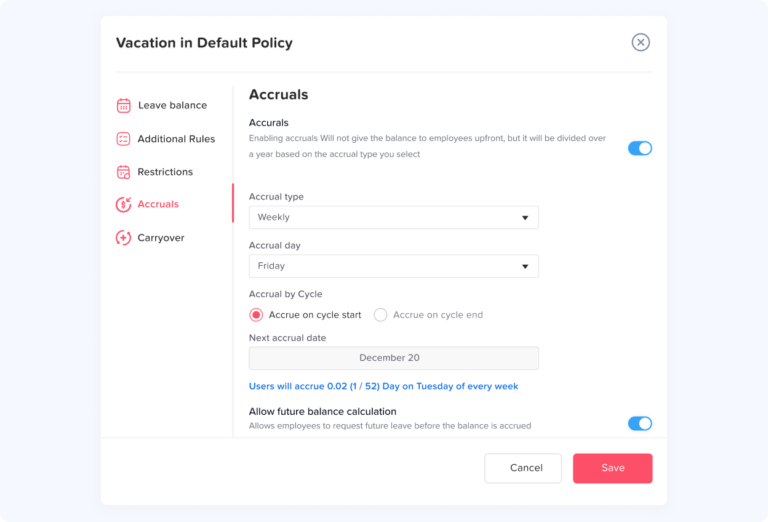
A PTO accrual audit confirms that employees are earning time off based on the correct formula.
Common accrual methods include:
- Monthly accrual
- Biweekly accrual
- Semimonthly accrual
- Weekly accrual
- Annual front-loaded PTO
- Accrual based on hours worked
- Accrual based on employee anniversary date
When auditing accruals, HR should check:
- The accrual start date
- The accrual frequency
- The accrual rate
- The maximum balance cap
- Whether accrual pauses during unpaid leave
- Whether accrual differs by tenure
- Whether part-time employees accrue at a different rate
- Whether the system applied the correct reset date
For example, if an employee earns PTO monthly, the audit should confirm that each monthly accrual was added correctly and that no month was missed or duplicated.
Day Off helps companies manage different leave policies and accrual rules in one place, reducing the need to calculate balances manually in spreadsheets.
Review Used PTO and Approved Requests
After checking what employees earned, review what they used.
Compare approved leave requests against employee balances. Make sure every approved absence was deducted from the correct leave type and on the correct date.
Check for:
- Approved PTO that was not deducted
- Duplicate deductions
- Canceled requests that still reduced the balance
- Half-day requests counted as full days
- Full-day requests counted incorrectly
- Requests deducted from the wrong leave type
- Sick leave recorded as vacation leave
- Unpaid leave recorded as paid leave
- Leave taken outside the employee’s normal work schedule
This step is especially important for teams with half-day leave, rotating shifts, flexible schedules, or multiple leave types.
Review Pending Leave Requests
Pending requests can create confusion during an audit. An employee may appear to have enough PTO today, but several pending requests may reduce the balance later.
Review:
- Pending requests waiting for manager approval
- Requests waiting for HR approval
- Old pending requests that should be approved or rejected
- Requests submitted for dates that already passed
- Overlapping requests in the same team
- Requests submitted during blockout periods
If your company uses two-level approval, make sure each request is sitting with the correct approver. Day Off supports approval workflows that help HR and managers track request status clearly instead of losing approvals in email or chat.
Check Carryover Balances
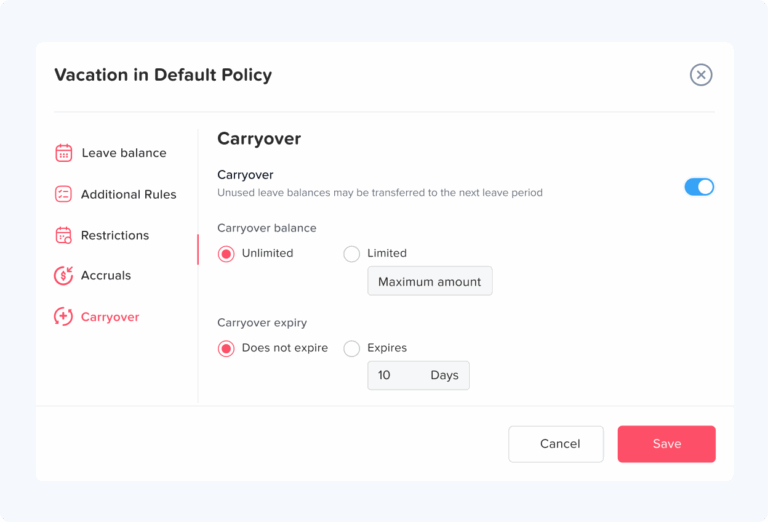
Carryover is one of the most common sources of PTO errors. If your company allows unused PTO to carry into the next period, HR should confirm that the correct amount moved forward.
Review:
- Whether carryover is allowed
- The maximum carryover limit
- Whether carryover expires
- Whether different leave types have different carryover rules
- Whether carryover applies by calendar year or employee anniversary
- Whether unused PTO above the cap was handled correctly
For example, if an employee ended the year with 10 unused days but the policy allows only 5 days to carry over, the audit should confirm that only 5 days were moved into the new period.
If your company operates across different locations, do not assume the same rules apply everywhere. Some sick leave laws include specific accrual, usage, and carryover rules. For example, California generally requires 5 days or 40 hours of paid sick leave as of January 1, 2024, while New York sick leave requirements vary by employer size.
Review PTO Resets and Expiration Rules
Some companies reset PTO at the beginning of the year. Others reset leave based on the employee’s anniversary date. Some leave types may reset in a specific month.
During the audit, check:
- Whether the reset date is correct
- Whether balances reset too early or too late
- Whether expired leave was removed correctly
- Whether employees were notified before expiration
- Whether different leave types follow different reset rules
- Whether manual adjustments were added after reset
Day Off supports flexible leave type resets, allowing companies to manage leave based on company year, specific month, or employee anniversary depending on the policy.
Audit Different Leave Types Separately
PTO audits become messy when all leave types are treated the same. Vacation leave, sick leave, unpaid leave, personal leave, maternity or paternity leave, and bereavement leave may follow different rules.
Review each leave type separately:
| Leave Type | What to Check |
|---|---|
| Vacation Leave | Accrual, carryover, usage, expiration, approvals |
| Sick Leave | Local rules, usage limits, carryover, documentation process |
| Unpaid Leave | Payroll impact, approval notes, reason codes |
| Personal Leave | Eligibility and annual limits |
| Parental Leave | Duration, approval process, policy documentation |
| Bereavement Leave | Allowed days and required approval |
| Half-Day Leave | Correct deduction amount |
This is one reason a dedicated leave management system is better than a basic spreadsheet. Day Off allows companies to create and manage multiple leave types, so HR can track each category more clearly.
Compare PTO Records With Payroll
Add Your Heading Text Here
If PTO affects payroll, HR should compare leave records with payroll data. This helps prevent underpayment, overpayment, or incorrect final payout calculations.
Check:
- Approved paid leave included in payroll
- Unpaid leave deducted correctly
- PTO payout for departing employees
- Negative PTO balance deductions, if allowed by policy and law
- Leave dates that overlap with payroll periods
- Hourly employee leave records
- Overtime calculations where relevant
- Manual payroll adjustments related to PTO
Payroll-related PTO rules can vary depending on location, company policy, and employment agreements. HR should confirm requirements with legal or payroll advisors when needed.
Review Manual Adjustments
Manual edits are sometimes necessary, especially when correcting old records or importing balances from a previous system. However, every manual adjustment should have a clear reason.
Review:
- Who made the adjustment
- When it was made
- Which leave type was changed
- Whether the adjustment added or removed time
- Whether there is a note explaining the reason
- Whether the adjustment was approved by HR
Common manual adjustment reasons include:
- Starting balance correction
- Policy migration
- Payroll correction
- Manager approval correction
- Carryover correction
- Offboarding update
Too many manual edits may be a sign that the current tracking process is not reliable.
Check Manager Approval Patterns
A PTO audit should also review how managers approve requests. Approval delays and inconsistent decisions can create frustration for employees.
Look for:
- Managers with many pending requests
- Requests approved after the leave date
- Requests rejected without a clear reason
- Inconsistent approval behavior across teams
- PTO approved during busy periods without coverage
- Requests that skipped the proper approval workflow
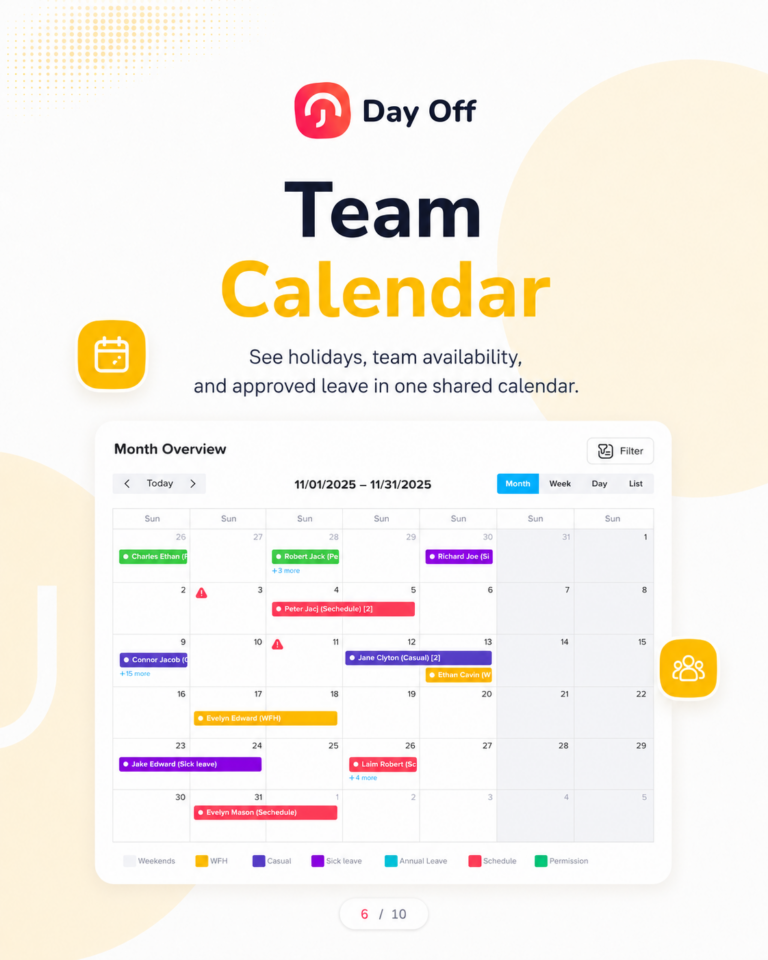
A shared leave calendar in Day Off helps managers see who is off before approving more requests. This can reduce overlapping leave and improve team planning.
Review Team Coverage and Overlapping Leave
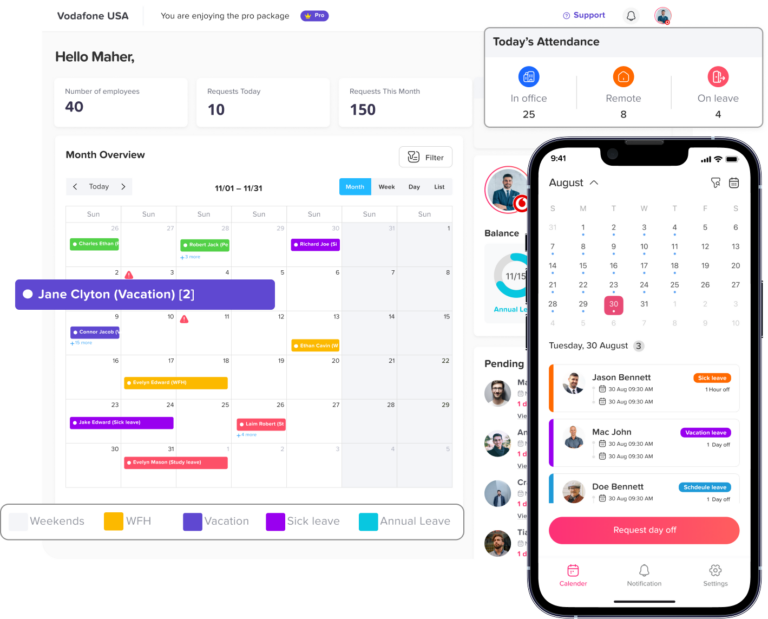
TO is not only an HR recordkeeping issue. It also affects daily operations.
During the audit, review:
- Teams with too many employees off at the same time
- Departments with repeated coverage gaps
- Busy seasons with high PTO usage
- Employees who rarely take time off
- Employees with high unused balances
- Managers who approve overlapping leave without checking availability
This information can help HR improve future planning, set blockout dates, or remind employees to schedule time off earlier.
Check Leave Records for Former Employees
Former employee records should not be ignored. Offboarding is one of the most sensitive points in PTO tracking.
Review:
- Final PTO balance
- PTO used before departure
- PTO payout, if applicable
- Unpaid leave before termination
- Manual adjustments before final payroll
- Whether the employee was removed from active calendars
- Whether records are still available for reporting
Keeping clean historical records helps HR answer future questions and prepare reports if needed.
Create a PTO Audit Report
After reviewing the data, HR should create a simple PTO audit report. The report does not need to be complicated, but it should summarize what was checked and what needs to be fixed.
A good PTO audit report includes:
- Audit date
- Audit owner
- Number of employees reviewed
- Policies reviewed
- Leave types reviewed
- Balance errors found
- Accrual errors found
- Carryover issues found
- Pending request issues
- Payroll-related issues
- Corrections made
- Follow-up actions
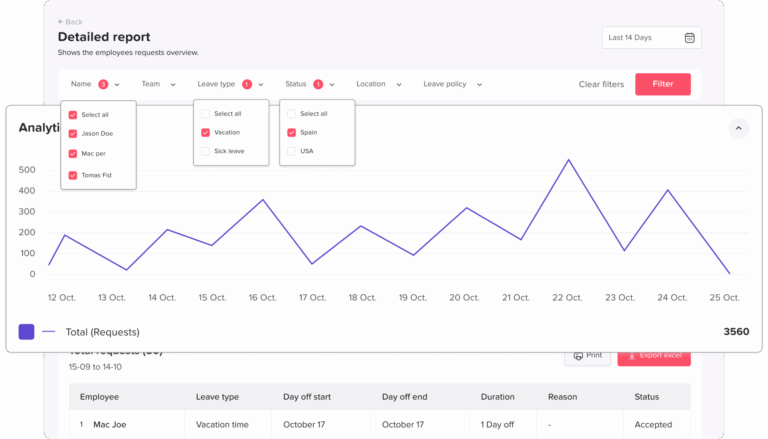
Day Off reports can help HR review leave balances, usage, requests, and team availability without manually building everything from scratch.
Common PTO Audit Mistakes to Avoid
Even experienced HR teams can miss important details during a PTO audit. Here are common mistakes to avoid.
Only Checking Final Balances
A balance may look correct but still have incorrect history behind it. Review accruals, used leave, carryover, and manual edits.
Ignoring Pending Requests
Pending requests can affect future availability and balances. Old pending requests should be cleaned up.
Mixing Leave Types
Vacation, sick leave, unpaid leave, and personal leave should be reviewed separately.
Forgetting Part-Time Employees
Part-time employees may have different eligibility or accrual rules. Make sure the correct policy is applied.
Not Reviewing Carryover Limits
Carryover rules often cause errors at year-end. Always check caps, expiration dates, and reset timing.
Relying on Spreadsheets Alone
Spreadsheets can work for very small teams, but they become risky as the company grows. Version issues, formula errors, and missed updates can lead to inaccurate records.
PTO Audit Checklist Table
Use this table as a quick HR checklist.
PTO Audit Checklist
Key areas HR should review during leave and PTO audits.
| Audit Area | What HR Should Review |
|---|---|
| PTO Policy | Eligibility, accrual, carryover, reset, expiration, approvals |
| Employee Data | Hire date, status, location, team, work schedule, policy assignment |
| Leave Balances | Available balance, used leave, pending leave, negative balance |
| Accruals | Rate, frequency, start date, caps, tenure rules |
| Used Leave | Approved requests, canceled requests, half-day deductions |
| Pending Requests | Old requests, approval delays, overlapping leave |
| Carryover | Limits, expiration, reset rules, unused balances |
| Leave Types | Vacation, sick, unpaid, personal, parental, bereavement |
| Payroll | Paid leave, unpaid leave, final payout, manual corrections |
| Manual Edits | Reason, date, owner, approval note |
| Manager Approvals | Delays, skipped approvals, inconsistent decisions |
| Former Employees | Final balance, payout, archived records |
| Reports | Corrections made, open issues, next audit date |
How Day Off Helps With PTO Audits
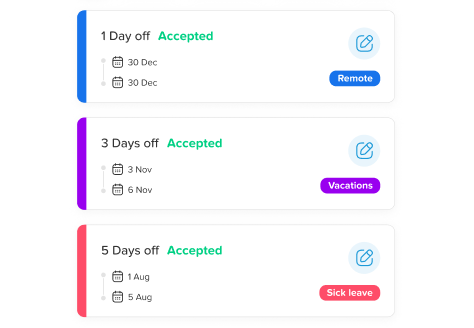
Day Off gives HR teams a clearer way to manage PTO records without relying on scattered spreadsheets or long email threads. Instead of manually checking balances, approvals, and leave history from different places, HR can manage leave in one system.
With Day Off, companies can:
- Track employee leave balances
- Create different leave types
- Manage accrual and carryover policies
- Review approved, pending, and rejected requests
- Use shared calendars to see team availability
- Organize employees by teams and locations
- Set approval workflows
- Export reports for HR and payroll review
- Track half-day leave and custom policies
- Reduce manual balance corrections
For PTO audits, this means HR can review records faster, spot issues more easily, and give employees more confidence in their leave balances.
Best Practices for a Better PTO Audit Process
To make PTO audits easier in the future, HR should build a repeatable process.
Keep One Source of Truth
Use one system for leave requests, approvals, balances, and reports. Avoid tracking PTO in multiple spreadsheets and calendars.
Audit Regularly
A quarterly PTO audit is better than fixing a year of errors at once.
Document Every Adjustment
If HR changes a balance manually, add a reason. This makes future audits easier.
Review Policies Before Updating Systems
The system should match the written policy. If the policy is unclear, update it before changing balances.
Separate PTO From Attendance
PTO, sick leave, unpaid leave, and attendance records may be connected, but they should still be tracked clearly.
Communicate With Employees
Employees should know how PTO is earned, when it resets, and where they can check their balance.
FAQ: PTO Audit Checklist
What is a PTO audit?
A PTO audit is a review of employee paid time off records to make sure leave balances, accruals, used PTO, carryover, approvals, and manual adjustments are accurate. HR teams use PTO audits to catch errors, prepare for payroll, review policy compliance, and make sure employees can trust their available leave balances.
How do you audit PTO balances?
To audit PTO balances, HR should compare each employee’s current balance with their starting balance, accrued PTO, approved leave, pending requests, carryover, expired time, and manual adjustments. The final balance should match the company’s PTO policy and the employee’s work schedule, hire date, location, and leave type.
What should be included in a PTO audit checklist?
A PTO audit checklist should include employee information, PTO policy rules, accrual settings, available balances, used leave, pending requests, carryover limits, expired PTO, leave types, manager approvals, payroll records, manual balance changes, and former employee records. It should also include a final report showing errors found and corrections made.
How often should HR audit PTO records?
HR should audit PTO records at least once or twice a year. Many companies run a PTO audit before year-end, before payroll changes, before updating leave policies, or after moving from spreadsheets to PTO tracking software. Growing companies may benefit from quarterly audits.
Why are PTO balances wrong?
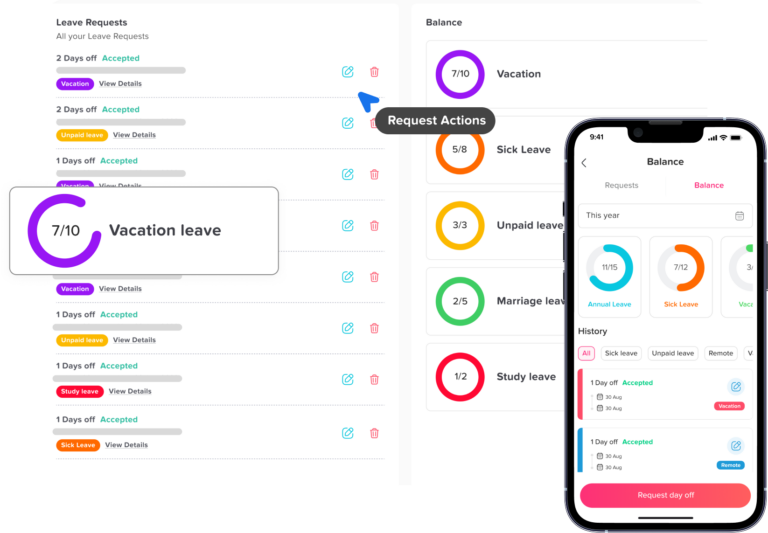
PTO balances can be wrong because of incorrect accrual rules, missed leave deductions, duplicate requests, canceled requests that were not restored, wrong carryover settings, manual spreadsheet errors, incorrect employee policy assignments, or outdated employee information.
How do you check PTO accrual accuracy?
To check PTO accrual accuracy, review the employee’s accrual rate, accrual frequency, hire date, work schedule, employment status, policy group, balance cap, and reset date. Then compare the PTO the employee should have earned with the PTO recorded in your tracking system.
What is the difference between accrued PTO and available PTO?
Accrued PTO is the amount of paid time off an employee has earned based on the company’s policy. Available PTO is the amount the employee can currently use after subtracting approved leave, used time, expired time, and any other adjustments.
Should pending PTO requests be included in an audit?
Yes. Pending PTO requests should be reviewed during a PTO audit because they may affect future balances and team availability. HR should check old pending requests, requests waiting for manager approval, requests for past dates, and requests that overlap with other team absences.
How do you audit PTO carryover?
To audit PTO carryover, check whether the company allows unused PTO to move into the next year or next reset period. Then review the carryover limit, expiration date, employee balance before reset, amount carried forward, and any unused PTO that should have expired according to policy.
How long should employers keep PTO records?
Recordkeeping requirements can depend on location, company policy, and the type of leave. In the U.S., employers covered by the FLSA must keep certain payroll records for at least three years, and records used for wage calculations should generally be kept for two years. PTO records connected to payroll, wages, or deductions should be organized carefully.
Is PTO required by law?
In the U.S., the Fair Labor Standards Act does not require employers to pay employees for time not worked, including vacation, sick leave, or holidays. However, some state or local laws may apply, and employers must follow their own written PTO policies consistently.
Should PTO and sick leave be audited separately?
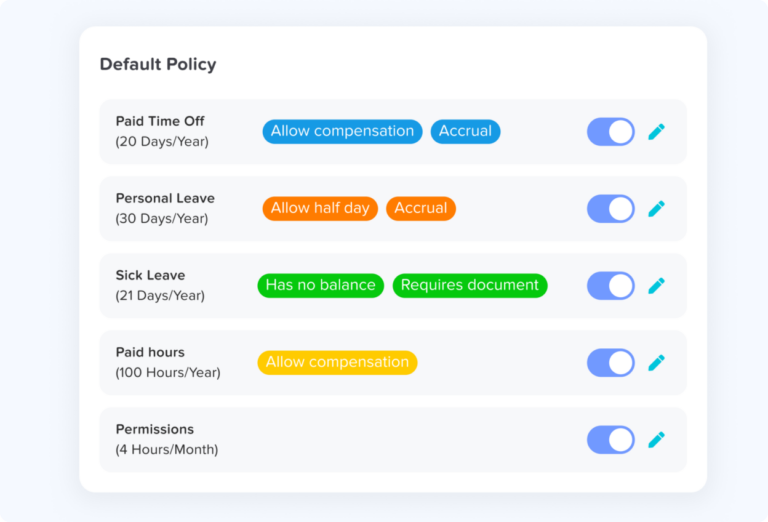
Yes. PTO and sick leave should be audited separately because they may have different rules for accrual, usage, carryover, documentation, and expiration. Vacation leave, sick leave, unpaid leave, personal leave, parental leave, and other leave types should each be reviewed based on the correct policy.
What PTO records should HR review before payroll?
Before payroll, HR should review approved paid leave, unpaid leave, PTO used during the pay period, half-day requests, hourly employee leave, manual corrections, negative balances, and final PTO balances for departing employees. This helps reduce payroll errors and prevents incorrect deductions or payouts.
How can HR avoid PTO audit mistakes?
HR can avoid PTO audit mistakes by using one source of truth, reviewing records regularly, documenting every manual adjustment, separating leave types, checking carryover rules, reviewing pending requests, and making sure the PTO policy matches the settings in the tracking system.
Can PTO tracking software help with audits?
Yes. PTO tracking software can make audits easier by keeping leave balances, accruals, approvals, carryover, requests, calendars, and reports in one place. Day Off helps HR teams manage employee leave records, track PTO balances, review requests, organize leave policies, and export reports instead of relying on scattered spreadsheets and emails.
Conclusion
A PTO audit is one of the best ways to keep employee leave records accurate and trustworthy. By reviewing balances, accruals, carryover, approvals, payroll records, and policy settings, HR can prevent confusion and reduce manual corrections.
For small teams, a simple checklist may be enough. But as the company grows, PTO tracking becomes harder to manage manually. A tool like Day Off helps HR centralize leave records, automate policy rules, improve visibility, and prepare better reports.
When employees can trust their leave balances and managers can see availability clearly, PTO becomes easier for everyone to manage.