







Managing employee time off can quickly become confusing when there is no dedicated HR department. A clear PTO Workflow helps small businesses, startups, agencies, and growing teams organize vacation requests, sick leave, approvals, employee balances, and team availability without relying on scattered emails or manual spreadsheets. Even if your company does not have an HR team, you can still create a simple, fair, and reliable process that keeps employees informed and managers in control.

For many small companies, paid time off starts informally. An employee sends a message to the founder, a manager approves it verbally, someone updates a spreadsheet, and the rest of the team finds out later. This may work for five people, but it becomes risky as the company grows. Requests get missed, PTO balances become unclear, overlapping absences happen, and employees may feel unsure about what they are allowed to take.
The good news is that building a PTO workflow does not have to be complicated. With the right structure and a simple leave management tool like Day Off, companies without HR teams can manage PTO requests, approvals, calendars, balances, and reports in one place.
This guide explains how to build a practical PTO workflow from scratch, even if no one in your company has formal HR experience.
What Is a PTO Workflow?
A PTO workflow is the step by step process employees and managers follow when requesting, approving, tracking, and recording paid time off.
A good PTO workflow answers important questions such as:
- Who can request PTO?
- How should employees submit a request?
- Who approves the request?
- How much PTO does each employee have?
- What happens if two employees request the same days off?
- How are sick days, vacation days, unpaid leave, and personal days tracked?
- Where can the team see who is away?
- How are records saved for payroll or future review?
Without a clear workflow, time off becomes dependent on memory, messages, and manual updates. That can lead to mistakes, frustration, and unfair treatment.
Why Companies Without HR Teams Need a PTO Workflow
Small companies often delay building a formal PTO process because they assume it is only necessary for larger businesses. In reality, companies without HR teams may need a clear workflow even more because there is no dedicated person responsible for checking every detail.
When there is no HR department, PTO responsibilities are usually shared between founders, operations managers, team leads, office admins, or finance teams. Without a system, each person may handle time off differently.
A structured PTO workflow helps your company:
- Reduce confusion around vacation and sick leave
- Avoid missed or forgotten requests
- Keep leave approvals consistent
- Prevent overlapping absences
- Give employees visibility into their balances
- Help managers plan work around absences
- Keep records organized for payroll and reporting
- Build trust by treating employees fairly
The goal is not to create a complicated HR process. The goal is to create a simple system that everyone can understand and follow.
Step 1: Define Your PTO Policy First
Before building the workflow, you need a clear PTO policy. The policy explains what employees are entitled to, while the workflow explains how they use it.
Your PTO policy should cover the basics:
- Annual vacation allowance
- Sick leave rules
- Personal days or emergency leave
- Unpaid leave
- Public holidays
- Half day requests
- Carryover rules
- Accrual rules
- Notice period for planned leave
- Rules for overlapping requests
- Approval requirements
For example, your company may decide that full-time employees receive 15 vacation days per year, sick leave is tracked separately, and vacation requests should be submitted at least two weeks in advance.
This policy does not need to be long. For a small company, a one-page document can be enough if it is clear and accessible.
Step 2: Choose the Leave Types You Want to Track
One common mistake small companies make is treating all time off the same way. This may seem simple at first, but it creates problems later.
Vacation leave, sick leave, unpaid leave, maternity leave, personal leave, and emergency leave may need different rules. Some may be paid, some may be unpaid, and some may require different approval steps.
Start with the leave types your company actually uses. For example:
- Vacation leave
- Sick leave
- Personal leave
- Unpaid leave
- Maternity or paternity leave
- Emergency leave
- Half day leave
You do not need too many categories. Too many leave types can make the process harder to manage. Choose the ones that help your company stay organized.
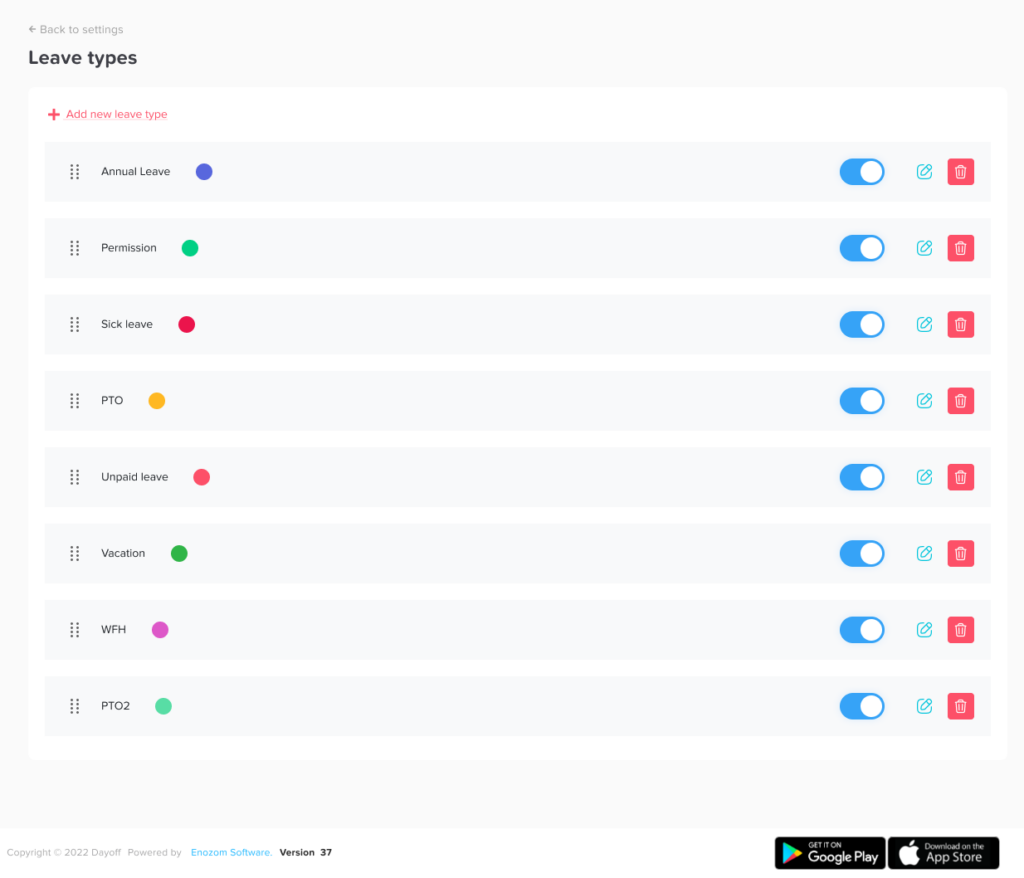
With Day Off, you can create different leave types and assign them based on your company’s policy. This makes it easier for employees to choose the correct type when submitting a request and easier for managers to review leave records later.
Step 3: Decide Who Approves PTO Requests
A PTO workflow needs a clear approval path. Employees should know exactly who reviews their requests.
For a company with no HR team, PTO approvals may go to:
- The employee’s direct manager
- The founder or business owner
- The operations manager
- The department lead
- The project manager
For very small teams, one approver may be enough. As the company grows, you may need a more structured approval process.
For example:
- Employees submit PTO requests to their direct manager.
- Managers review workload and team availability.
- Approved requests appear on the shared leave calendar.
- The finance or operations person reviews leave reports when needed.
If your company needs more control, you can use a two level approval process. For example, a team lead approves the request first, then a manager or admin gives final approval. This is useful when time off affects client deadlines, shifts, payroll, or staffing levels.
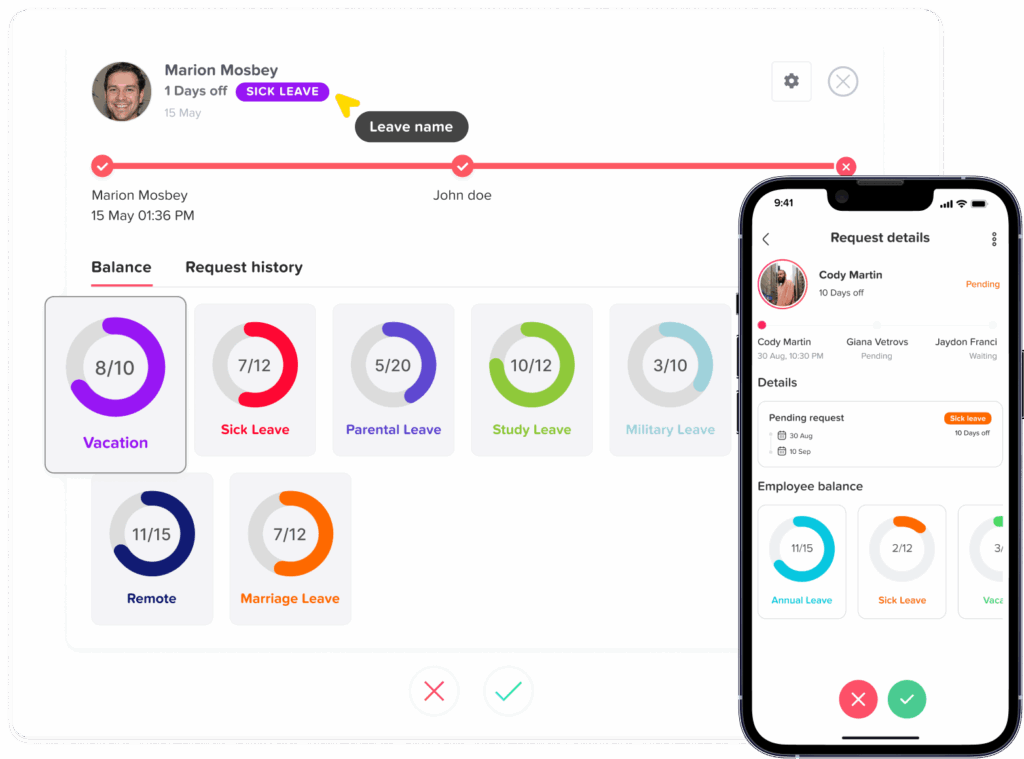
Day Off makes this easier by allowing companies to set approval workflows, so requests go to the right person automatically instead of getting lost in email threads.
Step 4: Create a Standard PTO Request Process
A good PTO workflow should make it easy for employees to request time off. If the process is unclear, employees may use different methods such as email, chat, verbal requests, or calendar invites.
That creates confusion.
Your company should choose one standard process for PTO requests.
A simple process could look like this:
- Employee checks their available balance.
- Employee submits a PTO request through the approved system.
- Manager receives a notification.
- Manager reviews team availability and workload.
- Manager approves or rejects the request.
- Employee receives a notification.
- Approved leave appears on the team calendar.
- The leave record is saved automatically.
This process is simple, but it gives everyone clarity. Employees know what to do, managers know where to check requests, and the company has a reliable record.
Using Day Off, employees can submit requests from the web or mobile app, managers can approve them quickly, and the team calendar updates automatically after approval.
Step 5: Set Rules for Notice Periods
A PTO workflow should include clear expectations around timing. Employees need to know how early they should request time off.
For planned vacation, you may require employees to request PTO at least one or two weeks in advance. For longer vacations, you may ask for more notice. For sick leave or emergencies, the request may happen on the same day.
For example:
- Vacation leave: request at least two weeks in advance
- One day personal leave: request at least three business days in advance
- Sick leave: notify the manager as soon as possible
- Long leave: request at least one month in advance
This helps managers plan ahead and reduces last minute scheduling problems.
Of course, your workflow should still allow flexibility for urgent situations. A good PTO process should be organized, but not rigid in a way that makes employees uncomfortable asking for legitimate time off.
Step 6: Make PTO Balances Easy to See
One of the biggest problems in companies without HR teams is unclear PTO balances. Employees may not know how many days they have left, and managers may not know whether a request should be approved.
If balances are tracked manually, mistakes can happen easily. Someone may forget to update a spreadsheet, count public holidays incorrectly, or miss a half-day request.
Your PTO workflow should make balances visible and easy to review.
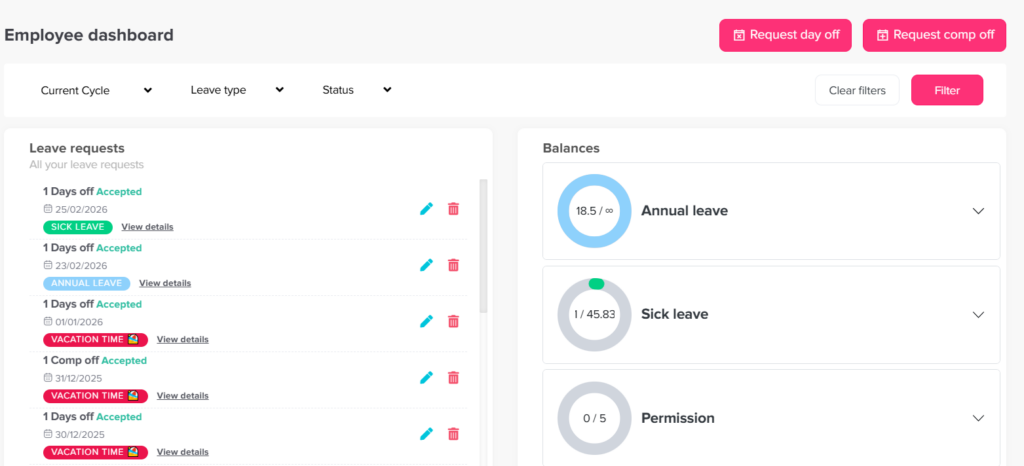
Employees should be able to see:
- Total PTO allowance
- Used days
- Pending requests
- Remaining balance
- Different leave type balances
- Carryover days, if applicable
Managers should also be able to check balances before approving requests.
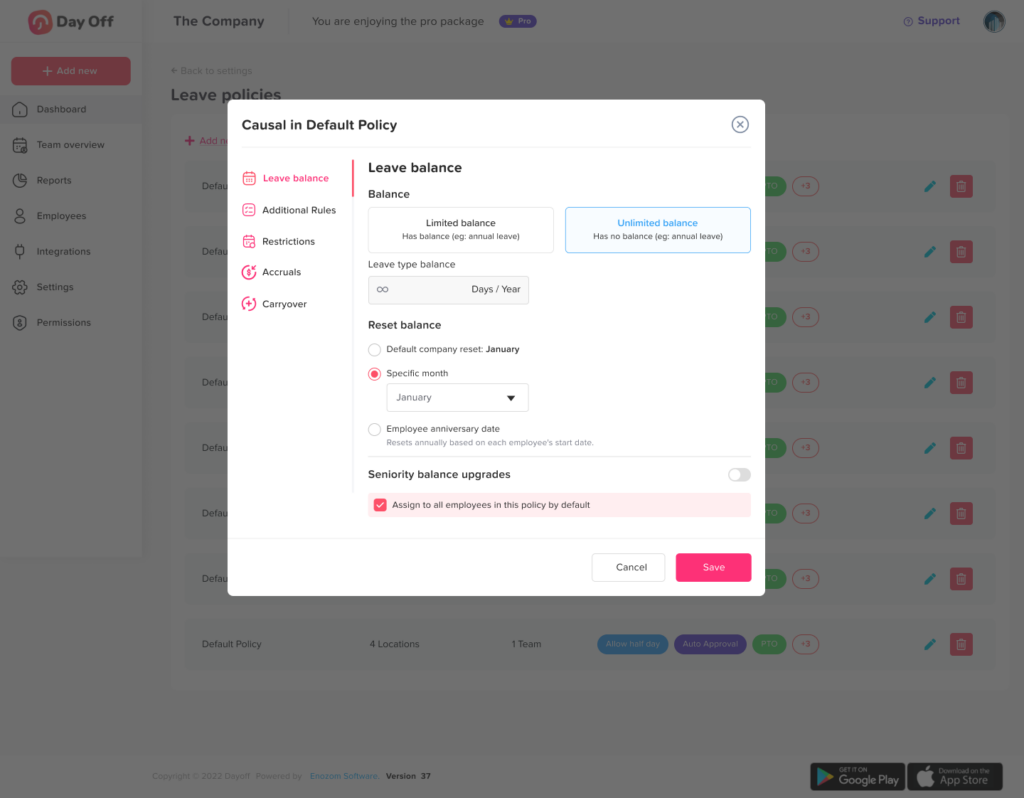
Day Off helps by calculating and displaying PTO balances clearly, so employees do not need to ask managers every time they want to plan time off. This reduces back-and-forth messages and makes the process more transparent.
Step 7: Use a Shared Leave Calendar
A PTO request is not just an individual matter. It affects team planning, project timelines, customer support, shifts, meetings, and deadlines.
That is why a shared leave calendar is one of the most important parts of a strong PTO workflow.
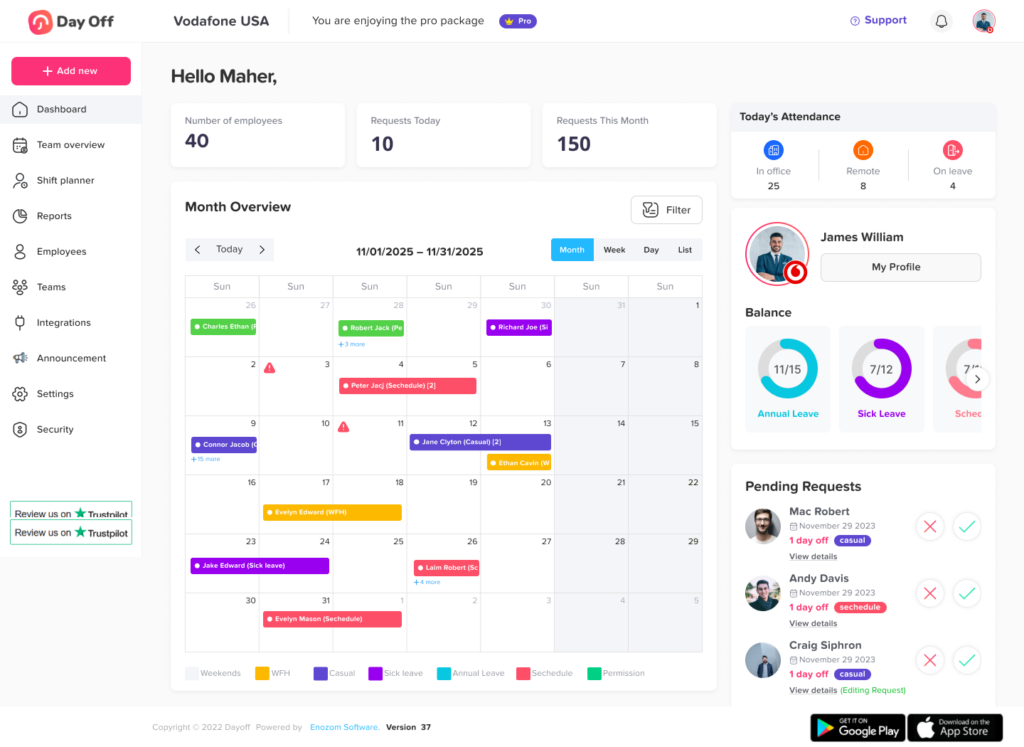
A shared calendar helps managers and employees see who is off and when. This reduces the chance of approving too many absences at the same time.
A good leave calendar should show:
- Approved time off
- Pending leave requests
- Team availability
- Department or location-based absences
- Upcoming vacations
- Public holidays
When using Day Off, approved leave can appear in a shared calendar, helping teams plan around absences. This is especially useful for companies without HR teams because managers can quickly understand availability without checking multiple tools.
Step 8: Create Rules for Overlapping PTO Requests
Overlapping leave requests can become a major issue for small teams. If several employees are away at the same time, work may slow down or customers may not receive proper support.
Your PTO workflow should include a fair way to handle overlapping requests.
Possible rules include:
- First request submitted gets priority
- Managers decide based on business needs
- Critical roles cannot be absent at the same time
- Employees should coordinate before requesting busy periods
- Peak business periods may have limited PTO availability
- Special cases are reviewed individually
The most important thing is consistency. Employees should understand how decisions are made, especially when a request is rejected.
A tool like Day Off helps managers see upcoming absences before approving new requests. This makes it easier to avoid coverage gaps and explain decisions clearly.
Step 9: Decide How to Handle Sick Leave and Emergencies
Not all time off can be planned. Sick leave, family emergencies, and urgent personal situations need a flexible process.
Your PTO workflow should include a separate approach for unplanned leave.
For example:
- Employee notifies their manager as soon as possible.
- Employee submits the sick leave request when they are able.
- Manager approves or records the leave.
- The absence appears in the leave calendar.
- The balance or record is updated.
This keeps records accurate without making the process difficult for employees during stressful situations.
If your company tracks sick leave separately from vacation leave, make sure employees understand the difference. This helps avoid confusion and protects vacation balances from being used incorrectly.
Step 10: Keep PTO Records Organized
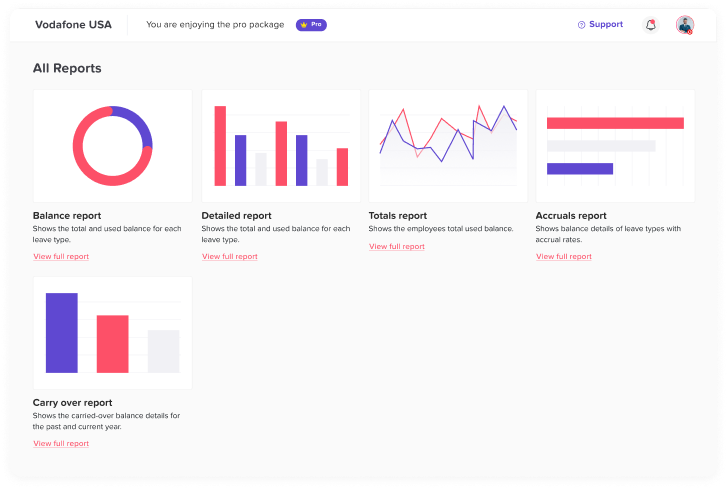
Even without an HR team, your company still needs accurate leave records. PTO data may be needed for payroll, performance planning, compliance, internal reviews, and workforce planning.
Your PTO workflow should make it easy to answer questions such as:
- How many days did an employee take this year?
- How much PTO is remaining?
- Which leave types are used most often?
- Which requests are pending?
- Who approved each request?
- Were any requests rejected?
- Are there patterns of frequent absence?
Manual tracking makes these questions harder to answer. A digital PTO tracker like Day Off keeps records organized and allows admins or managers to review leave history when needed.
This is helpful for small businesses because it removes the pressure of maintaining multiple spreadsheets.
Step 11: Connect PTO With Daily Work Planning
A good PTO workflow should support the way your team actually works. Time off affects more than payroll. It affects meetings, deadlines, client communication, project delivery, and team workload.
When PTO is approved, managers should check:
- Who will cover urgent tasks?
- Are client deadlines affected?
- Should meetings be moved?
- Does another team member need access to files or systems?
- Will customer support need backup?
- Are shifts still covered?
This is especially important for companies without HR teams because managers often handle both people management and operations.
A clear workflow helps PTO become part of planning, not a surprise that appears at the last minute.
Step 12: Make the Workflow Easy for Employees
A PTO workflow will only work if employees actually use it. If the process is too complicated, people will return to messages, verbal approvals, or informal requests.
Keep the workflow simple.
Employees should know:
- Where to request PTO
- How early to request it
- Who approves it
- How to check their balance
- Where to see approved leave
- What to do in emergencies
- What happens after approval
Day Off is useful here because it gives employees a simple place to request leave and check balances. They do not need to search through old messages or ask managers for basic information.
The easier the workflow is, the more consistent your records will be.
Step 13: Assign One Owner for the PTO Process
Even if your company has no HR team, someone should own the PTO process. This does not mean they need to do all the work manually. It simply means they are responsible for keeping the process clear.
The PTO owner could be:
- The founder
- The operations manager
- The office admin
- The finance manager
- A team lead
Their responsibilities may include:
- Setting up leave policies
- Making sure employees understand the process
- Reviewing reports
- Updating company rules when needed
- Checking unusual requests
- Supporting managers with questions
When Day Off is used, the PTO owner does not need to manually track every request. They can manage settings, review reports, and keep the process running smoothly.
Step 14: Document the PTO Workflow
Your PTO workflow should be written down in a simple format. This helps new employees understand the process and prevents misunderstandings.
You can create a short internal document that includes:
- PTO policy summary
- Leave types
- Request process
- Approval rules
- Notice periods
- Emergency leave process
- Shared calendar instructions
- Manager responsibilities
- Contact person for questions
Keep the language simple. Employees should not need legal or HR knowledge to understand how time off works.
A documented workflow also makes onboarding easier as your company grows.
Example PTO Workflow for a Company With No HR Team
Here is a simple example you can adapt:
- Employee checks their PTO balance in Day Off.
- Employee submits a leave request through Day Off.
- The direct manager receives a notification.
- Manager reviews the request, team calendar, workload, and overlapping absences.
- Manager approves or rejects the request.
- Employee receives an update.
- Approved leave appears on the shared calendar.
- PTO balance updates automatically.
- Leave records remain available for reporting and payroll review.
This workflow is easy enough for a small company but structured enough to support growth.
Common PTO Workflow Mistakes to Avoid
Using Too Many Request Channels
If employees can request PTO through email, chat, phone calls, calendar invites, and verbal conversations, requests will eventually get lost. Choose one official request method.
Not Tracking Pending Requests
Pending requests should not disappear. Managers need to see what still needs review, and employees need to know whether their request is approved.
Not Showing PTO Balances
Employees should not have to ask every time they want to know their remaining balance. Lack of visibility creates confusion and extra work.
Approving PTO Without Checking Team Availability
Managers should always check the leave calendar before approving requests. This prevents staffing problems and overlapping absences.
Treating Every Leave Type the Same
Vacation, sick leave, unpaid leave, and personal leave may have different rules. Tracking them separately keeps records clearer.
Waiting Too Long to Create a Process
Many companies wait until PTO becomes messy before building a workflow. It is better to create a simple process early and improve it over time.
How Day Off Makes PTO Workflow Easier
Day Off is designed to help companies manage time off without making the process complicated. This is especially helpful for businesses that do not have a dedicated HR team.
With Day Off, companies can:
- Create custom leave types
- Set PTO policies
- Track employee balances
- Manage leave requests in one place
- Send requests to the right approver
- Use a shared leave calendar
- View employee availability
- Track pending, approved, and rejected requests
- Generate leave reports
- Support employees through web and mobile access
Instead of managing PTO through spreadsheets, emails, and messages, Day Off gives your company one organized system. Employees know where to request time off, managers know where to approve it, and the company keeps accurate records automatically.
For a small team, this means less admin work. For a growing company, it means the PTO process can scale without needing to hire HR immediately.
Why a Simple PTO Workflow Builds Trust
PTO is not just an administrative task. It affects employee trust, fairness, and work life balance.
When employees understand how PTO works, they feel more confident planning time off. When managers have clear visibility, they can approve requests fairly. When records are accurate, everyone avoids unnecessary confusion.
A strong PTO workflow shows employees that the company respects their time and values organization. It also protects managers from making random or inconsistent decisions.
Even if your company is small, a professional PTO process can make the workplace feel more stable and employee friendly.
FAQ
What is a PTO workflow?
A PTO workflow is the process employees and managers follow to request, approve, track, and record paid time off. It includes leave types, approval steps, PTO balances, calendars, and reporting.
Can a small company manage PTO without an HR team?
Yes. A small company can manage PTO without an HR team by creating a clear policy, assigning an owner, using one request process, and tracking everything in a tool like Day Off.
What is the easiest way to track PTO requests?
The easiest way is to use a digital PTO tracker where employees submit requests, managers approve them, balances update automatically, and approved absences appear on a shared calendar.
Who should approve PTO if there is no HR manager?
PTO can be approved by the direct manager, founder, operations manager, team lead, or business owner. The key is to make the approval path clear for every employee.
How do you prevent overlapping PTO requests?
Use a shared leave calendar and require managers to check team availability before approving requests. You can also create rules for busy periods, critical roles, or first-come-first-served approvals.
Should sick leave and vacation leave be tracked separately?
In most companies, yes. Tracking sick leave and vacation leave separately gives clearer records and helps employees understand their remaining balances for each leave type.
How often should a company review its PTO workflow?
A company should review its PTO workflow at least once or twice a year, or whenever the team grows, policies change, or managers notice repeated confusion.
Conclusion
Building a PTO workflow for a company with no HR team does not have to be difficult. The most important step is to create a clear, simple, and consistent process that everyone can follow.
Start by defining your PTO policy, choosing leave types, setting approval rules, making balances visible, and using a shared calendar. Then document the process and assign one person to keep it organized.
With Day Off, small companies can manage PTO requests, approvals, balances, calendars, and reports without relying on manual spreadsheets or scattered messages. It gives employees a simple way to request time off and gives managers the visibility they need to plan work properly.
A clear PTO workflow saves time, reduces confusion, and helps your company create a fair and organized leave management process, even without a full HR team.