







Running a business around the clock requires more than a standard vacation calendar. A PTO Tracker helps 24/7 teams record employee leave, calculate balances, manage approvals, and protect shift coverage without relying on spreadsheets, messages, or last minute schedule changes.

Hospitals, security companies, factories, hotels, customer support centers, transportation providers, emergency services, warehouses, and other continuous operations cannot simply pause when an employee takes time off. Every approved absence must be considered in relation to the employee’s scheduled shift, job responsibilities, location, team, and available coverage.
For these organizations, PTO management is directly connected to workforce planning. Managers need to know not only who is away, but also which shift is affected, how many working hours should be deducted, whether another qualified employee is available, and whether the absence could lead to overtime or understaffing.
This guide explains how to use a PTO tracker for 24/7 teams, how to handle overnight and rotating shifts, and how to create a fair leave process that supports both employees and business operations.
What Is a PTO Tracker for 24/7 Teams?
A PTO tracker is a digital system used to manage paid time off, vacation days, sick leave, personal leave, unpaid leave, parental leave, and other employee absences.
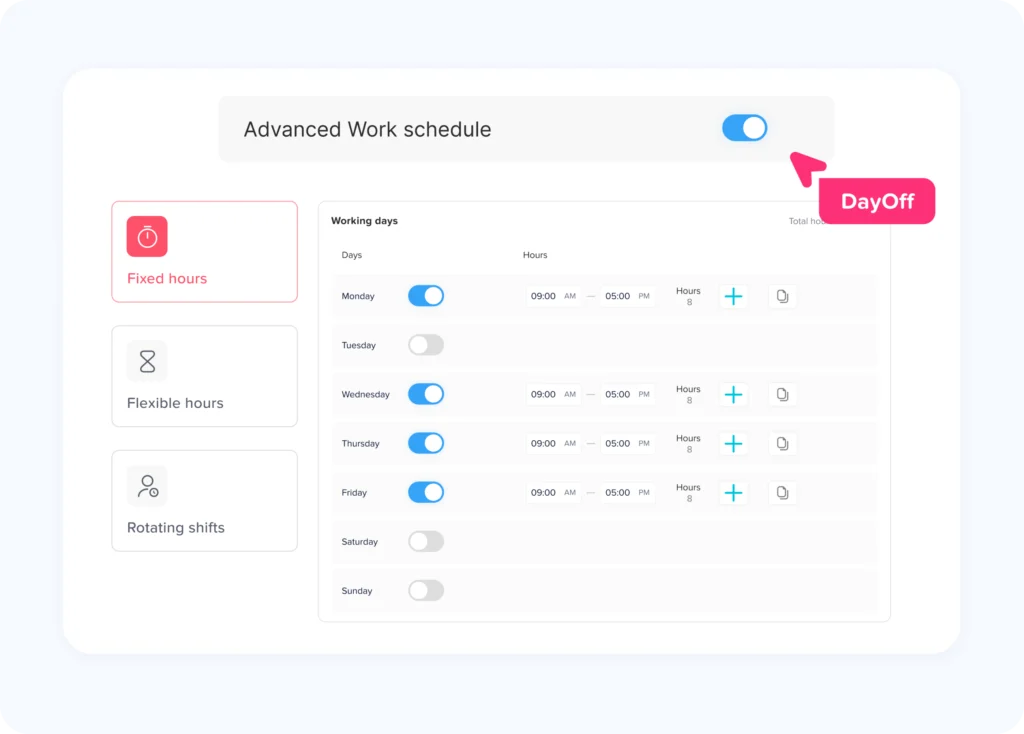
For a traditional Monday to Friday workplace, leave tracking may be based on standard eight hour workdays. A 24/7 workplace is more complicated because employees may work:
- Morning, evening, or night shifts
- Eight hour, ten hour, or twelve hour shifts
- Rotating schedules
- Alternating weekends
- Split shifts
- Overnight shifts that cross two calendar dates
- Compressed workweeks
- On call or standby schedules
- Different schedules each week
A PTO tracker for 24/7 operations must therefore connect each leave request to the employee’s actual working schedule. It should not assume that every employee works the same days or the same number of hours.
Why PTO Tracker Is More Difficult for 24/7 Operations
In a continuous workplace, every absence can affect staffing. A leave request from one employee may create a gap that needs to be covered by another employee, a backup worker, an agency worker, or a manager.
The challenge becomes greater when the absent employee performs a specialized role. Replacing one person with any available employee may not be possible if the shift requires a licensed nurse, certified machine operator, security supervisor, multilingual support agent, or trained maintenance technician.
Operations Continue During Employee Leave
A regular office may be able to delay some work until an employee returns. A 24/7 operation often cannot.
Customers still need support. Patients still need care. Equipment must continue running. Buildings must remain secure. Deliveries must continue. Hotel guests still require service.
This means managers need to evaluate leave requests against real staffing requirements rather than only checking whether the employee has enough PTO.
Calendar Days and Working Shifts Are Not the Same
An employee may request one calendar day off, but the actual PTO deduction depends on the shift that was scheduled.
For example:
- An employee working an eight hour shift may use eight PTO hours.
- An employee working a twelve hour shift may use twelve PTO hours.
- An employee who was not scheduled to work may use no PTO.
- An employee leaving halfway through a ten hour shift may use five PTO hours.
A system that automatically deducts one standard day from everyone can create inaccurate balances and employee disputes.
Overnight Shifts Cross Calendar Dates
Suppose an employee is scheduled from 10:00 p.m. on Monday until 6:00 a.m. on Tuesday. If the employee requests Monday night off, the request affects two calendar dates but only one scheduled shift.
The PTO tracker should treat the absence according to the shift record, not divide it incorrectly simply because midnight occurred during the shift.
Rotating Schedules Change Over Time
An employee may work mornings during one week and nights during the next. Another employee may work four days followed by four days off.
Leave cannot be calculated accurately from a permanent Monday to Friday template when the employee’s real schedule changes regularly.
Unplanned Absences Require Immediate Decisions
Vacation requests may be submitted weeks in advance, but illness, family emergencies, transportation problems, and other unexpected situations can occur shortly before a shift begins.
Managers need a clear process for recording the absence, finding coverage, updating attendance, and correcting the employee’s PTO Tracker balance without losing important details.
Common PTO Tracker Challenges Across Different Shifts
| PTO Challenge | Example | What the PTO Tracker Should Do |
|---|---|---|
| Overnight leave | Employee works from 10:00 p.m. to 6:00 a.m. | Connect the request to the complete shift rather than treating it as two unrelated days |
| Rotating schedule | Employee changes from day shift to night shift weekly | Use the schedule assigned for the requested date |
| Partial-shift absence | Employee leaves four hours into a twelve-hour shift | Deduct only the remaining approved leave hours |
| Non-working day | Employee requests PTO on a scheduled rest day | Avoid deducting PTO unless company policy requires otherwise |
| Coverage conflict | Two qualified employees request the same shift off | Show the overlap before approval |
| Emergency absence | Employee calls in sick shortly before work | Allow authorized managers to record or confirm the absence |
| Multiple locations | Branches operate in different time zones | Store the request using the correct local date and time |
| Specialized position | Only two employees can operate specific equipment | Compare the request with role-based coverage requirements |
| Shift exchange | Another employee agrees to cover the shift | Keep the PTO request and schedule change as separate records |
| Holiday shift | Employee is scheduled on a public holiday | Apply the organization’s holiday and PTO rules correctly |
What Information Should a PTO Tracker Record?
A useful PTO tracker should keep enough information to explain every approved, rejected, pending, or corrected leave request.
Each request should ideally include:
- Employee name
- Department or team
- Work location
- Job role
- Leave type
- Request start and end date
- Requested hours
- Scheduled shift
- Employee’s available balance
- Primary approver
- Secondary approver, when applicable
- Approval status
- Request submission time
- Approval or rejection time
- Comments or supporting notes
- Coverage status
- Schedule changes connected to the absence
- Balance adjustment history
This information creates a reliable record for employees, managers, HR, payroll, and workforce planners.
PTO Tracker in Hours When Shift Lengths Vary
PTO Tracker only in days may work when everyone has the same schedule. It becomes unreliable when employees work different shift lengths.
For 24/7 teams, hourly PTO Tracker is often the clearest approach.
Consider two employees:
- Employee A works five eight hour shifts.
- Employee B works three twelve hour shifts.
If both request one scheduled shift off, deducting one PTO day from each may hide the fact that Employee A missed eight working hours while Employee B missed twelve.
Tracking the absence in hours gives HR a more accurate record of how much scheduled work was replaced by paid leave.
Create a Standard Conversion Rule
The organization should define what a “PTO day” means when balances are displayed in days.
For example, one PTO day may equal eight hours for balance purposes. An employee taking a twelve-hour shift off would then use 1.5 PTO days.
Alternatively, the company can display and manage balances entirely in hours. This often makes deductions easier to understand for employees with variable or compressed schedules.
Calculate Leave From the Scheduled Shift
| Employee Schedule | Leave Request | Recommended Deduction |
|---|---|---|
| Monday to Friday, 8 hours daily | Full scheduled Monday | 8 hours |
| Four 10-hour shifts | Full scheduled Tuesday | 10 hours |
| Three 12-hour shifts | Full scheduled night shift | 12 hours |
| Eight-hour shift | Employee misses final three hours | 3 hours |
| Ten-hour shift with unpaid break | Employee misses the complete shift | Deduct scheduled paid hours according to policy |
| Rotating shift | Employee requests a date scheduled for 12 hours | 12 hours |
| Employee is not scheduled | Requests a normal rest day | Usually 0 hours |
| Overnight shift from 10 p.m. to 6 a.m. | Requests the full shift | 8 hours |
| Employee works part of a shift before becoming ill | Works 5 of 12 hours | Up to 7 leave hours, depending on policy |
| On-call employee is not activated | Requests removal from standby duty | Follow the separate on-call or standby policy |
Connect Leave Requests to the Published Schedule
The PTO tracker and employee schedule should support one another.
When a request is submitted, the approver should be able to see:
- The employee’s scheduled shift
- Other employees already on leave
- The number of available workers
- The roles and skills available during the shift
- Pending leave requests
- Public holidays or special events
- Expected workload
- Available backup employees
This prevents managers from approving requests based only on the employee’s balance.
A sufficient balance means the employee has time available. It does not automatically mean the shift can safely operate without that employee.
Use Role Based Coverage, Not Only Headcount
A shift may appear fully staffed while still missing an essential skill.
For example, a warehouse night shift may have ten scheduled employees. If the only certified forklift operator receives leave approval, the remaining headcount may still be inadequate for the work that must be completed.
Coverage rules should consider:
- Required certifications
- Job responsibilities
- Supervisor presence
- Language requirements
- Equipment permissions
- First-aid training
- Security clearance
- Seniority or experience
- Customer or patient ratios
- Location specific requirements
A strong PTO Tracker process asks, “Do we have the right people available?” rather than only, “Do we have enough people?”
Establish Minimum Staffing Rules
Managers should know the minimum staffing level required for each shift, department, and role.
A customer service operation may require at least:
- One shift supervisor
- Two technical specialists
- Six customer support agents
- One multilingual agent
A hotel night shift may require:
- One front desk employee
- One security employee
- One maintenance contact
- One duty manager on call
Minimum staffing rules should reflect real operational needs. They should also allow reasonable flexibility when demand is lower or when qualified employees can cover more than one responsibility.
The goal is not to reject leave automatically. The goal is to identify coverage needs early enough to find a fair solution.
Manage Overlapping PTO Tracker Requests Fairly
Employees in popular vacation periods may request the same shifts off. Without clear rules, approval decisions can feel inconsistent.
Organizations may use one or more of the following approaches:
- First request submitted, first reviewed
- Rotating priority for high-demand periods
- Seniority, where permitted by policy or agreement
- Balanced holiday allocation
- Minimum staffing limits
- Voluntary shift exchanges
- Temporary or backup staffing
- Manager review of exceptional circumstances
The method should be documented and applied consistently.
Managers should also avoid relying only on informal memory. A shared PTO Tracker calendar makes existing absences visible before additional requests are approved.
Handle Overnight Leave Correctly
Overnight shifts are one of the most common sources of leave-recording errors.
The organization should establish whether an overnight shift belongs to:
- The date on which the shift begins
- The date on which most hours occur
- A defined schedule identifier
- Both dates for display purposes, while remaining one shift for calculation
Using the shift start date is often the simplest administrative approach, but the best method depends on the company’s scheduling and payroll setup.
Whatever rule is selected, it should be used consistently across:
- PTO requests
- Attendance records
- Timesheets
- Shift premiums
- Payroll exports
- Manager reports
Example
An employee works from 7:00 p.m. Friday until 7:00 a.m. Saturday.
The employee requests the entire shift off. The PTO Tracker record should normally deduct the scheduled paid hours for that single shift. It should not create two full-day absences simply because the shift includes parts of Friday and Saturday.
Track Partial Shift PTO
Employees do not always need a complete shift off. They may need to:
- Arrive two hours late
- Leave early for an appointment
- Miss the first half of a shift
- Take intermittent leave
- Leave during a shift because of illness
- Attend a family or personal event
A PTO tracker should support hourly or partial-shift requests so the recorded deduction matches the actual absence.
For example, an employee scheduled from 6:00 a.m. to 6:00 p.m. may request leave from 6:00 a.m. to 10:00 a.m. The tracker should record four leave hours, while the remaining scheduled hours stay available for attendance tracking.
This is more accurate than recording a half day when “half day” could mean four, five, or six hours depending on the employee’s schedule.
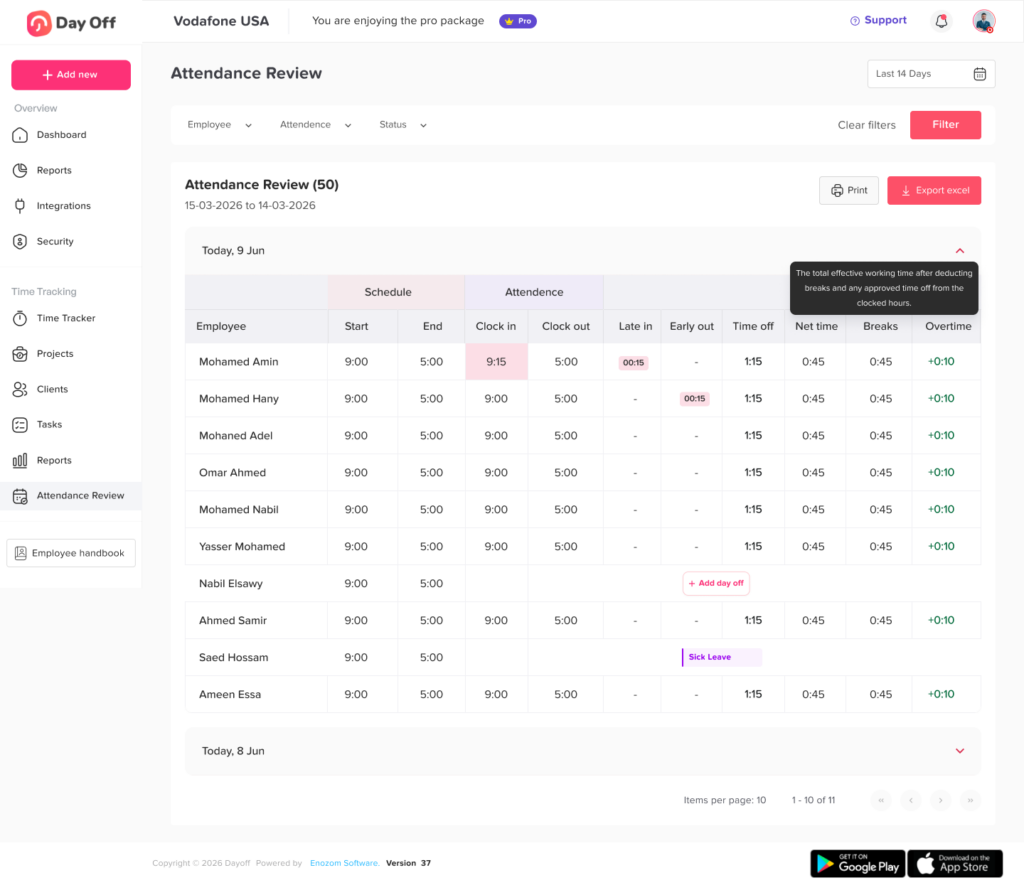
Separate PTO, Attendance, and Shift Coverage Records
PTO, attendance, and scheduling are closely connected, but they represent different information.
- The schedule shows when an employee was expected to work.
- Attendance shows when the employee actually worked.
- PTO explains approved paid time away from scheduled work.
- Coverage records show who replaced the employee or how the shift was reorganized.
Keeping these records connected reduces confusion.
For example, an employee who did not clock in may not be absent without permission. The employee may have approved vacation leave. Another employee may have exchanged shifts. The original shift may have been canceled.
Managers should review the complete record before correcting attendance or making payroll decisions.
Keep PTO Tracker and Overtime Calculations Distinct
A PTO tracker should send clear leave data to payroll, but PTO hours should not automatically be treated as worked hours.
Under the United States Fair Labor Standards Act, paid vacation, holiday, and sick time generally do not count as hours worked for federal overtime calculations. Covered nonexempt employees generally earn federal overtime based on hours actually worked beyond the applicable workweek threshold. State laws, collective bargaining agreements, employment contracts, and company policies may provide different or additional requirements.
This distinction matters in 24/7 operations.
Suppose an employee receives eight hours of PTO and works an additional shift during the same week. Payroll should not simply combine every paid hour and assume the total is legally treated as worked time.
HR and payroll teams should configure calculations according to the laws and policies that apply to their workforce.
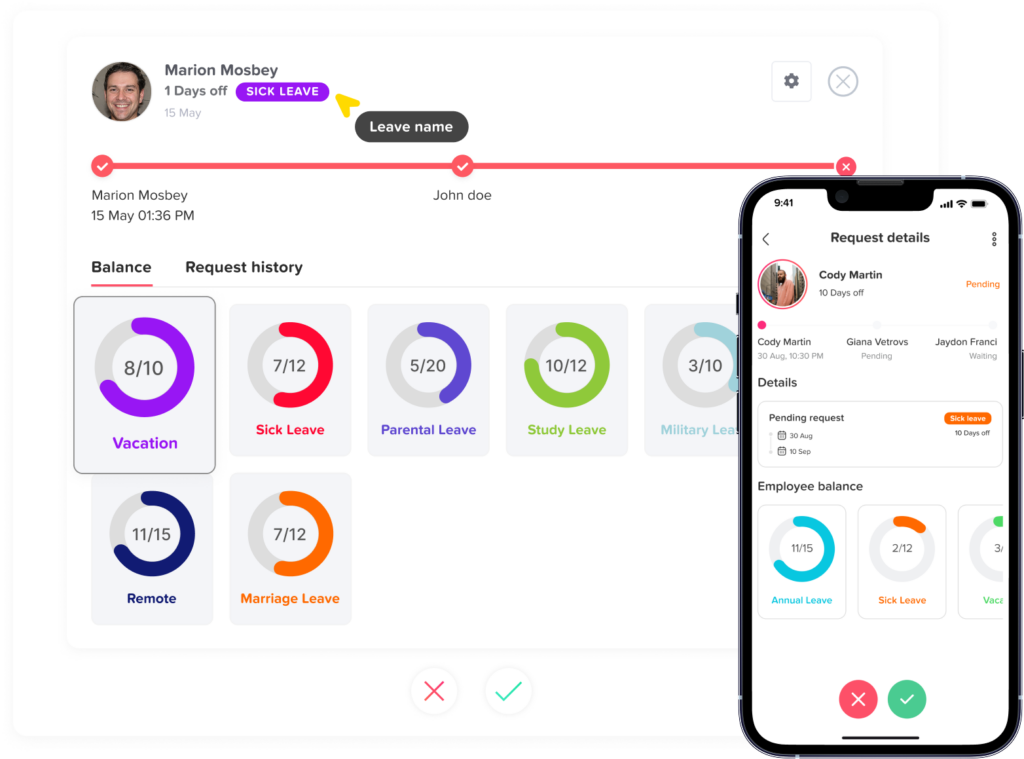
Create Clear Approval Workflows
Leave approvals should be routed to managers who understand both the employee and the affected shift.
A practical workflow may include:
- The employee submits a request.
- The PTO tracker checks the available balance.
- The direct manager reviews shift coverage.
- A department manager or HR reviews longer or sensitive requests.
- The employee receives the final decision.
- The shared calendar and balance update automatically.
- Scheduling staff arrange replacement coverage when needed.
Use Backup Approvers
A 24/7 organization cannot allow requests to remain unanswered because the only approver is unavailable.
Each team should have:
- A primary approver
- A secondary approver
- An escalation rule
- A maximum expected response time
- A process for urgent requests
This is especially important for night shift and weekend employees who may submit requests outside normal HR office hours.
Distinguish Planned and Unplanned Leave
Planned and unplanned absences need different workflows.
Planned Leave
Planned leave may include:
- Vacation
- Personal days
- Scheduled appointments
- Weddings
- Planned family events
- Educational leave
- Extended travel
These requests can usually be reviewed in advance against projected staffing.
Unplanned Leave
Unplanned leave may include:
- Sudden illness
- Family emergency
- Transportation disruption
- Bereavement
- Workplace injury
- Urgent caregiving responsibilities
The immediate priority is notifying the right manager and maintaining safe coverage. The leave record can then be reviewed and confirmed according to company policy.
Employees should know:
- Who to contact
- How early they should report an absence
- Whether they must use the app, phone, email, or another channel
- What information is required
- When documentation may be requested
- How the absence will affect their balance
Emergency reporting should be simple enough to use during stressful situations.
Avoid Using PTO Denials to Create Unsafe Schedules
Maintaining coverage is important, but managers should not solve every staffing shortage by repeatedly denying leave or adding excessive hours to remaining employees.
NIOSH and OSHA identify night work, extended hours, and irregular shifts as factors that can contribute to fatigue, stress, reduced concentration, errors, injuries, and other health and safety risks.
A PTO tracker can help managers recognize patterns such as:
- Too many consecutive shifts
- Repeated overtime caused by leave coverage
- Employees who rarely take available leave
- Departments with frequent emergency absences
- Teams that depend heavily on one qualified employee
- High leave rejection rates
- Recurring staffing shortages on specific shifts
These patterns may indicate a scheduling or workforce capacity problem rather than an employee leave problem.
Give Employees Self Service Access
Employees should not need to contact HR every time they want to check a balance or request leave.
A self service PTO tracker allows employees to:
- View available PTO
- Review accruals
- Check previous requests
- Submit new requests
- Request partial shifts
- Add comments
- Receive approval notifications
- See upcoming team absences when permissions allow
- Cancel or update requests according to policy
Self-service access reduces repetitive administrative work and gives employees more confidence in the accuracy of their records.
Mobile access is particularly important for nurses, factory workers, drivers, security employees, hospitality workers, maintenance teams, and other employees who may not work at a desk.
Use Notifications for Every Shift
Notifications help prevent requests from being missed.
Useful notifications include:
- New request submitted
- Request awaiting approval
- Request approved
- Request rejected
- Additional information required
- Balance adjusted
- Request canceled
- Upcoming leave reminder
- Coverage requirement identified
- Approver escalation
- Employee scheduled while on approved leave
Notifications should reach the people responsible for the affected shift, not only HR.
For example, a night shift request should notify the night operations manager even if HR works only during the day.
Manage Multiple Locations and Time Zones
Global and multi location operations need local scheduling rules.
A leave request entered at 11:30 p.m. in one location may appear on a different date for a manager in another time zone. The PTO tracker should preserve the employee’s local schedule and clearly display the relevant time zone.
Each location may also have different:
- Public holidays
- Weekends
- Working hours
- Leave policies
- Accrual rules
- Approval workflows
- Minimum staffing requirements
- Peak business periods
- Legal requirements
A centralized system should allow local differences without forcing HR to maintain separate spreadsheets for every office.
Track Public Holidays Separately
Public holidays create special challenges for continuous operations because the business may remain open while some employees are scheduled to work.
The company should define:
- Whether scheduled holiday work receives premium pay
- Whether employees can request PTO for holiday shifts
- Whether a holiday is deducted from PTO
- Whether employees receive an alternative day off
- How holiday work affects part-time employees
- How floating holidays are managed
- Whether local holidays vary by location
In the United States, federal law generally does not require private employers to provide vacation or holiday pay, and extra pay for night, weekend, or holiday work is generally determined by applicable agreements or policies unless overtime or another legal requirement applies.
Organizations should review the rules that apply in each jurisdiction where they employ people.
PTO Metrics HR Should Review
| Metric | What It Shows | Why It Matters |
|---|---|---|
| PTO usage rate | How much available leave employees use | May reveal underuse, high demand, or policy confusion |
| Leave requests by shift | Which shifts receive the most requests | Helps identify scheduling preferences and difficult shifts |
| Approval time | How long requests remain pending | Shows whether workflows are responsive |
| Rejection rate | Percentage of requests declined | A high rate may indicate staffing or policy problems |
| Unplanned absence rate | Frequency of short-notice leave | Helps managers improve backup planning |
| Overtime caused by absence coverage | Extra work assigned after leave | Shows the operational cost of inadequate coverage |
| Overlapping requests | How often employees request the same periods | Helps plan high-demand dates |
| Unused balance | PTO remaining near the end of the policy period | Supports carryover and workforce planning |
| Manual balance corrections | Frequency of administrator adjustments | May indicate configuration or process errors |
| Leave by department | How absence patterns vary across teams | Helps identify workload or staffing concerns |
| Shift coverage exceptions | Times minimum staffing was not met | Supports operational and safety reviews |
| Leave cancellation rate | Approved requests later withdrawn | May reveal employee or scheduling difficulties |
How to Create a PTO Policy for 24/7 Teams
A written PTO policy should answer the questions employees and managers are most likely to face.
Define Leave Types
List the available leave categories, such as:
- Vacation
- Sick leave
- Personal leave
- Unpaid leave
- Parental leave
- Bereavement leave
- Floating holidays
- Compensatory time
- Jury duty
- Emergency leave
Explain whether each type is paid, unpaid, accrued, allocated, or legally protected.
Explain How Balances Are Earned
State whether PTO is:
- Granted at the beginning of the year
- Accrued each pay period
- Accrued monthly
- Based on hours worked
- Based on employee seniority
- Prorated for new employees
- Different for full-time and part-time workers
Define How PTO Is Deducted
Explain whether leave is deducted in:
- Days
- Hours
- Half days
- Minimum increments
- Scheduled paid hours
For variable shifts, hourly deductions are usually easier to apply accurately.
Establish Notice Requirements
Different requests may require different notice periods.
For example:
- One or two hours of leave may require several days’ notice.
- A full shift may require two weeks’ notice.
- Extended vacation may require one month’s notice.
- Emergency or sick leave may be reported as soon as reasonably possible.
Notice rules should not conflict with applicable laws or protected leave requirements.
Explain Coverage and Approval
Employees should understand that available PTO does not always guarantee approval for a specific date.
The policy should explain:
- Who approves requests
- How overlapping requests are handled
- Minimum staffing requirements
- Whether shift exchanges are allowed
- How peak periods are managed
- How urgent requests are escalated
- How employees can question or appeal a decision
Define Carryover and Expiration Rules
Explain:
- How much unused PTO carries forward
- Whether carried leave expires
- Whether balances have a maximum limit
- Whether unused leave is paid at separation
- Whether rules vary by location
These rules should be reviewed for compliance with applicable local law.
How Day Off Helps 24/7 Teams Track PTO
Day Off is a PTO tracker and leave management platform that helps organizations manage employee requests, balances, accruals, approvals, leave policies, calendars, and reports in one place. It supports configurable leave types, accrual and carryover rules, approval workflows, employee groups, and shared visibility.
Employees can submit requests from mobile devices, while managers can review requests and receive notifications without waiting to return to a desktop computer. Day Off is available through web, iOS, and Android, which is useful for employees working overnight, remotely, in the field, or away from a traditional office.
Day Off can help 24/7 teams:
- Track different leave types
- Maintain employee PTO balances
- Configure accrual and carryover rules
- Route requests through approval workflows
- Give managers visibility into team availability
- Organize employees by team or location
- Apply local holiday calendars
- Review leave reports
- Access leave information from web and mobile devices
- Connect PTO information with broader attendance and schedule planning
When leave records, schedules, and attendance are managed together, managers can understand who is expected to work, who has approved leave, and where coverage may be required.
FAQ
What is the best way to track PTO for shift workers?
The best approach is to connect PTO requests to each employee’s scheduled shift and track leave in hours when shift lengths vary. This prevents a twelve-hour shift from being treated the same as an eight-hour shift.
Can a PTO tracker handle overnight shifts?
Yes. A PTO tracker can record overnight leave accurately when requests are connected to the complete scheduled shift. The company should define whether the shift is assigned to its start date or another consistent schedule rule.
How should PTO be deducted for a twelve-hour shift?
If the employee is scheduled for twelve paid hours and takes the complete shift off, the employer will commonly deduct twelve PTO hours, subject to its policy and applicable rules.
Should employees use PTO on scheduled days off?
Normally, PTO is used to replace scheduled working time. If an employee was not expected to work, there may be no hours to replace. The company’s written policy should explain any exceptions.
Can managers reject PTO when there is not enough shift coverage?
A request may be denied or alternative dates may be discussed when approving it would leave the operation below documented staffing requirements. Decisions should follow a clear, consistently applied policy and applicable employment laws.
How can businesses prevent too many employees from taking the same shift off?
Managers can use a shared leave calendar, minimum staffing rules, role-based coverage checks, notice requirements, and fair priority rules for high-demand periods.
How do you track partial shift PTO?
Record the scheduled hours the employee will miss. For example, an employee missing three hours of a ten-hour shift would generally use three PTO hours rather than a full day.
What happens when an employee calls in sick before a night shift?
The employee should follow the company’s absence-reporting process. An authorized manager can record or confirm the sick leave, update the employee’s balance, and arrange shift coverage.
Does PTO count toward overtime?
Under the federal FLSA in the United States, paid vacation, sick leave, and holiday time generally are not treated as hours worked for federal overtime calculations. Other laws, contracts, or company policies may differ, so employers should verify the rules that apply to them.
Should PTO be tracked in days or hours for 24/7 teams?
Hours are usually more accurate when employees have different shift lengths, rotating schedules, or partial-shift absences. A company may still display balances in days, but it should define a consistent hours-per-day conversion.
Can a PTO tracker support multiple locations?
Yes. A suitable system can organize employees by location and apply different schedules, holiday calendars, policies, approvers, and time zones.
What is the difference between a PTO tracker and a shift scheduler?
A PTO tracker manages employee leave, balances, policies, requests, and approvals. A shift scheduler shows when employees are expected to work. Connecting both provides a clearer picture of staffing and availability.
Final Thoughts
Managing leave across a 24/7 organization requires more than recording vacation dates. Every absence affects a particular schedule, shift, role, and operational need.
A PTO tracker gives employees a clear way to request leave while helping managers review balances, staffing, overlapping absences, and coverage. When PTO is connected with work schedules and attendance, organizations can reduce manual errors, treat employees more consistently, and prepare for absences before they become urgent staffing problems.
The most effective process is built around accurate scheduled hours, clear approval rules, mobile access, role-based coverage, and transparent employee records. With these elements in place, 24/7 teams can support employee time off while keeping every shift organized and prepared.