







Managing employee working hours and time off in separate systems often creates unnecessary work for HR teams, managers, and payroll administrators. Clock In Clock Out Software with built in PTO and leave tracking brings attendance, work hours, vacation requests, sick leave, schedules, and employee availability into one centralized platform. Instead of comparing spreadsheets, paper timesheets, emails, and separate leave calendars, organizations can maintain more accurate workforce records and make better staffing decisions from one system.

Modern teams need more than a basic digital time clock. They need a complete view of when employees are working, when they are scheduled, when they are absent, and how those records affect payroll, overtime, leave balances, and daily operations.
A connected solution helps businesses reduce manual data entry, avoid attendance conflicts, improve employee visibility, and create a more consistent process for both working time and approved leave.
What Is Clock In Clock Out Software?
Clock in clock out software is a digital system employees use to record the beginning and end of their working time.
Depending on the platform, employees may Clock In Clock Out Software through:
- A web browser
- An iOS or Android application
- A shared workplace device
- A tablet or kiosk
- A desktop application
- An approved company network
- A location enabled mobile device
When an employee clocks in, the system creates a time record. When the employee clocks out, the system calculates the length of the work session. More advanced platforms can also track breaks, overtime, late arrivals, early departures, missed punches, scheduled shifts, and manually adjusted time entries.
Furthermore, basic time clock tools focus only on attendance. Integrated platforms connect those attendance records with PTO, vacation, sick leave, personal days, unpaid leave, and other absence types.
This connection is important because working time and time off are closely related. An employee should not normally appear as both actively working and on approved leave during the same period without a clear explanation.
What Does PTO and Leave Tracking Include?
PTO and leave tracking software helps organizations manage employee absences and leave entitlements.
The system may support leave types such as:
- Vacation
- Paid time off
- Sick leave
- Personal leave
- Maternity leave
- Paternity leave
- Bereavement leave
- Unpaid leave
- Compensatory time
- Study leave
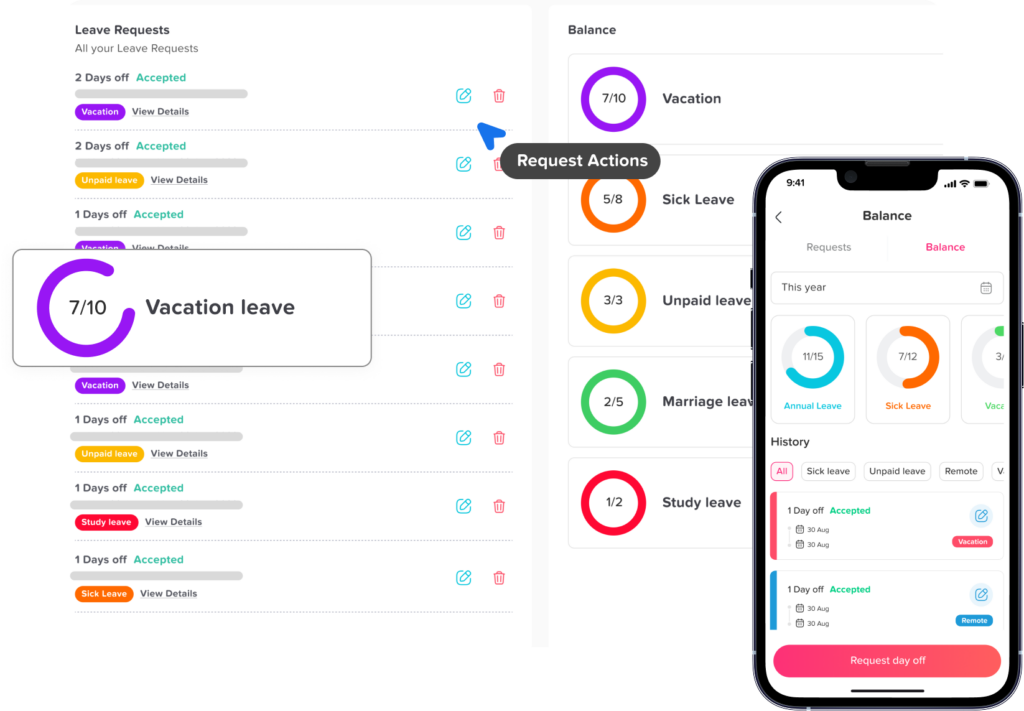
Employees can also submit requests, check their balances, view company policies, and see the status of pending approvals. Managers can approve or reject requests while reviewing team availability and overlapping absences.
HR teams can also configure leave policies, accrual rules, carryover limits, expiration dates, reset periods, holiday calendars, and approval workflows.
When these capabilities are combined with attendance tracking, the organization gains a more complete and reliable workforce management system.
Why Combine Time Tracking With PTO and Leave Management?
Time tracking and absence management are often treated as separate administrative processes. In reality, they affect the same employee schedule, payroll period, and workforce availability.
For example, imagine that an employee has approved vacation from Monday through Wednesday. In addition, a disconnected attendance system might still expect that employee to Clock In Clock Out Software on those days. This could also create missed attendance alerts, incorrect absence records, or confusion for payroll.
An integrated system can recognize that the employee is on approved leave and update attendance expectations accordingly.
Separate Systems vs. One Integrated Platform
| Process | Separate Systems | Integrated Platform |
|---|---|---|
| Recording work hours | Employees clock in through a dedicated time system | Employees clock in through the same platform used for leave |
| Requesting PTO | Requests are submitted by email, form, or another application | Requests are submitted within the attendance platform |
| Reviewing availability | Managers compare schedules, calendars, and leave records | Work schedules and approved leave appear together |
| Handling absences | HR manually updates attendance records | Approved leave can automatically explain the absence |
| Calculating balances | Balances are maintained in a separate spreadsheet or tool | Leave balances update according to configured policies |
| Payroll preparation | HR combines data from multiple sources | Work hours and paid leave can be exported together |
| Detecting conflicts | Conflicts may be found after payroll review | The system can flag overlapping work and leave records |
| Employee access | Employees use several systems | Employees use one account for attendance and leave |
Combining the processes reduces the amount of information that must be copied between systems. It also improves the likelihood that managers, employees, HR teams, and payroll administrators are working with the same records.
Common Problems Caused by Separate Attendance and Leave Systems
Using separate tools is not always a problem for very small teams. However, the process becomes harder to control as the workforce grows, operates across multiple locations, or follows different schedules.
Employees Are Marked Absent During Approved Leave
A time tracking system may flag an employee as absent because no clock-in was recorded, even though the employee has approved PTO in another platform.
HR then has to investigate the missing attendance record manually.
Employees Clock In Clock Out Software During Approved PTO
An employee may also forget that a full day or partial day of leave was approved and Clock In Clock Out Software as usual. Alternatively, a manager may ask an employee to complete urgent work while the employee is officially on leave.
Without connected records, this overlap may also remain unnoticed.
Payroll Receives Incomplete Information
Payroll teams need to distinguish between:
- Regular working hours
- Overtime
- Paid leave
- Unpaid leave
- Sick time
- Holidays
- Missed time
- Schedule exceptions
When these records come from different systems, payroll preparation becomes more time-consuming and error prone.
Managers Cannot See True Team Availability
A schedule may show that an employee is assigned to work, while the leave calendar shows that the same employee is unavailable.
Managers must compare both systems before assigning work or approving additional leave.
Employees Do Not Know Their Current PTO Balance
When leave balances are updated manually, employees may see outdated information. This can also result in requests that exceed available balances or repeated questions to HR.
Reports Do Not Match
Attendance reports may show one total while PTO records show another. HR must also determine whether the difference comes from an incorrect punch, an approved absence, a policy rule, or a manual edit.
How Integrated Clock In Clock Out Software Works
A connected system creates one workflow for schedules, attendance, and leave.
Step 1: The Organization Creates Work Schedules
Managers define when employees are expected to work. Schedules may be:
- Fixed
- Flexible
- Rotating
- Shift based
- Part-time
- Remote
- Hybrid
- Location specific
In addition, the system uses the schedule as a reference for attendance monitoring.
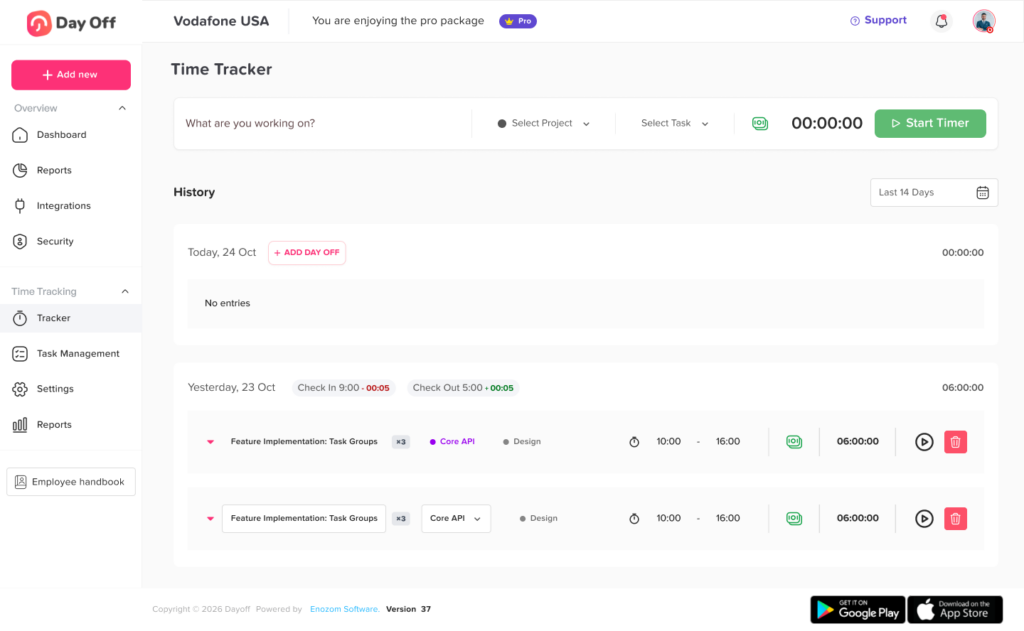
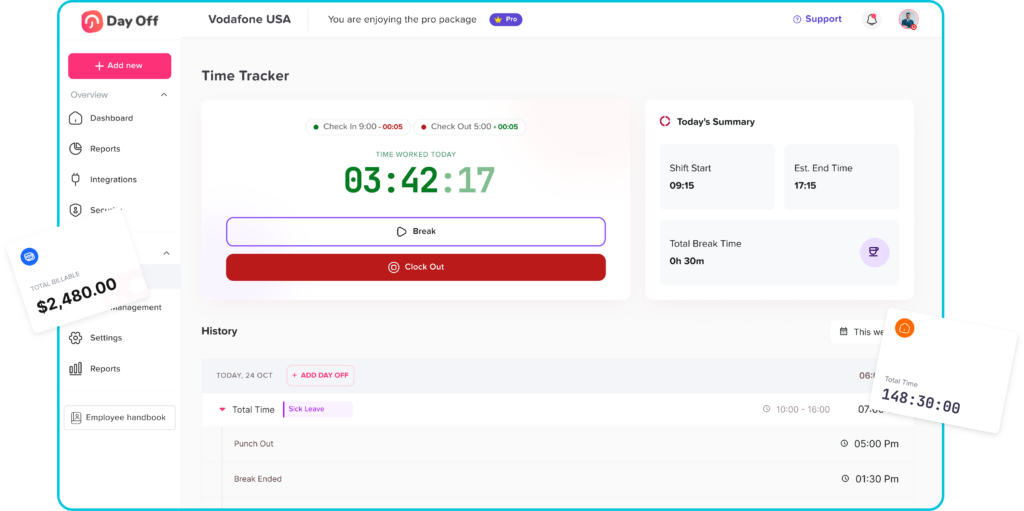
Step 2: Employees Clock In Clock Out Software
Employees record their working time through an approved device or application.
The system may also compare each punch with the employee’s scheduled start and end times.
Step 3: Employees Submit Leave Requests
Employees select the leave type, dates, duration, and any required notes or attachments.
Furthermore, the system checks the request against the employee’s leave balance and company policy.
Step 4: Managers Review the Request
The approver can review:
- Current leave balance
- Requested dates
- Overlapping team absences
- Work schedules
- Public holidays
- Previous requests
- Staffing requirements
The manager can also approve, reject, or request additional information.
Step 5: Approved Leave Updates Availability
Once approved, the leave appears on the shared calendar and employee record.
Furthermore, the attendance system should recognize that the employee is not expected to Clock In Clock Out Software during the approved period.
Step 6: Exceptions Are Flagged
The platform can identify situations such as:
- Missing Clock In Clock Out Software
- Missing clock out
- Clock In Clock Out Software during approved leave
- Leave requested after attendance was recorded
- Unplanned overtime
- Late arrival
- Early departure
- Work performed on a non-working day
- Attendance outside the scheduled location
Step 7: HR Reviews Reports
HR can review attendance, hours, leave usage, overtime, exceptions, and employee balances before preparing payroll or management reports.
Essential Features to Look For
Not every attendance platform provides complete leave management. Businesses should evaluate whether the software supports the full workflow rather than only recording Clock In Clock Out Software times.
| Feature | What It Does | Business Value |
|---|---|---|
| Web and mobile clock-in | Allows employees to record time from approved devices | Supports office, remote, hybrid, and mobile teams |
| Real-time attendance dashboard | Shows who is working, absent, late, or on leave | Improves daily workforce visibility |
| PTO request workflow | Allows employees to submit leave requests digitally | Replaces emails and paper forms |
| Leave balance tracking | Displays available, used, scheduled, and remaining leave | Reduces balance questions and manual calculations |
| Approval workflows | Routes requests to the correct managers | Creates a consistent approval process |
| Shared leave calendar | Displays approved absences across teams | Helps prevent staffing shortages |
| Work schedules | Defines expected workdays and hours | Makes attendance records easier to evaluate |
| Break tracking | Records paid and unpaid breaks | Supports accurate working-time records |
| Overtime reporting | Identifies hours beyond configured thresholds | Helps managers review additional working time |
| Missed punch alerts | Flags incomplete attendance records | Allows corrections before payroll |
| Partial-day leave | Supports leave measured in hours or half-days | Improves accuracy for short absences |
| Holiday calendars | Applies relevant public and company holidays | Prevents unnecessary leave deductions |
| Reports and exports | Produces attendance and leave data | Simplifies payroll and workforce analysis |
| Audit history | Records approvals, edits, and policy changes | Improves accountability and record review |
| Role based access | Limits data based on employee responsibilities | Protects sensitive workforce information |
Real Time Attendance Visibility
A strong attendance dashboard should show the current status of employees without requiring managers to open individual records.
Common attendance statuses include:
- Not started
- Clocked in
- On break
- Clocked out
- Late
- Absent
- On approved leave
- Working remotely
- On a scheduled day off
- Missing a punch
- Working overtime
Moreover, this information helps managers respond quickly to staffing changes.
For example, if two employees are on approved leave and another employee has not clocked in, the manager can identify the coverage issue early rather than discovering it after work has been delayed.
PTO Balance Management
Leave balances are one of the most important parts of PTO management.
A reliable system should clearly separate:
- Opening balance
- Accrued leave
- Used leave
- Scheduled leave
- Adjustments
- Carried over leave
- Expired leave
- Remaining balance
Accrual Rules
Some businesses grant the full annual allowance at the beginning of the year. Others allow employees to earn leave gradually.
Accrual schedules may be:
- Weekly
- Biweekly
- Semimonthly
- Monthly
- Quarterly
- Annual
- Based on employee anniversary dates
In addition, the correct method depends on company policy, employment agreements, and applicable regulations.
Carryover Rules
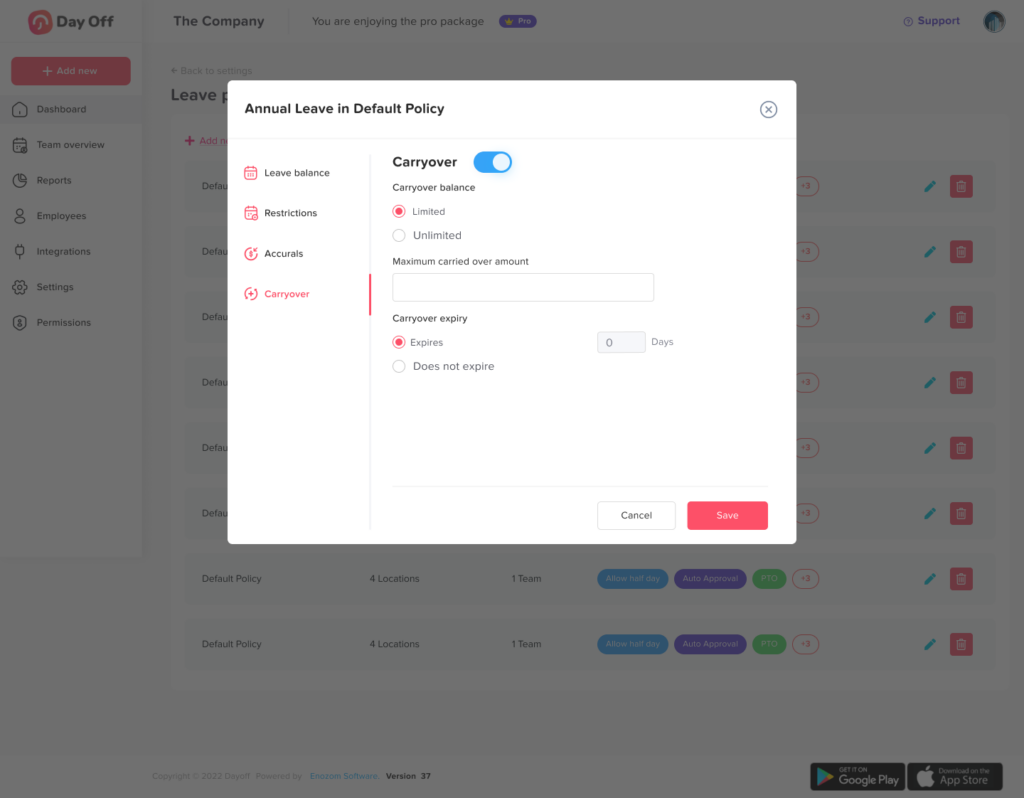
Organizations may allow unused leave to move into the next policy year.
The system should support rules such as:
- Unlimited carryover
- Carryover up to a maximum number of days
- Carryover that expires after a set period
- No carryover
- Different rules for different leave types
- Different rules for different employee groups
Manual Adjustments
HR may need to adjust balances because of:
- A policy correction
- A new employment agreement
- A data migration
- An approved exception
- A return from extended leave
- A payroll correction
Every manual adjustment should also include a reason and appear in the audit history.
Managing Partial Day and Hourly Leave
Not every absence requires a full day of PTO.
Employees may need time away for:
- Medical appointments
- School meetings
- Personal errands
- Family responsibilities
- Late arrivals
- Early departures
- Short-term emergencies
Clock in clock out software with hourly leave support can also calculate the difference between scheduled hours, worked hours, and approved paid time.
For example, an employee may be scheduled from 9:00 a.m. to 5:00 p.m. but receive approval to take two hours of personal leave at the end of the day. The employee works until 3:00 p.m. and clocks out.
The system should record:
- Six hours of work, depending on the configured break rules
- Two hours of approved leave
- No unexplained early departure
Without the leave record, the employee might incorrectly appear to have left work early.
Attendance Exceptions and How to Handle Them
Automated systems are useful, but not every unusual record should be corrected automatically.
Human review remains important because attendance exceptions can have legitimate explanations.
Common exceptions include:
Missing Clock Out
The employee recorded the beginning of work but did not record the end.
The system should also mark the entry as incomplete and ask the employee or manager to provide the correct time.
Late Clock In Clock Out Software
Additionally, the employee clocked in after the scheduled start.
The system can calculate the delay, but the manager should determine whether the lateness was approved or caused by a schedule change.
Work During Approved Leave
An employee has an active leave request and an attendance record for the same period.
The system should flag the conflict. HR may also need to cancel or adjust the leave, approve the work entry, or determine whether the employee should receive the time back.
Leave Submitted After the Absence
Employees may also submit sick leave after missing a shift.
The system should allow authorized managers to convert an unexplained absence into approved leave while preserving the original attendance history.
Incorrect Manual Edit
An employee or manager changes a punch to the wrong time.
The software should also retain the original value, the edited value, the person who made the change, the time of the change, and the reason.
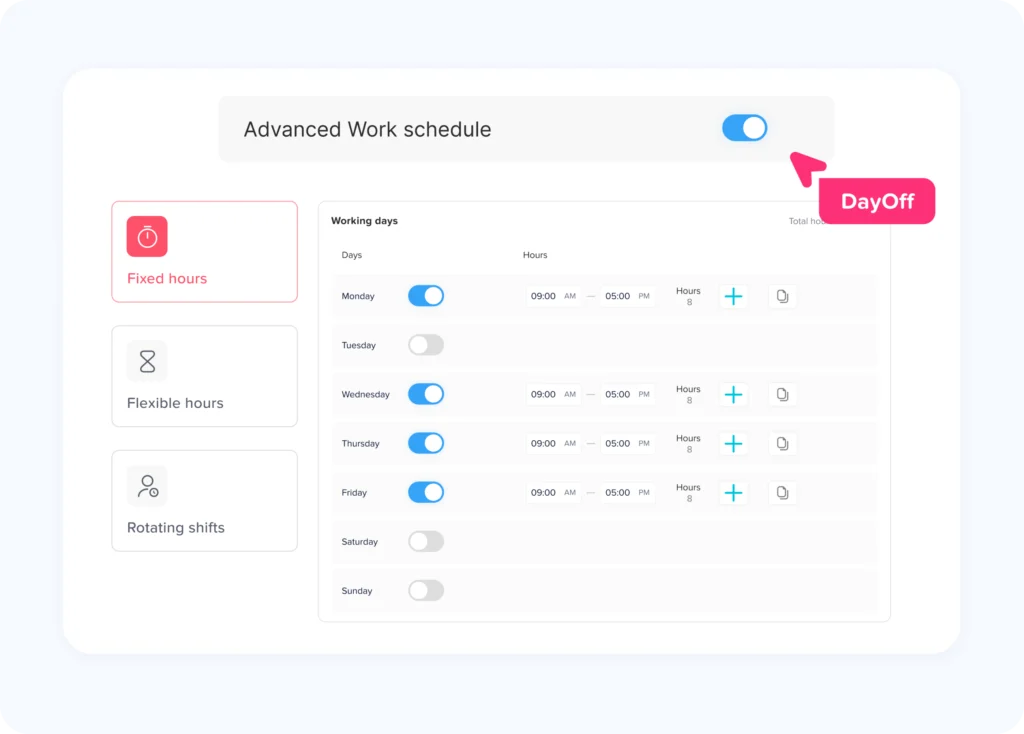
The Role of Work Schedules
Attendance data is more useful when it is compared with a schedule.
Moreover, using Clock In Clock Out Software at 9:15 a.m. cannot be classified as late unless the system knows when the employee was expected to begin work.
Similarly, eight hours of recorded time may be normal for one employee and overtime for another.
Integrated scheduling helps the system understand:
- Expected starting time
- Expected ending time
- Working days
- Weekly hours
- Break expectations
- Shift assignments
- Rest days
- Flexible working windows
- Location assignments
- Overnight shifts
For rotating and shift-based teams, managers should also be able to update schedules without deleting historical records.
Supporting Remote and Hybrid Teams
Remote work makes digital attendance and leave tracking more important.
Additionally, managers may not be able to confirm attendance by seeing who is physically present. They need a reliable system that gives employees a clear way to record working time from approved locations or devices.
A remote-friendly platform may include:
- Mobile Clock In Clock Out Software
- Browser based Clock In Clock Out Software
- Approved device controls
- IP or location restrictions
- Remote work status
- Time zone support
- Location specific holiday calendars
- Flexible schedules
- Shared availability calendars
- Automated reminders
In addition, location tracking should be used carefully. Organizations should also collect only the information they genuinely need, communicate the purpose clearly, restrict access, and follow applicable privacy requirements.
Multi Location and International Teams
Organizations with employees in different cities or countries often require different leave and attendance rules.
A centralized system should allow administrators to assign employees to:
- Different workweeks
- Different weekend days
- Different holiday calendars
- Different leave policies
- Different approval chains
- Different time zones
- Different schedules
- Different locations or departments
For example, one location may follow a Monday to Friday workweek, while another follows a Sunday to Thursday schedule.
Public holidays may also differ by country, region, or branch. Applying one holiday calendar to the entire company can also result in incorrect attendance expectations or unnecessary leave deductions.
Benefits for Employees
The purpose of Clock In Clock Out Software should not be limited to monitoring employees. A well designed system also gives employees better access to their own records.
Employees can:
- Clock In Clock Out Software easily
- Review their recorded hours
- Identify missing punches
- Request corrections
- Check PTO balances
- Submit leave requests
- Follow approval status
- View upcoming leave
- See team availability
- Review assigned schedules
- Access policies
- Receive reminders and notifications
Additionally, employee self service reduces the need to contact HR for routine information.
It also gives employees an opportunity to identify errors before payroll is finalized.
Benefits for Managers
Managers need to balance employee flexibility with operational coverage.
An integrated system helps managers:
- See who is working
- Review late or missing attendance
- Approve leave requests
- Check overlapping absences
- Review remaining team capacity
- Track overtime
- Manage schedules
- Assign shift coverage
- Review correction requests
- Prepare for busy periods
The shared view is particularly useful during product launches, holidays, seasonal demand, deadlines, and other periods when several absences could affect delivery.
Benefits for HR Teams
HR teams are often responsible for maintaining policies, resolving attendance disputes, answering balance questions, and preparing reports.
Connected Clock In Clock Out Software and leave tracking can reduce manual work by:
- Automating balance calculations
- Applying approved leave to attendance
- Maintaining policy history
- Recording approval decisions
- Identifying exceptions
- Producing standardized reports
- Reducing duplicate data entry
- Centralizing employee records
- Improving audit readiness
- Supporting consistent policy administration
Furthermore, automation does not remove the need for HR judgment. It gives HR better information and allows the team to focus on exceptions instead of repetitive calculations.
Benefits for Payroll Preparation
Payroll accuracy depends on complete and correctly categorized time records.
Before payroll processing, the organization may need to confirm:
- Regular working hours
- Overtime hours
- Paid leave hours
- Unpaid leave
- Sick time
- Public holidays
- Break deductions
- Shift premiums
- Manual corrections
- Missing punches
When the attendance and leave systems are connected, payroll teams can receive one more complete dataset.
However, the software must be configured carefully. Leave types should be mapped correctly, approval cutoffs should be defined, and unresolved exceptions should be reviewed before export.
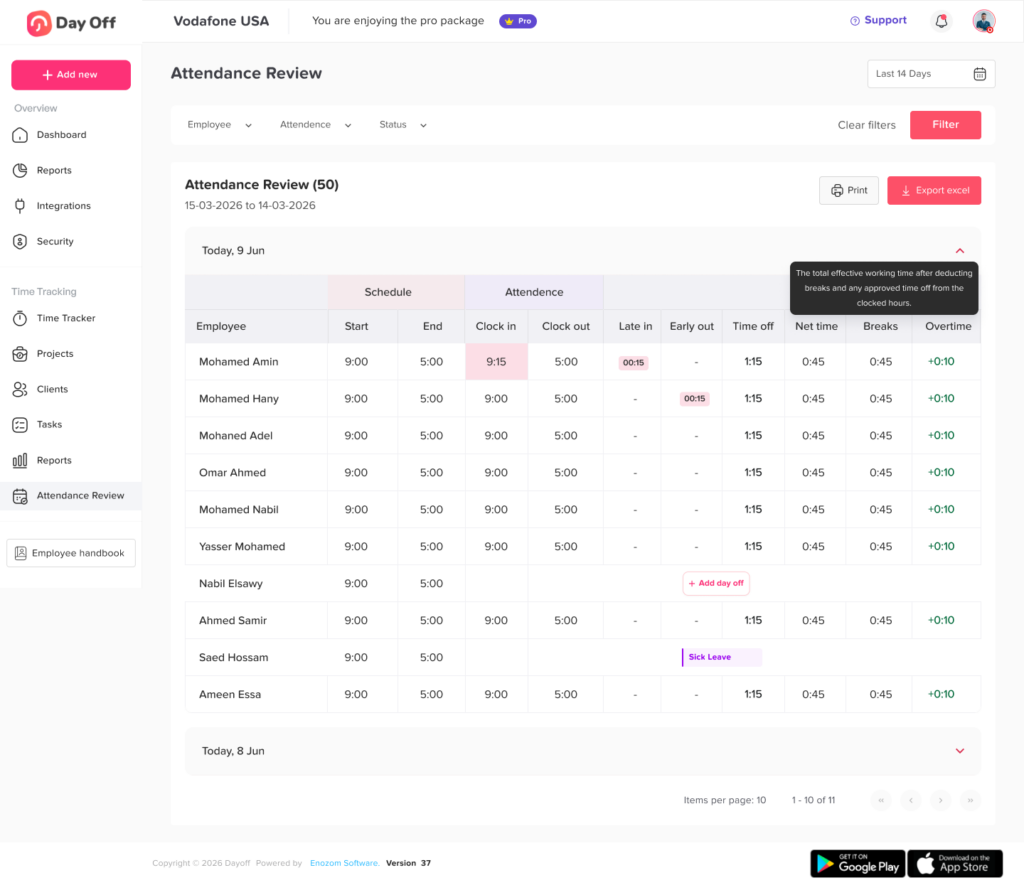
Reports Businesses Should Use
Clock in clock out software should offer more than raw punch records.
Useful reports include:
Attendance Summary
Shows scheduled time, actual time, late arrivals, early departures, absences, and completed hours.
Timesheet Report
Lists individual work sessions, breaks, total hours, and manual changes.
Overtime Report
Shows employees who worked beyond configured daily or weekly thresholds.
Missing Punch Report
Identifies records without a valid clock-in or clock-out.
Leave Balance Report
Shows available, used, scheduled, carried-over, and remaining leave.
Leave Usage Report
Summarizes how different leave types are being used across teams or periods.
Absence Report
Displays approved and unapproved absences.
Conflict Report
Identifies attendance records that overlap with approved leave.
Team Availability Report
Shows scheduled work, leave, holidays, and other availability information.
Reports should also be filtered by date, employee, team, location, department, leave type, or attendance status.
Data Accuracy and Audit Trails
Attendance and leave records may affect pay, employee entitlements, workforce planning, and internal disputes. Furthermore, the system should preserve a clear audit history.
A strong audit record may include:
- Original Clock In Clock Out Software times
- Updated values
- Reason for the update
- Person who made the change
- Date and time of the change
- Leave request submission
- Approval or rejection decision
- Approver comments
- Balance adjustments
- Policy changes
- Schedule changes
In addition, deleting the original record can make later reviews difficult. It is usually better to preserve the original information and record the correction separately.
Privacy and Access Controls
Attendance and leave data can contain sensitive employee information.
Organizations should define who can access:
- Individual timesheets
- Team attendance
- Leave reasons
- Medical documentation
- Payroll exports
- Employee locations
- Balance adjustments
- Audit logs
- Company wide reports
Role-based permissions can also give each user access to only the information needed for their responsibilities.
For example:
- Employees can view their own records.
- Managers can view direct reports.
- HR can manage policies and balances.
- Payroll can access approved time records.
- System administrators can manage configuration without receiving unnecessary medical details.
Businesses should also review data retention, privacy, security, and employee monitoring requirements in every location where they operate.
Compliance Considerations
Working time, overtime, break, leave, recordkeeping, privacy, and employee monitoring rules vary between countries and jurisdictions.
Software can help an organization apply its policies consistently, but it does not automatically guarantee legal compliance.
Businesses should:
- Confirm which employees require time records
- Understand applicable overtime rules
- Configure paid and unpaid breaks correctly
- Maintain required employment records
- Use the correct holiday calendars
- Review local leave entitlements
- Protect personal employee data
- Communicate monitoring practices
- Define who can edit attendance records
- Seek qualified legal or payroll guidance when necessary
The system should be flexible enough to reflect the organization’s actual policies and legal obligations rather than forcing every employee into one standard rule.
How to Choose the Right Clock In Clock Out Software
The best platform is not necessarily the one with the longest feature list. It is the one that matches the organization’s workforce structure and administrative needs.
Evaluate Your Workforce
Start by identifying:
- Number of employees
- Number of locations
- Remote and hybrid arrangements
- Work schedule types
- Employee classifications
- Leave policies
- Approval levels
- Payroll requirements
- Mobile access needs
- Reporting needs
Review the Full Workflow
Do not evaluate clock-in features alone.
Test what happens when:
- An employee requests leave
- A manager approves it
- The leave overlaps with a shift
- The employee clocks in during leave
- A punch is missed
- A timesheet is corrected
- Payroll data is exported
- A balance is adjusted
- An employee changes location or team
Check Ease of Use
Employees will use the system every working day. Clocking in should also require only a few clear steps.
Managers should also be able to review requests and exceptions without extensive training.
Review Mobile Availability
Mobile access is especially valuable for:
- Remote employees
- Field teams
- Construction crews
- Sales representatives
- Healthcare workers
- Hospitality teams
- Multi location businesses
Check whether the provider supports both iOS and Android, as well as web access.
Test Reporting
Reports should be easy to filter, understand, and export.
Ask whether the system can also provide the exact information required by HR, payroll, finance, and management.
Examine Security
Review:
- User permissions
- Authentication options
- Encryption practices
- Backup procedures
- Login controls
- Audit trails
- Data retention settings
- Security documentation
Confirm Scalability
A small business may begin with one leave policy and a simple schedule. Over time, it may also add locations, departments, approval levels, and employee groups.
The software should also support growth without requiring the organization to rebuild all its processes.
Implementation Checklist
| Implementation Stage | Recommended Actions |
|---|---|
| Review current processes | Document how employees Clock In Clock Out Software, request leave, correct records, and submit information to payroll |
| Clean employee data | Confirm employee names, departments, locations, schedules, start dates, and managers |
| Configure schedules | Add working days, hours, shifts, breaks, weekends, and flexible working windows |
| Build leave policies | Define allowances, accruals, carryover, reset dates, eligibility, and negative balance rules |
| Add approval workflows | Assign primary and secondary approvers where needed |
| Configure attendance rules | Define late thresholds, overtime rules, missed punch handling, and manual edit permissions |
| Add holiday calendars | Assign the correct holidays to each location or employee group |
| Set user permissions | Limit access according to employee, manager, HR, payroll, and administrator roles |
| Test realistic scenarios | Test leave overlaps, partial-day leave, overnight shifts, missed punches, and payroll exports |
| Train employees | Explain clock-in procedures, leave requests, corrections, and mobile access |
| Train managers | Explain approvals, reports, attendance exceptions, and schedule management |
| Launch in phases | Consider beginning with one team or location before a company-wide rollout |
| Review after launch | Check data quality, user feedback, unresolved records, and policy configuration |
Best Practices for Daily Use
Once the system is active, consistent routines help maintain accurate records.
Organizations should:
- Ask employees to review their timesheets regularly
- Resolve missed punches before payroll deadlines
- Require reasons for manual edits
- Review overtime before it becomes excessive
- Keep schedules updated
- Approve or reject leave requests promptly
- Monitor overlapping absences
- Review unusual attendance and leave conflicts
- Audit policy settings periodically
- Remove access when employees leave the company
- Update employee teams, managers, and locations
- Communicate policy changes clearly
In addition, managers should focus on patterns rather than isolated events. One late clock-in may also have a reasonable explanation. Repeated lateness, missing punches, or work during approved PTO may require a conversation or process review.
How Day Off Supports Attendance and Leave Management
Day Off helps organizations manage employee leave, PTO, attendance, schedules, and workforce availability through web, iOS, and Android applications.
Employees can also use one platform to submit leave requests, check balances, follow approval status, review schedules, and access attendance-related information.
Managers and HR teams can organize:
- Employee leave requests
- PTO balances
- Approval workflows
- Shared calendars
- Leave policies
- Accrual rules
- Carryover settings
- Employee schedules
- Attendance records
- Team availability
- Reports and exports
Bringing these functions together helps reduce the gap between scheduled work, recorded attendance, and approved time off.
Instead of maintaining one tool for leave, another for schedules, and another for attendance, teams can work from a connected system designed to provide a clearer view of employee availability.
FAQ
What is the main purpose of clock in clock out software?
The main purpose is to record when employees begin and end work. Advanced systems also track breaks, schedules, overtime, attendance exceptions, PTO, and approved leave.
Can clock in clock out software track PTO?
Yes. In addition, some platforms include PTO and leave management, allowing employees to request time off, view balances, and receive approvals within the same system used for attendance.
Can employees clock in from a mobile phone?
Also, many modern platforms provide iOS and Android applications. Businesses may also apply device, network, or location rules depending on their workforce and privacy requirements.
What happens when an employee forgets to Clock In Clock Out Software?
Furthermore, the system should mark the time entry as incomplete. The employee or manager can then submit a correction, which should include a reason and remain visible in the audit history.
Can the system handle hourly leave?
A suitable platform can also support full day, half day, and hourly leave. Hourly leave is useful for appointments, late arrivals, early departures, and other short absences.
Does approved PTO automatically update Clock In Clock Out Software?
In an integrated platform, approved PTO can update the employee’s expected attendance status so the person is not incorrectly treated as absent during the approved period.
Can managers see who is working and who is on leave?
Yes. Real-time dashboards and shared calendars can also show who is clocked in, absent, scheduled, late, on break, or on approved leave.
Can clock in clock out software calculate overtime?
Moreover, many platforms can identify hours that exceed configured thresholds. Final overtime treatment should also reflect company policy and applicable employment rules.
Is clock in clock out software suitable for salaried employees?
It can be. Organizations may also use time tracking for project costing, attendance, capacity planning, compliance, workload analysis, or internal reporting. The appropriate approach depends on the employee’s role and applicable requirements.
Is Clock In Clock Out Software suitable for remote teams?
Yes. Web and mobile access can also help remote employees record working time and request leave. Businesses should establish clear policies for working hours, availability, location data, and privacy.
Can one system support several offices?
A flexible platform can also assign different schedules, policies, managers, holidays, weekends, and time zones to different teams or locations.
Does Clock In Clock Out Software guarantee compliance?
No. Software can support recordkeeping and policy administration, but the organization remains responsible for understanding and following applicable employment, payroll, privacy, and leave requirements.
Conclusion
Clock in clock out software with PTO and leave tracking gives organizations a more complete view of employee time.
It connects scheduled hours, actual attendance, approved absences, leave balances, overtime, and team availability. This helps HR teams reduce manual administration, gives managers better information for staffing decisions, and allows employees to manage routine attendance and leave tasks through one system.
Additionally, the most effective platform should do more than collect punches. It should also help the organization understand why an employee is present, absent, late, working additional hours, or unavailable.
By connecting attendance with PTO, schedules, approvals, and reporting, businesses can create a clearer and more reliable workforce management process while reducing the errors that often occur when employee time is divided across several disconnected tools.