




When a PTO Approver on Leave is unavailable to review an employee’s time-off request, the request does not necessarily disappear, get rejected, or become automatically approved. What happens next depends on the company’s approval workflow, the leave management system being used, whether backup or multiple approvers have been assigned, and whether an administrator is allowed to intervene.

This situation is more common than it may seem. Managers take vacations too, HR employees become unavailable, and department heads may be away when employees need decisions about upcoming leave. Without a clear backup approval process, requests can remain pending, employees may not know whether they can finalize travel plans, and managers may struggle to plan staffing.
A well designed PTO approval workflow should therefore answer an important question before the problem occurs: Who can approve a leave request when the normal approver is unavailable?
This guide explains what happens to pending PTO requests when an approver is away, how different approval structures handle the situation, what employees and HR teams should do, and how companies can design approval workflows that continue working even when managers are taking time off themselves.
Quick Answer: What Happens If Your PTO Approver Is on Leave?
If a company uses only one designated approver, a PTO request may remain pending until that person returns or another authorized person takes action.
If several people are authorized to approve the request, another approver may be able to review it instead.
The exact result depends on the system and company policy.
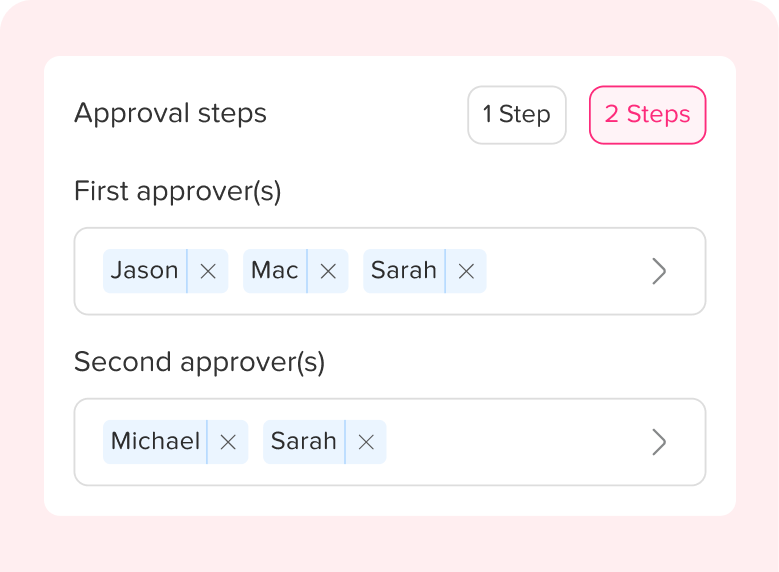
For example, Day Off allows organizations to assign multiple approvers within the same approval step. A request is sent to the approvers assigned to that step, and only one of them needs to approve it. Day Off can also use a two step workflow, with multiple approvers assigned to each individual step.
This means the approval process can continue even when one manager is unavailable.
Common PTO Approval Scenarios
| Approval Setup | Approver Is on Leave | Likely Result |
|---|---|---|
| One employee, one approver | Approver unavailable | Request may remain pending |
| Multiple approvers in one step | One approver unavailable | Another approver can review the request |
| Two-step approval | One Step 1 approver unavailable | Another Step 1 approver may approve if assigned |
| Manager + HR approval | Manager unavailable | Request usually waits at the manager stage unless another manager is authorized |
| Admin oversight available | Assigned approver unavailable | Admin may be able to intervene according to system permissions |
| Auto-approved leave type | Approver unavailable | Approval may not be required |
Why a PTO Approver Being Away Can Create Problems
A leave request affects much more than the employee requesting time off.
Managers may need to check:
- Team coverage
- Shift schedules
- Customer responsibilities
- Project deadlines
- Other approved absences
- Required staffing levels
- Employee leave balances
- Leave policy rules
If the request remains unanswered, the employee does not have a confirmed decision and the company may not have an accurate picture of future availability.
For example, imagine an employee submits a vacation request on June 1 for leave beginning June 20. Their manager begins a two week vacation on June 2 and does not return until June 16.
If nobody else can approve the request, the employee may spend two weeks waiting for an answer.
That creates uncertainty that could easily have been avoided with a backup approval structure.
Does the PTO Request Automatically Get Approved?
Usually, no.
A manager being unavailable should not automatically convert a pending request into an approved request unless the company has specifically configured an automatic approval rule.
Approval and manager availability are separate issues.
A pending request simply means the approval process has not yet been completed.
Employees should therefore not assume that silence means approval.
Unless company policy explicitly states otherwise, employees should wait until their PTO request has been formally approved before treating the leave as confirmed.
This is especially important when the requested dates affect:
- Shift coverage
- Peak business periods
- Customer appointments
- Project deadlines
- Required staffing
- Payroll
- Travel schedules
- Other employees requesting the same dates
A clear approval status prevents misunderstandings between employees and managers.
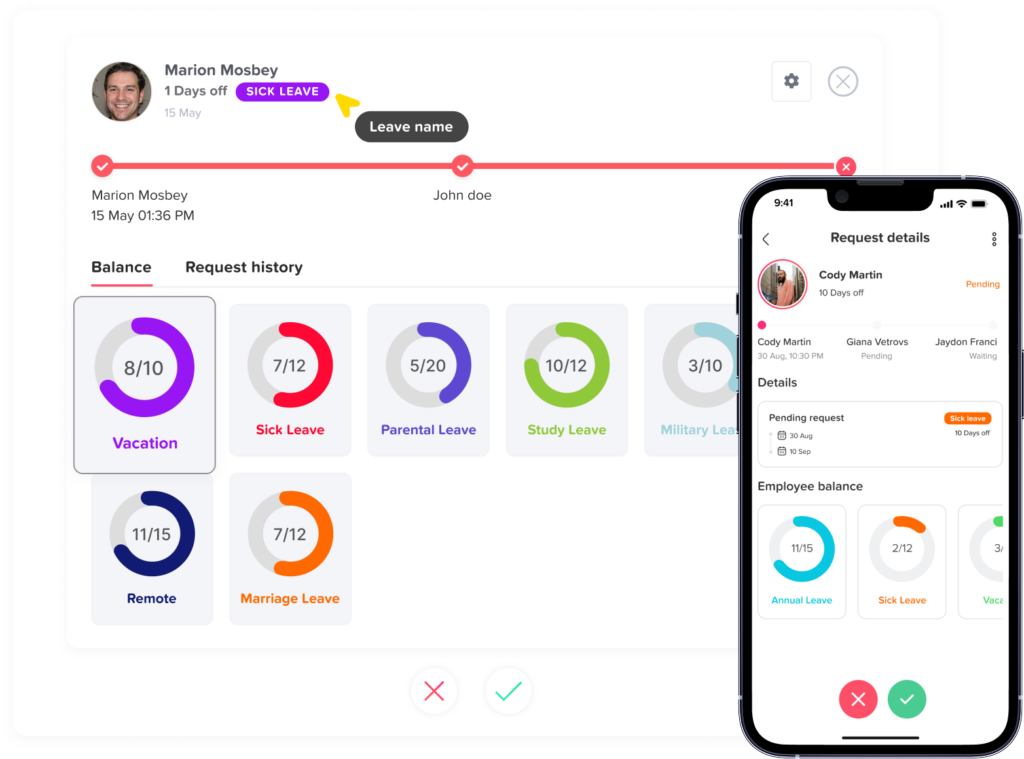
What Happens With a Single PTO Approver?
The greatest risk of an approval delay occurs when each employee has only one person authorized to approve PTO.
For example:
Employee → Direct Manager
If the manager is working, the process is simple.
But if the manager is:
- On vacation
- Sick
- Traveling
- On parental leave
- On extended leave
- Temporarily unavailable
- No longer employed by the company
the request may have nowhere to go.
In Day Off, if only one approver is assigned and that approver is on leave, the request remains pending until action is taken.
This is why companies relying on one approver should have a documented escalation process.
For example:
Normal process:
Employee → Team Manager
If manager is unavailable:
Employee → Department Head or HR
The backup person should already have appropriate authority. Employees should not have to search for someone willing to approve their leave after a request becomes stuck.
Using Multiple PTO Approvers in the Same Step
One of the simplest ways to prevent approval bottlenecks is to assign more than one authorized person to the same approval stage.
For example:
Employee → Manager A OR Manager B
Both managers are authorized to review the request.
If Manager A is on vacation, Manager B can still act.
This does not necessarily mean both managers must approve.
In Day Off, multiple approvers can be assigned to a single step. The request goes to the approvers assigned to that step, and only one approval is required for the workflow to continue.
This provides useful redundancy for teams where managers regularly cover for one another.
Example
Sarah works in the Customer Success department.
Her approval configuration is:
Step 1
- Customer Success Manager
- Customer Success Team Lead
Sarah submits a request for three vacation days.
Her manager is already on vacation.
Because the Team Lead is also assigned as a Step 1 approver, the Team Lead can review the request instead.
Sarah does not need to wait for her manager to return.
Using Multiple Approvers in Each Approval Step
Larger organizations may require more than one approval stage.
For example:
Step 1: Manager approval
Step 2: HR approval
The first step may focus on operational coverage.
The second step may focus on policy, records, documentation, or payroll implications.
The problem is that either step can become a bottleneck.
A more resilient configuration might look like this:
Step 1
- Direct Manager
- Assistant Manager
Step 2
- HR Manager
- HR Administrator
In Day Off, companies can create a two-step approval workflow and assign multiple approvers to each individual step. Only one approval is required within each step before the request progresses.
For example:
Employee → Manager A or Manager B → HR A or HR B → Approved
If Manager A is on leave, Manager B can complete Step 1.
The request then moves to Step 2.
If HR A is also unavailable, HR B can complete the second approval.
This structure reduces the risk that a single employee’s absence stops the entire PTO process.
Single Approver vs Multiple Approvers
| Workflow | Advantage | Main Risk |
|---|---|---|
| One approver | Simple administration | Requests can stall when the approver is unavailable |
| Multiple approvers in one step | Faster backup coverage | Requires clear approval authority |
| Two approval steps | More oversight | More opportunities for delays |
| Multiple approvers in each step | Strong oversight plus backup coverage | Requires careful setup |
| Auto approval | Very fast | Not appropriate for every leave type |
Should HR Automatically Become the Backup Approver?
Not necessarily.
HR can be a useful escalation point, but HR should not automatically replace the employee’s manager in every situation.
Managers and HR often evaluate different aspects of a leave request.
A manager may be responsible for determining:
- Whether there is enough team coverage
- Whether another employee is already away
- Whether key deadlines are approaching
- Whether shift coverage needs to be changed
- Whether responsibilities need to be reassigned
HR may focus more on:
- Leave policy eligibility
- Available balance
- Documentation requirements
- Leave category
- Payroll implications
- Company records
This is one reason companies may use a two step approval process rather than making HR responsible for every decision. Day Off supports structured single level and two level workflows so businesses can route requests according to their approval structure.
Can an Admin Approve the Request Instead?
This depends on the leave management system and company permissions.
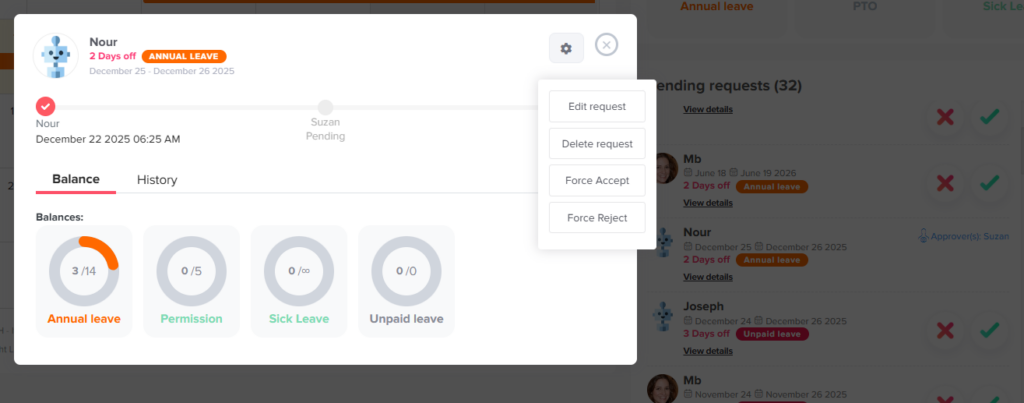
In Day Off, admins can view pending requests even when they are not the assigned approver. They can also use Force Accept or Force Reject to take action when necessary.
This gives companies another way to handle exceptional situations.
For example:
An employee requests emergency leave.
Their only assigned approver is already on vacation.
The absence begins tomorrow.
Rather than leaving the request pending until the manager returns, an authorized administrator can review the situation and take the appropriate action.
Admin intervention should normally be treated as an exception rather than the primary workflow.
If administrators regularly need to override requests because approvers are unavailable, the company may need to reconsider how its approval chain is configured.
What Should Employees Do When Their PTO Approver Is on Leave?
Employees should first check the request status.
If the request still shows Pending, it should not be treated as approved.
The employee can then follow the company’s normal escalation procedure.
That might mean:
- Checking whether another approver is assigned.
- Contacting the manager covering the absent approver.
- Informing HR if the request is becoming time-sensitive.
- Confirming whether an administrator can review the request.
- Waiting for a formal approval notification before finalizing the absence.
Employees should avoid submitting duplicate requests unless instructed to do so.
Multiple requests for the same dates can create confusing records and make it harder for HR to determine which request is valid.
What Should HR Do When an Approver Plans to Take PTO?
Ideally, HR should solve the approval problem before the approver leaves.
When a manager is preparing for vacation or extended leave, HR should review whether employees who report to that person still have an active approval route.
A simple checklist can include:
- Review pending PTO requests before the manager leaves.
- Identify requests that may arrive during the absence.
- Confirm backup approval responsibilities.
- Check whether multiple approvers are already configured.
- Make sure backup approvers understand their authority.
- Review urgent requests before the manager’s departure.
- Make employees aware of the temporary process if necessary.
- Confirm who will handle exceptions.
This is especially useful before common vacation periods such as summer holidays, year-end holidays, school breaks, and extended public holiday periods.
Do Not Create a Hidden Approval Rule
One mistake companies make is creating an unofficial backup process.
For example:
“If James is away, just send PTO requests to Maria.”
This may work temporarily, but it creates problems if the leave management system still identifies James as the actual approver.
The company may end up with:
- Approval decisions in chat messages
- Requests still marked as pending
- Manual balance adjustments
- Missing approval history
- Employees receiving inconsistent instructions
- Different departments following different procedures
The approval workflow in the system should reflect the real approval workflow used by the company.
If Maria has authority to approve requests when James is unavailable, that authority should ideally be configured within the approval process.
What About Emergency Leave?
Emergency leave presents a different challenge because an employee may not have several days to wait for approval.
Examples include:
- Sudden illness
- Family emergencies
- Bereavement
- Unexpected caregiving responsibilities
- Urgent personal situations
Companies should distinguish between planned PTO and leave that may require immediate action.
For planned vacation, employees may be expected to submit requests several days or weeks in advance.
Emergency absences may follow another notification and approval process.
Depending on company policy, the employee may need to notify a manager, HR, scheduling coordinator, or another designated contact as quickly as reasonably possible.
The important point is that an absent approver should never make the company’s emergency absence process unclear.
Policies should state who employees contact when their normal manager is unavailable.
Should Some Leave Types Use Auto Approval?
Possibly.
Not every type of leave needs the same approval workflow.
A company may decide that certain leave categories do not require a manager to make an operational decision.
For example, some organizations may configure specific leave types for automatic approval where appropriate.
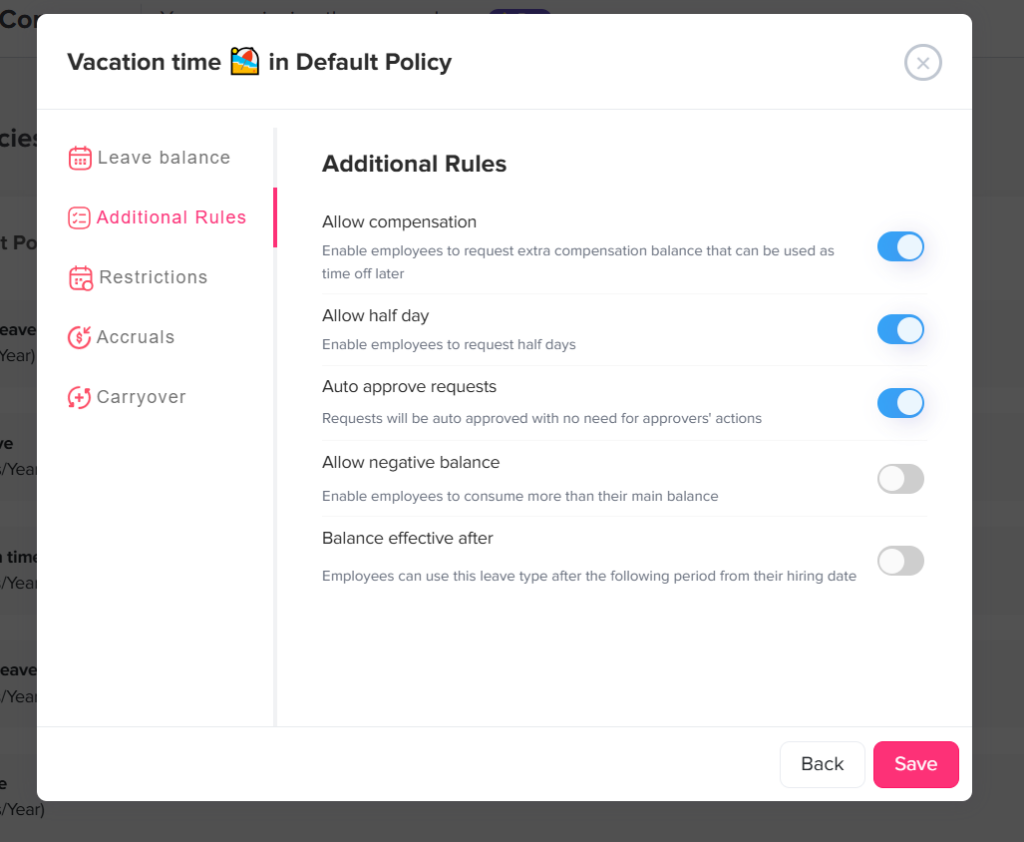
Day Off allows auto approval to be enabled for specific leave types, meaning requests under those configured types can be approved without going through the standard approval workflow.
However, companies should use auto approval intentionally.
It may not be appropriate when the organization needs to evaluate:
- Staffing coverage
- Restricted periods
- Documentation
- Leave eligibility
- Operational conflicts
- Extended absences
- Unpaid leave
- Special policy exceptions
Auto approval should match the actual company policy.
What Happens to the Employee’s PTO Balance While the Request Is Pending?
A pending request and an approved absence are not the same thing.
Organizations should make sure employees can distinguish between:
- Current balance
- Pending requested time
- Approved time off
- Used time off
This becomes particularly important when an employee submits several future requests.
Suppose an employee has 40 PTO hours available.
They submit:
- 16 hours for June
- 24 hours for July
If the June request remains pending because the approver is away, HR and the employee still need a clear view of how that pending request affects future planning.
A dedicated PTO tracking system is more reliable than treating approval status and balances as separate spreadsheet entries.
PTO Approval Delays Can Affect Scheduling
The employee is not the only person affected by a pending request.
Consider a retail team where three employees request the same Friday off.
Employee A is approved.
Employee B is rejected.
Employee C’s request remains pending because their manager is away.
The scheduler now faces uncertainty.
Should Employee C be included on the schedule?
Should another employee be asked to cover?
Can another leave request for that day be approved?
The longer a request remains unresolved, the harder workforce planning can become.
This is why approval redundancy matters even when the company receives relatively few PTO requests.
PTO Approvals for Remote and Global Teams
Approval delays can become even more noticeable when companies operate across countries and time zones.
A manager in California may supervise an employee in Europe.
HR may be based in another location entirely.
If the company relies on manual messages, the employee may spend hours or days waiting for the right person to see the request.
A structured workflow provides a clearer route.
For example:
Step 1: Local Team Lead or Department Manager
Step 2: Regional HR Manager or Global HR Administrator
Multiple approvers at each stage can also provide coverage across time zones.
The objective is not to add unnecessary approval layers.
It is to ensure that the required approval can still happen when one person is unavailable.
Example: One Approver Creates a Bottleneck
Consider a company with 40 employees.
Each employee’s direct manager is their only PTO approver.
Maria submits a request on Monday for leave beginning the following Friday.
Her manager left for vacation the previous Friday and will return in two weeks.
Nobody else has been assigned approval authority.
The request remains pending.
Maria contacts HR.
HR now has to determine:
- Whether the manager intended to approve it
- Whether another team member can cover Maria’s responsibilities
- Whether HR has authority to decide
- Whether an administrator should override the normal workflow
A configuration problem has turned a normal PTO request into an HR escalation.
Example: Multiple Approvers Keep the Request Moving
Now consider the same situation with two Step 1 approvers:
Step 1
- Direct Manager
- Assistant Manager
Maria submits her request.
The Direct Manager is away.
The Assistant Manager receives the same request, checks team coverage, and approves it.
The process is completed without HR intervention.
The employee receives an answer and the team can plan around the absence.
This is one of the main operational benefits of assigning multiple approvers.
Example: Two Step Approval With Backup Approvers
A company requires manager and HR approval for extended PTO.
The workflow is:
Step 1
- Department Manager
- Deputy Manager
Step 2
- HR Manager
- HR Specialist
Daniel submits a two-week vacation request.
The Department Manager is away, so the Deputy Manager approves Step 1.
The request moves automatically to Step 2.
The HR Manager is working and completes the approval.
Daniel’s request does not have to wait for the Department Manager to return.
Day Off supports this type of two-step workflow, including multiple approvers within each step. Only one approval within a step is required before the request moves forward.
How to Design a PTO Approval Workflow That Does Not Stop When Someone Is Away
A good approval workflow should continue functioning during normal employee absences.
Avoid unnecessary single points of failure
If only one person in the company can approve requests for an entire department, their vacation can stop every request.
Where appropriate, assign another authorized approver.
Clearly define authority
Backup approvers need to know what they can decide.
They should understand:
- Which employees they cover
- Which leave types they can approve
- What staffing rules apply
- When requests should be escalated
- Which situations require HR review
Use multi step approval only when necessary
Adding approval layers does not automatically create a better process.
A simple vacation request may only need manager approval.
A long unpaid absence may require both management and HR review.
Design the workflow around the decision being made.
Add multiple approvers where continuity matters
Two managers in the same approval step can provide useful coverage.
This is especially valuable for:
- Shift based businesses
- Customer support teams
- Remote companies
- Large departments
- Multi location businesses
- Teams with frequent manager travel
Establish an escalation process
Employees should know what happens if their request has not been reviewed within a reasonable period.
For example:
Day 0: Employee submits request
Day 2: Request still pending
Day 3: Employee may contact the backup approver
Urgent request: Employee contacts HR according to policy
The exact timeline should reflect the company’s operations and leave policy.
Review pending requests before managers leave
Managers should ideally process outstanding requests before beginning planned PTO.
This simple habit can prevent many approval problems.
Keep the process inside the leave management system
Avoid approving requests through separate emails, chat messages, and spreadsheets whenever possible.
Keeping the decision within the PTO system creates a clearer history of what happened and who approved the request.
How Day Off Helps When a PTO Approver Is on Leave
Day Off is designed to help businesses avoid approval bottlenecks while keeping PTO decisions organized.
Companies can assign approvers to employees and create approval workflows based on how the organization operates.
With Day Off, businesses can:
- Assign one or multiple approvers to Step 1.
- Add an optional Step 2 approval stage.
- Assign multiple approvers within Step 2 as well.
- Require only one approval from the approvers assigned to each step.
- Allow another assigned approver to act when one approver is unavailable.
- Allow admins to view pending requests.
- Allow authorized admins to force accept or force reject requests when intervention is necessary.
- Configure auto approval for specific leave types when appropriate.
- Keep employees informed about request status.
- Maintain PTO requests, approvals, balances, and leave records in one system.
The ability to add multiple approvers in each step is particularly useful for companies that want both structured oversight and approval continuity.
Instead of designing an approval process that depends entirely on one person’s availability, businesses can create a workflow that continues operating when managers, team leads, or HR employees take their own time off.
Best Practices for Handling a PTO Approver on Leave
A reliable PTO approval process should follow a few basic principles:
- Never assume a pending request is approved.
- Give employees a clear backup contact.
- Assign more than one approver where appropriate.
- Review pending requests before an approver begins planned leave.
- Use escalation procedures for urgent requests.
- Keep approval authority documented.
- Avoid informal approvals that never appear in the PTO system.
- Give HR or administrators an exception process.
- Use automatic approval only for leave types where it matches company policy.
- Review approval workflows when managers change roles or leave the company.
Most importantly, employees should not have to figure out the process themselves every time a manager is away.
A well designed leave policy should already answer the question.
Frequently Asked Questions
What happens to my PTO request if my manager is on vacation?
If your manager is the only approver, the request may remain pending until the manager returns or another authorized person intervenes. If your company has multiple approvers or a backup approval process, another authorized approver may be able to review the request.
Does PTO automatically get approved if my manager does not respond?
Not normally. A request that has not been reviewed generally remains pending unless the company uses an automatic approval policy or the leave type is configured for auto approval.
Employees should not assume that a lack of response means their PTO has been approved.
Can HR approve PTO if my manager is away?
Possibly. It depends on the company’s approval policy and the permissions assigned to HR.
Some organizations allow HR to act as a backup approver, while others require an operational manager to approve the absence first.
Can more than one manager approve the same employee’s PTO?
Yes, if the company’s leave management system supports multiple approvers.
For example, Day Off allows multiple approvers to be assigned within an approval step. Any one of the assigned approvers can provide the approval required for that step.
Can Day Off assign multiple approvers to the same PTO request?
Yes. Day Off supports multiple approvers within the same approval step. It also supports a two-step workflow, and multiple approvers can be assigned to each step. Only one approval is required within each step before the workflow continues.
What happens in Day Off if the only approver is on leave?
If there is only one assigned approver, the request remains pending until action is taken. An administrator can also view pending requests and may use Force Accept or Force Reject when intervention is appropriate.
Should companies assign backup PTO approvers?
For teams where approval delays could affect scheduling or employee planning, having more than one authorized approver can be useful.
The backup approver should have clearly defined authority rather than being selected informally after a request becomes stuck.
What should I do if my PTO request is still pending?
Check your company’s PTO policy or approval procedure first. If the expected response period has passed, contact your designated backup approver, manager, or HR team.
Do not assume the request is approved until its status has formally changed.
Who should approve PTO when a manager is on extended leave?
Companies should designate another manager, team lead, department head, HR representative, or authorized administrator according to the organization’s approval structure.
For extended manager absences, the backup arrangement should ideally be configured before the leave begins.
Is one PTO approver enough?
It can be enough for a very small organization, but relying on one approver creates a potential bottleneck whenever that person is unavailable.
Companies with larger teams, multiple locations, shift schedules, or frequent PTO activity may benefit from multiple approvers or a documented backup process.
Final Thoughts
Having a PTO Approver on Leave should not stop employees from receiving timely decisions about their own time off.
If one person is the only approver, a request may remain pending until that person returns or an administrator intervenes. A better approach is to build continuity into the approval process before the problem occurs.
Companies can assign backup approvers, establish escalation procedures, review pending requests before managers leave, and use multiple approvers where appropriate.
With Day Off, organizations can go further by assigning multiple approvers within each approval step, including both stages of a two step workflow. If one approver is unavailable, another assigned approver can keep the request moving.
A strong PTO workflow should do more than approve vacation requests when everyone is working. It should continue working when managers, HR employees, and approvers are taking the time off they are entitled to as well.