





Split shifts can make Time Tracking more complicated than a standard 9 to 5 workday. Instead of working one continuous block of hours, an employee may work in the morning, leave for several hours, and return for another shift later in the day. For HR teams and managers, the challenge is determining which hours count as working time, which gaps are unpaid, how breaks should be recorded, and how the total affects payroll, overtime, attendance, and employee records.
This type of schedule is common in restaurants, hospitality, retail, transportation, healthcare, cleaning services, education, customer service, and other businesses where staffing demand changes throughout the day.

Accurate time tracking is especially important for split shifts because simply subtracting the first clock in from the final clock out can produce a completely incorrect result. A worker who clocks in at 7:00 AM and finally clocks out at 8:00 PM has not necessarily worked 13 hours. If the employee had a five hour off duty gap in the middle of the day, those hours normally need to be separated from actual working time.
This guide explains how split shift time tracking works, how to calculate hours correctly, how different types of breaks should be handled, and what employers should consider when connecting split shifts with payroll, overtime, PTO, and attendance.
What Is a Split Shift?
A split shift is a work schedule in which an employee works two or more separate periods during the same day, with a significant nonworking period between those work periods.
For example:
- First shift: 7:00 AM to 11:00 AM
- Off duty period: 11:00 AM to 4:00 PM
- Second shift: 4:00 PM to 8:00 PM
The employee works eight hours in total, even though 13 hours pass between the first clock-in and final clock out.
The long period between the two work sessions is what distinguishes a split shift from an ordinary meal break.
California’s wage regulations, for example, define a split shift as a work schedule interrupted by employer-established unpaid, nonworking periods other than bona fide rest or meal periods.
Exact definitions and compensation requirements can differ by jurisdiction, so employers should always check the labor rules that apply where their employees work.
Why Split Shifts Make Time Tracking More Difficult
Traditional time tracking is relatively straightforward when an employee works one continuous period:
Clock-in → Work → Break → Work → Clock-out
A split shift creates another layer:
Clock-in → Work → Clock-out → Long off-duty gap → Clock-in again → Work → Clock-out
If the time tracking system treats the entire day as one continuous shift, several problems can occur.
Employers may accidentally:
- Count unpaid off-duty hours as worked time
- Exclude breaks that should be paid
- Deduct meal periods incorrectly
- Calculate overtime from inaccurate totals
- Create payroll discrepancies
- Record incorrect attendance hours
- Miscalculate labor costs
- Confuse split-shift gaps with ordinary meal breaks
- Produce inaccurate timesheets
- Create inconsistencies between schedules and actual hours worked
The best approach is to treat each working period as a separate time entry while still grouping those entries under the same workday.
How to Calculate Hours Worked on a Split Shift
The basic formula is:
Total Hours Worked = First Work Period + Second Work Period + Any Additional Work Periods
Do not calculate working time by simply subtracting the first clock-in from the final clock-out.
Example 1: Basic Split Shift
An employee works:
| Time Period | Status | Hours Counted |
|---|---|---|
| 7:00 AM to 11:00 AM | Working | 4 hours |
| 11:00 AM to 4:00 PM | Off duty | 0 hours |
| 4:00 PM to 8:00 PM | Working | 4 hours |
| Total | 8 hours worked |
The employee’s workday spans 13 hours from beginning to end, but only eight hours are actual working time.
The correct calculation is:
4 hours + 4 hours = 8 hours worked
The five hour gap should not automatically be included simply because it occurs between the employee’s first and last work periods.
Under U.S. federal rules, a period may generally be treated as off-duty time when the employee is completely relieved from work and has enough time to use the period effectively for personal purposes. The employee must also know that they are free from duty until a specified time.
The Split Shift Gap Is Not the Same as a Meal Break
One of the most important distinctions in split-shift time tracking is the difference between an off duty split shift gap and an ordinary meal period.
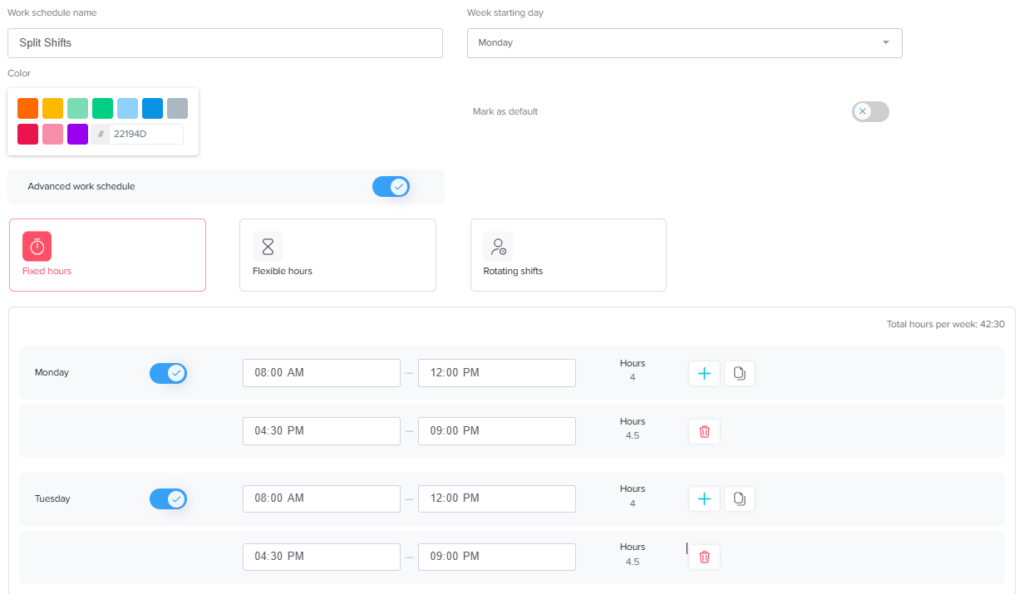
Consider this schedule:
- 8:00 AM to 12:00 PM: Work
- 12:00 PM to 4:30 PM: Off duty
- 4:30 PM to 9:00 PM: Work
The four and a half hour gap is not simply a long lunch. It is a separate period between two working sessions.
Now compare that with:
- 8:00 AM to 12:00 PM: Work
- 12:00 PM to 12:30 PM: Meal
- 12:30 PM to 4:30 PM: Work
That is generally one continuous shift containing a meal period rather than a split shift.
Keeping these categories separate makes payroll records and timesheets much easier to understand.
How Should Breaks Be Tracked During Split Shifts?
Breaks should be recorded according to their actual purpose and the laws that apply to the employee.
Under the U.S. Fair Labor Standards Act (FLSA), federal law does not generally require employers to provide meal or rest periods, although state laws may impose additional requirements. When employers do provide short rest breaks, typically between 5 and 20 minutes, those breaks are generally counted as compensable working time. Bona fide meal periods, typically 30 minutes or longer, may generally be unpaid when the employee is completely relieved of duties.
A practical time tracking structure could look like this:
| Time Type | Usually Counted as Work Time Under U.S. Federal Rules? | Example |
|---|---|---|
| Active work | Yes | Serving customers, completing tasks |
| Short rest break | Generally yes | 10 or 15-minute rest |
| Bona fide meal period | Generally no if completely relieved from duty | 30-minute unpaid lunch |
| True off-duty split gap | Generally no | Several hours free between shifts |
| Required waiting time | May be compensable | Employee must remain available for work |
| Work performed during a break | Yes | Answering calls or serving customers |
State and local requirements may be more protective than federal rules, so this table should be treated as a general U.S. federal framework rather than a universal payroll rule.
What Happens If an Employee Works During the Split Shift Gap?
A gap should not automatically be treated as unpaid simply because the schedule calls it a break.
Imagine an employee’s schedule says:
- 9:00 AM to 1:00 PM: Work
- 1:00 PM to 5:00 PM: Off duty
- 5:00 PM to 9:00 PM: Work
During the scheduled gap, however, the manager asks the employee to:
- Respond to customer calls
- Watch a company phone
- Complete reports
- Monitor a system
- Stay at the workplace waiting for customers
- Handle deliveries
- Answer work messages
- Perform administrative tasks
Now the situation may be different.
Under federal rules, waiting periods can count as working time when employees cannot effectively use that time for their own purposes because the employer continues to control the time.
This is why time tracking should record what actually happened, not simply what the original schedule expected to happen.
Example: Split Shift With an Unpaid Meal Break
A split shift can also contain a normal meal break within one of its working periods.
Suppose an employee works:
Morning shift
7:00 AM to 11:00 AM = 4 hours
Split-shift gap
11:00 AM to 3:00 PM = off duty
Evening shift
3:00 PM to 8:00 PM = 5 hours
During the evening shift, the employee takes a fully relieved 30-minute unpaid meal period.
The calculation becomes:
Morning work: 4 hours
Evening scheduled period: 5 hours
Unpaid meal: -0.5 hours
Total working time = 8.5 hours
The four hour split gap is excluded separately from the 30 minute meal period.
This distinction matters because a time tracking system should not classify every unpaid period under the same category.
Split Shifts and Overtime
Split shifts do not create a separate method for calculating overtime. Employers still need to total the employee’s compensable working time according to the overtime rules that apply in the relevant jurisdiction.
For employees covered by the U.S. FLSA and eligible for overtime, federal overtime generally applies after more than 40 hours of work in a defined workweek and must be paid at no less than one and one-half times the employee’s regular rate.
The important point is that employers should add actual hours worked across every work period, rather than calculating the length of time between the day’s first clock in and final clock out.
For example:
| Day | Morning Hours | Evening Hours | Daily Total |
|---|---|---|---|
| Monday | 4 | 4 | 8 |
| Tuesday | 4 | 4 | 8 |
| Wednesday | 4 | 4 | 8 |
| Thursday | 4 | 4 | 8 |
| Friday | 4 | 4 | 8 |
| Weekly Total | 20 | 20 | 40 hours |
Even though each employee’s day may span 12 or 13 elapsed hours, this example contains 40 actual work hours.
If the employee then works another three compensable hours during the same workweek, the weekly total becomes 43 hours. For a covered, nonexempt employee subject to the standard federal rule, those additional three hours would generally fall into overtime.
However, some states impose additional daily overtime or other wage rules, so businesses should not rely exclusively on the federal 40 hour threshold.
Do Split Shifts Require Extra Pay?
Not everywhere.
There is no universal rule stating that every employee working a split shift must receive a special premium. Requirements depend on the employee’s jurisdiction, industry, wage level, and other circumstances.
California is a useful example of why location matters. California wage rules can require qualifying employees working split shifts to receive additional split-shift compensation. The state’s Division of Labor Standards Enforcement explains that workers earning minimum wage may be entitled to an additional hour of pay at the applicable minimum wage for a qualifying split shift, while the calculation can differ for employees earning above minimum wage.
Employers operating across multiple states or countries should therefore avoid applying one split-shift rule to everyone.
A better approach is to configure policies by:
- Employee work location
- Applicable labor law
- Employee classification
- Pay structure
- Industry
- Collective bargaining agreement, where relevant
- Company policy
Split Shifts That Cross Midnight
Time tracking becomes even more important when one of the work periods crosses midnight.
For example:
- First period: 4:00 PM to 8:00 PM
- Off duty: 8:00 PM to 11:00 PM
- Second period: 11:00 PM to 3:00 AM
The employee works:
4:00 PM to 8:00 PM = 4 hours
11:00 PM to 3:00 AM = 4 hours
Total = 8 working hours
However, the hours fall across two calendar dates.
Employers should define clearly how their system handles:
- Workdays
- Payroll days
- Workweeks
- Overnight shifts
- Overtime calculations
- Attendance dates
For payroll purposes, these concepts are not always identical to a simple calendar date. A time tracking system should preserve the actual timestamps instead of forcing employees to manually decide which date an overnight work period belongs to.
Split Shifts and PTO
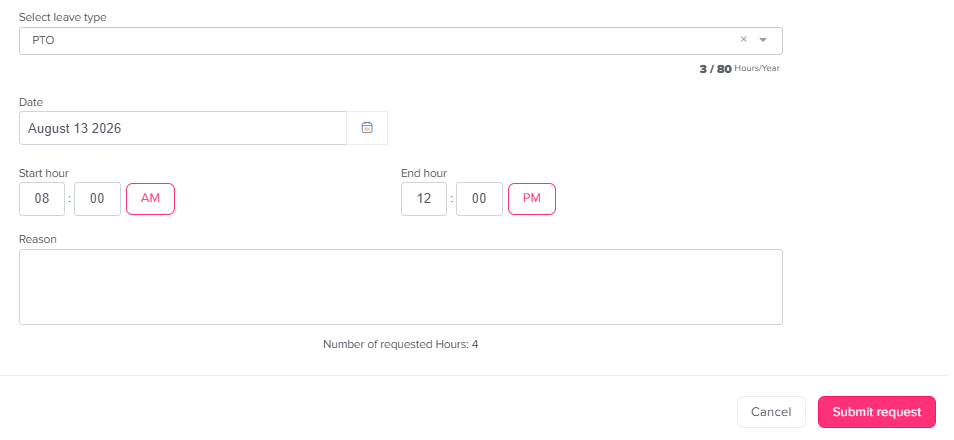
Split shifts can also create challenges when an employee requests paid time off.
Suppose an employee normally works:
- 8:00 AM to 12:00 PM
- 5:00 PM to 9:00 PM
Their normal scheduled working time is eight hours.
If the employee takes the entire day off and the company’s PTO policy replaces scheduled working hours, the relevant leave amount may be eight hours rather than the 13-hour span between 8:00 AM and 9:00 PM.
A more complicated situation occurs when the employee works one portion of the day but takes PTO for the other.
For example:
- Morning shift: worked 4 hours
- Evening shift: PTO for 4 scheduled hours
The employee record might show:
Worked time: 4 hours
PTO: 4 hours
Total accounted scheduled time: 8 hours
This is why organizations using split shifts benefit from keeping work schedules, time tracking, attendance, and leave records connected rather than managing each one in a different spreadsheet or system.
Day Off supports custom work schedules and combines leave management with attendance and time-tracking functionality, helping teams maintain a clearer relationship between scheduled hours, worked time, and employee absences.
How to Record Split Shifts on a Timesheet
A split shift timesheet should record each work period separately.
Instead of entering:
7:00 AM to 8:00 PM
enter:
Work period 1: 7:00 AM to 11:00 AM
Work period 2: 4:00 PM to 8:00 PM
This gives managers a clear record of:
- When work actually started
- When the first working period ended
- When the employee returned
- When the second period ended
- How long the off-duty gap lasted
- Whether paid or unpaid breaks occurred
- Total compensable hours
- Any corrections made later
This structure is much easier to review during payroll preparation or a timesheet audit.
Scheduled Hours vs Actual Hours
Split shift employers should also distinguish between scheduled hours and actual hours.
Imagine an employee is scheduled:
- 6:00 AM to 10:00 AM
- 4:00 PM to 8:00 PM
But actually works:
- 5:55 AM to 10:15 AM
- 3:50 PM to 8:20 PM
The schedule tells the employer what was expected.
The time record tells the employer what actually happened.
Those two records should not simply overwrite each other.
Tracking both makes it easier to identify:
- Early starts
- Late finishes
- Missed punches
- Unauthorized overtime
- Schedule changes
- Attendance issues
- Payroll discrepancies
- Staffing problems
Accurate time tracking should preserve the real work record while allowing managers to investigate legitimate exceptions.
Common Split Shift Time Tracking Mistakes
Calculating From First Clock In to Final Clock Out
This can significantly overstate working hours because the off-duty gap is included.
Always calculate each work period separately.
Treating Every Gap as Unpaid
A period is not necessarily unpaid simply because an employee is not actively completing a task.
If the employee remains under meaningful work restrictions, must continue performing duties, or cannot use the time effectively for personal purposes, the time may require different treatment under applicable law.
Treating a Split Shift Gap as a Meal Break
A normal meal period and a multi-hour split between work periods serve different purposes and should be recorded separately.
Forgetting Short Paid Breaks
Under U.S. federal rules, short employer-provided rest breaks of approximately 5 to 20 minutes are generally compensable working time.
Automatically deducting these periods can create inaccurate work hour totals.
Automatically Deducting Meals That Were Not Taken
An automatic meal deduction can become problematic when an employee actually works through the meal.
The Department of Labor notes that bona fide meal periods can generally be excluded when employees are completely relieved of duties.
Employers using automatic deductions should therefore have a process for reporting interrupted or missed meals.
Ignoring Work Outside the Scheduled Shift
Employees may perform work before their scheduled start, after clocking out, or during the split gap.
Accurate records should capture compensable work that was actually performed, not only scheduled hours.
Checking Overtime One Day at a Time
For employees covered by federal weekly overtime rules, employers must consider the entire defined workweek rather than viewing each day in isolation.
Applicable state rules should also be reviewed.
Best Practices for Split Shift Time Tracking
Create a Clear Split Shift Policy
Employees should know:
- What counts as a split shift
- When they should clock out
- When they should clock back in
- Whether they are free to leave during the gap
- How meal breaks are recorded
- How short rest breaks are treated
- What to do if they work during an off duty period
- How to report missed punches
- How timesheet corrections are handled
- Who approves time entries
Clear rules reduce the chance that employees and managers interpret the same schedule differently.
Use Separate Time Entries
Every separate work period should have its own start and end time.
This creates a much cleaner audit trail than one long entry with manually deducted hours.
Preserve Exact Clock Times
Do not rely only on a final daily total such as “8 hours.”
Keep the underlying information:
- Clock in
- Clock out
- Break periods
- Return time
- Corrections
A detailed record makes unusual days much easier to investigate.
Connect the Schedule With Time Tracking
The schedule answers:
When was the employee expected to work?
The time record answers:
When did the employee actually work?
Comparing the two can help managers identify exceptions without changing the original time record.
Track PTO Separately From Worked Time
PTO is not the same as active work.
For a partial split-shift absence, record the hours worked and PTO separately so HR can understand exactly how the employee’s scheduled day was covered.
Review Local Labor Requirements
Break laws, overtime rules, minimum wage requirements, and split-shift premiums differ between locations.
The U.S. Department of Labor specifically notes that although the FLSA generally does not mandate meal and rest periods, individual states may have their own requirements.
Organizations with employees in several locations may therefore need different rules for different groups.
How Time Tracking Software Helps With Split Shifts
Manual spreadsheets can work for a very small team, but split shifts quickly create complicated records.
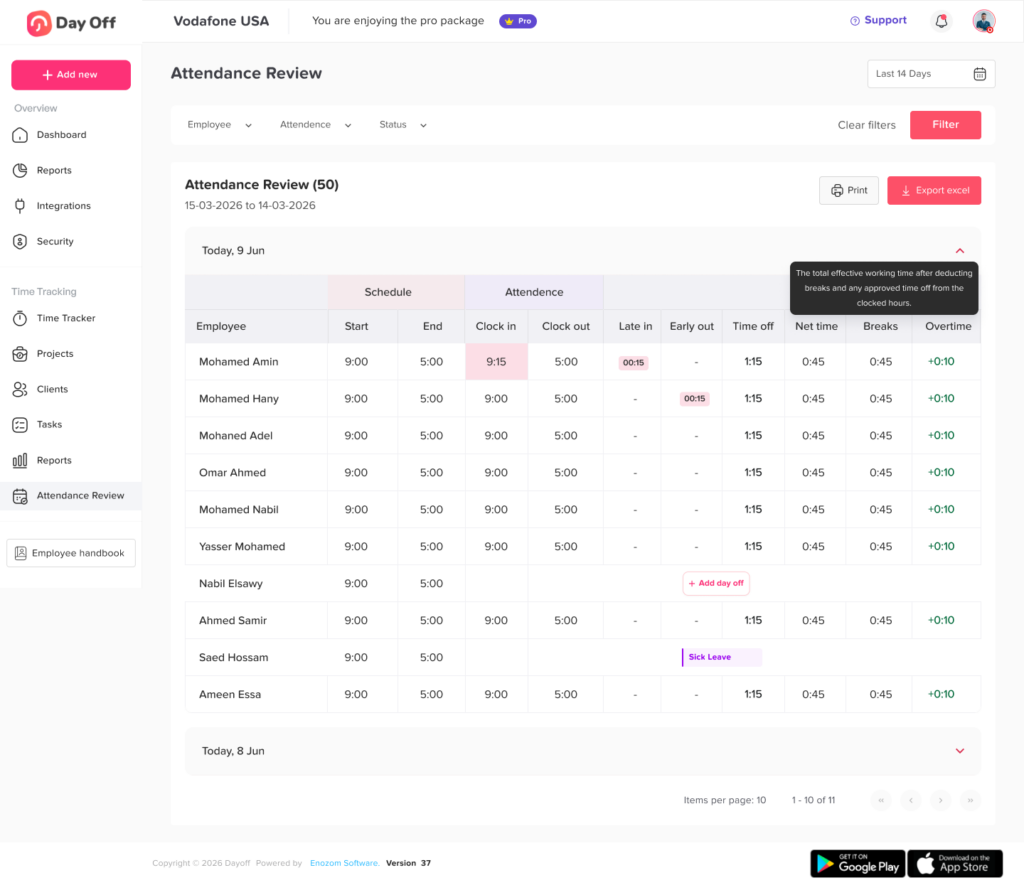
A good time tracking system should allow organizations to record:
- Multiple work sessions per day
- Exact start and end times
- Breaks
- Projects or tasks
- Daily and weekly totals
- Attendance
- Schedule differences
- PTO
- Overtime
- Timesheet corrections
- Manager reviews
- Historical records
Instead of trying to reconstruct the day from a single eight-hour total, HR can see how that time was actually distributed.
For example:
7:00 AM: Work begins
11:00 AM: First work period ends
4:00 PM: Second work period begins
8:00 PM: Work ends
The system can then calculate the two work blocks rather than incorrectly counting the entire 13-hour span.
Why Accurate Split Shift Records Matter Beyond Payroll
Time tracking is often viewed mainly as a payroll requirement, but reliable split-shift data can help businesses make better operational decisions.
Managers can analyze:
Staffing Demand
Are split shifts actually necessary, or could schedules be reorganized?
Labor Costs
Which periods require the most staffing, and which periods have excess capacity?
Employee Workload
Are certain employees regularly covering unusually long days even when their paid hours appear normal?
Overtime Risk
Are second shifts repeatedly pushing employees beyond overtime thresholds?
Scheduling Quality
Are employees being called back too frequently because forecasts underestimate demand?
Attendance
Are late returns after the split period becoming common?
PTO Coverage
Can employees take leave during one portion of a split shift without leaving another period understaffed?
Good time data gives managers more than a payroll total. It creates a clearer picture of how the workday actually operates.
Example Split Shift Time Tracking Workflow
A simple process can make split shifts much easier to manage.
Step 1: Build the Employee’s Schedule
Record both expected work periods separately.
For example:
Morning: 8:00 AM to 12:00 PM
Evening: 5:00 PM to 9:00 PM
Step 2: Employee Starts the First Work Period
The employee records the beginning of actual work.
Step 3: Employee Ends the First Work Period
When the first shift ends, the employee stops the timer or clocks out.
Step 4: Off-Duty Gap Begins
The gap remains outside working time when it qualifies as genuine off-duty time under applicable rules.
Step 5: Employee Returns
The employee begins a new work session.
Step 6: Record Any Breaks
Meal periods and other breaks should be categorized correctly according to company policy and applicable law.
Step 7: End the Second Work Period
The employee records the final clock-out.
Step 8: Review Daily Hours
The system or manager adds the separate work sessions.
Step 9: Review Weekly Totals
Managers check total compensable hours against overtime requirements and other payroll rules.
Step 10: Resolve Exceptions Before Payroll
Missing punches, interrupted breaks, unscheduled work, or incorrectly categorized time should be corrected before payroll records are finalized.
FAQs
How do you calculate hours for a split shift?
Calculate each working period separately and then add them together. For example, an employee who works 8:00 AM to 12:00 PM and 5:00 PM to 9:00 PM works eight hours in total. The five-hour gap between the shifts should not simply be added to working time if it qualifies as genuine off-duty time.
Is the time between split shifts paid?
It depends on the circumstances and applicable labor law. Under U.S. federal rules, a sufficiently long period when an employee is completely relieved of duties and can use the time effectively for personal purposes can generally be excluded from hours worked.
If the employer continues to restrict the employee or requires work during the gap, the analysis may be different.
Does a split shift count as overtime?
Working a split shift does not automatically mean the employee earns overtime. Overtime depends on total compensable hours and the rules that apply to the employee. Under the standard federal FLSA rule for covered nonexempt employees, overtime generally applies after 40 hours worked in a workweek.
Some jurisdictions have additional requirements.
Is a split shift the same as taking a long lunch?
Not necessarily. A genuine split shift generally contains two distinct work periods separated by a substantial nonworking period. A normal meal break occurs within an otherwise continuous shift.
Do meal breaks count as hours worked?
Under U.S. federal rules, a bona fide meal period, commonly 30 minutes or longer, generally does not need to be counted as working time when the employee is completely relieved from duty. Short rest periods, generally 5 to 20 minutes, are typically compensable.
State laws may impose additional rules.
What if an employee answers work messages during the split-shift gap?
Employers should not assume that scheduled off-duty time remains nonworking time when the employee actually performs work. Work performed during a supposedly unpaid period should be reviewed under the applicable hours-worked rules.
Can an employee take PTO for only one part of a split shift?
A company may allow partial-day PTO depending on its policy. If an employee normally works four morning hours and four evening hours, for example, they may work one portion and use PTO for the scheduled hours missed in the other portion if the employer’s leave rules allow it.
Should each part of a split shift appear separately on a timesheet?
Yes, separate entries usually provide the clearest record. They make it easier to distinguish active work, the off-duty gap, meals, PTO, and any unscheduled work.
What is the best way to track split shifts?
Use a time tracking system that records exact start and end times for each work period rather than relying only on daily totals. Connecting those records with schedules, attendance, leave, and payroll preparation can reduce manual calculations and help managers identify discrepancies earlier.
Final Thoughts
Time Tracking for split shifts requires more detail than simply recording when an employee first arrives and finally leaves. Each working period should be recorded separately, legitimate off-duty gaps should be distinguished from meals and paid breaks, and actual hours should be reviewed against overtime and payroll requirements.
The most important principle is to track what actually happens during the day. A scheduled gap may be unpaid when the employee is genuinely off duty, but work performed during that period should not disappear from the record. Likewise, short breaks, meal periods, PTO, and overnight hours should each be categorized correctly rather than combined into one generic “break” entry.
For organizations that regularly use split shifts, connecting schedules with attendance, PTO, and time tracking can make the entire process much easier to manage. Clear records help HR prepare payroll, help managers understand staffing patterns, and give employees a more transparent view of how their working hours are recorded.