




Managing several projects at the same time becomes difficult when you cannot clearly see where employees are spending their working hours. Learning how to Track Employee Hours across multiple projects gives businesses a more accurate picture of workloads, labor costs, project progress, and productivity. Instead of knowing only that an employee worked eight hours, project-based time tracking shows whether those hours were spent on Project A, Project B, internal work, meetings, administration, or another activity.

This level of detail matters for agencies, software companies, consulting firms, construction businesses, professional service providers, remote teams, and any organization where employees regularly divide their day between different clients, projects, or responsibilities.
Good project time tracking is not about monitoring every minute of an employee’s day. It is about creating reliable records that help businesses answer practical questions: Which projects consume the most resources? Are teams spending more hours than planned? Which projects are profitable? Is someone overloaded? Are client invoices based on accurate records?
This guide explains how to build an effective system for Track Employee Hours across multiple projects without making time reporting unnecessarily complicated.
What Does It Mean to Track Employee Hours Across Multiple Projects?
Track Employee Hours across multiple projects means recording not only when an employee works, but also where their working time is allocated.
For example, an employee may work eight hours during one day but divide that time between several activities:
- 3 hours on a client website project
- 2 hours on an internal software project
- 1.5 hours in meetings
- 1 hour handling customer support
- 0.5 hours on administrative work
Traditional attendance tracking might record only that the employee worked eight hours.
Project time tracking records how those eight hours were distributed.
That distinction is important because attendance records and project records serve different purposes.
| Tracking Type | What It Records | Main Purpose |
|---|---|---|
| Attendance tracking | When employees start and finish work | Payroll, attendance, overtime, and workforce management |
| Project time tracking | Which project or task receives the employee’s working time | Project costing, billing, planning, and profitability |
| Task time tracking | Time spent on individual activities | Productivity analysis and detailed project management |
| Billable time tracking | Hours that can be charged to a client | Client invoicing and revenue calculation |
Why Track Employee Hours by Project Matters
A simple employee timesheet can tell you how many hours someone worked. It cannot necessarily tell you what the business received from those hours.
When employees work across multiple projects, project-level tracking provides additional context.
Better Project Cost Control
Labor is often one of the largest project expenses.
If you know how many hours employees spend on a project and understand their labor cost, you can estimate the actual staffing cost of that project.
A basic calculation is:
Project labor cost = Employee hours on project × Employee hourly labor cost
For example, suppose three employees work on a project:
- Employee A: 20 hours at a labor cost of $30 per hour
- Employee B: 10 hours at $40 per hour
- Employee C: 5 hours at $50 per hour
The project’s labor cost would be:
- Employee A: $600
- Employee B: $400
- Employee C: $250
Total labor cost = $1,250
Without project-level time records, the company may have difficulty calculating this cost accurately.
More Accurate Client Billing
For businesses that charge clients based on time, accurate timesheets are essential.
Law firms, consultancies, agencies, developers, contractors, designers, accountants, and other professional service organizations may need to distinguish between:
- Billable hours
- Non billable hours
- Internal work
- Client meetings
- Administrative work
- Rework
- Support hours
Recording these categories helps prevent both underbilling and overbilling.
Better Workload Visibility
Project tracking also helps managers understand how employee capacity is being used.
An employee assigned to five projects may appear available when looking at only one project calendar. Once all assignments are considered, the employee may already be working at full capacity.
Tracking hours across projects makes workload problems easier to identify.
More Realistic Project Estimates
Historical time data improves future planning.
Suppose a business originally estimated that a particular type of project would require 100 hours. After completing five similar projects, the average actual requirement turns out to be 145 hours.
Future estimates can then be adjusted using real operational data instead of assumptions.
Improved Project Profitability Analysis
Revenue alone does not tell you whether a project is successful.
A $20,000 project that requires $8,000 in labor is very different from a $20,000 project that consumes $18,000 in labor.
Accurate project time records allow businesses to compare:
Project revenue – labor costs – other project costs = estimated project profit
Time tracking therefore becomes an important source of financial information.
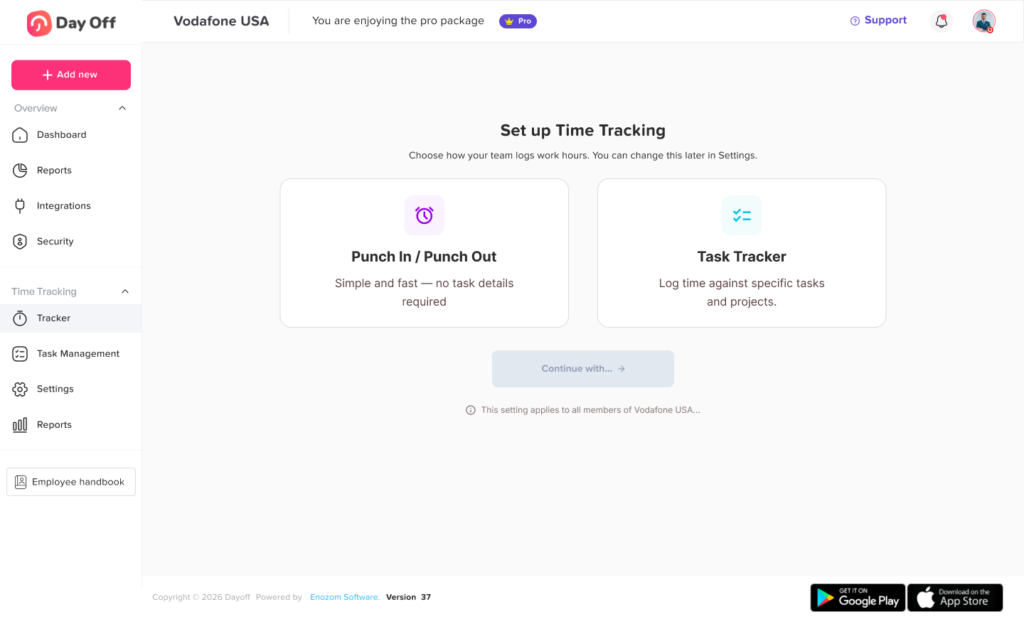
How to Track Employee Hours Across Multiple Projects
A reliable system requires more than asking employees to write down what they worked on at the end of the week.
The process should be simple enough for employees to follow consistently while producing useful data for managers.
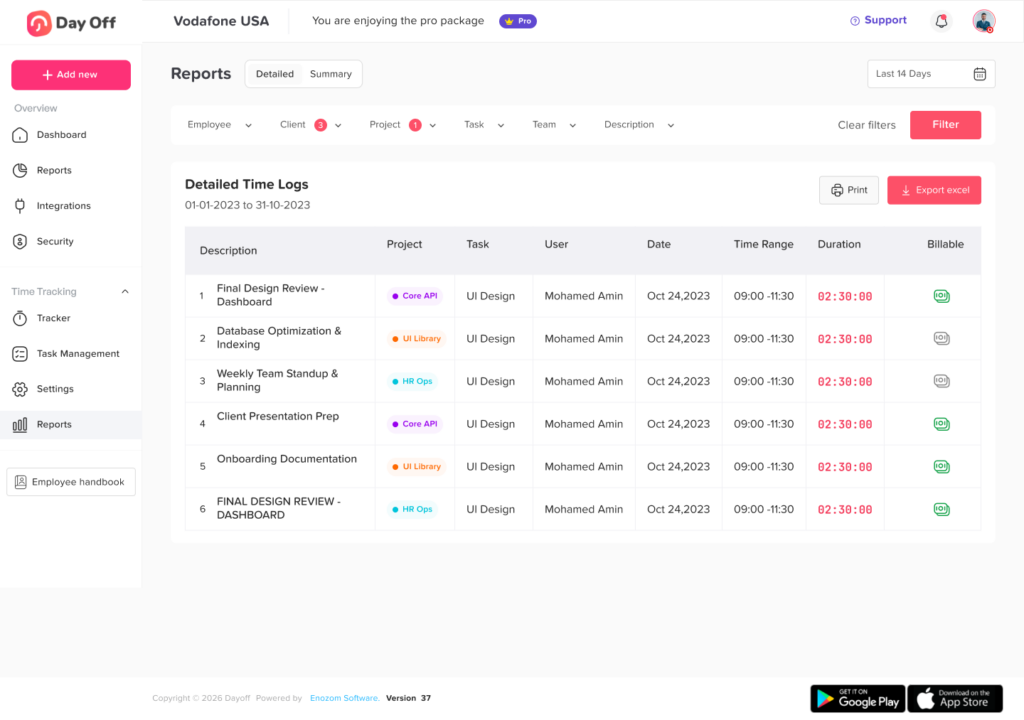
Create a Clear Project Structure
Begin by deciding what employees should track their hours against.
This might include:
- Client projects
- Internal projects
- Departments
- Campaigns
- Products
- Development projects
- Customer accounts
- Support activities
- Research
- Training
- Administrative work
Avoid creating too many unnecessary categories.
If employees must search through hundreds of project names every time they log an hour, time tracking quickly becomes frustrating.
A good project structure usually includes:
Project name
Use clear and recognizable names.
Instead of:
Project 0274
Consider:
Acme Website Redesign
Client or Department
If appropriate, associate the project with a specific client, department, business unit, or cost center.
Project Owner
Assign someone responsible for reviewing time, budget, progress, or approvals.
Project Status
Projects should usually have a clear status such as:
- Planned
- Active
- On hold
- Completed
- Archived
Archived projects should generally stop appearing in employees’ active project lists.
Decide How Detailed Time Tracking Should Be
Businesses need to determine whether employees should track only project hours or individual tasks as well.
For example:
Project level tracking
Website Redesign: 6 hours
Task level tracking
Website Redesign:
- Homepage development: 2 hours
- Checkout testing: 1.5 hours
- Mobile optimization: 1.5 hours
- Client revisions: 1 hour
Task level tracking provides more detail, but it also requires more employee effort.
The right level depends on what the organization actually needs to analyze.
If management will never use extremely detailed task records, requiring employees to create them may simply increase administrative work.
Use a Timer or Timesheet
There are two main ways employees can record project hours.
Real Time Timer
The employee starts a timer when beginning a task or project and stops it when switching activities.
For example:
9:00 AM: Start Project A
10:45 AM: Stop Project A
10:45 AM: Start Project B
12:15 PM: Stop Project B
Timers can be useful when employees switch frequently between assignments.
The main advantage is accuracy. Employees do not need to remember several hours later how long each task took.
However, employees must remember to start, stop, and switch timers correctly.
Manual Timesheet
Employees enter their time manually.
For example:
| Time | Project | Task | Hours | Type |
|---|---|---|---|---|
| 9:00-11:00 | Client A | Website development | 2.0 | Billable |
| 11:00-12:00 | Internal | Team meeting | 1.0 | Non-billable |
| 1:00-3:30 | Client B | Reporting dashboard | 2.5 | Billable |
| 3:30-5:00 | Client A | Bug fixes | 1.5 | Billable |
Manual timesheets provide flexibility, especially for employees whose work does not require constant timer use.
Some organizations combine both methods. Employees can run timers during focused work and manually correct or complete their timesheets later.
Require Employees to Select a Project
One of the most common problems with Track Employee Hours is having hours recorded without knowing what they belong to.
For example:
Employee worked: 40 hours
But management cannot determine whether those hours were spent on:
- Client projects
- Internal projects
- Administration
- Training
- Meetings
- Business development
Requiring employees to assign working time to a project or activity creates much more useful records.
Organizations should also provide an approved category for legitimate work that does not belong to a client project, such as:
- Internal operations
- Training
- Meetings
- Administration
- Research
- Business development
Otherwise, employees may choose random client projects simply because they need somewhere to record the time.
Separate Billable and Non Billable Hours
Businesses that charge clients for services should distinguish between billable and non billable work.
Billable Hours
These are hours that can generally be charged to a client according to the contract or billing arrangement.
Examples may include:
- Development
- Consulting
- Design
- Client specific analysis
- Implementation
- Approved client meetings
Non Billable Hours
These hours are still working time, but they are not invoiced directly to the client.
Examples can include:
- Internal meetings
- Employee training
- Administrative tasks
- General business development
- Internal planning
Some project work may also be non-billable depending on the client agreement.
Tracking the distinction helps businesses calculate important metrics such as billable utilization.
A simple formula is:
Billable utilization rate = Billable hours ÷ Total eligible working hours × 100
For example:
If an employee records 120 eligible working hours during a month and 90 are billable:
90 ÷ 120 × 100 = 75% billable utilization
This does not automatically mean higher utilization is always better. Appropriate targets depend heavily on the employee’s role. Managers, internal teams, and employees with significant administrative responsibilities may naturally have lower billable percentages.
Make Project Switching Easy
Employees who regularly work on multiple projects need an easy way to move between assignments.
If switching projects takes too many steps, employees are more likely to:
- Forget to switch
- Leave timers running
- Estimate their hours later
- Record everything under one project
- Avoid tracking small tasks
A useful time tracking workflow should allow employees to quickly select:
- Project
- Task, when required
- Time entry or timer
- Billable or non billable status, if relevant
The easier this process becomes, the more reliable the data is likely to be.
Compare Project Hours With Total Working Hours
Project hours should make sense when compared with the employee’s overall workday.
Suppose an employee’s attendance records show:
8 hours worked
But the project timesheet shows:
10.5 project hours
That discrepancy needs investigation.
Similarly, an employee might record eight attendance hours but only five project hours.
The missing three hours could represent:
- Meetings
- Administrative work
- Breaks
- Training
- Forgotten entries
- Incorrect tracking
The goal is not necessarily to make every category equal. Different systems may intentionally treat breaks, leave, travel, or other activities differently.
The important point is that managers should understand the reason for significant differences.
Establish Rules for Overlapping Time Entries
A good project tracking policy should explain whether overlapping time entries are allowed.
Consider this example:
Project A: 10:00 AM to 12:00 PM
Project B: 11:00 AM to 1:00 PM
The employee has recorded four project hours during a three-hour period.
In most normal work situations, this represents a tracking problem.
Systems should therefore either prevent overlapping time entries or flag them for review.
There may be exceptional situations where an organization intentionally allocates costs differently, but these should be handled through clearly defined accounting rules rather than accidental duplicate time entries.
Create a Consistent Time Entry Policy
Employees need to know exactly what is expected.
Your time tracking policy should answer questions such as:
- When should time be recorded?
- Should employees use timers or manual entries?
- How detailed should task descriptions be?
- Which projects should be used?
- Where should internal work be recorded?
- How are meetings categorized?
- How are corrections made?
- Who approves timesheets?
- When are timesheets due?
- How should billable work be identified?
- How should project switching be handled?
Consistency is more important than excessive detail.
A short, understandable policy that employees actually follow is generally more useful than a complicated 20-page procedure.
Ask Employees to Record Time Daily
Weekly time entry may seem convenient, but recalling exactly how Monday’s eight hours were divided between four projects on Friday afternoon can be difficult.
Employees may begin estimating:
- About 3 hours on Project A
- Maybe 2 hours on Project B
- Probably 2 hours in meetings
- 1 hour somewhere else
Those estimates can gradually reduce the reliability of project reports.
Recording time during the workday or shortly after completing work usually produces better data.
A practical rule is to encourage employees to complete their timesheets before finishing each workday.
Introduce Timesheet Approvals
Project time records should be reviewed before they are used for:
- Payroll
- Client invoices
- Project reports
- Budget analysis
- Cost calculations
A basic workflow might look like this:
Employee records time → Employee submits timesheet → Manager reviews → Corrections made if required → Manager approves
For client-focused organizations, the project manager may need to review the project allocation while another manager handles attendance or payroll approval.
The approval structure should match the organization’s responsibilities.
Track Project Budgets in Hours
Project budgets do not always need to be expressed only in money.
They can also be measured in hours.
For example:
Website redesign budget: 300 hours
After several weeks:
Hours used: 210
The company has consumed:
210 ÷ 300 × 100 = 70% of the project hour budget
If only 50% of the work is complete, management may need to investigate why the project is consuming hours faster than planned.
This can reveal problems before the final deadline.
Monitor Estimated Hours vs. Actual Hours
Tracking only actual hours tells you what happened.
Comparing estimates with actuals helps improve future decisions.
| Task | Estimated Hours | Actual Hours | Variance |
|---|---|---|---|
| Research | 10 | 12 | +2 |
| Design | 25 | 31 | +6 |
| Development | 60 | 75 | +15 |
| Testing | 20 | 18 | -2 |
| Launch | 10 | 12 | +2 |
In this example, development required significantly more time than expected.
Managers can investigate whether this was caused by:
- Scope changes
- Technical complexity
- Incorrect estimates
- Additional client requests
- Rework
- Staffing issues
- Poor requirements
Over time, this analysis makes project estimates more realistic.
Track Project Labor Costs
Hours become even more useful when combined with cost information.
Suppose an employee records 40 hours on a project and their internal labor cost is $35 per hour.
40 × $35 = $1,400
If another employee spends 20 hours at $50 per hour:
20 × $50 = $1,000
Total labor cost:
$1,400 + $1,000 = $2,400
Managers can compare this figure with:
- Project revenue
- Project budget
- Other expenses
- Planned labor costs
This provides a much better view of project financial performance.
Keep in mind that an employee’s internal labor cost may include more than their base wage. Some organizations include payroll taxes, benefits, insurance, equipment, or other employment-related costs when calculating fully loaded labor costs.
Watch for Scope Creep
One of the most valuable uses of project time tracking is identifying scope creep.
Scope creep happens when a project gradually requires more work than originally planned.
For example, a client may repeatedly request:
- Additional revisions
- Extra reports
- New features
- Additional meetings
- Unplanned integrations
- New deliverables
Individually, each request may seem small.
Over several months, however, they can consume dozens or hundreds of additional hours.
Project time records create evidence that managers can use when deciding whether to:
- Adjust deadlines
- Increase budgets
- Renegotiate contracts
- Charge for additional work
- Reduce project scope
Use Project Tags and Categories
As a business grows, project names alone may not provide enough reporting structure.
Tags can help organize records by:
- Client
- Department
- Service
- Product
- Location
- Project type
- Billing status
- Cost center
For example, a marketing agency may categorize work as:
Client: Company ABC
Project: Summer Campaign
Service: Social Media
Task: Video Editing
This makes it possible to analyze time at several levels rather than reviewing hundreds of individual entries.
Avoid Excessive Time Tracking Categories
Detailed data can be useful, but there is a point where additional categories create more problems than insights.
Imagine requiring an employee to choose from:
- Project
- Client
- Department
- Task
- Subtask
- Activity
- Work type
- Billing category
- Campaign
- Cost center
for every time entry.
Employees may spend more time managing the tracking system than recording useful information.
Before adding a field, ask:
ill someone actually use this information to make a decision?
If the answer is no, the field may not be necessary.
Handle Small Tasks Consistently
Employees often perform short activities throughout the day:
- Answering emails
- Responding to Slack or Teams messages
- Reviewing documents
- Taking quick client calls
- Helping another employee
Trying to track every two minute activity can become disruptive.
Companies should define a practical method.
For example, small activities could be:
- Added to the related project
- Grouped into one daily entry
- Recorded under an administrative category
The exact method matters less than consistency.
Include Meetings in Project Time
Meetings consume real employee capacity.
Ignoring meetings can make project reports misleading.
If four employees attend a one-hour project meeting, the project has consumed four employee-hours, not one.
Those hours may need to be included when evaluating:
- Project cost
- Project workload
- Project profitability
- Capacity
Companies should determine whether different meeting types are categorized as billable or non billable according to their business model and client agreements.
Track Leave Separately From Project Hours
Vacation, sick leave, public holidays, and other absences generally should not be entered as project work.
Project tracking and leave tracking answer different questions.
A complete workforce view might show:
40 scheduled hours
Including:
- 28 project hours
- 4 internal administration hours
- 4 training hours
- 4 approved PTO hours
This makes employee availability much easier to understand.
Without integrating schedule and absence information, managers may mistakenly assume all scheduled hours are available for project work.
Account for Different Work Schedules
Not every employee works the same schedule.
One person may work:
- 8 hours per day, Monday through Friday
Another may work:
- Four 10-hour days
Another may follow:
- Flexible working hours
Project utilization should therefore be evaluated against each employee’s actual working capacity instead of assuming everyone has identical availability.
For example:
Employee A has 160 scheduled working hours during the month.
They have:
- 16 PTO hours
- 8 holiday hours
Their available working capacity may therefore be approximately:
160 – 16 – 8 = 136 hours
That provides a more realistic base for project planning.
Important Project Time Tracking Metrics
Collecting time is only useful if the information helps managers make decisions.
Several metrics are particularly valuable.
Project Hours
Total employee time recorded against a project.
Hours by Employee
Shows how project workload is distributed between team members.
Hours by Task
Helps identify the parts of a project consuming the most resources.
Estimated vs. Actual Hours
Measures whether project planning was realistic.
Variance = Actual hours – Estimated hours
Project Budget Utilization
Shows how much of an hour-based project budget has been consumed.
Budget utilization = Hours used ÷ Budgeted hours × 100
Billable Utilization
For roles where billable time is relevant:
Billable utilization = Billable hours ÷ Eligible working hours × 100
Labor Cost
Labor cost = Project hours × Labor cost per hour
Revenue per Billable Hour
For service businesses:
Revenue per billable hour = Project revenue ÷ Billable hours
These metrics should be interpreted in context. For example, lower billable utilization is not automatically negative if an employee’s responsibilities include management, training, administration, or internal development.
How Often Should Managers Review Project Hours?
Waiting until a project is complete removes much of the value of time tracking.
Managers should review hours while there is still time to correct problems.
The appropriate frequency depends on project duration.
Daily
Useful for:
- Very short projects
- Hourly client work
- Fast-moving operational teams
Weekly
Suitable for many project-based organizations.
Weekly reviews can identify:
- Missing timesheets
- Budget overruns
- Employee overload
- Unexpected task hours
- Project delays
Monthly
Useful for broader management reporting, profitability analysis, and capacity planning.
For many organizations, daily employee entry combined with weekly manager review provides a practical balance.
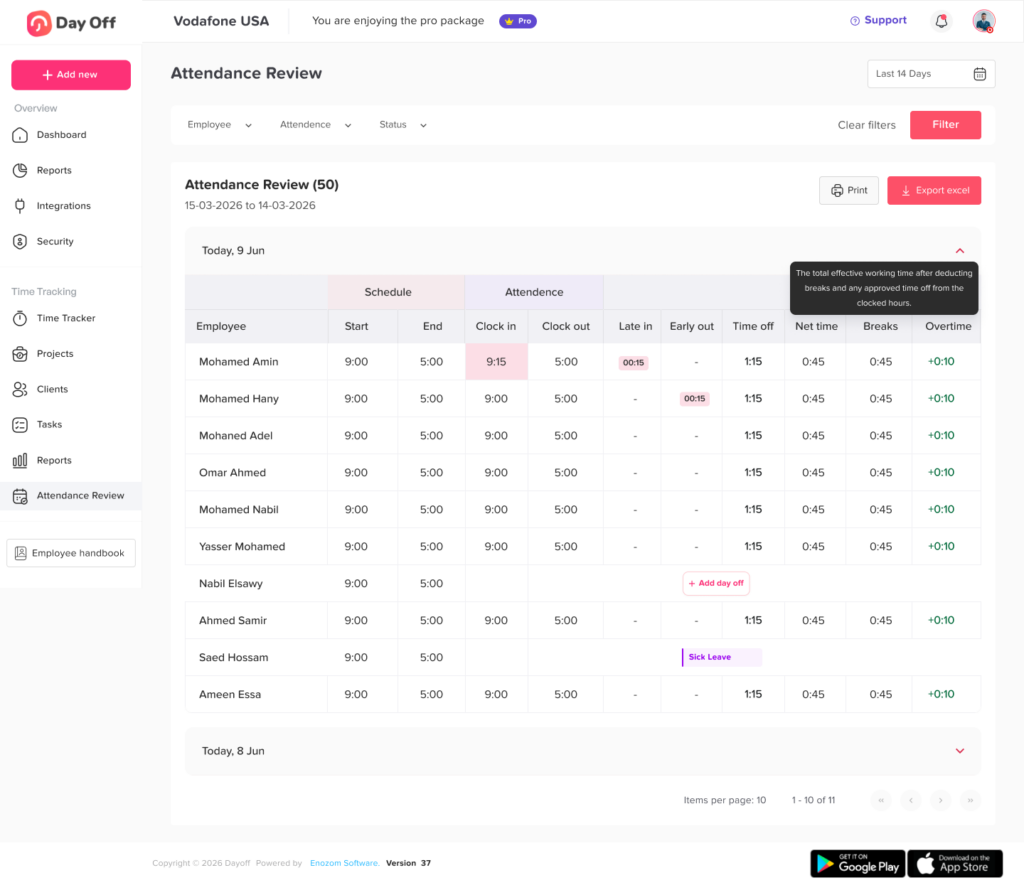
How to Introduce Project Track Employee Hours
Employees may resist a new time tracking system if they believe its purpose is constant surveillance.
Managers should explain why project level records are being collected.
For example:
- Improve project estimates
- Understand workloads
- Prevent employee over-allocation
- Improve client billing
- Reduce manual timesheets
- Identify projects requiring additional resources
- Improve project profitability
Employees should also know:
- What they need to record
- How detailed entries should be
- Who can see their timesheets
- When entries are due
- How corrections work
- How the organization uses the data
Transparency makes implementation easier.
How to Choose Software for Track Employee Hours Across Projects
Spreadsheets can work for very small teams, but they become difficult to manage as the number of employees and projects increases.
A project time tracking system should ideally make common tasks simple.
Look for features such as:
Project Based Time Entries
Employees should be able to assign time to a specific project.
Task Tracking
Useful when managers need to understand where project hours are being spent.
Timer
Real-time timers reduce reliance on memory.
Manual Entries
Employees may still need to record offline work, meetings, or forgotten entries.
Timesheets
Managers should be able to review daily or weekly employee hours.
Project Reports
Reports should show hours by:
- Employee
- Project
- Task
- Date
- Client
Project Management
Completed projects should be archived while active assignments remain easy to access.
Approval Workflows
Managers may need to approve timesheets before payroll, billing, or financial reporting.
Work Schedule Information
Scheduled hours help managers understand employee capacity.
PTO and Leave Information
Approved leave should be considered when evaluating project availability.
Exporting
Businesses may need to export records for accounting, payroll, invoicing, or further analysis.
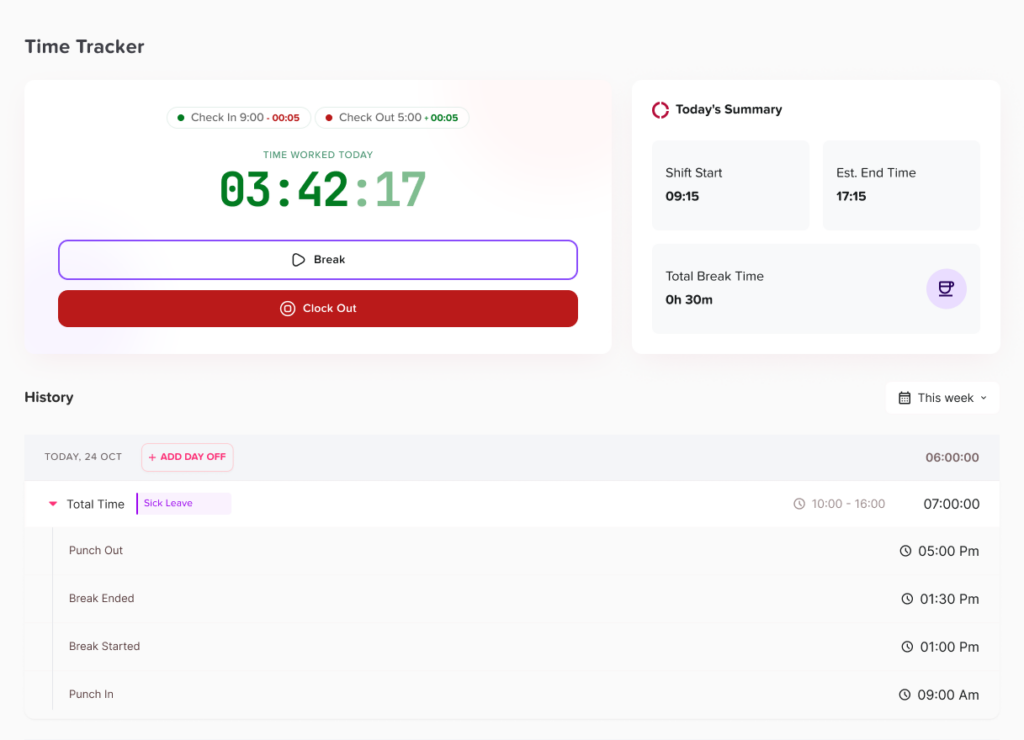
Spreadsheet vs. Project Time Tracking Software
A spreadsheet may be enough when:
- The team is very small
- Projects are limited
- Employees rarely switch projects
- Client billing is simple
- Detailed reporting is unnecessary
Dedicated software becomes more useful when:
- Employees work on several projects every day
- Dozens of projects are active
- Managers need real-time reports
- Timesheets require approval
- Project budgets must be monitored
- Labor costs need to be calculated
- Time entries affect client invoices
- Work schedules and leave affect capacity
The cost of a time tracking platform should be compared with the administrative time, billing errors, project overruns, and reporting limitations it may reduce.
Track Employee Hours Who Work on Many Projects
Some employees may switch between ten or more projects during a week.
For these teams, time tracking must be especially easy.
Consider using:
- Favorite projects
- Recently used projects
- Searchable project lists
- Project assignments
- Quick timer switching
- Default tasks
- Saved categories
Employees should not need to navigate through every company project when only five are relevant to their work.
How Project Time Tracking Improves Resource Planning
Historical timesheets can help answer an important planning question:
How much project work can the team realistically handle?
Suppose five employees each have approximately 140 available working hours during a month after planned leave, holidays, and internal commitments.
Total capacity:
5 × 140 = 700 hours
If existing projects already require 650 hours, the team has only about 50 hours of remaining capacity.
Accepting another estimated 200-hour project may require:
- Extending the deadline
- Moving another project
- Adding staff
- Hiring contractors
- Reducing scope
Without capacity data, businesses can accidentally commit to more work than the team can deliver.
Protect Time Tracking Data Quality
Management decisions are only as reliable as the data behind them.
A simple monthly review can look for:
- Missing project assignments
- Unusually long entries
- Duplicate entries
- Overlapping time
- Excessive unallocated hours
- Entries against completed projects
- Unexpected overtime
- Large estimate variances
- Missing timesheets
Rather than correcting records silently, managers should identify recurring causes and improve the underlying workflow.
Best Practices for Track Employee Hours Across Multiple Projects
For a system that employees can maintain consistently:
- Keep project names clear.
- Archive projects when they are completed.
- Avoid unnecessary tracking categories.
- Record time daily whenever practical.
- Give employees a category for internal work.
- Separate billable and non-billable hours when relevant.
- Require project selection for project-based work.
- Review timesheets regularly.
- Compare estimates with actual hours.
- Monitor project budgets before they are exhausted.
- Include meetings when they consume project resources.
- Account for PTO and employee schedules when calculating capacity.
- Make correcting legitimate mistakes simple.
- Explain why the organization tracks time.
- Use time data to improve planning rather than treating hours as the only measure of employee performance.
Frequently Asked Questions
What is the best way to track employee hours on multiple projects?
The best method is usually a project-based time tracking system where employees select a project or task before starting a timer or entering their hours manually. The system should allow managers to review timesheets, compare project hours with employee working time, and generate reports by project, employee, and date.
How do you track time spent on different projects?
Create separate projects in your time tracking system and require employees to assign each work session or timesheet entry to the appropriate project. Employees can use timers while working or enter their time manually throughout the day.
Can employees track time for more than one project per day?
Yes. Employees who work across multiple assignments can create separate entries for each project. For example, an eight-hour workday could contain three hours on Project A, two hours on Project B, two hours on Project C, and one hour of internal work.
How detailed should employee timesheets be?
Timesheets should contain enough information to support business decisions without creating unnecessary administrative work. In many organizations, the employee, date, project, task, duration, and billable status provide sufficient detail.
Should employees track every minute of their workday?
Not necessarily. The appropriate level of detail depends on the organization’s goals. Businesses should avoid creating a system so detailed that employees spend excessive time managing their timesheets. Consistent and useful project records are usually more valuable than extreme precision.
How often should employees submit timesheets?
Daily recording is useful because employees are less likely to forget what they worked on. Formal submission and approval may occur daily, weekly, or according to the company’s payroll and project management process.
How do you calculate project labor costs from employee hours?
Multiply the number of employee hours assigned to the project by the relevant hourly labor cost.
Project labor cost = Project hours × Hourly labor cost
If several employees work on the project, calculate each employee’s cost and add the results together.
How do you calculate employee project utilization?
One common method is:
Project utilization = Project hours ÷ Available working hours × 100
Businesses may also calculate billable utilization separately using billable hours rather than all project hours.
Can project time tracking help prevent employee burnout?
It can help managers identify workload patterns. If an employee consistently records unusually high hours or is assigned to more projects than their available capacity allows, managers can investigate and redistribute work. Time data should be combined with schedules, workload discussions, deadlines, and employee feedback rather than used alone.
What is the difference between time tracking and project management?
Time tracking records how working hours are spent. Project management covers a broader range of activities such as tasks, deadlines, responsibilities, dependencies, budgets, milestones, and project status. The two systems are often connected because time data helps managers understand the actual effort required to complete project work.
Conclusion
Knowing how to Track Employee Hours across multiple projects gives businesses much more than a record of when employees started and finished work. It creates visibility into where labor is being used, how quickly project budgets are being consumed, whether workloads are realistic, and how actual effort compares with original estimates.
The most effective system is not necessarily the one that collects the most data. It is the one employees can use consistently and managers can turn into useful decisions.
By assigning hours to clear projects, recording time regularly, separating billable and non-billable work when necessary, reviewing timesheets, and comparing actual hours with budgets and estimates, businesses can build a more accurate picture of project costs and employee capacity. Over time, that information can lead to better project planning, more reliable client billing, improved resource allocation, and stronger control over project profitability.