







A PTO reset date is the point when an organization closes one paid time off cycle and begins the next. Depending on the company’s leave policy, employees may receive a new annual allowance, continue accruing PTO, carry unused time into the new period, or have certain balances expire. Although the idea sounds simple, resetting leave balances correctly requires HR teams to account for accrual rules, carryover limits, approved future leave, employee eligibility, policy changes, and applicable employment laws.

A PTO reset should therefore be treated as more than a date on the HR calendar. It is an important control point for ensuring that every employee starts the new leave cycle with the correct balance.
This guide explains how PTO resets work, the different reset methods companies can use, what happens to unused leave, and what HR should review before and after a new leave year begins.
What Is a PTO Reset Date?
A PTO reset date is the date on which an employee’s current PTO or annual leave cycle ends and a new cycle begins.
January 1 is a common example.
A company might define its leave year as:
January 1 to December 31
When January 1 arrives, the company’s PTO rules for the new leave year take effect.
However, this does not necessarily mean every employee’s balance simply becomes zero and then receives a new allowance.
The actual calculation depends on the PTO policy.
For example, an employee could finish December 31 with 6 unused vacation days. If the company allows up to 5 days of carryover and provides 20 new vacation days each year, the employee might begin January 1 with:
20 new days + 5 carried-over days = 25 available days
The remaining 1 day would need to be handled according to the employer’s policy and applicable law.
In another company, employees may not receive 20 days immediately. Instead, the employee could carry 5 days into the new year and then continue earning additional PTO gradually each month.
The reset date therefore marks the transition between leave cycles rather than simply functioning as a button that sets every balance back to zero.
PTO Reset vs PTO Accrual vs Carryover vs Expiration
| PTO Rule | What It Controls | Example |
|---|---|---|
| PTO reset | When one leave cycle ends and another begins | January 1 |
| PTO accrual | How employees earn leave during the cycle | 1.67 days per month |
| PTO carryover | How much unused leave moves into the next cycle | Maximum 5 days |
| PTO expiration | When previously earned or carried leave stops being available, where permitted | Carryover expires March 31 |
| Accrual cap | Maximum balance an employee may accumulate before additional accrual stops | Maximum balance of 30 days |
These rules can work together.
For example, a company might have:
- January 1 PTO reset date
- 20-day annual vacation allowance
- Monthly accrual
- Maximum 5-day carryover
- March 31 expiration for eligible carried over leave
- 30-day overall accrual cap
HR needs to understand every component because changing one rule can affect the employee’s final available balance.
Does PTO Always Reset on January 1?
No, January 1 is convenient because it follows the calendar year, but employers can structure their leave cycles differently depending on their policies, workforce, payroll setup, and applicable laws.
Three common approaches are calendar or fixed date resets, fiscal year resets, and employee anniversary resets.
Calendar Year PTO Reset
The entire organization follows the same annual cycle.
For example:
January 1 to December 31
Everyone reaches the PTO reset date at the same time.
This structure can simplify administration because HR has one major annual balance review.
It can also make reporting easier because PTO usage aligns with calendar-year reporting.
However, HR may need rules for employees who join during the year.
An employee hired on September 1, for example, might receive:
- A prorated allowance
- PTO based on months remaining
- Normal accrual beginning on the hire date
- A waiting period before PTO becomes available
The employee would then join the organization’s regular January reset cycle.
Fiscal Year PTO Reset
Some organizations align leave with their financial or operational year instead.
For example:
July 1 to June 30
In this situation, July 1 becomes the annual PTO reset date.
A fiscal-year reset can be useful when workforce planning, budgeting, or annual policy reviews already operate around the fiscal year.
Anniversary Based PTO Reset
Instead of resetting everyone together, each employee receives a separate leave year based on their hire or employment anniversary.
For example:
Employee A hired March 12
Leave cycle:
March 12, 2026 to March 11, 2027
Reset:
March 12, 2027
Meanwhile, another employee hired October 5 would reset on October 5.
Anniversary-based leave years spread resets across the year and can make PTO entitlement easier to connect with an employee’s completed service.
The tradeoff is administrative complexity because HR may be managing dozens or hundreds of different reset dates.
| Reset Method | Example | Main Advantage | Main Challenge |
|---|---|---|---|
| Calendar year | January 1 | Simple company wide administration | Requires rules for mid-year hires |
| Fiscal year | July 1 | Aligns leave with business year | Employees must understand a less familiar leave cycle |
| Anniversary year | Employee hire date | Connects PTO directly to employee service | Many different reset dates must be tracked |
What Happens to PTO on the Reset Date?
There is no single calculation that applies to every employer.
At the end of the leave cycle, HR typically needs to determine four things:
- How much leave the employee has remaining.
- How much unused leave is eligible to carry forward.
- Whether any balance expires or is otherwise handled according to policy and law.
- How the employee receives leave during the new cycle.
A simplified calculation for a frontloaded policy could look like:
Opening New Balance = New Annual Entitlement + Eligible Carryover + Approved Adjustments
Consider an employee with:
- Annual allowance: 20 days
- PTO used: 15 days
- Remaining PTO: 5 days
- Carryover limit: 3 days
- New annual allowance: 20 days
The employee reaches the reset date with 5 unused days.
If 3 days are eligible for carryover, the new available balance becomes:
20 + 3 = 23 days
The remaining 2 days must be handled according to the company’s policy and applicable law.
The Calculation Changes With Accrued PTO
Suppose the company does not frontload the entire annual allowance.
Instead, the employee earns:
20 days ÷ 12 months = approximately 1.67 days per month
If the employee carries 3 days into January, they may begin the new cycle with only the carryover balance and receive additional PTO as accruals occur.
The employee might therefore see:
January opening balance: 3 carried-over days
Then, after the first monthly accrual:
3 + 1.67 = 4.67 days
This distinction is important.
An annual PTO reset does not automatically mean employees receive their entire yearly allowance immediately.
Does Unused PTO Disappear on the Reset Date?
Not necessarily, This is one of the most important issues for HR teams to understand.
At the federal level in the United States, the Fair Labor Standards Act generally does not require employers to provide paid vacation. Vacation benefits are normally determined by agreements or employer policies. State laws can impose additional requirements once vacation or PTO has been earned.
As a result, employers should not assume that placing a sentence such as “all PTO resets on January 1” in an employee handbook automatically allows earned balances to be erased.
State requirements differ considerably.
California Example
California treats earned vacation as wages. The California Division of Labor Standards Enforcement states that earned vacation cannot be forfeited through a “use it or lose it” policy.
Employers may instead use a reasonable accrual cap that stops employees from earning additional vacation once their balance reaches a specified level.
Colorado Example
Colorado similarly provides that earned and determinable vacation pay cannot be forfeited. Employers can establish accrual rates and caps, but already earned vacation cannot simply disappear because an employee reached the end of a leave year.
Illinois Example
Illinois takes a different approach. The Illinois Department of Labor explains that certain use it or lose it vacation policies may be permitted when employees receive proper notice and a reasonable opportunity to use their vacation, although already earned vacation cannot simply be retroactively removed by changing the policy.
These examples show why PTO reset policies should be reviewed for each jurisdiction in which employees work.
Companies with employees across several states may need different rules instead of applying one forfeiture or carryover rule nationwide.
A Reset Date and an Expiration Date Are Not the Same
These terms are frequently confused.
Imagine an employee reaches January 1 with 4 unused vacation days.
The company’s policy allows all 4 days to carry over, but carried over PTO must be used by March 31, where such expiration is permitted.
The dates would be:
PTO reset date: January 1
Carryover expiration date: March 31
On January 1, the employee does not lose the 4 days.
They move into the new cycle.
The expiration rule applies later.
Tracking these balances separately helps HR answer questions such as:
- How much PTO came from the current year?
- How much came from the previous year?
- Which balance should employees use first?
- When does carried over leave expire?
- How much carried over leave remains?
- How much was ultimately used?
Without this distinction, employees may see one combined number and assume all available PTO follows the same rules.
What HR Should Track Before Every PTO Reset
A PTO reset involves more than checking the remaining balance.
HR should review the entire chain of transactions that produced that balance.
| Item to Review | Why It Matters |
|---|---|
| Current balance | Establishes what remains before the reset |
| Annual entitlement | Determines the employee’s new-cycle allowance |
| Accrual history | Confirms PTO was earned correctly |
| PTO already used | Prevents incorrect remaining balances |
| Pending requests | Requests may affect available PTO |
| Approved future leave | Leave booked for the new cycle may need to be reserved |
| Carryover amount | Determines how much unused PTO transfers |
| Carryover cap | Prevents excess carryover where the policy allows a limit |
| Carryover expiration | Identifies time that may expire later |
| Manual adjustments | Explains additions or deductions made by HR |
| Employee hire date | Important for anniversary resets and proration |
| Employee location | Different legal requirements may apply |
| Employee policy | Employees may have different PTO rules |
| Work schedule | Important when PTO is calculated in hours or variable days |
| Policy changes | New rules may affect the next leave cycle |
A good PTO system should preserve this history rather than simply replacing the old balance with a new number.
The Problem of Approved Future PTO
One of the easiest annual reset issues to miss is leave that has already been approved for the next leave year.
Suppose an employee has:
December 31 balance: 4 days
They have also already received approval for:
5 vacation days in February
If the new annual allowance is 20 days, HR needs to know whether those February days have already been deducted or reserved.
Depending on the system, an employee could display:
20 days total with 5 already committed
or:
15 days available after the approved request
The request date should not be confused with the leave date.
An employee may submit a request in November for vacation that takes place the following March. The system needs to apply the request against the correct leave cycle.
If this is not handled properly, HR can accidentally deduct leave twice or allow employees to use more PTO than their policy permits.
Pending PTO Requests Around the Reset Date
Pending requests create another issue.
Imagine an employee requests December 29 through January 3.
The request crosses two leave years.
The system may need to calculate:
- December 29 against the old balance
- December 30 against the old balance
- December 31 against the old balance
- January 1 according to holiday and work schedule rules
- January 2 against the new balance
- January 3 according to the employee’s schedule
Simply deducting the entire request from whichever balance exists when the manager approves it can produce inaccurate results.
For organizations that frequently have requests crossing the end of a leave year, HR should test this scenario before implementing a new PTO policy or leave management system.
Carryover Should Usually Be Tracked Separately
A common mistake is combining carried over PTO and current-year PTO into one unexplained balance.
Suppose an employee has:
- 3 carried over days
- 20 new annual days
- Total displayed balance: 23 days
If the carried over 3 days have a separate expiration date, HR needs to know which balance is being consumed first.
Many organizations choose to use the carried-over balance before the new entitlement.
For example:
Opening balance: 23 days
Employee takes 2 days in February.
The remaining balance becomes:
- Carryover: 1 day
- Current year PTO: 20 days
- Total: 21 days
This makes it easier to determine whether any carryover remains as its expiration date approaches.
A single total of 21 days would not provide enough information on its own.
PTO Reset for New Hires
New employees deserve special attention because they may join halfway through a leave year.
Suppose a company gives employees 24 vacation days per year and resets balances every January 1.
An employee joins July 1.
Possible approaches include:
Prorated Frontloading
The employee receives half of the annual allowance:
24 × 6/12 = 12 days
Monthly Accrual
Instead of receiving 12 days immediately, the employee earns:
24 ÷ 12 = 2 days per month
The employee earns PTO gradually from July through December.
Waiting Period
The company could require employees to complete an eligibility or waiting period before using PTO, subject to applicable law and the organization’s policy.
These details should be clearly documented because the January reset can create unexpected results for employees hired late in the year.
For example, an employee starting December 1 should not accidentally receive a full 24-day allowance for December and then another 24 days on January 1 unless that is genuinely the employer’s policy.
PTO Reset for Employees Who Change Policies
Employees do not always remain under the same leave policy for an entire year.
An employee could:
- Move from part time to full time
- Transfer to another location
- Join another department
- Receive a promotion
- Move into a different seniority level
- Become eligible for a different PTO allowance
Suppose an employee moves from a 15-day policy to a 20-day policy on October 1.
HR needs rules for determining:
- Whether the change applies immediately
- Whether the new allowance is prorated
- Whether previous PTO usage carries into the new policy
- Whether unused PTO moves with the employee
- Whether the new entitlement starts at the next PTO reset date
Without a defined transition rule, the same employee could receive too much or too little leave.
Employee Anniversary Resets Require Accurate Hire Dates
Anniversary based policies create a different type of administrative risk.
The employee’s joining date becomes a critical field in the PTO calculation.
If the wrong hire date is stored, the system could:
- Reset the balance too early
- Reset the balance too late
- Apply carryover incorrectly
- Trigger the wrong accrual cycle
- Calculate seniority incorrectly
HR should therefore verify employee service dates before moving from a fixed annual reset to anniversary based PTO.
Special cases may also require separate rules, such as rehired employees or employees whose recognized service date differs from their most recent hire date.
Days vs Hours at the PTO Reset
Organizations should also confirm the unit used to track PTO.
Some employees may work a simple five-day, eight-hour schedule.
Others may work:
- 10 hour shifts
- Part time schedules
- Rotating schedules
- Flexible schedules
- Split shifts
- Different hours on different weekdays
For an employee working eight hours per day:
5 PTO days = 40 hours
But that conversion may not work for every employee.
If PTO is managed in hours, the reset should preserve the correct hourly value rather than assuming one PTO day always equals eight hours.
This becomes especially important for hourly employees and organizations with non-standard work schedules.
Negative PTO Balances at the Reset Date
Some organizations allow employees to use PTO before they have earned it.
This can create negative balances.
For example:
Available balance: -2 days
When the new leave year begins, HR needs a documented rule for what happens next.
Does the new allowance offset the negative amount?
If the employee receives 20 new days:
20 – 2 = 18 days available
Or does company policy treat the negative balance differently?
The answer should be defined before the reset occurs.
Negative PTO can also affect termination procedures, payroll calculations, and wage deductions, so employers should confirm what applicable law permits before attempting to recover advanced leave from employee wages.
A Practical PTO Reset Checklist for HR
A structured process reduces year end problems.
60 to 90 Days Before the Reset
Review:
- PTO policies
- Carryover rules
- Accrual rules
- Expiration rules
- Employee classifications
- Legal requirements by employee location
- Upcoming policy changes
- Leave balances with unusual values
This is also a good time to identify employees with unusually large unused balances.
30 to 60 Days Before the Reset
Communicate with employees.
Tell them:
- The PTO reset date
- Their current unused balance
- How much can carry forward
- Whether eligible balances have an expiration date
- Any deadlines for submitting leave requests
- Any upcoming changes to the PTO policy
Clear communication reduces the surge of questions that often appears at the end of the leave year.
7 to 14 Days Before the Reset
HR should review:
- Pending requests
- Future approved requests
- Manual balance adjustments
- Employees who recently joined
- Employees changing policies
- Employees leaving the company
- Negative balances
- Carryover amounts
- Exceptions approved by management
Immediately After the Reset
Do not assume automation means no verification is necessary.
Audit a sample of employee balances.
Include:
- New hires
- Long serving employees
- Employees with carryover
- Employees with zero carryover
- Employees with future leave approved
- Part time employees
- Employees in multiple locations
- Employees with manual adjustments
Verify that the new balances match the policy.
How to Audit a PTO Reset
For each employee, HR should be able to reconstruct the calculation.
A useful formula is:
Previous Balance + Accrued PTO + Adjustments – Used PTO = Closing Balance
Then:
Eligible Closing Balance – Non-Carryover Amount = Carryover Balance
Finally:
Carryover Balance + New Entitlement = New Opening Balance
For accrued policies, replace the full new entitlement with the amount actually accrued at the beginning of the new cycle.
Example
An employee starts the year with:
18 days
During the year:
- Accrues or receives: 2 additional days
- Manual adjustment: +1 day
- Uses: 16 days
Closing balance:
18 + 2 + 1 – 16 = 5 days
Policy permits 4 days of carryover.
Carryover:
4 days
New annual frontloaded allowance:
20 days
New opening balance:
20 + 4 = 24 days
HR should be able to see every component that produced the final 24-day balance.
That audit trail is much more valuable than simply seeing “24 days available.”
Should Every Leave Type Have the Same Reset Date?
Not necessarily, company might have different rules for:
- Vacation
- Paid sick leave
- Personal days
- Volunteer leave
- Bereavement
- Floating holidays
- Comp time
- Parental leave
- Statutory leave
For example, vacation might follow an employee anniversary while another leave category follows the calendar year.
Statutory leave can also have specific accrual, carryover, usage, or benefit year requirements that differ from an employer’s normal vacation policy.
For that reason, HR should define the reset logic at the leave policy or leave-type level when necessary rather than assuming every balance follows one universal rule.
How PTO Tracking Software Helps With Annual Resets
Managing PTO resets through spreadsheets becomes increasingly difficult as the workforce grows.
A spreadsheet may initially contain:
- Employee name
- Annual entitlement
- Used PTO
- Remaining balance
But annual reset calculations eventually require more information:
- Employee policy
- Hire date
- Accrual schedule
- Carryover amount
- Carryover limit
- Expiration date
- Adjustments
- Pending leave
- Approved future leave
- Location
- Work schedule
- Balance unit
- Previous-year history
At that point, manual formulas can become difficult to audit.
Leave management software can apply policy rules consistently and preserve the history behind each balance.
Managing PTO Reset Dates With Day Off
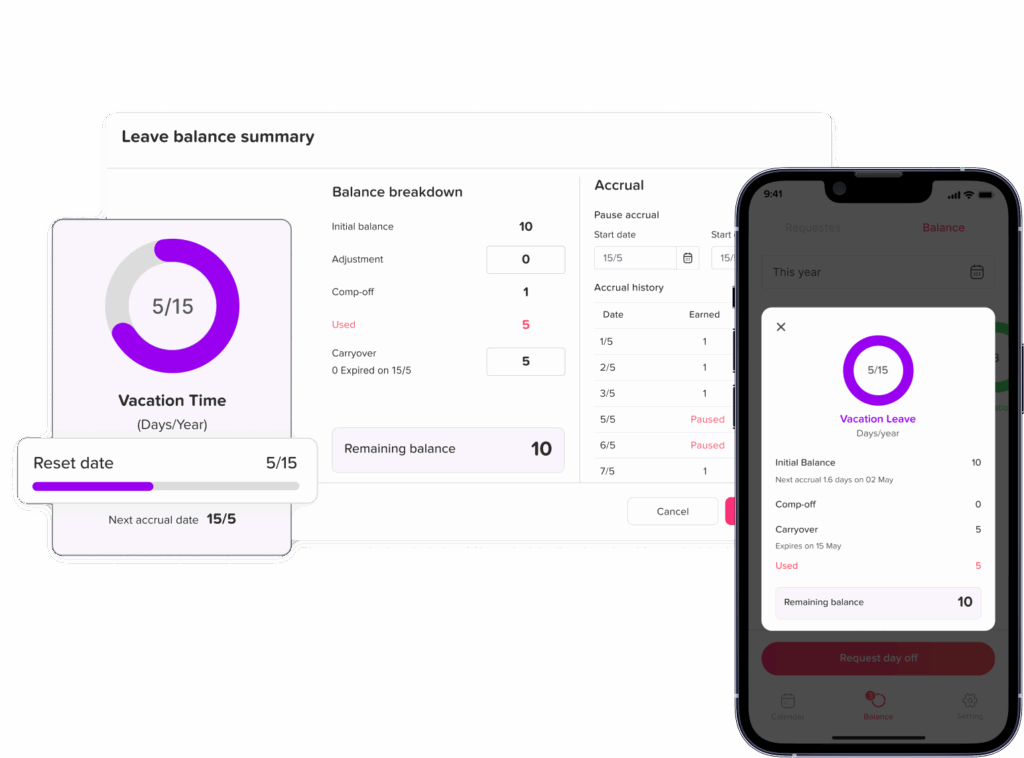
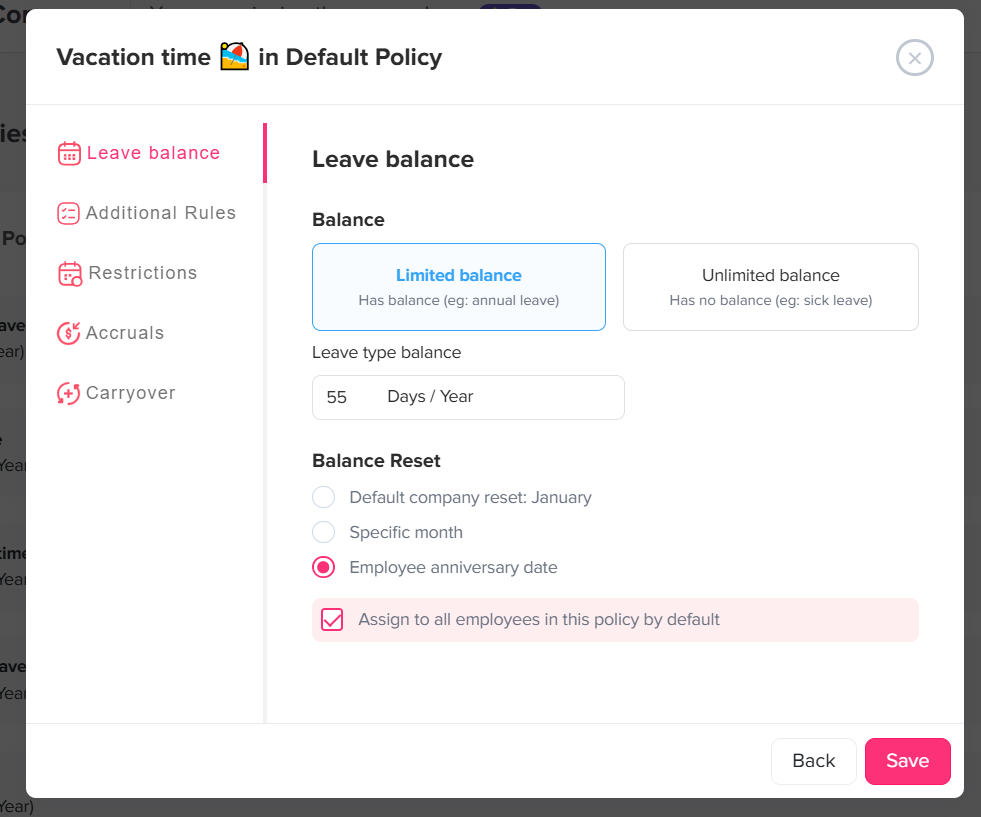
Day Off allows organizations to manage leave balance resets based on a fixed date or employee anniversary.
With a fixed reset, administrators can select a month for balances to begin a new leave cycle. For example, choosing January creates a January 1 reset.
Companies that use anniversary based policies can instead reset employees based on their joining dates. Day Off can also support organizations using both approaches for different employees.
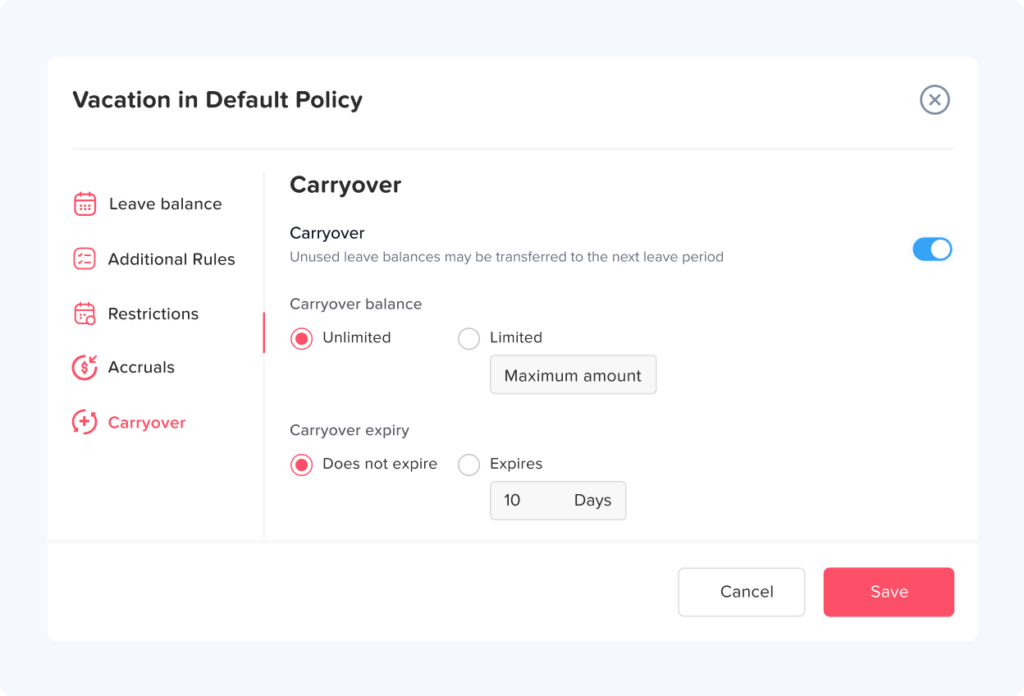
Leave policies can also include accrual and carryover rules. Unused leave can be carried forward fully or up to a configured limit, and carried-over balances can have expiration dates when the organization’s policy allows them.
This allows HR teams to connect the full process:
- Annual leave entitlement
- PTO accrual
- PTO balance reset
- Carryover
- Carryover limits
- Expiration
- Employee leave requests
- Balance adjustments
- Leave reports
Day Off also provides balance, accrual, and carryover reporting so administrators can review how balances were calculated and monitor unused leave across the workforce.
For employees, having these calculations available in the same system also makes it easier to understand what has been earned, carried over, used, adjusted, and remains available.
Best Practices for Managing a PTO Reset Date
A reliable annual reset process should follow several principles.
Write the Rules Clearly
Employees should know:
- When their leave year starts
- When it ends
- How they earn PTO
- Whether unused PTO carries forward
- Carryover limits
- Any applicable expiration rules
- What happens when they leave the company
Keep Historical Records
Do not overwrite last year’s balance without retaining its history.
HR should be able to explain exactly how the current balance was created.
Separate Carryover From New PTO
Especially when carried-over leave has a separate expiration date.
Review Applicable Laws
PTO rules differ across jurisdictions.
Organizations operating in multiple states or countries should review local requirements before implementing forfeiture, payout, carryover, or expiration rules.
Communicate Before the Reset
Employees should not discover a PTO rule only after their balance changes.
Provide reminders well before the end of the leave year.
Automate Calculations Where Possible
Automated accruals, resets, carryover, and reporting reduce repetitive manual calculations.
Automation should still be paired with periodic HR audits.
Frequently Asked Questions
What is a PTO reset date?
A PTO reset date is the date when one paid time off cycle ends and the next begins. Depending on company policy, employees may receive a new leave entitlement, continue accruing PTO, carry unused leave forward, or have certain balances handled under applicable expiration rules.
Does PTO automatically reset on January 1?
No. January 1 is a common reset date, but organizations can use another fixed date, a fiscal year date, or each employee’s work anniversary.
Does a PTO reset mean the balance goes back to zero?
Not always. An employee may carry unused PTO into the new cycle, receive a new allowance, continue accruing leave, or retain previously earned vacation when required by law. A reset marks the beginning of a new leave cycle, not necessarily the elimination of the previous balance.
What happens to unused PTO at the end of the year?
It depends on the employer’s PTO policy and applicable law. Unused PTO might carry forward completely, carry forward up to a limit, remain available because earned vacation cannot legally be forfeited, or expire under a valid policy where permitted.
Can employees have different PTO reset dates?
Yes. Some employers use anniversary based leave years, meaning each employee’s reset date depends on their employment anniversary. Companies may also use different leave cycles for different employee groups or leave types.
What is the difference between PTO reset and carryover?
A PTO reset starts a new leave cycle. Carryover determines how much unused leave from the previous cycle moves into that new cycle.
For example, January 1 may be the PTO reset date while 5 days is the maximum amount an employee may carry over.
Can carried over PTO expire after the reset?
Some company policies set a separate expiration period for eligible carried over leave where permitted by applicable law. For example, PTO might reset January 1 while eligible carried over leave remains available until March 31.
Should HR audit balances after a PTO reset?
Yes. Even when the reset is automated, HR should review representative employee balances after the reset. The audit should include carryover, accruals, adjustments, new entitlements, future approved leave, and employees under special policies.
Conclusion
A PTO reset date should create a clear transition from one leave cycle to the next, but the calculation behind that transition can involve much more than replacing an old balance with a new one.
HR teams need to account for unused PTO, carryover limits, accrual schedules, employee anniversaries, approved future leave, policy changes, work schedules, manual adjustments, termination rules, and applicable employment laws.
The strongest PTO reset process is one that can answer three simple questions for every employee:
- What did the employee have before the reset?
- What happened to that balance?
- How was the new balance calculated?
When those answers are documented and easy to verify, annual leave resets become far easier for HR to manage and far easier for employees to understand.
Using a dedicated PTO tracking system such as Day Off can further simplify the process by connecting balance resets, accruals, carryover, employee requests, and reporting in one place instead of relying on separate spreadsheets and manual calculations.