







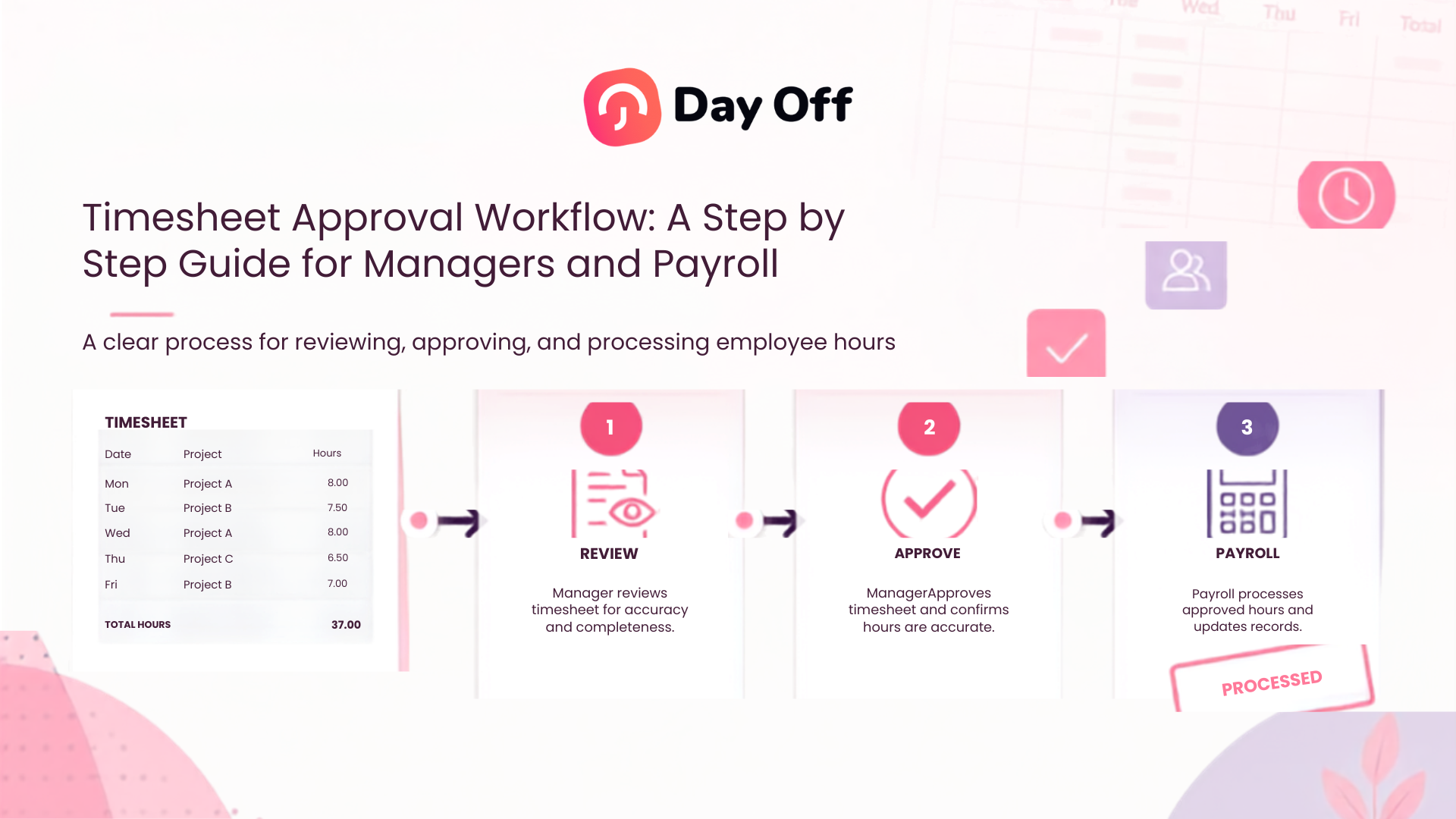
A clear Timesheet Approval Workflow helps businesses move employee time records from clock in to payroll without relying on last minute messages, spreadsheets, or assumptions. Employees record their working time, managers verify that the records reflect what actually happened, and payroll performs a final validation before using those hours to calculate wages. When this process is consistent, companies can catch missing punches, incorrect breaks, unexpected overtime, PTO conflicts, and other timekeeping problems before they become payroll errors.

Timesheet approval may sound like a simple task: review the hours and click approve. In practice, it is an important control between employee time tracking and payroll. A manager needs enough information to understand why an employee worked more or fewer hours than expected, while payroll needs confidence that the records are complete, reviewed, and ready to use.
An effective workflow should therefore answer several questions:
- Did the employee record all working time?
- Are clock in and clock out records complete?
- Were breaks recorded correctly?
- Does approved PTO explain missing work hours?
- Is overtime accurate?
- Were manual changes reviewed?
- Has the correct manager approved the record?
- Is payroll working from the final version?
- Can changes be traced later if a question arises?
This guide explains how to build a reliable timesheet approval process from employee submission through payroll finalization.
What Is a Timesheet Approval Workflow?
A timesheet approval workflow is the process a company uses to record, review, correct, approve, and finalize employee working hours before those hours are used for payroll, billing, attendance reporting, or labor analysis.
A typical workflow looks like this:
Employee records time → Employee reviews record → Manager reviews exceptions → Corrections are resolved → Manager approves → Payroll validates → Period is finalized → Payroll is processed
The exact process may differ depending on the business.
A ten-person company may have one manager reviewing all employees. A larger organization may have team managers, department heads, HR, and payroll involved at different stages. Businesses with multiple locations may require managers at each site to approve their own teams before payroll receives the consolidated records.
The important point is not how many approval levels exist. The important point is that every stage has a clear owner, deadline, and purpose.
Why Is a Timesheet Approval Workflow Important?
Payroll depends on accurate working time information.
If a timesheet says an employee worked 42 hours when they actually worked 38, payroll may overpay them. If the timesheet records 38 hours when they worked 42, they may be underpaid and overtime calculations may also be incorrect.
The problems are not limited to payroll.
Inaccurate timesheets can affect:
- Overtime calculations
- Attendance reports
- Labor cost reporting
- Client or project billing
- Staffing analysis
- PTO records
- Schedule adherence
- Employee disputes
- Payroll reconciliation
- Workforce planning
A structured approval process creates an opportunity to identify problems before information moves into payroll.
For employers operating in the United States, accurate time records can also have compliance implications. The U.S. Department of Labor states that covered employers must maintain accurate records of hours worked for covered nonexempt employees. Employers are not required to use one particular timekeeping format, but the records must contain required information such as daily and weekly hours worked.
Rules vary by country, state, industry, employee classification, and collective agreement, so businesses should configure their workflow according to the laws that apply to them.
Who Is Responsible for Timesheet Approval?
A strong workflow separates the responsibilities of employees, managers, HR, and payroll.
| Role | Main Responsibility | Typical Checks |
|---|---|---|
| Employee | Record and review working time | Clock-ins, clock-outs, breaks, projects, tasks, missing entries |
| Manager | Confirm operational accuracy | Schedule differences, absence, overtime, missing punches, PTO |
| HR | Support policy and employee-record review | Leave, schedules, attendance policies, recurring exceptions |
| Payroll | Validate payroll readiness | Approved hours, pay period, overtime, unresolved exceptions, final totals |
| System administrator | Maintain configuration | Permissions, schedules, time-tracking settings, reporting access |
The manager and payroll team should not perform exactly the same review.
A manager usually knows what happened operationally. They know whether an employee stayed late, swapped a shift, attended a meeting, worked remotely, or was absent.
Payroll usually knows how the final hours affect pay. Payroll may verify totals, overtime treatment, pay period dates, pay codes, and whether all required approvals have been completed.
Keeping these responsibilities separate provides a useful control.
Step by Step Timesheet Approval Workflow
Step 1: Employees Record Their Working Time
The workflow begins with the source data.
Depending on the business, employees may record time through:
- Clock in and clock out
- A web based timer
- Shift attendance records
- Project timers
- Task timers
- Manual timesheets
- Approved manual adjustments
The goal is to record what actually happened, not simply copy the employee’s planned schedule.
For example, imagine an employee is scheduled from:
9:00 AM to 5:00 PM
but actually works:
9:08 AM to 5:37 PM
The attendance record should reflect the actual times. The schedule remains useful as the expected work pattern, but it should not automatically replace the real attendance record.
This distinction becomes important when reviewing lateness, early departures, overtime, or schedule variance.
Employees should record time consistently
A good policy should explain:
- When employees should clock in
- When they should clock out
- How breaks should be recorded
- How split shifts are handled
- Whether project or task tracking is required
- What employees should do after a missed punch
- How corrections are requested
- When the timesheet period closes
- When records must be submitted
The fewer ambiguous rules employees have to interpret, the cleaner the approval process becomes.
Step 2: Employees Review Their Own Timesheet
Managers should not be the first people to notice every missing clock out.
Before submission or the end of the pay period, employees should review their own time records.
They should look for:
- Missing clock ins
- Missing clock outs
- Incorrect start or end times
- Missing breaks
- Incorrect projects or tasks
- Duplicate entries
- PTO days showing working time incorrectly
- Working days with no time recorded
Employee self review creates an additional accuracy check before the manager becomes involved.
Example
An employee works Monday through Friday.
Their record shows:
- Monday: Complete
- Tuesday: Complete
- Wednesday: Clock in recorded, no clock-out
- Thursday: Complete
- Friday: Complete
Instead of sending the incomplete week directly to the manager, the employee should identify Wednesday and follow the company’s correction process.
This reduces the amount of basic administrative work managers need to perform.
Step 3: Check for Incomplete or Unusual Records
Before detailed manager approval, the system or reviewer should identify obvious exceptions.
An exception is not automatically an error. It is simply something that needs additional review.
Examples include:
- Missing clock out
- Missing clock in
- Unusually long shift
- Very short workday
- Unexpected overtime
- Working time on an approved leave day
- No break recorded
- Large manual correction
- Work outside the assigned schedule
- Duplicate time entries
- Negative or impossible durations
Exception based reviewing is often more efficient than treating every timesheet row as equally risky.
If 90 percent of employees have complete records matching normal patterns, managers can spend more attention on the 10 percent that require investigation.
Step 4: Compare Scheduled Time With Actual Attendance
This is one of the most useful parts of a Timesheet Approval Workflow.
Managers should compare what the employee was expected to work with what the employee actually worked.
For example:
Scheduled shift: 8:30 AM to 4:30 PM
Actual attendance: 8:47 AM to 5:15 PM
This tells the manager more than simply knowing that the employee worked a certain number of hours.
It may show:
- A 17-minute late arrival
- Work beyond the scheduled end
- Potential overtime
- A schedule exception
- A need to review the employee’s break
The manager can then determine whether the difference is expected, authorized, incorrect, or simply requires documentation.
Do not automatically overwrite actual time with scheduled time
A common mistake is assuming that employees should always be paid according to their schedule even when the recorded work differs.
Schedules provide context. They are not necessarily proof of the hours actually worked.
In the United States, the Department of Labor states that work an employer permits an employee to perform may qualify as compensable working time even when it was not specifically requested.
This is why schedule comparison should be used to identify exceptions, not automatically delete differences.
Step 5: Review PTO, Leave, and Absence Information
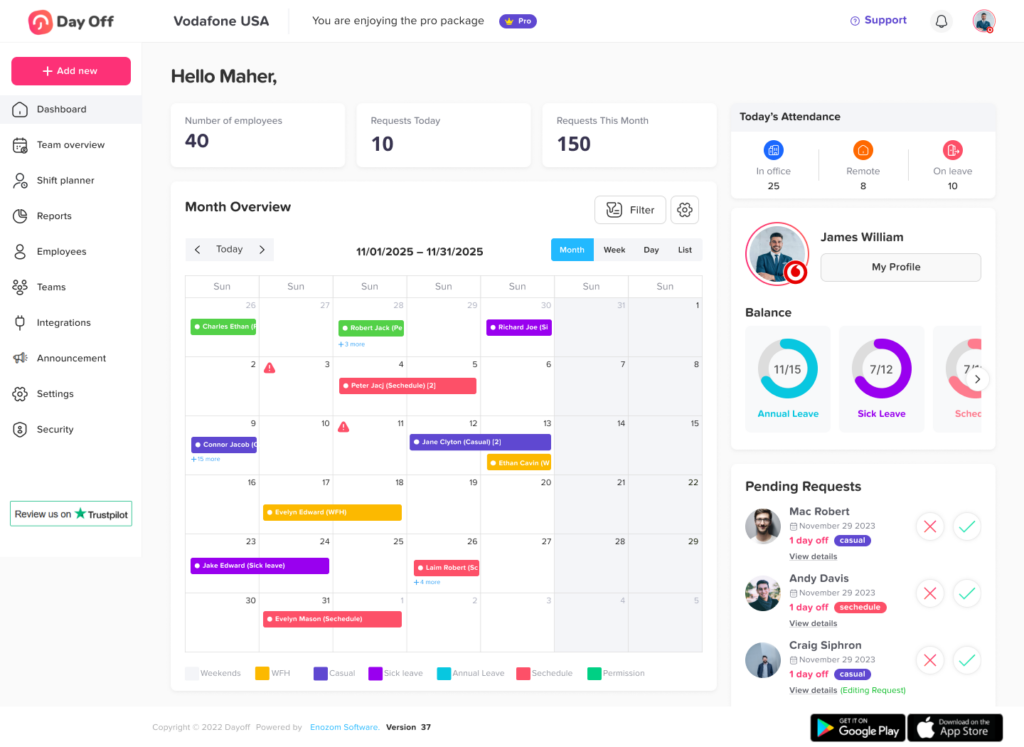
Timesheet review becomes much more accurate when managers can see approved time off alongside attendance.
Consider an employee with no clock-in on Tuesday.
Without leave information, the record could mean:
- The employee forgot to clock in
- The employee was absent
- The employee was not scheduled
- The employee was on vacation
- The employee was on sick leave
- The employee worked but the timer failed
Approved PTO provides important context.
Before treating missing time as an attendance problem, check whether the employee had:
- Vacation leave
- Sick leave
- Personal leave
- Partial day leave
- Unpaid leave
- Public holiday
- Other approved absence
Watch for partial day PTO
Partial day leave can create more complicated records.
For example:
Schedule: 9:00 AM to 5:00 PM
Approved PTO: 9:00 AM to 1:00 PM
Employee works: 1:00 PM to 5:00 PM
The timesheet should not necessarily appear as a four-hour attendance shortage. The PTO record explains the remaining scheduled hours.
Connecting leave data with attendance makes this much easier to interpret.
Step 6: Review Breaks and Net Working Hours
Clock in to clock out duration is not always the same as working time.
If an employee clocks in at 9:00 AM and clocks out at 5:30 PM, the elapsed duration is:
8 hours 30 minutes
If the employee also takes a 30-minute unpaid break, net working time becomes:
8 hours
A basic formula is:
Net Working Hours = Clock Out Time – Clock In Time – Deductible Breaks
Managers should therefore verify:
- Whether required breaks are present
- Whether break durations look reasonable
- Whether a break was paid or unpaid according to policy
- Whether the employee accidentally left a break running
- Whether work continued through a recorded unpaid break
- Whether break entries were manually changed
Break requirements vary significantly by jurisdiction, so companies should configure policies based on the applicable laws.
Step 7: Review Overtime and Hours Outside the Schedule
Overtime should be reviewed carefully before the timesheet reaches payroll.
Managers should ask:
- Did the employee actually work these additional hours?
- Why were the hours necessary?
- Were they expected?
- Were they approved under company policy?
- Are they being calculated using the correct workweek?
- Is the employee eligible for overtime under applicable rules?
- Is there a recurring workload or staffing issue?
Pre-approval and payment are different questions
A company may have a policy requiring employees to obtain approval before working overtime.
However, managers should distinguish between:
- Whether the employee followed the overtime authorization policy
- Whether the time actually worked must be recorded and compensated
For covered nonexempt employees in the United States, an employer generally cannot refuse to count otherwise compensable work merely because overtime was not authorized in advance. The U.S. Department of Labor states that an employer that permits overtime work generally must compensate it, and an advance authorization rule does not remove the employee’s right to compensation for compensable overtime actually worked.
A company may address failure to follow its approval policy separately, but managers should not simply delete genuine working time to make the timesheet fit the schedule.
Step 8: Resolve Timesheet Exceptions Before Approval
Timesheets containing unexplained exceptions should normally be resolved before final approval.
| Exception | What the Manager Should Review | Possible Resolution |
|---|---|---|
| Missing clock-out | Actual departure time | Correct record using documented information |
| Long workday | Work performed, missed punch, overtime | Confirm actual hours |
| Working time during PTO | PTO timing and actual work | Correct leave or attendance record if necessary |
| Unexpected overtime | Operational reason and actual hours | Confirm hours and document exception |
| Missing break | Actual break activity | Correct record according to policy |
| Early clock-in | Whether work actually began | Confirm compensable working time |
| Large manual edit | Original entry and reason | Verify correction history |
| No attendance | Schedule, leave, absence | Determine whether record is missing or absence is valid |
The goal of this review is not to make every timesheet look perfect.
The goal is to make the record accurate.
An unusual shift may be completely legitimate. A 12-hour day might reflect approved overtime, an emergency, travel, a special project, or a staffing shortage.
An exception should prompt a question, not an automatic assumption.
Step 9: Document Corrections
Corrections are normal.
Employees forget to clock out. Internet connections fail. Managers adjust schedules. PTO is entered late. Someone chooses the wrong project.
The important question is how changes are controlled.
A reliable correction process should ideally preserve:
- Original entry
- Corrected entry
- Date of change
- Person who made the change
- Reason for change
- Approval where required
Avoid a process where time records can silently change without any explanation.
An audit trail makes it easier to answer future questions such as:
- Why did the employee’s hours change?
- Who corrected the clock out?
- Was the correction made before or after manager approval?
- Did payroll use the original or corrected value?
- Why was overtime added?
- Was an employee’s PTO updated after attendance was recorded?
Step 10: Manager Approves the Timesheet
Once exceptions are resolved, the manager can approve the record.
Manager approval should mean:
“I have reviewed this employee’s time for the period, investigated relevant exceptions, and believe the record accurately reflects the available information.”
Approval should not mean:
“Everything matches the original schedule.”
Those are very different standards.
A good approval process may record:
- Employee
- Pay period
- Total hours
- Overtime
- Time off
- Approving manager
- Approval date
- Approval status
Possible statuses may include:
- Draft
- Submitted
- Needs correction
- Manager approved
- Payroll review
- Finalized
The terminology can vary, but the status should make it clear where each record is in the workflow.
What Should a Manager Check Before Approving a Timesheet?
Managers do not need to recalculate every minute manually.
A focused checklist is more effective.
Before approving, review:
Attendance completeness
Check for:
- Missing punches
- Incomplete shifts
- Duplicate entries
- Open timers
Schedule variance
Look for:
- Late arrivals
- Early departures
- Early starts
- Late finishes
- Work on unscheduled days
Breaks
Confirm:
- Breaks were recorded
- Durations make sense
- Unpaid breaks are correctly deducted where applicable
PTO
Check:
- Approved leave appears correctly
- Work and leave do not incorrectly overlap
- Partial-day leave is reflected properly
Overtime
Review:
- Overtime hours
- Reason for overtime
- Repeated overtime patterns
- Unexpected work outside normal schedules
Manual changes
Review:
- Edited start times
- Edited end times
- Manually created entries
- Large changes to total working time
Projects or tasks
If the business tracks work by project:
- Confirm project selection
- Check unusually high project hours
- Review missing task allocations
- Make sure time is not incorrectly assigned
A Practical Timesheet Approval Schedule
A good workflow should not begin five minutes before payroll.
For a company with weekly timesheets, the process might look like this:
During the week: Employees record time and correct obvious mistakes.
End of Friday: Employees review their records.
Monday morning: Managers review missing punches, overtime, PTO, breaks, and schedule exceptions.
Monday afternoon: Employees or managers complete approved corrections.
Tuesday morning: Managers finalize review.
Tuesday afternoon: Payroll validates approved records.
Wednesday: Payroll preparation begins using finalized data.
The dates themselves are not important.
What matters is leaving enough time between:
Timesheet cutoff → Manager approval → Correction deadline → Payroll processing
If all four happen at the same moment, payroll problems become much more likely.
Should Timesheets Be Reviewed Daily or Only Before Payroll?
Ideally, both.
Waiting until payroll day to discover two weeks of missing punches makes the review unnecessarily difficult.
Daily or frequent review
Managers can monitor:
- Missing clock ins
- Missing clock outs
- Open timers
- Unexpected absence
- Major overtime
- Incorrect schedule assignments
These issues are easier to investigate while the events are still recent.
End of period review
Managers then perform a complete approval check before sending records to payroll.
Payroll review
Payroll verifies the finalized period and focuses on pay-impacting exceptions.
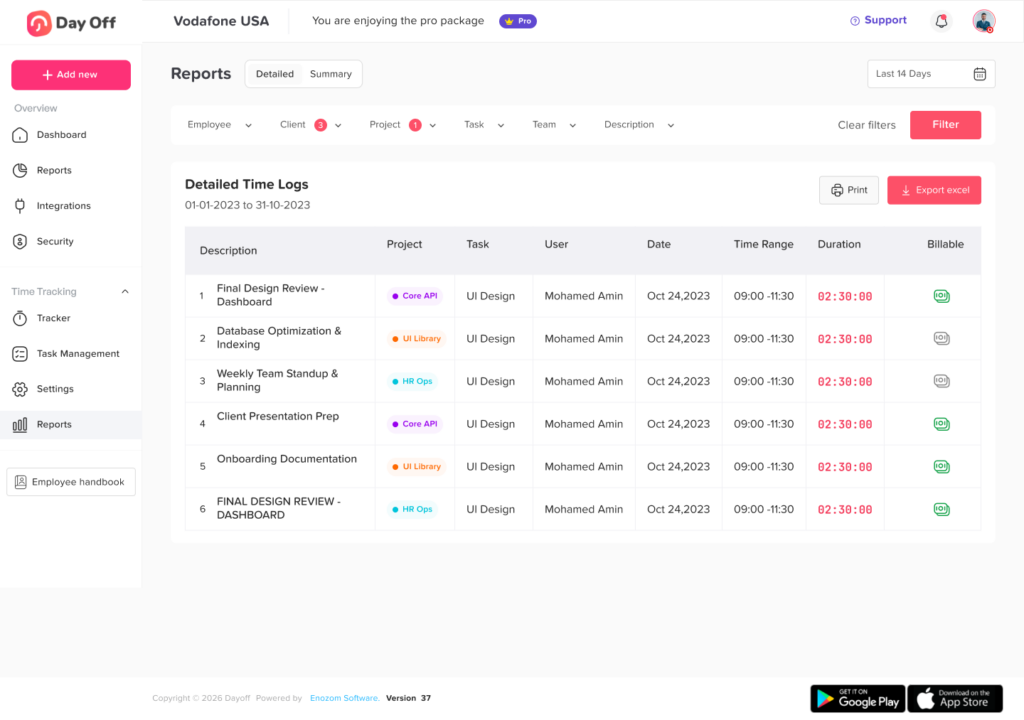
This creates three levels of control rather than one last-minute review.
Common Timesheet Approval Workflow Problems
Approvals happen too late
When managers wait until payroll cutoff, there is little time to investigate discrepancies.
Better approach: Set the manager deadline before the payroll deadline.
Managers approve without reviewing exceptions
Clicking “approve” does not create reliable data.
Better approach: Show managers which records require attention.
Employees cannot easily report mistakes
Employees often recognize incorrect records first.
Better approach: Define a simple correction process.
Managers change records without explanation
A corrected timesheet may be accurate, but without a change history, future reviewers cannot understand what happened.
Better approach: Record the reason for material edits.
PTO and attendance are reviewed separately
This can cause approved leave to appear as absence.
Better approach: Review attendance and time off together.
Payroll receives multiple versions
Spreadsheet-based processes often produce files such as:
Timesheet_Final.xlsx
Timesheet_Final_New.xlsx
Timesheet_Final_Updated2.xlsx
Nobody should need to guess which file is correct.
Better approach: Use one controlled source of truth and establish a finalization point.
Managers “fix” overtime by deleting it
This creates a serious accuracy problem.
If hours were actually worked, the organization should determine how they must be handled under applicable law rather than modifying the record simply because the work violated an internal authorization policy.
Every record receives the same level of review
This wastes manager time.
Better approach: Prioritize exceptions, changes, overtime, missing punches, leave conflicts, and unusual hours.
How to Improve Your Timesheet Approval Workflow
Create one source of truth
Avoid splitting attendance between spreadsheets, messages, paper forms, emails, and separate PTO calendars.
The reviewer should be able to understand the employee’s complete work record without reconstructing it from multiple systems.
Define approval deadlines
Employees, managers, and payroll should each know their deadlines.
For example:
- Employee submission: Monday 10:00 AM
- Manager approval: Monday 4:00 PM
- Corrections complete: Tuesday 10:00 AM
- Payroll review: Tuesday afternoon
Clear deadlines reduce last-minute follow ups.
Review exceptions instead of every minute manually
Highlight records that differ from normal expectations.
Managers should spend more time investigating:
- Missing punches
- PTO conflicts
- Overtime
- Long shifts
- Manual edits
- Unscheduled work
and less time manually recalculating ordinary complete shifts.
Keep schedules updated
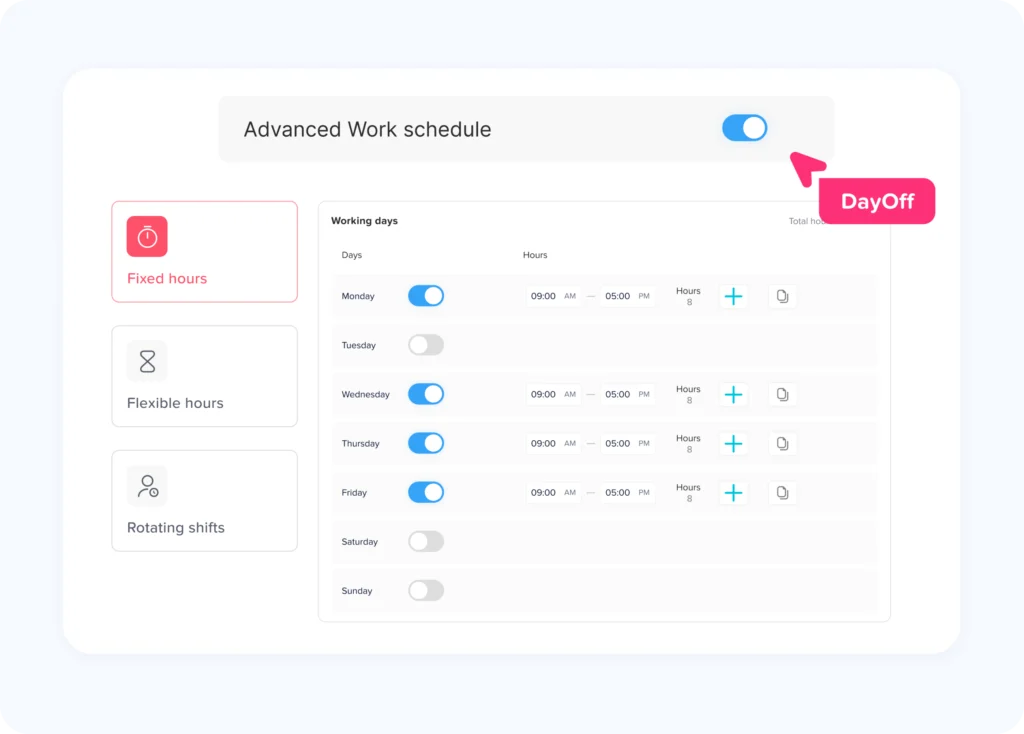
Schedule comparison is only useful if schedules are correct.
If an employee changes shifts but the system still contains the old schedule, the attendance report may show false lateness, early departures, or overtime.
Connect PTO with time tracking
An attendance record should not exist in isolation from approved leave.
Connecting the two helps managers understand whether missing working time represents:
- Approved leave
- Unscheduled time
- Absence
- Incomplete attendance data
Create a correction policy
Employees and managers should know:
- Who can request a correction
- Who can make the change
- What documentation is needed
- Who approves the correction
- What happens after payroll closes
Monitor recurring problems
One missing clock out may be an individual mistake.
Fifty missing clock outs every month may be a process problem.
Analyze recurring exceptions by:
- Employee
- Manager
- Department
- Location
- Schedule
- Exception type
This can help HR distinguish occasional errors from systematic issues.
Recordkeeping and Timesheet Approval
Approving a timesheet should not be treated as permission to discard the underlying record.
Employers should understand the recordkeeping requirements that apply in their jurisdiction.
For U.S. employers covered by the FLSA, the Department of Labor states that certain payroll records generally must be preserved for at least three years. Records used to calculate wages, including time cards and work schedules, generally should be retained for two years.
The Department also notes that employers may choose their timekeeping method as long as required records are complete and accurate.
Businesses operating across multiple states or countries should review the rules applicable to each workforce rather than assuming one retention period or approval policy applies everywhere.
How Day Off Supports Timesheet and Attendance Review
A reliable Timesheet Approval Workflow depends on giving managers enough context to understand working time before records move toward payroll.
Day Off brings leave management, work schedules, attendance, and time tracking into the same platform, helping managers compare expected working hours with actual attendance instead of reviewing timesheets in isolation.
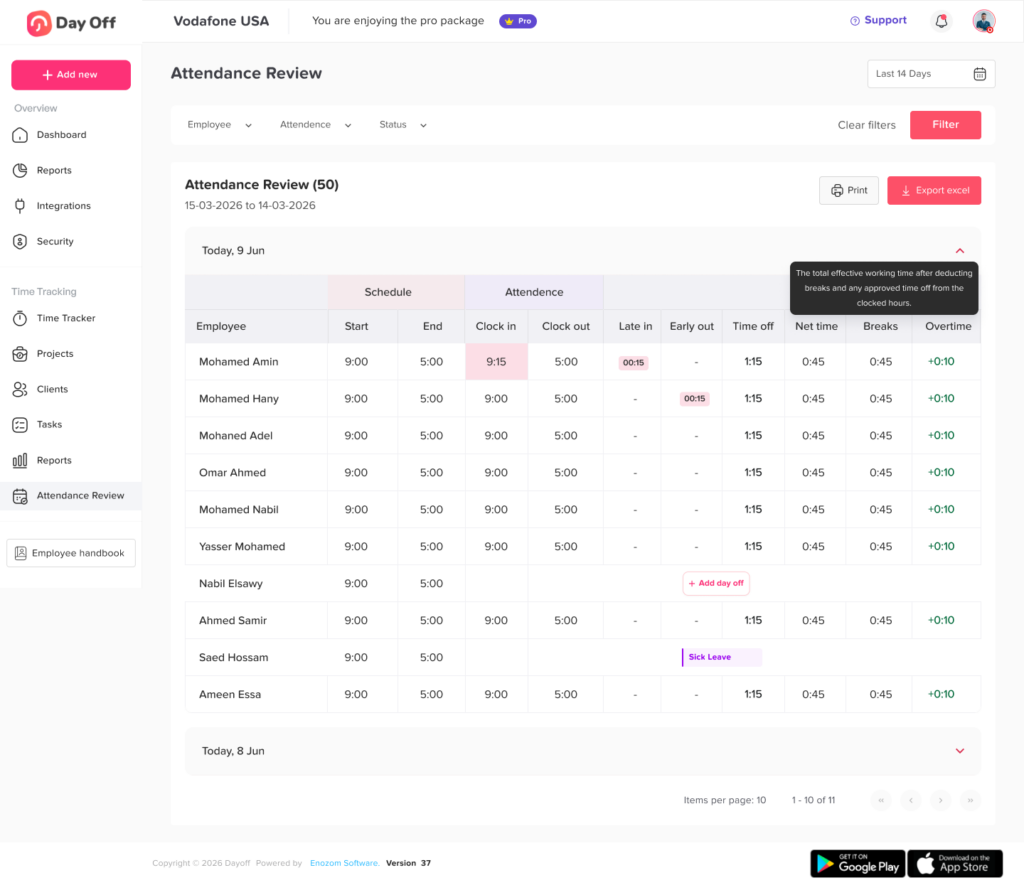
In Day Off’s Attendance Review, managers can review information such as:
- Scheduled start time
- Scheduled end time
- Actual clock in
- Actual clock out
- Late time
- Early departure
- Approved time off
- Net working time
- Breaks
- Overtime
The report can be filtered by employee, team, and location, and the selected data can be exported to Excel for further review.
This makes it easier to investigate questions such as:
- Why does this employee have fewer recorded hours?
The answer may be approved PTO rather than an attendance problem.
- Why is overtime showing?
The employee may have worked beyond the scheduled end time.
- Why is net time incomplete?
The employee may have clocked in but never recorded a clock-out.
- Why does the employee appear late?
The actual clock-in can be compared directly with their scheduled start.
Day Off’s Attendance Review organizes records by date and provides schedule and attendance data together, helping managers investigate exceptions before exporting information for payroll preparation.
This is particularly useful for organizations that want PTO and working-time information to provide context for each other instead of maintaining separate systems for leave and attendance.
Timesheet Approval Workflow Checklist
Before sending a pay period to payroll, confirm that:
- All employees expected in the period are included
- Missing clock ins have been reviewed
- Missing clock outs have been reviewed
- Open timers have been resolved
- Employee corrections have been completed
- Work schedules are accurate
- Approved PTO has been considered
- Partial day leave is reflected correctly
- Breaks have been reviewed
- Overtime has been verified
- Unscheduled working time has been reviewed
- Large manual edits have been checked
- Required managers have completed their review
- Unresolved exceptions have been escalated
- Payroll is using the final version of the records
- Any post approval changes can be traced
A checklist does not replace manager judgment, but it helps make the process consistent across teams and pay periods.
FAQ
What is a Timesheet Approval Workflow?
A Timesheet Approval Workflow is the process used to move employee working time records through review, correction, manager approval, payroll validation, and finalization. It helps ensure payroll is based on complete and reviewed working time information.
Who should approve employee timesheets?
The employee’s direct manager or another manager who understands the employee’s work and schedule is often the most appropriate first reviewer. Payroll or HR may perform an additional validation depending on the company’s structure.
The important factor is that the approver has enough information and authority to investigate discrepancies.
Should payroll approve timesheets?
Payroll should usually validate timesheets before using them for payroll, but payroll does not necessarily need to replace the manager’s operational review.
Managers verify what happened during the work period. Payroll checks whether the final information is complete and ready for payroll processing.
What happens if a manager misses the timesheet approval deadline?
The company should have an escalation process.
Depending on the organization, an overdue approval may be sent to:
- Another authorized manager
- Department head
- HR
- Payroll administrator
The process should be established before payroll cutoff rather than decided after an approval is already late.
Can a manager change an employee’s timesheet?
Whether managers can edit timesheets depends on company policy and system permissions. When corrections are permitted, organizations should preserve enough information to understand what changed, why it changed, and who made the correction.
The goal should be accurate time records, not simply making records match the employee’s planned schedule.
Can a manager reject overtime because it was not pre-approved?
A company can maintain a policy requiring overtime authorization, but employers must also follow applicable wage-and-hour law.
For covered nonexempt workers in the United States, compensable hours actually worked generally must still be counted even when the employee failed to obtain required advance approval. The policy issue can be handled separately from accurate recording and payment of working time.
How often should managers review timesheets?
Managers should monitor major attendance exceptions throughout the period and conduct a final review before payroll.
Frequent review is especially helpful for identifying missing punches, open timers, unexpected overtime, and leave conflicts while the information is still recent.
How long should businesses keep employee timesheets?
Retention requirements depend on the jurisdiction.
For employers covered by U.S. federal FLSA requirements, payroll records generally must be kept for at least three years, while certain supporting wage computation records such as time cards and work schedules generally must be retained for two years. State or local requirements may require longer retention.
Conclusion
A good Timesheet Approval Workflow is not simply a final approval button before payroll. It is a structured process for making sure employee working time records are complete, understandable, reviewed, and ready for payroll.
The strongest workflows begin with accurate employee time tracking, give employees an opportunity to identify mistakes, help managers compare schedules with actual attendance, connect PTO with missing work hours, highlight overtime and other exceptions, document corrections, and give payroll a final checkpoint before processing wages.
The process should also recognize an important principle: an unusual record is not automatically an incorrect record. A late clock out, extended shift, PTO overlap, or overtime entry should be investigated based on what actually occurred.
As organizations grow, managing this process through spreadsheets and disconnected systems becomes increasingly difficult. Bringing schedules, attendance, leave, working hours, breaks, and overtime into one view gives managers the context they need to review records efficiently.
Day Off helps teams connect employee time tracking with PTO, work schedules, attendance, and workforce reporting, allowing managers to identify discrepancies earlier and prepare cleaner, more reliable working time information for payroll.
A consistent approval process ultimately creates benefits for everyone involved: employees receive more accurate records, managers spend less time solving old attendance problems, HR gains better workforce data, and payroll receives clearer information before each pay run.