


-
Leave Policies
- Can employees view their leave policy details?
- Can I set carryover rules for unused leave?
- How do accrual rules work in a leave policy?
- How do I create a leave policy?
- How do I edit or update an existing leave policy?
- How do I set a request period for leave requests?
- How to Allow Compensation for a Leave Type?
- How to Create a Leave Type with No Balance
- How to require a mandatory comment or reason when submitting a leave request?
- How to set a negative balance for leave?
- How to set a notice period for leave requests?
- Is it possible to set probation period rules for leave?
- What is a leave policy and how does it work in Day Off?
- What is the Difference Between a Leave Policy and a Leave Type?
How do accrual rules work in a leave policy?
Accrual rules allow you to distribute leave balances gradually over time, rather than granting the full entitlement upfront. This helps organizations manage leave more effectively by allocating time off based on a defined schedule.
How accruals work
When accruals are enabled, the total leave balance is divided across a specific period (typically a year) and added incrementally according to the selected accrual settings.
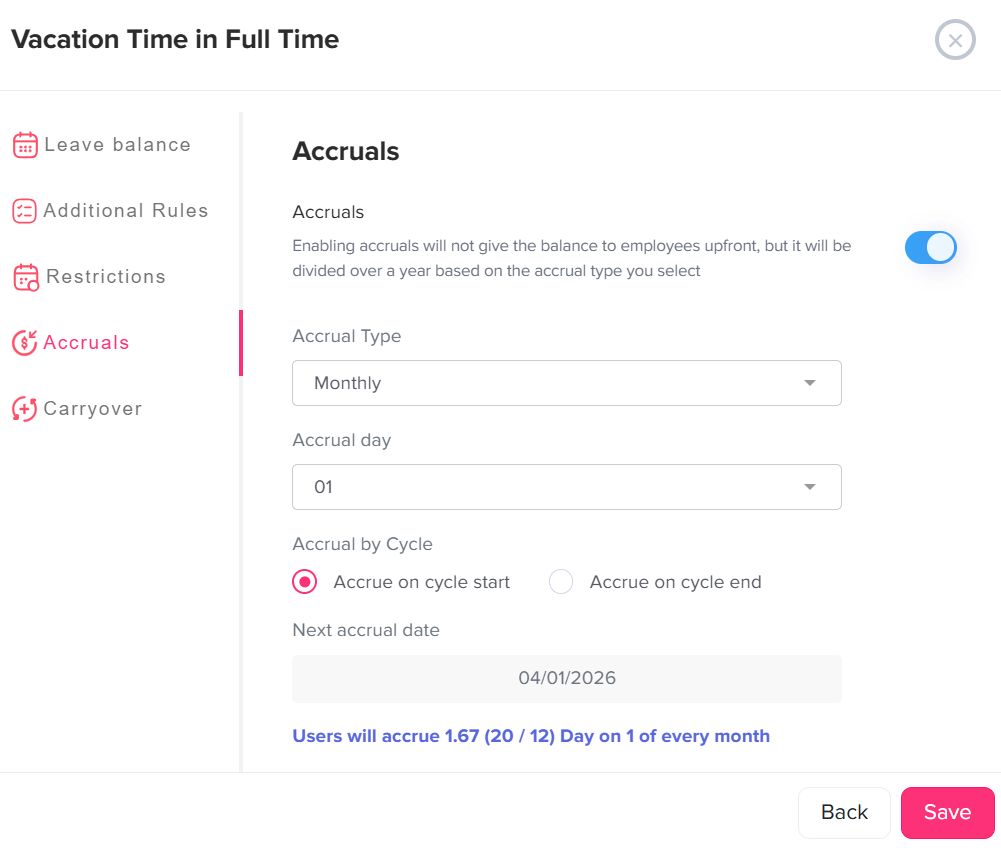
Steps to configure accrual rules
- Go to Settings.
- Navigate to Leave Policies, click on the edit icon near the required policy.
- Click the edit icon next to the leave type you want to configure.
- From the left-side menu, select Accruals.
- Enable the Accruals toggle.
- Choose the Accrual Type (e.g., weekly, biweekly, monthly, or semimonthly).
- Select the accrual day.
- Choose whether leave should accrue at the start or end of each cycle.
- Review the next accrual date and accrual summary displayed.
- Click Save to apply your changes.
What does this mean for employees?
Instead of receiving their full leave balance at once, employees will earn leave progressively based on the defined accrual schedule. For example, if a policy is set to weekly accruals, a portion of the total leave will be added each week.
How can admins view and adjust accrued leave for an employee?
Admins have full visibility and control over how much leave an employee has accrued, what they are expected to accrue next, and when it will be granted.
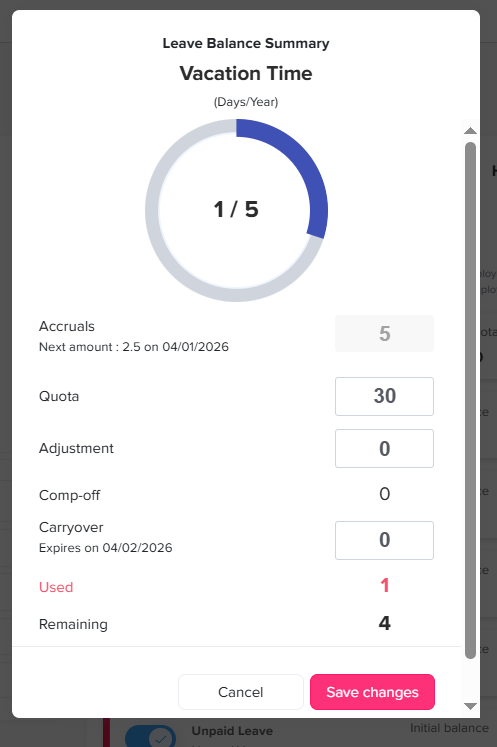
- Go to the Employees list.
- Click on the employee to open their profile.
- Navigate to the Balance section.
- Enable the Customization toggle.
- Click the edit icon next to the leave type you want to manage.
- Adjust the leave quota as needed, this will automatically update the accrued amount for that employee.
Once customization is enabled, the system will reflect the updated balance based on your manual adjustments.
To revert back to the default policy: Disable the Customization toggle.
When turned off, the employee’s leave balance will be recalculated based on the original leave policy and accrual rules they are assigned to.
How can employees track their accrued leave?
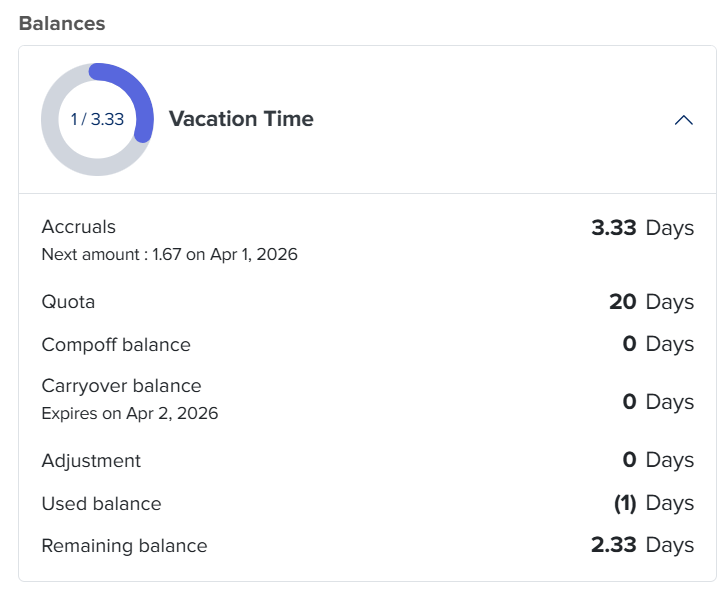
Employees can easily track their accrued leave and view detailed information about their balance directly from their profile.
- Go to the Balance section.
- Click on any leave type assigned to you.
A detailed view will be displayed, including:
- The amount accrued so far
- The total leave quota for the year
- The next accrual amount
- The next accrual date (when the leave will be added)
- Any manual adjustments made by admins
- The amount of leave already used
This transparency allows employees to clearly understand how their leave is accumulating and plan their time off more effectively.
By using accrual rules, you can manage leave in a simple and organized way. Admins can easily control and adjust balances when needed, and employees can clearly see how much leave they have and how it grows over time. This makes planning time off easier and keeps everything clear for everyone.