


-
Leave Policies
- Can employees view their leave policy details?
- Can I set carryover rules for unused leave?
- How do accrual rules work in a leave policy?
- How do I create a leave policy?
- How do I edit or update an existing leave policy?
- How do I set a request period for leave requests?
- How to Allow Compensation for a Leave Type?
- How to Create a Leave Type with No Balance
- How to require a mandatory comment or reason when submitting a leave request?
- How to set a negative balance for leave?
- How to set a notice period for leave requests?
- Is it possible to set probation period rules for leave?
- What is a leave policy and how does it work in Day Off?
- What is the Difference Between a Leave Policy and a Leave Type?
How to Create a Leave Type with No Balance
You can set a leave type to have no limit by enabling the Unlimited balance option inside a leave policy. Follow these steps:
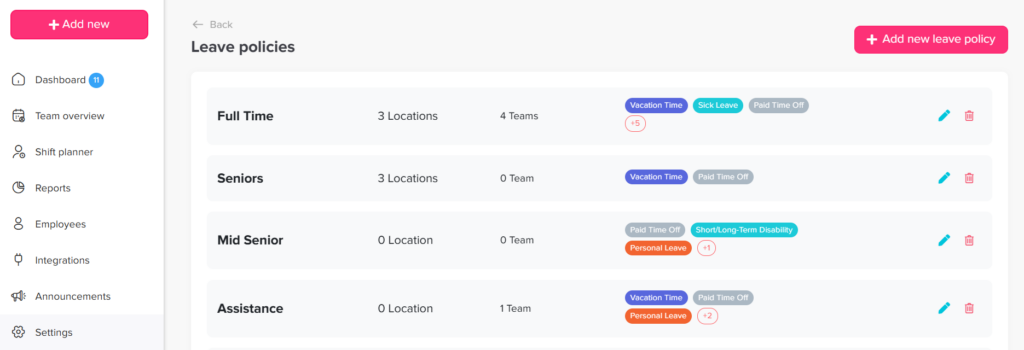
Step 1: Go to Settings
- From the main menu, navigate to Settings
This is where you manage all system configurations, including leave policies and leave types.
Step 2: Open Leave Policies
- Click on Leave Policies
Here, you’ll find all the policies created in your account. Each policy contains the leave types and rules assigned to employees.
Step 3: Edit the Policy
- Find the policy you want to update
- Click the edit icon next to it
This opens the full policy settings, where you can manage leave types and their configurations.
Step 4: Edit the Leave Type
- Locate the leave type you want to modify
- Click the edit icon next to that leave type
Each leave type has its own settings, including balance, rules, and restrictions.
Step 5: Set Unlimited Balance
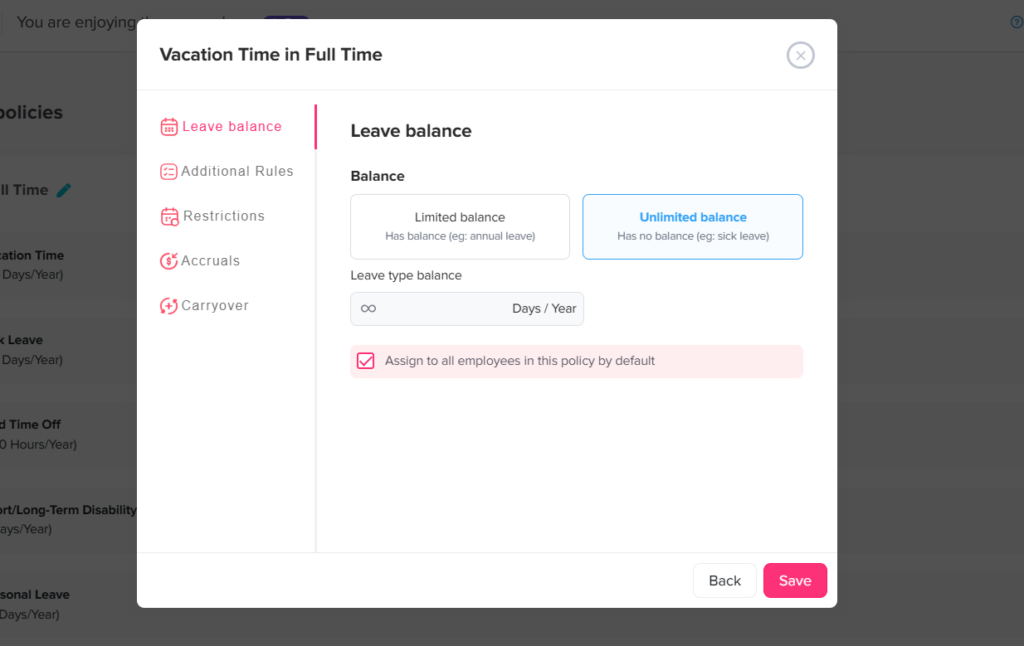
- Select Unlimited balance
This removes any limit on how much leave employees can take for this type, meaning no fixed number of days or hours is assigned.
Step 6: Save Your Changes
- Click Save to apply your updates
Your changes will take effect immediately, and employees will now be able to request this leave type without a balance limit.
How It Appears for Employees
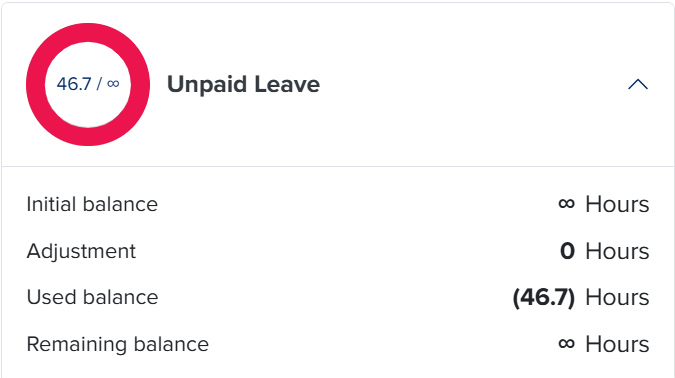
When a leave type is set to Unlimited balance, it will be reflected differently on the employee’s side:
- No balance limit shown
Employees won’t see a fixed number of days (like 20 or 30 days). Instead, the leave type will appear as available without a limit. - Can request anytime
Employees can submit requests for this leave type without worrying about running out of balance. - Still follows approval rules
Even though it’s unlimited, requests may still require approval based on your policy settings. - Tracked in the system
All requests are still recorded and visible in reports, so you can monitor usage.
Using an unlimited balance is useful when you want to track leave without restricting it, such as for unpaid leave or special permissions. It gives you flexibility while still keeping everything recorded in the system.