







An online PTO tracking tool helps employees and HR manage time off in one place. Instead of using spreadsheets, emails, paper forms, or chat messages, companies can use a digital platform to track leave requests, approvals, balances, calendars, and reports more accurately. Many teams take this further by connecting a Time-Off API to sync PTO data directly with HR, payroll, and calendar systems.

For modern teams, PTO tracking is no longer just an administrative task. It affects payroll, scheduling, compliance, employee satisfaction, and workforce planning. When time off is managed clearly, employees feel more confident, managers can plan better, and HR teams spend less time fixing errors.
What Is an Online PTO Tracking Tool?
An online PTO tracking tool is software that helps businesses manage employee paid time off digitally. It allows employees to submit leave requests, managers to approve or reject them, and HR teams to monitor balances, policies, and records from one centralized system.
PTO can include different types of paid leave, such as:
- Vacation leave
- Sick leave
- Personal days
- Public holidays
- Maternity or paternity leave
- Bereavement leave
- Comp time
- Floating holidays
- Custom leave types
A good PTO tracking tool does more than record absences. It helps companies organize the full leave management process from request to approval, balance updates, team visibility, and reporting.
For employees, it creates a simple and transparent way to manage their own time off. For HR, it reduces manual work and improves accuracy. For managers, it provides a clear view of who is available, who is away, and whether approving a request will affect team coverage.
Why PTO Tracking Matters for Employees and HR
PTO tracking may seem simple when a company has only a few employees. A manager may approve requests through email, HR may update a spreadsheet, and employees may ask about their remaining balance whenever they need time off. But this manual process becomes harder to manage as the company grows.
When PTO tracking is not organized, common problems appear:
- Employees do not know how many days they have left
- Managers approve overlapping leave requests by mistake
- HR teams manually update balances
- Leave records become scattered across emails and spreadsheets
- Payroll may not match actual absences
- Employees may receive different answers about policies
- Requests may be forgotten or delayed
- Team planning becomes harder during busy seasons
An online PTO tracking tool helps solve these problems by creating one source of truth for employee leave. Everyone involved in the process can access the information they need without relying on manual follow ups.
For employees, this means more transparency. For HR, it means better control. For managers, it means easier planning.
How an Online PTO Tracking Tool Helps Employees
Employees want a leave request process that is simple, fast, and clear. If they need to send emails, wait for manual updates, or ask HR for their balance every time they plan a vacation, the process becomes frustrating.
An online PTO tracking tool improves the employee experience in several ways.
Easy Leave Requests
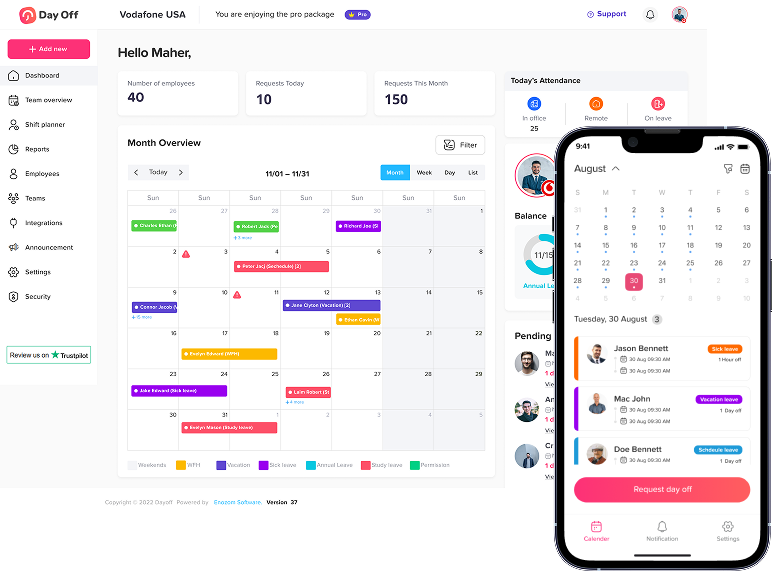
Employees can submit time off requests online instead of sending emails or filling out forms. They can choose the leave type, select the dates, add notes if needed, and send the request directly to the right approver.
This makes the process faster and reduces confusion. Employees know their request has been submitted properly, and managers receive it in a structured format.
Clear PTO Balances
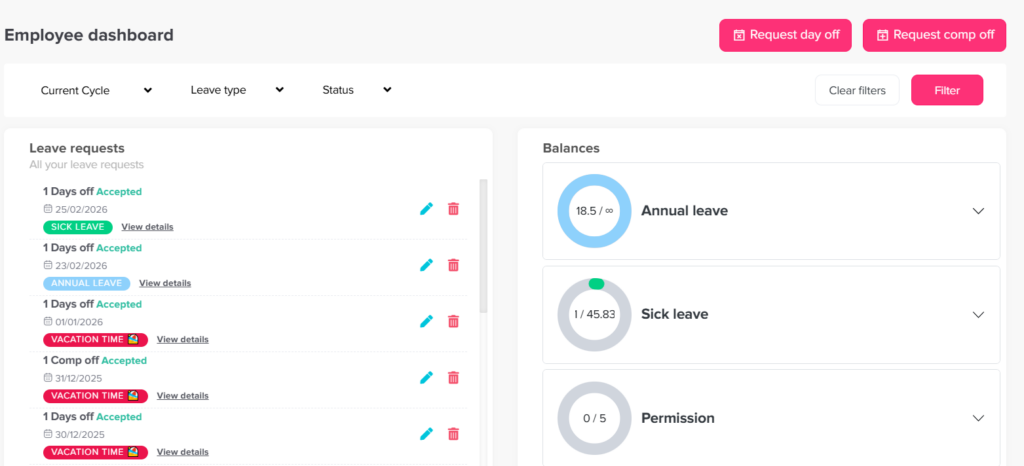
One of the biggest benefits for employees is visibility into their remaining PTO balance. Instead of asking HR, employees can check how many vacation days, sick days, or personal days they have available.
This helps employees plan their time off responsibly. They can see whether they have enough balance before submitting a request, which reduces unnecessary back-and-forth with HR.
Request Status Visibility
Employees should not have to wonder whether their request was seen, approved, or rejected. An online PTO tracking tool shows the status of each request, such as pending, approved, rejected, or canceled.
This gives employees peace of mind and reduces follow-up messages.
Mobile Access
Many teams work remotely, travel often, or do not spend their full day at a desk. A PTO tracking tool with mobile access allows employees to request time off from anywhere.
This is especially useful for remote teams, field employees, hybrid teams, and companies with multiple locations.
Better Transparency
When leave policies and balances are visible, employees have a clearer understanding of how time off works. They can see available leave types, request rules, approval requirements, and remaining balances without needing to ask HR every time.
Transparency helps build trust between employees and the company.
How an Online PTO Tracking Tool Helps HR Teams
HR teams are responsible for keeping leave records accurate and consistent. When PTO is tracked manually, HR often spends a lot of time updating spreadsheets, answering balance questions, correcting mistakes, and preparing reports.
An online PTO tracking tool helps HR reduce manual work and manage leave more efficiently.
Centralized Leave Records
Instead of keeping leave data in different spreadsheets, email threads, or paper files, HR can manage everything in one system. This includes employee balances, leave history, pending requests, approvals, policies, and reports.
Centralized records make it easier to find information quickly and avoid duplicate or outdated data.
Automated Balance Updates
Manual balance calculations are one of the most common sources of PTO tracking errors. HR may need to calculate accruals, carryover, used days, remaining days, and policy changes.
An online PTO tracking tool can automatically update balances when leave is approved, accrued, carried over, or adjusted. This saves time and improves accuracy.
Custom Leave Policies
Different companies have different leave rules. Some offer fixed annual balances, while others use accrual based PTO. Some allow carryover, while others reset balances at the start of the year or on the employee’s work anniversary.
A strong PTO tracking tool allows HR to create custom leave policies based on company needs. This can include:
- Annual leave allowances
- Monthly or weekly accruals
- Carryover limits
- Expiration rules
- Probation period rules
- Different policies by location, department, or employee group
- Custom leave types
This flexibility is important for companies with different teams, locations, or employment types.
Better Reporting
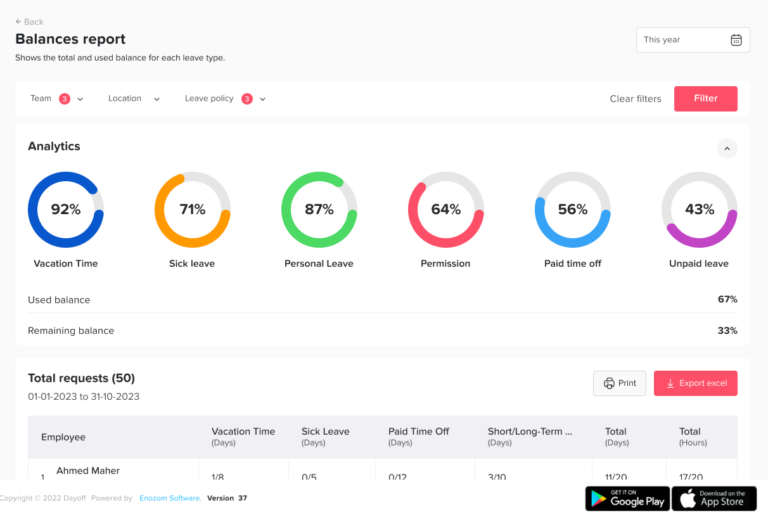
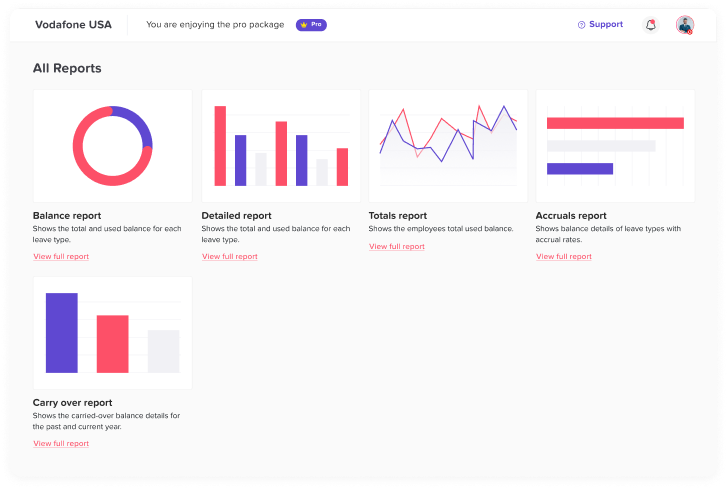
HR teams often need reports for payroll, leadership, compliance, and workforce planning. An online PTO tracking tool makes it easier to generate reports on leave usage, balances, upcoming absences, employee history, and department trends.
Instead of building reports manually, HR can export accurate data when needed.
Common PTO Tracking Challenges and How Online Tools Solve Them
| PTO Tracking Challenge | How an Online PTO Tracking Tool Helps |
|---|---|
| Employees do not know their remaining balance | Employees can view updated balances anytime |
| HR manually updates spreadsheets | Balances and records update automatically |
| Requests get lost in emails or chats | All requests are stored in one system |
| Managers approve overlapping time off | Shared calendars show team availability |
| Policies are applied inconsistently | Custom rules help standardize leave management |
| Payroll data is inaccurate | Reports provide clearer absence records |
| HR spends too much time answering questions | Employees can access request status and balances themselves |
| Leave history is hard to find | Employee records are stored digitally |
Important Features to Look for in an Online PTO Tracking Tool
Not every PTO tracking tool offers the same level of functionality. Before choosing a system, businesses should look for features that support employees, HR, and managers.
Employee Self Service
Employee self service allows team members to request time off, check balances, view past requests, and track request status on their own. This reduces HR workload and improves the employee experience.
Custom Leave Types
A business may need to track more than vacation and sick leave. The tool should allow custom leave types such as unpaid leave, personal leave, maternity leave, paternity leave, work from home, comp time, or study leave.
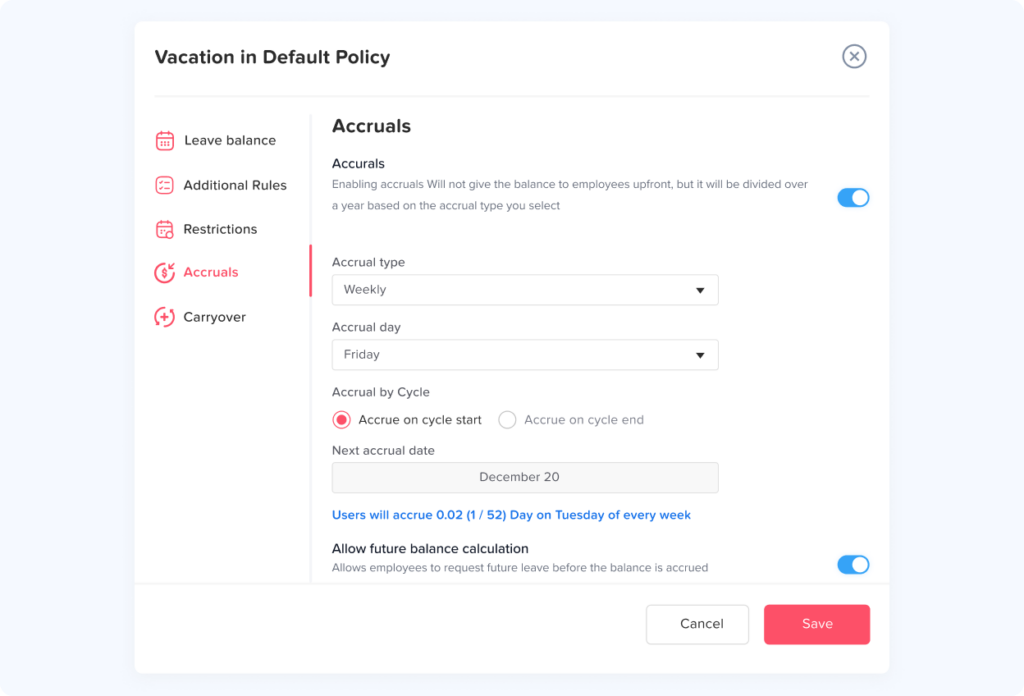
Automated Accruals
If employees earn PTO over time, automated accruals are important. The system should calculate earned leave based on the company’s policy, such as monthly, weekly, biweekly, or annual accruals.
Carryover Rules
Some companies allow employees to carry unused leave into the next year. A PTO tracking tool should support carryover limits, expiration dates, and reset rules.
Approval Workflows
Approval workflows help route requests to the right manager, HR person, or multiple approvers. This is useful for companies that need manager approval first and HR approval second.
Shared Leave Calendar
A shared calendar helps teams see upcoming absences. It improves planning and reduces scheduling conflicts.
Notifications
Notifications help keep everyone updated when a request is submitted, approved, rejected, changed, or canceled. This prevents requests from being missed.
Reports and Exports
HR should be able to create reports for leave balances, usage, upcoming absences, employee history, and department-level trends. Export options are useful for payroll and management reporting.
Mobile Access
Mobile access makes PTO tracking easier for employees and managers who are away from their desks. It is especially valuable for remote, hybrid, or field-based teams.
Integrations
Integrations with calendars and communication tools can make PTO tracking more connected. For example, approved leave can appear on team calendars, and managers can receive notifications through workplace communication platforms.

Online PTO Tracking vs Manual PTO Tracking
Many companies start with manual PTO tracking because it seems simple and affordable. However, manual tracking often creates hidden costs over time.
| Manual PTO Tracking | Online PTO Tracking Tool |
|---|---|
| Uses spreadsheets, emails, and paper forms | Uses one centralized digital system |
| Requires manual balance updates | Updates balances automatically |
| Easy to lose or miss requests | Stores every request clearly |
| Hard to see team availability | Provides shared calendars |
| More likely to create errors | Improves accuracy |
| Takes more HR time | Reduces repetitive admin work |
| Hard to scale with company growth | Supports growing teams more easily |
| Reports must be built manually | Reports can be generated faster |
How to Choose the Right Online PTO Tracking Tool
Choosing the right PTO tracking tool depends on the company’s size, structure, policies, and work style. Before choosing a system, HR teams should consider their current problems and future needs.
Here are important questions to ask:
| Question | Why It Matters |
|---|---|
| How many employees will use the tool? | Helps choose a system that fits the company size |
| What leave types do we need to track? | Ensures the tool supports company policies |
| Do we use accruals or fixed annual balances? | Determines balance calculation needs |
| Do we allow carryover? | Helps manage unused leave correctly |
| Who approves leave requests? | Helps configure approval workflows |
| Do we need mobile access? | Important for remote, hybrid, or field teams |
| Do we need calendar integrations? | Improves visibility and planning |
| Do we need reports for payroll or management? | Supports accurate recordkeeping |
| Do we have employees in multiple locations? | May require different policies or holiday calendars |
Best Practices for Managing PTO Online
Using PTO tracking software is more effective when companies also follow clear leave management practices.
Keep Leave Policies Clear
Employees should understand how PTO is earned, used, approved, carried over, and reset. Clear policies reduce confusion and help employees use the system correctly.
Make Balances Visible
When employees can see their balances, they can plan better and avoid submitting requests that exceed their available time off.
Use a Shared Calendar
A shared leave calendar helps teams avoid scheduling conflicts and plan around absences.
Review Reports Regularly
HR should review leave reports to understand usage trends, unused balances, and upcoming absences.
Train Employees and Managers
Even simple tools work better when everyone understands how to use them. A short introduction can help employees submit requests correctly and help managers approve them quickly.
Keep Data Updated
Employee records, policies, approvers, and leave types should be reviewed regularly to keep the system accurate.
Why Day Off Is a Helpful Online PTO Tracking Tool
Day Off is an online PTO tracking tool designed to help employees, managers, and HR teams manage leave more easily. It brings leave requests, balances, approvals, policies, calendars, and reports together in one simple system.
With Day Off, employees can request time off and check their balances without depending on manual follow ups. Managers can review requests, approve leave, and see team availability. HR teams can create leave policies, manage accruals, track carryover, and export reports when needed.
Day Off is useful for small businesses, growing teams, remote teams, hybrid workplaces, and companies that want to move away from manual PTO tracking. It is available on web, iOS, and Android, making it easy for teams to manage time off from anywhere.
Conclusion
An online PTO tracking tool helps employees and HR manage paid time off with more accuracy, transparency, and control. Instead of relying on spreadsheets, emails, and manual updates, businesses can use a centralized system to manage requests, approvals, balances, calendars, and reports.
For employees, online PTO tracking makes it easier to request time off, check balances, and follow request status. For HR, it reduces manual work and improves record accuracy. For managers, it provides better visibility into team availability and helps prevent scheduling conflicts.
As teams grow and work becomes more flexible, manual PTO tracking becomes harder to manage. A reliable online PTO tracking tool gives companies the structure they need to manage employee leave clearly and efficiently.