

Managing accounts payable software efficiently is crucial for maintaining healthy cash flow and ensuring that vendors and suppliers are paid on time. With the increasing complexity of financial operations, businesses of all sizes need reliable software solutions to automate and streamline their accounts payable processes. From handling invoices and payments to managing multi-currency transactions and vendor relationships, the right accounts payable software, alongside tools like Day Off for time tracking and leave management, can save time, reduce errors, and enhance financial visibility.

In this article, we’ll explore the top 10 accounts payable software options available, highlighting their key features, pros, and cons to help you choose the best solution for your business.

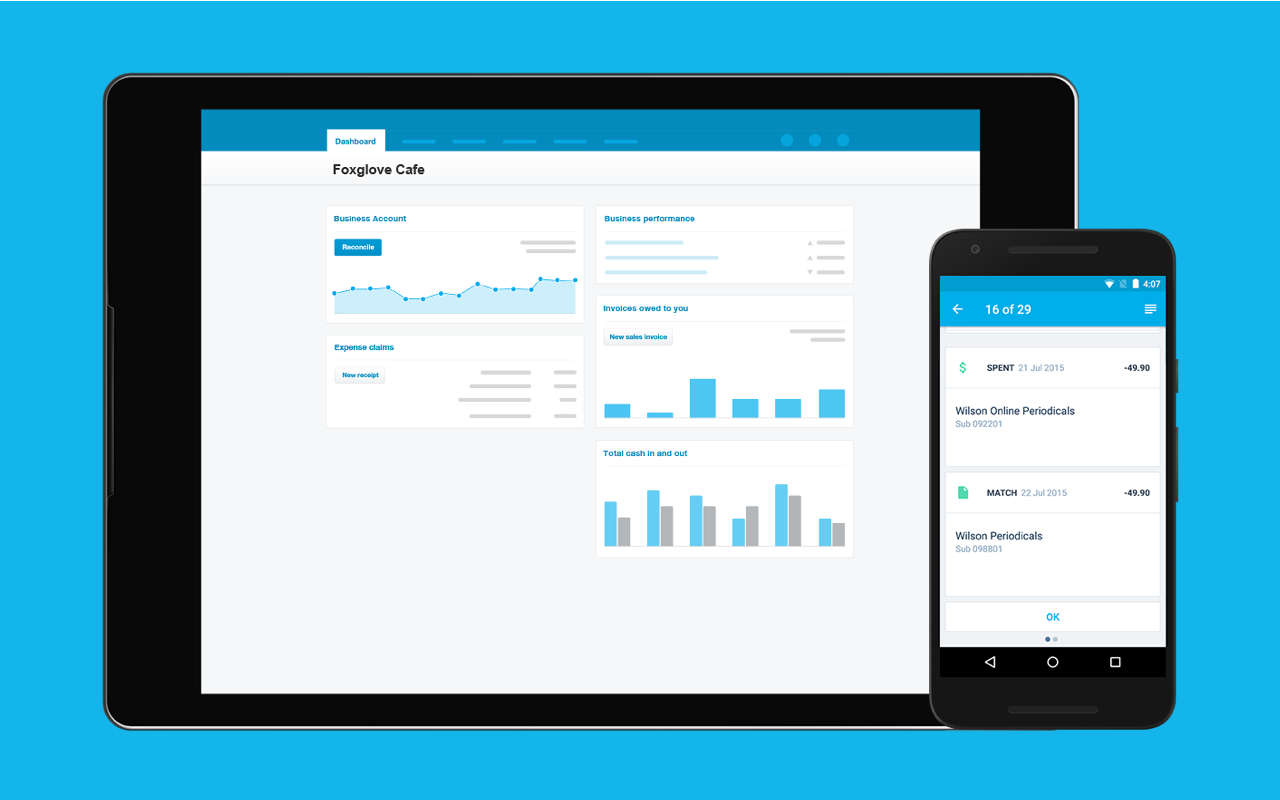
Xero

Xero

Key Features

  • Cloud-Based Accounting: Accessible from anywhere with internet access, offering real-time updates.
  • Bank Reconciliation: Automatically imports and categorizes bank transactions, making reconciliation faster.
  • Invoicing: Customizable invoicing templates, with automatic reminders for overdue payments.
  • Expense Tracking: Allows easy tracking of business expenses, with the ability to attach receipts to transactions.
  • Inventory Management: Helps track stock levels, sales, and purchases in real-time.
  • Multi-Currency Support: Automatically calculates exchange rates for international transactions.
  • Payroll: Integrated payroll processing with tax calculations and employee management tools.
  • Financial Reporting: Provides a wide range of customizable reports including profit and loss, balance sheets, and more.
  • Integration with Third-Party Apps: Connects with over 800 apps, including CRM systems, payment gateways, and more.
  • Mobile App: Offers a mobile app for on-the-go access to key features like invoicing, expenses, and reports.

Mobile App

Workflow

$13 to $70 per month • Trial: Yes • Free Plan: No.

View pros and cons

Pros

tick circle 1 Top 10 Accounts Payable SoftwareUser-Friendly Interface: Simple and intuitive dashboard for easy navigation, even for non-accountants.

tick circle 1 Top 10 Accounts Payable SoftwareScalability: Suitable for both small and medium-sized businesses, with features that grow alongside your business needs.

tick circle 1 Top 10 Accounts Payable SoftwareAutomation: Automates many manual tasks like invoicing and reconciliation, saving time.

tick circle 1 Top 10 Accounts Payable SoftwareCollaboration: Multiple users can access the platform simultaneously, making it easy for teams and accountants to collaborate.

tick circle 1 Top 10 Accounts Payable SoftwareSecurity: Uses strong encryption and multi-factor authentication for secure access.

tick circle 1 Top 10 Accounts Payable SoftwareMulti-Currency Capabilities: Great for businesses dealing with international clients or suppliers.

tick circle 1 Top 10 Accounts Payable SoftwareRegular Updates: Xero frequently updates and improves its platform with new features.

tick circle 1 Top 10 Accounts Payable SoftwareExtensive Integration Options: Seamless integration with numerous third-party applications to enhance functionality.

Cons

close circle Top 10 Accounts Payable SoftwareSteep Learning Curve for Advanced Features: While the basics are simple, more advanced features might require a learning curve for new users.

close circle Top 10 Accounts Payable SoftwareLimited Customer Support: No phone support is available, and customer support is primarily through email or online chat, which can be slow at times.

close circle Top 10 Accounts Payable SoftwareCost: Can become expensive, especially when using multiple add-ons or premium features.

close circle Top 10 Accounts Payable SoftwarePayroll Limitations: Payroll is limited to certain countries, requiring additional third-party apps for global payroll management.

close circle Top 10 Accounts Payable SoftwareNo Native Project Management: Lacks built-in project management tools, requiring integration with other apps for this functionality.

close circle Top 10 Accounts Payable SoftwareCustom Reporting: While the reports are useful, custom reporting features are limited compared to other platforms.
FreshBooks

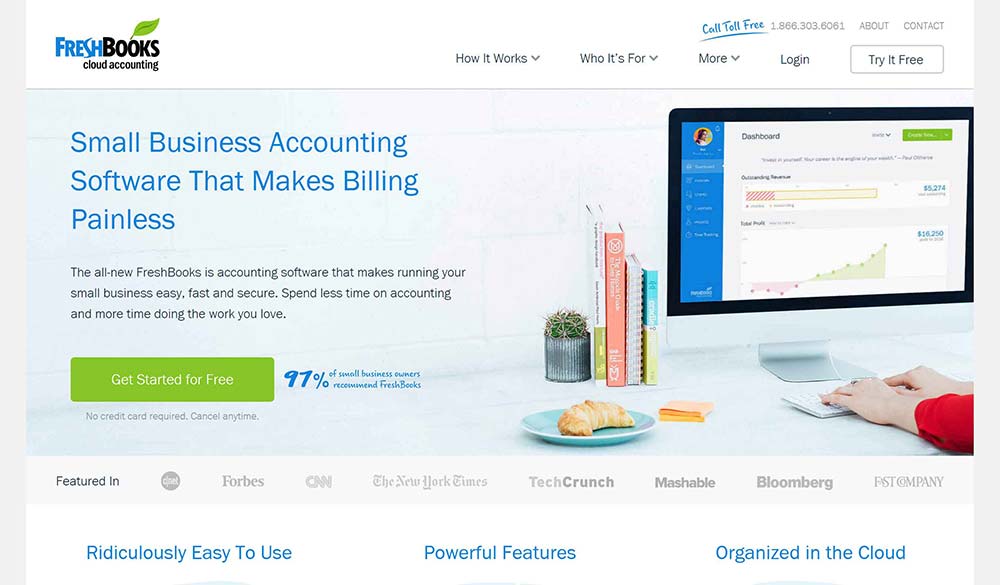
FreshBooks

Key Features

  • Invoicing: Create and customize professional invoices, set up recurring invoices, and accept online payments.
  • Expense Tracking: Easily track expenses by connecting your bank account or uploading receipts.
  • Time Tracking: Built-in time tracking to log billable hours, useful for freelancers and service-based businesses.
  • Project Management: Collaborate with team members and clients by sharing files, assigning tasks, and tracking project progress.
  • Automated Billing and Reminders: Automates payment reminders, late fees, and recurring invoices.
  • Estimates and Proposals: Create estimates and proposals and convert them into invoices once accepted by clients.
  • Reports and Financial Statements: Offers various reports like profit and loss, tax summaries, and expense reports.
  • Mobile App: Access invoicing, expenses, and time tracking from the mobile app.
  • Multi-Currency Support: Handle international clients with automatic currency conversions.
  • Integration with Third-Party Apps: Integrates with numerous apps including payment gateways, CRMs, and accounting tools.

Mobile App

Reports

Integrations

$17 to $55 per month • Trial: Yes • Free Plan: No.

View pros and cons

Pros

tick circle 1 Top 10 Accounts Payable SoftwareUser-Friendly Interface: Simple and intuitive design, especially great for freelancers and non-accountants.

tick circle 1 Top 10 Accounts Payable SoftwareComprehensive Invoicing Features: Extensive invoicing capabilities with customization, automation, and payment options.

tick circle 1 Top 10 Accounts Payable SoftwareTime Tracking and Billing: Helps service businesses track billable hours and easily invoice clients for time worked.

tick circle 1 Top 10 Accounts Payable SoftwareClient Collaboration: Great tools for working with clients on projects, proposals, and sharing files.

tick circle 1 Top 10 Accounts Payable SoftwareExpense Management: Automated expense tracking by linking bank accounts and credit cards.

tick circle 1 Top 10 Accounts Payable SoftwareMobile App: Offers flexibility with a powerful mobile app for invoicing, expense tracking, and time logging.

tick circle 1 Top 10 Accounts Payable SoftwareStrong Customer Support: Well-known for excellent customer service through phone, email, and live chat.

tick circle 1 Top 10 Accounts Payable SoftwareCustomizable Reports: Provides a variety of reports that can be customized for financial insights.

tick circle 1 Top 10 Accounts Payable SoftwareRecurring Payments: Automates payments for subscriptions or ongoing services.

Cons

close circle Top 10 Accounts Payable SoftwareLimited Scalability for Large Businesses: Better suited for freelancers and small businesses rather than larger enterprises with complex accounting needs.

close circle Top 10 Accounts Payable SoftwareNo Inventory Management: Lacks built-in inventory tracking, which may be a drawback for product-based businesses.

close circle Top 10 Accounts Payable SoftwareLimited Integration with Payroll: FreshBooks doesn’t have its own payroll processing, requiring third-party integration for this feature.

close circle Top 10 Accounts Payable SoftwareHigher Cost for Multiple Users: The price increases significantly as you add more users, which can be expensive for small teams.

close circle Top 10 Accounts Payable SoftwareLimited Customization for Reports: While reports are useful, they might not be as customizable or detailed as other accounting platforms.

close circle Top 10 Accounts Payable SoftwareNo Double-Entry Accounting: Lacks traditional double-entry accounting features, making it less suitable for businesses requiring more complex financial reporting.
Tipalti

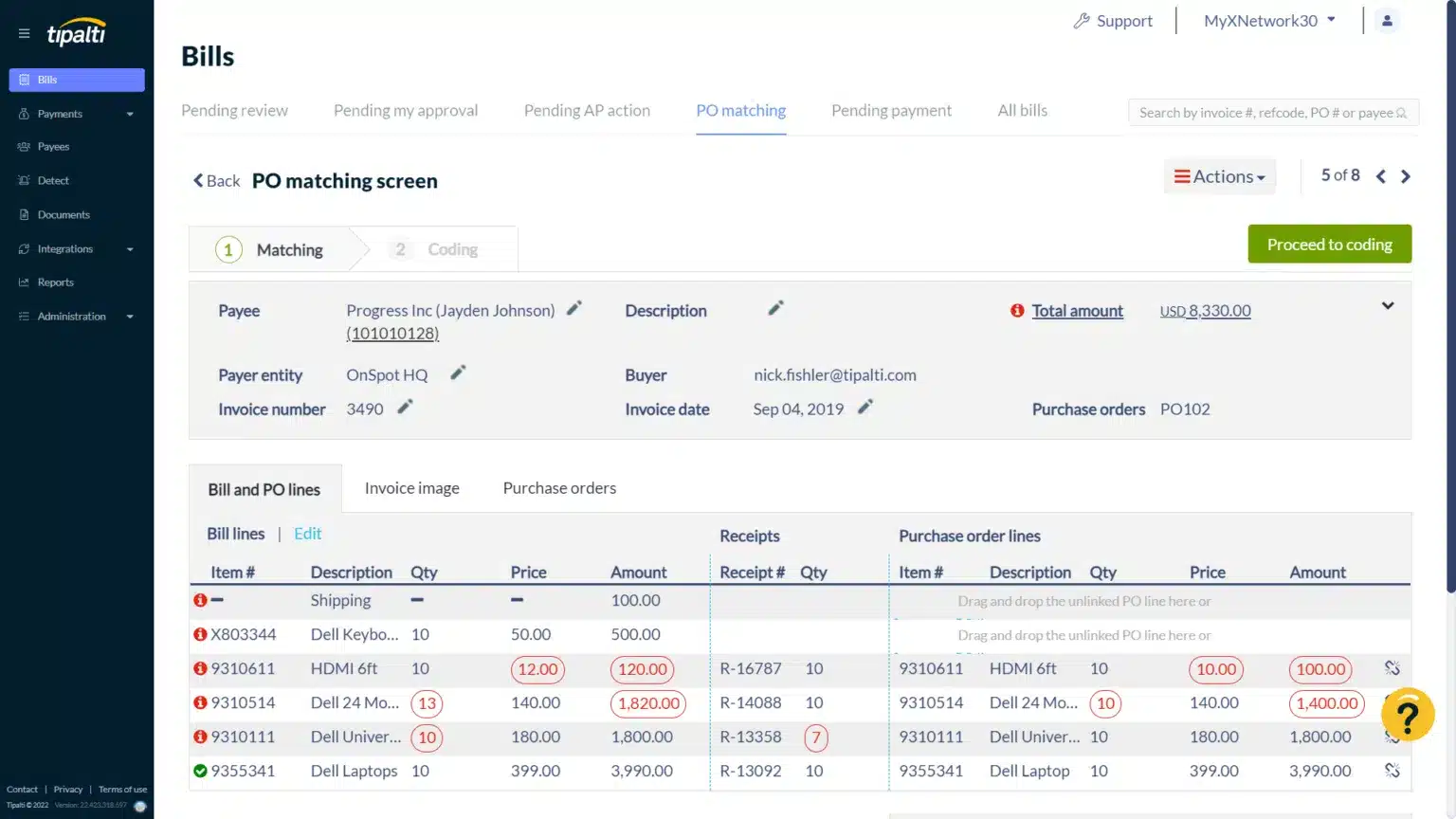
Tipalti

Key Features

  • Global Payments Automation: Supports payments in multiple currencies and payment methods, such as wire transfers, PayPal, ACH, and prepaid debit cards.
  • Supplier Management: Centralized platform for onboarding, managing, and paying suppliers, with automated tax form collection (W-8, W-9).
  • AP Automation: Automates the entire accounts payable workflow from invoice capture to approval and payment.
  • Multi-Entity Support: Consolidates financial operations for multiple subsidiaries and business entities.
  • Tax Compliance: Ensures compliance with international tax regulations and automatically collects, validates, and generates tax reports.
  • Self-Billing and Invoice Management: Automates invoice creation, approval workflows, and payment scheduling, reducing manual entry.
  • Payment Reconciliation: Automatic reconciliation of payments with ERP systems like NetSuite, QuickBooks, and others.
  • Real-Time Currency Conversion: Offers automated currency conversion with competitive rates and real-time foreign exchange data.
  • Fraud Detection and Risk Management: Built-in fraud prevention mechanisms, including payment validation and screening.
  • Regulatory Compliance: Adheres to global compliance standards like OFAC, AML, and KYC requirements.

Workflow

Self-Service

Automation

$299 per month • Trial: No • Free Plan: No.

View pros and cons

Pros

tick circle 1 Top 10 Accounts Payable SoftwareEnd-to-End Payment Automation: Automates the entire AP process, from supplier onboarding to payment and reconciliation, saving time and reducing errors.

tick circle 1 Top 10 Accounts Payable SoftwareGlobal Payments: Supports over 190 countries and 120 currencies, making it highly suited for global operations.

tick circle 1 Top 10 Accounts Payable SoftwareScalability: Tipalti is designed to scale with growing businesses, managing multi-entity accounting and high transaction volumes.

tick circle 1 Top 10 Accounts Payable SoftwareCompliance and Risk Management: Ensures tax and regulatory compliance across different countries, reducing the risk of penalties and errors.

tick circle 1 Top 10 Accounts Payable SoftwareSupplier Portal: Suppliers can update their payment details and view payment status, reducing the burden on internal teams.

tick circle 1 Top 10 Accounts Payable SoftwareERP Integration: Seamlessly integrates with leading ERP systems like NetSuite, QuickBooks, and others for streamlined financial processes.

tick circle 1 Top 10 Accounts Payable SoftwareFraud Prevention: Robust fraud detection and risk management tools help safeguard financial transactions.

tick circle 1 Top 10 Accounts Payable SoftwareImproved Efficiency: By automating repetitive tasks, Tipalti reduces manual labor, minimizes errors, and speeds up payment cycles.

Cons

close circle Top 10 Accounts Payable SoftwareHigh Cost for Small Businesses: Tipalti is primarily designed for mid-sized and large businesses, making it potentially costly for smaller companies with limited transactions.

close circle Top 10 Accounts Payable SoftwareComplex Setup: Initial implementation can be time-consuming and may require dedicated IT resources or support to configure.

close circle Top 10 Accounts Payable SoftwareLimited Customization: Some users may find the platform’s customization options for workflows and reporting limited compared to other solutions.

close circle Top 10 Accounts Payable SoftwareLearning Curve: The platform offers many advanced features, which can take time to master, particularly for teams new to payment automation.

close circle Top 10 Accounts Payable SoftwareSupplier Fees: Some payment methods (e.g., PayPal) incur fees for suppliers, which may create friction in payment preferences.

close circle Top 10 Accounts Payable SoftwareCustomer Support: While generally good, some users report longer response times or challenges with support for complex issues.
Sage Intacct

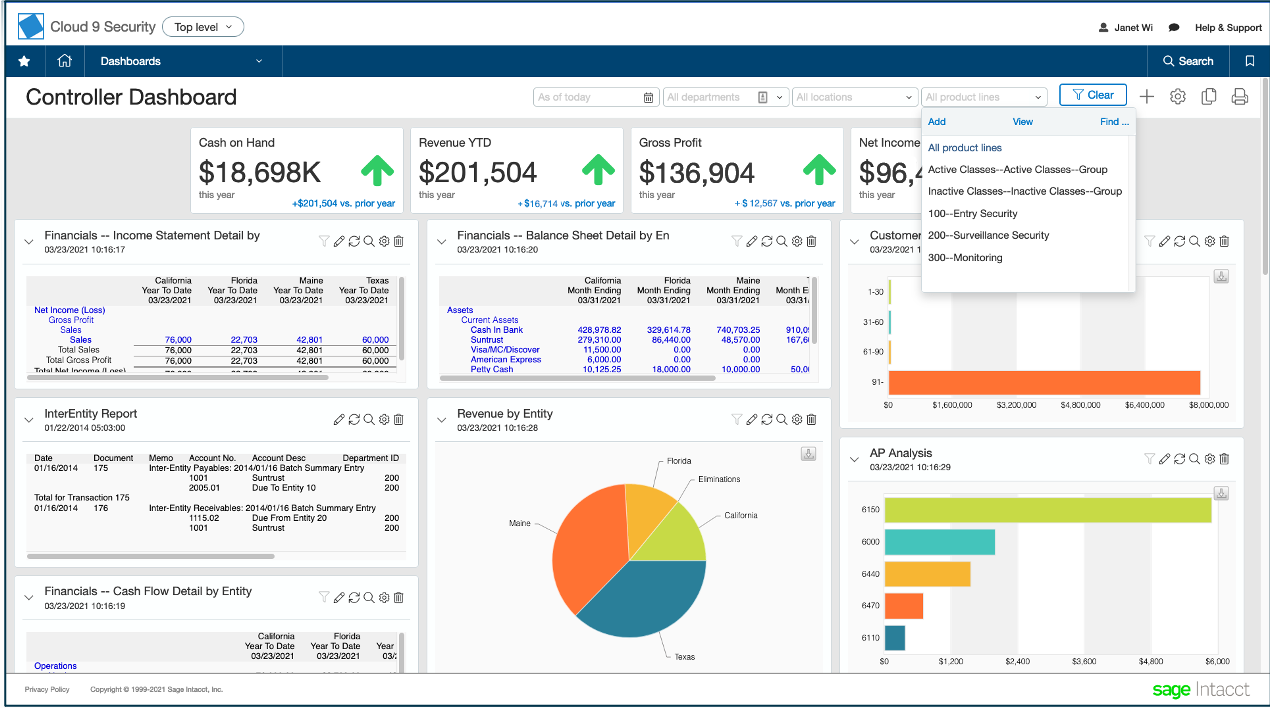
Sage Intacct

Key Features

  • Core Financials: Includes general ledger, accounts payable, accounts receivable, order management, and cash management.
  • Multi-Entity and Global Consolidations: Enables consolidation across multiple entities, currencies, and geographies in real time.
  • Financial Reporting: Advanced reporting capabilities with customizable financial reports and dashboards, including real-time visibility.
  • Automation: Automates processes like billing, revenue recognition, accounts payable, and invoicing to improve efficiency.
  • Project Accounting: Offers project management features for tracking project costs, profitability, and time tracking.
  • Dimensional Accounting: Allows for detailed financial tracking using dimensions like department, location, and customer for enhanced reporting.
  • ERP Integration: Seamless integration with a wide range of ERP solutions and other third-party apps, including Salesforce and ADP.
  • Budgeting and Forecasting: Advanced tools for managing budgets, forecasts, and financial planning.
  • Compliance Management: Ensures adherence to accounting standards like GAAP, IFRS, and SOX compliance.
  • Cloud-Based Platform: Accessible anywhere with internet access, offering a real-time, scalable solution.

Workflow

Automation

Reports

$1,250 to $2,500 per month • Trial: No • Free Plan: No.

View pros and cons

Pros

tick circle 1 Top 10 Accounts Payable SoftwareScalable for Growing Businesses: Ideal for mid-sized businesses that need to scale up financial processes as they grow.

tick circle 1 Top 10 Accounts Payable SoftwareComprehensive Financial Management: Offers a wide array of financial tools, from core accounting to advanced features like multi-entity management.

tick circle 1 Top 10 Accounts Payable SoftwareAutomation of Complex Processes: Helps reduce manual effort by automating complex financial processes like revenue recognition and consolidations.

tick circle 1 Top 10 Accounts Payable SoftwareReal-Time Visibility: Provides real-time data and dashboards, allowing businesses to make data-driven decisions quickly.

tick circle 1 Top 10 Accounts Payable SoftwareCustomizable Reports: Offers powerful and customizable financial reporting to fit specific business needs.

tick circle 1 Top 10 Accounts Payable SoftwareMulti-Entity and Multi-Currency: Excellent for businesses operating in multiple countries or with multiple subsidiaries.

tick circle 1 Top 10 Accounts Payable SoftwareIntegration Capabilities: Easily integrates with other software like CRM, payroll, and ERP systems.

tick circle 1 Top 10 Accounts Payable SoftwareCloud-Based: Provides flexibility to work from anywhere, and the cloud-based nature ensures automatic updates and maintenance.

tick circle 1 Top 10 Accounts Payable SoftwareStrong Security Features: Adheres to top-level data security standards, including encryption, backup, and user authentication.

Cons

close circle Top 10 Accounts Payable SoftwareExpensive for Small Businesses: Sage Intacct is designed for mid-sized to large businesses, so the pricing may be steep for smaller organizations.

close circle Top 10 Accounts Payable SoftwareComplex Setup and Implementation: Requires a significant amount of time and resources for setup and integration, particularly for complex needs.

close circle Top 10 Accounts Payable SoftwareSteep Learning Curve: Some users may find the advanced features and reporting difficult to master initially.

close circle Top 10 Accounts Payable SoftwareLimited Customization in User Interface: While reports are highly customizable, the user interface itself offers limited customization.

close circle Top 10 Accounts Payable SoftwareAdditional Costs for Add-Ons: Many key features, such as advanced modules (like project accounting or budgeting), may come at an extra cost.

close circle Top 10 Accounts Payable SoftwareCustomer Support: Some users have reported slower customer support response times, particularly for more complex queries.
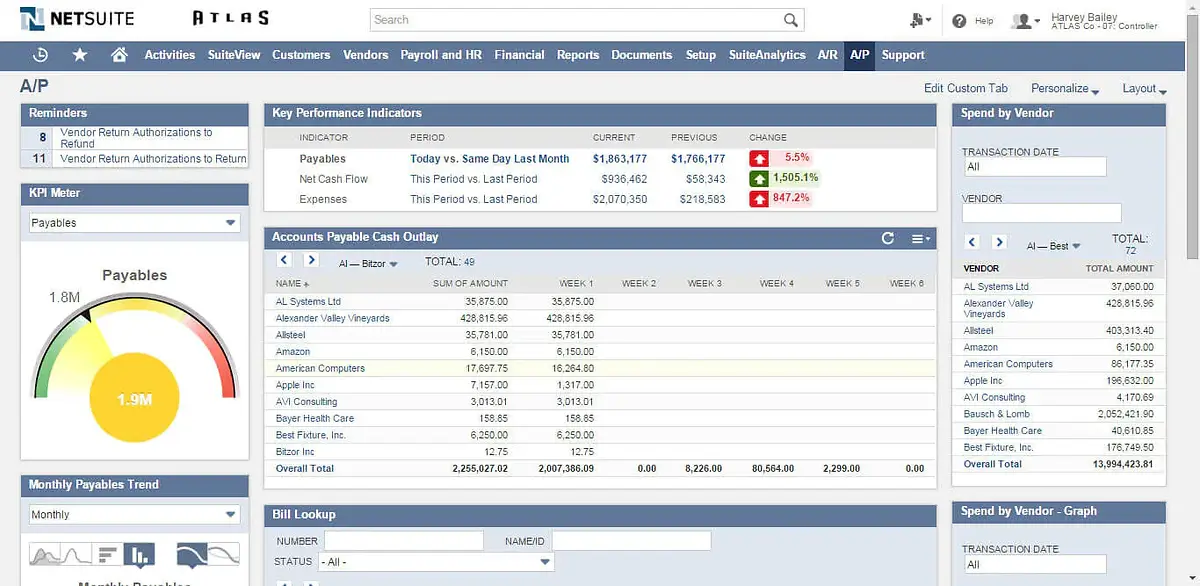
Oracle NetSuite

Oracle NetSuite

Key Features

  • Comprehensive ERP Solution: Integrates financial management, CRM, inventory, and e-commerce in a single cloud-based platform.
  • Financial Management: Includes general ledger, accounts receivable, accounts payable, and tax management, along with automated revenue recognition.
  • Real-Time Dashboards and Reporting: Provides real-time, customizable reports and dashboards for deeper insights into business performance.
  • Global Business Management: Supports multi-currency, multi-language, and multi-subsidiary operations, making it ideal for global businesses.
  • Order and Inventory Management: Streamlines order processing and inventory management across various channels with real-time tracking.
  • CRM and Sales Automation: Built-in CRM helps manage customer relationships, track sales opportunities, and automate marketing efforts.
  • Supply Chain Management: Provides real-time visibility into the supply chain, including inventory levels, demand planning, and vendor management.
  • E-commerce Integration: Offers native integration with e-commerce platforms, unifying online and offline operations.
  • Customization and Scalability: Highly customizable platform with the ability to scale as the business grows, offering a wide range of modules and add-ons.
  • Compliance Management: Helps ensure compliance with global financial regulations and standards like GAAP, IFRS, and SOX.

Integrations

Reports

Self-Service

$999 per month • Trial: No • Free Plan: No.

View pros and cons

Pros

tick circle 1 Top 10 Accounts Payable SoftwareAll-in-One Solution: Combines ERP, CRM, financials, and e-commerce into one unified platform, reducing the need for multiple systems.

tick circle 1 Top 10 Accounts Payable SoftwareScalability: Suitable for small businesses, mid-sized companies, and enterprises with the ability to scale operations as the company grows.

tick circle 1 Top 10 Accounts Payable SoftwareReal-Time Visibility: Provides real-time data and insights across the business, which improves decision-making and operational efficiency.

tick circle 1 Top 10 Accounts Payable SoftwareGlobal Capabilities: Ideal for international companies with multi-currency, multi-language, and multi-entity support.

tick circle 1 Top 10 Accounts Payable SoftwareExtensive Customization: Highly customizable platform with numerous options for custom workflows, reporting, and third-party integrations.

tick circle 1 Top 10 Accounts Payable SoftwareAutomation of Key Processes: Automates many business processes, including financial reporting, inventory management, and order processing.

tick circle 1 Top 10 Accounts Payable SoftwareAdvanced Reporting: Provides detailed, customizable financial reports and dashboards for improved financial performance tracking.

tick circle 1 Top 10 Accounts Payable SoftwareCloud-Based: Being cloud-native, it offers easy access from anywhere, automatic updates, and lower maintenance costs.

tick circle 1 Top 10 Accounts Payable SoftwareE-commerce Integration: Streamlines omnichannel sales with built-in e-commerce functionality and support for retail operations.

tick circle 1 Top 10 Accounts Payable SoftwareStrong Ecosystem: Extensive marketplace for third-party applications and integrations, extending its capabilities further.

Cons

close circle Top 10 Accounts Payable SoftwareHigh Cost: NetSuite is one of the more expensive ERP solutions, making it less accessible for smaller businesses or startups.

close circle Top 10 Accounts Payable SoftwareComplex Implementation: Implementation can be time-consuming and complex, often requiring dedicated IT support or external consultants.

close circle Top 10 Accounts Payable SoftwareSteep Learning Curve: Due to its vast feature set, new users may find it overwhelming and require significant training to master the system.

close circle Top 10 Accounts Payable SoftwareCustomization Costs: While highly customizable, advanced customizations can increase costs and complexity, especially if professional services are required.

close circle Top 10 Accounts Payable SoftwareCustomer Support: Some users report that the quality of customer support can be inconsistent, especially for more technical issues.

close circle Top 10 Accounts Payable SoftwareOverkill for Small Businesses: Smaller businesses with simpler needs may find NetSuite’s comprehensive feature set to be excessive.

close circle Top 10 Accounts Payable SoftwareIntegration Challenges: Integrating with non-native third-party systems can sometimes be challenging and may require technical expertise.

close circle Top 10 Accounts Payable SoftwareUpgrade Process: Regular updates are automatic, but some users report challenges when dealing with these upgrades, particularly if customizations are involved.
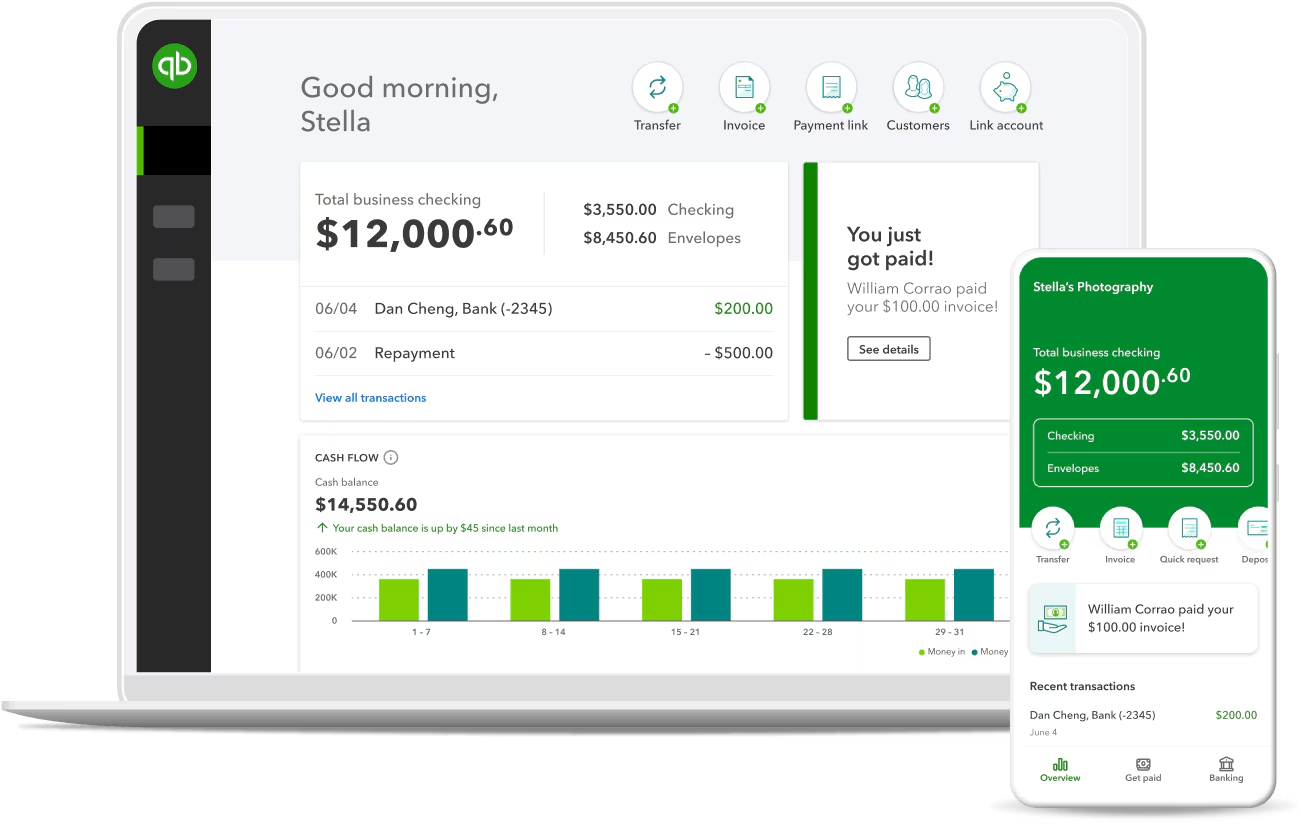
QuickBooks Online

QuickBooks Online

Key Features

  • Cloud-Based Accounting: Allows businesses to manage finances from anywhere with an internet connection, offering real-time data access.
  • Invoicing and Payments: Create and send customizable invoices, track payments, and set up automated reminders for overdue invoices.
  • Expense Tracking: Automatically track and categorize expenses by connecting bank accounts and credit cards.
  • Bank Reconciliation: Automatically import and reconcile bank transactions, simplifying bookkeeping.
  • Payroll Integration: Offers payroll processing with tax calculations and filing, seamlessly integrated into the platform (available as an add-on).
  • Financial Reporting: Provides a wide range of standard and customizable financial reports, such as profit & loss, balance sheet, and cash flow.
  • Multi-Currency Support: Handles transactions in different currencies, useful for businesses with international clients or suppliers.
  • Tax Management: Tracks sales tax and automates tax calculations, including preparing and filing taxes.
  • Inventory Management: Helps manage and track inventory levels, with alerts for stock reordering.
  • Integration with Third-Party Apps: Supports integration with various third-party tools, including payment gateways, CRMs, and e-commerce platforms.

Reports

Integrations

$30 to $200 Per month • Trial: Yes • Free Plan: No.

View pros and cons

Pros

tick circle 1 Top 10 Accounts Payable SoftwareEase of Use: User-friendly interface that is easy to navigate, even for non-accountants, with helpful tutorials and support.

tick circle 1 Top 10 Accounts Payable SoftwareAccessibility: Being cloud-based, it offers flexibility with access from any device, anytime.

tick circle 1 Top 10 Accounts Payable SoftwareAutomation: Automates many tasks like invoicing, recurring payments, and bank reconciliation, saving time and effort.

tick circle 1 Top 10 Accounts Payable SoftwareScalability: Offers different pricing tiers to suit businesses of varying sizes, making it flexible for growth.

tick circle 1 Top 10 Accounts Payable SoftwareCustomizable Reports: Provides useful financial insights through standard and customizable reporting tools.

tick circle 1 Top 10 Accounts Payable SoftwareWide Range of Integrations: Connects with hundreds of third-party applications, such as PayPal, Shopify, and Stripe, to extend functionality.

tick circle 1 Top 10 Accounts Payable SoftwareMobile App: Offers a mobile app that allows users to manage key features like invoicing, expenses, and bank reconciliation on the go.

tick circle 1 Top 10 Accounts Payable SoftwareReal-Time Collaboration: Allows multiple users to access the system simultaneously, improving collaboration between business owners and accountants.

Cons

close circle Top 10 Accounts Payable SoftwareLimited Features for Advanced Accounting: While great for small to mid-sized businesses, it may lack the advanced features needed by larger enterprises.
close circle Top 10 Accounts Payable SoftwareCostly Add-Ons: Adding features like payroll, advanced reporting, or third-party app integrations can increase the overall cost.

close circle Top 10 Accounts Payable SoftwareCustomer Support: Some users report inconsistent or slow customer service response times, especially for complex issues.

close circle Top 10 Accounts Payable SoftwareTransaction Limits: For larger businesses with high transaction volumes, QuickBooks may run into limitations with data processing or performance.

close circle Top 10 Accounts Payable SoftwareLearning Curve for Advanced Features: While basic tasks are simple, some advanced accounting features may have a steeper learning curve.

close circle Top 10 Accounts Payable SoftwareMobile App Limitations: The mobile app, while convenient, has limited functionality compared to the desktop version.

close circle Top 10 Accounts Payable SoftwareOccasional Syncing Issues: Users have reported occasional syncing issues with bank accounts and third-party integrations, requiring manual corrections.


AvidXchange

AvidXchange

Key Features

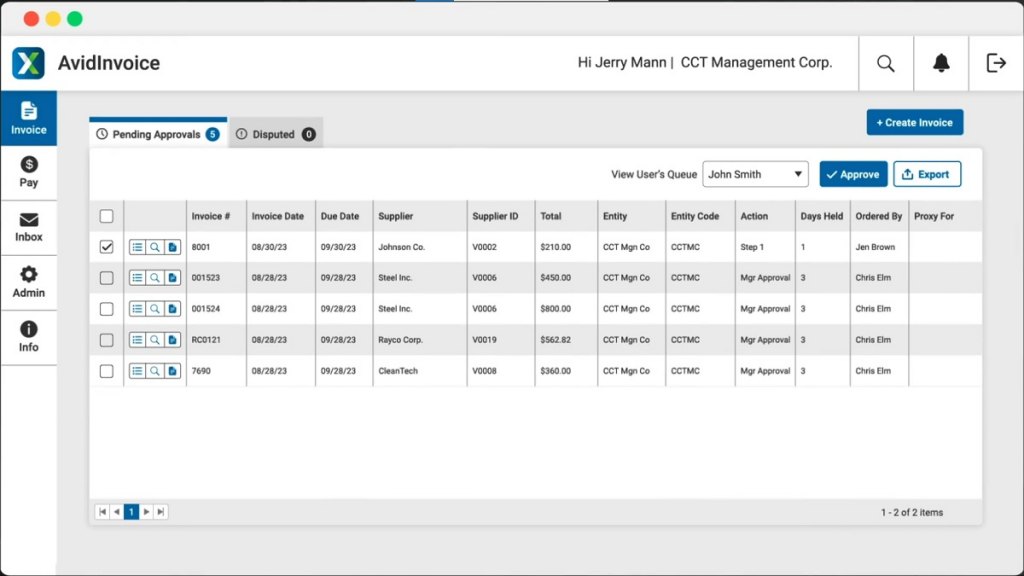
  • Automated Invoice Processing: Streamlines the entire invoice lifecycle by automating invoice capture, approval workflows, and payments.
  • Accounts Payable Automation: Automates accounts payable (AP) processes, reducing manual data entry and improving accuracy.
  • Payment Automation: Offers a full-service payment solution to process vendor payments through checks, ACH, and virtual cards.
  • Vendor Management: Provides a centralized platform for onboarding and managing vendor information and payment preferences.
  • Approval Workflows: Customizable approval workflows allow routing of invoices to the appropriate departments or personnel for review.
  • ERP Integration: Integrates seamlessly with leading ERP systems, including NetSuite, Microsoft Dynamics, QuickBooks, and others.
  • Real-Time Reporting and Analytics: Offers insights into financial performance with real-time reporting tools and customizable dashboards.
  • Compliance and Security: Ensures payment compliance, manages tax forms, and adheres to industry regulations for secure transactions.
  • Multi-Entity Support: Manages multiple business entities or subsidiaries, consolidating payments and reporting across them.
  • Mobile Access: Allows users to approve invoices and manage payments from any device through its mobile-friendly platform.

Mobile App

Integrations

Automation

$1,500 to $2,500 per month • Trial: No • Free Plan: No.

View pros and cons

Pros

tick circle 1 Top 10 Accounts Payable SoftwareTime Savings: Automates many manual tasks, significantly reducing the time spent on invoice processing, data entry, and payment approvals.

tick circle 1 Top 10 Accounts Payable SoftwareImproved Accuracy: Minimizes human error through automation, leading to more accurate AP processes and vendor payments.

tick circle 1 Top 10 Accounts Payable SoftwareEnhanced Vendor Relationships: Provides timely and accurate payments, improving relationships with vendors and reducing payment disputes.

tick circle 1 Top 10 Accounts Payable SoftwareScalability: Can easily scale to accommodate growing businesses and manage high transaction volumes.

tick circle 1 Top 10 Accounts Payable SoftwareCustomizable Workflows: Tailored approval workflows and payment processes can adapt to the specific needs of an organization.

tick circle 1 Top 10 Accounts Payable SoftwareSecure Payments: Ensures payment security and regulatory compliance, protecting businesses from fraud and maintaining data privacy.

tick circle 1 Top 10 Accounts Payable SoftwareERP Integration: Easily integrates with popular ERP systems, simplifying financial operations by syncing data between platforms.

tick circle 1 Top 10 Accounts Payable SoftwareReal-Time Reporting: Provides actionable insights through detailed reporting and analytics, helping businesses make data-driven decisions.

tick circle 1 Top 10 Accounts Payable SoftwareMobile-Friendly: Approve invoices and payments on the go with a mobile app, offering convenience for busy managers.

tick circle 1 Top 10 Accounts Payable SoftwareSupports Various Payment Methods: Handles multiple payment types, including ACH, checks, and virtual cards, providing flexibility for vendors.

Cons

close circle Top 10 Accounts Payable SoftwareCostly for Small Businesses: The pricing structure may be expensive for smaller businesses or those with fewer transactions.

close circle Top 10 Accounts Payable SoftwareImplementation Complexity: Setup and implementation can be complex and may require dedicated IT support or a lengthy onboarding process.

close circle Top 10 Accounts Payable SoftwareLearning Curve: Some users report a learning curve when getting familiar with the platform’s features, especially for teams new to AP automation.

close circle Top 10 Accounts Payable SoftwareCustomer Support: There are mixed reviews about the responsiveness and quality of customer support, especially for more technical issues.

close circle Top 10 Accounts Payable SoftwareVendor Fees: Some vendors may incur fees when receiving payments through certain methods like virtual cards, which could lead to resistance.

close circle Top 10 Accounts Payable SoftwareCustomization Limitations: While it offers customizable workflows, some users report limited flexibility in certain aspects of customization.

close circle Top 10 Accounts Payable SoftwareOccasional Integration Challenges: Depending on the ERP system used, some users may experience challenges or delays with integration.

close circle Top 10 Accounts Payable SoftwareNot Ideal for Complex Accounting Needs: AvidXchange is primarily focused on AP automation and might not be suitable for businesses requiring advanced accounting or financial management features.
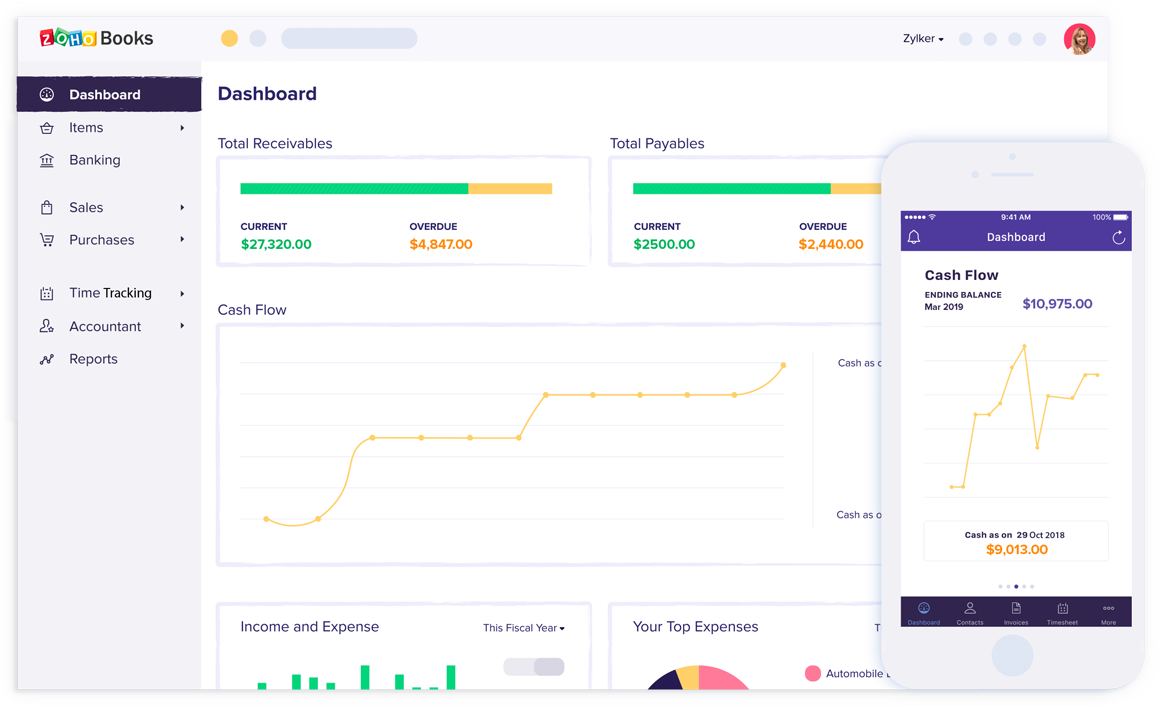
Zoho Books

Zoho Books

Key Features

  • Invoicing: Create professional, customizable invoices with options for recurring invoices, automated payment reminders, and multiple currencies.
  • Expense Tracking: Track and categorize expenses with receipt uploads, and connect your bank accounts for automated transaction importing.
  • Bank Reconciliation: Automatically import bank transactions and reconcile them with your accounts, making bookkeeping simpler.
  • Project Management: Manage projects and track time spent on tasks, with the ability to bill clients for hours worked.
  • Multi-Currency Support: Easily handle transactions in multiple currencies, with automatic exchange rate calculations.
  • Inventory Management: Track inventory levels, manage stock, and set reorder points for efficient inventory management.
  • GST and VAT Compliance: Built-in tax management for businesses in regions with GST, VAT, and other tax structures, with easy tax filing options.
  • Financial Reporting: Generates detailed reports such as profit & loss, balance sheets, cash flow statements, and more.
  • Client Portal: Offers a portal where clients can view, accept, or comment on estimates and pay invoices.
  • Mobile App: Provides access to invoicing, expense tracking, and reports on the go via its mobile app for both iOS and Android.
  • Workflow Automation: Automates repetitive accounting tasks, including invoicing, payment reminders, and approval workflows.
  • Third-Party Integrations: Integrates with a wide range of Zoho applications and third-party apps like PayPal, Stripe, and G Suite.

Mobile App

Reports

Automation

$20 to $70 per month • Trial: Yes • Free Plan: Yes.

View pros and cons

Pros

tick circle 1 Top 10 Accounts Payable SoftwareAffordable Pricing: Offers competitive pricing with a range of features, making it ideal for small to medium-sized businesses.

tick circle 1 Top 10 Accounts Payable SoftwareUser-Friendly Interface: Clean, intuitive interface that’s easy to navigate, even for users without an accounting background.

tick circle 1 Top 10 Accounts Payable SoftwareGST/VAT Compliance: Excellent for businesses in regions where GST or VAT is applicable, with built-in compliance and tax filing features.

tick circle 1 Top 10 Accounts Payable SoftwareScalability: Can scale with your business, with features that support growing companies, such as inventory tracking and multi-currency support.

tick circle 1 Top 10 Accounts Payable SoftwareAutomation: Reduces manual work by automating tasks like invoicing, payment reminders, and expense tracking.

tick circle 1 Top 10 Accounts Payable SoftwareIntegration with Zoho Ecosystem: Works seamlessly with other Zoho apps, such as Zoho CRM, Zoho Inventory, and Zoho Projects.

tick circle 1 Top 10 Accounts Payable SoftwareMobile Access: Provides full functionality via its mobile app, allowing users to manage their finances from anywhere.

tick circle 1 Top 10 Accounts Payable SoftwareMulti-User Access: Offers multiple user roles and permissions, allowing businesses to collaborate more effectively on accounting tasks.

tick circle 1 Top 10 Accounts Payable SoftwareCustomizable Reports: Offers a range of customizable financial reports that provide insights into business performance.

Cons

close circle Top 10 Accounts Payable SoftwareLimited Payroll Features: Lacks built-in payroll management in many countries, requiring third-party integrations or manual workarounds.

close circle Top 10 Accounts Payable SoftwareComplexity in Advanced Features: While easy for basic tasks, some advanced features (e.g., multi-currency, project management) may have a learning curve.

close circle Top 10 Accounts Payable SoftwareLimited Integration Outside Zoho Ecosystem: While it integrates well with other Zoho apps, it has fewer third-party integrations compared to competitors like QuickBooks.

close circle Top 10 Accounts Payable SoftwareNo Offline Access: Being a cloud-based platform, Zoho Books requires an internet connection, with no offline access available.

close circle Top 10 Accounts Payable SoftwareSupport for Larger Businesses: While ideal for small to mid-sized businesses, it may lack the advanced features needed for larger enterprises or those with highly complex financial needs.

close circle Top 10 Accounts Payable SoftwareLimited Automation Compared to Competitors: While automation features are useful, they may not be as robust as some competitors’ offerings in terms of complex workflows.

close circle Top 10 Accounts Payable SoftwareLimited Customization for Invoices: Although invoices can be customized, some users report wanting more advanced design flexibility.
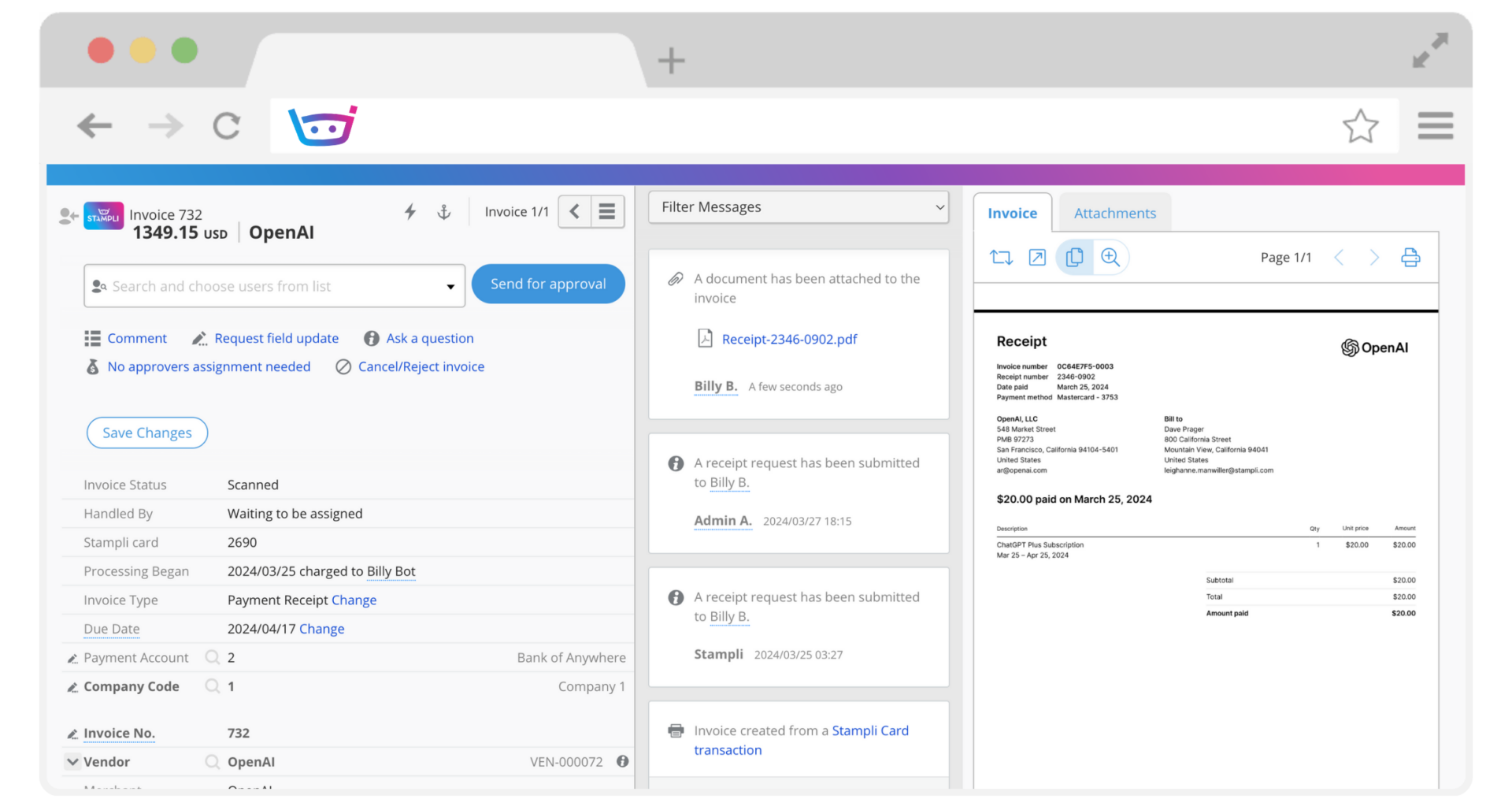
Stampli

Stampli

Key Features

  • AP Automation: Automates the entire accounts payable (AP) process, including invoice capture, approval workflows, and payment processing.
  • Collaborative Invoice Management: Offers a collaborative platform where AP teams, approvers, and vendors can communicate directly on each invoice.
  • AI-Powered Assistant (Billy): Uses AI to capture and code invoices, learn approval patterns, and make recommendations to streamline AP processes.
  • Custom Approval Workflows: Tailored workflows for routing invoices to the appropriate team members for approval based on specific rules and requirements.
  • Two-Way Matching: Matches invoices with purchase orders (POs) and receipts to ensure accuracy before processing payments.
  • Integration with ERP Systems: Seamlessly integrates with popular ERP systems like NetSuite, SAP, QuickBooks, and Oracle for synchronized financial management.
  • Vendor Management: Manages vendor details, payment preferences, and communication, and provides a vendor portal for self-service.
  • Payment Processing: Supports various payment methods, including ACH, checks, and credit cards, with complete control over payment timing.
  • Real-Time Visibility and Reporting: Offers real-time insights into AP processes, including invoice status, payment details, and approval progress.
  • Mobile Access: Enables invoice approvals and management on the go through a mobile app for iOS and Android.

Mobile App

Integartion

Reports

Automation

$2,500 per month • Trial: No • Free Plan: No.

View pros and cons

Pros

tick circle 1 Top 10 Accounts Payable SoftwareStreamlines AP Process: Automates repetitive tasks, reducing manual data entry, and helps ensure accuracy in invoice processing.

tick circle 1 Top 10 Accounts Payable SoftwareAI-Powered Efficiency: The AI assistant (Billy) improves efficiency by learning from user behavior, making recommendations, and speeding up approval processes.

tick circle 1 Top 10 Accounts Payable SoftwareCollaborative Platform: Allows for direct communication between AP teams, approvers, and vendors on the invoice itself, reducing delays and confusion.

tick circle 1 Top 10 Accounts Payable SoftwareCustomizable Workflows: Flexibility in setting up workflows based on business needs, allowing for a more tailored AP process.

tick circle 1 Top 10 Accounts Payable SoftwareERP Integration: Easily integrates with popular ERP and accounting systems, eliminating duplicate data entry and ensuring real-time updates.

tick circle 1 Top 10 Accounts Payable SoftwareImproved Control and Visibility: Offers enhanced control over invoice approvals and payments, with real-time tracking and reporting for better decision-making.

tick circle 1 Top 10 Accounts Payable SoftwareMobile Access: Allows users to approve invoices and manage the AP process from anywhere, increasing convenience and efficiency.

tick circle 1 Top 10 Accounts Payable SoftwareTwo-Way Matching: Ensures accuracy by matching invoices with purchase orders and receipts before payment processing.

tick circle 1 Top 10 Accounts Payable SoftwareSecure Payments: Offers a secure payment process, reducing the risk of fraud, with control over the timing and method of payments.

tick circle 1 Top 10 Accounts Payable SoftwareReduces Approval Cycle Time: Streamlines invoice approvals, resulting in faster payments and stronger vendor relationships.

Cons

close circle Top 10 Accounts Payable SoftwareHigher Cost for Small Businesses: Stampli’s pricing is generally designed for mid-sized to large businesses, which might make it expensive for smaller companies.

close circle Top 10 Accounts Payable SoftwareLimited Advanced Features for Global Operations: While Stampli is excellent for automating AP processes, it may lack some advanced features needed by global enterprises, such as multi-currency or complex tax compliance.

close circle Top 10 Accounts Payable SoftwareLearning Curve: The AI assistant and some advanced features may have a learning curve for users unfamiliar with AP automation platforms.

close circle Top 10 Accounts Payable SoftwareCustomization Limitations: While workflows are customizable, some users may find limitations in terms of deeper customization or specific integrations.

close circle Top 10 Accounts Payable SoftwareNo Built-In Payment Processing: While Stampli automates invoice approvals, payments are usually processed through third-party integrations, which may add complexity.

close circle Top 10 Accounts Payable SoftwareVendor Onboarding: Some vendors may face challenges when interacting with the platform initially, as they need to adapt to using the portal or processes.

close circle Top 10 Accounts Payable SoftwareCustomer Support: Some users have reported inconsistent customer support, especially when dealing with more complex issues or integrations.
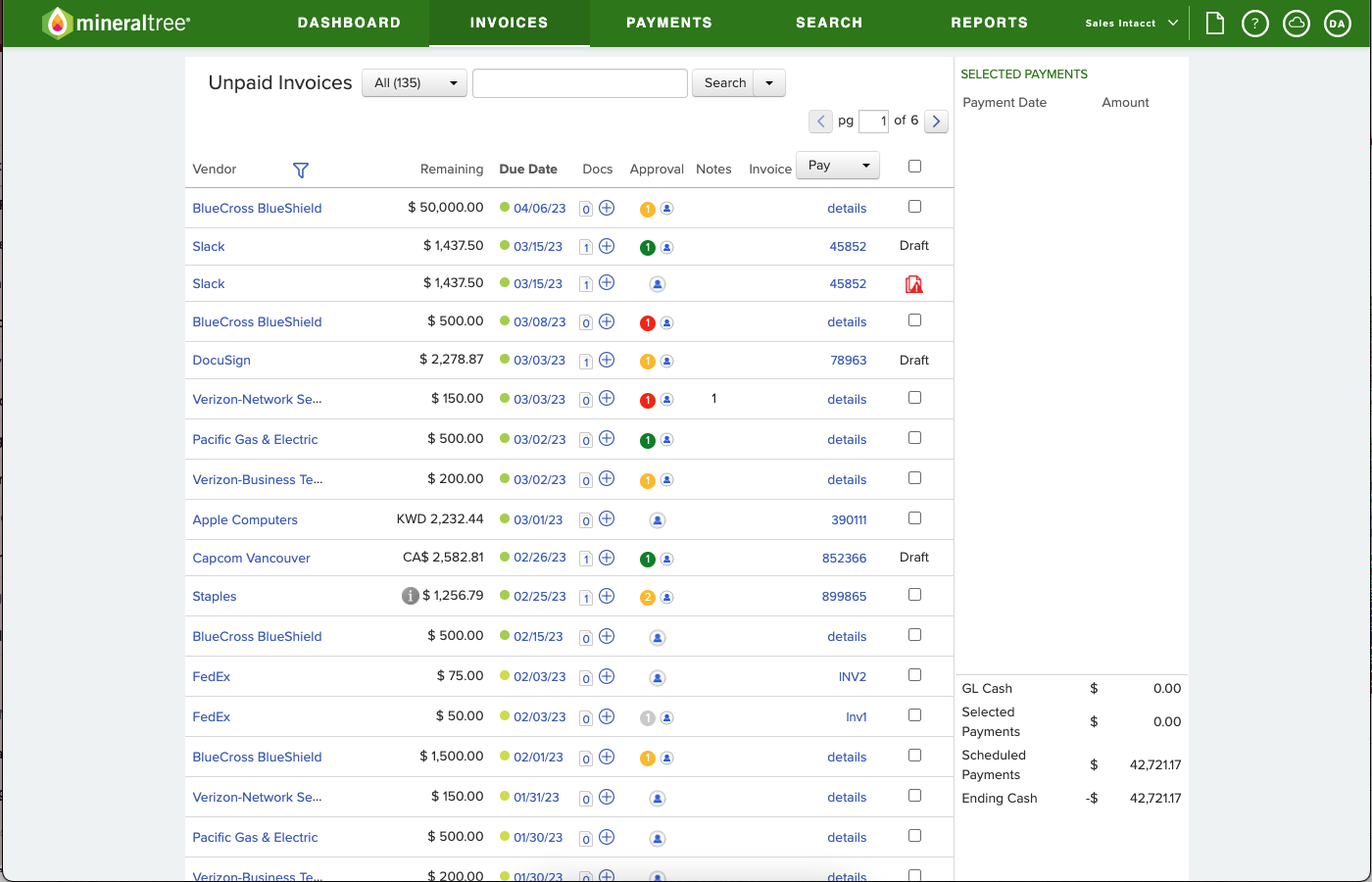
MineralTree

MineralTree

Key Features

  • AP Automation: Streamlines the entire accounts payable process, from invoice capture to approval workflows and payment processing.
  • Invoice Capture and Processing: Uses OCR (optical character recognition) to digitize invoices and automatically extract data, reducing manual data entry.
  • Custom Approval Workflows: Allows for customizable approval workflows to ensure that invoices are reviewed and approved by the correct personnel.
  • Payment Automation: Automates payments through multiple methods, including ACH, virtual credit cards, and checks.
  • Two-Way and Three-Way Matching: Matches invoices with purchase orders and receipts to ensure accuracy and prevent fraud.
  • ERP Integration: Seamlessly integrates with major ERP systems such as QuickBooks, NetSuite, Microsoft Dynamics, Sage, and others for efficient data syncing.
  • Fraud Detection and Security: Built-in fraud prevention tools that validate payments and flag potential security issues.
  • Mobile Access: Provides a mobile app for invoice approvals and payment management, allowing users to work on the go.
  • Real-Time Reporting and Analytics: Offers detailed financial insights with customizable dashboards and real-time reporting of AP metrics and performance.
  • Vendor Management: Simplifies vendor onboarding and management, offering tools for vendor payments and communications.

Mobile App

Automation

Analytics

$495 per month • Trial: No • Free Plan: No.

View pros and cons

Pros

tick circle 1 Top 10 Accounts Payable SoftwareComprehensive AP Automation: Provides a complete end-to-end solution for automating accounts payable, from invoice capture to payment processing.

tick circle 1 Top 10 Accounts Payable SoftwareImproves Accuracy and Reduces Manual Work: Automates data extraction and invoice processing, reducing the risk of human error and improving efficiency.

tick circle 1 Top 10 Accounts Payable SoftwareCustomizable Workflows: Approval workflows are highly customizable to meet the specific needs and structure of a business.

tick circle 1 Top 10 Accounts Payable SoftwareFraud Prevention: Incorporates security measures, such as two-way and three-way matching and payment validation, to reduce the risk of fraud.

tick circle 1 Top 10 Accounts Payable SoftwareERP Integration: Easily integrates with leading ERP and accounting systems, ensuring data flows seamlessly between systems.

tick circle 1 Top 10 Accounts Payable SoftwareMultiple Payment Options: Supports a variety of payment methods, including ACH, virtual cards, and checks, offering flexibility to vendors.

tick circle 1 Top 10 Accounts Payable SoftwareReal-Time Insights: Provides valuable, real-time reporting and analytics to help businesses make data-driven decisions regarding their AP processes.

tick circle 1 Top 10 Accounts Payable SoftwareMobile-Friendly: Enables invoice approvals and payment management through a mobile app, offering flexibility for busy teams and executives.

tick circle 1 Top 10 Accounts Payable SoftwareReduces AP Cycle Time: By automating tasks and streamlining approvals, MineralTree significantly speeds up the AP cycle, improving cash flow management.

Cons

close circle Top 10 Accounts Payable SoftwareHigh Cost for Small Businesses: MineralTree is designed for mid-sized and larger businesses, so it may be too expensive or complex for smaller organizations.

close circle Top 10 Accounts Payable SoftwareImplementation Complexity: Setting up MineralTree, especially with complex workflows and ERP integrations, may require significant time and resources.

close circle Top 10 Accounts Payable SoftwareLimited Vendor Self-Service Options: While it helps manage vendors, MineralTree offers limited self-service features for vendors compared to other AP platforms.

close circle Top 10 Accounts Payable SoftwareLearning Curve: Some users may experience a learning curve when getting familiar with all of the features and capabilities of the platform.

close circle Top 10 Accounts Payable SoftwareCustomer Support: Some users have reported delays or challenges in resolving complex technical issues with customer support.

close circle Top 10 Accounts Payable SoftwareCustomization Limitations: While workflows are customizable, other aspects of the platform may have limited flexibility in terms of specific business needs.

close circle Top 10 Accounts Payable SoftwareMobile App Limitations: The mobile app, while useful, may have limited functionality compared to the desktop version.

Smarter time off tracking starts here.