







Managing employee sick days without a proper system is a slow drain on every small business. HR managers lose time chasing records, payroll gets complicated, and patterns that signal a bigger problem, burnout, a recurring health issue, a disengaged employee, go completely unnoticed. The right employee sick day tracking app changes all of that. It gives managers a clear record of absences, automates the request and approval process, and surfaces the data needed to make informed decisions without turning sick leave into a bureaucratic ordeal for employees. With an employee sick day tracking app, you can streamline the entire process and ensure compliance with company policies.
Here are the best apps for tracking employee sick days in 2026, evaluated for teams of all sizes.

Why Choose an Employee Sick Day Tracking App?
Before choosing a tool, make sure it covers these fundamentals:
- Dedicated sick leave type: the ability to track sick days separately from vacation, personal days, and other leave types
- Simple employee-side experience: calling in sick is stressful enough; logging it shouldn’t add friction
- Manager notifications: instant alerts when an employee reports sick so coverage can be arranged quickly
- Sick day history and reporting: visibility into absence patterns over time, not just current balances
- Privacy controls: employees should be able to log a sick day without being required to disclose medical details
- Bradford Factor support: for teams that use this absence scoring method to identify frequency patterns
- Payroll integration: so sick pay calculations happen automatically where applicable
Day Off: Best Overall Sick Day Tracker for All Teams
Pricing: Free plan available ·Paid from $2/user/month
Best for: Organizations that want simple, scalable sick day tracking
Day Off is one of the strongest absence management apps on the market, combining an intuitive employee experience with the flexibility needed to support teams of all sizes. Whether you’re managing a 10-person startup, a growing mid-sized company, or a distributed workforce across multiple locations, Day Off makes sick day tracking straightforward and reliable.
How Day Off handles sick days
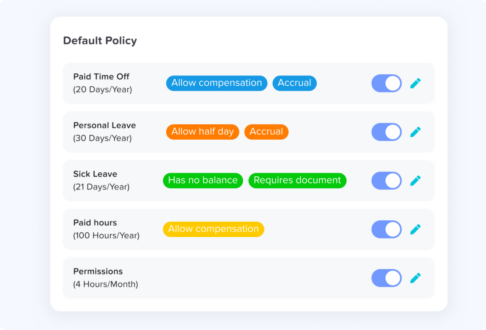
Sick leave is fully configurable.
Sick leave can be set up as a dedicated leave type with its own balance, accrual rules, approval workflow, documentation requirements, and reporting. This keeps sick day data separate from vacation, personal leave, remote work, and other absence categories, making reporting more accurate and compliance easier.
Employees can report sick days in seconds.
Using the mobile app or web platform, employees can submit a sick day request with minimal effort. The process is intentionally simple, encouraging accurate and timely reporting while reducing administrative burden for HR and managers.
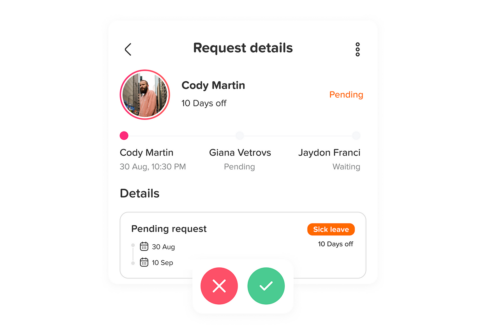
Managers receive instant notifications.
As soon as a sick day is submitted, the appropriate manager is notified. Real-time visibility helps teams respond quickly, adjust schedules, and maintain coverage without relying on manual communication.
Shared calendars update automatically.
Approved absences appear immediately on the team calendar, giving managers and colleagues a clear view of availability across departments, locations, and teams.
Comprehensive absence records and reporting.
Managers and HR teams can review absence history, identify trends, generate reports, and export data when needed. This provides the visibility required for workforce planning, policy enforcement, and payroll processes.
Works for growing and distributed organizations.
Day Off supports multiple leave policies, locations, countries, public holiday calendars, approval chains, and department structures, making it suitable for organizations that operate across regions or have diverse leave requirements.
Potential limitations
When selecting an employee sick day tracking app, consider features like automated reporting, integration with payroll systems, and user-friendly interfaces for both employees and managers.
Day Off focuses primarily on leave and absence management rather than becoming a full HR suite. Organizations that require advanced payroll processing, workforce scheduling, or highly specialized absence analytics may still need additional HR software alongside it.
Verdict
The fastest and most practical way for a small team to start tracking sick days properly. Free to start, operational in minutes, and genuinely useful from day one.
Rippling: Best for Teams That Need Sick Days Tied to Payroll
Pricing: From ~$8/user/month
Best for: Teams that want sick leave, HR, and payroll in one connected system
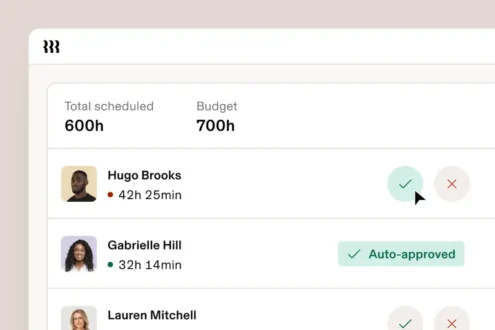
Rippling is one of the most integrated HR platforms available, and that integration is precisely what makes it stand out for sick day tracking. When an employee logs a sick day in Rippling, it flows automatically into payroll, ensuring sick pay is calculated correctly without any manual reconciliation. For businesses with statutory sick pay obligations or complex sick pay policies, this automation eliminates a significant source of error and admin work.
Beyond payroll, Rippling connects sick leave data to the employee’s full HR profile, making it easy to spot absence trends across departments or employment types. The reporting engine is powerful, managers can filter by team, date range, absence type, and more.
The trade-off is cost and complexity. Rippling is a full workforce management platform, and its pricing reflects that. For a team of 8 that just needs to know who called in sick today, it’s significant overkill. For a team of 40 with payroll complexity and multi-state compliance requirements, it’s worth every dollar.
Verdict:
The strongest choice when sick day tracking needs to connect directly and automatically with payroll processing.
Personio: Best for European Teams with Compliance Requirements
Pricing: Custom pricing · Demo required
Best for: European SMBs that need sick day tracking aligned with local labor law
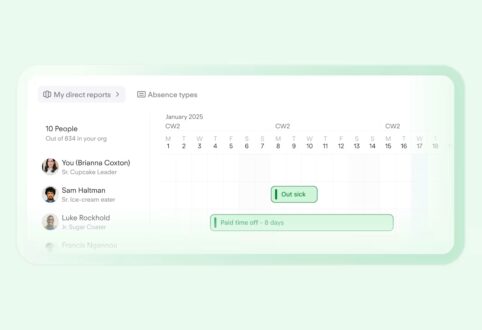
Personio is the dominant HR platform for small and mid-sized businesses in Europe, and its sick leave management reflects deep familiarity with European compliance requirements. It handles statutory sick leave rules across Germany, the UK, Spain, France, and other European markets, including automatic calculations for statutory sick pay, doctor’s note tracking, and return-to-work workflow prompts.
For teams operating under works council agreements or subject to strict labor regulations, Personio’s compliance-aware approach is genuinely valuable. The platform covers the full HR lifecycle, recruiting, onboarding, absence management, and payroll- so sick day data sits alongside the complete employee record.
The interface is clean and well-organized, and the absence management module is one of the most feature-complete in this category for European use cases. Custom pricing and a required sales process put it out of reach for very small teams just starting out, but for European SMBs of 20 to 200 people, it’s the natural choice.
Verdict:
The go-to sick day tracking solution for European teams that need labor law compliance built into the tool, not bolted on.
Workday: Best Enterprise Sick Day Tracking
Pricing: Custom pricing · Enterprise only
Best for: Large organizations with complex absence policies and multi-country operations
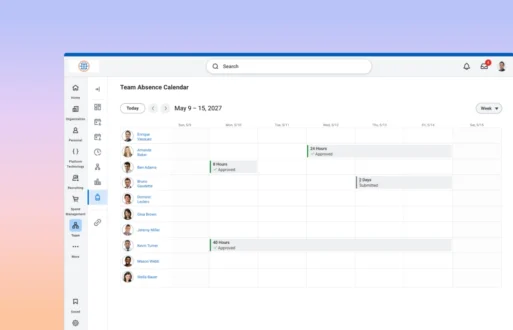
Workday is the enterprise standard for HR management, and its absence management module reflects that. Sick leave policies of almost any complexity, tiered accruals, FMLA tracking, ADA accommodations, multi-country statutory requirements, can be configured and enforced at scale. The analytics capabilities are unmatched at this level: workforce planning dashboards can surface absence trends across thousands of employees, flag departments with above-average sick day rates, and model the cost impact of absence on productivity.
For teams under 50, Workday is not remotely appropriate, the implementation cost alone typically runs into six figures, and the system requires dedicated HR and IT resources to configure and maintain. But for enterprise HR teams evaluating sick day tracking as part of a broader HRIS selection, it sets the benchmark that other platforms measure themselves against.
Verdict:
The enterprise gold standard, powerful and comprehensive, but only justifiable for large organizations with dedicated HR infrastructure.
Zoho People: Best Value for Mid-Sized Teams
Pricing: From ~$1.25/user/month
Best for: Growing teams that want strong features at a competitive price point
Zoho People is a full HR platform that punches well above its price point. The leave management module handles sick days as a configurable leave type with accruals, carryover rules, and a clean approval workflow. What makes it stand out for mid-sized teams is the Bradford Factor calculator, built directly into the platform, which automatically scores employee absence patterns and flags individuals whose absence frequency warrants a conversation, even when total days are low.
The reporting is strong for the price: managers can track sick day trends by department, generate absence summaries for payroll, and export data in multiple formats. Integration with Zoho Payroll (and third-party payroll tools) means sick pay can be processed without manual data entry.
The interface is dense and takes some getting used to, and the sheer number of features can feel overwhelming for teams that just want simple absence tracking. But for growing teams that want Bradford Factor support, solid reporting, and payroll connectivity at a low per-user cost, Zoho People is hard to beat.
Verdict:
The best value proposition for mid-sized teams that need Bradford Factor tracking and payroll integration without enterprise pricing.
Sage HR: Best for Teams Already Using Sage for Accounting
Pricing: From ~$5.50/user/month
Best for: Businesses running Sage accounting that want HR and absence data connected
Sage HR is a standalone HR platform that integrates tightly with Sage’s accounting suite, making it a natural fit for businesses already in the Sage ecosystem. The sick day tracking module covers the essentials cleanly: configurable leave types, accrual policies, manager notifications, and a team calendar view. When sick pay needs to be processed, the connection to Sage accounting reduces the reconciliation work that would otherwise fall to finance teams manually.
Outside the Sage ecosystem, it’s a competent but unremarkable HR tool. The interface is functional, the feature set covers the basics, and the pricing is reasonable at the entry level. The Bradford Factor is supported, and the reporting gives managers enough data to have informed conversations about absence patterns.
Verdict:
A logical choice for Sage accounting users who want sick day tracking that connects cleanly with their existing financial workflows.
Breathe HR: Best for UK Small Businesses
Pricing: From ~£13/month for up to 10 employees
Best for: UK-based small businesses that need statutory sick pay compliance
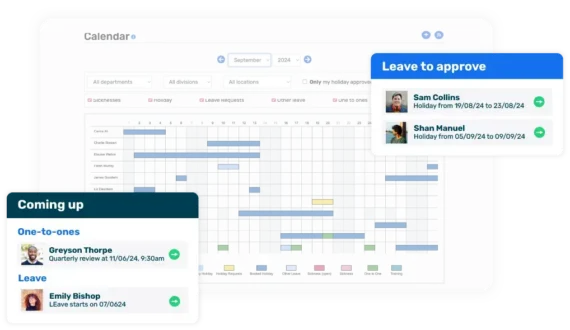
Breathe HR is built specifically for UK small businesses, and its sick leave tracking reflects that focus. Statutory Sick Pay (SSP) eligibility and calculations are handled automatically, doctor’s note reminders are built into the absence workflow, and the Bradford Factor calculator is included as a standard feature. For a UK business navigating SSP rules, qualifying days, and return-to-work procedures, having all of that handled inside one tool is a significant time saver.
The platform covers HR essentials beyond absence management, document storage, performance reviews, and an employee self-service portal, making it a practical all-in-one for UK SMBs that don’t need the scale of Personio or BambooHR. The flat-rate pricing model (per company rather than per user at lower tiers) makes it particularly cost-effective for teams of 5 to 20.
Verdict:
The strongest option for UK small businesses that need Statutory Sick Pay compliance and Bradford Factor tracking without a complex enterprise platform.
Side-by-Side Comparison
| Platform | Free Plan | Bradford Factor | Payroll Integration | Best For |
|---|---|---|---|---|
| Day Off | ✅ | ❌ | Limited | All teams, fast setup |
| Rippling | ❌ | ❌ | ✅ Native | Payroll-connected sick leave |
| Personio | ❌ | ❌ | ✅ | European compliance |
| Workday | ❌ | ✅ | ✅ | Enterprise organizations |
| Zoho People | ❌ | ✅ | ✅ | Mid-sized teams, value-focused |
| Sage HR | ❌ | ✅ | ✅ Sage | Sage accounting users |
| Breathe HR | ❌ | ✅ | Limited | UK small businesses |
Which Sick Day Tracking App Is Right for Your Team?
Start with Day Off
If you manage a team under 50 and want sick day tracking running today. The free plan is genuinely useful; setup takes minutes, and the core workflow, employee logs sick day, manager is notified, calendar updates, records are stored, works exactly as it should from the moment you sign up.
Choose Rippling
If sick pay accuracy is a priority and you want absence data to flow directly into payroll without manual reconciliation.
Choose Personio
If you’re a European SMB that needs statutory sick leave rules, works council compliance, and multi-country support built into the platform.
Choose Workday
If you’re an enterprise HR team managing sick leave at scale across multiple countries, employment types, and complex policy structures.
Choose Zoho People
If you’re a growing team that needs Bradford Factor scoring and payroll integration at a price point that doesn’t require executive sign-off.
Choose Sage HR
If your business already runs on Sage accounting and you want sick day data connected to your financial workflows without a separate integration.
Choose Breathe HR
If you’re a UK small business that needs Statutory Sick Pay handled automatically and Bradford Factor tracking included as standard.
Frequently Asked Questions
What is the best app for tracking employee sick days?
Day Off is the best app for tracking employee sick days for small teams. It’s fast to set up, free to start, and handles the core sick day tracking workflow, logging, approval, team calendar visibility, and absence history, without unnecessary complexity. For teams with specific needs like payroll integration or statutory compliance, Rippling, Personio, or Breathe HR may be more appropriate depending on your location and team size.
What is sick day tracking software?
Sick day tracking software is a tool that helps employers record, manage, and report on employee sick leave. It replaces manual spreadsheets and email-based processes with an automated system that handles the full absence workflow, from the moment an employee reports sick, through manager notification and approval, to updating the team calendar and storing the record for payroll and HR purposes. The best tools do all of this with minimal friction for both employees and managers.
How do small businesses track sick days?
Small businesses typically track sick days in one of three ways: manually via spreadsheets or shared documents, through a dedicated absence management app like Day Off, or as part of a broader HR platform. Spreadsheets work at very small team sizes but break down quickly as headcount grows, records get lost, patterns go unnoticed, and payroll reconciliation becomes error-prone. Dedicated apps eliminate most of these problems with minimal setup effort and cost.
Benefits of Using an Employee Sick Day Tracking App
An employee sick day tracking app ensures that all sick days are recorded accurately, providing valuable data for workforce planning and management. This helps in identifying trends and addressing employee well-being proactively.
Pricing varies significantly depending on the tool and team size. Day Off offers a free plan for smaller teams, with paid plans starting at approximately $1–2 per user per month. Timetastic starts at around $1.50 per user per month. Zoho People from $1.25, Sage HR from $5.50, and Rippling from around $8 per user per month. Enterprise platforms like Workday and Personio use custom pricing that requires a sales conversation. For most small teams, a free or low-cost tool covers everything they actually need.
Is it legal to track employee sick days?
Yes, in most countries, employers have a legal right to record employee absences, including sick days, for payroll and HR purposes. What varies by jurisdiction is what information can be collected; in many regions, employers cannot require employees to disclose the specific nature of their illness. A good sick day tracking tool allows employees to log an absence without providing medical details while still giving managers the operational information they need. If you operate across multiple countries, tools like Personio and Rippling are built with multi-jurisdiction compliance in mind.
Can an employer deny a sick day?
Employment law on this varies significantly by country and contract type. In most jurisdictions, employees have a statutory right to take sick leave and cannot be formally denied it, however, employers may require evidence such as a doctor’s note for absences beyond a certain duration. What sick day tracking software helps with is creating a clear, documented process so both employees and managers understand the rules, and every absence is recorded consistently regardless of how it’s handled.
What is the Bradford Factor and should I use it?
The Bradford Factor is a formula used to measure the disruptive impact of short, frequent absences versus longer single absences. It weights frequent short absences more heavily because they tend to be harder to plan around operationally. The formula is S² × D, where S is the number of separate absence spells and D is the total number of days absent. Tools like Zoho People, Breathe HR, Workday, and Sage HR calculate it automatically. It’s a useful trigger for absence review conversations when applied fairly and transparently, less useful when used punitively without considering the context behind each absence.
How many sick days is normal for an employee to take per year?
Average sick day usage varies by country, industry, and role type. In the UK, the national average sits at around 4–5 days per employee per year according to ONS data. In the US, averages vary widely by state and sector, with many employees taking 3–5 days annually. Tracking sick day data over time with a dedicated tool helps managers understand what’s normal for their specific team and identify when someone’s pattern warrants a supportive check-in conversation rather than a disciplinary one.
What is the difference between sick leave and sick days?
Sick leave and sick days are often used interchangeably, but there is a subtle distinction. Sick days typically refers to individual days taken off due to illness, counted as discrete units. Sick leave is the broader entitlement or policy that governs how many sick days an employee is allowed, how they accrue, whether they are paid, and what documentation is required. In absence management software, both concepts are managed together, the leave policy defines the rules, and individual sick days are recorded against it.
Is cloud-based sick day tracking better than on-premise software?
For teams under 50 people, cloud-based sick day tracking is almost always the better choice. Cloud tools require no installation, no IT infrastructure, no maintenance, and are accessible from any device, including the mobile apps that make it easy for employees to report sick days from home. On-premise HR software is generally only justifiable for large enterprises with specific data sovereignty requirements or legacy system dependencies. Every tool in this guide is cloud-based and accessible from anywhere with an internet connection.
Conclusion
Tracking employee sick days doesn’t have to be complicated. What matters is having a consistent process, one where employees know how to report an absence, managers are notified immediately, and every record is stored automatically without anyone having to chase it down.
For most small teams, Day Off is the right place to start. It’s free, takes minutes to set up, and handles everything a sub-50 team needs without unnecessary complexity. As your team grows and your requirements become more specific, payroll automation, statutory compliance, Bradford Factor tracking, tools like Rippling, Personio, Zoho People, Breathe HR, and Sage HR offer the depth to match.
The most expensive sick day isn’t the one an employee takes. It’s the one that goes unrecorded, unnoticed, and unmanaged until it becomes a much bigger problem.
Start tracking properly today.