








Managing public holidays and PTO in one calendar is one of the simplest ways to improve employee availability, reduce scheduling confusion, and help HR teams plan time off more accurately. When public holidays, vacation days, sick leave, unpaid leave, and other time-off requests are tracked separately, it becomes harder to understand who is actually available to work.
For small businesses, remote teams, hybrid teams, and companies with employees in different locations, this problem can grow quickly. One employee may be off because of a national holiday, another may be using PTO, and another may be on sick leave. If these details are stored in different spreadsheets, calendars, emails, or chat messages, managers may not notice the full picture until it affects daily operations.

A shared PTO calendar that also includes public holidays gives HR teams, managers, and employees one reliable view of team availability. It helps companies avoid overlapping absences, plan work around holidays, calculate leave days correctly, and keep everyone informed.
In this article, we will explain why public holidays and PTO should be managed together, what problems happen when they are tracked separately, and how a leave management system like Day Off can help teams organize time off in one clear calendar.
What Are Public Holidays?
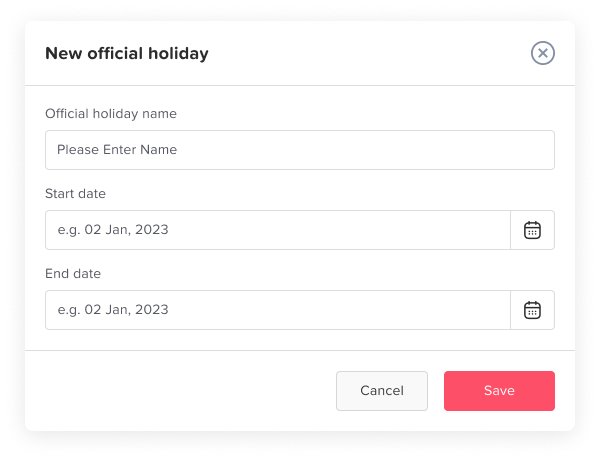
Public holidays are official non-working days recognized by a country, state, region, or organization. These days may include national holidays, religious holidays, federal holidays, regional holidays, or company-wide holidays.
Examples of public holidays may include:
- New Year’s Day
- Independence Day
- Labor Day
- Christmas Day
- Eid holidays
- National or regional celebration days
- Local government holidays
- Company-wide closure days
Public holidays are usually different from PTO because employees do not normally need to request them individually. If the company recognizes the holiday, eligible employees are automatically off on that day.
However, public holidays can become more complicated when a company has employees in different countries, regions, or offices. A holiday that applies to employees in one location may not apply to another location. For example, a team member in the United States may have a different public holiday schedule than a team member in the United Kingdom, Canada, Saudi Arabia, Egypt, or the United Arab Emirates.
That is why companies need a clear public holiday calendar that is connected to employee locations and leave policies.
What Is PTO?
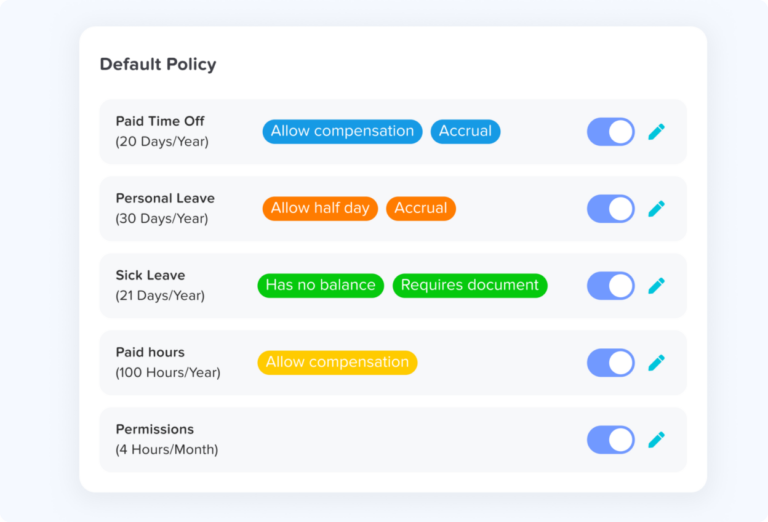
PTO stands for paid time off. It is the time employees can take away from work while still being paid, depending on the company’s policy. PTO may include vacation days, personal days, sick leave, mental health days, family leave, or other approved absence types.
Some companies use one combined PTO balance for all paid time off. Other companies separate leave types into different balances, such as annual leave, sick leave, maternity leave, paternity leave, unpaid leave, bereavement leave, and personal leave.
PTO usually requires a request and approval process. An employee submits a time-off request, a manager or HR team member reviews it, and the request is either approved or rejected based on company rules, staffing needs, and available balance.
When PTO is managed properly, employees know how much leave they have available, managers can plan around absences, and HR teams can keep accurate records.
Why Public Holidays and PTO Should Be Managed Together
Public holidays and PTO affect the same important question: who is available to work?
If public holidays are tracked in one place and PTO requests are tracked somewhere else, managers may not get a complete view of employee availability. This can lead to scheduling mistakes, incorrect leave calculations, and confusion between employees and HR.
For example, imagine an employee requests vacation from Monday to Friday. If Wednesday is a public holiday, that day should usually not be deducted from the employee’s PTO balance. Without a connected public holiday calendar, HR may accidentally count all five days as PTO instead of four working days.
Managing public holidays and PTO in one calendar helps prevent this type of mistake. It allows the system or HR team to separate working days from non-working holidays and calculate time off more accurately.
It also improves planning. Managers can see upcoming public holidays and approved PTO requests together, which makes it easier to avoid understaffing, project delays, and overlapping leave.
Common Problems When Public Holidays and PTO Are Tracked Separately
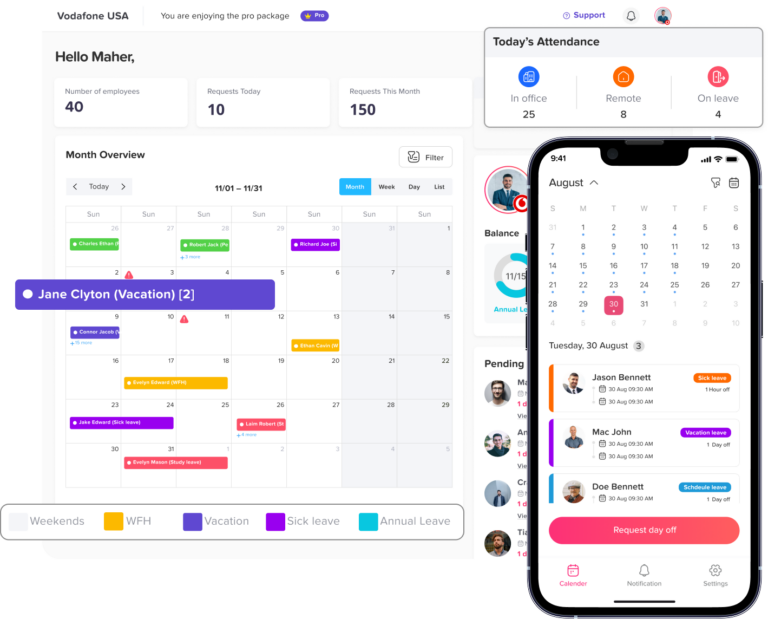
Many businesses start by tracking public holidays in one spreadsheet, PTO requests in another spreadsheet, and team availability in a shared calendar. This may work for a very small team, but it becomes difficult to maintain as the company grows.
Here are some of the most common problems.
Incorrect PTO Calculations
One of the biggest problems is deducting PTO on days that should not count as leave. If an employee takes time off during a week that includes a public holiday, the holiday should often be excluded from the PTO deduction.
Without an automatic system, HR may need to manually check every request against the holiday calendar. This increases the chance of errors, especially when employees work in different locations.
Overlapping Absences
Managers may approve multiple PTO requests without realizing that the same week already includes a public holiday. This can leave a team short-staffed during an important period.
For example, if a public holiday falls on a Thursday and several employees request Friday off, the company may experience a long weekend staffing gap. A shared calendar makes this easier to notice before approvals are made.
Confusion for Employees
Employees need to know whether a public holiday affects their PTO balance. If the process is unclear, they may ask HR questions such as:
- Does this holiday count as PTO?
- Do I need to request this day off?
- Will my balance be reduced?
- Which public holidays apply to my location?
- Why does another employee have a different holiday schedule?
When public holidays and PTO are shown in one calendar, employees can understand their time off more clearly without needing to ask HR every time.
Different Holiday Rules by Location
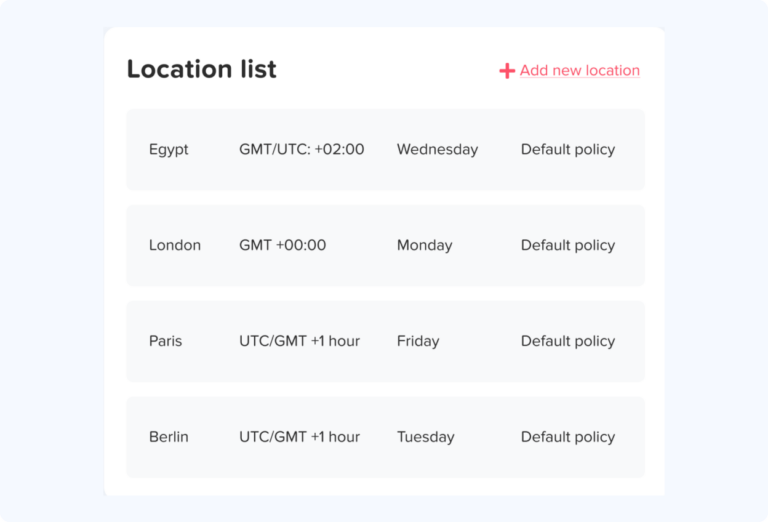
Companies with remote or international teams often deal with multiple holiday calendars. Employees may follow the holiday calendar of their country, state, office location, or employment agreement.
Tracking this manually can become complicated. HR teams need to know which employees belong to which holiday calendar and whether each public holiday should be excluded from PTO calculations.
Poor Workforce Planning
Public holidays often create shorter workweeks. PTO requests around these holidays can create even longer gaps. Without one combined calendar, managers may fail to plan ahead for coverage, deadlines, customer support, payroll processing, or client work.
A combined calendar helps teams see busy leave periods before they become a problem.
What Should Be Included in a PTO and Public Holiday Calendar?
A strong employee leave calendar should show more than approved vacation days. It should give managers and employees a complete view of time off and availability.
A good calendar should include:
- Public holidays by country, state, or location
- Approved PTO requests
- Pending time off requests
- Sick leave
- Vacation days
- Unpaid leave
- Half day leave
- Hourly leave, if supported
- Company-wide days off
- Remote work or work-from-home days, if relevant
- Department or team filters
- Employee availability
- Leave type labels
- Approval status
- Work schedules, if needed
The calendar should be easy to understand at a glance.
Managers should be able to answer questions such as: quickly
- Who is off today?
- Who is off next week?
- Is this absence a public holiday or PTO?
- Are too many people off at the same time?
- Does this holiday apply to all employees or only one location?
- Is this time off request approved or still pending?
The more visible this information is, the easier it becomes to manage time off fairly and accurately.
How to Manage Public Holidays and PTO in One Calendar
Managing public holidays and PTO in one calendar requires a clear process. The goal is not only to display time off, but also to make sure balances, approvals, and team availability stay accurate.
Define Your Company’s Public Holiday Rules
Start by deciding which public holidays your company recognizes. This may depend on your country, state, industry, office location, or internal company policy.
Some companies follow national public holidays only. Others add regional holidays, religious holidays, floating holidays, or company-wide closure days.
HR teams should document:
- Which public holidays are recognized
- Which employees are eligible for each holiday
- Whether holidays are paid or unpaid
- Whether holidays apply by country, state, office, team, or policy
- What happens when a holiday falls on a weekend
- Whether employees can work on public holidays
- Whether substitute days are offered
Clear rules make it easier to apply holidays consistently.
Create Location-Based Holiday Calendars
If your company has employees in different regions, one public holiday calendar may not be enough. Employees in different locations may need different holiday schedules.
For example, a company may have:
- A United States holiday calendar
- A United Kingdom holiday calendar
- A Canada holiday calendar
- A Saudi Arabia holiday calendar
- A UAE holiday calendar
- A remote team holiday calendar
- A custom company holiday calendar
Using location-based calendars helps HR avoid applying the wrong holidays to the wrong employees. It also improves fairness because each employee follows the holiday schedule that matches their location or policy.
Connect Public Holidays to PTO Calculations
A public holiday calendar should not only be visible. It should also affect leave calculations.
If an employee requests PTO during a period that includes a public holiday, the system should exclude that holiday from the PTO deduction when the company policy requires it.
| Requested Time Off | Public Holiday Included? | PTO Days Deducted |
|---|---|---|
| Monday to Friday | No | 5 days |
| Monday to Friday | Wednesday is a public holiday | 4 days |
| Thursday to Friday | Thursday is a public holiday | 1 day |
| Monday only | Monday is a public holiday | 0 days |
This is one of the biggest benefits of managing public holidays and PTO in one system. It reduces manual calculation errors and helps employees trust their leave balances.
Show Public Holidays and PTO in the Same View
Managers should not need to switch between different tools to understand availability. Public holidays and PTO should appear in the same calendar view.
A combined view helps managers see patterns. For example, they may notice that many employees want to take PTO right before or after a public holiday. This is common because employees often use PTO to create a longer break.
When managers can see this in advance, they can plan coverage, adjust deadlines, and make better approval decisions.
Use Team and Department Filters
Not every manager needs to see the entire company calendar all the time. A large calendar can become difficult to read if it includes every employee, every location, and every leave type.
Filters make the calendar more useful. Managers should be able to filter by:
- Team
- Department
- Location
- Employee
- Leave type
- Approval status
- Date range
This helps each manager focus on the employees they are responsible for while still allowing HR to view the full company calendar when needed.
Set Rules for Peak Holiday Periods
Public holidays often create high-demand PTO periods. Many employees may request time off around the same dates, especially before long weekends, summer holidays, school breaks, or end-of-year holidays.
To avoid staffing problems, companies should define clear rules for peak holiday periods.
These rules may include:
- Maximum number of employees off at the same time
- Earlier request deadlines
- First-come, first-served approval rules
- Rotation rules for popular holiday periods
- Required coverage for key roles
- Manager review before final approval
- Blackout dates for business-critical periods
These rules help reduce conflict and make PTO approvals more consistent.
Keep Pending Requests Visible
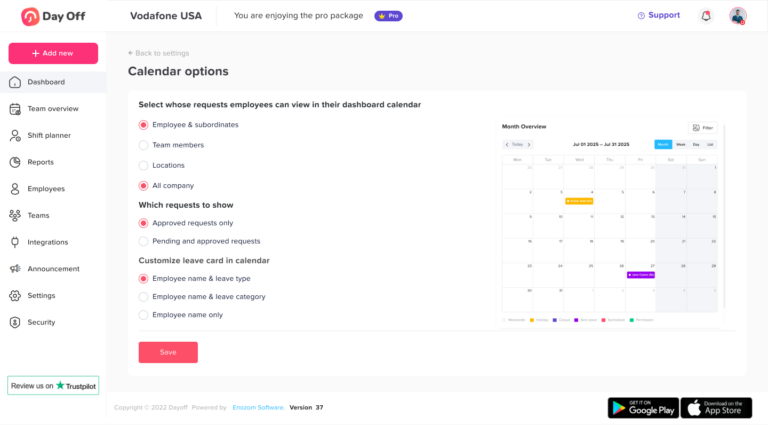
A calendar should not only show approved PTO. Pending requests are also important because they help managers understand upcoming demand.
If several employees have pending requests for the same week, the manager can review them together rather than approving each request in isolation.
Keeping pending requests visible helps avoid over-approval and makes the approval process more thoughtful.
Communicate the Calendar to Employees
A PTO and public holiday calendar is most effective when employees can access it. Employees should be able to see their approved time off, upcoming holidays, team availability, and remaining balances.
This reduces repetitive HR questions and helps employees plan responsibly. When employees can see that several teammates are already off during a certain week, they may choose a different date or submit their request earlier.
Transparency improves planning for both employees and managers.
Review the Calendar Regularly
Public holidays may change, new company days off may be added, and employees may move to different locations or teams. HR should review holiday calendars and PTO rules regularly to make sure everything remains accurate.
It is especially important to review calendars before the start of a new year. This gives employees enough time to plan vacations and helps managers prepare for public holiday periods in advance.
Public Holidays vs PTO: What Is the Difference?
Public holidays and PTO both give employees time away from work, but they are managed differently.
| Item | Public Holidays | PTO |
|---|---|---|
| Usually requested by employee? | No | Yes |
| Usually approved individually? | No | Yes |
| Applies to everyone? | Sometimes | No |
| May depend on location? | Yes | Sometimes |
| Deducted from PTO balance? | Usually no | Yes |
| Shown in calendar? | Yes | Yes |
| Important for availability planning? | Yes | Yes |
Public holidays are usually scheduled by the company or government. PTO is usually requested by the employee and approved by a manager or HR team.
However, both should appear in the same calendar because both affect whether an employee is available to work.
How Day Off Helps Manage Public Holidays and PTO
Day Off helps companies manage employee leave, PTO requests, public holidays, leave balances, approvals, and team availability in one place.
Instead of using separate spreadsheets, email threads, and manual calendars, HR teams can use Day Off to create a clear leave management process. Employees can request time off, managers can review approvals, and everyone can see who is off through a shared calendar.
Day Off is especially useful for teams that need to manage different leave types, different locations, and different holiday calendars. Public holidays can be included in the leave calendar so teams can understand availability more accurately and avoid deducting PTO incorrectly when a holiday falls during a time off request.
With Day Off, businesses can manage:
- PTO requests
- Vacation days
- Sick leave
- Unpaid leave
- Custom leave types
- Public holidays
- Leave balances
- Approval workflows
- Team calendars
- Employee availability
- Reports
This gives HR teams and managers one organized system instead of relying on scattered manual updates.
Best Practices for Managing Public Holidays and PTO
To get the most value from a combined calendar, companies should follow a few practical best practices.
Keep Holiday Calendars Updated
Public holidays should be reviewed at least once a year. If your company operates in multiple countries or regions, make sure each location has the correct holiday calendar.
Make PTO Rules Easy to Understand
Employees should know how PTO is calculated, when holidays are excluded, how to submit requests, and how approvals work.
A clear PTO policy reduces confusion and helps employees plan time off responsibly.
Use One Source of Truth
Avoid managing PTO in one spreadsheet, holidays in another file, and approvals in email. One central calendar reduces errors and makes it easier for everyone to find accurate information.
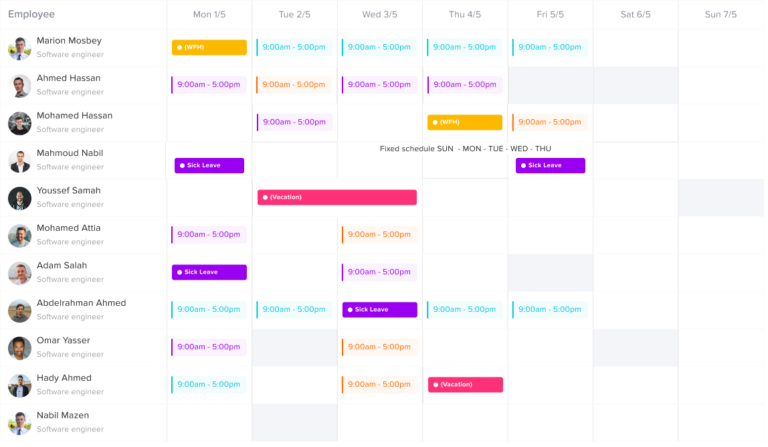
Give Managers Visibility Before Approving Requests
Managers should review team availability before approving PTO. A calendar view helps them make better decisions and prevent staffing problems.
Allow Employees to View Their Own Time Off
Employees should be able to see their PTO balance, approved leave, pending requests, and upcoming public holidays. This improves transparency and reduces HR workload.
Plan Early Around Popular Holiday Periods
Encourage employees to request time off early around public holidays, school breaks, and end-of-year periods. Early planning gives managers more time to organize coverage.
Common Mistakes to Avoid
Even with a calendar, companies can still face problems if the process is not managed carefully.
Counting Public Holidays as PTO by Mistake
This is one of the most common errors. If public holidays are not connected to leave calculations, employees may lose PTO days they should not lose.
Using One Holiday Calendar for Every Employee
A single holiday calendar may not work for companies with employees in different countries or regions. Location-based calendars are more accurate.
Hiding the Calendar from Employees
If only HR can see the calendar, employees may continue asking basic questions about holidays, balances, and availability. A shared calendar improves transparency.
Approving PTO Without Checking Team Coverage
Managers should always review who else is off before approving time-off requests, especially near public holidays.
Not Updating Holiday Rules Each Year
Public holiday dates can change, especially for holidays based on religious, lunar, or government-announced calendars. HR teams should review dates regularly.
Example: Managing PTO Around a Public Holiday
Imagine your company has a public holiday on Thursday. Several employees want to take Friday off to create a four-day weekend.
Without a shared calendar, managers may approve too many Friday PTO requests without realizing the team will already have a short week.
With a combined PTO and public holiday calendar, the manager can see:
- Thursday is a public holiday
- Several employees requested Friday off
- Two team members are already on vacation
- One employee has a pending sick leave request
- A project deadline is scheduled for the same week
This visibility helps the manager make a better decision. They may approve some requests, delay others, or arrange coverage in advance.
Why Spreadsheets Are Not Enough
Spreadsheets can work for very small teams, but they become risky as the company grows. Manual spreadsheets require constant updates and are easy to break. They also do not automatically calculate leave balances, exclude public holidays, notify managers, or show real-time availability.
Common spreadsheet problems include:
- Outdated holiday dates
- Duplicate leave entries
- Incorrect PTO deductions
- Missing approvals
- No automatic notifications
- Poor visibility for employees
- No easy way to filter by team or location
- Difficult reporting
- Errors caused by manual formulas
A leave management system solves these problems by keeping requests, approvals, holidays, balances, and calendars connected.
FAQ
What is a PTO calendar?
A PTO calendar is a shared calendar that shows employee time off, including vacation days, sick leave, unpaid leave, and other approved absences. It helps managers and HR teams understand who is available and who is off.
Why should public holidays and PTO be managed in one calendar?
Public holidays and PTO should be managed in one calendar because both affect employee availability. A combined calendar helps teams avoid scheduling conflicts, calculate PTO more accurately, and plan work around holidays and absences.
Do public holidays count as PTO?
In many companies, public holidays do not count as PTO because they are company-recognized non-working days. However, this depends on the company policy, employee location, and local rules.
How can companies avoid deducting PTO on public holidays?
Companies can avoid this mistake by using a leave management system that connects public holiday calendars with PTO calculations. When a holiday falls during a time-off request, the system can exclude it from the PTO deduction if the policy allows it.
What is the best way to track public holidays for remote teams?
The best way is to use location-based holiday calendars. This allows each employee to follow the public holidays that apply to their country, state, office, or employment policy.
Can a PTO calendar help prevent overlapping leave requests?
Yes. A PTO calendar helps managers see who is already off before approving new requests. This makes it easier to avoid understaffing and overlapping absences.
How does Day Off help with public holidays and PTO?
Day Off helps teams manage PTO requests, public holidays, leave balances, approval workflows, and employee availability in one shared calendar. This makes leave planning easier for HR teams, managers, and employees.
Final Thoughts
Managing public holidays and PTO in one calendar helps businesses create a clearer, fairer, and more organized leave process. It gives employees better visibility, helps managers plan team availability, and reduces manual work for HR.
When public holidays and PTO are tracked separately, companies are more likely to face incorrect leave deductions, scheduling conflicts, employee confusion, and poor workforce planning. But when everything is managed in one shared calendar, teams can make better decisions and avoid unnecessary mistakes.
Day Off helps businesses manage public holidays, PTO requests, leave balances, approvals, and team availability in one simple system. Whether your team works in one location or across multiple countries, having one clear leave calendar can make time-off management easier, more accurate, and more transparent.