







Manage employee time off may seem simple at first, but as organizations grow, tracking time off becomes increasingly complex. HR teams and managers must balance employee requests, maintain accurate leave records, avoid scheduling conflicts, ensure compliance with company policies, and keep teams productive.
Many businesses start by using a shared calendar to track vacations and absences because it is easy to implement and often already available through workplace tools. However, as workforce demands increase, organizations frequently discover that shared calendars lack the functionality needed for efficient leave administration.

This is where dedicated leave management software such as Day Off becomes a valuable solution.
In this comprehensive guide, we’ll explore the differences between shared calendars and leave management software, examine the advantages and limitations of each approach, and explain why many businesses are moving toward automated leave management systems.
Understanding Shared Calendars
A shared calendar is a collaborative scheduling tool that allows team members to view upcoming events, meetings, appointments, and employee absences in a centralized location.
Organizations commonly use platforms such as Google Calendar or Microsoft Outlook to create team calendars where employees can add vacation dates and notify colleagues about planned absences.
For small teams, this approach offers a simple way to communicate availability and avoid scheduling meetings when employees are out of the office.
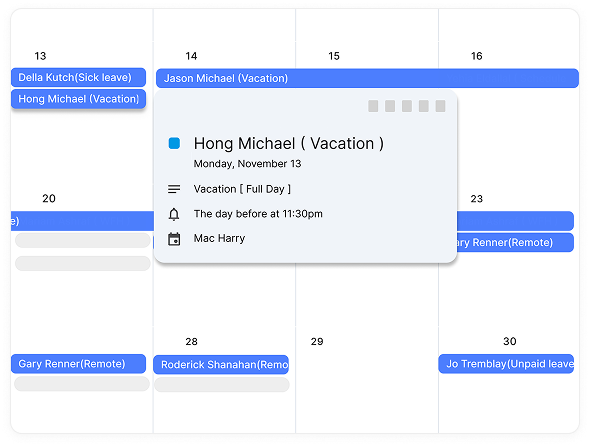
However, shared calendars were originally designed for scheduling and collaboration, not for managing employee leave.
While they can display who is absent and when, they typically lack the deeper functionality required to manage leave policies, leave balances, approvals, reporting, and compliance requirements.
As a result, HR teams often rely on separate spreadsheets, emails, and manual processes alongside the calendar, creating inefficiencies that grow over time.
Understanding Leave Management Software
Leave management software is a specialized solution designed specifically to automate and streamline the entire employee leave process.
Instead of simply showing who is absent, a leave management platform handles every stage of leave administration, including:
- Leave requests
- Manager approvals
- Leave balance calculations
- PTO tracking
- Sick leave management
- Public holiday management
- Team scheduling
- Reporting and analytics
A modern solution like Day Off goes even further by providing an intuitive mobile and web experience that allows employees and managers to handle leave requests from anywhere.
Rather than relying on manual updates and spreadsheets, Day Off centralizes leave management into a single platform that keeps everyone informed while reducing administrative workload.
Shared Calendar vs Leave Management Software: Detailed Comparison
1. Purpose and Core Functionality
Shared Calendar
The primary purpose of a shared calendar is scheduling and visibility.
It helps teams coordinate meetings, events, deadlines, and employee availability. When used for leave management, employees simply add an event indicating that they will be away.
Although this provides visibility, it does not actually manage leave.
The calendar doesn’t know:
- How many vacation days an employee has left
- Whether the leave request follows company policy
- Whether a manager approved the absence
- Whether another team member is already off during the same period
As a result, organizations often need multiple tools to support what appears to be a simple process.
Leave Management Software
Leave management software is purpose-built for handling employee absences.
Every feature is designed to simplify leave administration while improving accuracy and transparency.
For example, with Day Off, employees can submit leave requests directly through the platform, managers can approve them instantly, and leave balances update automatically.
The system becomes the single source of truth for all leave-related information, eliminating confusion and reducing manual work.
Why This Matters
2. Leave Request and Approval Process
Shared Calendar
In many organizations using shared calendars, the leave request process involves several manual steps.
An employee may:
- Send an email to their manager.
- Wait for approval.
- Create a calendar event.
- Inform team members separately.
This process increases the risk of communication breakdowns.
Employees may forget to add calendar events. Managers may overlook requests. Different versions of leave records may exist across emails, calendars, and spreadsheets.
The lack of a structured workflow can quickly become problematic.
Leave Management Software
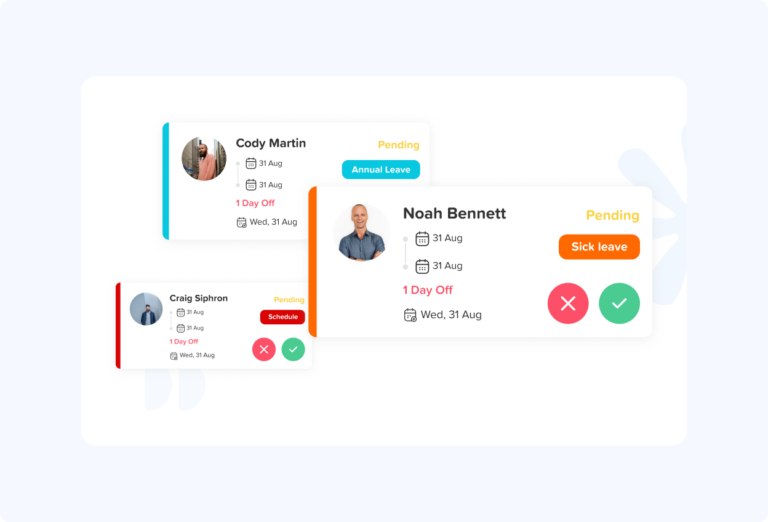
With Day Off, leave requests follow a streamlined and automated process.
Employees submit requests through the app or web platform. Managers receive instant notifications and can approve or reject requests with a single click.
The system automatically updates leave balances and team calendars, ensuring everyone has access to accurate information.
This eliminates unnecessary back-and-forth communication while creating a clear approval trail.
Benefits for Organizations
- Faster approvals
- Fewer administrative tasks
- Reduced errors
- Better accountability
- Improved employee experience
Winner: Leave Management Software
3. Leave Balance Tracking
Shared Calendar
One of the biggest weaknesses of shared calendars is the inability to track leave balances.
Employees often need to ask HR questions such as:
- How many vacation days do I have left?
- How much PTO have I used this year?
- How many sick days remain?
HR departments frequently maintain separate spreadsheets to answer these questions.
Manual tracking introduces significant risks, including:
- Calculation errors
- Outdated records
- Duplicate data entry
- Increased administrative workload
Leave Management Software
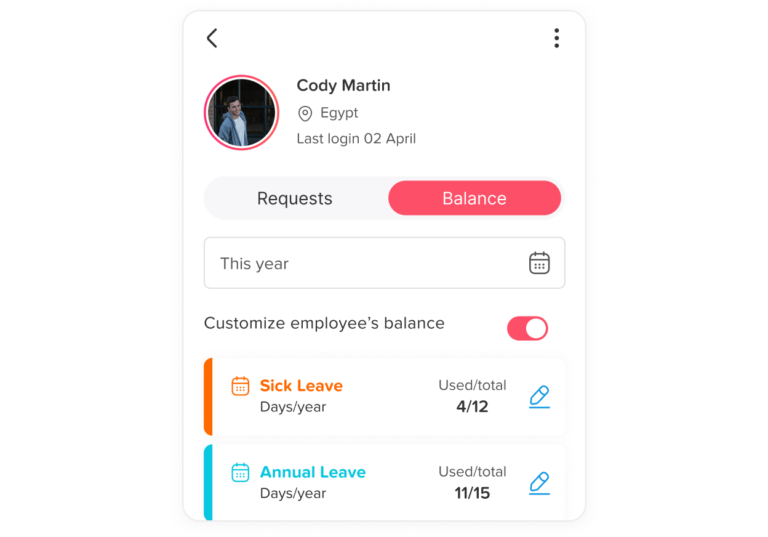
This is where Day Off provides substantial value.
The platform automatically tracks:
- Vacation days
- PTO balances
- Sick leave
- Personal leave
- Custom leave policies
- Carryover balances
Employees can view their remaining leave instantly without contacting HR.
Managers and HR teams always have access to accurate, real-time information.
Why This Matters
Self-service access improves transparency and reduces repetitive HR inquiries, allowing HR professionals to focus on more strategic initiatives.
Winner: Leave Management Software
4. Team Availability and Workforce Planning
Shared Calendar
Shared calendars provide a visual overview of who is away, making them useful for basic scheduling.
However, problems arise when multiple employees request leave simultaneously.
Managers often need to manually review calendars and determine whether approving a request could create staffing shortages.
This process becomes increasingly difficult as teams grow.
Leave Management Software
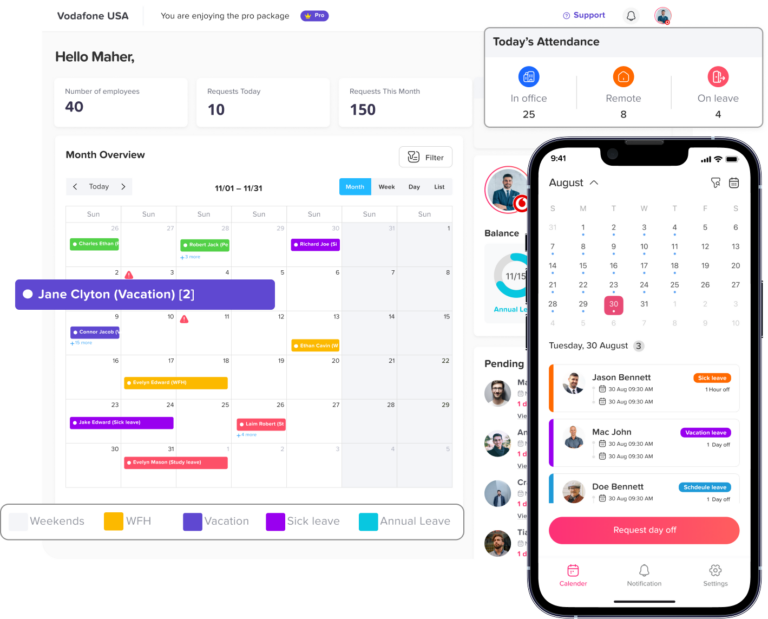
Day Off provides a comprehensive team calendar that allows managers to view employee absences across departments and locations.
Before approving a request, managers can immediately see:
- Existing absences
- Upcoming vacations
- Team availability
- Potential staffing conflicts
This visibility helps organizations maintain adequate coverage and avoid operational disruptions.
Benefits
- Better resource planning
- Reduced scheduling conflicts
- Improved team productivity
- Stronger workforce coordination
Winner: Leave Management Software
5. Reporting and Analytics
Shared Calendar
Shared calendars offer very limited reporting capabilities.
If HR needs information such as:
- Total leave taken this year
- Absence trends
- Department leave usage
- Sick leave patterns
They usually need to collect and analyze data manually.
This process can be time-consuming and inaccurate.
Leave Management Software
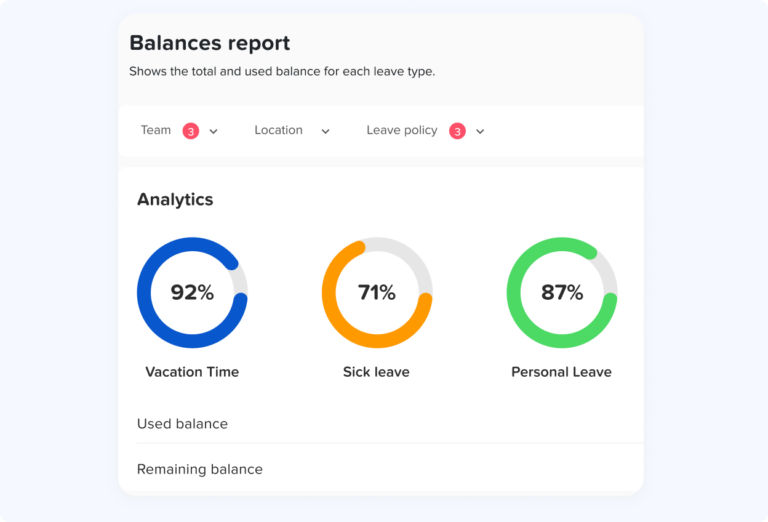
Advanced reporting is one of the strongest advantages of Day Off.
Organizations can generate reports on:
- Leave balances
- Employee absences
- Department trends
- PTO utilization
- Leave history
- Team attendance patterns
These insights help managers make better staffing and workforce planning decisions.
Why Reporting Matters
Data-driven organizations can identify trends early, optimize staffing levels, and improve operational efficiency.
Winner: Leave Management Software
6. Compliance and Policy Enforcement
Shared Calendar
Most shared calendars have no built-in compliance functionality.
This means HR teams must manually ensure that:
- Leave policies are followed
- Accrual rules are applied correctly
- Employee entitlements are accurate
- Records are maintained for audits
The risk of human error increases significantly over time.
Leave Management Software
Day Off helps organizations standardize leave management and apply company policies consistently.
Custom leave rules can be configured to match organizational requirements, helping ensure fairness and consistency across the workforce.
Centralized records also simplify audits and reporting.
Benefits
- Better policy enforcement
- Reduced compliance risks
- Accurate leave records
- Consistent employee treatment
Winner: Leave Management Software
7. Employee Experience
Shared Calendar
Employees often face uncertainty when using manual leave processes.
Common frustrations include:
- Waiting for approval updates
- Not knowing remaining leave balances
- Sending follow-up emails
- Confusion regarding leave status
These issues negatively impact employee satisfaction.
Leave Management Software
Day Off is designed with employee convenience in mind.
Employees can:
- Request leave in seconds
- Check balances instantly
- View company holidays
- Track approval status
- Access the system from mobile devices
The entire process becomes faster, clearer, and more transparent.
Why Employee Experience Matters
A positive leave management experience contributes to employee engagement and trust while reducing unnecessary administrative friction.
Winner: Leave Management Software
Key Features of Day Off Leave Management Software
Easy Leave Requests
Day Off makes requesting time off quick and straightforward. Employees can submit leave requests in just a few taps through the mobile app or web platform, eliminating the need for emails, paper forms, or manual calendar updates. This creates a faster and more organized process for everyone involved.
Automated Approval Workflows
Managers receive instant notifications whenever a leave request is submitted. They can review and approve or reject requests directly within the platform, helping reduce delays and ensuring employees receive timely responses. The automated workflow keeps the approval process transparent and efficient
Real-Time Leave Balance Tracking
Employees can view their remaining leave balances at any time without contacting HR. Day Off automatically updates balances after every approved request, providing accurate and up-to-date information for vacation days, PTO, sick leave, and other leave types.
Shared Team Calendar
The built-in team calendar gives managers and employees a clear overview of who is on leave and when. This visibility helps teams avoid scheduling conflicts, plan workloads effectively, and ensure adequate coverage during employee absences.
Multiple Leave Types
- Annual leave
- PTO
- Sick leave
- Personal leave
- Unpaid leave
- Custom leave types
This flexibility allows organizations to tailor the system to their specific requirements.
Mobile and Web Access
Whether employees are in the office, working remotely, or traveling, they can manage leave requests from anywhere. Day Off’s mobile and web accessibility ensures that leave management remains convenient and accessible for both employees and managers.
Public Holiday Management
Day Off automatically incorporates public holidays into leave calculations, helping organizations avoid manual adjustments and ensuring leave balances remain accurate. This feature is especially useful for businesses operating across different regions.
Detailed Reporting
The platform provides valuable reports on employee absences, leave balances, and time-off trends. These insights help HR teams and managers make informed decisions, improve workforce planning, and monitor leave usage across the organization.
Custom Leave Policies
Day Off allows businesses to configure leave rules according to their unique policies. Organizations can customize leave entitlements, approval structures, accrual rules, and other settings to ensure the system aligns with their internal processes.
Multi-Team Support
As companies grow, managing leave across multiple teams and departments becomes more challenging. Day Off is built to support organizations of all sizes, providing centralized leave management while giving managers visibility into their specific teams and departments. This makes it easier to coordinate schedules and maintain productivity across the business.
Shared Calendar vs Leave Management Software: Quick Comparison
Shared Calendar vs Leave Management Software
See how a basic shared calendar compares with dedicated leave management software like Day Off.
| Feature | Shared Calendar | Leave Management Software e.g., Day Off |
|---|---|---|
| Primary Purpose | Schedule events and display availability | Manage employee leave and absences |
| Leave Requests | Manual process | Automated request submission |
| Approval Workflow | Usually handled via email or chat | Built-in approval workflows |
| Leave Balance Tracking | Not available | Automatic real-time tracking |
| PTO Management | Requires spreadsheets | Fully automated |
| Sick Leave Tracking | Manual tracking | Automated tracking and reporting |
| Leave Accruals | Not supported | Automatically calculated |
| Employee Self-Service | Limited | Employees can check balances and requests anytime |
| Team Calendar View | Basic visibility | Advanced team availability planning |
| Public Holiday Management | Manual entry required | Built-in holiday support |
| Notifications | Limited calendar reminders | Automated notifications and alerts |
| Reporting & Analytics | Minimal or none | Comprehensive HR reporting |
| Audit Trail | Not available | Full leave history and approval records |
| Policy Enforcement | Manual | Automated policy application |
| Mobile Access | Calendar dependent | Dedicated mobile apps and web access |
| Scalability | Best for very small teams | Suitable for growing and large organizations |
| HR Administrative Work | High | Significantly reduced |
| Compliance Support | Limited | Better compliance and record keeping |
| Multi-Department Support | Difficult to manage | Built specifically for multiple teams |
| Integration Possibilities | Basic | HR, payroll, and calendar integrations |
| Cost | Usually included in productivity suites | Subscription-based but saves administrative time |
Frequently Asked Questions (FAQ)
Can leave management software integrate with existing calendars?
Yes. Most modern leave management solutions, including Day Off, can integrate with popular calendar tools such as Google Calendar and Outlook. This allows approved leave requests to automatically appear on team calendars while maintaining accurate leave records within the software.
Is leave management software suitable for remote and hybrid teams?
Absolutely. Leave management software is especially valuable for remote and hybrid workplaces because it provides a centralized system for requesting, approving, and tracking leave regardless of employee location. Managers can easily monitor team availability and coordinate schedules across different locations and time zones.
How does leave management software help reduce HR workload?
By automating leave requests, approvals, balance calculations, and reporting, leave management software eliminates many repetitive administrative tasks. This allows HR teams to spend less time managing spreadsheets and emails and more time focusing on strategic initiatives.
What should businesses look for when choosing leave management software?
Key features to consider include automated approval workflows, real-time leave balance tracking, customizable leave policies, reporting capabilities, mobile access, calendar integrations, and support for multiple leave types. The right solution should be able to scale as your organization grows.
Can small businesses benefit from leave management software?
Yes. While shared calendars may work for very small teams, leave management software can help small businesses establish efficient processes from the beginning. Automation reduces administrative effort, improves transparency, and makes it easier to manage employee leave as the company expands.
Final Thoughts
Shared calendars offer visibility, but they do not provide true leave management. As businesses scale, relying on manual processes often leads to inefficiencies, errors, and administrative burdens.
Modern leave management software such as Day Off transforms the entire process by automating requests, approvals, balance tracking, reporting, and workforce planning. The result is a more organized, transparent, and efficient approach to managing employee time off.
For companies focused on growth, productivity, and employee satisfaction, investing in dedicated leave management software is not just a convenience, it is a strategic advantage.