








Tracking employee billable hours easily is important for any business that charges clients based on time. Agencies, consulting firms, software companies, marketing teams, legal teams, freelancers, contractors, and service-based businesses all need a clear way to record how much time employees spend on client work.
When billable hours are tracked properly, businesses can invoice clients accurately, understand project profitability, plan workloads, and avoid losing revenue. But when time is tracked manually through spreadsheets, notes, memory, or scattered messages, important hours can be missed or recorded incorrectly.

A good billable hours process should help employees log time quickly, separate billable and non-billable work, connect hours to projects or tasks, and give managers clear reports before billing or payroll review.
This guide explains what billable hours are, why they matter, how to track them correctly, and how Day Off can help teams manage work hours, attendance, PTO, and employee availability in one place.
What Are Billable Hours?
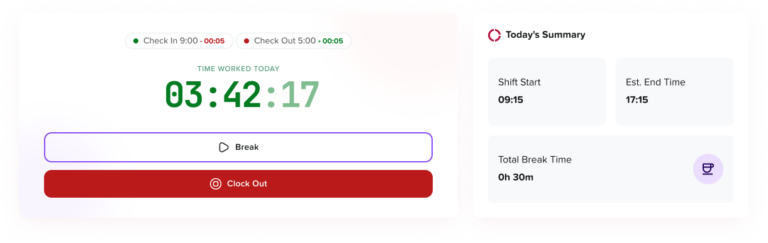
Billable hours are the hours an employee spends working on tasks that can be charged to a client, customer, project, or contract.
For example, if a software developer spends 5 hours fixing a client’s checkout issue, those 5 hours may be billable. If the same developer spends 1 hour in an internal team meeting, that hour may be non-billable.
Common billable activities include client meetings, consulting sessions, design work, software development, legal research, client reports, implementation work, support covered by a contract, and project planning for a specific client.
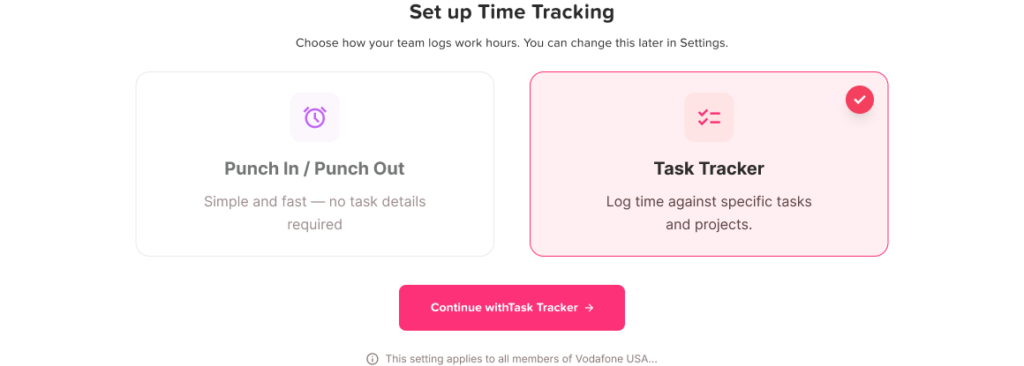
Common non-billable activities include internal meetings, admin work, training, hiring interviews, company updates, internal documentation, and general business planning.
The exact definition of billable time depends on the business model and client agreement. That is why every company should clearly define what counts as billable before employees start tracking time.
Why Billable Hour Tracking Matters
Billable hour tracking is not only about invoicing clients. It also helps businesses understand where employee time goes and whether projects are profitable.
Accurate billable hour tracking helps teams:
- Create accurate client invoices
- Reduce missed revenue
- Improve project estimates
- Understand employee workload
- Compare estimated hours with actual hours
- Separate client work from internal work
- Review project profitability
- Avoid billing disputes
- Prepare cleaner records for managers and finance teams
Even small mistakes can become expensive. If an employee forgets to track 20 minutes of billable work each day, that becomes more than 1.5 hours per week. Across a team of 10 employees, the business may lose more than 15 billable hours every week.
Billable vs Non-Billable Hours
The first step to tracking billable hours correctly is separating client-chargeable work from internal work.
| Type of Time | What It Means | Example |
|---|---|---|
| Billable hours | Time that can be charged to a client or project | Designing a client landing page |
| Non-billable hours | Work time that cannot be charged to a client | Internal team meeting |
| Admin time | Operational work for the company | Updating internal files |
| PTO or leave | Approved time away from work | Vacation, sick leave, unpaid leave |
| Unassigned time | Work time not linked to a clear task | Logged hours without project details |
This separation is important because an employee may work 8 hours in a day, but not all 8 hours are billable. For example, they may spend 5 hours on client work, 2 hours on internal meetings, and 1 hour on admin tasks.
Why Manual Billable Hour Tracking Creates Problems
Many teams start with spreadsheets because they are easy to set up. But as projects, clients, and employees increase, manual tracking becomes harder to manage.
Employees may forget to enter time daily. Managers may receive timesheets late. Project names may be written differently by different employees. Billable and non-billable work may be mixed together. PTO may be confused with missing hours. Reports may take too long to prepare.
Manual tracking also depends heavily on memory. When employees wait until the end of the week to fill out their time, entries are often estimated instead of accurate.
For service-based teams, this can affect revenue directly. Missing one or two hours may not seem serious, but over several weeks or months, those missed hours can reduce profit and make project reports unreliable.
Original Example: How Missed Time Affects Revenue
Imagine a marketing agency with 8 employees. Each employee forgets to record only 15 minutes of billable work per day.
That equals:
- 1.25 missed hours per employee per week
- 10 missed billable hours across the team each week
- Around 40 missed billable hours per month
If the agency charges $75 per hour, that means the business could miss around $3,000 in billable revenue each month.
This example shows why tracking billable hours should be simple and easy to do every day. The harder the process is, the more likely employees are to delay it, guess later, or forget time completely.
How to Track Employee Billable Hours Easily
Tracking billable hours does not need to be complicated. The best process is clear, repeatable, and easy for employees to follow.
Step 1: Define What Counts as Billable
Before employees start tracking time, the company should define billable and non-billable work clearly.
For example, a company may say:
“Billable time includes approved client work, client meetings, project research, implementation work, and client reporting. Non-billable time includes internal meetings, training, admin work, hiring, and company planning.”
This removes confusion and helps employees log time consistently.
Step 2: Create Clear Projects and Tasks
Employees should not log time under vague labels like “work,” “client task,” or “meeting.” Each entry should be connected to a specific client, project, or task.
Better time entries include:
- Client A, website redesign, homepage wireframe
- Client B, weekly strategy meeting
- Client C, checkout bug fix
- Client D, monthly SEO report
- Client E, campaign performance review
Clear task names help managers review work faster and make reports more useful.
Step 3: Track Time Daily
Daily tracking is much more accurate than weekly tracking. When employees wait until Friday to fill out their hours, they often rely on memory.
Employees should track time when they start a task, finish a task, switch between projects, or at least at the end of each day.
This habit keeps records accurate and reduces the need for corrections later.
Step 4: Separate Billable and Non-Billable Time
Every time entry should clearly show whether the work is billable or non-billable.
This helps managers understand:
- How much time was spent on client work
- How much time was spent on internal work
- Which projects are using the most time
- Whether clients are staying within budget
- Whether employees are overloaded with non-billable tasks
Without this separation, reports become too general to support real business decisions.
Step 5: Add Short Notes to Time Entries

Time entries should include simple notes that explain what was done. Employees do not need to write long descriptions, but the note should be clear enough for a manager or client to understand.
Weak note:
“Design work”
Better note:
“Designed homepage hero section and mobile layout for Client A website.”
Clear notes help with invoice review, project history, client questions, and manager approval.
Step 6: Review Time Before Billing
Managers should review time entries before they are used for invoices or client reports.
The review should check whether the hours are assigned to the right client, whether task details are clear, whether billable and non-billable work are separated, whether duplicate entries exist, and whether PTO or absences were recorded correctly.
A simple review step can prevent billing mistakes and protect client trust.
Step 7: Keep PTO Separate From Billable Hours
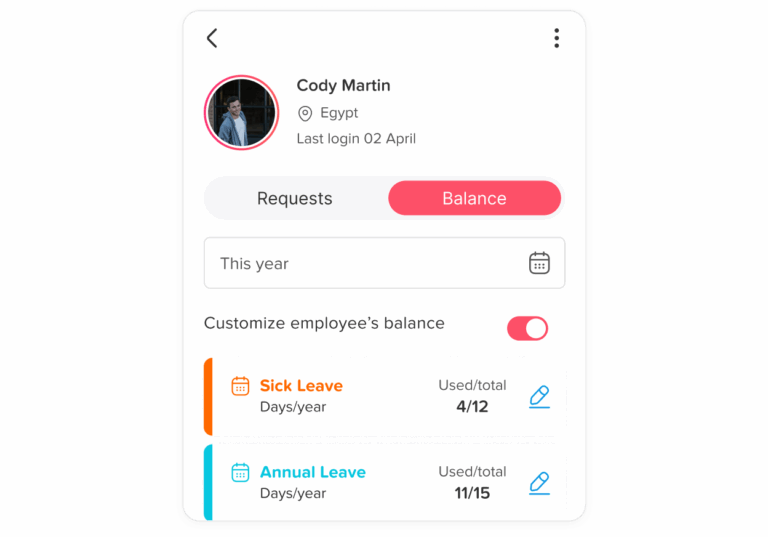
PTO should never be counted as billable time. Vacation, sick leave, unpaid leave, holidays, and other approved absences should be tracked separately from client work.
For example, if an employee worked Monday and Tuesday, took PTO on Wednesday, and returned to client work on Thursday, Wednesday should appear as approved leave, not as missing time or non-billable work.
This is especially important for managers reviewing employee availability, attendance, and project timelines.
Step 8: Connect Billable Hours With Attendance
Billable hour tracking and attendance tracking are related, but they are not the same.
Attendance tracking shows whether an employee worked, when they started, when they ended, and whether they were absent or late. Billable hour tracking shows what the employee worked on and whether that time can be charged to a client.
A connected process helps managers understand the full picture. For example, an employee may have 8 attendance hours, but only 5 billable hours. The remaining time may be internal meetings, admin work, or training.
Practical Example: Marketing Agency
A marketing agency works with several clients every day. One employee may write content for Client A, attend a call with Client B, update reports for Client C, and join an internal team meeting.
Without billable hour tracking, the manager only sees that the employee worked 8 hours. But with proper tracking, the manager can see how many hours were billable, which client used the most time, and how much internal work happened during the day.
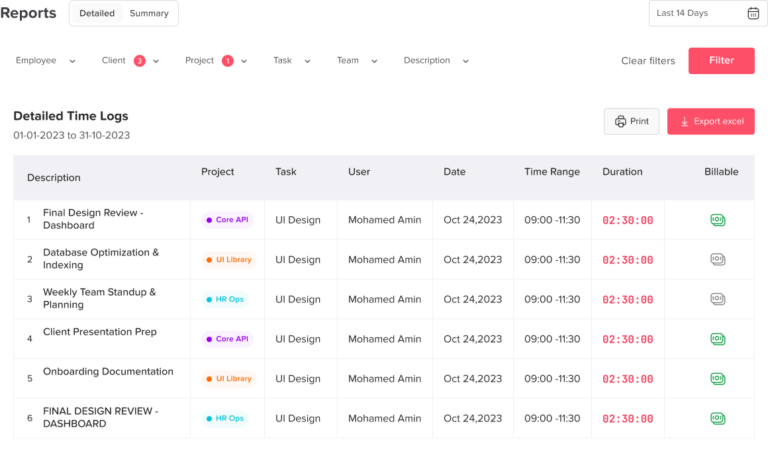
A clear daily record may look like this:
- 2.5 hours writing a blog article for Client A
- 1 hour campaign meeting with Client B
- 1.5 hours SEO updates for Client A
- 1 hour internal team meeting
- 1 hour admin updates
Total time worked: 7 hours
Billable time: 5 hours
Non-billable time: 2 hours
This gives the business a much clearer view than simply recording “7 hours worked.”
Practical Example: Software Development Team
A software team may work on client features, bug fixes, internal tools, testing, and support tickets. If time is not tracked clearly, managers may not know whether a project is taking longer than expected.
For example, a payment integration may have been estimated at 10 hours but actually took 15 hours. If this is recorded properly, the team can improve future estimates and understand why the project took longer.
Clear billable hour tracking helps software teams answer questions like:
- Which features took longer than expected?
- Which clients used the most development time?
- How much time went to bug fixes?
- How much time was spent on internal work?
- Are future estimates realistic?
Practical Example: Consulting Team
Consulting teams often charge clients based on meetings, preparation, research, and reporting. If consultants do not write clear time notes, clients may question invoices.
A weak time entry would be:
“Client work, 3 hours.”
A better time entry would be:
“Prepared Q2 performance review, analyzed client data, and created recommendation notes, 3 hours.”
This kind of detail helps managers approve time confidently and gives clients a clearer reason for the billed hours.
What a Good Billable Hours Process Should Include
A strong billable hour tracking process should be easy for employees and useful for managers.
Key Process Elements That Improve Time Tracking
| Process Element | Why It Matters |
|---|---|
| Clear billable rules | Employees know what can and cannot be charged. |
| Project and task labels | Time is connected to the right client or job. |
| Daily time tracking | Records are more accurate. |
| Billable/non-billable status | Reports and invoices are clearer. |
| Notes on time entries | Managers understand what work was done. |
| Manager review | Mistakes are caught before billing. |
| PTO separation | Leave is not confused with work time. |
| Attendance connection | Managers can compare work hours and availability. |
| Reports | The business can review revenue, workload, and project performance. |
This process helps teams avoid missed hours, unclear invoices, and messy reports.
Billable Hours vs Payroll Hours
Billable hours and payroll hours are different.
Payroll hours are the hours used to pay employees. Billable hours are the hours charged to clients.
An employee may work 8 payroll hours in one day, but only 5 of those hours may be billable. The rest may be internal work, admin tasks, training, or meetings that cannot be charged to a client.
This difference matters because a company may pay employees for all approved working time, while only billing clients for specific project-related work.
Reports That Help With Billable Hours
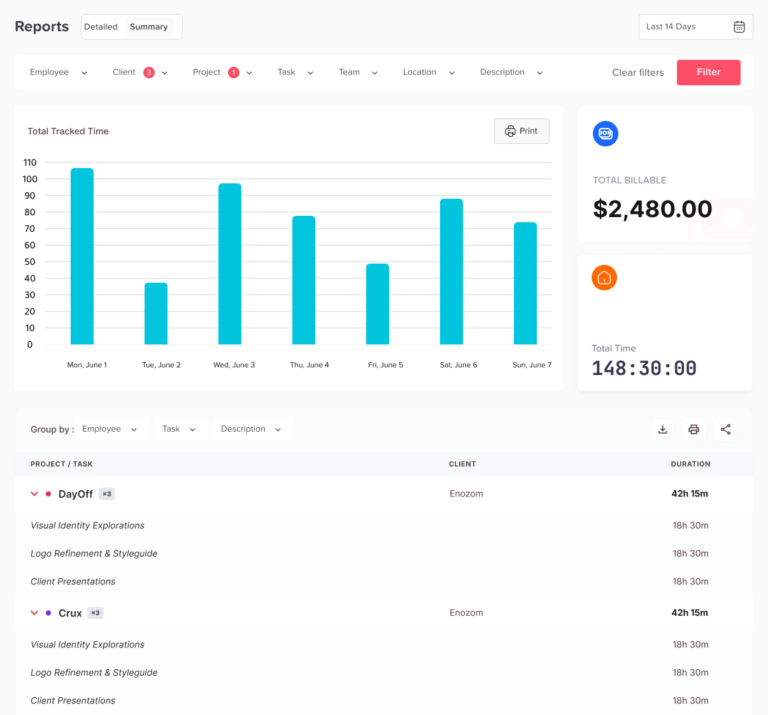
Reports turn time entries into useful business information. They help managers understand how time is being used and whether projects are profitable.
Useful billable hour reports include:
- Billable hours by employee
- Billable hours by client
- Billable hours by project
- Billable vs non-billable time
- Timesheet approval status
- Estimated vs actual hours
- PTO and attendance summary
- Workload by team
These reports help businesses improve pricing, staffing, client communication, and project planning.
How Day Off Helps Teams Track Work Hours and PTO
Day Off helps teams manage time tracking, attendance, work schedules, PTO requests, leave balances, and team availability in one place.
For teams that track billable hours, this is useful because managers need to know who is working, who is away, and how employee time is recorded. If work hours and PTO are managed in separate systems, approved leave may look like missing time, and reports may become harder to review.
With Day Off, teams can manage:
- Employee time tracking
- Punch in and punch out
- Work schedules
- Fixed hours
- Flexible hours
- Rotating shifts
- PTO requests
- Vacation leave
- Sick leave
- Unpaid leave
- Leave balances
- Attendance records
- Team availability
- Reports and exports
This helps managers review employee time more clearly and avoid confusion between work hours, PTO, absence, and availability.
Common Billable Hour Tracking Mistakes
Waiting Until the End of the Week
Employees are more likely to forget details if they track time only once a week. Daily tracking is more accurate.
Using Vague Task Names
Entries like “client work” or “project update” do not give managers enough detail. Task names should explain what was actually done.
Mixing Billable and Non-Billable Work
If all time is grouped together, managers cannot see what should be invoiced.
Counting PTO as Work Time
Approved leave should be recorded separately from billable and non-billable work.
Not Reviewing Time Before Invoicing
Managers should approve time entries before they are used for client billing.
Making the Process Too Complicated
If employees need too many steps to log time, they may delay it or avoid it. Keep the process simple.
Best Practices for Tracking Employee Billable Hours Easily
To make billable hour tracking easier, teams should keep the process simple and consistent.
Start by defining billable work clearly. Create standard project and task names. Ask employees to track time daily instead of weekly. Require short notes for each entry. Separate billable and non-billable time. Review time before invoices are created. Keep PTO and attendance connected so managers can understand whether employees were working, away, or unavailable.
Most importantly, choose a system that employees will actually use. The best tracking process is not the most complicated one. It is the one that creates accurate records without adding unnecessary work.
FAQ
How should PTO be tracked for shift workers?
PTO for shift workers should be tracked based on the employee’s actual scheduled work time. If an employee is scheduled for an 8-hour shift and takes that shift off, the PTO deduction should normally match those 8 scheduled hours. This is more accurate than deducting a fixed “one day” amount when employees work different shift lengths.
Should PTO for shift workers be tracked in days or hours?
For shift workers, PTO is usually easier and fairer to track in hours. A “day off” may not mean the same thing for every employee. One employee may be scheduled for 4 hours, while another may be scheduled for 10 or 12 hours. Tracking PTO in hours helps businesses deduct leave based on the real schedule.
What happens if an employee requests PTO on a day they are not scheduled to work?
In most cases, PTO should not be deducted if the employee was not scheduled to work that day. However, the company should clearly define this rule in its leave policy. The key is to check the employee’s schedule before approving or deducting PTO.
How do rotating shifts affect PTO tracking?
Rotating shifts make PTO tracking more complex because an employee’s working days may change from week to week. Before approving leave, managers should review the employee’s assigned schedule for the exact requested dates. This helps prevent incorrect deductions and avoids approving leave without checking coverage.
What should managers check before approving PTO for shift workers?
Managers should check the employee’s available balance, scheduled shift hours, other approved leave, public holidays, minimum staffing needs, and whether the shift still has enough coverage. This helps avoid understaffing, especially during weekends, holidays, and busy seasons.
How should partial-shift PTO be handled?
Partial-shift PTO should be tracked based on the number of hours the employee will miss. For example, if an employee leaves 3 hours early with approval, the business may deduct 3 PTO hours or record the time under the correct leave type. This should be clearly explained in the company’s PTO policy.
Can PTO software help with changing schedules?
Yes. PTO software can make shift-based leave tracking easier by keeping leave requests, approvals, balances, public holidays, and team availability in one place. This gives managers a clearer view before approving time off and reduces mistakes caused by spreadsheets or manual tracking.
Why is a shared leave calendar important for shift-based teams?
A shared leave calendar helps managers and employees see who is off, who is available, and where coverage gaps may happen. For shift-based teams, this is especially important because several employees may request the same shift, weekend, or holiday off.
How can businesses avoid PTO conflicts during busy shifts?
Businesses can avoid PTO conflicts by setting approval rules, using blockout dates for peak periods, checking minimum staffing needs, and reviewing the team calendar before approving requests. This helps managers balance employee time off with business coverage.
How does Day Off help manage PTO for shift workers?
Day Off helps teams manage PTO requests, approvals, leave balances, public holidays, shared calendars, teams, locations, and reports in one place. For shift-based teams, this makes it easier to track who is working, who is away, and how employee leave affects team availability.
Final Thoughts
Tracking employee billable hours easily starts with a clear and simple process. Employees need to know what counts as billable, how to record time, where to add task details, and when to submit their entries. Managers need accurate reports that show billable work, non-billable work, PTO, attendance, and employee availability.
When billable hours are tracked properly, businesses can invoice clients more accurately, reduce missed revenue, improve project planning, and understand how employee time is being used.
Day Off helps teams manage time tracking, attendance, schedules, PTO, and availability together, giving managers a clearer view of who is working, who is away, and how time is recorded.