








Managing PTO for shift workers is more complicated than tracking time off for employees who work the same 9-to-5 schedule every week. Shift workers may have rotating schedules, night shifts, split shifts, weekend work, part-time hours, changing weekly availability, and different days off depending on business demand. Because of this, a basic spreadsheet or shared calendar is often not enough to track leave accurately.
For small businesses, restaurants, retail stores, healthcare teams, customer support teams, security companies, manufacturing teams, and field operations, PTO tracking needs to connect with the actual work schedule. If an employee requests Monday off but they were not scheduled to work on Monday, should PTO be deducted? If an employee works four 10-hour shifts instead of five 8-hour shifts, how many hours should be removed from their balance? If the schedule changes after leave is approved, which record should HR follow?

These questions matter because shift-based PTO affects staffing, payroll, employee fairness, overtime planning, and team coverage. A good PTO process should make it clear who is working, who is away, how much leave should be deducted, and whether the business still has enough people scheduled.
This guide explains how to track PTO for shift workers when schedules change, what mistakes to avoid, and how leave tracking software like Day Off can help teams manage time off, attendance, schedules, and availability in one place.
What Makes PTO for Shift Workers Different?
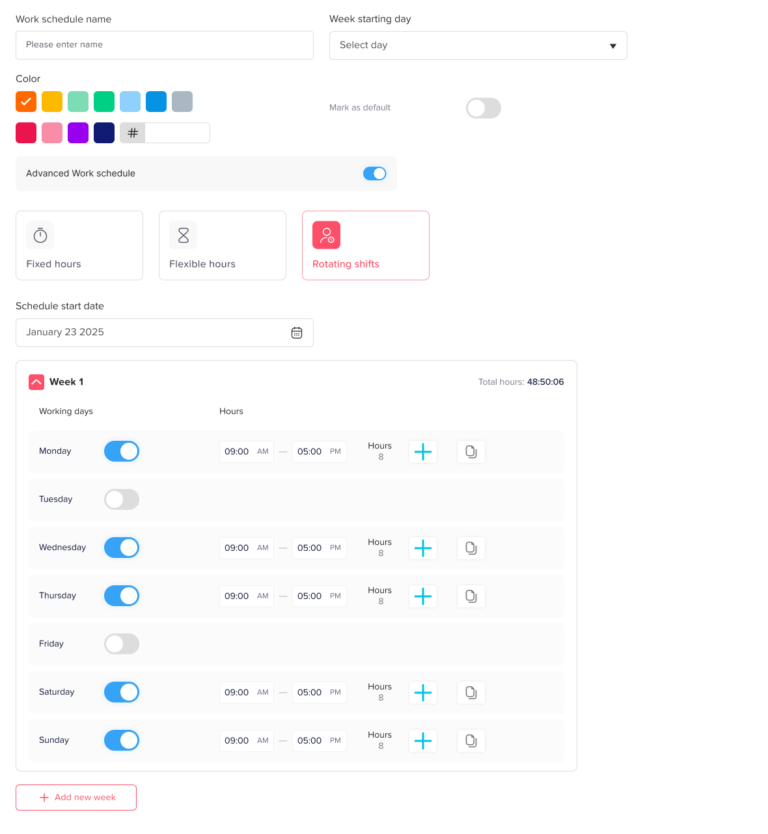
PTO for shift workers is different because the number of leave hours or days may depend on the employee’s actual schedule. In a fixed office schedule, one day off often equals one standard workday. For shift workers, one day off may represent 4 hours, 8 hours, 10 hours, 12 hours, or no scheduled hours at all.
In the U.S., the Department of Labor explains that the FLSA does not generally require payment for time not worked, such as vacation, sick leave, or holidays, so employers should clearly define PTO rules in their company policy.
For example:
- A restaurant employee may work different shifts each week.
- A retail employee may work weekends and have weekdays off.
- A nurse may work three 12-hour shifts instead of five 8-hour shifts.
- A security guard may rotate between day and night shifts.
- A support agent may work evening shifts one week and morning shifts the next.
- A part-time employee may work only three days per week.
This means PTO tracking must answer more than “What date is the employee off?” It must also answer “Was the employee scheduled to work that day?” and “How many scheduled hours should be deducted?”
Common Shift Work PTO Problems
When PTO is tracked manually, small mistakes can create major confusion. Shift workers often have changing schedules, so HR and managers need a reliable way to connect leave requests with work schedules.
Where PTO Tracking Breaks Down
| Problem | What Usually Happens | Business Impact |
|---|---|---|
| PTO is deducted by day only | A 12-hour shift and 4-hour shift are treated the same | Employees may lose too much or too little leave |
| Schedule changes after approval | HR does not know which schedule to follow | Payroll and leave balances become unclear |
| Employees request leave on unscheduled days | PTO may be deducted when it should not be | Leave balances become inaccurate |
| Managers approve leave without coverage visibility | Too many people are away during the same shift | Understaffing and service delays |
| PTO and attendance are tracked separately | Approved leave may look like absence | Employees may be marked absent incorrectly |
| Spreadsheets are updated late | Managers work with outdated availability | Scheduling conflicts increase |
For shift-based teams, PTO tracking should be connected to schedule visibility. Otherwise, managers may approve leave without knowing the real coverage impact.
PTO by Days vs PTO by Hours
One of the biggest decisions for shift workers is whether PTO should be tracked by days or by hours.
For employees with a regular schedule, tracking PTO by days may be simple enough. But for shift workers, tracking PTO by hours is often more accurate because shifts are not always equal in length.
| Tracking Method | Best For | Risk |
|---|---|---|
| PTO by days | Employees with the same daily schedule | Can be unfair if shift lengths vary |
| PTO by hours | Shift workers, part-time employees, rotating schedules | Requires accurate schedule records |
| PTO by fixed workday value | Teams with predictable standard shifts | May still be inaccurate for changing shifts |
| PTO by scheduled shift length | Teams with changing shifts | Requires schedule and PTO to work together |
Example 1: PTO by Day Can Be Unfair
Two employees request one day off.
Employee A was scheduled for a 4-hour shift.
Employee B was scheduled for a 10-hour shift.
If the company deducts one PTO day from both employees, the deduction may look equal on paper, but it is not equal in working time. Employee A used 4 hours away from work, while Employee B used 10 hours away from work.
For this reason, many shift-based businesses prefer tracking leave in hours.
Example 2: PTO by Scheduled Hours Is More Accurate
An employee is scheduled for:
- Monday: 6 hours
- Tuesday: 8 hours
- Wednesday: Off
- Thursday: 10 hours
- Friday: 6 hours
If the employee requests Thursday off, the system should deduct 10 hours, not one generic day. If the employee requests Wednesday off, no PTO should be deducted because they were not scheduled to work.
This is why shift-based leave tracking works best when the PTO system can see the employee’s work schedule.
How Schedule Changes Affect PTO
Shift schedules can change for many reasons. Employees may swap shifts, managers may adjust staffing needs, someone may call in sick, or demand may increase during holidays or weekends.
When a schedule changes after PTO is approved, businesses need a clear rule.
There are three common approaches:
There is no single rule that works for every business. The important thing is to define the rule clearly in the PTO policy and apply it consistently.
Practical Example: Restaurant Shift Change
A restaurant employee is approved for PTO on Friday. At the time of approval, the employee was scheduled from 12 PM to 8 PM, an 8-hour shift.
Two days later, the manager changes the schedule because another employee is unavailable. The employee’s shift becomes 10 AM to 10 PM, a 12-hour shift.
What should be deducted?
Option 1: Deduct 8 hours because that was the schedule when PTO was approved.
Option 2: Deduct 12 hours because that is the final scheduled shift.
Option 3: Manager reviews and adjusts based on company policy.
The business should not decide this case by case without a rule. A clear PTO policy helps prevent confusion and protects fairness.
Practical Example: Retail Weekend Coverage
A retail store has six employees. Three employees request PTO for the same Saturday. Saturday is the busiest sales day of the week.
If the manager only sees individual requests, they may approve all three without realizing the store will be short-staffed. But if the manager uses a shared leave calendar and schedule view, they can see the coverage problem before approving.
A better process would be:
- Employee submits PTO request.
- Manager checks the Saturday schedule.
- Manager reviews how many people are already off.
- Manager approves, rejects, or suggests another date.
- The approved leave appears on the team calendar.
This avoids understaffing and keeps leave decisions more organized.
Practical Example: Healthcare Rotating Shifts
A healthcare employee works rotating 12-hour shifts. One week, they work Monday, Tuesday, and Friday. The next week, they work Wednesday, Thursday, and Sunday.
If the employee requests “Monday off,” HR cannot assume Monday is always a workday. The system must check the schedule for that specific week.
For rotating teams, PTO tracking should always be based on the employee’s assigned schedule for the requested dates.
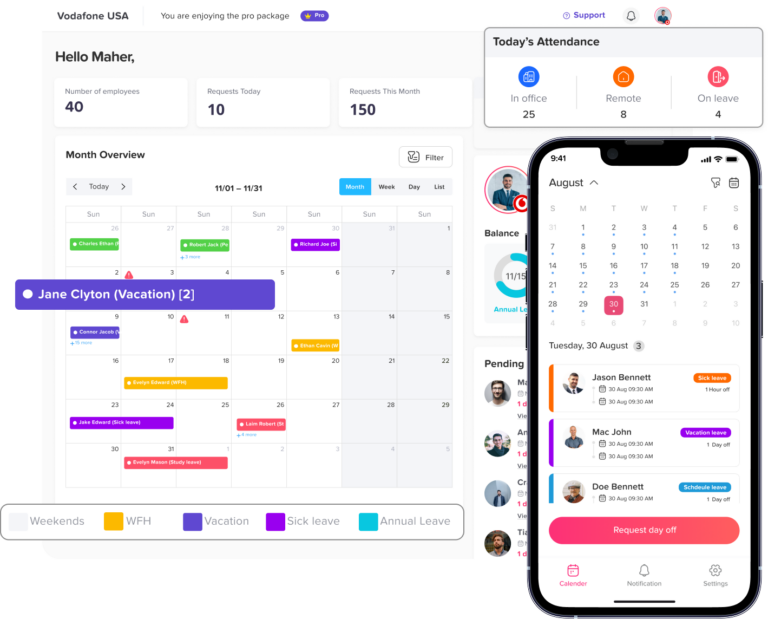
How to Track PTO for Shift Workers Correctly
To track PTO for shift workers accurately, businesses need more than a leave request form. They need a process that connects leave, schedules, approvals, balances, and payroll records.
Here is a practical step-by-step process.
Lorem ipsum dolor sit amet, consectetur adipiscing elit. Ut elit tellus, luctus nec ullamcorper mattis, pulvinar dapibus leo.
Step 1: Decide Whether PTO Is Tracked in Days or Hours
The first step is choosing the right unit.
For shift workers, hourly PTO tracking is usually more accurate because shifts may vary in length. If your team works different shift lengths, tracking leave by hours helps prevent unfair deductions.
Use PTO by hours when:
- Employees work different shift lengths.
- Employees work part-time schedules.
- Employees work rotating shifts.
- Some shifts are longer than others.
- Payroll needs accurate leave hours.
- Overtime and attendance are tracked carefully.
Use PTO by days only when:
- Employees work the same daily schedule.
- Every workday has the same value.
- Leave policies are simple.
- Payroll does not require detailed hour-level deductions.
Step 2: Connect PTO Requests to the Work Schedule
A PTO request should be checked against the employee’s assigned schedule. This helps HR and managers understand whether the employee was supposed to work on the requested date.
Before approving PTO, managers should know:
- Was the employee scheduled to work?
- What shift was assigned?
- How many hours were scheduled?
- Is the employee requesting a full shift or part of a shift?
- Are other employees already off?
- Will the team still have enough coverage?
When PTO and schedules are disconnected, managers have to check several places before making a decision. This increases the chance of mistakes.
Step 3: Set Clear Rules for Shift Swaps
Shift swaps can make PTO tracking confusing. An employee may request leave, swap a shift, or cover another employee’s shift in the same week.
Your policy should explain:
- Can employees swap shifts after PTO is approved?
- Who must approve a shift swap?
- Does the PTO balance change if the shift changes?
- What happens if an employee gives away a shift instead of using PTO?
- Can employees use PTO for only part of a shift?
For example, if an employee gives away their shift to another employee and does not work, the business must decide whether that counts as PTO, unpaid time, or a schedule change. The answer should not be left unclear.
Step 4: Define How PTO Is Deducted for Partial Shifts
Partial-shift leave is common in shift-based work. An employee may need the first half of a shift off, the last two hours off, or a few hours for an appointment.
Your PTO policy should explain how partial leave is handled.
| Approach | How It Works | Best For |
|---|---|---|
| Deduct based on original approved schedule | PTO follows the shift that existed when leave was approved | Teams that want approval records to stay fixed |
| Deduct based on final published schedule | PTO follows the latest schedule before payroll | Teams that frequently adjust schedules |
| Require manager review when schedule changes | Manager confirms the correct deduction | Teams with complex shifts or high payroll sensitivity |
This is where hourly leave tracking can make the process much clearer.
Step 5: Use Leave Types Clearly
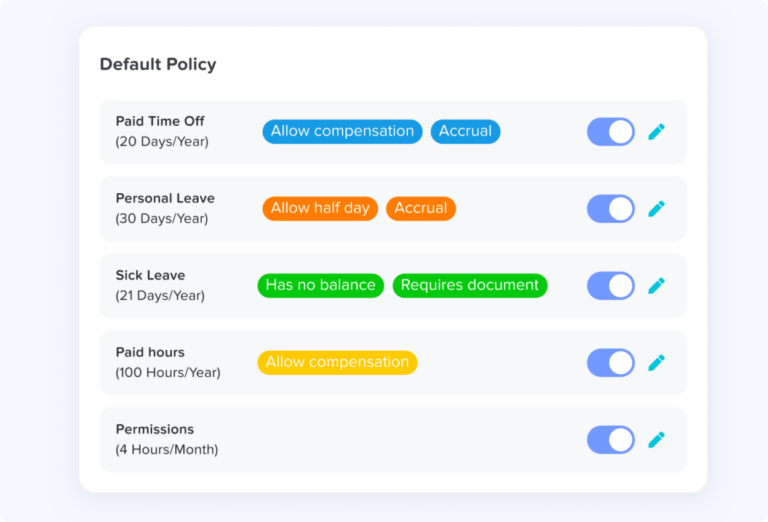
Shift workers may need different leave types depending on the reason for absence. Clear leave types help HR report correctly and help managers understand availability.
Common leave types include:
- Vacation leave
- Sick leave
- Personal leave
- Unpaid leave
- Emergency leave
- Public holiday
- No-show or unapproved absence
- Partial-day leave
- Custom leave types
Do not group everything under one generic “time off” category if your business needs clearer records. Separate leave types make reports more useful.
Step 6: Add Public Holidays to the Same Calendar
Public holidays can affect shift workers differently. Some employees may still work on holidays, while others may have the day off. Restaurants, healthcare teams, hotels, support teams, and retail stores may operate during public holidays.
Because of this, public holidays should be visible in the same calendar as PTO and shifts.
A good system should help managers see:
- Which holidays apply to each location
- Who is scheduled to work on a holiday
- Who requested PTO around the holiday
- Whether PTO should be deducted for holiday dates
- Whether holiday work affects attendance or payroll
This is especially important for businesses with multiple locations or employees in different regions.
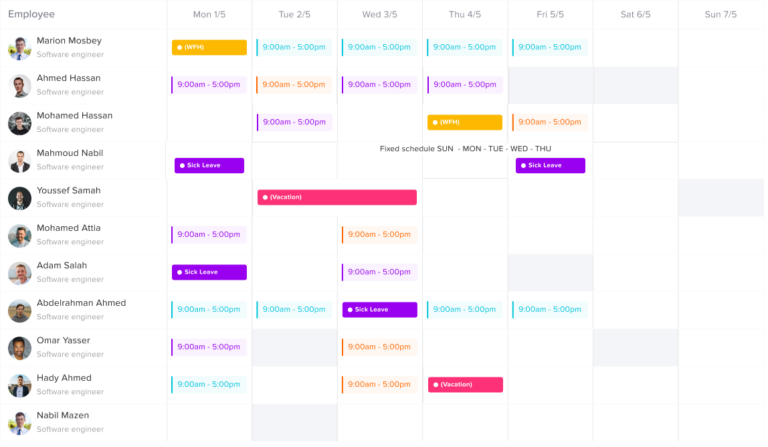
Step 7: Create Approval Rules Based on Coverage
For shift-based teams, PTO approval is not only about whether an employee has enough balance. It is also about whether the business can operate with that employee away.
Managers should check:
- Minimum staffing requirements
- Skills or roles needed for the shift
- Other approved leave
- Busy periods
- Public holidays
- Weekend coverage
- Seasonal demand
- Employee fairness
For example, a retail store may need at least two cashiers and one supervisor on every evening shift. If a PTO request would leave the shift without a supervisor, the manager may need to reject the request or ask the employee to choose another date.
Step 8: Use Blockout Dates for Busy Seasons
Some businesses have periods where time off is limited because demand is high. These are often called blackout dates or blockout dates.
Examples include:
- Holiday shopping season for retail
- Weekends for restaurants
- Tax season for accounting teams
- Product launch periods for support teams
- Summer peak season for hospitality
- End-of-month closing for finance teams
Blockout dates should be used carefully and fairly. They should be communicated in advance, added to the leave policy, and applied consistently.
Internal link suggestion: Link this section to your article or feature page about blockout dates using anchor text like PTO blackout dates or blockout periods.
Step 9: Keep PTO and Attendance Connected
PTO and attendance should not be managed separately for shift workers. If a worker is on approved PTO, they should not be treated as absent or late.
When PTO and attendance are disconnected, these problems can happen:
- Approved leave appears as absence.
- Payroll records do not match leave records.
- Managers think an employee missed a shift.
- Overtime calculations become confusing.
- HR has to manually correct attendance sheets.
A better process connects approved PTO with the attendance record. If an employee is on approved leave, the schedule should show that they are away, not missing.
Internal link suggestion: Link this section to Leave Tracker App vs Attendance Tracker: What Does Your Team Need? using anchor text like leave tracker vs attendance tracker.
Step 10: Review Reports Before Payroll
Before payroll is prepared, HR or managers should review PTO and attendance records.
The review should include:
- Approved PTO
- Unpaid leave
- Sick leave
- Missed shifts
- Late arrivals
- Overtime
- Shift swaps
- Public holidays
- Manual adjustments
This is especially important for hourly employees because PTO deductions, unpaid leave, and overtime can affect payroll.
A PTO tracker with reports can help HR export leave data instead of manually checking every request.
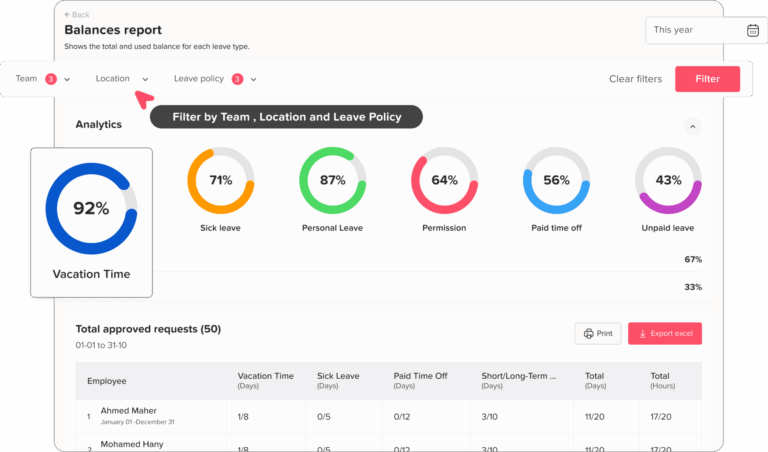
Manual PTO Tracking vs PTO Software for Shift Workers
Many businesses start with spreadsheets, but spreadsheets often become difficult for shift-based teams because schedules change often.
| Area | Manual Spreadsheet | PTO Tracking Software |
|---|---|---|
| Leave requests | Sent through email, chat, or paper forms | Submitted in one system |
| Approval status | Updated manually | Tracked automatically |
| PTO balances | Calculated by HR | Updated after approval |
| Shift visibility | Requires separate schedule file | Can be reviewed with leave calendar |
| Partial shifts | Easy to miscalculate | Can be tracked more clearly |
| Public holidays | Often tracked separately | Visible with leave and availability |
| Reports | Manual filtering and formulas | Exportable reports |
| Mistake risk | High when schedules change | Lower with connected records |
| Manager visibility | Limited | Clearer team availability |
| Employee experience | Employees ask HR for updates | Employees can check request status and balance |
For some small teams, the next question is whether they need a dedicated PTO tracker or a full HRMS. If your main challenge is managing leave requests, balances, approvals, and team availability, a PTO tracker may be simpler than a larger HR platform. You can read this full comparison here: PTO Tracker vs HRMS: Which Is Better for Small Teams?
How Day Off Helps Track PTO for Shift Workers
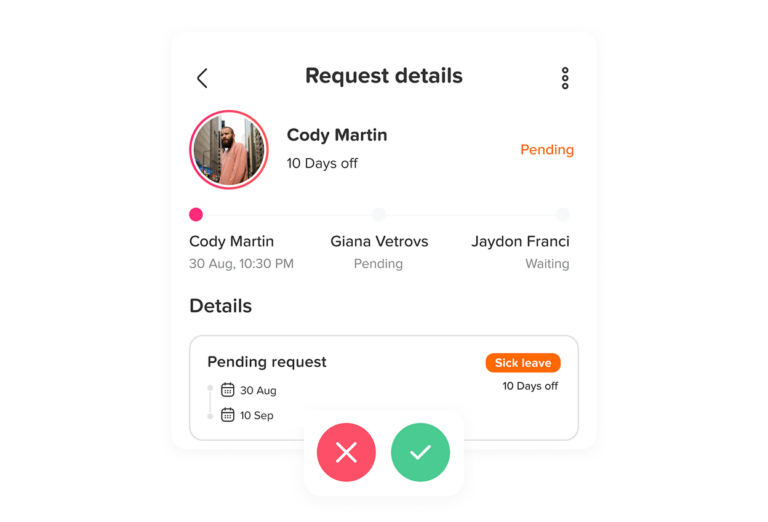
Day Off helps teams manage leave requests, PTO balances, approvals, public holidays, and team availability in one place. For shift-based teams, this is useful because managers need a clear view of who is working and who is away before approving time off.
With Day Off, teams can manage:
- Vacation leave
- Sick leave
- Unpaid leave
- Custom leave types
- PTO balances
- Leave requests
- Approval workflows
- Multiple approvers
- Public holidays
- Teams and locations
- Shared leave calendar
- Leave reports
- Calendar integrations
- Slack and Microsoft Teams notifications
Day Off also supports time tracking and work schedules, helping teams connect attendance, work hours, and approved time off more clearly.
Internal link suggestion: Link this section to your main product or features page using anchor text like Day Off PTO tracker, leave management software, or employee leave tracker.
Example Setup: PTO Policy for Shift Workers
Here is a simple example of how a small business can structure PTO rules for shift workers.
Company Type
A small retail store with 25 employees.
Work Schedule
Employees work different shifts each week. Some shifts are 4 hours, some are 6 hours, and some are 8 hours.
PTO Rule
PTO is tracked in hours, not days.
Request Rule
Employees must request PTO at least 7 days in advance, except for sick leave or emergencies.
Deduction Rule
PTO is deducted based on scheduled shift hours.
Partial Leave Rule
Employees can request partial-shift leave in hourly increments.
Approval Rule
Managers review PTO requests based on balance, shift coverage, and minimum staffing needs.
Holiday Rule
Public holidays are shown in the leave calendar. PTO is not deducted for holidays unless the employee is scheduled and company policy requires a specific process.
Reporting Rule
HR reviews approved PTO and unpaid leave before payroll.
This kind of policy is simple, but it answers the questions that usually cause confusion.
Example Setup: PTO for Rotating Shifts
Here is another example for a support team with rotating shifts.
Company Type
A customer support team with 40 employees.
Work Schedule
Employees rotate between morning, evening, and weekend shifts.
PTO Rule
PTO is tracked by scheduled hours.
Request Rule
Employees can request leave after the schedule is published.
Schedule Change Rule
If the schedule changes after PTO approval, the manager reviews whether the PTO deduction should stay the same or be adjusted.
Coverage Rule
At least three support agents must be available per shift.
Approval Rule
PTO is approved only if the shift still meets coverage requirements.
Reporting Rule
Approved PTO is reviewed with attendance records before payroll export.
This process helps prevent a common problem: approving PTO without realizing the team will not have enough people on a specific shift.
PTO Tracking Checklist for Shift-Based Teams
Use this checklist to review your current PTO process.
| Question | Yes/No |
|---|---|
| Do employees know how to request PTO? | |
| Are PTO requests connected to the work schedule? | |
| Are leave balances updated automatically? | |
| Do managers check coverage before approval? | |
| Are partial shifts tracked correctly? | |
| Are public holidays shown in the same calendar? | |
| Are shift swaps handled in the PTO policy? | |
| Are approved PTO and attendance records connected? | |
| Can HR export leave reports before payroll? | |
| Can employees see their request status and balance? |
Best Practices for Tracking PTO for Shift Workers
Here are practical rules that can make PTO tracking easier and fairer.
Track PTO in Hours When Shifts Vary
If shift lengths are different, hourly PTO tracking is usually more accurate than daily tracking.
Require PTO Requests Before Schedule Finalization When Possible
If employees request time off before the schedule is built, managers can plan coverage more easily.
Make the Published Schedule the Source of Truth
Choose whether PTO deductions follow the original schedule or final schedule, then write the rule clearly.
Keep Leave and Attendance in One Process
Approved PTO should not appear as absence. Attendance and leave records should support each other.
Use a Shared Calendar
Managers and employees should be able to see approved time off and public holidays in one place.
Create Rules for Peak Periods
If the business has busy seasons, define blockout dates or limited PTO rules early.
Review PTO Reports Regularly
Do not wait until year-end to fix PTO balance mistakes. Regular review helps catch errors early.
Train Managers on Approval Rules
Managers should understand how PTO affects coverage, payroll, and employee fairness.
FAQ
How should PTO be tracked for shift workers?
PTO for shift workers should usually be tracked based on the employee’s scheduled hours. If an employee is scheduled for an 8-hour shift and takes that shift off, 8 hours of PTO should be deducted. If the employee is not scheduled to work that day, PTO may not need to be deducted, depending on company policy.
Is it better to track PTO by days or hours for shift workers?
For shift workers, tracking PTO by hours is often more accurate because shift lengths can vary. A day off may represent 4, 8, 10, or 12 hours depending on the schedule.
What happens if a shift changes after PTO is approved?
The company should have a clear policy. Some businesses deduct PTO based on the schedule at the time of approval, while others use the final published schedule. For complex schedules, manager review may be required.
Should PTO be deducted on an employee’s unscheduled day?
Usually, PTO should not be deducted if the employee was not scheduled to work. However, the final rule depends on the company’s PTO policy and applicable labor rules.
How can managers avoid approving too much PTO during the same shift?
Managers should review a shared leave calendar and work schedule before approving requests. They should check minimum staffing requirements, roles needed, existing approved leave, and public holidays.
Can PTO tracking software help with shift workers?
Yes. PTO tracking software can help shift-based teams manage leave requests, balances, approvals, public holidays, calendars, and reports in one place. This reduces manual work and improves visibility.
Why is Day Off useful for shift-based teams?
Day Off helps shift-based teams manage PTO requests, leave balances, approvals, shared calendars, public holidays, teams, locations, reports, and integrations. It helps managers see who is away before approving time off.
Final Thoughts
Tracking PTO for shift workers requires more than recording a date on a spreadsheet. Shift-based teams need to know whether the employee was scheduled, how long the shift was, whether the absence affects coverage, and how the leave should be reflected in payroll and attendance records.
The most reliable approach is to connect PTO requests with schedules, approvals, leave balances, public holidays, and reports. This helps managers avoid understaffing, helps HR reduce manual corrections, and gives employees a fairer leave process.
For teams with rotating shifts, changing schedules, part-time employees, or hourly workers, Day Off can help make PTO tracking clearer and easier. By keeping leave requests, approvals, balances, calendars, and reports in one place, businesses can manage time off without losing visibility into who is working and who is away.