







An online employee punch card gives businesses a simple digital way to track when employees start work, end work, take breaks, and complete their scheduled hours. Instead of relying on paper timecards, spreadsheets, or manual timesheets, employees can punch in and punch out online while managers get a clearer view of attendance, work hours, overtime, and time off.
For many small and growing teams, time tracking becomes difficult when attendance records are separated from PTO, schedules, and employee availability. A manager may know that an employee did not punch in, but without checking another system, they may not know whether that employee is absent, on vacation, sick, working a different schedule, or taking an approved day off.

That is why modern businesses need more than a basic time clock. They need an online employee punch card that connects work hours with schedules, attendance, and leave management. Tools like Day Off help teams manage PTO, work schedules, and time tracking in one place, making it easier to understand who is working, who is away, and who needs follow-up.
In this guide, we will explain what an online employee punch card is, how it works, why businesses use it, and what features to look for when choosing the right solution.
What Is an Online Employee Punch Card?
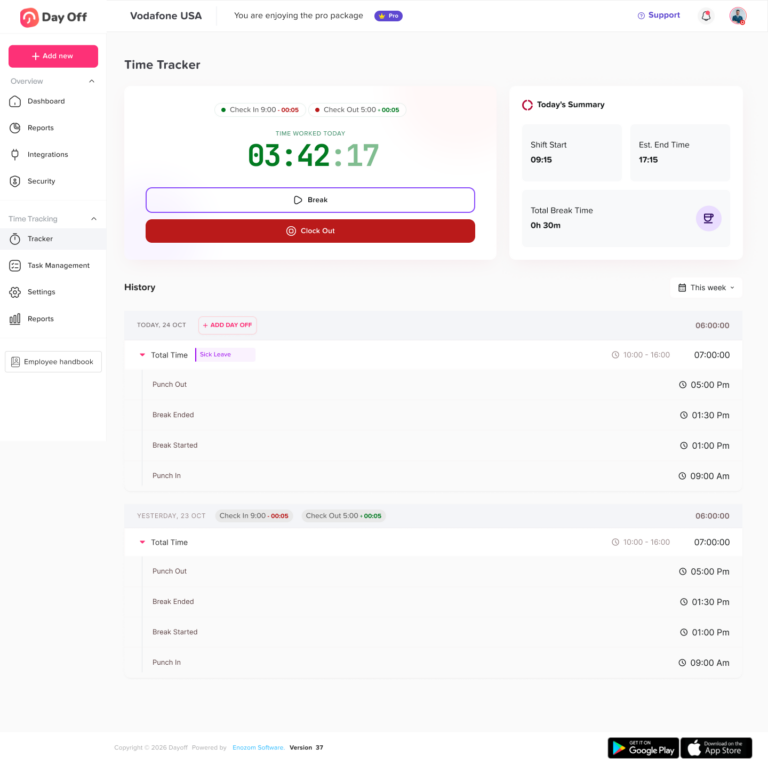
An online employee punch card is a digital version of the traditional paper punch card. It allows employees to record their working time by punching in and punching out through a mobile app, web browser, tablet, or desktop device.
Instead of stamping a physical card, the system records time automatically and stores it in a digital attendance record.
An online employee punch card can help track:
- Punch-in time
- Punch-out time
- Total worked hours
- Break time
- Late arrivals
- Overtime
- Missed punches
- Attendance status
- Work schedules
- Approved PTO
- Absences
- Employee attendance history
You may also see it called a digital punch card, online time clock, punch in punch out app, work hours tracker, or employee time tracking software. The purpose is the same: helping businesses track employee work hours more accurately and with less manual effort.
Why Businesses Are Replacing Paper Punch Cards
Paper punch cards were useful when most employees worked from one location and followed the same fixed schedule. But today, teams are more flexible. Businesses may have remote employees, hybrid teams, part-time workers, rotating shifts, multiple branches, and flexible schedules.
A paper punch card does not handle these situations well.
Common problems with paper punch cards include:
- Timecards can be lost or damaged
- Employees may forget to record their time
- Managers have to calculate hours manually
- Payroll preparation takes longer
- Overtime is harder to review
- Attendance data is not available in real time
- Remote and field employees cannot use the same process easily
- PTO and attendance are often tracked separately
- Managers may confuse approved leave with absence
An online employee punch card reduces these issues by keeping time records digital, organized, and easier to review.
How an Online Employee Punch Card Works
Most online punch card systems follow a simple process.
Employees Punch In
At the start of the workday or shift, the employee opens the system and punches in. The tool records the time automatically.
Employees may punch in from:
- A mobile phone
- A web browser
- A tablet kiosk
- A desktop computer
- A shared workplace device
This gives the business a clear record of when the employee started work.
Employees Punch Out
At the end of the workday or shift, the employee punches out. The system then calculates the total time worked.
This removes the need for employees to manually write down their hours or submit a separate timesheet at the end of the week.
Breaks Can Be Tracked
Some systems allow employees to start and end breaks. This helps businesses understand total working time more clearly, especially when break rules affect payroll or internal attendance policies.
Managers Review Attendance
Managers can review attendance records, check missed punches, approve corrections, and monitor late arrivals or overtime.
Instead of chasing employees for updates, managers can see time records from one dashboard.
Reports Can Be Used for Payroll
Once attendance data is reviewed, managers can export reports or use the data to prepare payroll. This helps reduce manual calculation and gives payroll teams more reliable information.
Why an Online Employee Punch Card Is Useful for Growing Teams
A growing team needs more structure. What worked for five employees may not work for twenty, fifty, or one hundred. As more employees join the company, manual tracking becomes harder to manage.
An online employee punch card helps businesses build a more reliable attendance process.
It Reduces Manual Work
Manual time tracking creates repetitive admin work. Managers or HR teams often have to collect timesheets, check missing hours, calculate totals, review overtime, and compare attendance with leave requests.
A digital punch card records the basics automatically. Managers still review and approve records, but they do not have to build everything manually from scattered notes or spreadsheets.
It Improves Attendance Accuracy
Manual timesheets depend on memory. Employees may enter hours at the end of the day or week, which increases the chance of mistakes.
With an online employee punch card, employees record time when work actually starts and ends. This creates cleaner attendance data and helps reduce confusion.
It Gives Managers Real-Time Visibility
With paper timecards, managers often discover attendance problems too late. With an online system, they can see who has punched in, who has not, who is late, and who may need follow-up.
This is especially helpful for businesses with remote teams, hybrid employees, multiple locations, or shift-based operations.
It Makes Payroll Preparation Easier
Payroll depends on accurate work hours. If attendance records are missing or unclear, payroll can become delayed or inaccurate.
An online punch card helps organize work hours, overtime, and attendance records before payroll starts. This can reduce last-minute corrections and help payroll teams work with cleaner data.
It Helps Separate Absence From Approved Leave
A missing punch does not always mean an employee is absent without approval. The employee may be on vacation, sick leave, a public holiday, or another approved time off request.
When time tracking is connected with PTO, managers can understand the reason behind an employee’s availability status much faster.
This is one of the reasons businesses use Day Off. It helps teams connect PTO, schedules, attendance, and time tracking so managers can see the full picture instead of checking separate tools.
Online Employee Punch Card vs Manual Timesheets
Manual timesheets can work for very small teams, but they become harder to manage as the company grows. An online employee punch card gives businesses more structure and better visibility.
Manual Timesheets vs Online Employee Punch Card
See how digital time tracking improves accuracy, visibility, and payroll preparation.
| Feature | Manual Timesheets | Online Employee Punch Card |
|---|---|---|
| Time recording | Employees write or type hours manually | Employees punch in and out digitally |
| Accuracy | Higher risk of mistakes | More accurate real-time records |
| Manager visibility | Usually delayed | Available faster and more clearly |
| Payroll preparation | Requires manual calculations | Easier to review and export |
| Missed punches | Harder to detect | Easier to identify and correct |
| Overtime tracking | Often manual | Can be calculated from attendance data |
| Remote access | Limited | Works through web or mobile |
| PTO connection | Usually separate | Can connect with leave and availability |
| Attendance history | Scattered across files | Stored in one place |
The biggest difference is visibility. A manual timesheet tells managers what employees submitted later. An online punch card shows attendance as it happens.
Online Employee Punch Card vs Physical Time Clock
A physical time clock can work well for a single-location business where all employees work on-site. But it is less flexible for modern teams.
An online employee punch card is usually better for:
- Remote teams
- Hybrid teams
- Multi-location businesses
- Field employees
- Flexible schedules
- Part-time employees
- Businesses that need digital reports
- Teams that want PTO and attendance in one place
A physical time clock records attendance at one location. A digital punch card gives managers access to attendance records from anywhere and can connect time tracking with other workforce data.
Important Features to Look For in an Online Employee Punch Card
Not every punch card system offers the same value. Some tools only record start and end times. Others help with schedules, PTO, reports, approvals, and attendance visibility.
Here are the most important features to look for.
Simple Punch In and Punch Out
Employees should be able to punch in and out quickly. If the process is confusing, employees may forget to use it or make mistakes.
A good online employee punch card should be easy enough for the whole team to use with minimal training.
Web and Mobile Access
Employees should be able to record time from the tools they already use. Web and mobile access is especially useful for remote, hybrid, field, and multi-location teams.
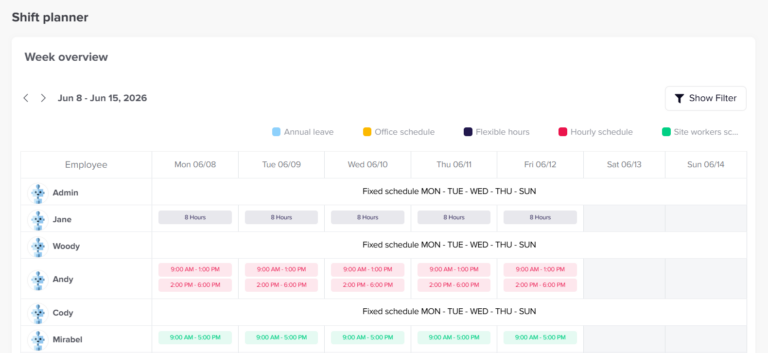
Work Schedule Support
Time tracking is more useful when it is connected to schedules. Without schedules, the system may know how many hours someone worked, but not whether they were early, late, or working overtime.
Look for a system that supports:
- Fixed schedules
- Flexible schedules
- Rotating shifts
- Part-time schedules
- Different schedules by employee, team, or location
Late Time Tracking
Managers need to know when employees arrive after their scheduled start time. Late time tracking helps identify attendance patterns and gives managers the information they need to follow up fairly.
Overtime Tracking
Overtime can be difficult to calculate manually, especially when employees have different schedules. An online punch card can help managers review extra hours and prepare more accurate reports.
PTO and Leave Management
This is one of the most important features. Time tracking and PTO should not be completely separate.
If an employee does not punch in, managers should be able to quickly check whether that employee is on approved leave. This helps avoid confusion and unnecessary follow-up.
With Day Off, businesses can manage leave requests, employee schedules, and time tracking together. This makes attendance data more meaningful because managers can understand both work hours and time off from one place.
Manager Review and Approval
Employees may forget to punch out or may need to correct a record. A good system should let managers review and approve corrections based on company rules.
This keeps records accurate while still allowing flexibility for normal mistakes.
Attendance Reports
Reports help managers turn daily punch data into useful business information.
Useful reports may include:
- Total worked hours
- Daily attendance
- Weekly attendance
- Late arrivals
- Overtime
- Missed punches
- Absence records
- Employee-level summaries
- Team or location reports
- Payroll-ready exports
Clear Permissions
Employees, managers, and admins should not all have the same access. The system should allow different permission levels so each person can only view or manage the information they need.
Why PTO and Time Tracking Should Work Together
Many businesses make the mistake of tracking attendance in one system and PTO in another. This creates unnecessary confusion.
For example, imagine an employee does not punch in on Monday morning. Without PTO visibility, a manager may assume the employee is absent. But the employee may actually be on approved vacation, sick leave, or a public holiday.
When PTO and attendance are separate, managers have to check multiple places before they understand what is happening.
When they work together, managers can answer important questions faster:
- Is the employee working today?
- Is the employee on approved leave?
- Did the employee forget to punch in?
- Is the employee late?
- Is the employee working overtime?
- Is the absence planned or unplanned?
- Does the schedule explain the attendance record?
This connected view helps teams plan better and avoid mistakes.
Common Problems an Online Employee Punch Card Can Solve
Employees Forget to Submit Hours
Manual timesheets are often submitted late. Employees may forget their exact hours, which leads to inaccurate records.
An online punch card encourages employees to record time when work starts and ends.
Managers Chase Attendance Updates
Without a digital system, managers may need to ask employees whether they are working, late, absent, or on leave.
An online employee punch card gives managers a clearer view without constant follow-up.
Payroll Takes Too Long
When attendance records are spread across spreadsheets, paper cards, and messages, payroll preparation becomes slow.
A digital punch card keeps work hours organized and easier to review.
Approved Leave Looks Like Absence
If PTO is not connected with time tracking, approved leave can look like an attendance problem.
A connected system like Day Off helps managers understand whether an employee is actually absent or simply away on approved time off.
Overtime Is Hard to Review
Overtime can be missed or calculated incorrectly when records are manual. An online punch card helps managers identify extra hours more clearly.
Attendance History Is Hard to Find
Digital records make it easier to review past attendance, compare patterns, and prepare reports when needed.
Best Use Cases for an Online Employee Punch Card
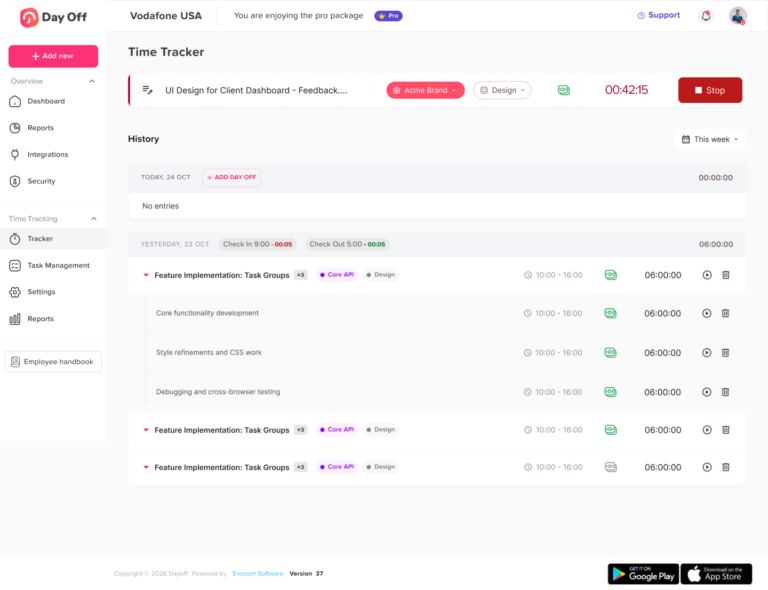
An online employee punch card can support many types of teams.
Remote Teams
Remote employees need a simple way to record hours without being tied to an office device. A web-based or mobile punch card makes this easier.
Hybrid Teams
Hybrid teams may work from home some days and from the office on others. An online punch card gives managers one consistent attendance process.
Small Businesses
Small businesses need tools that save time without adding complexity. A digital punch card helps owners and managers track work hours without relying on spreadsheets.
Retail Stores
Retail teams often work different shifts. An online punch card helps managers see who worked, when they worked, and whether shifts were covered.
Restaurants and Cafes
Restaurants and cafes often deal with changing shifts, part-time employees, late arrivals, and overtime. A digital punch card makes daily attendance easier to manage.
Field Teams
Field employees may work from different locations. A mobile-friendly punch card helps them record hours without returning to the office.
Agencies and Service Teams
Agencies may need to understand work hours, capacity, and employee availability. Time tracking helps managers plan workloads and review team performance.
How to Introduce an Online Employee Punch Card to Your Team
Changing the way employees track time should be handled clearly. The goal is to make attendance easier, not to make the process feel complicated.
Explain the Reason Behind the Change
Tell employees why the business is moving to an online punch card. The reason may include better accuracy, easier payroll, clearer attendance records, and fewer manual errors.
Set Simple Time Tracking Rules
Before launching the system, define clear rules such as:
- When employees should punch in
- When employees should punch out
- How breaks should be recorded
- What to do after a missed punch
- Who approves time corrections
- How overtime is handled
- How PTO affects attendance
Clear rules help employees use the system correctly.
Train Managers First
Managers should know how to review records, approve corrections, and answer employee questions. If managers understand the system, the rollout will be smoother.
Start With the Basics
Do not make the process too complex at the beginning. Start with punch in, punch out, work schedules, and PTO visibility. Add more details later if needed.
Review the First Month
After the first few weeks, review missed punches, late arrivals, employee questions, and payroll preparation. Use this information to improve the process.
Mistakes to Avoid
Tracking Time Without Schedules
If time tracking is not connected to schedules, managers may not know whether an employee was late or simply working a different schedule.
Keeping PTO in a Separate System
When PTO is separate from attendance, managers may confuse approved leave with absence. Keeping both in one place gives a clearer view.
Making the System Too Complicated
Employees are more likely to use a system correctly when it is simple. Avoid unnecessary steps that make punching in and out difficult.
Ignoring Attendance Reports
The value of an online employee punch card is not only recording time. It is also reviewing the data and using it to improve planning, payroll, and attendance management.
Not Creating a Correction Process
Missed punches happen. Create a simple process for employees to request corrections and for managers to approve them.
What Makes Day Off Useful for Employee Time Tracking?
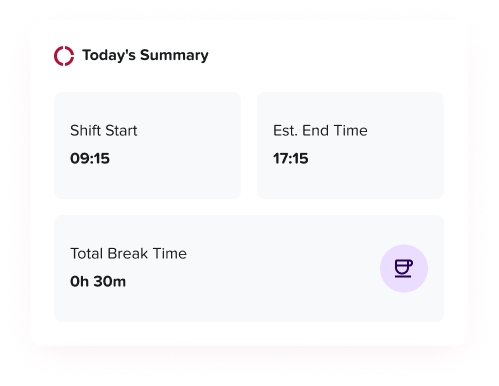
Day Off helps businesses manage PTO, work schedules, attendance, and time tracking in one connected system.
Instead of using one tool for leave requests, another for schedules, and another for punch cards, Day Off helps managers see employee availability more clearly.
With Day Off, teams can:
- Track employee punch in and punch out
- Manage PTO and leave requests
- View employee availability
- Connect attendance with work schedules
- Track late time and overtime
- Support fixed, flexible, and rotating schedules
- Review attendance records
- Export useful reports for payroll preparation
This connected approach is helpful for growing teams that want a simple way to manage both time worked and time off.
Frequently Asked Questions
What is an online employee punch card?
An online employee punch card is a digital tool that lets employees record when they start and finish work. Instead of using a paper card, spreadsheet, or physical punch clock, employees punch in and punch out using a web browser, mobile app, tablet, or computer.
The system then records working hours automatically and stores them in a digital attendance record. This helps managers review employee hours, late arrivals, overtime, missed punches, and attendance history more easily.
How does an online employee punch card work?
An online employee punch card works by allowing employees to punch in when they begin work and punch out when they finish. The system records the time of each action and calculates the total hours worked.
Some systems also allow employees to track breaks, submit corrections for missed punches, and connect attendance with work schedules. Managers can then review the records, approve corrections, and export reports for payroll or internal tracking.
Why should a business use an online employee punch card?
A business should use an online employee punch card because it makes time tracking more accurate, organized, and easier to manage. Manual timesheets often lead to missing hours, late submissions, calculation mistakes, and payroll delays.
With an online punch card, managers can see attendance records more clearly, reduce manual admin work, and prepare payroll with better information. It is especially useful for businesses with hourly employees, remote teams, hybrid teams, part-time workers, or shift-based schedules.
Is an online employee punch card better than paper timesheets?
Yes, for most growing teams, an online employee punch card is better than paper timesheets. Paper timesheets depend on employees remembering and writing their hours correctly. They can also be lost, submitted late, or calculated incorrectly.
An online punch card records time digitally when employees punch in and out. This creates a more reliable record and helps managers review attendance without collecting paper forms or checking multiple spreadsheets.
What is the difference between an online punch card and an online time clock?
An online punch card and an online time clock are very similar. Both allow employees to record their work time digitally.
The term “online punch card” often refers to the employee’s daily time record, while “online time clock” usually refers to the tool or system used to punch in and out. In practice, many businesses use both terms to describe the same type of employee time tracking software.
Can an online employee punch card track overtime?
Yes, many online employee punch card systems can help track overtime. The system records employee work hours and can compare them with scheduled hours or company overtime rules.
This makes it easier for managers to identify extra hours before payroll is processed. Overtime tracking is especially useful for businesses with hourly employees, rotating shifts, busy seasons, or teams that often work beyond their regular schedules.
Can an online employee punch card track late arrivals?
Yes, an online employee punch card can help track late arrivals when it is connected to employee work schedules. For example, if an employee is scheduled to start at 9:00 AM but punches in at 9:15 AM, the system can show the late time.
This helps managers review attendance patterns fairly and consistently. It also reduces the need to check arrival times manually.
Can remote employees use an online employee punch card?
Yes, remote employees can use an online employee punch card as long as the system supports web or mobile access. Employees can punch in and out from wherever they work, whether they are at home, in a coworking space, or working from another location.
This makes online punch cards useful for remote teams, hybrid teams, field employees, consultants, agencies, and businesses that do not rely on one physical office.
Can an online employee punch card work for flexible schedules?
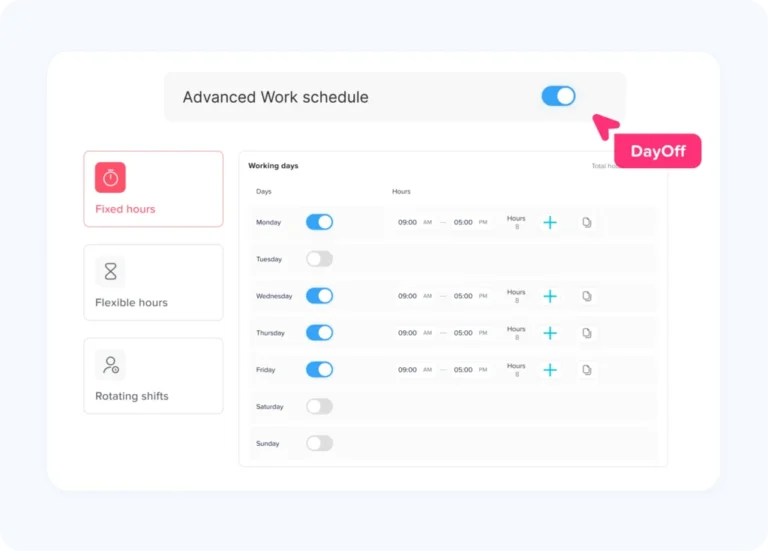
Yes, an online employee punch card can work for flexible schedules if the system supports flexible work rules. Instead of tracking only fixed start and end times, the system can focus on total required hours per day or week.
This is useful for teams where employees do not all start at the same time but still need to complete a certain number of working hours. For best results, time tracking should be connected with each employee’s assigned schedule.
Why should PTO be connected with an online punch card?
PTO should be connected with an online punch card because attendance data alone does not always explain why an employee is not working. If someone does not punch in, the manager needs to know whether the employee is absent, on vacation, sick, on a public holiday, or taking approved time off.
When PTO and time tracking are connected, managers get a clearer view of employee availability. This helps reduce confusion, prevents unnecessary follow-up, and makes workforce planning easier.
How does Day Off help with online employee punch cards?
Day Off helps teams manage time tracking, PTO, work schedules, and employee availability in one place. Employees can record their work hours, while managers can review attendance and understand how those records connect with approved leave and schedules.
This makes Day Off useful for businesses that do not want attendance tracking to be separated from PTO. Managers can see who is working, who is away, who is late, and who is on approved leave from one connected system.
Is an online employee punch card useful for small businesses?
Yes, an online employee punch card is very useful for small businesses. Small teams often start with spreadsheets or manual timesheets, but these methods become harder to manage as the business grows.
A digital punch card helps small businesses track hours more accurately, reduce payroll preparation time, and keep attendance records organized without needing a complicated process.
What types of businesses need an online employee punch card?
An online employee punch card can help many types of businesses, including:
- Small businesses
- Remote teams
- Hybrid teams
- Retail stores
- Restaurants and cafes
- Agencies
- Field service teams
- Healthcare offices
- Salons and service businesses
- Construction teams
- Multi-location businesses
- Teams with part-time or hourly employees
Any business that needs to track work hours, attendance, overtime, or employee availability can benefit from using an online punch card.
Can an online punch card help with payroll?
Yes, an online punch card can help with payroll by keeping work hours organized and easier to review. Instead of calculating hours from paper cards or spreadsheets, managers can use digital attendance reports to check total hours, overtime, late time, and missed punches.
This does not replace every payroll process, but it gives payroll teams cleaner and more reliable time data before payments are prepared.
What should managers do when employees forget to punch in or punch out?
Managers should create a clear correction process. Employees should know how to report a missed punch, and managers should know how to review and approve corrections.
A good online employee punch card should allow corrections while keeping records organized. This helps businesses stay flexible without losing control over attendance accuracy.
How do you choose the best online employee punch card system?
The best online employee punch card system should be easy for employees to use and useful for managers. Look for a system that includes punch in and punch out, schedule support, late time tracking, overtime tracking, PTO connection, manager approvals, reports, and mobile or web access.
For growing teams, it is also important to choose a system that connects attendance with leave management. A tool like Day Off can be helpful because it brings time tracking, PTO, schedules, and availability together in one place.
Final Thoughts
An online employee punch card is more than a digital time clock. It helps businesses track work hours, reduce manual admin work, improve attendance visibility, and prepare payroll with more confidence.
For modern teams, the most useful solution is one that connects punch records with PTO, schedules, and employee availability. This gives managers the context they need to understand whether someone is working, late, away, absent, or on approved leave.
If your business still uses paper punch cards, spreadsheets, or manual timesheets, moving to an online employee punch card can be a practical step toward better workforce management.
With a tool like Day Off, teams can bring PTO, attendance, schedules, and time tracking together in one place, making everyday employee management clearer and easier.