







Managing employee time off becomes more complicated as a company grows. In a small team, a simple message to the manager may be enough to approve a vacation day. But when more employees, departments, policies, and locations are involved, one approval step may not provide enough control or visibility.
That is where two-level leave approval becomes useful.
A two-level leave approval process means that an employee’s PTO request must be reviewed by two different approvers before it becomes final. In many companies, the first approver is the direct manager, while the second approver is HR, a department head, or another senior approver.

This process helps companies approve leave requests more carefully, avoid scheduling conflicts, apply leave policies consistently, and keep accurate records. However, two-level approval should be used in the right situations. If every leave request requires too many approvals, the process can become slow and frustrating for employees.
In this article, we will explain what two-level leave approval is, when managers should approve PTO, when HR should approve PTO, and how businesses can build a simple approval workflow that protects both employees and the company.
What Is Two-Level Leave Approval?
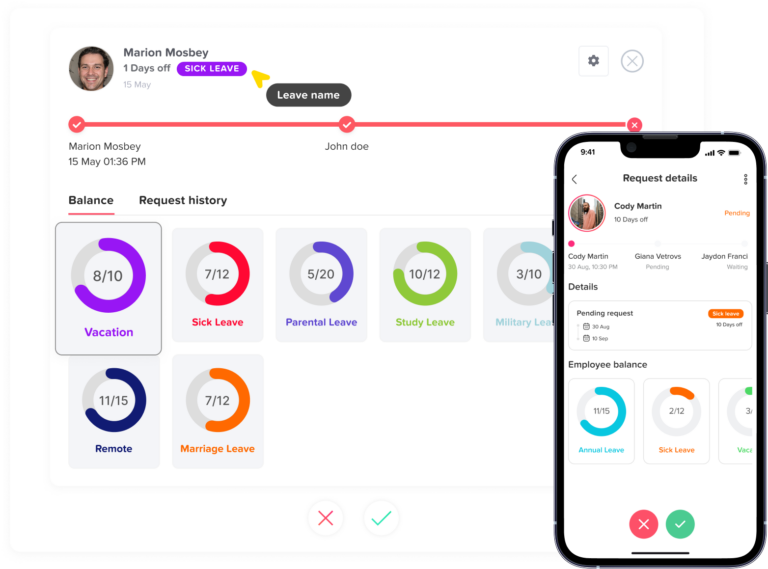
Two-level leave approval is a PTO approval workflow where a leave request needs approval from two people or two roles before it is officially accepted.
For example:
- An employee submits a PTO request.
- The direct manager reviews the request first.
- The manager checks team workload, coverage, and schedule conflicts.
- If the manager approves, the request moves to HR.
- HR checks leave balance, policy rules, documentation, and compliance.
- If HR approves, the request is finalized.
- The employee is notified, and the leave calendar is updated.
This workflow creates a clear approval path. The manager focuses on business operations, while HR focuses on policy, fairness, records, and compliance.
Why Two-Level Leave Approval Matters
PTO approval is not only about saying yes or no to a vacation request. A leave request can affect team planning, project deadlines, customer support, payroll, employee records, and workplace fairness.
When approvals are handled casually, companies may face problems such as:
- Too many employees taking leave at the same time
- Managers approving leave without checking balances
- HR finding out about approved leave too late
- Employees being treated differently across departments
- Unclear records of who approved the request
- Last-minute scheduling gaps
- Payroll mistakes caused by incorrect leave records
- Confusion between paid and unpaid leave
Two-level approval helps reduce these problems by adding structure. It makes sure the request is reviewed from both an operational point of view and an HR policy point of view.
Manager Approval vs HR Approval
Managers and HR teams usually look at PTO requests from different angles. Both roles are important, but they should not always review the same things.
A manager usually understands the daily work situation better. HR usually understands company rules, leave balances, and policy requirements better.
Leave Approval Roles
| Approval Role | Main Responsibility | What They Usually Check |
|---|---|---|
| Direct Manager | Team operations | Workload, coverage, deadlines, overlapping leave |
| HR | Policy and records | Leave balance, leave type, company policy, compliance, documentation |
| Department Head | Business impact | Critical roles, long absences, staffing risk |
| Finance or Payroll | Pay impact | Paid leave, unpaid leave, payroll deductions |
A good approval workflow makes each role clear. This prevents delays because each approver knows exactly what to review.
When Should Managers Approve PTO?
Managers should usually be the first approvers for regular PTO requests because they understand how the absence will affect the team. They know the employee’s tasks, deadlines, projects, shift schedule, and daily responsibilities.
Managers should review PTO requests when the decision depends on team operations.
When Team Coverage Matters
If an employee’s absence could affect daily work, the manager should approve the request first. This is especially important for teams that need constant coverage, such as:
- Customer support teams
- Sales teams
- Retail teams
- Restaurants and hospitality teams
- Healthcare teams
- Field service teams
- Operations teams
- Small departments with limited staff
For example, if two customer support agents already requested the same week off, the manager may need to delay another request to keep enough people available.
When Project Deadlines Are Involved
Managers should approve PTO when the employee is working on an important project or deadline. The manager can decide whether the timing works or whether the team needs to adjust tasks before approving the leave.
This does not mean employees should never take time off during busy periods. It means the manager should understand the impact and plan properly.
A manager may approve the request if:
- The work can be completed before the leave starts
- Another employee can cover the task
- The deadline can be adjusted
- The absence does not create major risk
- The employee has enough notice period
When Shift Scheduling Is Affected
In businesses with shifts, manager approval is essential. A manager needs to confirm that the schedule still works after the employee takes leave.
This applies to:
- Fixed work schedules
- Flexible hours
- Rotating shifts
- Weekend coverage
- Night shifts
- Part-time schedules
Without manager approval, one PTO request can create a staffing gap that affects the entire shift plan.
When Multiple Team Members Request the Same Dates
Overlapping PTO can be difficult to manage. If several employees request the same days off, the manager should review the team calendar before approving.
The manager can check:
- Who requested leave first
- Which employees have critical tasks
- Whether the team can still operate
- Whether work can be reassigned
- Whether the dates include public holidays or busy periods
This helps avoid approving leave in a way that leaves the team short-staffed.
When the Employee Has a Key Role
Some employees hold responsibilities that require extra planning before they are away. For example, an employee may be responsible for payroll, customer escalations, IT support, delivery planning, or daily operations.
A manager should approve PTO for key roles to make sure there is a handover plan.
The approval may include checking whether:
- A backup person is available
- Tasks are documented
- Urgent work is completed
- Clients or internal teams are informed
- Access or responsibilities are temporarily transferred
When Should HR Approve PTO?
HR should be involved when the request affects policy, leave balance, compliance, employee records, or fairness across the company.
HR approval is not always needed for every simple PTO request. But it becomes important when the request needs more than an operational review.
When Leave Balance Needs to Be Verified
HR should approve PTO when there is a need to confirm whether the employee has enough available balance.
This is especially important when the company uses:
- Annual leave accrual
- Sick leave balances
- Carryover rules
- Expiring leave balances
- Different policies by team or location
- Leave balances based on employee anniversary
- Part-time employee balances
- Unpaid leave rules
If balances are not checked correctly, an employee may take more paid leave than allowed, or payroll may need corrections later.
When the Leave Type Has Special Rules
Not all leave types should be treated the same. Vacation leave, sick leave, unpaid leave, parental leave, bereavement leave, and personal leave may all have different rules.
HR should approve requests when the leave type requires policy review.
For example:
- Sick leave may require medical documentation after a certain number of days.
- Unpaid leave may affect payroll.
- Maternity or paternity leave may follow special legal or company rules.
- Bereavement leave may have a fixed allowed period.
- Personal leave may require HR review depending on the policy.
HR helps make sure the right rule is applied to the right leave type.
When the Request Is Long
A long absence usually needs more review than a one-day request. Long leave can affect staffing, payroll, benefits, workload, and employee records.
HR approval is useful for requests such as:
- Two weeks of vacation
- One month of unpaid leave
- Extended sick leave
- Parental leave
- Study leave
- Sabbatical leave
The manager can review the business impact, while HR checks policy requirements and records.
When the Request Is Unpaid
Unpaid leave should usually involve HR because it can affect payroll and employee records. If unpaid leave is approved without HR involvement, the company may forget to adjust pay or record the absence correctly.
HR should confirm:
- Whether unpaid leave is allowed
- How many unpaid days are requested
- Whether manager approval is already given
- Whether payroll needs to be updated
- Whether the employee understands the impact
- Whether the unpaid leave affects benefits or attendance records
This helps avoid confusion at the end of the pay period.
When Policy Exceptions Are Requested
Sometimes an employee may request time off outside the normal policy. For example, they may ask for leave before they have enough balance, request an exception to the notice period, or ask for special approval during a busy period.
These requests should involve HR because exceptions need consistency.
HR can help answer:
- Is the exception fair?
- Has the company approved similar requests before?
- Will this create a precedent?
- Should the request be paid or unpaid?
- Does the manager’s approval conflict with company policy?
This protects the company from inconsistent decisions.
When Documentation Is Required
Certain leave types may require supporting documents. HR should manage this carefully because documents may contain personal or sensitive information.
Examples include:
- Medical certificates
- Jury duty documents
- Parental leave documents
- Bereavement-related documents
- Official government or legal documents
Managers may not need to see all documents. HR can review documentation while keeping the process professional and private.
How to Manage Two-Level Leave Approval Through Day Off
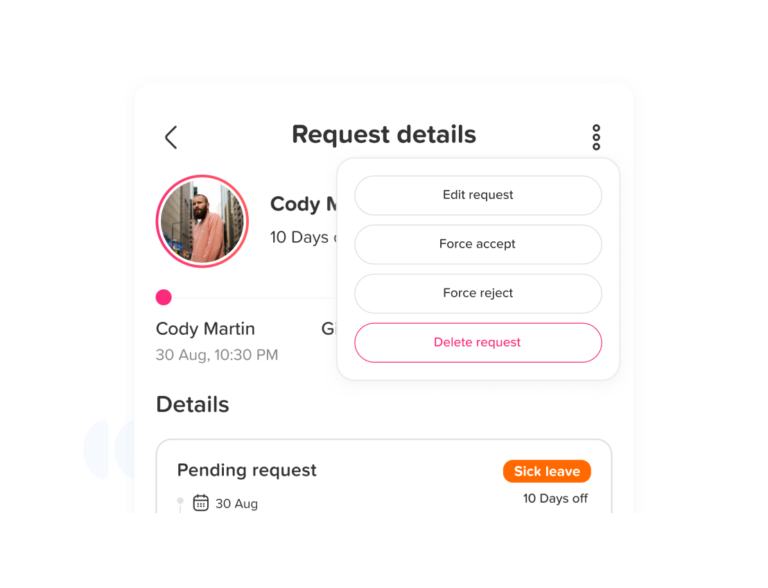
Day Off makes two-level leave approval easier by moving the full PTO process into one organized system. Instead of handling requests through emails, spreadsheets, or chat messages, employees can submit their leave requests directly through Day Off, and the request can follow the approval path set by the company.
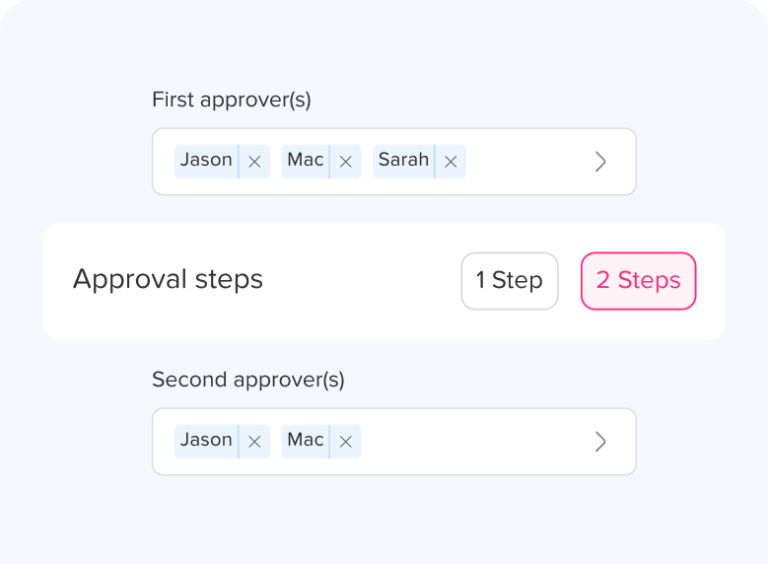
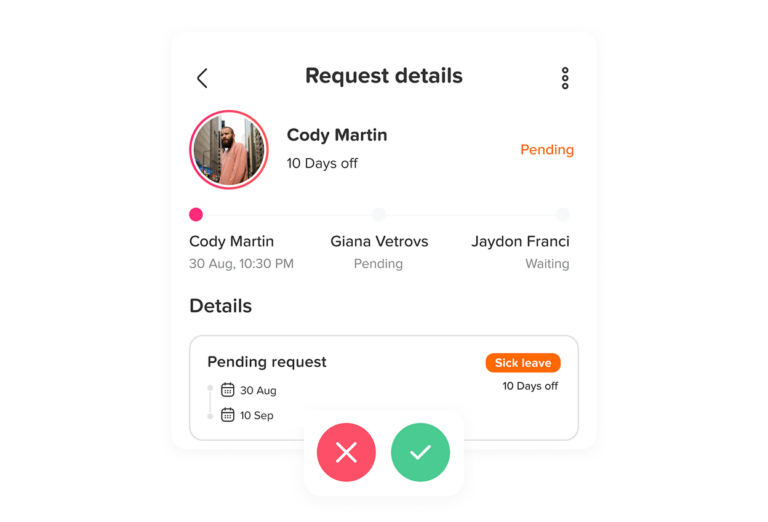
For example, a company can set a workflow where the employee’s direct manager reviews the request first. The manager can check team availability, overlapping absences, workload, and upcoming schedules before making a decision. If the manager approves the request, it can then move to the second approver, such as HR, a department head, or another assigned approver.
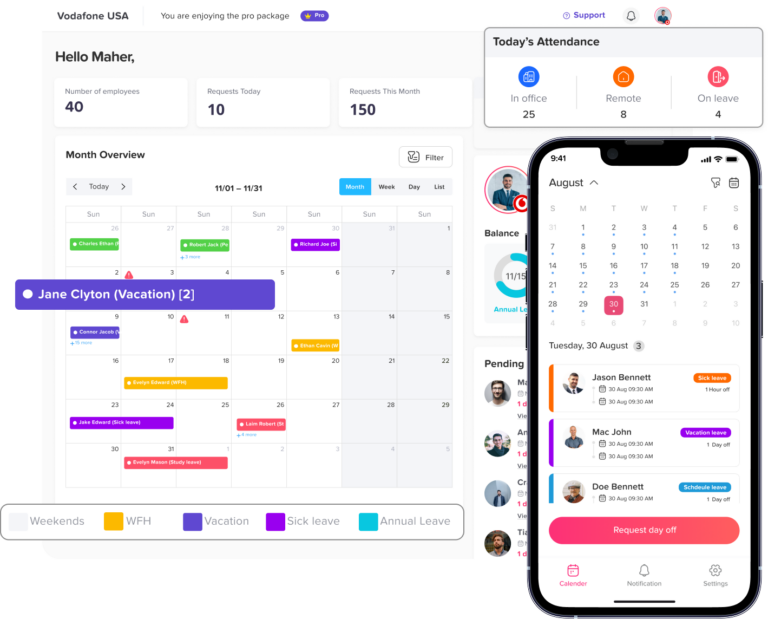
This helps each person focus on the right part of the decision. The manager can decide whether the team can manage the absence, while HR can review the leave balance, leave type, company policy, and employee records.
With Day Off, businesses can:
- Assign approvers for employees or teams
- Create single-level or multi-level approval workflows
- Send leave requests to the right approver automatically
- Notify managers and HR when action is needed
- Allow employees to track the status of their requests
- Keep a clear history of approvals and rejections
- Update leave balances automatically after approval
- Show approved time off in the shared leave calendar
- Help managers avoid overlapping leave requests
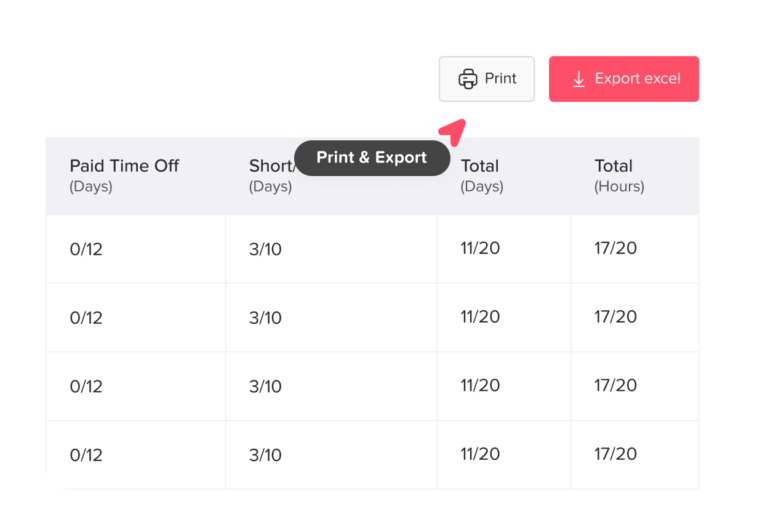
- Generate reports for HR and payroll records
This makes the two-level approval process faster and more transparent. Employees no longer need to ask several people for updates, managers do not have to search through messages, and HR does not need to manually update balances after every approved request.
Day Off also helps companies apply leave policies more consistently. If different teams, locations, or employees follow different leave rules, Day Off keeps the process organized by connecting requests with the correct policies, balances, approvers, and calendars.
For growing companies, this is especially useful. A two-level approval process can easily become slow if it depends on manual communication. Day Off helps keep the workflow moving by giving every request a clear route, every approver a clear responsibility, and every employee a clear answer.
When Should Both Manager and HR Approve PTO?
Two-level leave approval is most useful when both business impact and policy impact matter.
Here are common situations where both manager and HR approval are helpful.
Manager Checks vs HR Checks
Clear responsibilities for every type of leave request.
| Situation | Manager Checks | HR Checks |
|---|---|---|
| Long vacation request | Team coverage and deadlines | Balance, policy limits, records |
| Unpaid leave request | Workload and timing | Payroll impact and policy rules |
| Sick leave extension | Coverage and task reassignment | Documentation and leave type rules |
| Leave during busy season | Operational impact | Fairness and policy consistency |
| Multiple employees off at once | Team availability | Records and balance accuracy |
| New employee requesting PTO | Work planning | Eligibility and prorated balance |
| Special leave request | Business impact | Policy exception and documentation |
This split makes the approval process stronger. Managers do not have to handle policy alone, and HR does not have to guess whether the team can manage the absence.
When Two-Level Approval May Not Be Necessary
Two-level approval is useful, but it should not be used for every situation without thought. Too many approval steps can slow down simple requests and frustrate employees.
Two-level approval may not be necessary for:
- A short vacation request with enough balance
- A half-day leave request
- A request that does not affect team coverage
- A team with a simple PTO policy
- A small company with direct communication
- A leave type that only needs manager approval
- A request submitted far in advance with no conflicts
For simple requests, one manager approval may be enough. The best workflow depends on company size, leave policy, team structure, and risk level.
Benefits of Two-Level Leave Approval
When used correctly, two-level approval gives companies more control without making PTO management too complicated.
Better Team Planning
Managers can review leave based on workload and availability. This helps prevent coverage gaps and last-minute pressure on the rest of the team.
More Accurate Leave Records
HR can make sure balances, leave types, and employee records are updated correctly. This reduces manual errors and payroll confusion.
Fairer PTO Decisions
When HR is involved, PTO decisions are more likely to follow the same rules across departments. This helps employees feel the process is fair and consistent.
Fewer Policy Mistakes
Managers may not know every leave rule, especially in companies with multiple locations, employee types, or accrual policies. HR approval helps prevent policy mistakes before they happen.
Clear Accountability
A two-level workflow shows who approved each request and when. This creates a clear approval history that HR can review later if needed.
Better Employee Communication
Employees know where their request stands. Instead of asking several people for updates, they can see whether the request is waiting for the manager, HR, or final approval.
Risks of a Poor Two-Level Approval Process
Two-level approval can create problems if it is not designed well. The goal should be better control, not unnecessary delay.
Common problems include:
- Requests staying pending for too long
- Employees not knowing who should approve
- Managers and HR reviewing the same information twice
- HR becoming a bottleneck
- Too many approvals for simple requests
- No automatic notifications
- No clear escalation process
- Approval rules changing from team to team
To avoid these problems, companies should make the workflow simple, visible, and easy to follow.
How to Build a Simple Two-Level Leave Approval Workflow
A good two-level approval workflow should be clear enough for employees, managers, and HR to understand without extra explanation.
Here is a simple structure businesses can follow.
Step 1: Define Which Leave Requests Need Two Approvals
Not every PTO request needs both manager and HR approval. Start by deciding which requests require two levels.
Examples:
- Unpaid leave requires manager and HR approval.
- Leave longer than five working days requires manager and HR approval.
- Sick leave longer than three days requires manager and HR approval.
- Regular vacation under five days only requires manager approval.
- Leave during blockout periods requires manager and HR approval.
This keeps the workflow efficient.
Step 2: Choose the First Approver
In most companies, the first approver should be the direct manager. The manager can quickly review whether the requested time off works for the team.
The manager should check:
- Team coverage
- Workload
- Deadlines
- Shift schedule
- Overlapping leave
- Handover needs
If the manager rejects the request, it usually does not need to move to the second approver.
Step 3: Choose the Second Approver
The second approver is often HR, but it may also be a department head, office manager, or senior manager depending on the company structure.
The second approver should check:
- Leave balance
- Policy eligibility
- Documentation
- Payroll impact
- Company rules
- Record accuracy
- Special conditions
This gives the final approval more confidence.
Step 4: Set Approval Time Expectations
A two-level process can become slow if approvers do not respond quickly. Companies should set clear response time expectations.
For example:
- Managers should respond within 24 business hours.
- HR should respond within 24 business hours after manager approval.
- Urgent requests should be reviewed as soon as possible.
- If an approver is unavailable, another approver should be assigned.
This prevents requests from getting stuck.
Step 5: Use Automatic Notifications
Notifications help move requests from one approver to the next without manual follow-up.
Automatic notifications can alert:
- The manager when a new request is submitted
- HR when manager approval is complete
- The employee when the request is approved or rejected
- Approvers when requests are still pending
- Team members when approved leave affects the calendar
This keeps everyone updated.
Step 6: Keep a Clear Approval History
Every request should have a record of:
- Submission date
- Requested dates
- Leave type
- Employee note
- First approver decision
- Second approver decision
- Approval or rejection date
- Final status
This makes reporting easier and helps HR answer questions later.
Example Two-Level Leave Approval Policy
Leave Request Approval Matrix
A simple approval flow companies can adapt.
| Leave Request Type | First Approval | Second Approval |
|---|---|---|
| Vacation leave under 5 days | Direct manager | Not required |
| Vacation leave over 5 days | Direct manager | HR |
| Unpaid leave | Direct manager | HR |
| Sick leave over 3 days | Direct manager | HR |
| Parental leave | Direct manager | HR |
| Leave during busy period | Direct manager | Department head or HR |
| Policy exception | Direct manager | HR |
This type of structure helps employees understand what happens after they submit a request.
Two-Level Approval for Remote and Hybrid Teams
Remote and hybrid teams often need a stronger PTO approval process because managers may not always see absences in the same physical workplace.
A two-level workflow can help remote teams by making requests visible and trackable.
For remote and hybrid companies, two-level approval helps with:
- Avoiding hidden absences
- Keeping calendars updated
- Managing different time zones
- Coordinating team availability
- Supporting flexible schedules
- Tracking leave across locations
- Keeping HR records accurate
When employees work from different places, a shared leave system becomes even more important.
Two-Level Approval for Multi-Location Companies
Companies with multiple offices, countries, or branches may have different holidays, leave rules, and work schedules. A simple one-step approval may not be enough.
For example, one office may follow a different holiday calendar. Another location may have stricter rules for certain leave types. Part-time employees may have different entitlements from full-time employees.
In this case, HR approval helps make sure each request follows the correct policy for the employee’s location, team, and employment type.
How Leave Management Software Helps
Manual two-level approval can be difficult to manage through email or spreadsheets. Requests can get lost, approvers may forget to respond, and HR may need to update records manually.
Leave management software makes the process faster and easier by keeping everything in one place.
With a tool like Day Off, teams can manage PTO requests, approval workflows, leave balances, and shared calendars from one system. Employees can submit requests online, managers can approve or reject them quickly, and HR can keep records organized without chasing updates manually.
A leave management system can help with:
- Setting approval workflows
- Assigning approvers
- Managing two-level approvals
- Tracking leave balances
- Sending notifications
- Updating the leave calendar
- Avoiding overlapping leave
- Keeping approval history
- Exporting reports
- Managing different leave policies
This gives HR and managers a clearer way to handle PTO without relying on scattered messages or spreadsheets.
FAQ
What is two-level leave approval?
Two-level leave approval is a PTO approval process where a leave request needs approval from two people or roles before it becomes final. This often includes the direct manager as the first approver and HR as the second approver.
Why do companies use two-level leave approval?
Companies use two-level approval to improve team planning, apply leave policies consistently, check leave balances, avoid scheduling conflicts, and keep accurate employee records.
Should HR approve every PTO request?
HR does not always need to approve every PTO request. Simple requests may only need manager approval. HR approval is more useful for long leave, unpaid leave, policy exceptions, sensitive leave types, or requests that affect payroll and records.
What should managers check before approving PTO?
Managers should check team coverage, workload, deadlines, shift schedules, overlapping leave, and whether the employee’s absence will affect operations.
What should HR check before approving PTO?
HR should check leave balance, leave type rules, documentation, payroll impact, policy eligibility, and whether the request follows company rules.
Can two-level approval slow down PTO requests?
Yes, it can slow down requests if the workflow is not designed well. Companies should use two-level approval only when needed, set response time expectations, and use automatic notifications to avoid delays.
What is the best way to manage two-level PTO approval?
The best way is to use a leave management system that allows employees to submit requests, managers and HR to approve them, and the system to update leave balances, calendars, and approval history automatically.
Final Thoughts
Two-level leave approval is a useful way to manage PTO when one approval step is not enough. It helps managers protect team coverage and helps HR apply policies correctly.
The key is knowing when to use it.
Managers should usually approve PTO when the request affects workload, team availability, shifts, or project planning. HR should approve PTO when the request affects policy, leave balances, documentation, payroll, compliance, or employee records.
When both roles are needed, a two-level approval workflow gives the company more control and gives employees a clearer process. With the right leave management system, companies can make approvals faster, reduce manual work, and keep everyone informed.
For growing teams, two-level leave approval is not just an extra step. It is a smarter way to manage time off with fairness, accuracy, and better planning.