







As a company expands, managing employee absences becomes more complicated. Leave Management Software helps growing businesses organize time-off requests, approval workflows, employee balances, leave policies, and team calendars in one centralized system. Instead of relying on spreadsheets, emails, and separate calendars, companies can use an online platform to create a consistent and transparent leave process for employees, managers, and HR teams.

Growth often introduces new departments, locations, schedules, managers, and employment arrangements. A leave process that worked for ten employees may become difficult to maintain when the company reaches fifty, one hundred, or several hundred employees. Requests may be missed, balances may become inaccurate, and managers may approve absences without understanding their effect on staffing.
Online leave management software gives businesses the structure they need to manage employee time off while continuing to grow. It reduces repetitive administration, improves visibility, and helps employees understand how much leave they have available.
This guide explains how online leave management software works, why growing businesses need it, which features matter most, and how to implement a reliable system.
What Is Online Leave Management Software?
Online leave management software is a digital system used to record, approve, calculate, and report employee absences.
Employees can use the system to submit vacation, sick leave, personal leave, unpaid leave, parental leave, half days, and other types of time off. Managers can review requests, check team availability, and approve or decline them. HR administrators can configure company policies, monitor leave balances, manage public holidays, and generate reports.
Because the software is available online, authorized users can access it from a web browser or mobile application. This is especially useful for remote teams, distributed businesses, field employees, and companies with multiple offices.
A complete leave management system usually connects several processes:
- Employee time off requests
- Manager approvals
- Leave balance calculations
- PTO accruals
- Carryover rules
- Public holiday calendars
- Employee work schedules
- Department and location calendars
- Absence reports
- Notifications and reminders
By keeping these processes together, the business creates one reliable source of information for employee leave.
Why Leave Management Becomes Harder as a Business Grows
Small teams can often manage leave informally. An employee may send a message to a manager, and the manager may add the absence to a shared calendar. This approach can work temporarily, but it becomes less reliable as the organization expands.
More Employees Create More Requests
As headcount increases, the number of vacation requests, sick days, schedule changes, and leave questions also increases. HR may spend a significant amount of time checking balances, updating spreadsheets, and answering employees.
A digital leave system allows employees to find their own balances and request time off without asking HR to calculate every available day manually.
More Managers Create Approval Confusion
A growing company may have team leaders, department managers, location managers, and HR administrators. Without a defined workflow, employees may not know who should approve their requests.
Some requests may be sent to the wrong person. Others may remain unanswered because each manager assumes that someone else will review them.
Leave management software allows the company to assign approvers based on the employee, team, department, or location.
Leave Policies Become More Complex
A growing organization may introduce different policies for:
- Full-time and part-time employees
- Different countries or states
- Separate departments
- Senior and junior employees
- Remote and office-based teams
- Employees with different work schedules
- Permanent, temporary, or seasonal employees
Managing these differences manually creates a greater risk of inconsistent calculations.
An online system can apply the correct policy to each employee and calculate balances according to the selected rules.
Staffing Decisions Become More Important
When the team is small, managers may know everyone’s schedule from memory. That becomes difficult when several employees request overlapping dates.
A shared leave calendar helps managers identify possible coverage problems before approving a request.
Reporting Requirements Increase
Leadership may want to understand:
- How much PTO employees are using
- Which departments have high absence levels
- How much unused leave remains
- Whether employees are taking enough vacation
- Which balances may be carried into the next period
- How much leave may affect payroll or workforce planning
Spreadsheets can provide some of this information, but they require regular updates and careful maintenance. Leave management software can generate reports from the information already stored in the system.
Manual Leave Tracking vs Online Leave Management Software
| Area | Manual Leave Tracking | Online Leave Management Software |
|---|---|---|
| Requests | Submitted through email, chat, paper, or verbal communication | Submitted through a standardized employee request form |
| Approvals | Managers respond manually and may overlook requests | Requests are sent automatically to the assigned approver |
| Balances | Calculated and updated in spreadsheets | Updated automatically according to policy rules |
| Visibility | Absences may be spread across different calendars | Approved leave appears in a shared team calendar |
| Policy management | Rules must be checked manually | Policies can be configured and assigned to employees |
| Reporting | Reports must be prepared from spreadsheets | Reports can be generated from stored leave data |
| Remote access | Information may be difficult to access outside the office | Employees and managers can access the system online |
| Record history | Changes may be difficult to trace | Requests, approvals, and balance changes remain documented |
Key Benefits of Leave Management Software for Growing Businesses
Centralized Leave Information
A centralized system gives employees, managers, and HR teams access to the same leave information.
Employees can see their available balances and request history. Managers can review pending requests and team availability. HR can manage policies and reports from one place.
This reduces the possibility of different departments maintaining conflicting records.
Faster Approval Workflows
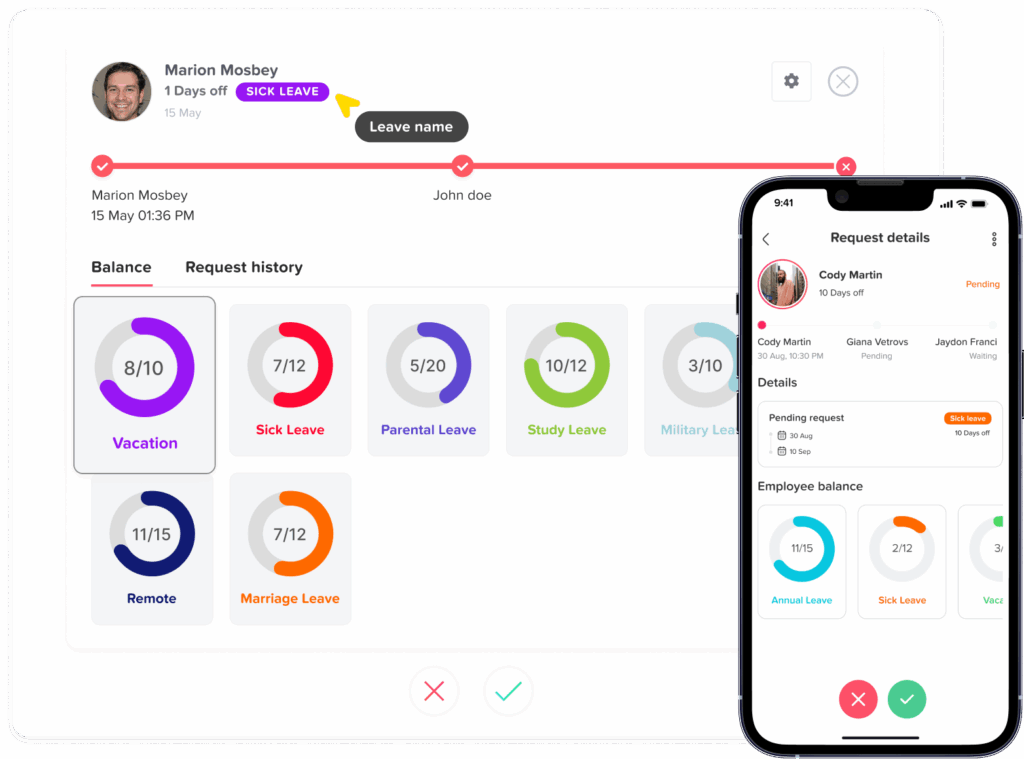
Managers receive a clear request showing the employee, leave type, dates, duration, and available balance. They can review the team calendar before making a decision.
Some businesses require more than one approval level. For example, a request may need approval from the employee’s direct manager before being reviewed by HR or a department head.
Leave management software can route requests through the correct approval steps without requiring the employee to contact each person separately.
More Accurate Leave Balances
Leave balances can change because of accruals, carryover, manual adjustments, used leave, expired hours, or policy changes.
A well configured system updates balances using the rules selected by the company. This reduces the need for HR to perform repeated manual calculations.
The software should still be reviewed regularly. Automation improves consistency, but the underlying policies and employee data must be accurate.
Better Employee Self Service
Employees should not need to contact HR every time they want to know how much vacation they have remaining.
A self service leave portal allows them to:
- View current balances
- Submit new requests
- Check request status
- Review previous absences
- Cancel or edit eligible requests
- View public holidays
- Check team availability when permitted
This gives employees more control while reducing routine administrative questions.
Improved Staffing Visibility
A shared leave calendar helps managers understand who will be available during a particular day, week, or month.
This is useful when planning:
- Project deadlines
- Customer coverage
- Seasonal demand
- Product launches
- Payroll processing
- Department meetings
- Employee training
- Shift assignments
Managers can identify overlapping requests and make informed decisions without searching through email threads or separate calendars.
Consistent Policy Application
Employees may lose trust in the leave process when similar requests receive different treatment.
Software supports consistency by applying the same configured rules to employees within the same policy. It can also show managers the information they need before approving or declining a request.
Consistency does not mean every employee must have the same policy. Different groups may have different entitlements, but those differences should be documented and applied correctly.
Clearer Absence Records
A complete leave history can help HR answer questions about:
- When a request was submitted
- Who approved or declined it
- Which policy was used
- How much leave was deducted
- Whether a balance was adjusted
- Why an adjustment was made
- Whether a request was later canceled
Clear records are useful when employees, managers, HR, and payroll need to review the same absence.
Support for Remote and Multi Location Teams
Remote and distributed teams cannot depend on office-based paper forms or informal conversations.
Online leave management software allows employees to submit requests regardless of location. Companies can also configure separate holiday calendars, workweeks, leave policies, and approval workflows for different offices.
Essential Leave Management Software Features
| Feature | Why It Matters for a Growing Business |
|---|---|
| Employee self-service | Allows employees to manage requests and view balances without contacting HR |
| Custom leave types | Supports vacation, sick leave, personal leave, unpaid leave, parental leave, and company-specific policies |
| Automated accruals | Calculates earned leave according to the selected schedule |
| Carryover rules | Controls how much unused leave moves into the next period |
| Multi-level approvals | Supports requests that require more than one decision-maker |
| Shared leave calendar | Shows approved and pending absences according to user permissions |
| Work schedules | Calculates leave correctly for employees with different working days or hours |
| Public holiday calendars | Prevents holidays from being deducted incorrectly |
| Reports and exports | Supports HR reviews, payroll preparation, and workforce planning |
| Mobile access | Allows employees and managers to use the system away from a desktop |
| Notifications | Reminds approvers about pending requests and informs employees about decisions |
| Role-based permissions | Controls who can view, approve, edit, or report on leave information |
| Integrations | Connects leave information with calendars, communication tools, or other business systems |
| Audit history | Records important changes, approvals, and balance adjustments |
How Automated PTO Accruals Work
Accrual means that employees earn leave gradually instead of receiving the full annual entitlement at once.
A company might allow employees to earn leave:
- Weekly
- Every two weeks
- Twice per month
- Monthly
- Quarterly
- Based on hours worked
The correct setup depends on the company policy and applicable requirements.
For example, if an employee receives 120 hours of annual PTO through 26 biweekly accrual periods, the calculated amount would be approximately 4.62 hours per period. The business must also decide how to handle rounding, waiting periods, maximum balances, carryover, and mid-period employment changes.
Leave management software can automate these calculations after the policy is configured. HR should test the results before launching the system and review unusual cases such as new hires, rehires, part-time employees, and policy transfers.
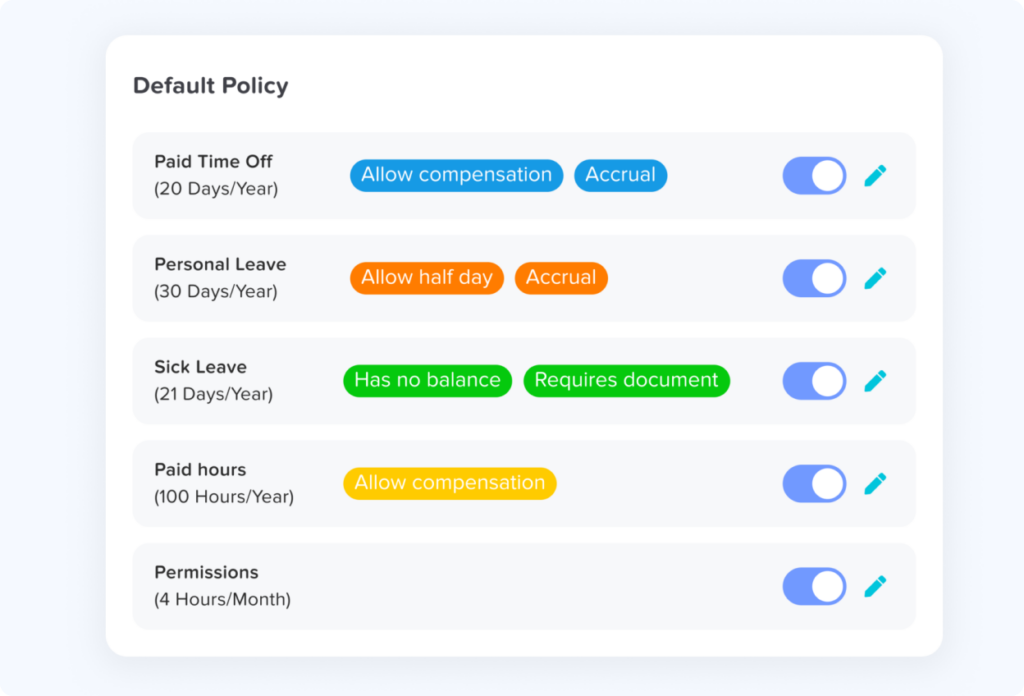
Managing Different Leave Policies
Growing companies often need more than one leave policy.
A business may provide:
- A standard vacation policy for full time employees
- A reduced policy for part time employees
- A separate sick leave policy
- A seniority based policy with higher entitlements
- Different policies for employees in separate locations
- Unlimited leave for a specific employee group
- Leave based on employee anniversary dates
- Leave that resets on a fixed company date
Software makes these policies easier to manage, but the business must define each rule clearly.
Before configuration, HR should document:
- Who is eligible
- How much leave is provided
- When leave becomes available
- Whether leave accrues
- Which dates control the leave year
- Whether unused leave carries over
- Whether carried leave expires
- Whether negative balances are allowed
- Which approvals are required
- What happens when employment ends
The technology should reflect the policy. It should not be used to create rules that the company has not formally decided.
Leave Calendars and Team Privacy
A shared calendar is one of the most useful parts of a leave management platform, but visibility should be controlled carefully.
Managers may need to see employee names, leave dates, and request status. Other employees may only need to know that a colleague is unavailable. Sensitive leave reasons may need to remain private.
A flexible system should allow the organization to decide:
- Who can view the calendar
- Which teams or locations are visible
- Whether pending requests are shown
- Whether leave types are displayed
- Whether absence reasons are hidden
- Whether employees can see balances belonging to colleagues
- Whether managers can view employees outside their department
The goal is to provide enough information for planning without exposing unnecessary personal details.
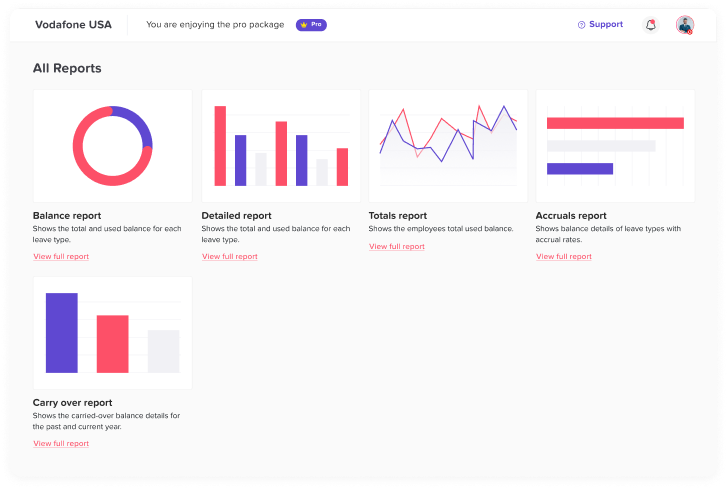
Reports Growing Businesses Should Use
Reports turn leave records into useful management information.
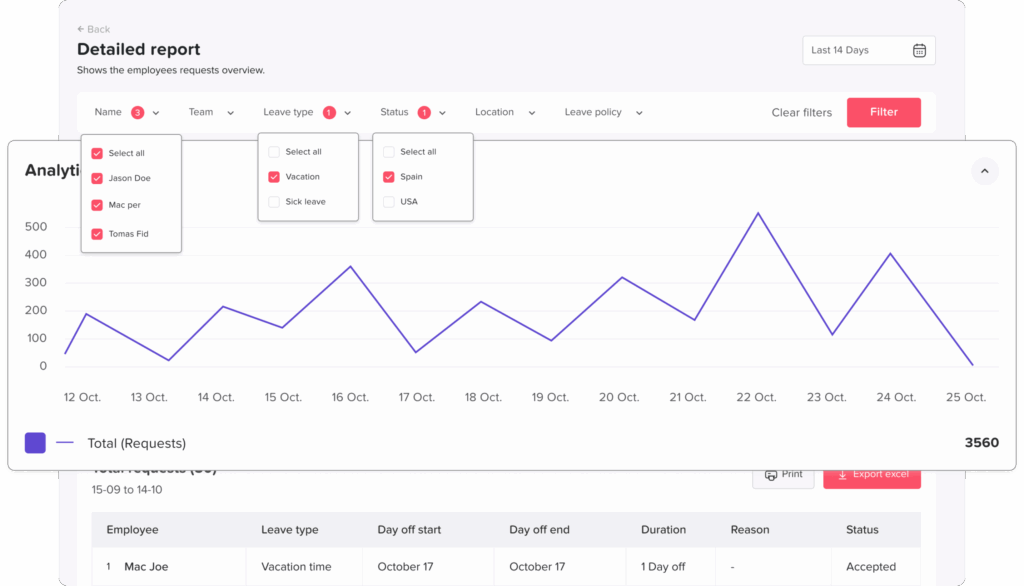
Leave Balance Report
This report shows how much leave each employee has available, used, scheduled, carried over, or expired.
It can help HR identify unusually high balances and confirm that employee records are accurate.
Leave Usage Report
A usage report shows how much leave employees have taken during a selected period. It can be reviewed by employee, team, location, department, or leave type.
Upcoming Leave Report
This report helps managers prepare for future absences and identify periods with limited staffing.
Accrual Report
An accrual report shows when and how employees earned additional leave. It is useful when reviewing balance questions or confirming policy calculations.
Carryover Report
This report identifies unused leave that moved from one leave year to another. It may also show carryover limits and expiration dates.
Detailed Leave History
A detailed report records individual requests, dates, duration, leave type, approval status, and related changes.
Absence Trends
Trend reporting can help the company understand when leave demand is highest. The goal should not be to discourage legitimate leave. Instead, the information can support staffing, employee wellbeing, and operational planning.
How Leave Management Software Supports HR
HR teams often become responsible for correcting problems created by disconnected leave processes.
They may need to compare email approvals with spreadsheets, update calendars manually, answer balance questions, and notify payroll about unpaid absences.
Leave management software reduces these repetitive activities by creating a structured workflow.
HR can focus more time on:
- Reviewing policies
- Supporting managers
- Planning workforce capacity
- Monitoring leave usage
- Resolving exceptions
- Improving employee communication
- Preparing accurate reports
The system does not remove the need for HR judgment. It provides cleaner information so HR can make better decisions.
How Leave Management Software Helps Managers
Managers need to balance employee flexibility with operational requirements.
A manager reviewing a request should be able to see:
- The requested dates
- The number of working days or hours
- The employee’s available balance
- Other team absences
- Public holidays
- Important staffing periods
- Approval history
- Relevant notes
With this information available in one place, the manager can make a faster and more consistent decision.
Managers should also receive training. A good system cannot prevent unfair decisions if approvers do not understand the policy.
How Leave Management Software Improves the Employee Experience
Leave is an important part of the employee experience. People need a process that is easy to understand and does not require repeated follow up.
Employees benefit when they can clearly see:
- How much leave they have
- How the balance was calculated
- Which leave types are available
- Who will review the request
- Whether the request is pending, approved, or declined
- Which upcoming absences have already been scheduled
A transparent process can reduce uncertainty and help employees plan their time off earlier.
It also prevents a common problem in growing businesses: employees receiving different answers depending on which manager or HR representative they ask.
Common Mistakes When Choosing Leave Management Software
Selecting Software Based Only on Price
Price matters, but a low-cost system may become expensive if it cannot support the company’s policies or growth.
Businesses should consider setup time, administrative work, integrations, support, reporting, and future requirements.
Ignoring Work Schedules
Leave deductions depend on when an employee was expected to work.
A system should support different workweeks, part-time schedules, shifts, and working hours when those arrangements exist.
Choosing a System Without Flexible Policies
A company may begin with one vacation policy and later introduce separate rules for locations, departments, or seniority levels.
The selected software should support future policy complexity.
Overlooking Employee Usability
Employees will not use a system consistently if the request process is confusing.
The platform should be easy to understand on both desktop and mobile devices.
Failing to Check Permission Controls
Not every user should have access to every employee record.
The system should provide clear roles for employees, managers, HR administrators, payroll users, and other stakeholders.
Skipping Implementation Testing
Businesses should test sample employees, balances, requests, accruals, holidays, and approvals before launch.
Testing is especially important when migrating from spreadsheets.
How to Implement Online Leave Management Software
| Implementation Stage | Recommended Action | Desired Result |
|---|---|---|
| Policy review | Confirm leave types, eligibility, accruals, carryover, schedules, and approvers | Clear rules before configuration |
| Data preparation | Clean employee records and verify current balances | Accurate starting information |
| System configuration | Add policies, employees, holidays, schedules, and approval workflows | A system that reflects real company rules |
| Testing | Submit sample requests and review calculations | Errors identified before launch |
| Employee communication | Explain how to access the system and submit requests | Better adoption and fewer questions |
| Manager training | Review approval responsibilities and team calendar use | Consistent request decisions |
| Launch | Move new requests into the online system | One central leave process |
| Ongoing review | Check balances, reports, permissions, and policy changes | Continued accuracy as the company grows |
Step 1: Review Existing Policies
Do not begin by copying spreadsheet columns into the software.
First, review the actual leave rules. Resolve unclear language, outdated practices, and differences between written policies and current behavior.
Step 2: Prepare Employee Data
Employee data may include:
- Name
- Email address
- Department
- Location
- Start date
- Manager
- Work schedule
- Leave policy
- Current balance
- Employment status
Incorrect employee information can lead to incorrect balances and approval routing.
Step 3: Configure Leave Types and Policies
Create the leave types employees will use and define how each one works.
Some types may deduct from a balance. Others may only record an absence. Some may require documentation or additional approval.
Step 4: Add Approval Workflows
Assign the correct approver to each employee.
Test situations involving manager absences, department changes, and requests that require multiple approval levels.
Step 5: Import Opening Balances
Opening balances should be verified before import.
Keep a record of the original source and the date the balances were confirmed. This makes later questions easier to resolve.
Step 6: Test Realistic Scenarios
Testing should include more than one basic vacation request.
Test:
- A half-day request
- A request that includes a public holiday
- A request with insufficient balance
- Overlapping team requests
- A canceled request
- A request crossing two leave periods
- A part-time employee
- A new hire
- A multi-level approval
- A carryover or accrual calculation
Step 7: Communicate the New Process
Employees should know when the system will launch, where to access it, and which requests must be entered.
Explain what will happen to requests that were approved before launch.
Step 8: Review the System Regularly
Policies, employees, managers, schedules, and legal requirements can change.
Schedule regular reviews to confirm that the software still matches the company’s real leave process.
Using Day Off as a Growing Business
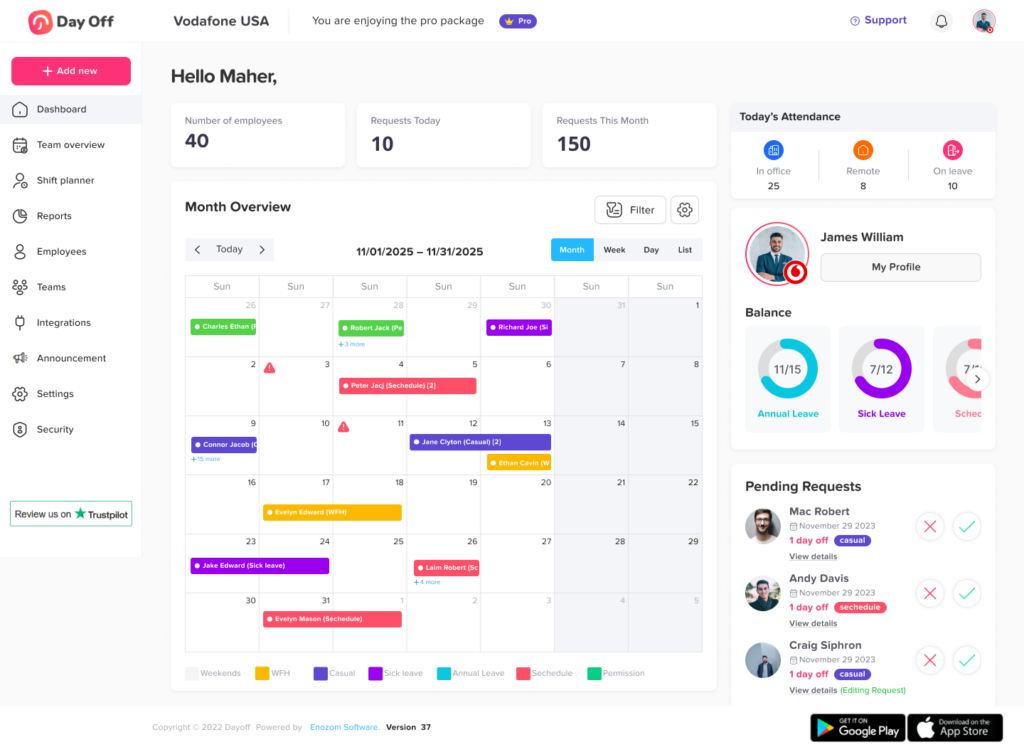
Day Off is an example of online Leave Management Software designed to help teams manage employee PTO, vacations, sick leave, balances, approvals, and shared calendars.
Businesses can use Day Off through the web, iOS, and Android applications. Employees can submit leave requests and review their balances, while managers can approve requests and check team availability.
Features such as custom leave policies, accruals, carryover rules, multiple approvers, public holiday calendars, work schedules, reports, and employee self-service can help companies move away from manual leave tracking.
For growing businesses, the value comes from creating one consistent process that can support additional employees, departments, managers, and locations without requiring HR to maintain several disconnected spreadsheets.
When Should a Business Move Away From Spreadsheets?
There is no single employee number that determines when a company needs leave software.
A business should consider moving to an online system when:
- HR updates balances manually after every request
- Employees frequently ask how much leave they have
- Managers overlook or delay requests
- Different departments maintain separate records
- Leave calculations are becoming more complicated
- The company has multiple policies or locations
- Employees work remotely
- Payroll needs more reliable absence information
- Managers cannot easily see upcoming absences
- Spreadsheet errors are becoming difficult to detect
The best time to improve the process is usually before the manual system becomes unmanageable.
How to Measure the Success of a Leave Management System
After implementation, the company should review whether the system is producing the expected improvements.
Useful indicators may include:
- Average request approval time
- Number of balance correction requests
- Number of leave-related HR questions
- Percentage of requests submitted through the system
- Number of overdue approvals
- Accuracy of employee schedules and balances
- Employee and manager feedback
- Time spent preparing leave reports
- Number of manual adjustments
The objective is not to approve every request automatically. The objective is to create a process that is clear, accurate, efficient, and fair.
Frequently Asked Questions
What is Leave Management Software?
Leave Management Software is a digital platform that helps businesses manage employee time-off requests, approvals, balances, policies, calendars, and absence reports. It replaces disconnected manual processes with one centralized system.
Can leave management software calculate PTO automatically?
Yes. Many systems can calculate PTO according to configured accrual rules. The company must define the entitlement, frequency, effective date, carryover rules, limits, and employee eligibility correctly.
Is leave management software suitable for small businesses?
Yes. Small businesses can use leave software to create an organized process before their team becomes larger. It can reduce administrative work and give employees a clearer way to request time off.
Can the software support different leave policies?
A flexible platform can support separate policies for different employee groups, departments, locations, schedules, or seniority levels. Businesses should verify that the system can represent their specific rules.
Does leave management software replace HR?
No. The software automates calculations, notifications, records, and workflows, but HR remains responsible for policy design, employee communication, exceptions, and compliance decisions.
Can remote employees use an online leave system?
Yes. Online leave systems are especially useful for remote and hybrid teams because employees and managers can access requests, balances, and calendars without being in the same office.
What types of leave can be tracked?
Depending on the system, businesses may track vacation, PTO, sick leave, personal leave, parental leave, bereavement leave, unpaid leave, compensatory time, study leave, half days, and custom absence types.
Can leave management software integrate with other tools?
Some platforms integrate with workplace calendars, communication platforms, HR systems, payroll tools, or application programming interfaces. Integration availability depends on the software provider.
How long does implementation take?
Implementation time depends on the number of employees, the complexity of the policies, the quality of existing data, and the number of approval workflows. A simple business may configure the system quickly, while a multi-location company may require more testing and data preparation.
What information should be checked before launch?
The company should verify employee records, opening balances, work schedules, public holidays, leave policies, accrual rules, approvers, permissions, notifications, and report access.
Conclusion
Online leave management software gives growing businesses a reliable way to manage employee absences as their teams, policies, and organizational structures become more complex.
Instead of maintaining separate spreadsheets, email approvals, and calendars, businesses can create one process for requests, balances, approvals, policies, and reporting. Employees gain better visibility into their leave, managers make decisions using clearer staffing information, and HR spends less time performing repetitive administrative work.
The right Leave Management Software should match the company’s current policies while remaining flexible enough to support future employees, departments, schedules, and locations.
Platforms such as Day Off can help businesses centralize leave tracking, automate PTO calculations, organize approvals, and provide employees with convenient access through web and mobile applications.
The most successful implementation begins with clear policies, accurate employee data, careful testing, and consistent communication. When those elements are combined with the right software, leave management can become a structured and scalable part of business operations rather than an administrative burden.