







Tracking Time Off is more than recording the days employees are away from work. A complete time off tracking process connects PTO requests, approval workflows, PTO policies, employee schedules, accruals, carryover rules, balance deductions, cancellations, and reporting. When these parts work together, employees know how much leave they have available, managers can make informed approval decisions, and HR can maintain more accurate absence records without constantly updating spreadsheets.

Paid leave is also a significant part of employee benefits. According to the U.S. Bureau of Labor Statistics, in March 2025, 80% of private industry workers had access to paid vacation and 80% had access to paid sick leave.
But providing time off is only one part of the process. Businesses also need to know:
- How much PTO each employee is entitled to
- How leave is earned
- Which requests are pending
- Which requests have been approved
- How much leave has already been used
- How much PTO remains
- Whether unused leave carries forward
- When carried over balances expire
- Who will be away on a particular date
- Whether leave records match company policies
- Whether the correct number of days or hours was deducted
Without a reliable system for tracking these details, even a straightforward PTO policy can become difficult to administer as the organization grows.
This guide explains how Tracking Time Off should work from the moment a leave policy is created to the point where an employee’s remaining PTO balance is calculated and reported.
What Does Tracking Time Off Mean?
Tracking time off is the process of recording and managing employee absences and their impact on leave balances.
Depending on the organization, time off may include:
- Vacation
- Paid time off
- Sick leave
- Personal leave
- Bereavement leave
- Parental leave
- Unpaid leave
- Compensatory time
- Floating holidays
- Study leave
- Volunteer leave
- Custom company leave types
The exact types of leave available depend on company policy and applicable employment laws.
In the United States, for example, the Fair Labor Standards Act does not generally require employers to pay employees for time that is not worked, including vacation and sick leave. Paid time off benefits are commonly established through employer policies, agreements, and applicable state or local requirements. Some jurisdictions have separate paid sick leave or paid family and medical leave requirements.
Because requirements can differ considerably by location, organizations should configure their time off tracking process around the policies and laws that apply to their employees.
The Complete Time Off Tracking Cycle
A useful way to understand Tracking Time Off is to look at the entire lifecycle rather than treating PTO balance as an isolated number.
A typical workflow looks like this:
Leave Policy → Employee Balance → Leave Request → Validation → Approval → Calendar → Balance Deduction → Reporting → Accrual or Carryover
Every stage affects the quality of the final PTO record.
If the original policy is configured incorrectly, the balance may be wrong.
If a cancellation is not recorded, the employee may lose leave they never actually used.
If accruals are missed, available balances may be understated.
If pending requests are ignored, managers may approve more leave than an employee actually has available.
That is why accurate PTO tracking requires more than a spreadsheet column labeled “Remaining Days.”
Start With a Clear Leave Policy
Before a business can track PTO accurately, it needs to define how employees receive and use leave.
A leave policy should answer questions such as:
- Who is eligible?
- How much leave does each employee receive?
- Is the allowance measured in days or hours?
- Is the balance granted immediately or earned gradually?
- When does accrual begin?
- Does the accrual rate change with seniority?
- Can employees use leave before it has been earned?
- Can employees have a negative balance?
- Is there a waiting period?
- Can unused leave carry over?
- Is there a carryover limit?
- Does carried over leave expire?
- Are there maximum balance caps?
- How much notice is required?
- Are there blackout periods?
- Who approves leave?
- Are public holidays deducted?
- How are partial day absences handled?
These rules determine how the tracking system should behave.
For example, two employees may both have “20 days of annual leave,” but their balances can develop very differently if one receives all 20 days on January 1 while another earns the balance monthly.
Decide How Employees Receive Their PTO
| PTO Method | How It Works | Example |
|---|---|---|
| Upfront allocation | The full allowance becomes available at the beginning of the leave year | Employee receives 20 days on January 1 |
| Periodic accrual | Leave is earned gradually throughout the year | Employee earns 1.25 days each month |
| Hours-based accrual | Employees earn leave in hours instead of days | Employee earns 10 PTO hours per month |
| Tenure-based entitlement | The allowance or accrual rate increases with service | 15 days initially, 20 days after five years |
| Unlimited PTO | No fixed balance is allocated, but requests remain subject to policy and approval | Employee requests leave without deducting from a fixed quota |
Understanding PTO Accrual
PTO accrual means employees earn paid time off over a defined period rather than receiving their entire allowance at once.
Common accrual frequencies include:
- Weekly
- Every two weeks
- Semi-monthly
- Monthly
- Annually
- Based on hours worked
For example, suppose an employee receives 15 days of PTO per year, earned evenly each month.
A simple calculation would be:
15 ÷ 12 = 1.25 days per month
After four monthly accruals, assuming no leave has been used:
1.25 × 4 = 5 days earned
If the employee then takes two approved PTO days:
5 – 2 = 3 days remaining
The concept is straightforward, but real policies often add additional variables such as carryover, balance caps, manual adjustments, different accrual rates, waiting periods, and previous leave.
PTO Balance Formula
A useful simplified formula is:
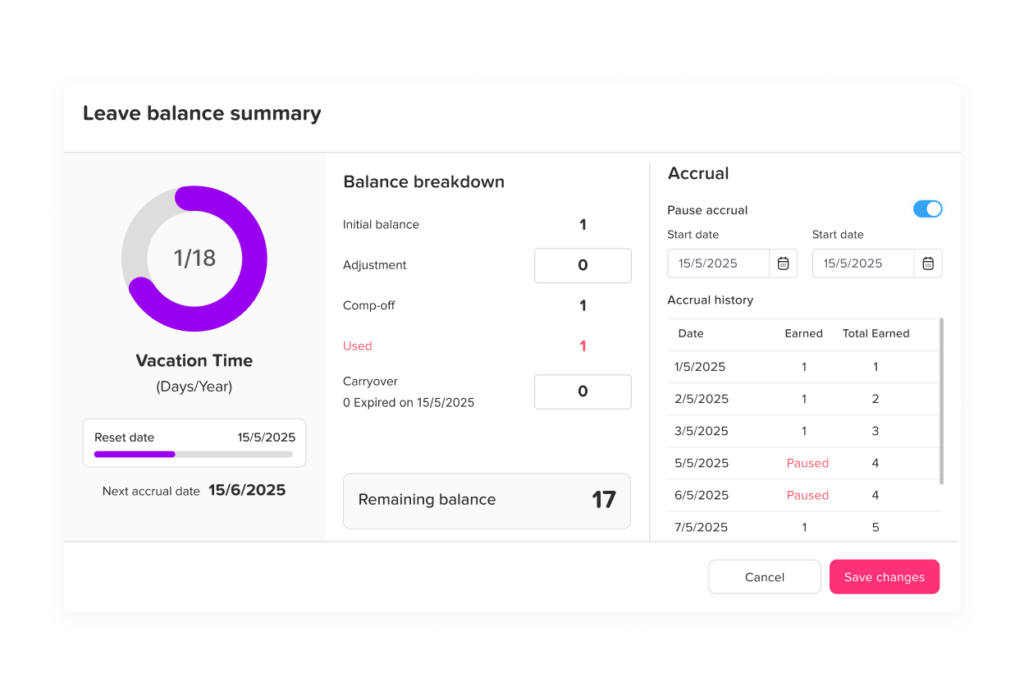
Current PTO Balance = Opening Balance + Accrued PTO + Carryover + Adjustments – PTO Used
For example:
- Opening balance: 2 days
- PTO accrued this year: 8 days
- Carryover: 3 days
- Manual adjustment: +1 day
- PTO used: 5 days
The balance becomes:
2 + 8 + 3 + 1 – 5 = 9 days
However, companies should also determine how future approved leave and pending requests appear.
For example, an employee could currently have 10 days available but already have a five-day vacation approved for next month.
A system might display:
Current balance: 10 days
Scheduled PTO: 5 days
Projected available balance: 5 days
Keeping these numbers separate can make balances easier for employees and managers to understand.
The Employee Submits a Leave Request
The leave request is where the tracking workflow moves from policy into actual usage.
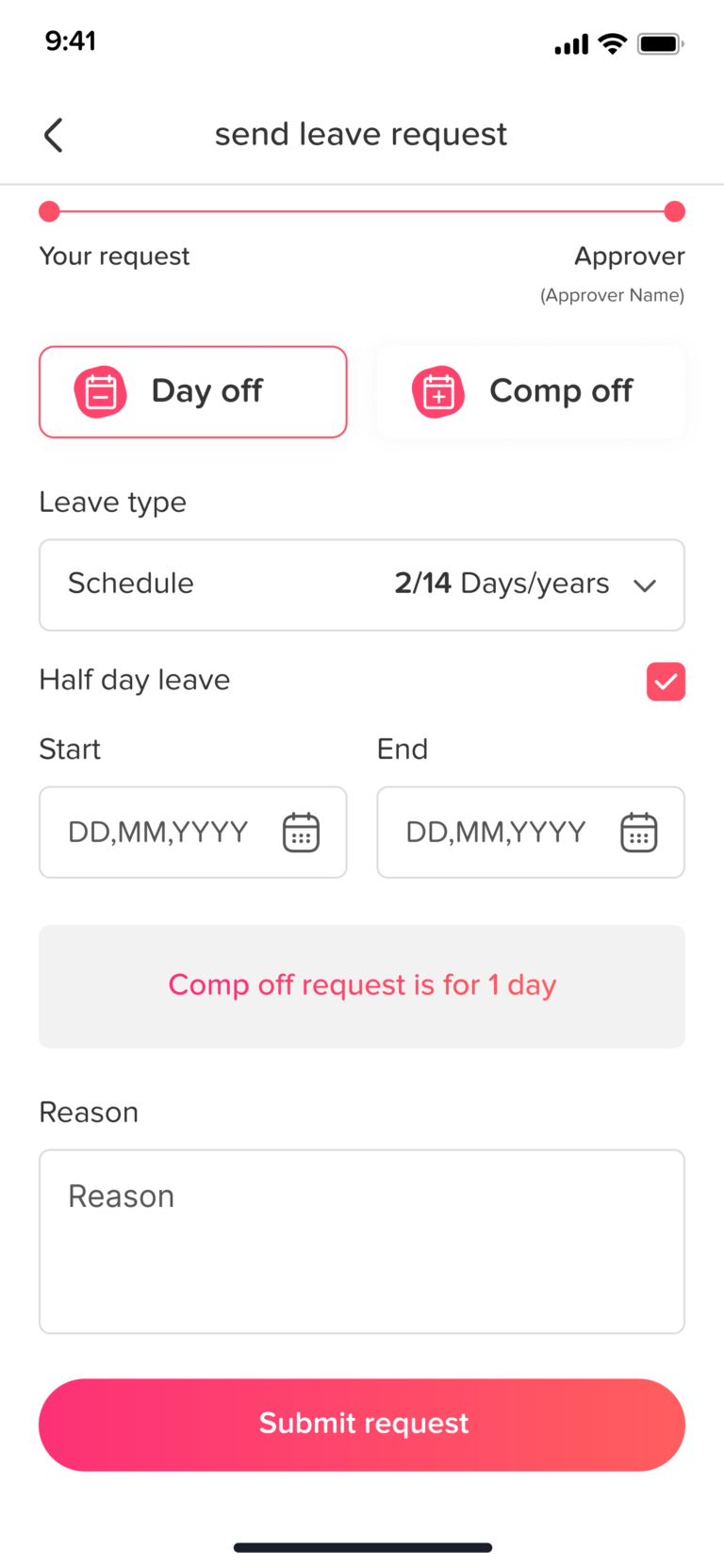
A complete leave request commonly contains:
- Employee
- Leave type
- Start date
- End date
- Duration
- Full day, partial day, or hourly duration
- Reason, when applicable
- Supporting documentation, when required
- Submission date
- Approver
- Request status
This creates a record that can be tracked from submission through approval, rejection, cancellation, or deletion.
Employees should ideally be able to see their available balance before submitting the request. This reduces unnecessary questions to HR and helps employees plan their leave more accurately.
Related reading: PTO Planner: How To Plan Employee Leave Without Spreadsheets
Tracking Leave in Days vs Hours
One important decision is whether leave should be recorded in days or hours.
Days may work well for employees who follow consistent schedules.
For example:
Monday to Friday, 8 hours every day
A one day vacation can simply deduct one day.
Hours become more useful when working schedules vary.
Consider an employee with this schedule:
- Monday: 8 hours
- Tuesday: 6 hours
- Wednesday: 4 hours
- Thursday: 8 hours
- Friday: Off
If the employee requests Monday through Wednesday off, deducting three identical “days” may not reflect the actual scheduled time.
The more precise calculation is:
8 + 6 + 4 = 18 hours of leave
This becomes particularly important for part-time employees, flexible schedules, rotating shifts, and businesses where employees have different daily working hours.
Validate the Leave Request Before Approval
Submitting a request should not automatically mean the request is valid.
Before approval, several conditions may need to be checked.
Available Balance
Does the employee have enough PTO available?
Leave Policy
Is the requested leave type available to the employee?
Eligibility
Has the employee completed any required eligibility or waiting period?
Minimum Notice
Was the request submitted early enough?
Minimum or Maximum Duration
Does the leave duration fit the company’s policy?
Blackout Dates
Has the organization restricted leave during certain high-demand periods?
Work Schedule
Does the request overlap with days or hours the employee was actually expected to work?
Public Holidays
Does a holiday fall inside the requested period, and if so, should it count against the employee’s balance?
Existing Requests
Does the employee already have approved or pending leave during these dates?
Team Availability
Will approving the request leave the department without sufficient coverage?
Automating these checks can significantly reduce manual review.
Send the Request Through the Approval Workflow
Once submitted, the request normally moves to one or more managers.
A simple approval flow might be:
Employee → Manager → Approved
A more complex workflow could be:
Employee → Team Manager → Department Head → HR
The appropriate structure depends on company size and internal policies.
What matters for time off tracking is maintaining a clear request status.
| Status | Meaning | Typical Balance Treatment |
|---|---|---|
| Pending | Request has been submitted but not decided | May be shown separately or temporarily reserved |
| Approved | Employee has permission to take the leave | Included in committed or used PTO according to system rules |
| Rejected | Request was declined | No PTO should be permanently deducted |
| Cancelled | Previously requested leave will no longer be taken | Previously reserved or deducted balance should be restored when applicable |
Companies should define exactly when a balance is deducted.
For example, some systems deduct leave immediately after approval. Others distinguish between scheduled future leave and leave that has already occurred.
Either method can work, but employees should be able to understand what their displayed balance represents.
Update the Shared Leave Calendar
Approving a request should not only update the employee’s record.
It should also update team availability.
A shared time off calendar can help managers answer questions such as:
- Who is off today?
- Who will be away next week?
- Are several team members requesting the same dates?
- Will a department have enough coverage?
- Is someone on vacation, sick leave, or another type of absence?
- Are there public holidays at another office location?
This turns Tracking Time Off into a workforce planning tool rather than simply an HR record.
For global and remote organizations, calendar visibility becomes even more important because different employees may follow different weekends, holidays, locations, and working schedules.
Deduct the Correct PTO Amount
Once leave is approved, the correct amount should be associated with the employee’s balance.
For a straightforward schedule:
Starting balance: 15 days
Approved vacation: 4 days
New available balance: 11 days
But deductions can become more complex.
Weekends
If an employee works Monday through Friday and requests Monday through Sunday off, the employee may only need five working days deducted.
Public Holidays
If a public holiday falls within the requested vacation period, whether it is deducted depends on applicable law and company policy.
Part Time Employees
A part-time employee may work only certain days of the week. Leave should normally correspond to scheduled working time rather than automatically counting every calendar day.
Hourly Leave
If the employee takes only three hours off, deducting a full day would create an inaccurate balance.
Flexible or Rotating Schedules
The leave calculation may need to reference the employee’s schedule for each requested date.
Connecting work schedules to PTO calculations helps prevent situations where employees are charged for time they were never scheduled to work.
Keep PTO Balances Updated After Every Change
A PTO balance is dynamic.
It may change because of:
- New accrual
- Approved leave
- Cancelled leave
- Carryover
- Balance expiration
- Manual adjustments
- Policy changes
- Employee schedule changes
- Corrections
- New leave year allocations
A reliable tracking process updates the balance whenever one of these events occurs.
This is one reason manual PTO spreadsheets become increasingly difficult to manage as a company grows. A single employee may have dozens of balance changing events during the year.
Multiply that by 50, 100, or 500 employees and maintaining accurate balances manually becomes much more demanding.
Track PTO Carryover
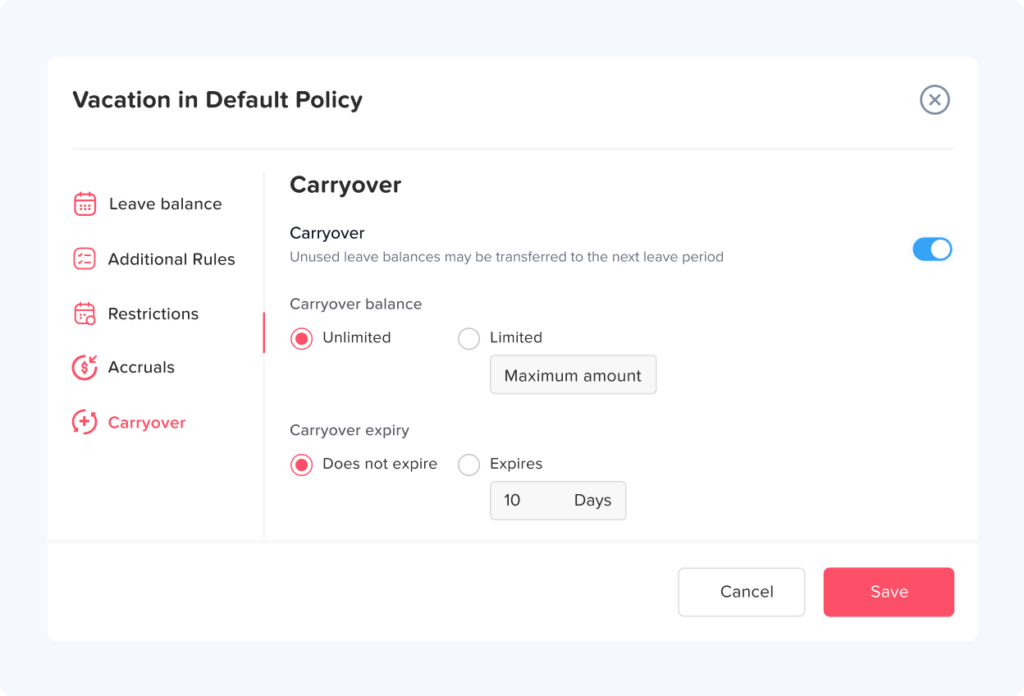
Carryover allows employees to move unused leave from one leave period into another.
For example:
Annual entitlement: 20 days
PTO used: 16 days
Remaining: 4 days
If the company allows all unused leave to carry forward:
Next year’s opening carryover = 4 days
However, policies can be more restrictive.
Suppose the employee has six unused days but the company allows a maximum carryover of three days.
Then:
Unused balance: 6 days
Carryover limit: 3 days
Carried forward: 3 days
What happens to the remaining three days depends on the company’s policy and any applicable legal requirements.
Carryover rules may include:
- Unlimited carryover
- Maximum carryover limits
- Balance caps
- Expiration dates
- Different rules by leave type
- Different rules by location
- Different rules based on employment agreements
Organizations should confirm that expiration and forfeiture rules comply with the laws applying to each employee.
Carryover Is Different From Accrual
These two terms are sometimes confused.
Accrual is newly earned leave.
Carryover is unused leave moved from a previous leave period.
For example:
An employee begins January with:
3 carried-over days
During January, the employee earns:
1.5 new days
The employee’s available balance before taking leave could therefore be:
3 + 1.5 = 4.5 days
Keeping accrued and carried-over amounts separately identifiable makes PTO records easier to audit.
Handle PTO Cancellations Correctly
A commonly overlooked part of Tracking Time Off is cancellation.
Suppose an employee has:
10 available days
They request and receive approval for:
4 vacation days
Their available or projected balance becomes:
6 days
If the vacation is later cancelled, those four days should return to the employee’s available balance when appropriate:
6 + 4 = 10 days
If HR simply removes the calendar event without reversing the balance transaction, the employee’s PTO record becomes inaccurate.
A good system should therefore connect:
Request Status → Calendar → PTO Balance
Changes should flow through the entire process.
Record Manual PTO Adjustments
Even with automation, HR occasionally needs to make corrections.
Examples include:
- Correcting an opening balance
- Adding an earned day
- Fixing an incorrect deduction
- Recognizing previous service
- Migrating balances from another HR system
- Correcting historical data
- Adding compensatory leave
Manual adjustments should ideally include:
- Employee name
- Adjustment amount
- Adjustment date
- Reason
- Person who made the change
- Previous balance
- New balance
The goal is not simply to change the number.
The goal is to preserve enough context to understand why the number changed.
Keep an Employee Leave History
Current PTO balance tells only part of the story.
HR should also be able to review the transactions behind it.
A useful employee leave history can contain:
- Opening balance
- Accrual transactions
- Approved leave
- Cancelled leave
- Rejected requests
- Manual adjustments
- Carryover
- Expired balances
- Policy changes
- Current balance
This provides an audit trail when employees have questions about their available PTO.
Instead of HR responding with:
“You have seven days left.”
They can explain:
“You started with two carried-over days, earned ten days this year, used four days, and had one day manually deducted to correct a previous balance. Your remaining balance is seven days.”
That level of transparency can reduce PTO disputes.
Separate PTO Balance From PTO Usage
Two metrics that should not be confused are:
PTO Balance
How much leave the employee currently has available.
PTO Usage
How much leave the employee has taken during a particular period.
An employee could have a large current balance while also having used considerable PTO during the year because they may have received a large allocation or carried over leave.
For example:
Annual allowance: 25 days
Carryover: 5 days
Total available during year: 30 days
PTO used: 15 days
Remaining balance: 15 days
Usage reports and balance reports answer different HR questions and should therefore be tracked separately.
Use PTO Reports, Not Just Individual Balances
Once leave information is recorded consistently, organizations can use it for broader analysis.
Useful reports include:
Balance Report
Shows:
- Total leave allowance
- Used leave
- Remaining leave
- Leave type
- Employee
Detailed Leave Report
Shows individual requests with:
- Start date
- End date
- Duration
- Leave type
- Status
- Employee
Accrual Report
Shows:
- Leave earned
- Current balance
- Accrual frequency
- Previous accruals
- Upcoming accruals
Carryover Report
Shows:
- Unused previous-year leave
- Amount carried forward
- Amount used
- Remaining carryover
- Expiration date
Leave Usage Report
Shows how much leave employees or teams used during a selected period.
These reports turn Tracking Time Off into useful workforce information rather than simply administrative recordkeeping.
Day Off, for example, includes separate Balance, Detailed, Total, Accruals, and Carryover reports for analyzing employee leave data.
What Information Should Be Tracked?
A structured PTO record should connect employee information, policy rules, leave transactions, and balances.
| Area | Information Worth Tracking | Why It Matters |
|---|---|---|
| Employee | Name, team, location, schedule, leave policy | Determines which rules apply |
| Policy | Allowance, accrual, carryover, limits, leave year | Controls balance calculations |
| Request | Type, dates, duration, status, approver | Creates the leave transaction |
| Schedule | Working days and hours | Determines deductible time |
| Balance | Allocated, accrued, used, carried over, remaining | Shows leave availability |
| History | Adjustments, cancellations, approvals, changes | Creates traceability |
| Calendar | Upcoming and current absences | Supports team planning |
| Reports | Usage, balances, accruals, carryover | Supports HR and management review |
The more connected these data points are, the less manual reconciliation HR needs to perform.
Why Spreadsheet PTO Tracking Becomes Difficult
A spreadsheet can work for a very small team with simple policies.
For example, a company might begin with columns such as:
Employee | Annual PTO | Used | Remaining
But as policies become more sophisticated, additional logic is required.
The spreadsheet may eventually need to account for:
- Monthly accruals
- Different leave types
- Part time schedules
- Carryover
- Expiration
- Half days
- Hourly leave
- Public holidays
- Multiple offices
- Pending requests
- Approval status
- Cancelled requests
- Manual balance adjustments
- Seniority
- Employee start dates
The problem is not that spreadsheets cannot calculate numbers.
The problem is that someone must continually keep the data, formulas, statuses, and policy logic synchronized.
If an approved request is entered into the calendar but not deducted from the balance sheet, the records disagree.
If an employee cancels leave but HR forgets to restore the balance, the remaining PTO becomes incorrect.
Dedicated PTO tracking software reduces this dependency on repeated manual updates.
Common Time Off Tracking Mistakes
Deducting Calendar Days Instead of Working Days
If an employee does not normally work weekends, those dates should not automatically be treated as PTO simply because they fall between the beginning and end of a vacation.
Always calculate leave based on the employee’s applicable work schedule and policy.
Forgetting Future Approved PTO
Looking only at leave already taken can create an incomplete picture.
An employee might have 15 days showing today but already have 10 days approved for later in the year.
Both current and committed leave should be visible.
Ignoring Carryover Expiration
Carried-over leave may be subject to separate expiry rules.
Without tracking expiration dates, HR may not know which part of the balance should be used first or when a balance is due to expire.
Using the Same Policy for Every Employee
Employees in different countries, states, teams, contracts, or employment categories may require different rules.
One universal spreadsheet formula may not be appropriate.
Updating Balances Without Recording the Reason
Changing 12 days to 15 days solves the immediate problem but removes the history behind the balance.
Record adjustments as transactions whenever possible.
Treating PTO and Working Hours as the Same Record
Time-off tracking and time tracking are connected, but they answer different questions.
Time off tracking asks:
When was the employee absent, and how much leave did they use?
Time tracking asks:
When did the employee work, and for how long?
Keeping the distinction clear is especially important for attendance and payroll processes.
Under the U.S. Fair Labor Standards Act, covered employers must maintain certain records for covered nonexempt employees, including hours worked each day and each workweek. The Department of Labor does not require one particular timekeeping format, but applicable records must be complete and accurate.
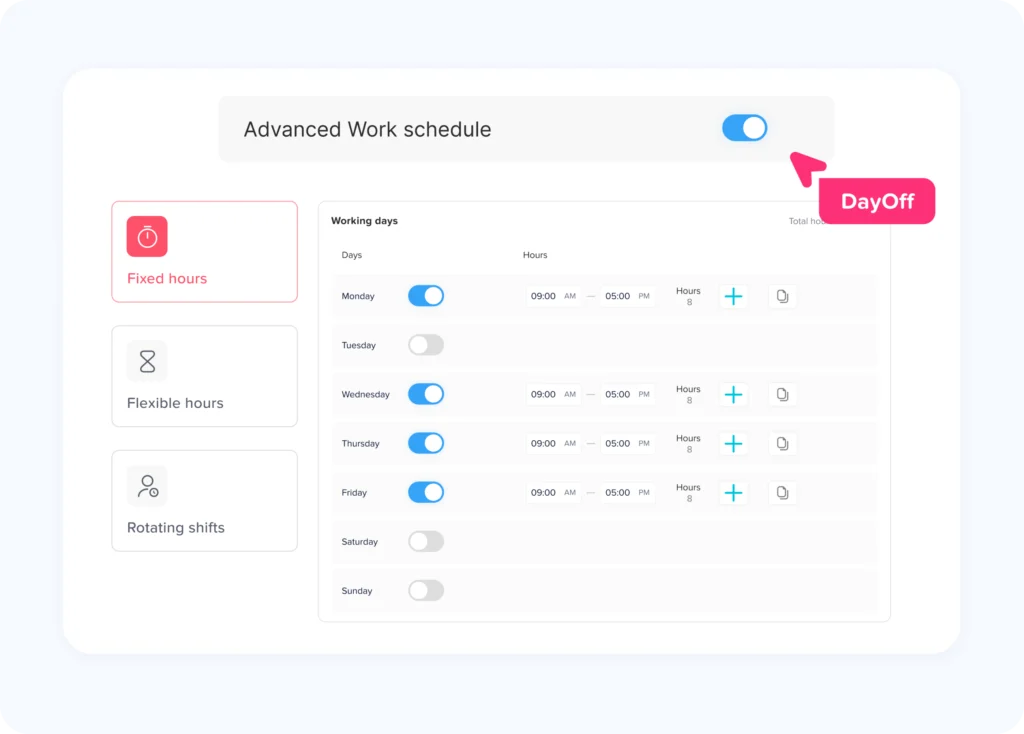
Tracking Time Off for Different Work Schedules
Modern workplaces do not always operate on a standard Monday-to-Friday schedule.
Employees may follow:
- Fixed days
- Fixed daily hours
- Part time schedules
- Flexible schedules
- Rotating shifts
- Split shifts
- Compressed workweeks
Time-off deductions should reflect those schedules when policy requires leave to correspond to scheduled working time.
Consider two employees who both request Tuesday off.
Employee A: scheduled for 8 hours
Employee B: scheduled for 5 hours
If leave is tracked in hours, their deductions may be different even though both employees took one calendar day away from work.
This is why integrating work schedules with leave tracking can improve accuracy for organizations with variable schedules.
Tracking Time Off Across Multiple Locations
International and multi location businesses face another challenge.
Employees may have different:
- Public holidays
- Weekends
- Leave entitlements
- Work schedules
- Leave types
- Accrual rules
- Carryover rules
- Approval structures
For example, a public holiday affecting an employee in one country may be an ordinary working day for another employee.
A centralized time off system should therefore allow organizations to maintain location specific rules rather than assuming every employee follows the same calendar.
Time Off Tracking and Legal Compliance
There is no single global rule governing PTO.
Leave requirements depend on jurisdiction, leave type, employment status, contract terms, collective bargaining agreements, and other factors.
In the United States specifically, the Department of Labor states that there is currently no general federal law guaranteeing paid sick leave to private sector workers, although many states and localities have their own paid sick leave requirements.
Federal law may also provide other types of leave protection. For example, qualifying employees may be entitled to job protected unpaid leave under the Family and Medical Leave Act when eligibility and qualifying conditions are met.
Businesses operating across different jurisdictions should therefore avoid assuming that one PTO rule applies everywhere.
Leave policies and tracking configurations should be reviewed against applicable laws and professional legal or HR guidance when necessary.
Employee Self Service Makes Tracking Time Off Easier
Employees should not need to contact HR every time they want to know:
“How many vacation days do I have left?”
Self-service leave tracking allows employees to access information such as:
- Current PTO balance
- Leave already used
- Upcoming approved leave
- Pending requests
- Leave history
- Accrual information
- Carryover balance
They can then submit requests using the same information that HR and managers see.
This reduces repetitive administration while improving transparency.
How Managers Benefit From Better Time Off Tracking
Managers need more than employee balances.
They need context.
Before approving a leave request, a manager may need to know:
- Who else is away?
- How much leave does the employee have?
- Is another request already pending?
- Is the requested day normally a working day?
- Are there critical deadlines during that period?
- Will the team still have enough coverage?
- Does the request follow company policy?
A connected leave system brings those pieces of information together.
Approval then becomes a workforce planning decision rather than an isolated yes or no response.
How HR Benefits From Accurate PTO Balances
For HR, accurate tracking reduces the need to manually reconcile different sources.
Instead of maintaining separate information in:
- Emails
- Spreadsheets
- Chat messages
- Paper forms
- Manager calendars
- Payroll notes
HR can maintain one consistent record of requests, approvals, balances, and leave history.
This becomes increasingly valuable as headcount grows because every new employee adds additional requests, accrual transactions, policy assignments, calendar events, and balance changes.
Tracking Time Off With Day Off
A PTO tracking system can automate much of the process described throughout this guide.
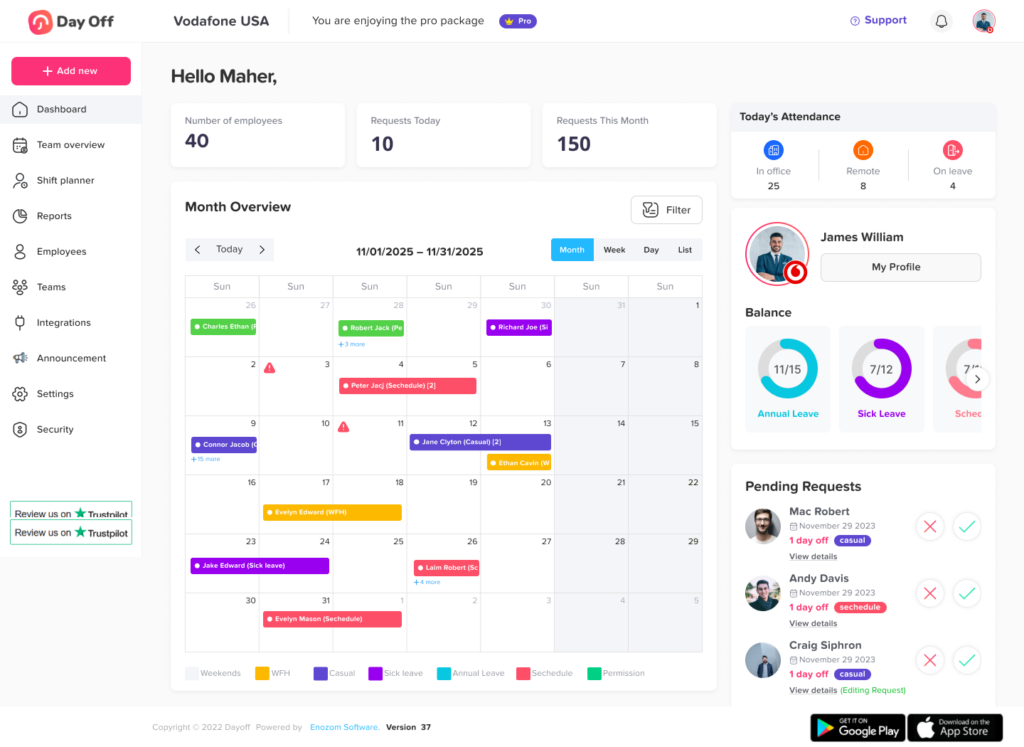
Day Off brings employee leave requests, approvals, leave balances, accruals, carryover, policies, calendars, and reports into one leave management platform.
Employees can submit requests while managers review and approve them through defined workflows. Administrators can configure leave policies with accrual and carryover rules, while balance and reporting tools provide visibility into how much leave employees receive, use, and still have available.
Day Off’s reporting tools also separate different aspects of leave management. Balance reports show total and used balances, accrual reports show how leave is earned, detailed reports record requests, and carryover reports show unused leave and applicable expiration information.
Instead of manually connecting requests to balances and calendars, businesses can keep the entire time-off lifecycle in one place.
What Should Good Time Off Tracking Software Do?
When evaluating PTO or leave management software, businesses should look beyond the ability to submit a vacation request.
A useful system should help manage the full process:
- Create different leave types
- Configure employee leave policies
- Maintain PTO balances
- Automate accruals
- Support carryover rules
- Process leave requests
- Route requests to approvers
- Display employee availability
- Account for working schedules
- Track leave in days or hours
- Maintain request history
- Restore balances after cancellations
- Record manual adjustments
- Generate leave reports
- Give employees self service access
- Support different teams and locations
- Export leave information when needed
The goal is not simply digitizing a request form.
The goal is creating a reliable connection between policy, request, approval, absence, and balance.
Frequently Asked Questions
What is the best way to track employee time off?
For very small teams with simple policies, a spreadsheet may be sufficient. As employee numbers, leave types, accrual rules, locations, and approval workflows increase, dedicated PTO tracking software can make requests, balances, accruals, calendars, and reports easier to keep synchronized.
What information should be included when tracking time off?
Businesses should generally track the employee, leave type, dates, duration, approval status, applicable policy, amount deducted, current balance, accruals, carryover, adjustments, and request history.
What is the difference between PTO balance and PTO accrual?
A PTO balance is the amount of leave currently available to an employee. PTO accrual is the process through which an employee earns additional leave over time.
When should PTO be deducted from an employee’s balance?
The answer depends on the organization’s policy and tracking method. Many systems account for the balance after a request is approved, while also distinguishing future scheduled PTO from leave already taken. The important point is to apply the rule consistently and make the calculation visible to employees.
Should pending leave requests reduce the PTO balance?
Organizations may handle pending requests differently. Some display pending leave separately without changing the official balance, while others reserve the requested amount when calculating available PTO. Employees should be able to distinguish earned balance, pending requests, approved future leave, and remaining available leave.
What happens to PTO when an employee cancels approved leave?
If PTO was deducted or reserved for the cancelled request, the corresponding amount should generally be restored according to company policy. The cancellation should remain in the employee’s leave history for accurate recordkeeping.
How do you calculate a PTO balance?
A simplified formula is:
PTO Balance = Opening Balance + Accrued Leave + Carryover + Adjustments – Used Leave
Additional rules may apply for pending requests, future approved leave, expiration, negative balances, or balance caps.
Should PTO be tracked in days or hours?
It depends on the workforce. Days may work well for employees with identical daily schedules. Hours can provide greater precision for part-time employees, flexible schedules, rotating shifts, split shifts, and hourly leave.
What is PTO carryover?
PTO carryover allows some or all unused leave from one leave period to move into the next period. Carryover may be subject to limits or expiration rules depending on company policy and applicable law.
Can PTO tracking help with workforce planning?
Yes. A shared view of approved and upcoming leave helps managers identify overlapping absences, periods of reduced staffing, seasonal leave patterns, and potential coverage problems before approving additional requests.
Final Thoughts
Effective Tracking Time Off means following employee leave through its entire lifecycle.
It starts with a clear leave policy and continues through:
PTO allocation → Accrual → Leave request → Approval → Scheduling → Balance deduction → Carryover → Reporting
When these stages are disconnected, HR teams spend more time checking spreadsheets, correcting balances, answering employee questions, and reconciling records.
When they are connected, an employee’s PTO balance becomes much more than a number. It becomes the result of a transparent history showing what the employee was entitled to, what they earned, what they requested, what was approved, what they used, and what remains available.
For organizations managing multiple employees, leave types, schedules, teams, or locations, moving from manual records to a centralized PTO tracking system can provide clearer balances, more consistent approvals, stronger visibility, and a much simpler process for everyone involved.