








An Employee Attendance Report gives HR teams and managers a structured view of when employees were expected to work, when they actually worked, and what happened when the two did not match. Instead of simply recording whether someone was present or absent, a useful attendance report can bring together scheduled hours, clock in and clock out times, approved time off, lateness, early departures, breaks, overtime, missing punches, and other attendance exceptions.

When this information is collected consistently, attendance reporting becomes useful for much more than checking who came to work. It can support payroll preparation, workforce planning, absence management, scheduling decisions, policy enforcement, and long term attendance analysis.
The challenge is deciding what the report should actually contain.
A report with too little information does not explain why attendance differed from the schedule. A report with too much unrelated information becomes difficult to review. The goal is to create a report that makes attendance exceptions easy to identify while preserving enough detail to investigate them.
This guide explains what an employee attendance report should include, which metrics are useful, how to calculate them, and how HR teams can turn attendance data into better workforce decisions.
What Is an Employee Attendance Report?
An employee attendance report is a record that compares an employee’s expected working time with their actual attendance during a defined period.
The reporting period might be:
- One day
- One week
- A payroll period
- One month
- One quarter
- A custom date range
A simple attendance report may only show whether employees attended work.
A more useful report goes further. It explains what happened during the employee’s scheduled working time.
For example, instead of showing:
Employee: Present
a detailed report could show:
Scheduled: 9:00 AM to 5:00 PM
Clock in: 9:14 AM
Clock out: 5:22 PM
Break: 45 minutes
Late arrival: 14 minutes
Net worked time: 7 hours 23 minutes
Overtime: 22 minutes
That information gives managers much more context than a basic Present/Absent status.
It also helps separate different situations that should not be treated the same way.
An employee who is on approved vacation is not the same as an employee who misses a shift without explanation. An employee who forgets to clock out is not necessarily absent. An employee who works fewer scheduled hours because of approved sick leave should not automatically appear as having poor attendance.
A good attendance report preserves these distinctions.
Why Employee Attendance Reports Matter
Attendance information affects several areas of workforce management at the same time.
Payroll Accuracy
For hourly employees, payroll may depend directly on recorded working time.
Missing clock-outs, duplicate punches, unusually long breaks, or incorrect hours can therefore affect payroll calculations.
Attendance reports give payroll and HR teams an opportunity to identify unusual records before payroll is finalized.
This is particularly important where actual time records are used for wage calculations.
For U.S. employers covered by the Fair Labor Standards Act, the Department of Labor states that employers must maintain accurate records of hours worked each day and total hours worked each workweek for covered nonexempt employees. The law does not require one specific timekeeping format, but the records must be complete and accurate.
Attendance Management
A single late arrival might not require action.
Repeated late arrivals may indicate a pattern.
Attendance reporting makes it possible to distinguish occasional exceptions from recurring behavior.
Managers can review:
- How frequently an employee arrives late
- How often scheduled shifts are missed
- Whether early departures are increasing
- Whether certain teams have more attendance exceptions
- Whether problems occur on particular days or shifts
The purpose should not be to automatically penalize every exception. The report provides information that managers can investigate alongside company policy and the circumstances involved.
Workforce Planning
Attendance reports can also reveal scheduling problems.
Imagine that a customer support team is scheduled for 400 hours each week, but actual working time repeatedly reaches 450 hours.
That 50-hour difference may indicate:
- Understaffing
- Unexpected workload
- Poor shift allocation
- Frequent overtime
- Employees staying beyond scheduled shifts
The opposite pattern can also be useful.
If scheduled hours consistently exceed actual working requirements, managers may need to review how staffing is allocated.
Attendance data therefore becomes an input for workforce planning, not just an administrative record.
PTO and Absence Management
Attendance cannot be interpreted correctly without knowing when employees are legitimately away from work.
A schedule might show an employee was expected to work eight hours, while the time clock shows zero hours.
Without leave information, the employee may appear absent.
But the employee could have been:
- On approved vacation
- Taking sick leave
- On parental leave
- Using a half-day PTO request
- Taking another approved leave type
Connecting attendance and PTO information prevents approved leave from being incorrectly classified as an attendance problem.
Policy Evaluation
Attendance reports can help HR determine whether company policies are working as intended.
For example, a company may introduce a grace period for clock-ins.
After several months, HR can compare attendance data to see whether late arrivals decreased, stayed the same, or increased.
Similar analysis can be performed after changes to:
- Flexible working hours
- Break rules
- Shift schedules
- Overtime approval
- Attendance policies
- Remote work arrangements
What Should an Employee Attendance Report Include?
There is no single attendance report format that works for every company.
A restaurant with rotating shifts may need different information from a software company with flexible hours.
However, most useful reports contain three groups of information:
- What was scheduled
- What actually happened
- What explains the difference
The following fields provide a strong starting point.
| Report Field | What It Shows | Why It Matters |
|---|---|---|
| Employee | Employee name or internal identifier | Identifies whose attendance is being reviewed |
| Team or department | Employee’s organizational group | Allows team-level analysis |
| Location | Employee’s assigned workplace or region | Useful for multi-location companies |
| Date | Working date | Establishes when attendance occurred |
| Scheduled start | Expected shift start | Provides the attendance benchmark |
| Scheduled end | Expected shift end | Helps calculate early departure or overtime |
| Scheduled hours | Expected working duration | Allows scheduled vs actual comparison |
| Clock-in time | Actual work start | Identifies late or early arrival |
| Clock-out time | Actual work end | Identifies early departure or overtime |
| Break time | Recorded break duration | Helps calculate net working time |
| Net worked time | Actual working time after deducted breaks | Useful for timesheet and payroll review |
| Late time | Difference between scheduled and actual start | Identifies lateness |
| Early departure | Time employee left before scheduled end | Identifies shortened shifts |
| Overtime | Time worked beyond applicable scheduled or regular hours | Helps review additional working time |
| Time off | Approved leave affecting the day | Prevents approved leave being treated as absence |
| Attendance status | Present, absent, on leave, incomplete, etc. | Makes exceptions easier to scan |
| Missing punch | Missing clock-in or clock-out | Flags incomplete records |
| Adjustment status | Shows whether a record was corrected | Helps maintain an audit trail |
Not every company needs every field.
The important point is that the report provides enough context to explain differences between expected and recorded attendance.
Scheduled Hours Should Be the Starting Point
Attendance data becomes much more meaningful when actual working time is compared against a schedule.
Suppose two employees both work seven hours.
That information alone does not tell you whether either employee had an attendance issue.
Employee A
Scheduled: 7 hours
Actual: 7 hours
The employee worked exactly as scheduled.
Employee B
Scheduled: 9 hours
Actual: 7 hours
The employee worked two hours fewer than scheduled.
The actual working hours are identical, but the attendance outcome is different because the schedules were different.
This is why an attendance report should ideally include both scheduled and actual time.
Scheduled vs Actual Hours
One useful calculation is schedule variance:
Actual Net Worked Hours – Scheduled Hours = Schedule Variance
For example:
Scheduled hours: 8 hours
Net worked hours: 7 hours 30 minutes
7h 30m – 8h = -30 minutes
The employee worked 30 minutes fewer than scheduled.
If the employee worked 8 hours 45 minutes:
8h 45m – 8h = +45 minutes
The employee worked 45 minutes beyond the scheduled duration.
However, schedule variance should not automatically be interpreted as an attendance problem.
A negative variance could be explained by:
- Approved PTO
- Sick leave
- An authorized early departure
- A shortened schedule
- Missing time records
- An unpaid break
- A manager-approved adjustment
A positive variance could indicate:
- Approved overtime
- Unplanned overtime
- Early clock in
- Late clock out
- A busy shift
- Incorrect time entries
The report identifies the difference. Managers still need to determine why the difference occurred.
Important Employee Attendance Metrics
Raw attendance records answer the question:
What happened?
Metrics help answer:
Is there a pattern?
Several calculations can be useful when reviewing attendance over longer periods.
| Metric | Example Formula | What It Measures |
|---|---|---|
| Attendance Rate | Attended scheduled work periods ÷ total scheduled work periods × 100 | Overall attendance consistency |
| Absence Rate | Absence hours ÷ scheduled hours × 100 | Share of scheduled time lost to absence |
| Lateness Rate | Late arrivals ÷ scheduled starts × 100 | Frequency of late arrivals |
| Early Departure Rate | Early departures ÷ scheduled shifts × 100 | Frequency of leaving early |
| No-Show Rate | Unexplained missed shifts ÷ scheduled shifts × 100 | Frequency of unexplained missed work |
| Schedule Variance | Actual net hours – scheduled hours | Difference between planned and worked time |
| Overtime Hours | Qualifying hours worked beyond applicable threshold | Additional working time |
Companies should define these metrics clearly before using them.
For example, does arriving one minute late count as a late arrival?
Does approved PTO count as an absence when calculating an internal attendance rate?
Does a half day leave count as a missed workday?
Without consistent definitions, two managers could calculate the same metric differently.
How to Calculate Employee Attendance Rate
A simple attendance rate calculation is:
Attendance Rate = Attended Scheduled Work Periods ÷ Total Scheduled Work Periods × 100
Suppose an employee is scheduled for 20 workdays during a month and attends 19.
19 ÷ 20 × 100 = 95%
The employee’s attendance rate is 95%.
However, organizations need to decide how approved leave is handled.
If the missing day was an approved vacation day, including it as poor attendance may create a misleading result.
For this reason, some businesses calculate attendance against days employees were actually expected to attend after approved leave is taken into account.
Whatever method is selected should be documented and applied consistently.
How to Calculate Employee Absence Rate
Attendance rate and absence rate are related but answer different questions.
Attendance rate focuses on attendance.
Absence rate focuses on working time lost to absence.
One hour-based method is:
Absence Rate = Absence Hours ÷ Scheduled Hours × 100
For example:
Scheduled hours: 160
Absence hours: 8
8 ÷ 160 × 100 = 5%
The absence rate for the period is 5%.
Organizations may also measure absence using working days rather than hours.
The CIPD identifies measuring absence as an important component of absence management and emphasizes the need for organizations to understand absence patterns rather than treating all time away from work identically.
Attendance Rate Is Not the Same as Productivity
This distinction is important.
An employee can have perfect attendance and still perform poorly.
Another employee can have approved absences while remaining highly productive.
Attendance reports measure availability and working time behavior. They do not directly measure:
- Work quality
- Output
- Sales performance
- Customer satisfaction
- Employee engagement
- Project completion
- Individual performance
Attendance should therefore be reviewed as one workforce metric, not used as a substitute for performance management.
Example Employee Attendance Report
| Employee | Scheduled | Actual Attendance | Late | Early Out | Time Off | Net Time | Overtime | Status |
|---|---|---|---|---|---|---|---|---|
| Alex | 9:00-17:00 | 9:08-17:10 | 8m | 0m | 0h | 7h 17m | 10m | Present |
| Maya | 9:00-17:00 | 9:00-13:00 | 0m | 0m | 4h PTO | 4h | 0m | Partial PTO |
| Omar | 8:00-16:00 | 8:03-15:45 | 3m | 15m | 0h | 6h 57m | 0m | Present |
| Nina | 10:00-18:00 | No clock-in | 0m | 0m | 8h vacation | 0h | 0m | On Leave |
| Sam | 9:00-17:00 | 8:58-No clock-out | 0m | N/A | 0h | Incomplete | N/A | Missing Punch |
Notice how this format does not reduce attendance to Present or Absent.
It explains what happened.
Nina has no clock in because she is on approved leave.
Sam’s record is incomplete rather than automatically marking Sam absent.
Maya worked a partial day and used PTO for the remaining scheduled time.
These distinctions make the report far more useful.
How to Use an Employee Attendance Report
Collecting attendance information is only useful when the organization has a process for reviewing it.
Different reporting periods can serve different purposes.
Daily Attendance Review
Daily review is best for identifying immediate exceptions.
Managers can look for:
- Employees who did not clock in
- Missing clock-outs
- Unexpected absences
- Late arrivals
- Employees leaving significantly early
- Unusually long shifts
- Attendance records that conflict with approved PTO
Daily reporting is particularly useful for businesses that depend on shift coverage.
An unexpected absence in retail, hospitality, healthcare, support, or operations may require immediate schedule adjustments.
Weekly Attendance Review
Weekly reports provide enough information to detect repeated behavior without generating too much noise.
Managers may identify:
- Multiple late arrivals
- Repeated early departures
- Excessive overtime
- Several incomplete time records
- Employees frequently working beyond scheduled hours
- Departments with recurring coverage problems
A weekly review can also take place before timesheets are approved for payroll.
Monthly Attendance Analysis
Monthly reports are better suited to trend analysis.
Instead of investigating individual time punches, HR can review patterns such as:
- Attendance rate
- Absence rate
- Total overtime
- Unplanned absence frequency
- Average late time
- Schedule variance
- Attendance by team
- Attendance by location
This provides a broader view of workforce behavior.
Use Attendance Reports for Exception Management
One of the most efficient ways to review attendance is to focus on exceptions rather than manually reviewing every normal workday.
An attendance exception is something that differs from the expected schedule or requires attention.
Examples include:
- Late clock in
- Early clock out
- Missing punch
- No clock in
- Approved time off
- Overtime
- Unusually long break
- Schedule mismatch
Suppose a company has 300 employees.
If 280 employees worked normally yesterday, HR does not necessarily need to manually investigate all 280 records.
Instead, the attendance report can help focus attention on the 20 records containing exceptions.
This is one reason attendance reporting becomes increasingly important as a company grows.
Use Attendance Reports Before Payroll
Attendance reports can form part of a payroll review process.
Before payroll is finalized, HR, payroll, or managers can check for:
- Missing clock ins or clock outs
- Unapproved time corrections
- Incorrect break records
- Overtime requiring review
- Approved PTO that should be accounted for
- Schedule changes not reflected in the attendance record
- Duplicate or unusual time entries
The goal is to resolve attendance problems before they become payroll problems.
For employers subject to the U.S. FLSA, accurate time records are particularly important. Department of Labor guidance states that employers may use different timekeeping methods as long as the system produces complete and accurate records. It also states that payroll records generally need to be preserved for at least three years, while records used to calculate wages, including time cards and work schedules, generally need to be retained for two years.
Retention and timekeeping requirements vary by jurisdiction, so organizations should also review applicable national, state, provincial, or local rules.
Use Attendance Reports to Identify Overtime Patterns
Overtime should not only be reviewed after payroll.
Attendance reports can help managers identify why overtime is occurring.
Imagine one department shows the following pattern:
Week 1: 18 overtime hours
Week 2: 23 overtime hours
Week 3: 27 overtime hours
Week 4: 31 overtime hours
The important question is not simply how much overtime employees worked.
Managers should investigate why the number continues to increase.
Possible explanations include:
- Understaffing
- Increased workload
- Poor scheduling
- Employees starting too early
- Employees regularly finishing late
- Certain roles becoming bottlenecks
- Seasonal demand
Attendance data can therefore become a workforce-planning signal.
Compare Attendance by Team and Location
Company wide averages can hide operational problems.
Suppose the overall company absence rate is 3%.
That may appear reasonable.
But the underlying data could look like this:
Sales: 1.2%
Engineering: 1.5%
Customer Support: 7.8%
Operations: 2.1%
The company wide number hides a significantly different pattern in Customer Support.
The next step should not automatically be disciplinary action.
Instead, management should investigate possible explanations.
There could be:
- Schedule problems
- Staffing shortages
- High workload
- Shift specific issues
- Seasonal illness
- Local conditions
- A small number of repeated absence cases
Filtering by team or location allows HR to investigate where patterns are occurring.
Separate Planned and Unplanned Absence
A particularly important reporting practice is separating planned leave from unexpected absence.
Planned time off can include:
- Vacation
- Scheduled PTO
- Parental leave
- Approved personal leave
- Pre-arranged unpaid leave
Unplanned absence can include:
- Unexpected sickness
- Emergency leave
- Unexplained absence
- No show
- Last minute call out
Both affect workforce availability, but they create different operational challenges.
Planned leave gives managers time to arrange coverage.
Unplanned absence creates less preparation time.
Combining the two into one generic “absence” category can therefore make workforce analysis less useful.
Do Not Treat Approved PTO as Poor Attendance
One of the biggest mistakes in attendance analysis is treating all non working time as an attendance failure.
If an employee has been approved for vacation, that employee is following the company’s leave process.
The attendance report should identify the employee as being on leave rather than simply absent.
The same principle applies to other authorized time off.
This distinction becomes particularly important when companies calculate employee attendance scores or compare teams.
Otherwise, employees who legitimately use their leave entitlement could appear to have worse attendance than employees who take less PTO.
How to Handle Partial Day Leave
Attendance reporting becomes more complicated when employees take only part of the day off.
For example:
Schedule: 9:00 AM to 5:00 PM
Approved PTO: 9:00 AM to 1:00 PM
Clock-in: 1:00 PM
Clock-out: 5:00 PM
A simplistic attendance report may show that the employee worked only four hours against an eight-hour schedule.
A better report explains the full day:
4 hours approved PTO + 4 hours worked
This prevents legitimate partial day leave from appearing as four missing work hours.
How to Handle Missing Clock Outs
Missing punches are common attendance reporting exceptions.
An employee may clock in normally and forget to clock out.
For example:
Scheduled: 8:00 AM to 4:00 PM
Clock in: 8:02 AM
Clock out: Missing
The system should not automatically assume the employee worked until midnight, the end of the day, or another arbitrary time.
Instead, the record should be flagged as incomplete until it is reviewed and corrected according to company policy.
Where corrections are made, maintaining information about the adjustment can also make attendance records easier to audit.
How to Handle Overnight Shifts
Attendance reports should also account for shifts that cross midnight.
For example:
Scheduled start: Monday, 10:00 PM
Scheduled end: Tuesday, 6:00 AM
The shift spans two calendar dates but represents one scheduled work period.
If attendance systems group records only by calendar date without recognizing the schedule, overnight employees can appear to:
- Work extremely short shifts
- Miss work
- Work excessive overtime
- Clock in on one day without clocking out
- Clock out without a matching clock in
Companies operating overnight shifts should ensure attendance rules account for shifts spanning multiple dates.
Flexible Work Schedules Need Different Attendance Rules
A traditional late arrival calculation assumes an employee has a fixed start time.
That does not work for every schedule.
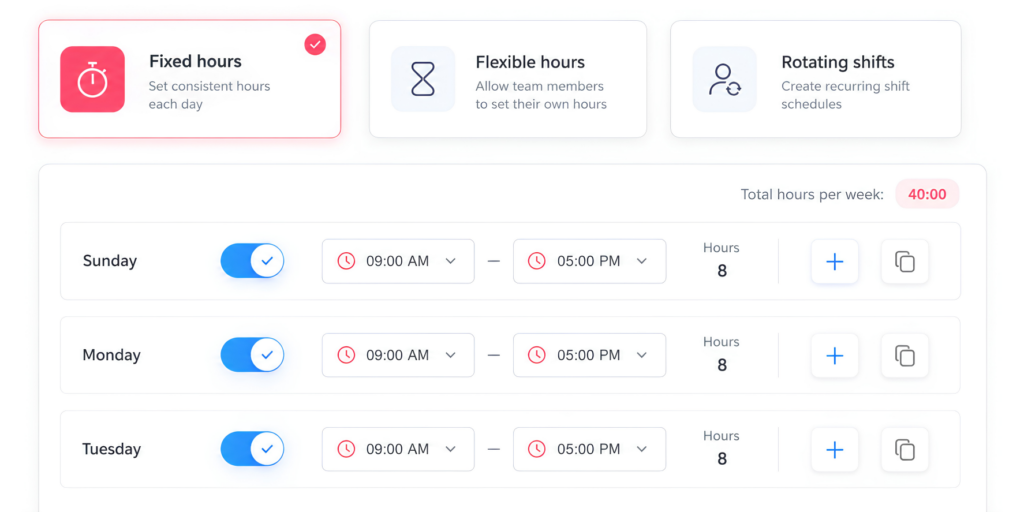
Suppose an employee has flexible hours and can begin work anywhere between 8:00 AM and 10:00 AM.
A 9:30 AM clock in should not be reported as 90 minutes late simply because another employee starts at 8:00 AM.
Attendance calculations should therefore reflect the employee’s assigned schedule type.
Different rules may be required for:
- Fixed days
- Fixed hours
- Flexible hours
- Rotating shifts
- Split shifts
- Part time schedules
Attendance reporting becomes more accurate when expected attendance comes from the employee’s actual work schedule rather than a company wide assumption.
Common Employee Attendance Report Mistakes
Even a detailed report can become misleading if the underlying rules are poorly defined.
Reporting Hours Without the Schedule
Seven hours worked means little without knowing whether the employee was scheduled for five, seven, or eight hours.
Include expected working time whenever schedule comparison matters.
Combining All Absences
Vacation, sick leave, unauthorized absence, and no shows should not automatically be placed in the same category.
Separate absence types where the distinction is useful.
Ignoring Partial Day PTO
A four hour day may be perfectly correct if the employee had four hours of approved leave.
Treating Missing Data as Zero
A missing clock out does not necessarily mean zero working hours.
Flag incomplete records separately.
Using Different Definitions Across Teams
If one manager defines “late” as one minute after the scheduled start while another allows ten minutes, company wide lateness metrics become unreliable.
Define the rules centrally.
Reviewing Percentages Without Context
A small team can produce large percentage changes from only one or two attendance events.
Always review the underlying event counts alongside percentages.
Collecting Sensitive Information That Is Not Needed
An attendance report should contain the information required to manage attendance.
Detailed medical information or unrelated personal information generally does not belong in a standard attendance dashboard.
Where absence reasons involve sensitive information, access should be limited according to organizational policy and applicable privacy requirements.
Building a Reliable Attendance Reporting Process
Good attendance reports depend on good data.
HR teams should establish consistent rules for:
Work schedules
Employees should have the correct schedule assigned before attendance is compared against it.
Clock-in and clock-out
Define when employees are expected to record work and how missed punches are corrected.
Breaks
Clarify which breaks are tracked and how they affect net working time.
Approved time off
Approved PTO should be connected to the attendance record whenever possible.
Attendance statuses
Define exactly what statuses such as Present, Absent, On Leave, Late, Missing Punch, or No-Show mean.
Corrections
Attendance adjustments should follow a consistent review process.
Reporting periods
Decide whether managers review attendance daily, weekly, per payroll period, monthly, or through a combination of periods.
Access permissions
Not every employee needs access to company wide attendance information. Reporting access should match each user’s responsibilities.
How Day Off Helps With Employee Attendance Reporting
Managing attendance becomes easier when leave, schedules, and working time are connected instead of being maintained in separate spreadsheets or systems.
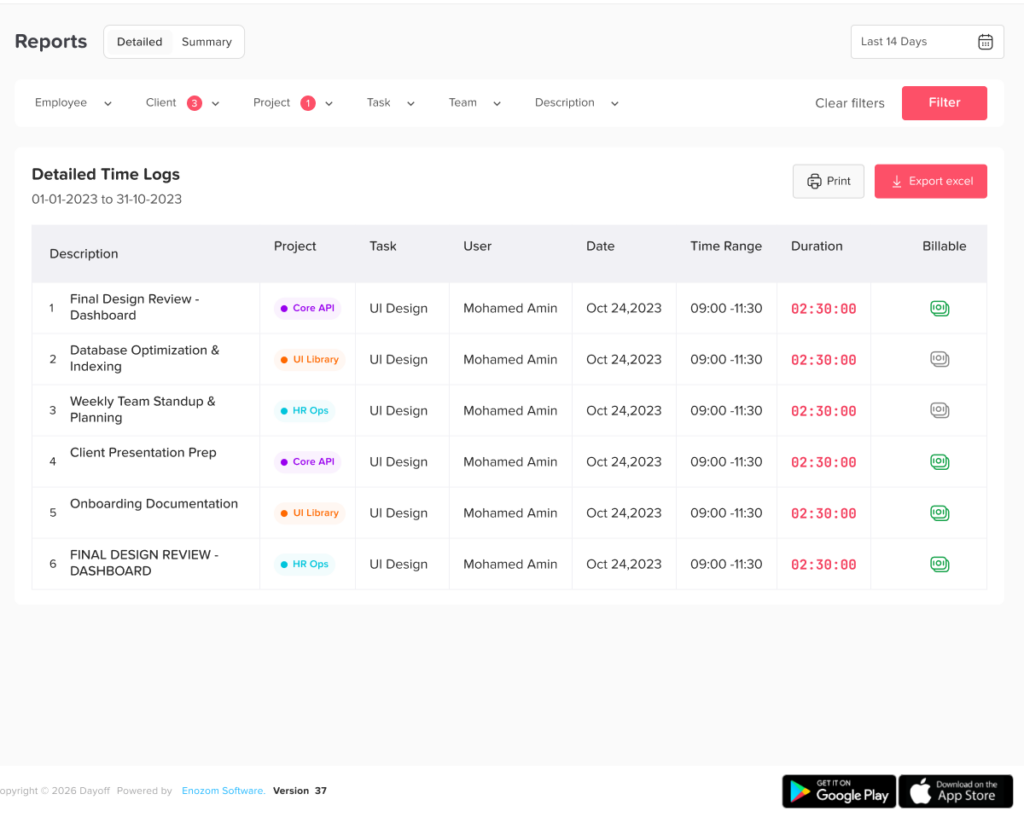
Day Off combines leave management, work schedules, attendance review, and time tracking within the same platform.
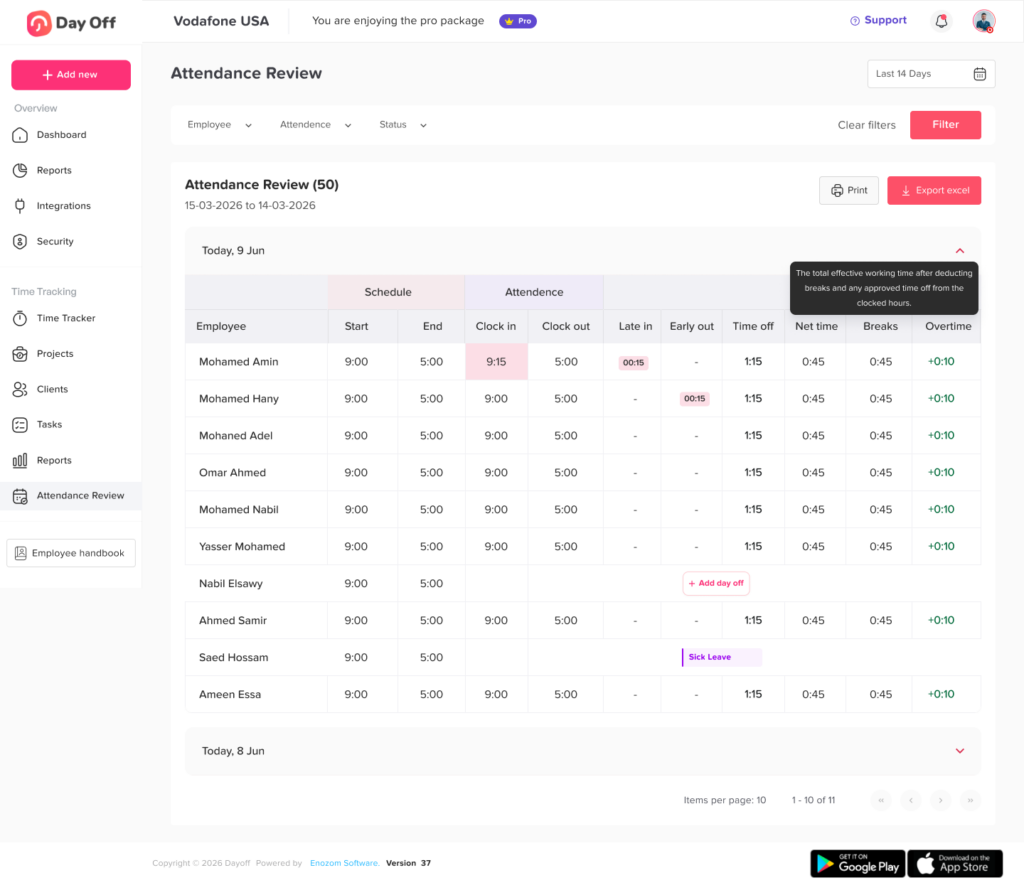
In Time Tracking > Attendance Review, managers can compare the employee’s assigned schedule with actual attendance.
The Attendance Review includes information such as:
- Scheduled start and end times
- Actual clock-in and clock-out
- Late arrival
- Early departure
- Time off
- Net working time
- Breaks
- Overtime
This makes it possible to read the schedule as the expectation and attendance as what actually happened.
For example, if an employee is scheduled from 9:00 AM to 5:00 PM but clocks in at 9:20 AM, the attendance data can show the schedule, actual clock in, and late time together.
If the employee was instead on approved leave, the time off information provides context for the missing attendance.
Filter Attendance by Employee, Team, or Location
HR teams do not always need a company-wide report.
Day Off’s Attendance Review can be filtered by:
- Employee
- Team
- Location
Managers can also choose periods such as Today, Yesterday, This Week, Last Week, This Month, Last Month, or a custom date range.
This allows the same attendance data to answer different questions.
For example:
Individual review: Has one employee had repeated late arrivals this month?
Team review: Is a department regularly working beyond its scheduled hours?
Location review: Does one office have more attendance exceptions than others?
Weekly review: Were there any missing punches before payroll is prepared?
Export Attendance Data
Attendance information can also be exported for further analysis, payroll preparation, internal records, or reporting outside the platform. Day Off’s reporting tools support filtering before export, allowing teams to work with the period and employee group they actually need.
Connecting these records with leave management helps reduce one of the biggest weaknesses of standalone time clock reports: not knowing whether missing work was an attendance problem or approved time off.
How Often Should Attendance Reports Be Reviewed?
There is no single frequency that works for every organization.
A useful approach is to use multiple levels of review.
Daily:
Check operational exceptions such as no-shows and missing punches.
Weekly:
Review late arrivals, early departures, unusual working hours, and repeated exceptions.
Before payroll:
Resolve incomplete records, corrections, overtime, and time-off discrepancies.
Monthly:
Analyze broader metrics and workforce trends.
Quarterly:
Review whether attendance policies, schedules, and staffing levels need adjustment.
Companies with shift-based operations may need much more frequent attendance review than businesses with highly flexible schedules.
FAQ
What should be included in an employee attendance report?
An employee attendance report should generally include the employee’s name, date, assigned work schedule, scheduled hours, clock in and clock out times, breaks, net working time, late arrivals, early departures, time off, overtime, missing punches, and attendance status.
The exact fields should reflect how the organization schedules and tracks employees.
How do you calculate employee attendance?
One basic method is:
Attendance Rate = Attended Scheduled Work Periods ÷ Total Scheduled Work Periods × 100
Organizations should define how approved PTO, partial days, remote work, and other authorized absences are handled before relying on the metric.
What is the difference between an attendance report and a timesheet?
A timesheet primarily records how much time an employee worked.
An attendance report usually adds context by comparing actual work against the employee’s expected schedule and identifying exceptions such as lateness, absence, early departure, PTO, or missing punches.
The same time data may contribute to both reports, but they answer different questions.
How often should employee attendance be reviewed?
Operational attendance exceptions may need daily review, while broader trends can be analyzed weekly or monthly. Attendance should also be reviewed before payroll when recorded working time affects employee pay.
The correct frequency depends on workforce size, schedule structure, payroll cycles, and operational requirements.
Can approved PTO affect an employee’s attendance rate?
It depends on how the company defines the metric.
However, employers should be careful about treating properly approved PTO as poor attendance. Separating approved time off from unauthorized or unexplained absence creates a more accurate view of employee attendance.
Final Thoughts
An Employee Attendance Report becomes valuable when it connects the full story of an employee’s working day: what they were scheduled to work, what they actually worked, and what explains any difference between the two.
Simply recording Present or Absent is often not enough.
Modern attendance reporting should distinguish between late arrivals, early departures, approved PTO, missing punches, overtime, breaks, partial day leave, and true absences. It should also allow HR teams to move from individual attendance events to longer term patterns.
When reviewed consistently, attendance reports can help organizations improve payroll accuracy, investigate attendance exceptions, plan staffing more effectively, understand overtime, evaluate work schedules, and make better workforce decisions.
Tools such as Day Off make this process easier by connecting employee schedules, leave management, and actual time tracking in one place. Instead of comparing separate spreadsheets and calendars, managers can review the expected schedule alongside actual attendance and understand not only whether a difference occurred, but why.