







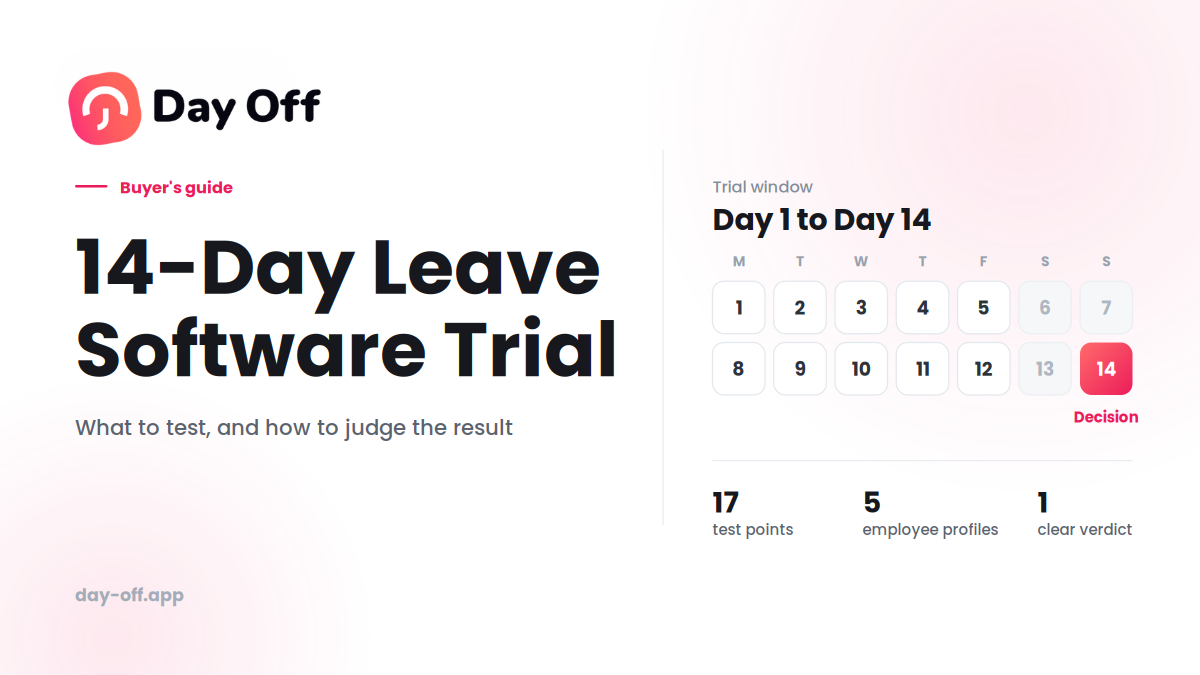
Most 14-day software trials end the same way.
Someone creates an account on day one, clicks through a few screens, maybe adds two or three employees, and then forgets about it. On day 13, a sales email arrives asking whether the company is ready to buy.
The result? Very little is learned.
The decision ends up being based on first impressions, a feature checklist, or whichever software looked nicest during a ten-minute demo.
That’s a problem when you’re choosing software that employees and managers may use every week for years.

A leave management system needs to do more than let someone submit a vacation request. It needs to handle your policies, approval process, holiday calendars, employee balances, reporting, and the awkward situations that don’t appear in a product demo.
The good news is that 14 days is enough to test most of the things that matter, if you treat the trial as a structured evaluation rather than an extended demo.
This guide gives you a practical 14-day testing plan, a checklist you can use with your team, and specific things to look for if you’re evaluating Day Off.
What a Leave Software Trial Should Actually Tell You
You don’t need to test every button in the application.
By the end of the 14 days, you should be able to answer seven questions:
- Can we set it up without spending days configuring it?
- Can employees request leave without needing instructions every time?
- Can managers approve and manage requests quickly?
- Does the system calculate balances and policies correctly?
- Can everyone see who’s available and who’s away?
- Can HR or payroll get the information they need without manual work?
- Would our team actually use this after the novelty wears off?
If you can answer those questions confidently, you’ve learned far more than you would from simply browsing the software.
Why Most Leave Software Trials Fail
The biggest problem isn’t usually the software. It’s the way companies test it.
A trial account with no employees, no policies, no holiday calendars, and no real requests is almost impossible to evaluate properly.
Imagine testing a project management tool without creating a project. Or testing accounting software without entering any transactions.
Leave software is the same.
The important problems usually appear when you introduce real-world conditions:
- Two employees request the same day off.
- Someone works part-time.
- A new employee joins halfway through the year.
- An employee cancels previously approved leave.
- A public holiday falls during a period of leave.
- Someone works in another country.
- An employee has a different leave allowance from the rest of the team.
- A manager needs to approve a request while away from their desk.
- Payroll needs a report at the end of the month.
If you don’t deliberately create these situations during the trial, you may never discover how the software handles them.
The solution: test scenarios, not features
Instead of asking: “Does the software have a calendar?”
Ask: “Can my manager quickly see who’s away next week and identify a staffing problem?”
Instead of asking: “Does it support leave balances?”
Ask: “If an employee has 12 days remaining and takes three days off, does the balance update correctly without HR having to intervene?”
That’s the difference between feature testing and real-world testing.
Before Day 1: Define What Success Looks Like
Before creating the trial account, spend 15–20 minutes writing down what you actually need from the software.
Start with your current process.
How do employees request leave today?
- Email?
- Spreadsheet?
- HR system?
- Slack or Microsoft Teams?
- Paper forms?
- A mixture of several methods?
Then identify what’s frustrating about the current system.
Maybe managers don’t know who’s away. Maybe balances are maintained manually. Maybe payroll spends hours reconciling leave. Maybe employees aren’t sure how much leave they have left.
Those problems should become your trial objectives.
Create a simple “must pass” list
For example:
- Employees can request annual leave themselves.
- Managers can approve requests without HR intervention.
- Leave balances update automatically.
- Employees can see their remaining balance.
- Managers can see team availability.
- Public holidays are handled correctly.
- Part-time employees can be configured correctly.
- Reports can be exported for payroll.
- Employees can use the system from mobile.
- The system doesn’t require constant administrative maintenance.
This list becomes your evaluation criteria.
Before You Start: Set Up the Trial Properly
Invite more than one person
A leave-management system normally has at least three perspectives:
Employee:
“I want to request time off and know how much I have left.”
Manager:
“I need to approve requests and make sure my team has enough coverage.”
HR or administrator:
“I need policies, balances, reports, and employee records to be accurate.”
If you’re the only person testing the software, you’re evaluating only one part of the experience.
Ideally, involve:
- One administrator or HR user
- One manager
- One or two employees
You don’t need your entire company to participate. A small group is enough to expose most usability problems.
Use realistic employee data
Fake data makes software look easier than it really is.
Instead of creating:
- Test User 1
- Test User 2
- Test User 3
create a test roster that resembles your actual organization.
For example:
| Employee | Scenario |
|---|---|
| Employee A | Full-time, standard leave allowance |
| Employee B | Part-time |
| Employee C | Recently hired |
| Employee D | Different country or holiday calendar |
| Employee E | Manager/approver |
You don’t necessarily need to import your entire workforce. What matters is reproducing the situations your software will have to handle.
Configure your actual policies
This is one of the most important steps.
Don’t leave the default settings in place just because they’re convenient.
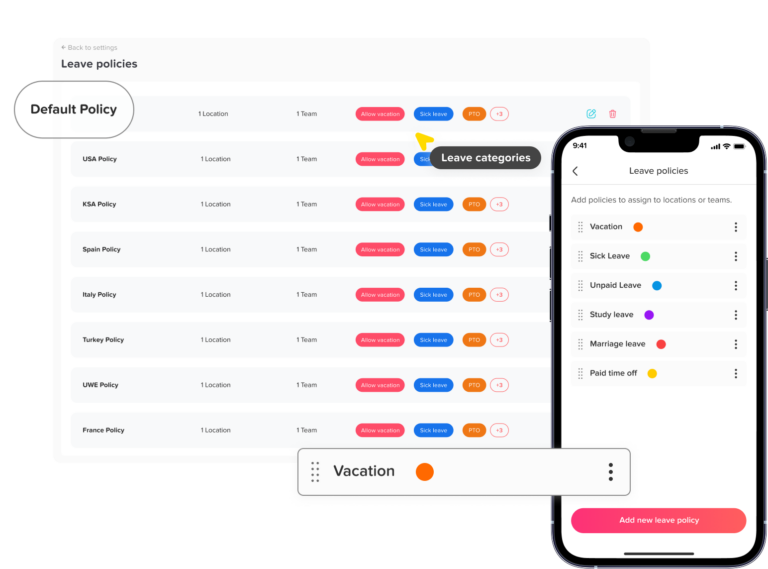
Configure the policies you actually use:
- Annual leave
- Sick leave
- Unpaid leave
- Parental leave
- Bereavement or compassionate leave
- Carryover rules
- Accrual rules
- Probation restrictions
- Pro-rated allowances
- Approval hierarchy
- Public holidays
The goal isn’t simply to see whether the software has these features.
The goal is to see whether you can configure them without creating a complicated workaround.
Your 14-Day Leave Software Trial Plan
Days 1–2: Setup and First Impressions
Start by setting up the system from scratch.
Add your test employees, configure leave types, create your holiday calendars, and establish the approval process.
Don’t immediately ask support for help.
Try to do the basic setup yourself first.
Measure three things
Time:
How long does setup take?
Clarity:
Can you understand what to do without constantly searching for instructions?
Flexibility:
Can you configure your actual policies, or are you forced to adapt your policies to the software?
For a 10–15 person test team, getting the basic setup working in around an hour is a useful benchmark.
It’s not a universal pass/fail rule, but if a small test takes several hours, that’s worth investigating before you scale it to hundreds of employees.
Also check the basics
Does the system support:
- Multiple leave types?
- Different allowances?
- Approval levels?
- Employee-specific policies?
- Different holiday calendars?
- Mobile access?
- Employee self-service?
Write down anything that feels confusing. Don’t rely on memory when you compare products later.
Days 3–5: Test the Request and Approval Workflow
This is the core of any leave-management system.
Test it from both sides.
Employee test
Log in as an employee and:
- Check the current leave balance.
- Find the leave request screen.
- Request one day off.
- Request several consecutive days.
- Try a half-day if your policy supports it.
- Add a reason or note if required.
- Submit the request.
Then ask:
Could an employee figure this out without training?
That’s more important than whether the interface looks impressive.
Manager test
Now switch to the manager’s perspective.
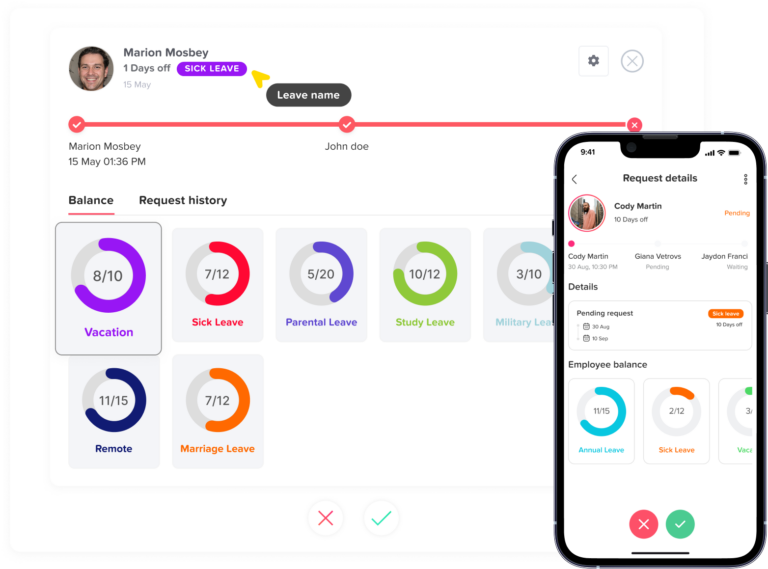
Check:
- Did the manager receive a notification?
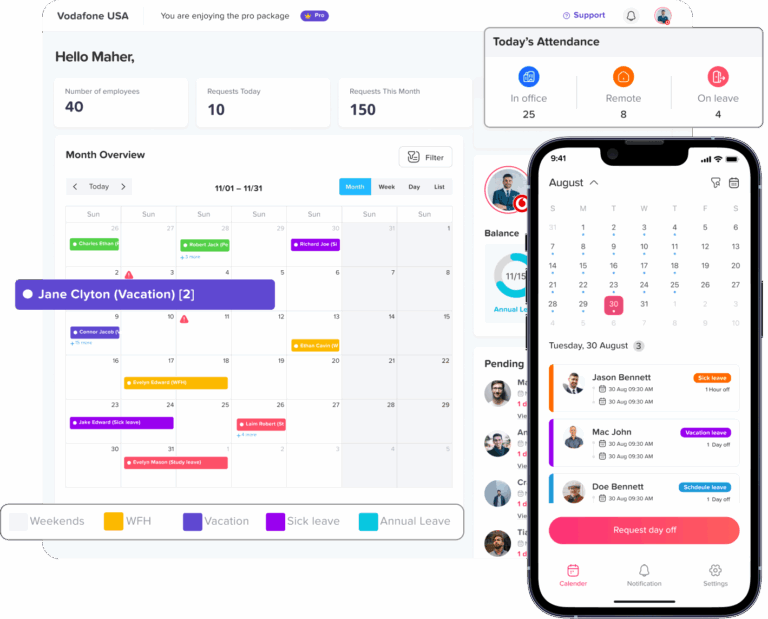
- Was the request easy to find?
- Can the manager see the employee’s remaining balance?
- Can they see other team members’ leave?
- Can they approve or reject the request quickly?
- Is there enough information to make the decision?
A manager shouldn’t need to open three different screens just to determine whether approving a request will leave the team short-staffed.
Test an overlapping request
This is where the trial becomes more interesting.
Have Employee A request a particular day and approve it.
Then have Employee B request the same day.
Does the system:
- Flag the overlap?
- Show the existing absence?
- Warn the employee?
- Warn the manager?
- Allow the request without any warning?
There isn’t necessarily one correct answer for every company. Some organizations allow unlimited overlap; others have staffing rules.
What matters is whether the software gives you the information and control you need.
Test cancellation
Approve a leave request.
Then cancel it.
Check the employee’s balance.
Did the balance return correctly?
Also check the manager’s calendar.
Did the cancelled absence disappear or update correctly?
Small workflows like this can expose data inconsistencies that aren’t obvious during a normal demo.
Days 6–8: Test Visibility and Reporting
Leave software isn’t just about submitting requests.
Managers need to answer questions like:
- Who is away today
- Who will be away next week?
- How many people are unavailable on Friday?
- Does John still have enough leave remaining?
- How much leave has the team taken this year?
Your trial should test those questions directly.
Test the team calendar
Open the team calendar and look ahead.
Try to answer, without generating a report:
- Who is away today?
- Who is away tomorrow?
- Who is away next week?
- Are several people away at the same time?
- Which leave type is being used?
- Can I filter by team or employee?
The best calendar isn’t necessarily the one with the most visual features.
It’s the one that lets a manager understand team availability quickly.
Test employee balances
Check the balance for several different employees.
Make sure the calculation makes sense after:
- Approved leave
- Cancelled leave
- Different allowances
- Part-time schedules
- New hires
- Carryover
If your company has different leave policies for different groups, test those too.
A system that works perfectly for one standard employee isn’t necessarily suitable for your organization.
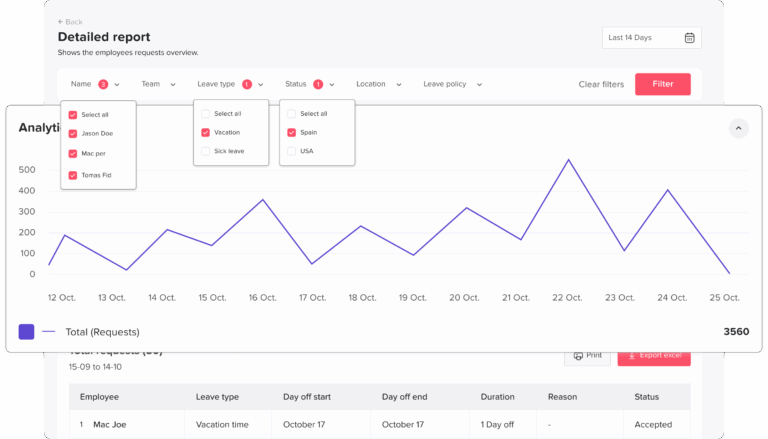
Test reports
Generate the reports you would actually use.
At minimum, look for:
- Current leave balances
- Leave taken
- Upcoming leave
- Employee absence history
- Team leave
- Leave by type
Then export the data.
Don’t just ask whether it exports
Open the exported file.
Can someone in HR or payroll actually use it?
Look at:
- Column names
- Date formats
- Employee identifiers
- Leave types
- Number of days or hours
- Remaining balances
An export technically being “available” isn’t useful if someone still has to spend an hour cleaning it before payroll can use it.
Days 9–11: Stress-Test the Policies
These are the days that separate a real software evaluation from a product tour.
Take your normal policies and deliberately create difficult scenarios.
Test carryover
Suppose your company allows employees to carry over up to five unused days.
Configure that rule and see what happens.
Can the system:
- Carry the balance forward automatically?
- Apply a maximum carryover?
- Expire unused days?
- Distinguish current-year and carried-over leave?
- Show employees where their balance came from?
You may not be able to reproduce an actual year-end during a 14-day trial, but you should still be able to determine whether the policy can be configured and how the system calculates it.
Test a new employee
Create a new employee who joins partway through the year.
Check whether their allowance is automatically pro-rated.
This is a particularly useful test because new-hire calculations are exactly the kind of thing that becomes painful when HR has to maintain them manually.
Test different working patterns
If your organization has part-time or non-standard employees, don’t skip this.
Try:
- Part time schedules
- Different working days
- Hour-based leave
- Shift workers
- Employees who don’t work Monday–Friday
Ask: Does the software understand this employee’s actual schedule?
Or does it simply assume everyone works five identical days per week?
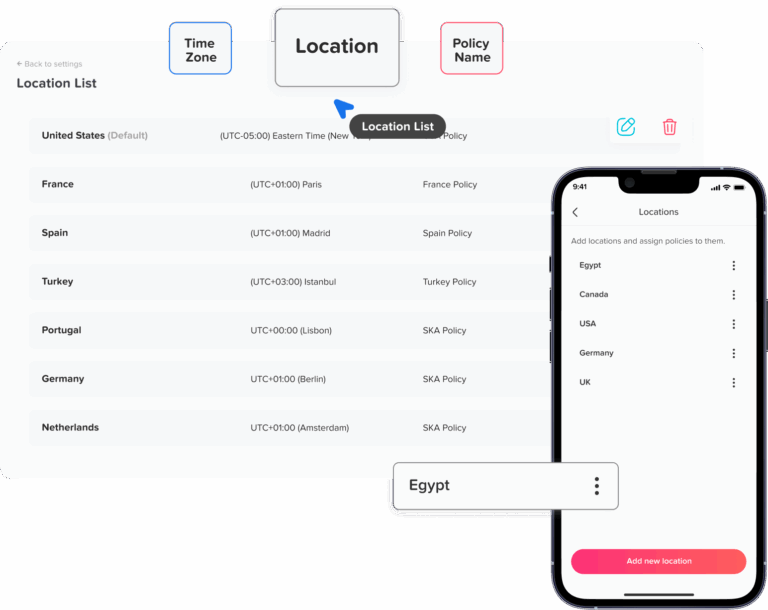
Multi-Country Teams: Test This Separately
If your employees work in multiple countries or regions, holiday management deserves its own test.
Create employees in the relevant locations and check whether the appropriate public holidays are applied.
For example, if you have employees in Egypt, the UK, and the US, you shouldn’t have to manually build one enormous holiday list and then remember which employees should receive which days.
Check:
- Regional holiday calendars
- Country-specific holidays
- Different workweeks
- Employee locations
- Whether holidays affect leave calculations
- Whether administrators can override a holiday when necessary
This is one of those features that may seem unimportant during a demo but becomes extremely important once you have a distributed workforce.
Days 12–13: Test Time Tracking, If You Need It
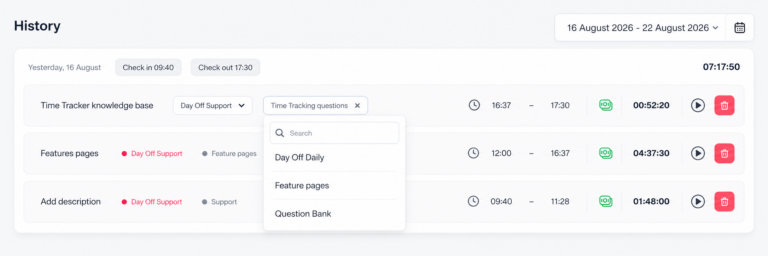
If you’re evaluating a platform that combines leave management with time tracking, don’t treat time tracking as an optional extra.
Test it as part of the actual employee workflow.
Have your test employee:
- Clock in.
- Clock out.
- Log working hours.
- Record time against a project or task if supported.
- Take a day of leave.
- Have the manager review the records.
Then ask: Are leave and worked-hours records actually connected?
This distinction matters.
Two tools can technically be sold as one platform while still behaving like separate systems behind the scenes.
A useful combined system should make it easier for managers and administrators to understand both:
“When was this person working?”
and
“When were they absent?”
without maintaining duplicate employee records or reconciling data manually.
Notifications: Test the Workflow Outside the App
A surprisingly important question is:
How do people know something needs their attention?
Test what happens when:
- An employee submits a request.
- A manager approves a request.
- A manager rejects a request.
- A request is cancelled.
- A balance changes.
If your company uses communication tools such as Slack or Microsoft Teams, check whether notifications can reach employees and managers where they already work.
The goal isn’t to send notifications for everything.
The goal is to prevent important requests from getting stuck because someone forgot to open the leave application.
Day 14: Make the Decision
Don’t wait until the trial expires to decide.
On the final day, bring your testers together for 15–30 minutes.
Ask each person the same questions.
For employees
- Was requesting leave straightforward?
- Did you understand your remaining balance?
- Did anything confuse you?
- Would you use this without being reminded?
For managers
- Was approving requests fast?
- Could you easily see team availability?
- Did you have enough information to make approval decisions?
- Did anything require a workaround?
For HR or administrators
- Was setup manageable?
- Were policies easy to configure?
- Were balances accurate?
- Were reports useful?
- How much ongoing administration would this create?
Pay particular attention to repeated complaints.
One person’s dislike of a button isn’t necessarily a deal-breaker.
If three different people independently say, “I wasn’t sure what would happen when I clicked this,” that’s a usability problem worth taking seriously.
Use a Scorecard Instead of Going With Your Gut
A simple scorecard makes software comparisons much easier.
Score each category from 1 to 5.
| Category | Weight | Score |
|---|---|---|
| Setup and administration | 15% | /5 |
| Employee experience | 15% | /5 |
| Manager experience | 15% | /5 |
| Leave policy flexibility | 15% | /5 |
| Calendar and visibility | 10% | /5 |
| Reporting and exports | 10% | /5 |
| Multi-country support | 5% | /5 |
| Time tracking | 10% | /5 |
| Integrations and notifications | 5% | /5 |
Then multiply each score by its weight.
The exact weighting doesn’t matter as much as making your criteria explicit.
If time tracking isn’t important to you, give it a smaller weight.
If you’re a multinational company, increase the weight of holiday calendars and regional policies.
This prevents a visually attractive product from winning simply because it made a good first impression.
Don’t Forget the Cost of Switching
Price is important, but the subscription price isn’t the whole cost.
Think about:
- Initial setup time
- Employee training
- Data migration
- Payroll reconciliation
- HR administration
- Support requirements
- Ongoing policy maintenance
- Integration costs
- Time spent correcting errors
A cheaper system that requires several hours of manual administration every month may cost more than a slightly more expensive system that automates the work.
Calculate the real cost
Don’t compare: $X per user
Compare: Software cost + implementation time + ongoing administration + manual reconciliation
That gives you a much more realistic picture.
Questions to Ask the Vendor Before You Buy
The trial should answer many questions, but there are some things worth asking the vendor directly.
Ask about data
- How is employee data stored?
- Can we export our data if we leave?
- What happens to our data when the account is cancelled?
- Are backups maintained?
Ask about support
- What support channels are available?
- What are the expected response times?
- Is support included in the subscription?
- Is onboarding assistance available?
Ask about pricing
- Is pricing per employee, per active user, or per account?
- Are there minimum user requirements?
- Are integrations included?
- Are there setup fees?
- What happens when our headcount changes?
Ask about future growth
A system that works for 15 people may not be the right choice for 150.
Ask: “What becomes different when our company grows?”
The answer can reveal limitations that aren’t visible during a small trial.
A Practical 14-Day Trial Checklist
Use this checklist while testing.
| Area | What to test | Pass condition |
|---|---|---|
| Setup | Employees, leave types, holidays, approvals | Setup is straightforward |
| Employee requests | Single-day, multi-day, half-day requests | Employees can complete requests without help |
| Approval | Manager approval/rejection | Fast and clear |
| Conflicts | Overlapping leave | Conflicts are visible or handled according to policy |
| Cancellation | Cancel approved leave | Balances and calendar update correctly |
| Calendar | Team availability | Managers can see absences at a glance |
| Balances | Different employee scenarios | Calculations are accurate |
| Policy | Carryover and pro-rating | Rules can be configured correctly |
| Holidays | Multiple locations | Correct regional holidays are applied |
| Part-time | Different schedules | Leave reflects actual working patterns |
| Reporting | Balances and leave history | Reports are usable without significant cleanup |
| Export | Payroll data | Export contains the information you need |
| Time tracking | Clock in/out and hours | Works naturally alongside leave |
| Notifications | Requests and approvals | People are notified reliably |
| Mobile | Employee request workflow | Core actions work comfortably on mobile |
| Usability | Employee + manager feedback | Core tasks require little or no help |
| Pricing | Full intended headcount | Total cost fits the budget |
Red Flags to Watch For During the Trial
Some problems are more significant than they initially appear.
You need a spreadsheet to make the software work
If you’re constantly exporting data to Excel to calculate something the system should handle, that’s a warning sign.
Employees need training for basic requests
If requesting one day off requires an instruction document, adoption may suffer.
Managers can’t see team availability quickly
The point of leave management isn’t only record-keeping. Managers need visibility to make staffing decisions.
Policy exceptions require manual work
Every company has exceptions. The question is whether the software gives administrators a sensible way to handle them.
Reports look good but aren’t usable
A beautiful dashboard doesn’t help much if payroll still needs to manually rebuild the numbers.
The mobile experience is an afterthought
Employees often request leave when they’re away from their desks. If mobile access matters to your workforce, test it properly rather than assuming the desktop experience represents it.
The vendor demo is better than the actual product
This is why you should test the software yourself.
A polished demo is useful for understanding what’s possible. Your trial should tell you what actually happens.
How to Test Day Off During the 14-Day Trial
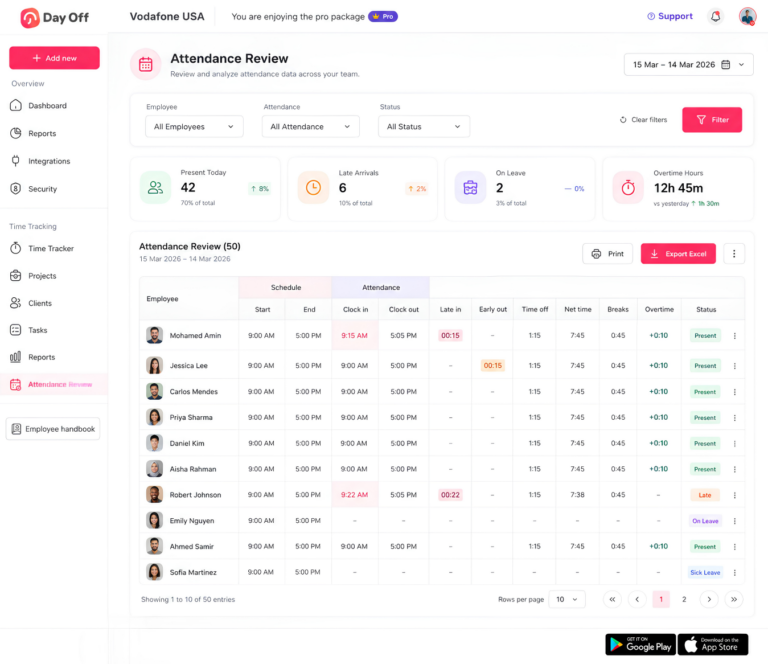
If you’re specifically evaluating Day Off, the general test plan above provides a useful framework. However, the most effective approach is to configure the system around your own employees, workflows, and company policies rather than relying solely on a product tour.
Focus particularly on the following areas:
Leave Requests and Approvals
Have employees submit different types of leave requests and ask managers to approve or reject them.
Pay attention to how quickly employees can submit requests and how easily managers can review, approve, or decline them. The process should feel straightforward for both sides.
Team Calendar
Use the shared calendar to test real scheduling scenarios. Create overlapping leave and check whether managers can quickly understand who is unavailable and when.
A good calendar should make potential scheduling conflicts obvious without requiring managers to dig through individual employee records.
Multi-Country Holidays
If your workforce is distributed across multiple countries, create employees in the relevant locations and verify that the correct holiday calendars are automatically applied.
Check that employees see the holidays relevant to their location without requiring manual adjustments.
Time Tracking
If you need both PTO management and time tracking, test them together. Try clocking in and out, recording worked hours, and submitting leave.
The key question is whether managers can get a clear picture of attendance, working hours, and leave in one place rather than having to maintain separate employee information.
Reporting
Generate leave balances, absence, and other relevant reports, then export them.
Don’t stop at confirming that a report exists. Check whether the information is actually useful for your HR, payroll, or management processes and whether it can be easily exported in the format you need.
Notifications and Integrations
If your team relies on tools such as Slack or Microsoft Teams, test how requests, approvals, and notifications fit into those existing workflows.
Ultimately, the best system isn’t just the one with the most features—it’s the one employees and managers can use easily enough that they actually remember to use it.
The Most Important Test: Would People Keep Using It?
This is the question that gets missed most often.
A leave system can have:
- dozens of reports,
- beautiful dashboards,
- extensive configuration options,
- multiple integrations,
and still fail if employees find it annoying.
After the trial, ask: “If nobody reminded you to use this system, would you still use it?”
That’s a better test of adoption than asking whether people “liked” the software.
You want the answer to be yes because the system is easier than the alternatives.
Frequently Asked Questions About Leave Software Trials
What is leave management software?
Leave management software is a system that helps businesses manage employee time off in one place. It typically handles leave requests, approvals, employee balances, holiday calendars, absence records, reporting, and sometimes attendance and time tracking.
Instead of managing leave through spreadsheets, email, or separate calendars, employees and managers can use one system to request, approve, track, and review time off.
Is leave management software worth it?
For many businesses, yes, particularly when leave is becoming difficult to manage manually.
The value isn’t simply in replacing a spreadsheet. Good leave management software can reduce administrative work, give employees visibility into their balances, make approvals faster, prevent scheduling confusion, and provide HR with more reliable records and reports.
The best way to determine whether it’s worth the cost is to calculate how much time your current process takes and then test whether the software actually reduces that workload.
How does a leave management system work?
Most leave management systems follow a simple workflow:
- An employee checks their available leave and submits a request.
- The request is sent to the appropriate manager or approver.
- The manager reviews the dates, balance, and team availability.
- The request is approved or rejected.
- The employee’s balance and team calendar are updated.
- HR can use the resulting data for reporting, payroll, and record-keeping.
The exact workflow varies between products, so it’s important to test it with your own employees and approval policies during a trial.
How are employee leave balances calculated?
Leave balances are normally calculated based on an employee’s entitlement minus the leave they have used, with the system also accounting for rules such as accrual, carryover, pro-rating, and sometimes pending requests.
For example, an employee with 20 days of annual leave who has used five days would generally have 15 days remaining. More complicated policies may require the system to account for when the employee joined, their working schedule, or how much leave can be carried into the following year.
This is why balance calculations should be tested with several different employee scenarios rather than just one standard employee.
What is leave accrual?
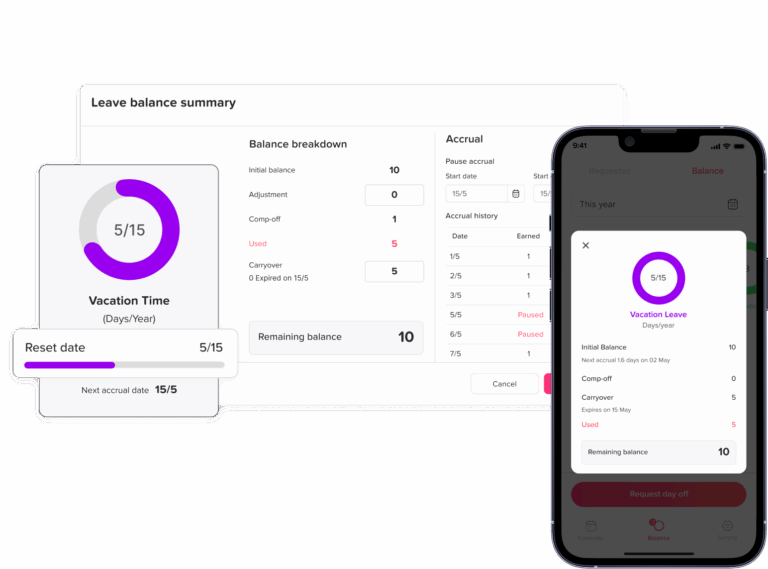
Leave accrual is the process of earning leave over time rather than receiving the entire annual allowance at once.
For example, an employee might receive a portion of their annual leave entitlement each month. A leave management system can automatically calculate the amount accrued and update the employee’s available balance.
If your company uses accruals, test different joining dates and employee types during the trial to make sure the calculations match your actual policy.
Can leave management software handle part-time employees?
Many leave management systems support part-time employees, but the way they handle them varies.
During a trial, test employees who work fewer days or hours than full-time staff. Check whether the system correctly handles their working schedule, leave allowance, public holidays, and partial-day leave.
Don’t assume that a system designed for full-time employees will automatically calculate part-time leave correctly.
Can leave software manage public holidays?
Yes, many leave management systems include public or bank holiday calendars.
This becomes particularly important when employees work in different countries or regions. Test whether the system applies the correct holidays based on each employee’s location and whether administrators can make adjustments when necessary.
If you operate internationally, don’t evaluate holiday management using only one country’s calendar.
Can leave management software support multiple countries?
Some leave management platforms are designed to support employees across multiple countries, including different holiday calendars, working weeks, leave policies, and employee locations.
If you have a distributed workforce, create test employees in each relevant country during your trial. Then check whether the correct holidays and policies are applied automatically.
Multi-country support can look good in a product description but behave very differently when you actually configure it.
Can employees request leave from their phones?
Many modern leave systems provide mobile access or mobile-friendly employee portals.
This is worth testing rather than simply checking whether a mobile app exists. Have an employee submit a real test request from their phone and see whether they can easily check their balance, choose dates, and track the request.
The question is not whether the software is technically available on mobile. It’s whether employees would actually want to use it there.
Can leave management software integrate with Slack or Microsoft Teams?
Some leave platforms integrate with workplace communication tools such as Slack and Microsoft Teams, allowing employees and managers to receive notifications or perform certain actions without constantly opening the leave application.
If your company already relies heavily on these tools, test the actual workflow during your trial.
For example, submit a leave request and see whether the manager receives a useful notification and can act on it without unnecessary steps.
Does leave management software integrate with payroll?
This depends on the software.
Some platforms offer direct payroll integrations, while others provide reports or CSV/Excel exports that HR or payroll teams can use.
Don’t assume that an advertised “payroll integration” will eliminate manual work. During the trial, test the actual data your payroll team needs and see how much cleanup or reconciliation is still required.
Final Thoughts
A 14-day free trial is more than an opportunity to explore a new piece of software. It’s a chance to find out whether a leave management system actually fits the way your business operates.
The best way to evaluate leave software is to test it with realistic employees, your actual leave policies, and the situations your HR and managers deal with every day. Don’t just check whether a feature exists. Test whether it works smoothly when someone requests leave, two employees want the same day off, a new employee joins, a holiday falls during leave, or payroll needs accurate records.
If you’re evaluating Day Off or another leave management platform, use the trial to answer the questions that matter most: Is it easy for employees to use? Can managers approve requests quickly? Are leave balances accurate? Can HR configure policies without workarounds? Are reports actually useful? And, most importantly, will your team continue using it once the trial is over?
Fourteen days is enough to uncover most of the important strengths and weaknesses — provided you test the software rather than simply browse it.
The goal isn’t to find the software with the longest feature list. It’s to find the system that makes managing leave simpler, more accurate, and easier for everyone involved.