







A PTO Balance Audit is a structured review of employee paid time off records to verify that the amount of leave shown for each employee matches what they should have earned, used, carried over, adjusted, or lost under the organization’s leave policy. Even small balance errors can become larger problems when they affect employee requests, payroll calculations, year-end carryovers, termination payouts, financial reporting, or trust in the company’s leave management process.

PTO balances may look simple on the surface, but the number employees see is usually the result of several separate calculations. Accrual schedules, hire dates, work schedules, carryover limits, policy changes, manual adjustments, approved leave, cancellations, and balance resets can all influence the final amount.
For HR teams, payroll administrators, and managers, periodically auditing these calculations can help identify errors before they spread across multiple leave cycles.
This guide explains how to conduct a PTO balance audit, how to calculate the expected balance, which errors to look for, how to correct discrepancies, and how companies can prevent balance problems from happening again.
What Is a PTO Balance Audit?
A PTO balance audit compares an employee’s recorded leave balance with the balance that should exist according to the company’s leave policy and the employee’s actual leave history.
The goal is not simply to check the number displayed in a PTO system. An effective audit verifies the transactions and rules that produced that number.
For example, suppose an employee’s dashboard shows 42 hours of available PTO. During an audit, HR may verify:
- The employee’s opening balance
- PTO earned during the current leave cycle
- Carryover from the previous year
- Approved PTO already taken
- Future approved leave that has already been deducted
- Manual balance adjustments
- Accrual caps
- Proration rules
- Carryover expiration
- Policy assignment
- Employment start date
- Work schedule
- Any retroactive policy changes
After rebuilding the calculation, HR may discover that the employee should actually have 46 hours available.
The four hour difference becomes an audit variance that needs to be investigated.
Why PTO Balance Accuracy Matters
Incorrect PTO balances affect more than the employee requesting vacation.
They can influence staffing decisions, payroll, employee relations, compliance, and financial reporting.
Employees rely on PTO balances when planning leave
Employees generally assume that the balance displayed in their leave management system is accurate.
If an employee plans a week long vacation based on an incorrect balance and later learns that they do not have enough PTO, the problem can create frustration for both the employee and manager.
The opposite problem is also possible. An employee may avoid taking time off because the system displays a lower balance than they have actually earned.
Payroll may depend on accurate leave records
Organizations may use leave records when processing paid absences, determining final pay, reviewing attendance, or calculating certain payroll-related adjustments.
An incorrect balance can therefore create differences between HR and payroll records.
PTO can represent a financial obligation
For some organizations, accrued vacation may create an accounting liability when the applicable accounting criteria are satisfied, including circumstances where the right has been earned through employee service, accumulates or vests, payment is probable, and the amount can be reasonably estimated.
If the underlying leave balance is wrong, the related financial estimate may also be inaccurate.
PTO rules can have legal implications
At the U.S. federal level, the Fair Labor Standards Act does not require employers to provide paid vacation, sick leave, or holiday pay. These benefits are generally matters of agreement between the employer and employee.
However, employers still need to consider applicable state and local requirements.
For example, California treats earned vacation as wages. Earned vacation generally cannot be forfeited under a “use it or lose it” arrangement, although reasonable accrual caps may be permitted. Earned and unused vacation must generally be paid when employment ends.
This is why an audit should never assume that the same forfeiture, expiration, or payout rule is valid for every employee or location.
Organizations operating across multiple jurisdictions should review applicable requirements with qualified payroll, HR, accounting, or legal professionals.
The Basic PTO Balance Formula
Most PTO balance calculations can be reconstructed using a relatively simple formula:
Expected PTO Balance = Opening Balance + PTO Earned + Carryover + Positive Adjustments – PTO Used – Negative Adjustments – Valid Expirations
The challenge is making sure every component is correct.
| PTO Component | What to Verify |
|---|---|
| Opening balance | Starting balance at the beginning of the audit period |
| PTO earned | Leave earned through accruals or granted upfront |
| Carryover | Unused PTO transferred from the previous cycle |
| PTO used | Approved leave deducted during the period |
| Adjustments | Manual credits or deductions made by administrators |
| Expiration | Carryover or leave that legitimately expired under applicable policy and law |
| Current balance | Amount that should remain after all valid transactions |
Example PTO balance calculation
Assume an employee started the year with:
- 16 hours of carryover
- 80 hours of PTO entitlement earned during the year
- 48 hours already used
- 4 hours manually added as a correction
The expected balance would be:
16 + 80 + 4 – 48 = 52 hours
If the leave management system displays 44 hours, there is an 8-hour variance.
HR should not immediately add eight hours to the employee’s balance. The next step is determining why the difference exists.
That distinction is important. A PTO balance audit should correct the underlying problem whenever possible, rather than simply adjusting the final number.
Common Causes of PTO Balance Errors
Leave balance errors usually come from a small number of recurring problems.
Understanding these causes makes the audit much faster.
Incorrect PTO Accrual Settings
Accrual configuration is one of the most common places for errors to occur.
A company policy may state that employees receive 120 hours of PTO annually, but the system may have been configured for a different accrual frequency or amount.
For example:
120 hours ÷ 12 months = 10 hours per month
If the system accidentally grants 12 hours each month, the employee could receive 144 hours during a full year instead of 120.
Auditors should verify:
- Annual entitlement
- Accrual frequency
- Accrual amount
- Accrual date
- Start of period versus end of period accrual
- Maximum balance
- Accrual cap
- Employee anniversary versus calendar year rules
Day Off, for example, supports recurring accrual schedules including weekly, biweekly, semi monthly, and monthly accrual configurations.
Incorrect Hire Date or Service Date
Many PTO policies use an employee’s start date when determining:
- Prorated entitlement
- Eligibility
- Anniversary resets
- Seniority based PTO
- Waiting periods
If the employee’s hire date is incorrect, multiple future accrual calculations may also become incorrect.
For example, an employee hired on July 1 might qualify for half of a yearly PTO entitlement under a prorated policy.
If the employee is incorrectly entered as starting January 1, the system could grant a full year’s entitlement.
Incorrect PTO Proration
Employees joining or leaving during a leave cycle may not receive the same entitlement as employees who work the full period.
Consider a policy offering:
24 vacation days per year
A simplified monthly proration would be:
24 ÷ 12 = 2 days per month
An employee eligible for six months would therefore receive:
2 × 6 = 12 days
However, actual proration methods vary. Some companies calculate by calendar month, pay period, actual days employed, hours worked, or another rule defined in the policy.
The PTO balance audit should use the method actually specified by the organization.
Approved Leave Was Not Deducted
An employee may have taken leave that appears on a calendar or timesheet but was never properly deducted from the PTO balance.
Possible causes include:
- Manual leave records
- Imported data
- Changes between systems
- Incorrect leave type
- Deleted requests
- Payroll adjustments that were never sent back to HR
Compare leave requests with actual balance transactions.
Leave Was Deducted Twice
Duplicate deductions can occur when leave is entered into multiple systems.
For example, HR may record an absence manually while the employee has already submitted the same PTO request through the company’s leave system.
The result could be:
8 hours requested + another 8-hour manual deduction = 16 hours removed
when only eight hours should have been deducted.
Cancelled Leave Was Never Returned
Suppose an employee requests five vacation days.
The leave is approved and five days are deducted.
Later, the employee cancels the trip.
If the request is removed from the calendar but the PTO balance is not restored, the employee could incorrectly lose five days.
Cancelled, rejected, deleted, or modified requests deserve special attention during an audit.
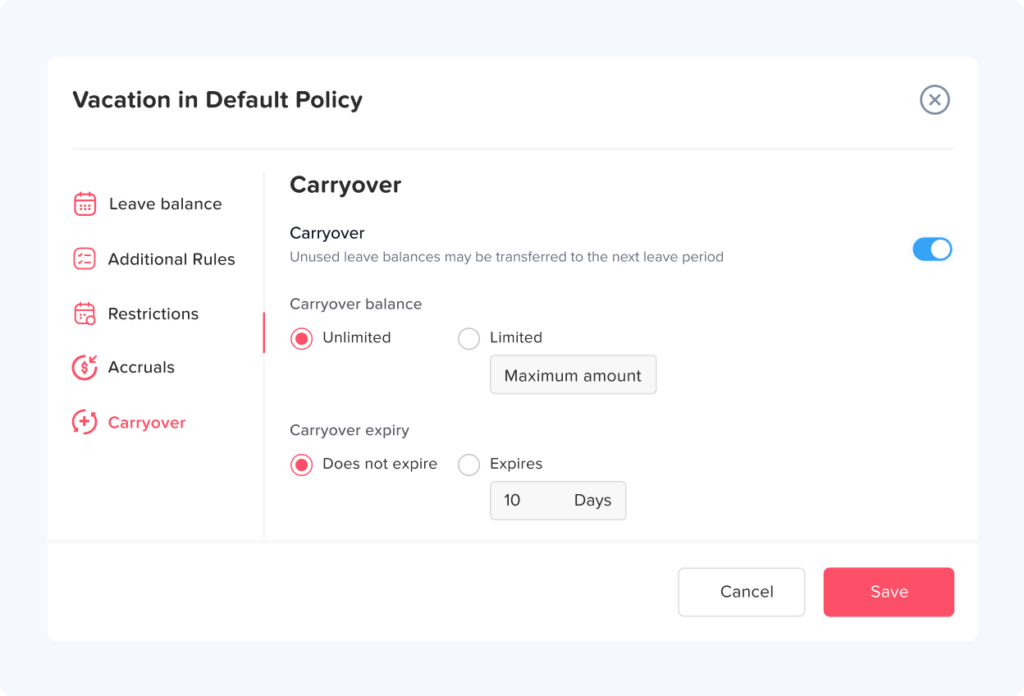
Carryover Was Calculated Incorrectly
Carryover rules can become complicated because policies may contain:
- Unlimited carryover
- Maximum carryover
- Carryover expiration
- Different carryover rules by leave type
- Different rules by employee group
- Anniversary based cycles
Suppose an employee finishes the year with 11 unused vacation days but the policy allows only five days to carry forward.
The new cycle should normally start with five carried over days, subject to applicable law and company policy.
If all 11 days are transferred, the balance could be overstated by six days.
Day Off allows organizations to configure carryover limits and provides a Carryover Report showing carried balances, remaining amounts, usage, and expiration details.
Carryover Expiration Was Applied Incorrectly
Some policies allow employees to carry unused PTO into the next period but require eligible carried leave to be used by a specific date.
An audit should verify both:
How much was carried over?
and:
When was that carryover allowed to expire?
Do not automatically assume expiration is legally permissible in every jurisdiction or for every type of leave.
Wrong Leave Policy Assignment
An employee may simply be assigned to the wrong leave policy.
For example:
- Full time employee assigned to a part time policy
- U.S. employee assigned to another country’s policy
- Manager assigned to the standard employee policy
- Tenured employee still assigned to an entry level entitlement
- Employee transferred to another location without updating the leave policy
This type of mistake can affect every future accrual.
Employee Status Changes Were Not Reflected
Changes in employment status can affect PTO entitlement.
Common examples include:
- Full time to part time
- Part time to full time
- Workweek changes
- Location transfer
- Promotion
- Contract changes
- Extended unpaid absence
- Rehire
- Change in working hours
When auditing an employee with a balance discrepancy, review major employment changes during the period.
Days and Hours Were Mixed
A PTO policy may be expressed in days while schedules vary by employee.
For example, one employee may work eight hour days while another works ten hour shifts.
Treating one PTO day as eight hours for every employee can produce inaccurate deductions when schedules differ.
For hourly PTO policies, the deduction should reflect the organization’s actual policy and relevant schedule rules.
Manual Adjustments Were Made Without Documentation
Manual adjustments are sometimes necessary.
They may be used for:
- Correcting historical balances
- Rewarding additional PTO
- Handling negotiated exceptions
- Correcting payroll errors
- Adding compensatory leave
- Migrating records from another system
The problem is not the adjustment itself.
The problem is an adjustment without an explanation.
Every manual adjustment should ideally answer:
Who changed the balance?
When was it changed?
By how much?
Why was it changed?
What supporting record exists?
How to Conduct a PTO Balance Audit Step by Step
A structured approach makes PTO auditing easier, particularly for organizations with many employees or multiple policies.
Step 1: Define the Audit Period
Choose the period you want to review.
Common options include:
- Current leave year
- Previous leave year
- Calendar year
- Fiscal year
- Employee anniversary cycle
- Specific payroll period
- Period since the last audit
Avoid mixing different leave cycles unless necessary.
Clearly defining the period helps establish the correct opening and closing balances.
Step 2: Collect the Required PTO Data
You will typically need:
- Employee list
- Employment start dates
- Employment status
- Leave policy assignments
- Work schedules
- Opening balances
- Accrual history
- Approved PTO requests
- Cancelled requests
- Rejected requests when relevant
- Manual adjustments
- Carryover records
- Balance reset records
- Current balances
- Termination information where applicable
Using a central leave system makes this process significantly easier than reconstructing records from spreadsheets, emails, calendars, and payroll files.
Step 3: Verify the Leave Policy First
Before calculating any balances, confirm what employees were actually entitled to receive.
Check:
- PTO allocation
- Leave type
- Balance unit
- Accrual frequency
- Accrual start date
- Eligibility rules
- Probation or waiting periods
- Proration
- Carryover
- Carryover limit
- Expiration
- Maximum balance
- Negative balance rules
- Reset date
Also determine whether the policy changed during the audit period.
Never audit historical balances against today’s policy if different rules applied at the time.
Step 4: Recalculate PTO Earned
Calculate how much PTO each employee should have earned during the audit period.
For example, suppose the policy grants:
96 PTO hours per year
with monthly accrual.
Monthly accrual:
96 ÷ 12 = 8 hours
If the employee completed nine eligible accrual periods:
9 × 8 = 72 hours earned
Compare that result with the system’s accrual history.
If the system shows 80 hours earned, investigate which additional eight hours were added.
Step 5: Reconcile PTO Taken
Next, total all leave that should reduce the employee’s PTO balance.
Compare:
- Approved requests
- Completed absences
- Timesheets where applicable
- Attendance records
- Payroll records when appropriate
- Leave transactions
Look specifically for:
- Duplicate requests
- Cancelled leave
- Half day requests
- Hourly leave
- Requests crossing leave cycles
- Requests crossing weekends or holidays
- Retroactive requests
The purpose is to confirm that only valid chargeable PTO was deducted.
Step 6: Audit Carryover
Determine the balance remaining at the end of the previous cycle.
Then apply the correct carryover rule.
Example:
Previous unused balance: 72 hours
Maximum carryover: 40 hours
Expected carryover:
40 hours
If the current period began with 72 hours, the employee received 32 more hours than the policy allows, assuming the carryover limitation itself is valid under applicable law.
Step 7: Review All Manual Adjustments
Manual adjustments are high value audit items because they bypass normal automated calculations.
Review every significant adjustment and classify it.
Possible classifications include:
- Correction
- Bonus PTO
- Payroll correction
- Migration
- Policy exception
- Compensatory time
- Unknown
“Unknown” adjustments should be investigated.
Step 8: Rebuild the Expected Balance
Once every component has been verified, calculate the expected balance.
Consider this example:
| Item | Hours |
|---|---|
| Opening carryover | +16 |
| PTO earned | +64 |
| Manual correction | +4 |
| PTO used | -32 |
| Expected balance | 52 |
| System balance | 44 |
| Variance | 8 |
The audit has now confirmed that an eight hour difference exists.
The next question is why.
Step 9: Trace the Variance to Its Source
Avoid correcting the balance before identifying the cause.
Possible root causes might include:
- Missing accrual
- Duplicate PTO deduction
- Incorrect carryover
- Wrong opening balance
- Incorrect policy
- Manual adjustment
- Cancelled request
- Data migration problem
Suppose you discover an eight hour vacation request was accidentally deducted twice.
The correct action is to reverse the duplicate deduction, not simply grant eight “bonus” hours.
That preserves a more accurate audit trail.
Step 10: Correct the Employee Balance
Once the cause has been verified, make the required correction.
A good correction record should include:
- Employee
- Leave type
- Original balance
- Correct balance
- Adjustment amount
- Reason
- Date
- Administrator
- Supporting evidence
Day Off allows administrators to adjust employee balances directly from the employee’s Balance section by adding or deducting days or hours when corrections are required.
Step 11: Check Whether Other Employees Are Affected
This step is frequently overlooked.
If the error was caused by an individual transaction, it may affect only one employee.
If the error was caused by a policy configuration, however, dozens or hundreds of employees may be affected.
For example, if monthly accrual was configured as 10 hours instead of 8 hours, every employee assigned to that policy may have an incorrect balance.
Once a configuration problem is discovered, expand the audit population.
PTO Balance Audit Example
Consider an employee named Jordan.
The company’s policy provides:
- 120 hours annual PTO
- Monthly accrual
- Maximum 40 hours carryover
- Eight-hour workday
Jordan carried 24 hours from last year.
The employee completed six monthly accrual periods.
Monthly accrual:
120 ÷ 12 = 10 hours
Six months earned:
10 × 6 = 60 hours
Jordan used three full PTO days:
3 × 8 = 24 hours
Expected balance:
24 + 60 – 24 = 60 hours
However, the system shows 70 hours.
The auditor reviews the accrual history and discovers seven monthly accrual transactions instead of six.
One accrual was accidentally processed twice.
Therefore:
System balance: 70 hours
Correct balance: 60 hours
Required correction: -10 hours
More importantly, HR should investigate whether the duplicate accrual affected anyone else assigned to the same policy.
When Should Companies Perform a PTO Balance Audit?
There is no single audit frequency suitable for every organization.
A risk-based approach generally works better.
Before a new leave year
Auditing before balances reset or carry over can prevent incorrect numbers from moving into another cycle.
After a balance reset
Check whether:
- New entitlements were granted correctly
- Carryover was processed correctly
- Expiring balances were treated correctly
- Accrual schedules restarted correctly
Before year-end financial reporting
Organizations that recognize liabilities related to accrued compensated absences may need reliable underlying leave data for accounting purposes.
Before employee termination payouts
Where unused vacation must be paid at termination, an inaccurate balance can directly affect final compensation.
Applicable rules vary significantly by jurisdiction and policy, so organizations should verify local requirements before processing payouts.
After major policy changes
Audit affected employees after changing:
- Annual entitlement
- Accrual frequency
- Carryover rules
- Balance caps
- Reset dates
- Work schedules
- PTO units
After migrating to new leave software
Data migration is another important audit trigger.
Opening balances should be reconciled between the previous system and the new system before the old source is retired.
Periodically during the year
For many organizations, quarterly spot checks can identify problems before year end.
Higher risk organizations may choose more frequent reviews.
PTO Balance Audit Checklist
A practical audit can include the following checks:
Employee information
- Verify employee start date
- Verify employment status
- Verify team and location
- Verify assigned leave policy
- Verify applicable work schedule
PTO entitlement
- Confirm annual allocation
- Confirm leave balance unit
- Confirm accrual frequency
- Confirm accrual amount
- Confirm eligibility rules
- Confirm proration
- Confirm balance cap
Transactions
- Verify approved leave
- Check cancelled requests
- Look for duplicate deductions
- Review retroactive requests
- Review manual adjustments
- Investigate unusual transactions
Carryover and resets
- Verify previous closing balance
- Apply carryover limit
- Verify carryover expiration
- Confirm reset date
- Confirm new-cycle entitlement
Final reconciliation
- Calculate expected balance
- Compare against current balance
- Record variance
- Identify root cause
- Correct confirmed error
- Document correction
- Check whether other employees are affected
How to Prioritize Employees During a Large PTO Audit
A company with hundreds or thousands of employees may not want to manually rebuild every balance.
Instead, HR can use exception based auditing.
Start with employees showing unusual conditions.
For example:
- Negative balances
- Very high unused balances
- Large manual adjustments
- Recent policy changes
- Multiple cancelled requests
- Large carryover balances
- Rehires
- Recently terminated employees
- Employees who changed schedules
- Employees transferred between locations
- Employees approaching accrual caps
- Balances that changed unexpectedly
This allows HR to focus attention where errors are more likely.
Useful PTO Audit Metrics
Tracking audit results over time can reveal weaknesses in the leave management process.
PTO balance variance rate
One useful metric is:
Employees With Balance Errors ÷ Employees Audited × 100
Example:
25 employees audited
3 balances incorrect
3 ÷ 25 × 100 = 12% variance rate
A consistently high variance rate suggests the organization should investigate its leave processes rather than continuing to make individual corrections.
Manual adjustment frequency
Track how often administrators manually change employee balances.
A high number of adjustments may indicate:
- Poor policy configuration
- Weak integration between systems
- Frequent exceptions
- Inaccurate imports
- Inconsistent leave procedures
Accrual exception rate
Measure how many employees receive accruals that differ from their expected policy calculation.
Carryover error rate
Track employees whose transferred balance does not match the applicable carryover rule.
Repeated correction rate
If the same employees repeatedly require corrections, investigate whether there is a broader scheduling, policy, or workflow issue.
How to Prevent PTO Balance Errors
The best PTO balance audit is one that produces fewer discrepancies every time it is performed.
Several controls can significantly improve accuracy.
Use Automated PTO Accruals
Instead of manually calculating leave every payroll period, configure accrual rules inside a leave management system.
Automation reduces repetitive calculations and helps apply the same rule consistently.
Limit Unnecessary Manual Adjustments
Manual adjustments should remain available for legitimate exceptions, but they should not become the normal way PTO is managed.
If HR repeatedly adds or removes balances manually, investigate why.
Keep Leave Policies Specific
Avoid ambiguous language such as:
“Employees receive vacation regularly.”
Instead define:
- Amount
- Accrual method
- Eligibility
- Carryover
- Cap
- Reset
- Expiration
- Treatment at termination where applicable
The written policy and configured system should match.
Keep Historical Records
When a leave policy changes, retain enough information to understand what rule applied previously.
Otherwise, future audits may become difficult because historical transactions are evaluated against current settings.
Centralize Leave Requests
Employees should use a consistent process for requesting time off.
Managing PTO through emails, messages, spreadsheets, paper forms, and separate calendars significantly increases the risk of duplicate or missing records.
Review Carryover Immediately After Reset
Do not wait several months to discover a reset problem.
Review a sample of balances shortly after the new leave cycle begins.
Give Employees Visibility Into Their Balance
Employees themselves can sometimes identify errors quickly.
When employees can see:
- Available PTO
- Used leave
- Upcoming leave
- Accrual information
- Carryover
they become an additional layer of verification.
Using Day Off for PTO Balance Management
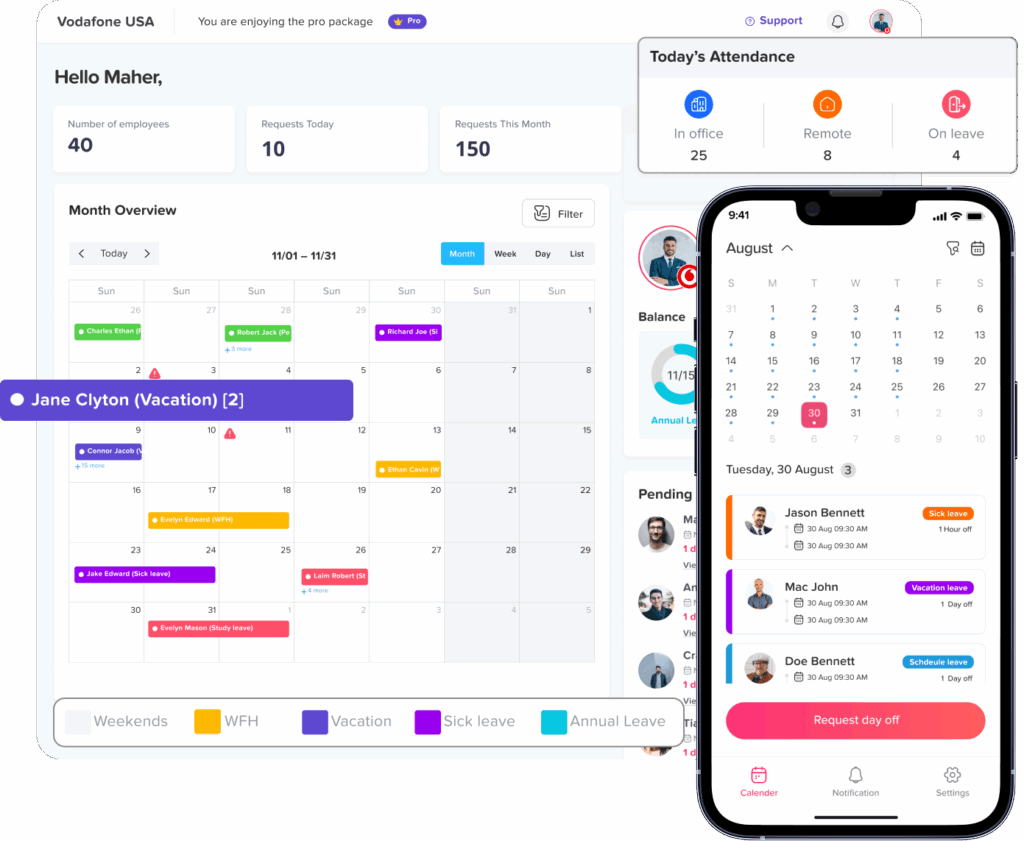
A leave management platform can make a PTO Balance Audit easier because the audit information is stored in a structured format rather than spread across multiple spreadsheets and email threads.
Day Off provides several reports that can support balance reviews.
The Balances Report shows employee leave balances, including total and used balances.
The Detailed Report provides a record of submitted leave requests and their statuses.
The Accruals Report shows accrued balances, earned leave, and upcoming accrual information.
The Carryover Report provides visibility into transferred leave, usage, remaining balances, and carryover expiration.
Administrators can also adjust individual employee balances when a verified correction is necessary.
Using these records together creates a stronger audit trail.
For example, if an employee questions a balance, HR can review:
Starting balance → Accruals → Carryover → Leave requests → Adjustments → Current balance
instead of trying to reconstruct the history manually.
PTO Balance Audit vs. PTO Balance Adjustment
These two actions should not be confused.
A PTO balance audit determines whether the balance is correct.
A PTO balance adjustment changes the balance.
The audit should normally happen first.
Consider an employee who says:
“I am missing one vacation day.”
Immediately adding one day may make the employee’s current balance appear correct, but it does not explain what happened.
Instead, HR should determine whether:
- An accrual was missing
- Leave was deducted twice
- Carryover was incorrect
- The employee misunderstood the policy
- The wrong leave type was used
- The employee’s schedule affected the deduction
Only after identifying the reason should HR make a correction if one is actually required.
This approach protects the integrity of the leave record.
FAQ
What is a PTO balance audit?
A PTO balance audit is a review of employee paid time off records to confirm that current leave balances match applicable company policies, accrual calculations, carryover rules, leave usage, and manual adjustments.
How do you audit a PTO balance?
Start with the employee’s opening balance, add valid accruals and carryover, subtract eligible PTO used, review manual adjustments and applicable expirations, then compare the calculated result with the balance recorded in the leave system.
How do you calculate an employee’s remaining PTO balance?
A general formula is:
Opening PTO + PTO Earned + Carryover + Positive Adjustments – PTO Used – Negative Adjustments – Valid Expirations = Remaining PTO
The exact calculation depends on the organization’s leave policy.
What causes incorrect PTO balances?
Common causes include incorrect accrual settings, duplicate leave deductions, missing accruals, incorrect hire dates, policy assignment errors, carryover mistakes, undocumented manual adjustments, cancelled requests, and incorrect balance resets.
How often should PTO balances be audited?
Audit frequency depends on workforce size, policy complexity, payroll processes, and risk. Many companies benefit from periodic reviews during the year and additional audits around leave-year resets, policy changes, system migrations, year-end reporting, and employee terminations.
Can HR manually correct an employee’s PTO balance?
Yes, organizations commonly need a controlled method for correcting verified leave balance errors. Adjustments should be documented with the reason, amount, date, and supporting information so future audits can understand why the change occurred.
Should PTO balances match payroll records?
Where payroll processes use PTO data, relevant HR and payroll records should be reconciled. Differences should be investigated because they may indicate missing leave entries, incorrect deductions, or timing differences between systems.
Can unused PTO expire?
The answer depends on the type of leave, employer policy, employment agreement, and applicable state or local law. U.S. federal law generally does not require vacation benefits, but state rules can impose additional requirements. For example, California generally prohibits forfeiture of earned vacation.
Conclusion
A PTO Balance Audit gives HR teams a systematic way to confirm that employee leave balances are correct before small discrepancies become payroll problems, employee disputes, incorrect carryovers, or financial reporting issues.
The process should go beyond comparing two numbers. HR should reconstruct how the balance was created by reviewing the employee’s opening balance, accruals, PTO usage, carryover, adjustments, policy assignment, schedule, and applicable reset rules.
When an error appears, identify the root cause before changing the employee’s balance. A missing accrual and a duplicate deduction may produce the same numerical difference, but they require very different corrections.
Companies should also treat every discovered error as a potential process signal. If one employee received the wrong accrual because of a policy configuration problem, everyone assigned to that policy may need to be reviewed.
Using a centralized leave management platform such as Day Off can make this process easier by keeping balances, leave requests, accruals, carryover information, and reports in one place. Instead of rebuilding leave history across spreadsheets and emails, HR teams can review the information behind each balance and make documented corrections when required.
Regular audits, clear leave policies, automated accruals, controlled adjustments, and transparent employee records can significantly reduce PTO discrepancies and help organizations maintain reliable leave data over time.