







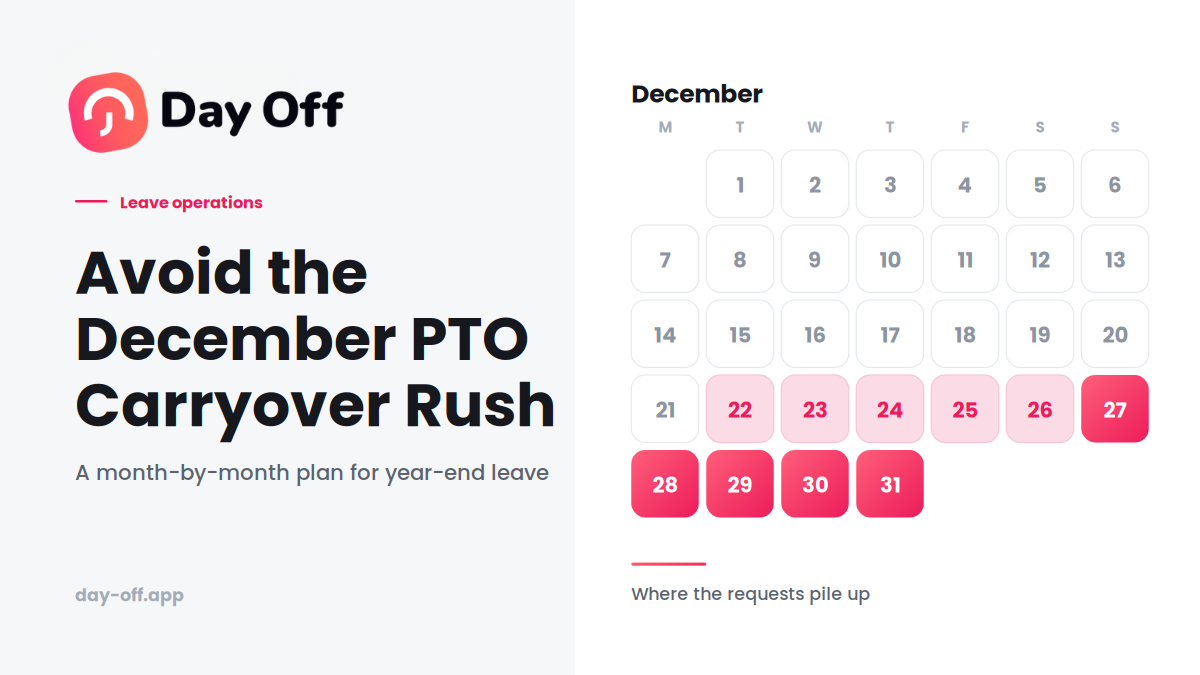
Every December, the same pattern appears on the team calendar: leave requests pile up during the final weeks of the year, half the company wants the same few days off, and managers are left trying to work out how much coverage they can realistically afford to lose as employees rush to use their remaining PTO before the year-end PTO carryover deadline.
Then comes the familiar reminder:
“Don’t forget to use your remaining leave before it expires.”
By the time that email goes out, it’s often too late.
The December leave rush isn’t really a scheduling problem. It’s a visibility and planning problem that eventually becomes a scheduling problem.

If employees don’t know how much leave they have left until November, and managers don’t have a clear view of upcoming absences until requests start flooding in, December becomes a race.
The good news is that most of this can be prevented months earlier.
Here’s how to manage unused leave and carryover without turning the end of the year into a scramble.
Why the December Leave Crunch Happens Every Year
Two problems usually drive the rush, and they reinforce each other.
Employees don’t think about their balance until it’s urgent
Most employees aren’t checking their leave balance every week.
They take a few days here and there, get busy with work, and assume they’ll deal with the rest later.
Then November arrives and they discover they still have 10 or 15 days available.
Suddenly, the problem is no longer:
“When should I take my vacation?”
It’s:
“How am I going to use all of this before the deadline?”
When dozens of employees make the same discovery at roughly the same time, the result is predictable: a flood of requests.
Managers end up approving leave request by request
The second problem is what happens on the management side.
When December requests start arriving, managers may handle them individually:
- Employee A requests December 20–23.
- Employee B requests December 21–24.
- Employee C requests December 27–30.
- Employee D requests the entire final week of the year.
Each request may look reasonable on its own.
The problem only becomes obvious when you look at the entire team calendar.
That’s how departments end up with too many people away at the same time, or with managers rejecting reasonable requests simply because everyone waited until the same deadline.
Neither situation is necessarily a people problem.
It’s usually a planning problem.
The Best Way to Prevent the December Leave Rush
The solution isn’t necessarily a stricter “use-it-or-lose-it” policy.
It’s earlier visibility and better planning.
Give Employees Year-Round Visibility Into Their Balance
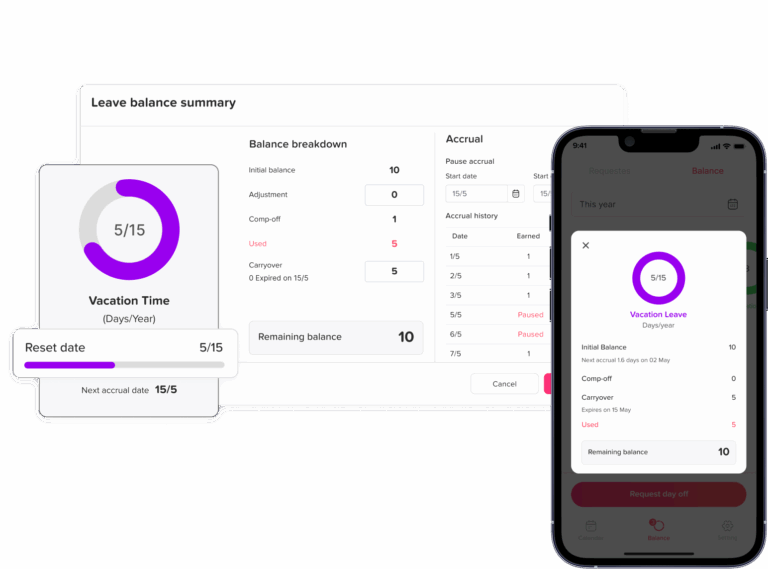
The simplest improvement is also one of the most effective: make employees’ current leave balances easy to find throughout the year.
If someone sees in July that they still have 14 days available, they have plenty of time to plan them.
If they only discover that balance in November, their options are much more limited.
Employees shouldn’t have to email HR or search through an unfamiliar HR system just to answer:
“How many days off do I have left?”
Make the balance visible where employees naturally interact with the system, whether that’s a dashboard, employee profile, mobile app, or workplace notification.
The objective isn’t to remind people constantly.
It’s to make the information available before it becomes urgent.
Send a Mid-Year Reminder
A single year-end email is usually too late.
Instead, send a simple reminder around the middle of the year.
For example: “You’ve used 8 of your 20 annual leave days so far this year. You currently have 12 remaining.”
That’s much more useful than: “Please remember to use your remaining leave before December 31.”
The first message gives employees time to plan.
The second creates urgency.
A mid-year reminder also gives managers an opportunity to identify teams where unused leave is accumulating unusually quickly.
Set a Soft Deadline Before the Actual Deadline
If your formal policy says employees must use their leave by December 31, consider setting an internal planning deadline earlier in the year.
For example, you might encourage employees to submit most end-of-year leave requests by mid-November.
This doesn’t necessarily mean refusing requests after that date.
It simply gives managers a point at which they can review coverage before the final weeks become crowded.
The distinction is important:
A soft deadline is a planning tool. A hard deadline is a policy rule.
Keep the two separate.
Look at the Team Calendar Before Approving December Leave
When the final weeks arrive, don’t evaluate requests in isolation.
Before approving a cluster of December requests, look at the team’s overall availability.
Ask:
- How many people will already be away?
- Are critical roles covered?
- Are several people requesting the same dates?
- Are there particular days when staffing will be too low?
- Can employees move their leave slightly earlier or later?
- Are there fair alternatives if everyone can’t be away simultaneously?
The goal shouldn’t be to automatically reject overlapping leave.
It’s to make decisions using the full picture.
How to Create a Fair Carryover Policy
A “use-it-or-lose-it” policy isn’t automatically unfair or unlawful. The rules depend heavily on the jurisdiction and the type of leave involved.
But from a management perspective, a policy becomes difficult when employees have little visibility into their balances and are then expected to use a large amount of leave within a short period.
A few approaches can reduce that pressure.
Allow Limited Carryover
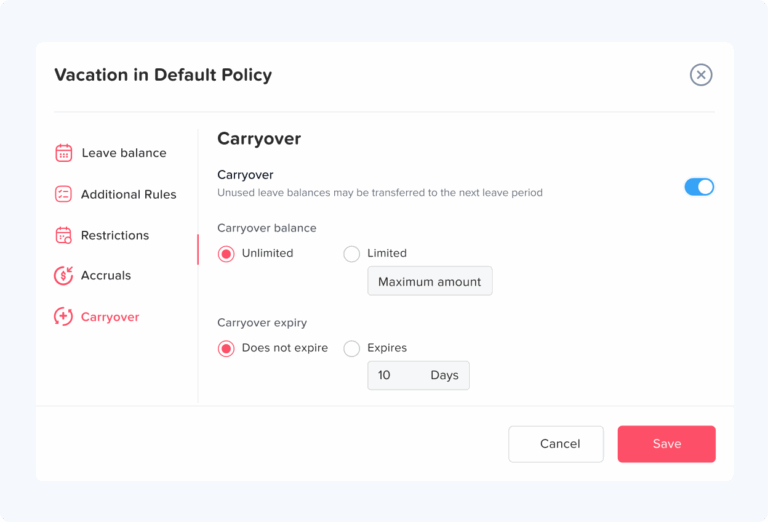
One option is to allow employees to carry a capped number of unused days into the following year.
For example:
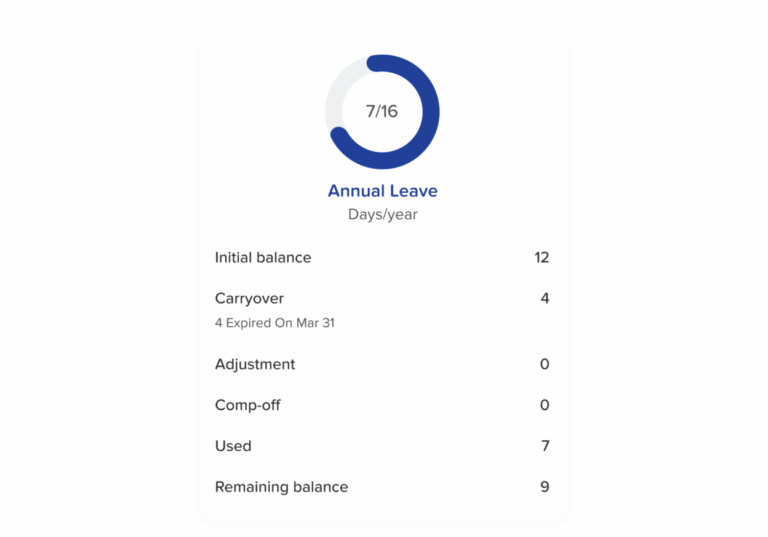
Up to 5 unused days can carry over and must be used by March 31.
This avoids an all-or-nothing December deadline while still encouraging employees to take their annual leave.
The exact cap and expiry period should reflect your company’s policy and applicable employment laws.
Use an Expiry Window
Instead of requiring all unused leave to disappear on December 31, allow carried-over days to remain available for a limited period.
For example:
2026 carried-over leave must be used by March 31, 2027.
This gives employees additional flexibility without creating unlimited accumulation.
Consider Payout Where Permitted
Some organizations allow unused leave to be paid out instead of carried over.
Whether this is permitted, required, or prohibited depends on local employment law and the type of leave involved.
Don’t build a payout option into your policy simply because it works for another company. Check the rules that apply to your employees first.
Account for Different Leave Years
Not every employee necessarily follows the same leave cycle.
Some organizations use a calendar year. Others use an employee’s anniversary date or another accrual period.
If employees have different reset dates, a single company-wide December reminder may not make sense.
Reminders and carryover rules should be tied to the employee’s actual leave period where necessary.
The Real Goal Isn’t to Eliminate Carryover
Carryover isn’t necessarily the problem.
The bigger problem is surprise.
If an employee reaches November with 12 unused days and had no idea that most of them were going to expire, the system has failed at communication.
If the employee has known since July that they have 12 days remaining and has had several opportunities to plan them, the situation is very different.
The best leave-management process makes balances, deadlines, and upcoming absences visible throughout the year.
That way, December becomes a normal planning period rather than an annual emergency.
A Simple Timeline for Managing Year-End Leave
| When | What to do |
|---|---|
| January–March | Make sure employees understand their annual allowance and carryover rules. |
| June–July | Send a mid-year balance reminder and identify unusually high unused balances. |
| September–October | Encourage employees to start planning remaining leave, particularly around popular holiday periods. |
| 6–8 weeks before year-end | Set an internal soft deadline for most year-end requests and review expected team coverage. |
| Final 2–3 weeks | Review the team calendar before approving overlapping requests and resolve coverage issues proactively. |
| Year-end | Confirm carryover, expiry, and any other policy consequences clearly, using each employee’s actual balance. |
This approach turns year-end leave from a last-minute problem into a process that can be managed throughout the year.
A Quick Checklist for This Year
If you’re already approaching the end of the year, you don’t need to redesign your entire leave policy.
Start with these steps:
- Pull a report of current employee balances.
- Identify employees with unusually high unused balances.
- Remind employees how much leave they have remaining.
- Clearly communicate the carryover or expiry rules.
- Ask employees to submit planned year-end leave early.
- Review the team calendar for overlapping requests.
- Identify critical coverage gaps before approving everything.
- Give managers a consistent approach for handling conflicting requests.
- Confirm that carried-over leave is recorded correctly.
- Schedule a mid-year reminder for next year so the same problem doesn’t repeat.
Identify Leave at Risk Before the Rush Starts
One of the easiest ways to prevent a December leave problem is to identify it before December.
HR teams don’t need to wait until the final quarter to see who has unused leave. A simple balance report can show which employees are likely to struggle to use their remaining allowance before the deadline.
For example, you might flag employees who:
- Have used less than half of their annual allowance by mid-year.
- Have accumulated significantly more leave than their colleagues.
- Have a large balance with only a few months remaining.
- Have already booked several weeks of leave but still have a significant balance.
- Are approaching the end of a probation or accrual period.
- Have a leave year that ends on a different date from the rest of the company.
The exact threshold will depend on your policy.
The important thing is to identify potential problems while employees still have time to act.
A simple quarterly review can be enough:
Who has a high remaining balance? Who is likely to lose leave? Who needs a reminder?
That is much easier to solve in July than in December.
Don’t Forget Managers When Planning Year-End Leave
Employees aren’t the only people who need to plan.
Managers can also become a bottleneck when dozens of requests arrive at the same time.
If every manager has to manually review individual requests, check spreadsheets, compare calendars, and work out team coverage, approvals can become slow and inconsistent.
Give managers the information they need before the rush begins.
They should be able to see:
- Current team availability.
- Approved leave.
- Pending requests.
- Remaining employee balances.
- Important business dates.
- Minimum staffing requirements.
- Potential overlaps.
This changes the manager’s role from reacting to requests to planning team coverage.
It also makes it easier to have proactive conversations.
For example, if three people on the same team are planning to take the final week of December off, the manager can address the conflict before approving all three requests.
Create Clear Rules for Conflicting Leave Requests
December is when vague leave policies tend to become uncomfortable.
If five employees request the same popular dates, who gets approved?
There is no single answer that works for every company. Some organizations use first-come-first-served. Others prioritize business needs, rotate priority from year to year, or use a seniority-based system.
Whatever approach you choose, make it clear before employees need to compete for dates.
Your policy should explain:
- Whether overlapping leave is allowed.
- Whether there is a minimum staffing requirement.
- How conflicting requests are prioritized.
- Whether certain business periods have restricted leave.
- Who has final approval authority.
- How exceptions are handled.
- Whether priority changes from year to year.
Consistency matters.
Employees are much more likely to accept an unpopular decision when they understand that the same rules apply to everyone.
Separate Popular Dates From Genuine Coverage Problems
Not every overlap is a problem.
A team of ten people might easily handle three employees being away at the same time. A team of three might struggle with one person being absent.
That’s why leave policies shouldn’t focus only on the number of overlapping requests.
Look at the actual business impact.
For example:
Three employees away on December 27 may be fine if the office is quiet.
One specialist away during a critical customer deadline may create a serious problem.
Managers should consider workload, roles, customer commitments, and required coverage rather than treating every overlap as equally risky.
A team calendar becomes particularly useful here because it allows managers to see leave alongside the broader schedule instead of evaluating requests in isolation.
Communicate the Policy Before Employees Need It
A leave policy isn’t very useful if employees only discover the rules when they submit a request.
Make the important information easy to understand before the year-end rush.
Employees should know:
- How much leave they receive.
- When their leave year ends.
- Whether unused leave can be carried over.
- How many days can be carried over.
- When carried-over days expire.
- Whether unused leave can be paid out.
- How overlapping requests are handled.
- Whether certain dates have restricted leave.
- Who approves their requests.
Avoid hiding this information in a long HR document that employees rarely read.
A short, plain-language explanation can be much more effective.
For example:
“You have 20 annual leave days. Up to 5 unused days can carry over into the next year and must be used by March 31. We recommend booking most year-end leave by November 15 so managers have enough time to plan coverage.”
That is much easier to act on than a page of policy language.
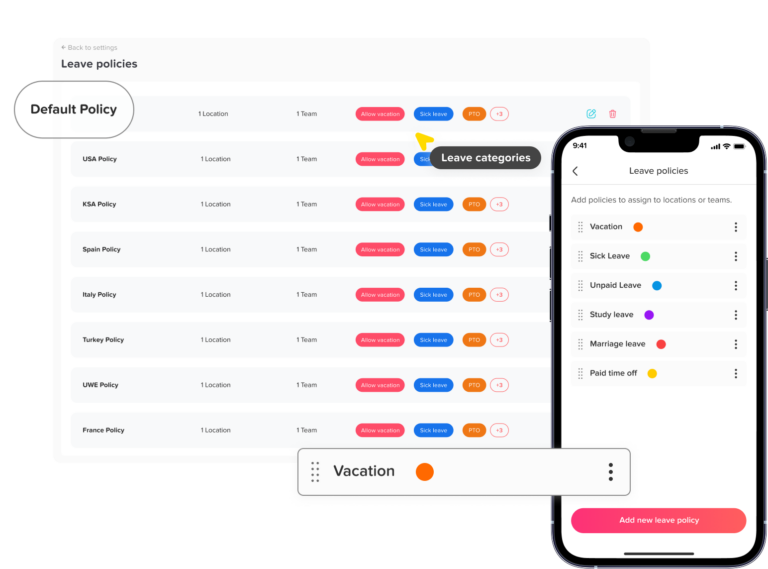
How Day Off Can Help Prevent the December Leave Rush
Day Off helps take the pressure out of year-end leave planning by making balances, upcoming absences, and carryover rules visible to employees, managers, and HR throughout the year.
The important point isn’t simply that Day Off lets employees request time off. It’s that the system can help your team see unused leave, plan absences, and manage carryover before December becomes a problem.
Employees Can See Their Leave Balance Anytime
One of the biggest causes of the December rush is employees not knowing how much leave they have left.
With Day Off, employees can check their current leave balance through the system rather than having to ask HR or search through spreadsheets.
That means an employee can see in July that they still have a significant amount of leave available and start planning time off while there is still plenty of space on the calendar.
This shifts the process from:
“You have to use your remaining leave before December 31.”
to:
“You still have plenty of leave available, so start planning it now.”
HR Can Track Unused Leave More Easily
HR shouldn’t have to wait until November to discover which employees have large unused balances.
With centralized leave information, administrators can review employee balances and identify people who may be at risk of carrying over or losing unused leave.
This makes it easier to send targeted reminders rather than sending the same generic message to everyone.
For example, an employee with two days remaining doesn’t need the same reminder as someone with 12 days remaining.
Managers Can See the Whole Team Calendar
December requests become difficult when managers approve them one at a time without seeing the bigger picture.
Day Off’s team calendar gives managers a shared view of employee availability, making it easier to see approved and upcoming absences together.
Before approving several requests for the same week, a manager can check whether too many people from the same team will be away at once.
This doesn’t automatically decide which requests should be approved. Instead, it gives managers the information they need to make better decisions.
Carryover Rules Can Be Automated
Manually calculating carryover can become tedious, particularly when employees have different leave policies.
Day Off can automate carryover according to the rules configured for each leave policy.
For example, if your policy allows a certain number of unused days to move into the next leave period, you can configure the relevant carryover rules rather than calculating every employee’s balance manually at year-end.
This reduces the risk of spreadsheet errors and saves HR from having to process every balance individually.
Notifications Help Keep Leave on the Radar
A year-end email shouldn’t be the first time employees hear about their unused leave.
Day Off’s notifications can help keep employees and managers informed about leave requests and related updates throughout the year.
If your organization uses Slack or Microsoft Teams, integrations can also help bring relevant notifications into the tools employees already use.
The benefit is simple: important leave information is less likely to be forgotten.
HR Can Use Reports to Identify Problems Earlier
Reports can help HR move from reacting to December problems to identifying them earlier.
Instead of waiting until the end of the year, HR can review leave balances and usage throughout the year and look for patterns.
For example:
- Which employees have unusually high unused balances?
- How much leave has the team used so far?
- How much leave is likely to carry over?
- Are certain teams taking most of their leave at the end of the year?
- Are there recurring periods where too many employees are away?
These insights can help HR address the underlying problem before the final weeks of the year.
Mobile Access Makes Checking and Requesting Leave Easier
Employees aren’t always sitting at their desks when they want to check their balance or request time off.
Day Off’s mobile experience allows employees to manage leave from their phones, making it easier to check balances and submit requests when needed.
The easier it is to access the system, the less likely employees are to fall back on informal processes such as messaging a manager or emailing HR.
Day Off Doesn’t Replace Your Leave Policy
It’s important to separate the software from the policy itself.
Day Off can’t decide whether your company should allow five days of carryover, require leave to be used by December 31, or allow unused days to expire.
Those are policy and legal decisions.
What the software can do is make your chosen rules easier to administer.
It can give employees visibility into their balances, give managers a clearer view of team availability, and reduce the amount of manual work HR has to perform.
The Real Benefit: Moving From Reactive to Proactive
The biggest advantage is not any individual feature.
It’s the ability to manage leave before it becomes urgent.
Instead of discovering in December that employees have large unused balances, HR can monitor those balances throughout the year.
Instead of approving requests individually, managers can see how absences affect the entire team.
Instead of manually calculating every carryover balance, administrators can rely on configured policies.
And instead of sending one last-minute reminder, employees can have visibility into their leave throughout the year.
That’s what makes a leave-management system useful for preventing the December rush: it gives everyone the information they need early enough to do something about it.
Frequently Asked Questions
What happens to unused PTO at the end of the year?
What happens to unused PTO depends on your company’s leave policy and local employment laws. Unused days may carry over into the next year, expire, or in some cases be paid out. Employees should know the rules well before the end of the year so they have time to plan their remaining leave.
How can companies prevent a year-end PTO rush?
The best way to prevent a December PTO rush is to manage leave throughout the year rather than waiting until the final weeks. Give employees regular visibility into their balances, send reminders during the year, identify employees with unusually high unused balances, and encourage early planning for popular dates.
How much PTO should employees be allowed to carry over?
There is no universal amount that works for every company. Some organizations allow a small number of days to carry over, while others allow more flexible arrangements. The appropriate limit should reflect your company’s leave policy, business needs, and applicable employment laws.
When should employees be reminded about unused PTO?
A good starting point is a mid-year reminder, followed by another reminder in the early fall. This gives employees enough time to plan their remaining leave instead of receiving their first warning in November or December.
Is use-it-or-lose-it PTO legal?
It depends on where your employees are located and the type of leave involved. Some jurisdictions restrict employers from making employees forfeit earned vacation, while others allow certain expiration rules. Companies with employees in multiple locations should check the laws that apply in each jurisdiction before creating or enforcing a use-it-or-lose-it policy.
How should managers handle multiple employees requesting the same days off?
Managers should look at the team’s overall coverage before approving requests individually. If several employees request the same dates, companies should follow a clear and consistent process for resolving conflicts. This might involve business coverage requirements, a rotation system, seniority, or another approach defined by company policy.
Can employees be forced to take vacation before the end of the year?
Whether an employer can require employees to take vacation depends on local employment law and the terms of the employment agreement or company policy. Even where it is permitted, companies should communicate any required leave periods well in advance and give employees reasonable opportunities to plan their time off.
What is the difference between PTO carryover and PTO payout?
PTO carryover means unused leave moves into the next leave period, usually subject to a limit or expiration date. A PTO payout means eligible unused leave is converted into payment instead. Which option is available depends on company policy and local laws.
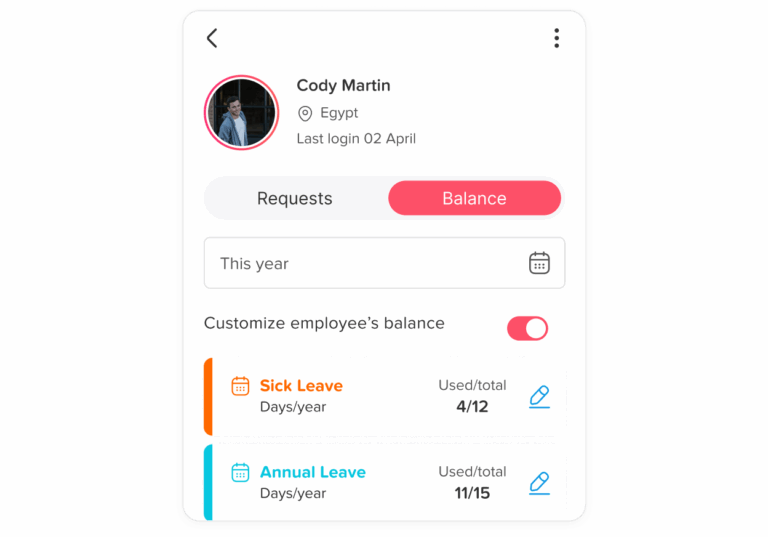
How can HR track employees with too much unused PTO?
HR can regularly review leave balances and identify employees who have accumulated unusually large amounts of unused leave. Reviewing balances at least quarterly makes it easier to spot potential problems early and encourage employees to plan time off before the end of the leave year.
Leave management software can make this easier by centralizing balances, leave requests, and reports instead of requiring HR to monitor multiple spreadsheets.
How can leave management software help with PTO carryover?
Leave management software can give employees real-time visibility into their balances, help managers see upcoming absences, and automate carryover rules according to company policy. This reduces manual calculations and makes it easier for HR to identify unused leave before it becomes a year-end problem.
The biggest benefit is earlier visibility: employees know where they stand, managers can plan coverage, and HR doesn’t have to discover the problem when December is already underway.
Conclusion
The December leave rush doesn’t have to be an annual crisis.
When employees only discover their remaining PTO in the final weeks of the year, and managers only see the impact when requests start piling up, even a fair leave policy can become difficult to manage.
The better approach is to make leave a year-round process. Give employees clear visibility into their balances, remind them early enough to plan, monitor unused leave throughout the year, and give managers a clear view of team availability before approving overlapping requests.
A well-designed carryover policy can provide additional flexibility, but it shouldn’t be the only solution. The real goal is to make sure employees understand their entitlement and have enough time to use it without creating unnecessary pressure or staffing problems.
Leave management software can make this process easier by centralizing balances, requests, calendars, notifications, and carryover rules in one place.
Ultimately, the goal isn’t to get every employee’s balance down to zero by December 31.
It’s to make sure nobody reaches December wondering what will happen to the leave they’ve earned, and to give managers enough visibility to keep the business running smoothly while employees take the time off they need.