







A Working Hours Report gives HR and payroll teams a clear record of how much time employees actually work during a specific day, week, pay period, or month. Instead of relying only on scheduled hours, the report brings together clock in clock out times, breaks, overtime, absences, paid time off, late arrivals, early departures, and other attendance data that can affect payroll and workforce planning.

For payroll teams, accurate working hour data helps ensure employees are paid for the correct amount of time. For HR teams, it can reveal attendance patterns, excessive overtime, scheduling problems, understaffing, missed punches, and inconsistencies between employee schedules and actual working time.
A useful working hours report should therefore do more than display a total number of hours. It should explain where those hours came from, how they compare with the employee’s schedule, and whether anything requires review before payroll is processed.
This guide explains what a working hours report should contain, the metrics HR and payroll teams should track, common calculations, reporting mistakes to avoid, and how businesses can use working hour data to make better workforce decisions.
What Is a Working Hours Report?
A working hours report is a structured record showing how employees’ actual working time compares with their expected or scheduled working time.
Depending on the organization and its time tracking system, a report might cover:
- One employee
- A department
- A team
- A location
- A payroll period
- A specific project
- The entire company
For example, an employee may be scheduled from 9:00 AM to 5:30 PM with a 30-minute unpaid break. Their expected net working time is eight hours.
If they actually clock in at 9:12 AM, take a 35-minute break, and clock out at 5:45 PM, simply recording “worked Tuesday” is not enough for accurate attendance analysis. HR may need to know the employee was 12 minutes late, worked later than scheduled, took a longer break, and ultimately completed a certain number of net working hours.
A detailed working hours report turns these individual time records into information that HR and payroll can review systematically.
Why Working Hours Reports Matter
Working-hour information connects several important HR and payroll processes.
Accurate payroll calculations
For employees whose compensation depends on hours worked, payroll needs reliable time records before wages can be calculated.
Missing clock outs, incorrect breaks, duplicate entries, or inaccurate overtime calculations can result in employees being overpaid or underpaid.
Instead of manually checking individual timesheets, payroll teams can use working hours reports to identify exceptions before payroll is finalized.
Overtime management
Overtime is one of the most important metrics to monitor because it directly affects labor costs and may create wage-and-hour compliance obligations.
Under the U.S. Fair Labor Standards Act, covered nonexempt employees generally must receive overtime compensation at not less than one and one-half times their regular rate for hours worked beyond 40 in a workweek. The FLSA operates on a workweek basis rather than simply treating every pay period as one overtime calculation period.
State and local laws may impose additional requirements, including different daily overtime rules, so employers should apply the regulations that cover their workforce.
Attendance monitoring
Working hour reports make attendance issues easier to identify.
HR can review patterns such as:
- Frequent late arrivals
- Repeated early departures
- Excessive breaks
- Missed shifts
- Unusually long working days
- Repeated missed clock ins
- Employees consistently working outside their scheduled hours
One late arrival may not indicate a problem. Twenty late arrivals across several weeks may.
Good reporting allows HR to distinguish isolated exceptions from recurring patterns.
Better workforce scheduling
Working-hour reports can also reveal whether schedules match actual workload.
If employees in one department repeatedly work two additional hours every Friday, the problem may not be employee behavior. The department may simply be understaffed during that period.
Similarly, if scheduled employees consistently work fewer hours than expected because demand is low, managers may need to adjust staffing levels.
Historical working-hour data can therefore improve future scheduling decisions.
Reliable attendance records
In the United States, employers covered by the FLSA must maintain specific wage and hour records for nonexempt employees, including hours worked each day and total hours worked each workweek. The Department of Labor states that employers may choose their timekeeping method, but the resulting records must be complete and accurate.
A structured working hours reporting process can make maintaining and reviewing these records considerably easier.
What Should a Working Hours Report Include?
A useful report should include enough information to explain an employee’s working day without overwhelming HR or payroll with unnecessary details.
The most important metrics include:
| Metric | What It Shows | Why HR or Payroll Needs It |
|---|---|---|
| Scheduled hours | Hours the employee was expected to work | Establishes the baseline |
| Clock-in time | When work started | Identifies lateness and actual start time |
| Clock-out time | When work ended | Identifies early departures or additional work |
| Gross duration | Time between clock-in and clock-out | Starting point for working-hour calculations |
| Break duration | Deductible or recorded break time | Prevents breaks from being counted incorrectly |
| Net working hours | Actual working time after deductible breaks | Important for payroll and utilization analysis |
| Overtime hours | Hours meeting applicable overtime rules | Supports payroll and labor-cost control |
| Late time | Time worked after the scheduled start | Helps attendance monitoring |
| Early departure | Time between actual and expected departure | Highlights schedule exceptions |
| PTO or leave | Approved time away from work | Explains scheduled hours not worked |
| Missed punches | Missing clock-in, clock-out, or break records | Flags timesheets for review |
| Attendance variance | Difference between expected and actual time | Helps identify abnormal records |
Not every company needs every metric. A salaried office may use working-hour data primarily for attendance and staffing analysis, while a business with hourly workers may depend heavily on the same data for payroll.
Scheduled Working Hours
Every meaningful working hours report needs a baseline.
Scheduled hours show how long the employee was expected to work.
For example:
Scheduled shift: 9:00 AM to 5:30 PM
Scheduled break: 30 minutes
Scheduled working hours: 8 hours
Without scheduled hours, HR can see that an employee worked 7 hours and 40 minutes but cannot immediately determine whether that represents a shortfall, a normal day, or additional time.
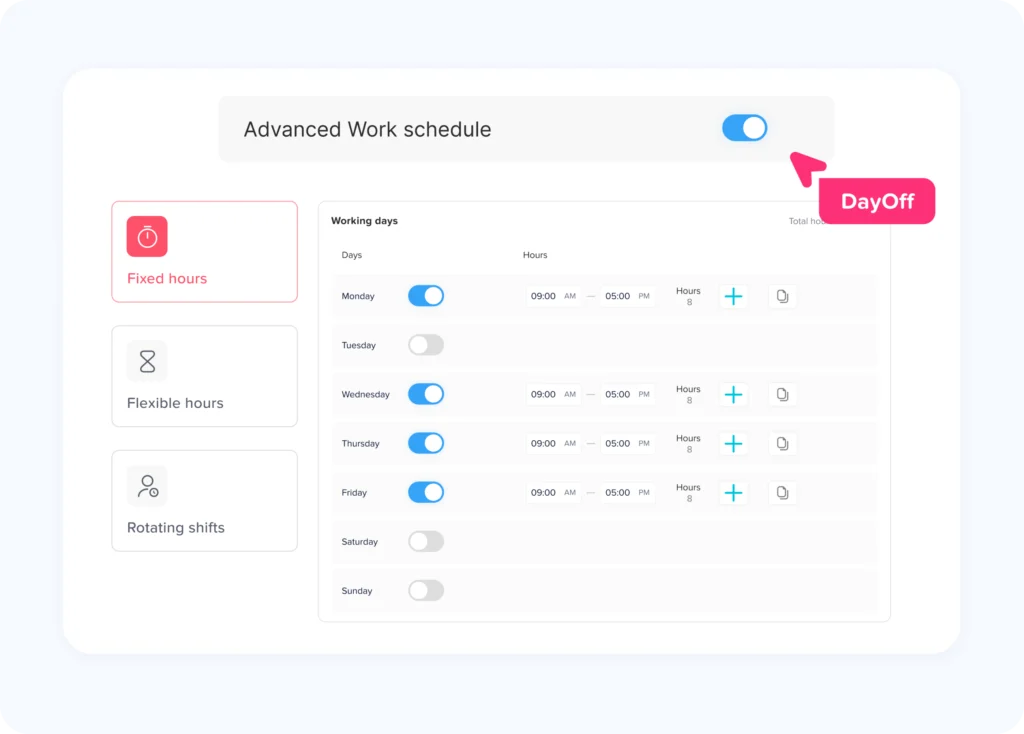
Schedule information becomes especially important when companies operate with:
- Part time employees
- Flexible schedules
- Rotating shifts
- Split shifts
- Different schedules by location
- Variable weekly schedules
- 4/10 or alternative workweeks
The report should therefore compare expected hours with actual hours, rather than analyzing actual time in isolation.
Actual Clock In and Clock Out Times
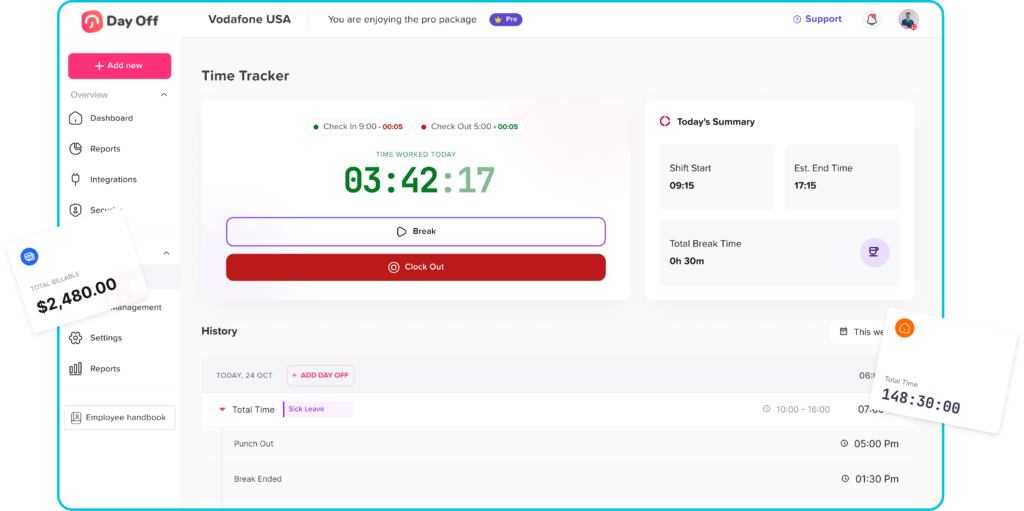
Clock in and clock out records provide the raw timestamps from which working time is calculated.
These records help identify:
- Employees starting late
- Employees arriving early
- Early departures
- Employees remaining after their scheduled shift
- Missing punches
- Unexpectedly long working days
The original timestamps should generally remain available even if HR later corrects a time entry.
For example, if an employee forgets to clock out at 5:00 PM and a manager later corrects the entry, having an audit history of the original record and correction can make payroll reviews easier.
Gross Working Duration
Gross duration represents the total elapsed time between the employee’s start and end times before deducting unpaid breaks.
The basic formula is:
Gross Duration = Clock Out Time − Clock In Time
Example:
Clock-in: 8:45 AM
Clock-out: 5:30 PM
Gross duration:
8 hours 45 minutes
Gross duration alone should not normally be treated as payable working time when unpaid breaks must still be deducted.
Break Duration
Breaks can significantly affect working-hour calculations.
Suppose an employee is present from 9:00 AM until 5:30 PM.
That creates a gross duration of:
8 hours 30 minutes
If the employee takes a 30-minute unpaid break:
8h 30m − 30m = 8h net working time
The report should distinguish between the time employees are present and the time classified as working time under company policy and applicable law.
HR should also watch for unusual break records, including:
- No break recorded
- Breaks much longer than scheduled
- Repeatedly interrupted breaks
- Manually edited breaks
- Breaks automatically deducted even when employees claim they continued working
Employers should ensure their break policies and timekeeping practices follow the laws applicable in each jurisdiction.
Net Working Hours
Net working hours are one of the most important values in the report.
A common calculation is:
Net Working Hours = Gross Duration − Deductible Break Time
For example:
Clock-in: 9:00 AM
Clock-out: 6:00 PM
Gross duration: 9 hours
Unpaid break: 45 minutes
Net working hours:
9h − 45m = 8h 15m
When payroll uses decimal hours, 15 minutes equals 0.25 hours, making the result:
8.25 hours
However, organizations should avoid repeatedly rounding intermediate calculations because small differences can accumulate across employees and pay periods. Store precise time records where possible and apply the organization’s approved payroll rules at the appropriate stage.
Scheduled vs. Actual Hours
One of the most useful calculations for HR is the difference between scheduled and actual working hours.
The formula is:
Working Hours Variance = Actual Net Hours − Scheduled Hours
Suppose an employee is scheduled for 8 hours but works 8 hours and 35 minutes.
The variance is:
8h 35m − 8h = +35 minutes
If another employee works only 7 hours and 30 minutes:
7h 30m − 8h = −30 minutes
Positive variance does not automatically mean overtime, and negative variance does not automatically mean unauthorized absence.
For example:
- Approved PTO may explain missing hours.
- An employee may have an approved shortened schedule.
- Extra time may not qualify as statutory overtime.
- An employee may be making up time under an approved arrangement.
The report should provide context before HR makes a decision.
Overtime Hours
Working hours reports should display overtime separately from ordinary working hours.
This makes it easier for payroll to verify overtime calculations and for managers to understand where additional labor costs are coming from.
For covered nonexempt employees under U.S. federal law, overtime generally applies after 40 hours worked in a defined workweek. The workweek is a fixed, regularly recurring period of seven consecutive 24-hour periods.
For example:
Monday: 8 hours
Tuesday: 9 hours
Wednesday: 8 hours
Thursday: 9 hours
Friday: 10 hours
Total:
44 hours
If the employee is subject to the standard federal overtime rule and no other rules change the calculation, four hours would fall above the 40-hour threshold.
The report should therefore track both:
Total weekly hours: 44
Overtime hours: 4
Employers should configure overtime based on the laws and employment rules applicable to their employees rather than assuming one overtime rule works everywhere.
Late Arrival
Late time measures the difference between an employee’s scheduled start and actual start.
For example:
Scheduled start: 9:00 AM
Actual clock-in: 9:17 AM
Late time:
17 minutes
Tracking the total number of late minutes can be more useful than simply counting late days.
Consider two employees who are each late five times:
Employee A is late by approximately three minutes each time.
Employee B is late by approximately 30 minutes each time.
Both have five late arrivals, but the operational impact is very different.
A detailed report reveals that difference.
Early Departures
Early departure time works similarly.
Scheduled end: 5:00 PM
Actual end: 4:35 PM
Early departure:
25 minutes
Payroll and HR should not immediately classify every early departure as unpaid time.
The employee may have:
- Approved PTO
- A flexible work arrangement
- Manager approval
- Completed additional hours earlier
- A schedule change that was not updated in the system
This is why working hours reports should connect time tracking, scheduling, and leave information whenever possible.
PTO and Leave Hours
Paid time off provides important context for missing working hours.
Imagine an employee is scheduled for eight hours but works only four.
Without leave data, a working hours report might show:
Scheduled: 8 hours
Worked: 4 hours
Variance: −4 hours
But if the employee had four hours of approved PTO, the record becomes:
Worked: 4 hours
Approved PTO: 4 hours
Expected accounted time: 8 hours
The employee no longer appears to have an unexplained attendance deficit.
Connecting time off information with attendance reporting helps reduce false exceptions and unnecessary payroll investigations.
Missed Clock Ins and Clock Outs
A missing punch is one of the most important exceptions to identify before payroll closes.
Examples include:
- Clock in without clock out
- Clock out without clock in
- Missing break start
- Missing break end
- Duplicate punches
- Impossible or overlapping entries
Missing punches can distort the employee’s total hours and therefore should usually be reviewed before payroll calculations are finalized.
A useful report should flag these entries automatically instead of requiring payroll employees to inspect every timesheet manually.
Manual Time Adjustments
HR should also monitor edits made after employees originally submit their time.
Examples include:
- Manager changes clock-out from 5:00 PM to 5:30 PM
- Payroll corrects an accidental duplicate entry
- Employee adds a forgotten break
- HR corrects an incorrect shift assignment
Manual changes are sometimes necessary, but frequent corrections can indicate a process problem.
Reports should ideally make it possible to determine:
- What changed
- When it changed
- Who changed it
- Why it changed
This creates a stronger audit trail and makes payroll disputes easier to investigate.
Example of a Working Hours Report
| Day | Scheduled | Actual Start | Actual End | Break | Net Hours | Variance |
|---|---|---|---|---|---|---|
| Monday | 8h | 9:00 AM | 5:30 PM | 30m | 8h | 0 |
| Tuesday | 8h | 9:12 AM | 5:30 PM | 30m | 7h 48m | -12m |
| Wednesday | 8h | 8:55 AM | 6:00 PM | 45m | 8h 20m | +20m |
| Thursday | 8h | 9:00 AM | 5:30 PM | 30m | 8h | 0 |
| Friday | 8h | 9:05 AM | 6:00 PM | 30m | 8h 25m | +25m |
| Total | 40h | 40h 33m | +33m |
The weekly total immediately tells HR that the employee worked 33 minutes more than scheduled.
However, the daily details also reveal two late arrivals and additional working time on Wednesday and Friday.
That information gives HR much more context than a simple “40.55 hours worked” payroll value.
Working Hours Report vs. Timesheet
Although the terms are sometimes used interchangeably, a working hours report and a timesheet can serve different purposes.
A timesheet is usually the underlying record of an employee’s time entries.
It may contain:
- Clock ins
- Clock outs
- Tasks
- Projects
- Breaks
- Manual entries
A working hours report analyzes or summarizes those records for HR, managers, payroll, or finance.
The timesheet answers:
“What time entries were recorded?”
The working hours report answers:
“What do those entries mean for attendance, payroll, overtime, and workforce management?”
Both are valuable, but the reporting layer makes raw time data much easier to use.
Working Hours Report vs. Attendance Report
Attendance reports often focus on whether employees were:
- Present
- Absent
- Late
- On leave
- On break
Working hours reports go deeper into the amount of time worked.
For example, an attendance report may show that an employee was present on Monday.
A working hours report may show:
Scheduled hours: 8
Worked hours: 6.75
Late time: 15 minutes
Early departure: 45 minutes
Break: 30 minutes
The best workforce reporting systems can connect both views.
Important Working Hour Exceptions HR Should Review
HR and payroll should not spend the same amount of time reviewing every employee record.
Exception based reporting is more efficient.
Instead, prioritize unusual records such as:
| Exception | Possible Cause | Recommended Review |
|---|---|---|
| Missing clock-out | Employee forgot to end timer | Confirm actual departure |
| Extremely long shift | Missed clock-out or actual overtime | Verify time record |
| Negative hours variance | Lateness, early departure, or PTO | Check schedule and leave |
| Frequent overtime | Staffing shortage or workload problem | Review staffing levels |
| Repeated manual edits | Timekeeping process issue | Audit modification history |
| No break recorded | Missed entry or employee worked through break | Verify actual working time |
| Hours during approved leave | Incorrect PTO or work entry | Review both records |
| Hours outside schedule | Early/late work or scheduling error | Confirm authorization and compensable time |
How HR Should Analyze Working Hours Reports
A report becomes valuable when organizations look beyond individual payroll cycles.
Compare overtime by department
Instead of asking only:
“How much overtime did the company pay?”
Ask:
“Which department generated the overtime?”
If one team generates 70% of the organization’s overtime, managers can investigate whether that team has:
- Too few employees
- Poor scheduling
- Seasonal workload
- Excessive absenteeism
- An unrealistic workload
- Inefficient processes
The answer may be operational rather than payroll-related.
Track working hours trends
Review working-hour data over several months.
A gradual increase in average weekly hours may indicate increasing workload before managers recognize the issue.
For example:
January average: 39.2 hours
February average: 40.1 hours
March average: 41.7 hours
April average: 43.0 hours
The trend deserves attention even if no single week initially looked unusual.
Compare locations
Businesses with multiple offices, restaurants, stores, warehouses, or other locations should compare working hour metrics by location.
Useful comparisons include:
- Average hours per employee
- Overtime hours
- Absence hours
- Late time
- Scheduled vs. actual hours
- Missed punches
Large differences may reveal inconsistent scheduling or attendance practices.
Analyze by role
Working hour patterns may also vary by job function.
If supervisors regularly work significantly longer shifts than employees, management should determine whether supervisory staffing is sufficient.
If a particular operational role consistently generates overtime, hiring an additional employee might eventually cost less than continuing to rely heavily on overtime.
How Payroll Teams Should Use Working Hours Reports
Payroll teams should review working hour reports before processing employee wages.
A practical pre payroll workflow includes:
- Confirm the reporting period.
- Check employees with missing time entries.
- Review unusual working-hour totals.
- Verify unpaid break deductions.
- Check approved PTO and absence records.
- Review overtime calculations.
- Confirm manual adjustments.
- Resolve outstanding timesheet exceptions.
- Export or transfer approved hours to payroll.
- Keep appropriate records according to company policy and legal requirements.
This prevents incomplete or questionable time data from moving directly into payroll.
Working Hours Recordkeeping and Compliance
Employers should maintain working hour information according to the laws applicable to their workforce.
For U.S. employers covered by the FLSA, required records for nonexempt workers include items such as:
- Hours worked each day
- Total hours worked each workweek
- Employee pay basis
- Regular hourly rate
- Straight time earnings
- Overtime earnings
- Wage additions and deductions
- Total wages paid
- Pay period information
The U.S. Department of Labor says payroll records generally must be retained for at least three years, while records used to calculate wages, including time cards, wage rate tables, work schedules, and certain wage adjustment records, generally must be kept for two years.
Businesses operating across multiple states or countries should not assume these U.S. federal standards apply everywhere. Local labor laws, collective agreements, employment contracts, industry requirements, and company policies may impose additional obligations.
How Day Off Can Simplify Working Hours Reporting
Using separate systems for PTO, schedules, attendance, and working time can make reporting unnecessarily difficult.
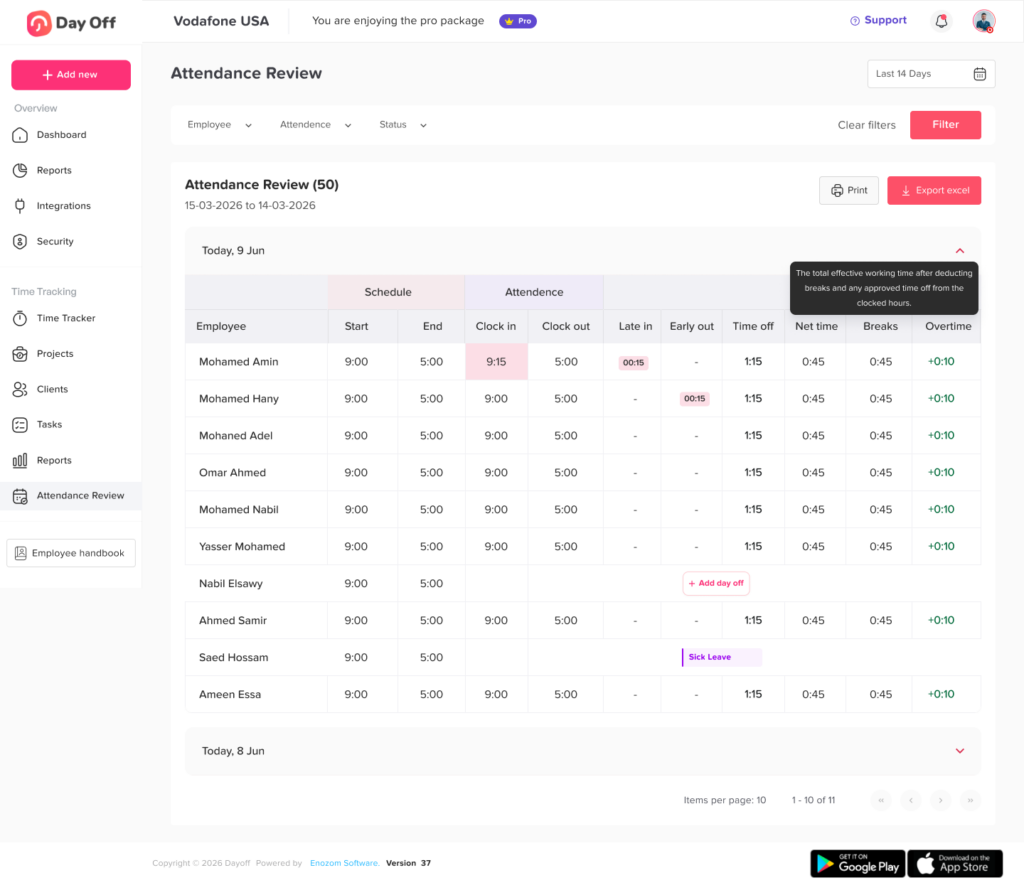
Day Off brings leave management and time tracking into the same environment, allowing organizations to connect employee availability with actual working activity.
Depending on how the organization configures its time tracking workflow, managers can review information such as:
- Employee clock in and clock out activity
- Scheduled versus actual working time
- Late arrivals
- Early departures
- Breaks
- PTO
- Attendance status
- Overtime
- Employee working duration
- Project and task time
Companies using task-based tracking can also understand where working hours are being spent by reviewing employee duration across projects and tasks.
This creates a more complete picture than looking at a payroll total alone. HR can understand attendance, managers can identify scheduling issues, and payroll teams can review working-time exceptions before wages are processed.
How Often Should Working Hours Reports Be Reviewed?
The ideal frequency depends on how the report is being used.
Daily review
Useful for operational managers who need to catch missed punches, absences, and attendance problems quickly.
Weekly review
Useful for overtime monitoring and schedule management.
Per payroll cycle
Essential for payroll teams reviewing payable hours before payroll is processed.
Monthly review
Useful for HR analytics, workforce trends, department comparisons, and labor planning.
Quarterly review
Useful for longer term workforce planning, staffing analysis, policy reviews, and identifying recurring attendance patterns.
Organizations do not necessarily need to generate separate reports for each purpose. A well-designed reporting system can allow users to filter the same underlying time data by employee, date, department, location, or reporting period.
FAQ
What should be included in a working hours report?
A working hours report should normally include scheduled hours, clock in and clock out times, break duration, net working hours, overtime, late arrivals, early departures, PTO, absences, missed punches, and any difference between scheduled and actual hours.
The exact fields depend on the company’s workforce and payroll requirements.
How do you calculate actual working hours?
A common calculation is:
Actual Working Hours = Clock Out Time − Clock In Time − Deductible Break Time
For example, if an employee works from 9:00 AM until 5:30 PM and takes a 30-minute unpaid break, their net working time is eight hours.
What is the difference between scheduled hours and working hours?
Scheduled hours are the hours an employee is expected to work. Working hours are the time the employee actually works.
Comparing the two helps HR identify lateness, early departures, additional work, absences, and scheduling problems.
Should PTO appear in a working hours report?
Yes, when possible. PTO provides important context.
If an employee works only four hours of an eight hour schedule but has four hours of approved PTO, the employee’s full scheduled day has been accounted for.
Without PTO information, the report could incorrectly present the remaining four hours as unexplained missing time.
How long should employers keep working hour records?
Retention requirements depend on applicable law.
For employers subject to the U.S. FLSA, the Department of Labor states that payroll records generally should be retained for at least three years and records supporting wage calculations, such as time cards and work schedules, generally for two years. State or local laws may require longer retention.
Conclusion
A Working Hours Report should be more than a list of clock in and clock out times. When designed correctly, it becomes a practical tool connecting attendance, payroll, scheduling, PTO, overtime, and workforce planning.
HR teams can use working-hour data to identify attendance patterns, compare scheduled and actual work, monitor overtime, investigate staffing problems, and improve workforce policies. Payroll teams can use the same information to detect missing punches, verify payable hours, review overtime, and resolve timekeeping issues before payroll is finalized.
The most valuable reports combine scheduled hours, actual hours, breaks, PTO, attendance exceptions, and overtime in one clear view. This allows organizations to understand not only how many hours employees worked, but also whether those hours match expectations and where intervention may be needed.
For companies that want leave management and working time tracking to work together, Day Off provides a centralized way to manage employee PTO, schedules, attendance, and time tracking while giving HR and managers clearer visibility into how employee time is actually being used.