







A PTO Calendar gives managers and employees a shared view of upcoming time off, but its real value goes beyond simply showing who will be away. When it is designed properly, a PTO calendar becomes a practical workforce planning tool that helps teams spot overlapping absences, protect essential roles, prepare handovers, manage busy periods, and make better approval decisions before staffing problems happen.

A calendar filled with vacation dates does not automatically prevent understaffing. Managers still need to understand how many people must be available, which skills or responsibilities need coverage, which shifts must remain staffed, and whether important deadlines or business events fall during the requested leave period.
That is why building an effective team PTO calendar requires more than adding employee names to dates.
This guide explains how to create a PTO calendar that supports employee flexibility while helping managers maintain reliable team coverage throughout the year.
What Is a PTO Calendar?
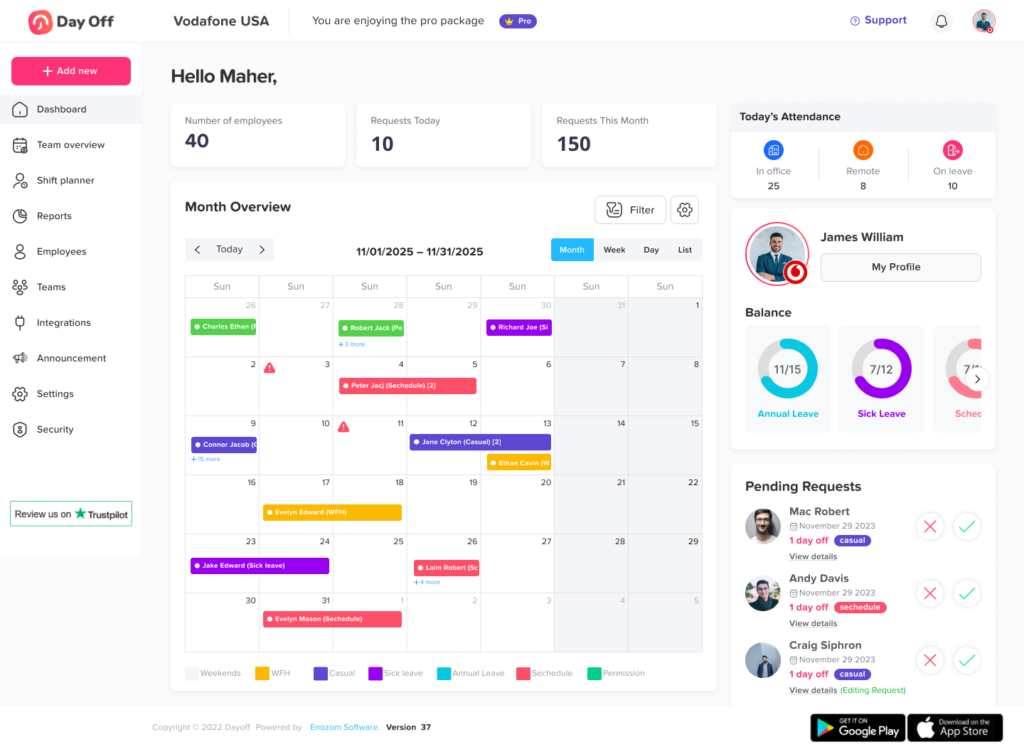
A PTO calendar is a shared calendars used to display planned employee absences such as vacation, personal leave, paid time off, and other approved time away from work.
Depending on the organization’s leave policy and privacy settings, it may also display:
- Public holidays
- Company holidays
- Pending time off requests
- Approved PTO
- Partial day absences
- Employee work schedules
- Team or department information
- Employee location
- Remote work status
- Blocked or restricted leave periods
Unlike a personal work calendar, a PTO calendar is primarily concerned with availability and workforce coverage.
A meeting calendar answers:
When is this employee busy?
A PTO calendar should help managers answer:
Who will actually be available to work on this date?
That difference becomes increasingly important as a company grows.
Why Team Coverage Matters When Managing PTO Calendar
Giving employees reasonable access to their earned time off is important, but approving requests without understanding staffing requirements can create operational problems.
Imagine a customer support team with eight employees.
Three employees request the same Friday off. Looking only at the number of employees, five people would remain, which may appear sufficient.
But suppose:
- One of the employees requesting PTO Calendar is the only person scheduled for the evening shift.
- Another is the only team member trained to handle enterprise accounts.
- One of the remaining five employees is already attending mandatory training.
- Friday is historically the team’s busiest support day.
The problem is no longer simply “three out of eight employees are away.”
The real question is whether the remaining team can perform the work that needs to be done.
A useful PTO calendar therefore needs to support coverage decisions based on responsibilities, schedules, skills, locations, and business demand rather than headcount alone.
What Should Be Included in a PTO Calendar?
A calendar should provide enough information for employees and managers to understand availability without turning the calendar into an unnecessarily detailed HR record.
A practical structure could include the following information:
| Calendar Information | Why It Matters |
|---|---|
| Employee name | Shows who will be unavailable |
| PTO dates | Defines the absence period |
| Partial-day or hourly absence | Prevents treating a short absence as a full-day absence |
| Approval status | Distinguishes confirmed leave from requests still being reviewed |
| Team or department | Helps managers evaluate team-level coverage |
| Work schedule | Shows whether the employee was scheduled to work |
| Public holidays | Prevents confusion between PTO and nonworking holidays |
| Location | Helps companies with different offices, weekends, or local holidays |
| Restricted dates | Warns employees about periods with limited PTO availability |
| General availability status | Allows teams to show that someone is unavailable without exposing unnecessary leave details |
Companies do not necessarily need to display the exact leave reason to everyone.
For example, coworkers may only need to know that an employee is “Out,” “On Leave,” or “Unavailable.” HR and authorized managers can maintain more detailed leave records separately when required.
A PTO Calendar Should Show Capacity, Not Just Absence
This is one of the most important principles of PTO Calendar planning.
Many shared calendars show absences clearly but provide little information about whether those absences create a staffing problem.
A manager should be able to evaluate at least four types of coverage.
Headcount Coverage
How many employees need to be available?
For example, a six-person customer service team may determine that at least four employees should normally be available during business hours.
That gives the manager an initial threshold for reviewing overlapping requests.
Role Coverage
Certain responsibilities may require a particular employee or job function.
For example:
- At least one supervisor must be available.
- At least one payroll administrator must be present during payroll processing.
- At least one senior support agent must cover escalations.
- At least one employee with opening responsibilities must cover each store location.
Four available employees do not provide sufficient coverage if all four perform the same function and nobody can perform an essential role.
Shift Coverage
Businesses with fixed hours, split shifts, rotating shifts, or different working periods need to evaluate coverage by schedule.
A company may technically have enough employees working that day while still having an uncovered morning or evening shift.
Skill Coverage
Coverage may depend on knowledge rather than title.
Examples include:
- Language skills
- Specific customer accounts
- Equipment certifications
- Technical specializations
- Financial authorization
- Product expertise
- Emergency responsibilities
This is why the PTO approval process should consider who is absent, not only how many employees are absent.
Step 1: Define Minimum Coverage Before PTO Requests Arrive
Do not wait until three employees request the same week before deciding what “enough coverage” means.
Managers should establish basic staffing requirements in advance.
For each team, identify:
- Normal team size
- Minimum employees required
- Critical positions
- Required shifts
- Skills that must remain available
- Peak business days
- Important recurring deadlines
- Seasonal workload changes
- Employees who can provide backup coverage
A simple coverage matrix can help.
| Team | Normal Staffing | Minimum Coverage | Additional Requirement |
|---|---|---|---|
| Customer Support | 10 | 7 | At least 1 senior agent available |
| Finance | 5 | 3 | Payroll specialist required during payroll week |
| Sales | 8 | 5 | At least 1 manager available |
| Operations | 12 | 8 | Every active shift must remain covered |
| IT Support | 6 | 4 | At least 1 escalation contact available |
These numbers are examples, not universal staffing standards. Each business should determine coverage based on workload, operating hours, service commitments, employee roles, and its own policies.
Once these requirements exist, managers can review leave requests against a defined operational rule rather than making subjective decisions every time.
Step 2: Put Approved PTO in One Central Calendar
Coverage planning becomes difficult when absence information is scattered across:
- Slack or Teams messages
- Spreadsheets
- Personal calendars
- Paper forms
- Manager notes
- HR systems
- Verbal agreements
Managers may approve a request without realizing another employee has already been approved for the same period.
A central PTO calendar should become the primary source for planned employee absence.
When an employee’s leave is approved, the calendar should be updated consistently so everyone who needs the information can see the employee’s availability.
For larger companies, employees should also be able to filter the calendar rather than viewing hundreds of unrelated absences.
Useful filters may include:
- Team
- Department
- Location
- Employee
- Leave status
- Date range
- Work group
The goal is not maximum visibility. The goal is relevant visibility.
Step 3: Include Pending Requests in the Manager’s Coverage Review
Approved PTO tells managers what has already been confirmed.
Pending PTO tells them what may happen next.
Consider this situation:
- One employee already has August 10 to 14 approved.
- Two other employees have requested August 12 to 15.
- A fourth employee now requests August 13.
If the manager only checks approved leave, the newest request may appear harmless.
But if all pending requests are approved, August 13 could suddenly have four employees unavailable.
Managers therefore need to evaluate both approved absences and requests that are still being considered.
The employee facing calendar can still distinguish confirmed leave from pending requests so employees do not assume an unapproved absence is final.
Step 4: Connect PTO With Employee Work Schedules
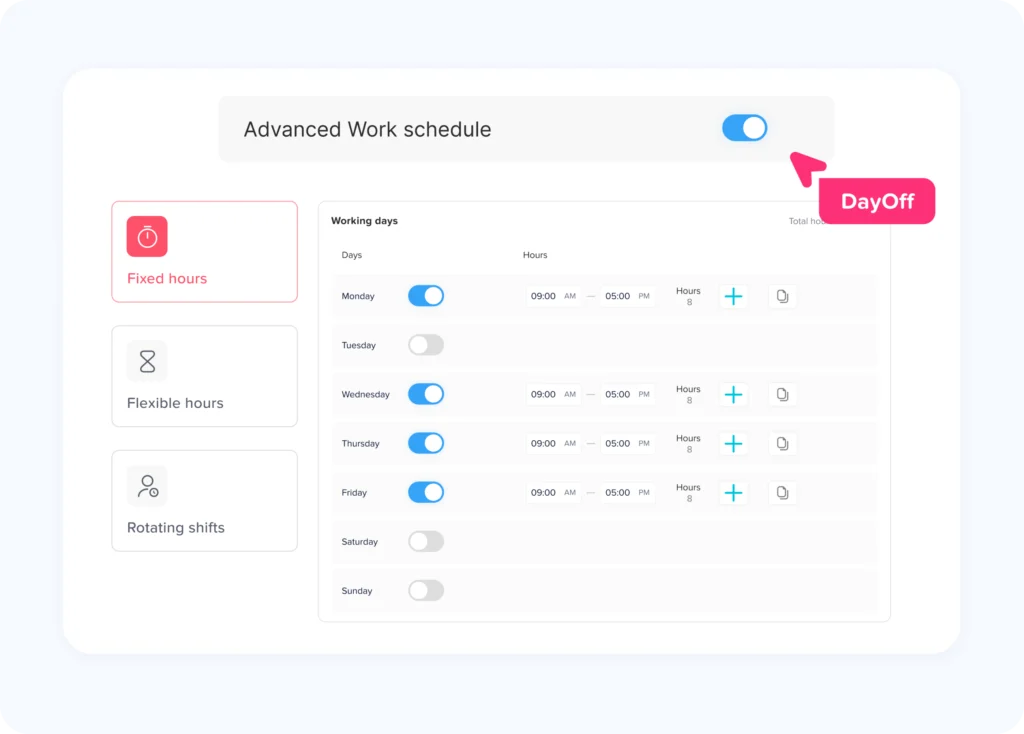
A PTO calendar becomes much more accurate when leave is evaluated against the employee’s actual schedule.
Suppose an employee requests Monday through Friday off.
Employee A normally works five eight hour days.
Employee B works four ten hour days and does not work Fridays.
Employee C works rotating shifts and is only scheduled Monday, Tuesday, Thursday, and Saturday that week.
The same calendar date range has a different operational impact for each employee.
Connecting PTO with work schedules helps managers understand:
- Whether the employee was actually scheduled
- How many scheduled hours are affected
- Which shifts need replacement
- Whether another employee can cover those shifts
- How the absence affects daily staffing
Day Off supports fixed days, fixed hours, flexible hours, and rotating work schedules, allowing leave planning to reflect the way employees are actually scheduled to work.
Step 5: Identify High Demand PTO Periods Early
Most organizations have dates when leave demand increases.
Examples can include:
- Summer vacation periods
- School holidays
- Long weekends
- Year end holidays
- Major cultural or religious holidays
- Local festivals
- Company shutdown periods
- Industry-specific slow seasons
At the same time, many companies also have periods when staffing requirements increase.
Examples include:
- Month-end closing
- Year-end accounting
- Product launches
- Major customer events
- Retail sales periods
- Inventory counts
- Audit periods
- Seasonal demand
- Important project deadlines
Managers should mark both types of dates on the planning calendar.
This allows employees to plan earlier and helps HR recognize potential conflicts before the calendar fills up.
Step 6: Set Rules for Overlapping PTO Requests
Two employees requesting the same dates does not necessarily create a problem.
The problem occurs when approving those requests would reduce staffing below an acceptable level.
Organizations should therefore define how overlapping requests will be handled.
Possible approaches include:
First Come, First Served
Requests are prioritized based on submission time.
This is simple to explain, but it can disadvantage employees who cannot plan far in advance.
Rotating Priority
Employees who received a popular holiday period one year may receive lower priority the following year.
This can be useful when the same dates are heavily requested every year.
Seniority
Longer-serving employees receive priority.
This may be appropriate in organizations where seniority already affects scheduling or workplace benefits, but it may repeatedly disadvantage newer employees.
Manager Review Based on Coverage
Managers compare requests against workload, employee roles, skills, and staffing requirements.
This is flexible but requires clear rules to reduce inconsistent decisions.
Hybrid Approach
A company may combine several methods.
For example:
- Determine whether all requests can be approved while maintaining minimum coverage.
- If not, check whether particular roles must remain available.
- Apply a defined priority method to the remaining conflicting requests.
- Consider alternative dates where appropriate.
Whatever method the organization uses, employees should understand the rules before a conflict occurs.
Consistency is especially important. PTO decisions should not appear to depend on which employee happens to ask a particular manager.
Step 7: Use Request Limits Instead of Blocking Every Busy Date
A common response to staffing concerns is to stop PTO entirely during busy periods.
Sometimes that may be necessary, but a complete restriction is not always the best solution.
Suppose an accounting department needs at least six of its eight employees during the first week of each month.
The business may not need to block PTO completely.
Instead, it could allow up to two employees to be away at the same time.
This provides employees with more flexibility while protecting required coverage.
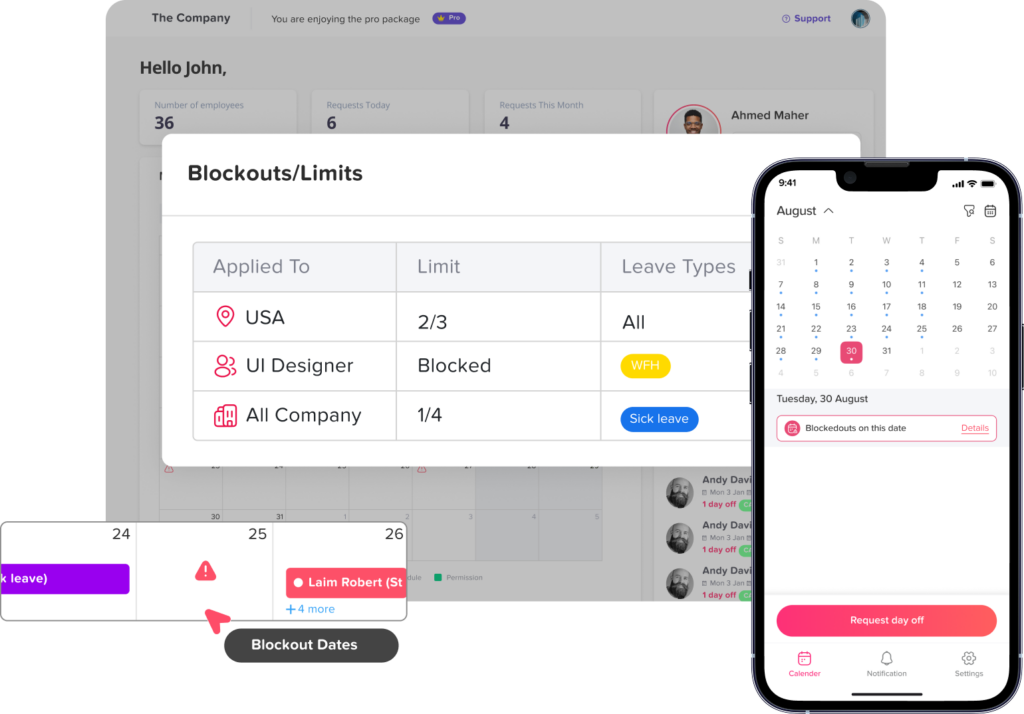
Day Off’s blockout date controls can be configured either to prevent requests entirely during selected periods or to limit how many employees may request leave at the same time.
This type of approach is particularly useful for:
- Payroll deadlines
- Retail peak periods
- Product launches
- Busy customer-service periods
- Inventory counts
- Audits
- Major company events
The restriction should match the actual staffing need rather than being broader than necessary.
Step 8: Account for Public Holidays and Different Locations
Coverage planning becomes more complicated when employees work in multiple cities or countries.
A normal working day for one office may be a public holiday for another.
Teams may also have different:
- Weekends
- Working days
- Public holidays
- Operating hours
- Time zones
- Leave policies
- Business peak periods
For example, a global support team may rely on employees across several countries to provide continuous coverage.
If one location has a public holiday and employees in another location are also approved for PTO, global coverage may drop more than expected.
A PTO calendar for an international workforce should therefore show relevant public holidays and allow managers to evaluate absence by location.
Day Off supports multiple locations and location based holiday management, helping organizations account for different working patterns when reviewing team availability.
Step 9: Build a Handover Process Into PTO Planning
Preventing a coverage gap does not only mean having another employee physically available.
Work also needs to continue.
Before planned PTO, employees may need to prepare a handover covering:
- Open customer issues
- Active projects
- Upcoming deadlines
- Scheduled meetings
- Pending approvals
- Important files or documents
- Tasks requiring follow up
- Key contacts
- Escalation instructions
- Work that can wait until the employee returns
For a one day vacation, a formal handover may be unnecessary.
For a two week absence by a department lead, it may be essential.
Companies can establish different expectations based on the length of the absence and the employee’s responsibilities.
Step 10: Cross Train Employees for Critical Responsibilities
A PTO calendar can reveal an important organizational weakness: excessive dependence on one employee.
If managers repeatedly cannot approve someone’s PTO because nobody else can perform that employee’s work, the real issue may not be the PTO request.
It may be a lack of backup coverage.
Organizations should identify responsibilities where only one employee can currently perform an essential task and determine whether appropriate cross-training is possible.
Cross-training can help:
- Reduce single-person dependency
- Improve vacation coverage
- Make scheduling more flexible
- Support unexpected absences
- Improve continuity when employees change roles
- Reduce pressure on employees to remain available during PTO
The goal is not to make every employee interchangeable. It is to make sure important work does not depend entirely on one person’s constant availability.
Planned PTO and Unexpected Absence Should Be Treated Differently
A strong PTO planning process needs to recognize that not every absence can be scheduled weeks in advance.
Vacations are often predictable.
Illness, emergencies, bereavement, and unexpected family needs may not be.
A team operating exactly at minimum capacity every day may therefore still be vulnerable even if every vacation request was planned correctly.
Managers should consider some operational buffer where practical, particularly in teams where short-notice absences can significantly disrupt service.
For example, if eight employees are technically enough to operate a department, scheduling exactly eight employees and allowing no capacity for unexpected absence creates a fragile staffing model.
The PTO calendar can help with planned absence, but broader workforce planning still needs to account for uncertainty.
How Far Ahead Should Teams Plan PTO?
There is no single notice period that works for every company.
The right amount of notice depends on:
- Team size
- Industry
- Type of work
- Length of leave
- Employee responsibilities
- Shift structure
- Seasonality
- Difficulty arranging replacement coverage
A company might allow short requests with minimal notice while requiring earlier submission for longer vacations.
For example:
- One day off: 3 to 5 days’ notice where practical
- Several consecutive days: 1 to 2 weeks
- Long vacation: several weeks in advance
- Highly competitive holiday periods: requests collected months in advance
These are planning examples rather than universal rules.
Organizations should establish notice requirements that reflect their operating model while maintaining appropriate flexibility for situations that cannot reasonably be predicted.
Avoid Treating Every Team the Same
A company-wide rule such as “no more than two employees can be off at once” sounds simple, but it can produce poor results.
Two employees absent from a four-person team means 50% of the team is away.
Two employees absent from a 40-person department means only 5% is away.
Coverage rules should therefore reflect the actual size and responsibilities of each team.
A more practical approach could define limits by:
- Department
- Team
- Role
- Location
- Shift
- Time period
- Business season
This allows the organization to protect coverage without creating unnecessarily restrictive rules.
Useful PTO Coverage Metrics
Companies do not need complicated analytics to improve PTO planning.
A few practical measurements can reveal recurring problems.
Number of Employees Away per Day
A basic daily count can highlight heavily booked periods.
Percentage of Team Available
For internal planning, companies can calculate:
Available employees ÷ normally scheduled employees × 100
For example, if 8 of 10 normally scheduled team members are available:
8 ÷ 10 × 100 = 80% availability
This metric is most useful when combined with role and skill coverage.
PTO Requests Declined Because of Coverage
If large numbers of legitimate requests are being rejected due to staffing, the business may need to reconsider scheduling, cross-training, staffing levels, or the timing of major projects.
High Demand Dates
Track dates that repeatedly attract multiple requests.
This allows managers to set expectations and create fair priority rules earlier.
Critical Role Coverage
Identify how often a team reaches a point where only one employee remains available for an essential responsibility.
This can reveal where additional training or backup planning is needed.
How Day Off Helps Teams Manage a PTO Calendar
Managing PTO through spreadsheets, messages, and manually maintained calendars becomes harder as teams grow.
Day Off brings leave requests, approvals, balances, team availability, holidays, work schedules, and calendar visibility into one leave management platform.
Managers can use the centralized calendar to review employee availability before making approval decisions. Day Off also provides blockout dates that can prevent leave requests or set request limits for critical periods, while its work schedule functionality supports fixed days, fixed hours, flexible hours, and rotating shifts.
This is particularly useful because PTO planning does not happen independently of scheduling.
Managers need to understand:
- Who is already away
- Who has requested leave
- When employees are scheduled to work
- Which holidays affect the team
- Whether a busy period requires additional restrictions
- Whether sufficient coverage remains after approving another request
Keeping this information connected makes it easier to make consistent decisions rather than comparing separate spreadsheets, calendars, and messages.
Day Off also supports calendar integrations that help approved employee absences stay visible in the tools teams already use.
FAQ
What is a PTO calendar?
A PTO calendar is a shared calendar that shows when employees are scheduled to be away from work. Companies use it to track planned absences, understand team availability, coordinate work, and identify potential staffing conflicts before approving additional leave.
What should a PTO calendar include?
A useful PTO calendar should include employee names or appropriate availability labels, leave dates, approval status, relevant public holidays, and enough team or schedule information to evaluate coverage. Organizations may also include department, location, work schedule, or partial-day absence information depending on how they operate.
How do you prevent too many employees from taking PTO at the same time?
Start by defining the minimum staffing and critical roles required for each team. Managers can then compare existing approved and pending leave against those requirements before approving additional requests. Companies can also establish overlapping-request rules or set limits during critical periods.
Should employees be able to see other employees’ PTO?
Employees often benefit from seeing coworker availability because it helps with meeting planning, handovers, and vacation coordination. However, companies should decide how much information is appropriate to display. In many situations, showing that a person is unavailable is sufficient without displaying a detailed leave reason.
How far in advance should employees request PTO?
There is no universal notice period that fits every organization. The appropriate notice depends on the length of the absence, staffing requirements, employee responsibilities, industry, seasonality, and how difficult replacement coverage is to arrange. Longer absences generally benefit from earlier planning.
How should managers handle two employees requesting the same vacation dates?
First determine whether both requests can be approved without creating a coverage problem. If not, use the company’s established prioritization method, such as first come, first served, rotating priority, coverage-based review, or another clearly defined system. The method should be communicated in advance and applied consistently.
Can a PTO calendar prevent overlapping leave requests?
A calendar can make overlapping requests visible, but visibility alone does not prevent them. Managers also need coverage requirements and approval rules. PTO management software can add controls such as request limits or blockout dates to help manage periods when staffing must remain above a certain level.
Is a shared Google Calendar enough for PTO tracking?
A shared calendar can help teams see employee absences, but a standard calendar generally does not manage PTO balances, accruals, leave policies, approval workflows, request history, or other leave-management requirements. For organizations that need these functions, dedicated PTO tracking software provides a more complete process.
Final Thoughts
A PTO Calendar should do more than tell employees who is on vacation. It should help managers understand whether the business can continue operating effectively when people take time off.
The strongest PTO calendars combine visibility with clear staffing rules. They show upcoming absences, account for work schedules and holidays, make overlapping requests easier to evaluate, identify critical roles, and give managers enough information to approve leave confidently.
The goal is not to prevent employees from taking PTO. It is to plan time off early enough that employees can step away while customers, projects, shifts, and essential responsibilities remain covered.
When leave requests, schedules, team availability, holidays, and coverage decisions are managed together, PTO becomes easier to plan for both employees and managers. A tool such as Day Off can centralize that process, helping teams move away from scattered spreadsheets and manual absence calendars toward a clearer and more consistent approach to workforce availability.